


 Video Converter Ultimate
 บันทึกหน้าจอ
 ซ่อมวิดีโอ
 ดาวน์โหลดอย่างปลอดภัย
วิธีแปลง SWF เป็น 3GP อย่างง่ายดายและรวดเร็ว
รูปแบบ Small Web Format หรือ SWF เป็นรูปแบบไฟล์ของ Adobe ที่บรรจุแอนิเมชันและวิดีโอแบบเวกเตอร์ อย่างไรก็ตาม รูปแบบไฟล์นี้ไม่ได้เป็นที่นิยมมากนัก และไม่ได้รับการรองรับจากเบราว์เซอร์และโปรแกรมอื่น ๆ มากเท่าที่ควร ทำให้เล่นไฟล์นี้ได้ยาก ในกรณีนี้ คุณควรจะแปลงไฟล์ SWF ของคุณเป็นรูปแบบอื่นที่เบราว์เซอร์และโปรแกรมรองรับ เช่น รูปแบบ 3GP โชคดีที่บทความนี้จะนำเสนอวิธีที่มีประสิทธิภาพในการแปลง SWF เป็น 3GP โดยใช้ตัวแปลงหลากหลายแบบ มาเรียนรู้วิธีที่เป็นประโยชน์เหล่านี้กันได้เลยในบทความนี้โดยไม่ต้องรอช้า.

ตอนที่ 1: ตัวแปลง SWF เป็น 3GP ที่น่าเชื่อถือที่สุดเพื่อเปลี่ยน SWF เป็น 3GP
แปลง SWF เป็น 3GP โดย Video Converter Ultimate
Video Converter Ultimate เป็นเครื่องมือออฟไลน์ที่เชื่อถือได้มากที่สุดสำหรับ Windows และ Mac แอปพลิเคชันนี้ช่วยให้คุณแปลง SWF เป็น 3GP ได้ทันที นอกจากนี้คุณยังสามารถแปลงไฟล์อื่น ๆ ได้มากขึ้น เพราะรองรับมากกว่า 100 รูปแบบไฟล์ รวมถึง MP4, MOV, MKV, FLV, DIVX, XVID และอื่น ๆ อีกมากมาย อีกทั้งเครื่องมือออฟไลน์นี้ยังสามารถแปลงไฟล์ได้เร็วกว่าโปรแกรมแปลงไฟล์อื่นถึง 30 เท่า คุณยังสามารถใช้งานได้ฟรีอีกด้วย นอกจากนี้ยังรองรับการแปลงหลายไฟล์พร้อมกันในครั้งเดียว คุณจึงไม่ต้องรอนาน จุดเด่นคือผู้ใช้ทุกคนสามารถใช้งานเครื่องมือนี้ได้ เพราะมีอินเทอร์เฟซที่เรียบง่าย พร้อมขั้นตอนพื้นฐานในการแปลงไฟล์ประเภทต่าง ๆ.
นอกจากนี้ Video Converter Ultimate ยังมีคุณสมบัติที่ยอดเยี่ยมมากกว่าที่คุณคิด คุณสามารถไปที่ฟีเจอร์ Toolbox หากคุณต้องการปรับปรุงวิดีโอ SWF ของคุณ คุณสามารถใช้โปรแกรมปรับปรุงวิดีโอเพื่อเพิ่มความละเอียดของวิดีโอ ความสว่าง และความเปรียบต่างของวิดีโอ คุณยังสามารถลบนอยส์ในวิดีโอของคุณได้อีกด้วย นี่เป็นเพียงหนึ่งในคุณสมบัติที่ยอดเยี่ยมที่คุณสามารถสัมผัสได้เมื่อใช้ตัวแปลงนี้ หากคุณต้องการค้นพบคุณสมบัติเพิ่มเติม ให้ใช้ Video Converter Ultimate และดูด้วยตัวคุณเอง
คุณสมบัติเด่น
◆ แปลงไฟล์วิดีโอมากมาย เช่น MP4, AVI, FLV, SWF, M4V, MTS เป็นต้น
◆ สร้างมิวสิกวิดีโอด้วยธีมที่ยอดเยี่ยมต่างๆ
◆ สร้างภาพตัดปะด้วยเทมเพลตและฟิลเตอร์ฟรีมากมาย
◆ มีกล่องเครื่องมือที่มีเครื่องมือต่างๆ เพื่อปรับปรุงวิดีโอ เช่น ตัวเพิ่มคุณภาพวิดีโอ การแก้ไขสี 3D Maker เป็นต้น
◆ ปรับความเร็ววิดีโอให้เร็วขึ้นสูงสุด 8 เท่า
◆ เพิ่มและลบลายน้ำออกจากวิดีโอ
◆ สามารถเปลี่ยนขนาดไฟล์ของวิดีโอได้
◆ สามารถแปลงรูปภาพได้
ข้อดี
- มีให้สำหรับผู้ใช้ทุกคน
- รองรับรูปแบบไฟล์มากกว่า 1,000 รูปแบบ
- เข้าได้ทั้งบน Windows และ Mac
- สามารถปรับปรุงวิดีโอได้อย่างง่ายดาย
จุดด้อย
- หากต้องการสัมผัสคุณสมบัติที่ยอดเยี่ยมยิ่งขึ้น ขอแนะนำให้ซื้อเวอร์ชันโปร
หากต้องการแปลง SWF เป็น 3GP ให้ทำตามคำแนะนำพื้นฐานด้านล่าง
ขั้นตอนที่ 1: คุณต้องดาวน์โหลดแอปพลิเคชัน Video Converter Ultimate บน Windows หรือ Mac ของคุณโดยคลิกปุ่มดาวน์โหลดด้านล่าง จากนั้นดำเนินการติดตั้งและเปิดโปรแกรม.
ดาวน์โหลดฟรีสำหรับ Windows 7 หรือใหม่กว่าดาวน์โหลดอย่างปลอดภัย
ดาวน์โหลดฟรีสำหรับ MacOS 10.7 หรือใหม่กว่าดาวน์โหลดอย่างปลอดภัย
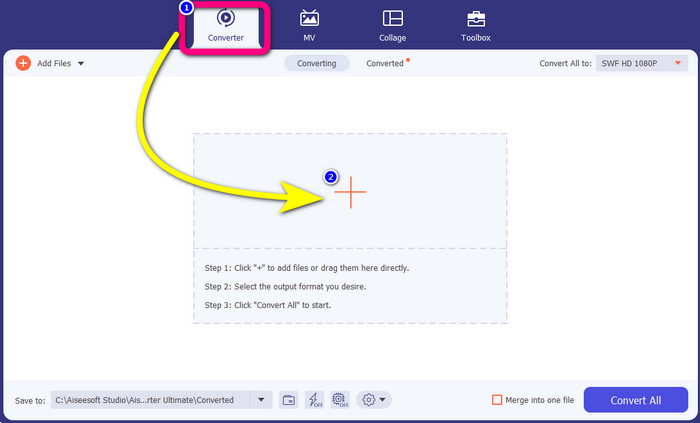
ขั้นตอนที่ 2: ที่ส่วนบนของอินเทอร์เฟซจะมีตัวเลือก 4 ส่วน ให้เลือกแถบ Converter จากนั้นคลิกไอคอน Plus แล้วเลือกวิดีโอไฟล์ SWF ที่คุณต้องการแปลง.
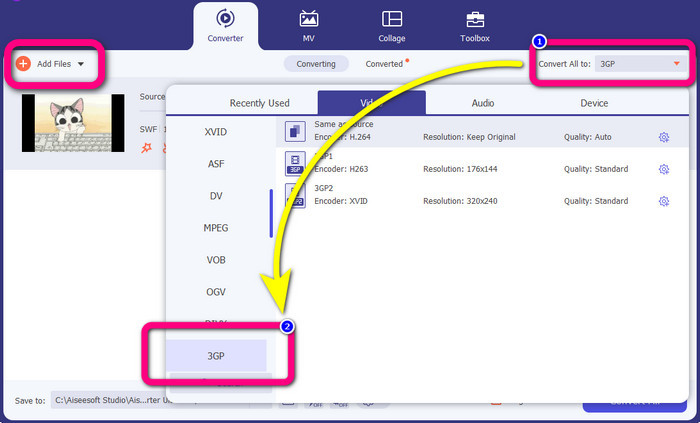
ขั้นตอนที่ 3: คลิกปุ่ม Convert all to แล้วเลือกฟอร์แมต 3GP จากตัวเลือกรูปแบบไฟล์ ระบบรองรับการแปลงแบบกลุ่ม ดังนั้นหากคุณต้องการแปลงไฟล์เพิ่มเติม หรือแปลงไฟล์ SWF ของคุณเป็นรูปแบบอื่น เช่น MP4, MKV, MOV, AVI และอื่น ๆ ให้คลิกปุ่ม Add Files คุณสามารถแปลงทั้งหมดได้พร้อมกัน.
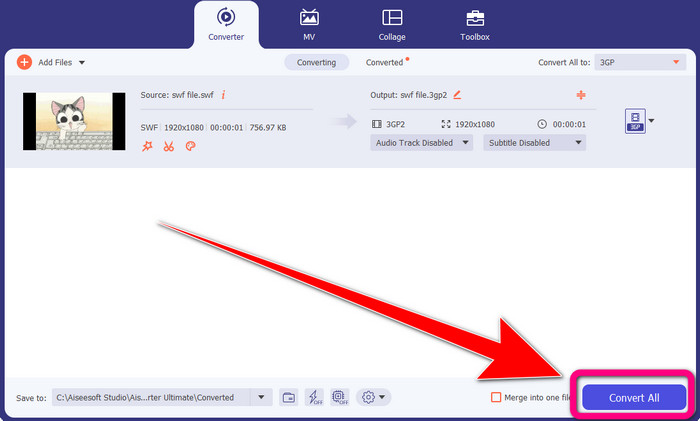
ขั้นตอนที่ 4: สุดท้าย เมื่อคุณเลือกฟอร์แมตไฟล์ 3GP เสร็จแล้ว ให้คลิกปุ่ม Convert All รอให้กระบวนการแปลงที่รวดเร็วเสร็จสิ้น แล้วบันทึกวิดีโอไฟล์ผลลัพธ์ของคุณ.
ตอนที่ 2: เครื่องมือออนไลน์ที่ยอดเยี่ยมในการแปลง SWF เป็น 3GP
FVC โปรแกรมแปลงวิดีโอออนไลน์ฟรี
เมื่อจะแปลง SWF เป็น 3GP แบบออนไลน์ คุณสามารถใช้ FVC Free Video Converter Online เครื่องมือออนไลน์นี้เชื่อถือได้สำหรับการแปลงรูปแบบไฟล์วิดีโอและเสียง เช่น FLV, MP4, MTS, MP3, AVI, WMA เป็นต้น คุณยังสามารถใช้งานได้ฟรีทั้งบน Mac และ Windows อีกด้วย นอกจากนี้ยังเหมาะกับผู้ใช้ทุกระดับ โดยเฉพาะมือใหม่ เพราะมีวิธีการใช้งานที่ยอดเยี่ยมและเรียบง่าย คุณจึงไม่ต้องลำบากใช้งานให้ยุ่งยาก หากคุณตื่นเต้นที่จะใช้ FVC Free Video Converter Online เพื่อแปลง SWF เป็น 3GP ให้ทำตามขั้นตอนด้านล่างนี้.
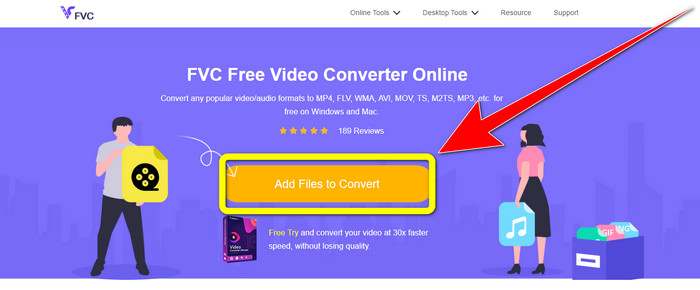
ขั้นตอนที่ 1: ไปที่เว็บไซต์ FVC Free Video Converter Online คลิกที่กล่องสีส้มเพื่อใส่วิดีโอที่มีรูปแบบไฟล์ SWF ของคุณ.
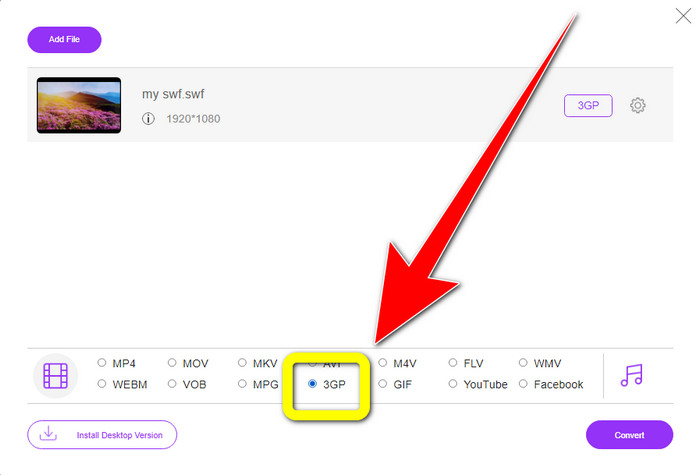
ขั้นตอนที่ 2: หลังจากที่คุณใส่ไฟล์วิดีโอแล้ว คุณสามารถเลือกฟอร์แมตไฟล์ 3GP จากตัวเลือกรูปแบบไฟล์และคลิกเลือกได้ทันที.
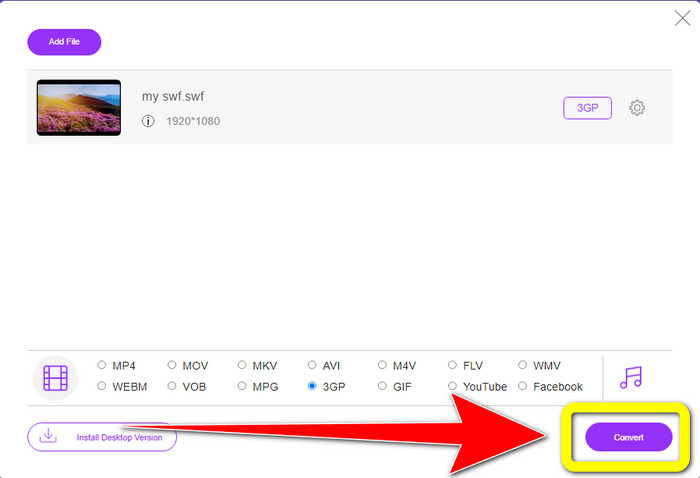
ขั้นตอนที่ 3: คลิกปุ่ม Convert เพื่อแปลงไฟล์ SWF ของคุณเป็นรูปแบบ 3GP.
ออนไลน์ แปลงฟรี
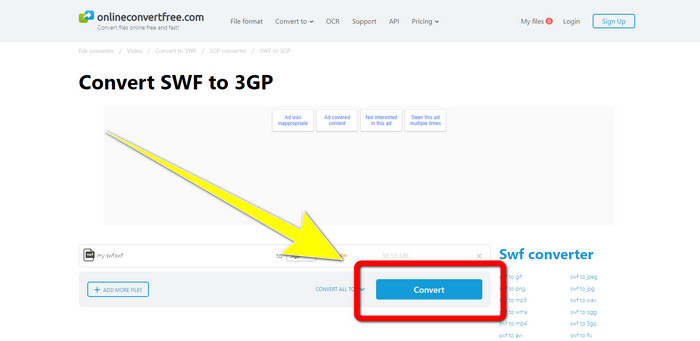
อีกหนึ่งเครื่องมือออนไลน์ที่มีประโยชน์สำหรับการแปลง SWF เป็น 3GP คือ Online Convert Free ด้วยความช่วยเหลือของซอฟต์แวร์ออนไลน์ตัวนี้ คุณสามารถแปลงไฟล์ได้หลากหลายประเภท รวมถึง M4V, MP4, AVI, WEBM, XVID, FLV และอื่น ๆ ดังนั้นคุณจึงสามารถแปลง MP4 เป็น 3GP ได้ด้วยเครื่องมือนี้ นอกจากนี้คุณยังสามารถไว้วางใจให้เครื่องมือนี้แปลงรูปภาพ ไฟล์เสียง เอกสาร ฯลฯ ได้ด้วย กระบวนการแปลงมีความรวดเร็ว และใช้งานง่าย ซึ่งเป็นข้อดีสำหรับผู้ใช้ที่ไม่ใช่มืออาชีพ อย่างไรก็ตาม การแปลงไฟล์ด้วยซอฟต์แวร์นี้ในเวอร์ชันฟรีจะรองรับขนาดไฟล์สูงสุดเพียง 100Mb เท่านั้น หากต้องการเพิ่มขนาดไฟล์สูงสุด คุณต้องซื้อแพ็กเกจสมาชิก ทำตามขั้นตอนด้านล่างเพื่อแปลง SWF เป็น 3GP ด้วยเครื่องมือออนไลน์ตัวนี้.
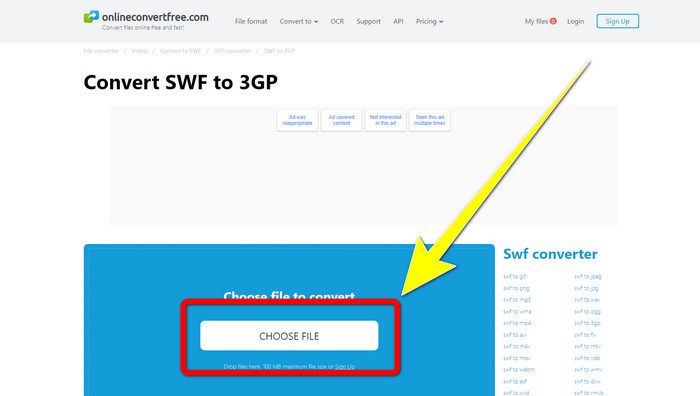
ขั้นตอนที่ 1: ไปที่เว็บไซต์ Online Convert Free คลิกปุ่ม Choose File เพื่อเพิ่มไฟล์วิดีโอ.
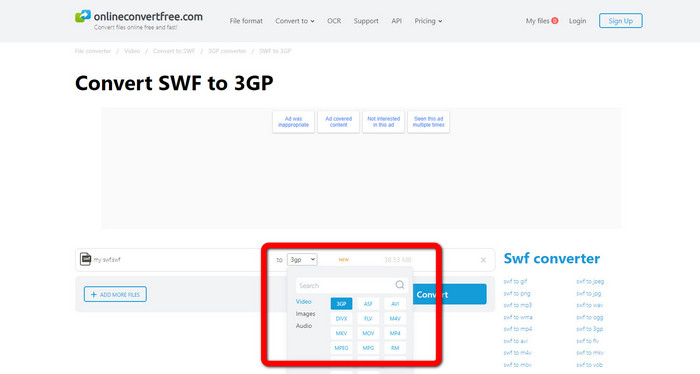
ขั้นตอนที่ 2: เลือกฟอร์แมตไฟล์ 3GP จากตัวเลือกรูปแบบไฟล์หลังจากที่นำเข้าไฟล์วิดีโอแล้ว.
ขั้นตอนที่ 3: เพื่อแปลงไฟล์ของคุณเป็น 3GP ให้คลิกปุ่ม Convert แล้วบันทึกผลลัพธ์ลงในเดสก์ท็อปของคุณ
ตอนที่ 3: SWF กับ 3GP
| SWF | 3GP | |
| คำอธิบาย | ภาพเคลื่อนไหวที่มีเวกเตอร์ กราฟิกแรสเตอร์ ข้อความ และเนื้อหาเชิงโต้ตอบที่เขียนด้วย ActionScript | คอนเทนเนอร์มัลติมีเดียที่กำหนดโดย 3GPP สำหรับบริการ 3G UMTS |
| พัฒนาโดย | อะโดบี | โครงการความร่วมมือรุ่นที่สาม |
| ประเภทไฟล์ | รูปแบบไฟล์ Adobe Flash | รูปแบบมัลติมีเดีย 3GPP |
| ข้อดี | โดยทั่วไปสามารถใช้เพื่อการส่งเนื้อหามัลติมีเดียอย่างมีประสิทธิภาพ | มีอยู่ในโปรแกรม/อุปกรณ์เกือบทั้งหมด |
| จุดด้อย | ไม่รองรับเบราว์เซอร์หรือโปรแกรมอื่น | วิดีโอจัดเก็บในคุณภาพต่ำ |
ส่วนที่ 4: คำถามที่พบบ่อยเกี่ยวกับการแปลง SWF เป็น 3GP
1. ไฟล์ SWF มีเสียงหรือไม่?
- รูปแบบ SWF สร้างขึ้นเพื่อเก็บกราฟิกแบบเวกเตอร์และภาพเคลื่อนไหว แต่อาจเก็บข้อมูลประเภทอื่นๆ เช่น ข้อความ วิดีโอ และเสียง ไฟล์เหล่านี้มักถูกใช้เพื่อสร้างแอนิเมชั่น เล่นเกม วิดีโอและเสียงบนเว็บไซต์
2. ไฟล์ .SWF สามารถเปิดอะไรได้บ้าง?
- หากต้องการเปิดไฟล์ SWF คุณสามารถใช้ VLC Player หรือโปรแกรมเล่น Flash ที่ซ่อนอยู่จาก Adobe ซึ่งนักพัฒนาซอฟต์แวร์ใช้เป็นประจำ
3. ฉันสามารถแปลงไฟล์ SWF เป็นรูปแบบอื่นได้หรือไม่?
- แน่นอนว่าได้เลย! วิธีที่ดีที่สุดคือดาวน์โหลดโปรแกรม Video Converter Ultimate บน Windows หรือ Mac แอปพลิเคชันนี้ช่วยให้คุณแปลง ไฟล์ SWF เป็น MKV และรูปแบบไฟล์อื่น ๆ ได้.
สรุป
นี่คือคู่มือที่ละเอียดที่สุดสำหรับการแปลง SWF เป็น 3GP ผู้คนมักจะชอบวิธีที่ง่ายกว่าวิธีที่ซับซ้อน ดังนั้นหากคุณต้องการแปลงไฟล์ต่าง ๆ ได้อย่างง่ายดาย ให้ใช้ FVC Free Video Converter Online.
-
 3 วิธีในการแปลง MPG เป็น 3GP บน Windows และ Mac [ฟรี]
 หากคุณกำลังมองหาวิธีการแปลง MPG เป็น 3GP อ่านบทความนี้เพื่อทราบวิธีที่ดีที่สุดในการแปลง MPG เป็น 3GP บน Windows และ Mac
-
 วิธีที่ดีที่สุดในการแก้ไข ลบ และดูข้อมูลเมตา 3GP บนเดสก์ท็อป
 เมตาดาต้า 3GP คืออะไร? จะดู เปลี่ยนแปลง และแก้ไขแท็กบน 3GP ของฉันได้อย่างไร หากคุณมีคำถามเดียวกัน บทความนี้เหมาะสำหรับคุณ
-
 วิธีแปลง DIVX เป็น 3GP บน Windows, Mac และ Online
 วิธีแปลง DIVX เป็น 3GP หากคุณกำลังมองหาคำตอบ โปรดอ่านบทความนี้ เราจะแสดงขั้นตอนที่ยอดเยี่ยมด้วยความช่วยเหลือของตัวแปลงต่างๆ
