


 Video Converter Ultimate
 บันทึกหน้าจอ
 ซ่อมวิดีโอ
 ดาวน์โหลดอย่างปลอดภัย
บทวิจารณ์แนะนำเกี่ยวกับ Inpaint Watermark Remover
คุณต้องการเรียนรู้วิธีใช้ Inpaint เพื่อลบลายน้ำหรือไม่? ถ้าใช่ เราพร้อมช่วยคุณแล้ว! หากคุณกำลังอ่านคู่มือนี้อยู่ แสดงว่าคุณอาจกำลังมองหาวิธีที่ดีที่สุดในการลบลายน้ำออกจากรูปภาพของคุณ ดังนั้นคุณไม่ต้องกังวลอีกต่อไป บทความนี้จะมอบรีวิวแบบตรงไปตรงมาของโปรแกรมที่คุณควรใช้ เช่น Inpaint Watermark Remover คุณจะได้เรียนรู้เกี่ยวกับแต่ละเครื่องมืออย่างเพียงพอ ทั้งฟีเจอร์ ข้อดี ข้อเสีย และค่าใช้จ่าย อีกทั้งเรายังจะแนะนำทางเลือกที่ดีที่สุดแทน Inpaint สำหรับการลบลายน้ำออกจากรูปถ่ายของคุณ เพื่อให้คุณมีตัวเลือกอื่นสำหรับโปรแกรมลบลายน้ำที่อาจใช้ มาอ่านบทความนี้เพื่อค้นหาข้อมูลที่เป็นประโยชน์เพิ่มเติมกันเลย.

ตอนที่ 1: ภาพรวมของ Inpaint
ซอฟต์แวร์ที่ยอดเยี่ยมและเชื่อถือได้ชื่อว่า Inpaint ถูกออกแบบมาเพื่อใช้ลบองค์ประกอบที่ไม่ต้องการออกจากรูปภาพ เช่น ลายน้ำ โลโก้ ตัวอักษร ตราประทับ และอื่น ๆ มีโปรแกรมปรับแต่งรูปภาพขั้นสูงจำนวนมากให้เลือกใช้ ซึ่ง Inpaint ไม่ได้อยู่ในกลุ่มนั้น หากคุณเป็นช่างภาพสมัครเล่น มือใหม่ หรือผู้ใช้ที่มีเวลาจำกัดซึ่งไม่สะดวกใช้ซอฟต์แวร์แต่งภาพขั้นสูงอย่าง Photoshop คุณจะต้องชอบความเรียบง่ายและความรวดเร็วของ Inpaint นอกจากนี้ Inpaint ยังรองรับทั้งผู้ใช้ Windows และ Mac คุณสามารถดาวน์โหลดแอปมาติดตั้ง หรือใช้งานผ่านออนไลน์ได้โดยตรง และที่สำคัญ เครื่องมือปากกาไฮไลต์อัจฉริยะของ Inpaint ทำให้การลบวัตถุที่ไม่ต้องการเป็นเรื่องง่ายมาก อีกทั้ง Inpaint ยังสามารถช่วยคุณบูรณะรูปถ่ายเก่าเสียหายให้กลับมาสมบูรณ์ได้อย่างดี อย่างไรก็ตาม หากคุณต้องการบันทึกรูปภาพในความละเอียดสูง คุณจำเป็นต้องสมัครสมาชิกจ่ายเงิน เวอร์ชันฟรีจะบันทึกรูปได้เพียงคุณภาพต่ำเท่านั้น.
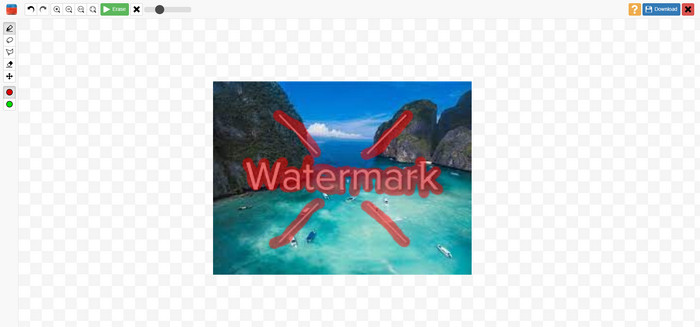
คุณสมบัติ ข้อดี ข้อเสียของ Inpaints
คุณสมบัติเด่น
◆ ลบองค์ประกอบที่ไม่ต้องการออกจากรูปภาพ
◆ ซ่อมแซมรูปภาพเก่า
◆ สามารถปรับแต่งใบหน้าได้
ข้อดี
- มีอินเทอร์เฟซที่ใช้งานง่ายซึ่งใช้งานง่าย
- สามารถลบลายน้ำได้ทันที สามารถลบลายน้ำได้ทันที
จุดด้อย
- ทำงานได้ไม่ดีกับภาพถ่ายที่มีพื้นหลังซับซ้อน
- ซื้อการสมัครสมาชิกเพื่อสัมผัสคุณสมบัติที่ยอดเยี่ยม
วิธีใช้ Inpaint เพื่อลบลายน้ำ
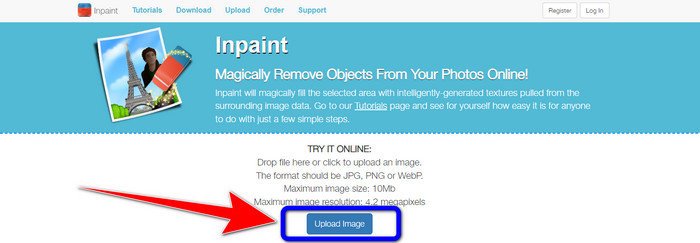
ขั้นตอนที่ 1: ไปที่เว็บไซต์ของ Inpaint จากนั้นคลิกปุ่ม Upload Image เพื่อเพิ่มรูปภาพที่มีลายน้ำที่คุณต้องการลบ.
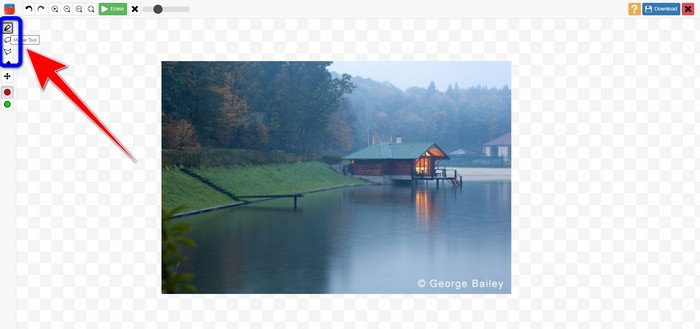
ขั้นตอนที่ 2: หลังจากอัปโหลดรูปภาพแล้ว คุณต้องไฮไลต์บริเวณลายน้ำโดยใช้เครื่องมือลบลายน้ำ ได้แก่ Marker, Polygonal และ Lasso.
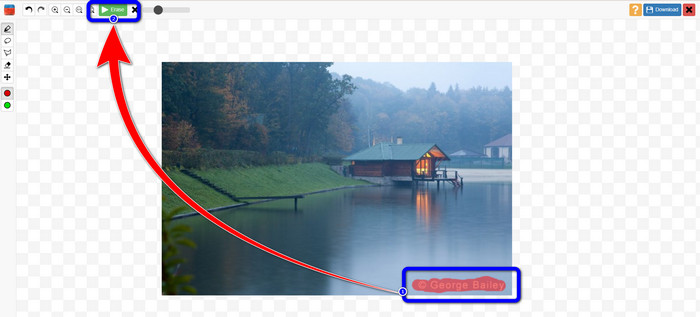
ขั้นตอนที่ 3: เมื่อไฮไลต์ลายน้ำบนรูปภาพเรียบร้อยแล้ว ให้คลิกปุ่ม Erase ที่มุมซ้ายบนของหน้าจอและรอให้ระบบประมวลผลการลบ.
ขั้นตอนที่ 4: เมื่อลายน้ำถูกลบออกแล้ว ให้คลิกปุ่ม Download และบันทึกผลงานของคุณลงในคอมพิวเตอร์.
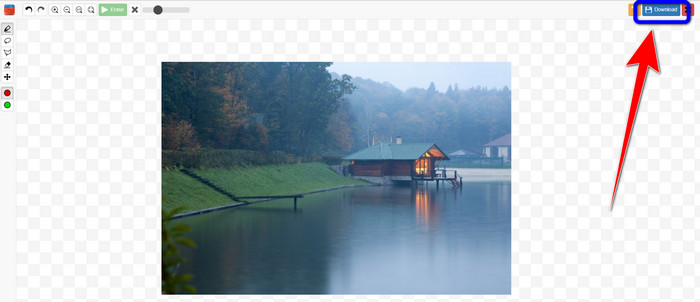
ส่วนที่ 2: ทางเลือกที่ดีที่สุดสำหรับ Inpaint เพื่อลบลายน้ำออกจากรูปภาพออนไลน์
หลังจากทราบวิธีที่มีประสิทธิภาพในการใช้ Inpaint เพื่อลบลายน้ำแล้ว นี่คือทางเลือกที่ดีที่สุดที่คุณสามารถใช้เพื่อลบลายน้ำออกจากรูปภาพของคุณ
FVC ฟรี Watermark Remover
เครื่องมือออนไลน์ที่ดีที่สุดที่คุณสามารถใช้แทน Inpaint คือ FVC Free Watermark Remover ซอฟต์แวร์ออนไลน์นี้ช่วยให้คุณลบองค์ประกอบที่ไม่ต้องการออกจากรูปภาพได้ทั้งหมด เช่น ลายน้ำ โลโก้ ตัวอักษร ลายเซ็น และอื่น ๆ คุณสามารถใช้เครื่องมือลบได้หลายแบบ เช่น Brush, Polygonal และ Lasso แต่นี่ยังไม่หมด ซอฟต์แวร์ออนไลน์นี้ยังมีฟังก์ชัน Crop ที่ช่วยให้คุณลบลายน้ำด้วยการครอปภาพออกได้ด้วย ขั้นตอนการลบรวดเร็วมาก คุณจึงไม่ต้องเสียเวลา หลังจากลบลายน้ำเสร็จแล้ว คุณสามารถบันทึกผลงานสุดท้ายในรูปแบบไฟล์เดิม นอกจากนี้ยังรองรับไฟล์ภาพหลายประเภท เช่น JPG, PNG, BMP และอื่น ๆ อีกทั้งโปรแกรมลบลายน้ำนี้ยังมีอินเทอร์เฟซที่เข้าใจง่าย พร้อมขั้นตอนการใช้งานที่ไม่ซับซ้อน เหมาะสำหรับผู้ใช้ทั่วไปที่ไม่ใช่มืออาชีพ.
คุณสมบัติเด่น
◆ ความสามารถในการครอบตัดรูปภาพเพื่อกำจัดลายน้ำ
◆ ส่งออกรูปภาพด้วยคุณภาพต้นฉบับ
◆ ลบองค์ประกอบที่น่ารังเกียจออกจากรูปภาพโดยใช้เครื่องมือ Lasso, Brush และ Polygonal
ข้อดี
- เหมาะสำหรับผู้ใช้ที่ไม่ใช่มืออาชีพ
- มีส่วนติดต่อผู้ใช้ที่เข้าใจได้
- ฟรีทั้งหมด
- มีกระบวนการกำจัดที่รวดเร็ว
- รับประกันความเป็นส่วนตัวของผู้ใช้ทุกคน
- ไม่จำเป็นต้องติดตั้งแอปพลิเคชัน
จุดด้อย
- ในการใช้งานแอปพลิเคชัน จำเป็นต้องมีการเชื่อมต่ออินเทอร์เน็ต
การใช้เครื่องมือ Watermark Remover
เนื่องจากพื้นที่ลายน้ำอยู่ตรงกลางรูปภาพของคุณ เราจะใช้เครื่องมือลบลายน้ำแทนเครื่องมือครอบตัด ทำตามขั้นตอนง่ายๆ ด้านล่างนี้เพื่อลบลายน้ำออกจากรูปภาพของคุณโดยใช้ FVC Free Watermark Remover
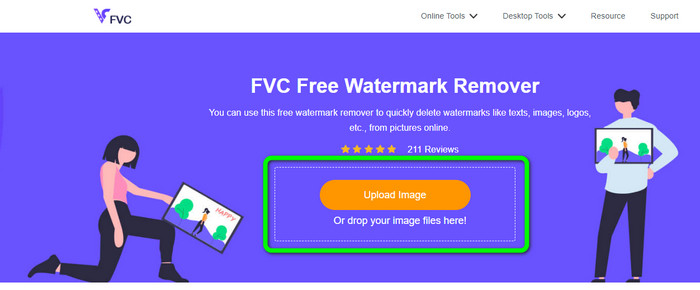
ขั้นตอนที่ 1: ไปที่เว็บไซต์ FVC Free Watermark Remover คลิกปุ่ม Upload Image เพื่ออัปโหลดภาพที่มีลายน้ำ คุณยังสามารถลากไฟล์มาปล่อยได้โดยตรง.
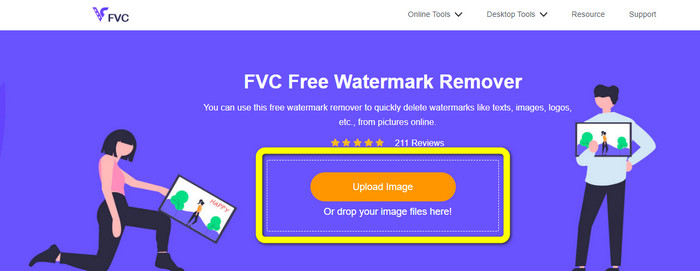
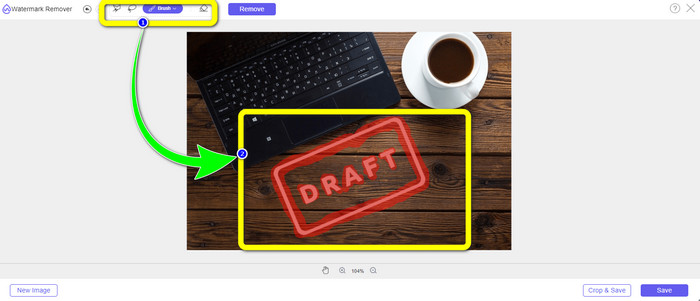
ขั้นตอนที่ 2: ไฮไลต์ลายน้ำด้วยเครื่องมือลบลายน้ำที่แสดงอยู่ด้านบนของอินเทอร์เฟซ.
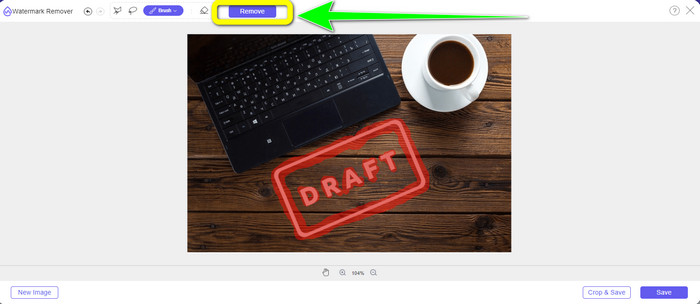
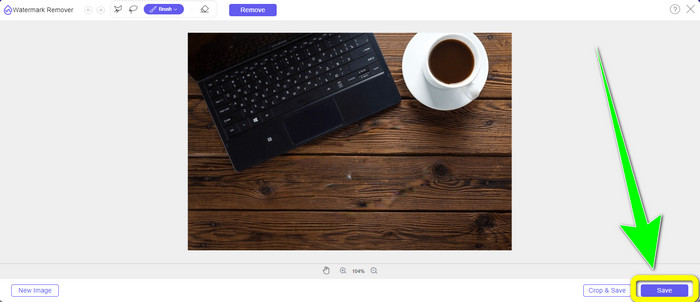
ขั้นตอนที่ 3: เมื่อไฮไลต์ลายน้ำบนภาพเรียบร้อยแล้ว ให้คลิกปุ่ม Remove เพื่อลบลายน้ำและรอให้ระบบประมวลผลอย่างรวดเร็ว.
ขั้นตอนที่ 4: หลังจากลบลายน้ำออกจากรูปภาพเรียบร้อยแล้ว ให้คลิกปุ่ม Save เพื่อดาวน์โหลดรูปภาพที่ไม่มีลายน้ำ.
ใช้เครื่องมือครอป (Cropping Tool)
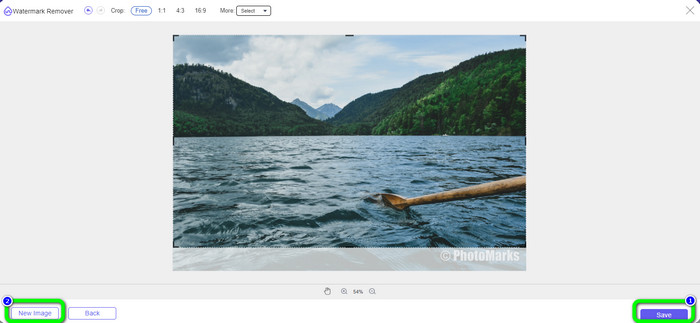
ในวิธีนี้ คุณต้องพิจารณาพื้นที่ของลายน้ำจากภาพถ่ายของคุณ หากลายน้ำอยู่ที่มุมหรือขอบของรูปภาพ คุณสามารถใช้เครื่องมือครอบตัดได้ ทำตามขั้นตอนง่ายๆ ด้านล่างเพื่อเรียนรู้วิธีการครอบตัดรูปภาพเพื่อกำจัดลายน้ำ
ขั้นตอนที่ 1: คลิกปุ่ม Upload Image เพื่อแทรกรูปภาพที่มีลายน้ำของคุณ.
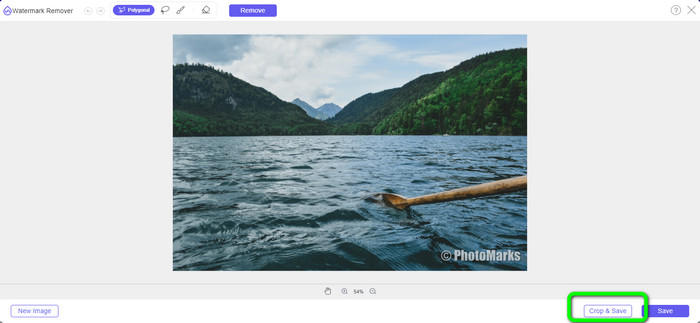
ขั้นตอนที่ 2: หลังจากแทรกรูปภาพแล้ว ให้คลิกปุ่ม Crop & Save ที่มุมขวาล่างของอินเทอร์เฟซ.
ขั้นตอนที่ 3: ที่ด้านบนของอินเทอร์เฟซจะมีตัวเลือกสำหรับการครอปให้เลือกใช้ ตัวเลือกเหล่านี้จะช่วยให้คุณครอปภาพได้สะดวก แต่หากคุณต้องการครอปภาพด้วยตนเอง ให้คลิกตัวเลือก Free.
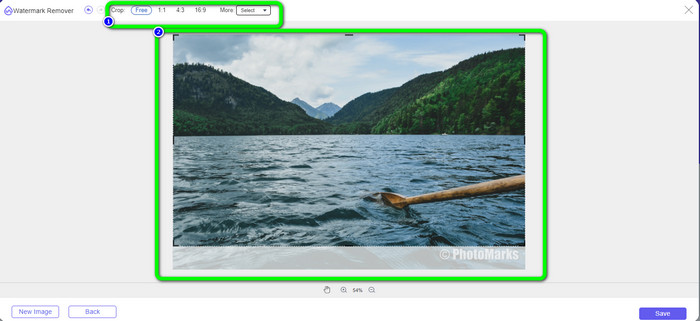
ขั้นตอนที่ 4: หลังจากลบลายน้ำด้วยการครอปภาพแล้ว ให้กดปุ่ม Save ที่มุมขวาล่างของอินเทอร์เฟซเพื่อดาวน์โหลดรูปภาพที่ไม่มีลายน้ำ จากนั้น หากคุณต้องการครอปภาพอื่นต่อ ให้คลิกปุ่ม New Image ที่มุมซ้ายล่างของอินเทอร์เฟซ.
ที่เกี่ยวข้อง:
วิธีลบลายน้ำ Reddit ออกจากรูปภาพได้อย่างง่ายดาย
วิธีลบลายน้ำใน Lightroom Mobile [แก้ไขแล้ว]
ส่วนที่ 3: คำถามที่พบบ่อยเกี่ยวกับ Inpaint Watermark Remover
ฉันควรใช้ Inpaint เมื่อใด
คุณสามารถใช้ Inpaint เพื่อกำจัดองค์ประกอบที่ไม่ต้องการออกจากรูปภาพของคุณ เช่น ผู้คน ลายน้ำ โลโก้ สติกเกอร์ และอื่นๆ ด้วยเครื่องมือนี้ คุณสามารถทำให้รูปภาพของคุณดูสวยงามและดึงดูดสายตาของผู้ชมได้มากขึ้น
ฉันสามารถใช้ Inpaint บนคอมพิวเตอร์ของฉันได้ไหม
ใช่คุณสามารถ! คุณสามารถดาวน์โหลด Inpaint ได้เนื่องจากมีเวอร์ชันเดสก์ท็อป แอปพลิเคชั่นที่ดาวน์โหลดได้นี้มีคุณสมบัติที่ยอดเยี่ยมมากกว่าเวอร์ชันออนไลน์ คุณสามารถแนบรูปภาพได้โดยไม่มีข้อจำกัด และให้คุณภาพการบูรณะที่สูงขึ้นด้วยอัลกอริธึมการลงสีที่ดีกว่า
Inpaint เป็นตัวลบลายน้ำที่ดีกว่าหรือไม่?
Inpaint มีความน่าเชื่อถือในการลบลายน้ำออกจากรูปภาพ อย่างไรก็ตาม ก็ยังมีข้อจำกัดอยู่ เช่น ขนาดไฟล์และความละเอียดสูงสุดที่รองรับ ซึ่งไม่ตอบโจทย์ผู้ใช้บางกลุ่ม หากคุณต้องการโปรแกรมลบลายน้ำที่ดีกว่า คุณสามารถใช้ FVC Free Watermark Remover ได้ เพราะไม่มีข้อจำกัดเหล่านี้ และคุณสามารถลบลายน้ำออกจากรูปภาพได้ฟรี.
สรุป
จากที่คุณเห็น บทความนี้ได้มอบรีวิวอย่างตรงไปตรงมาเกี่ยวกับ Inpaint Watermark Remover นอกจากนี้ยังแนะนำทางเลือกที่ดีที่สุดที่คุณสามารถใช้เพื่อลบลายน้ำออกจากรูปถ่ายของคุณ หากคุณต้องการโปรแกรมลบลายน้ำฟรีแบบ 100% คุณสามารถใช้ FVC Free Watermark Remover ได้.
-
 วิธีการลบลายน้ำออกจากวิดีโอใน After Effects ได้อย่างง่ายดาย
 บทความนี้จะช่วยลบลายน้ำออกจากวิดีโอโดยใช้ After Effects นอกจากนี้ยังเป็นทางเลือกที่ดีที่สุดสำหรับการกำจัดวัตถุที่รบกวน
-
 คำแนะนำทีละขั้นตอนเกี่ยวกับวิธีการลบ Emojis จากวิดีโอ
 รู้สึกรำคาญกับอีโมจิในวิดีโอของคุณหรือไม่? โพสต์นี้จะนำขั้นตอนที่ดีที่สุดในการลบอิโมจิออกจากวิดีโอของคุณทันทีโดยใช้เครื่องมือที่ยอดเยี่ยม
-
 วิธีที่ยอดเยี่ยมในการลบสติกเกอร์ออกจากรูปภาพและวิดีโอ
 คุณต้องการเอาสติกเกอร์ออกจากวิดีโอและรูปภาพอย่างง่ายดายหรือไม่? ต่อไปนี้คือวิธีที่มีประสิทธิภาพ รวมถึงวิธีที่ง่ายที่สุดและน่าเชื่อถือที่สุดที่คุณสามารถลองได้
