


 Video Converter Ultimate
 บันทึกหน้าจอ
 ซ่อมวิดีโอ
 ดาวน์โหลดอย่างปลอดภัย
ขั้นตอนที่ง่ายที่สุดในการใช้ Pixlr เพื่อลบลายน้ำ
หากคุณเข้ามาที่นี่เพื่อเรียนรู้วิธีใช้ Pixlr เพื่อลบลายน้ำออกจากรูปภาพของคุณ แสดงว่าคุณมาถูกบทความแล้ว โดยส่วนตัวแล้ว การได้รูปที่มีลายน้ำติดมานั้นน่ารำคาญมาก ดังนั้นการลบมันออกจึงดีกว่า ตั้งแต่ต้นจนจบของบทความนี้ คุณจะได้เรียนรู้อะไรหลายอย่าง ไม่ใช่แค่การใช้แอป Pixlr เท่านั้น แต่ยังรวมถึงการใช้ตัวเลือกอื่น ๆ ที่ยอดเยี่ยมในการกำจัดลายน้ำออกจากรูปภาพของคุณด้วย ดังนั้นถ้าคุณต้องการแก้ปัญหานี้ ก็สามารถอ่านบทความต่อไปและเรียนรู้วิธีลบลายน้ำที่น่ารำคาญออกจากภาพของคุณได้เลย.

ตอนที่ 1: ลบลายน้ำออกจากรูปภาพโดยใช้ Pixlr
Pixlr เป็นเครื่องมือสำหรับแก้ไขรูปภาพที่คุณสามารถใช้เพื่อปรับแต่งและเพิ่มความสวยงามให้กับภาพถ่ายของคุณ นอกจากนี้ยังมีเทมเพลตหลากหลายแบบให้เลือกใช้ ทำให้รูปของคุณดูสวยและไม่เหมือนใคร นอกจากฟังก์ชันเหล่านี้แล้ว คุณรู้หรือไม่ว่า Pixlr สามารถลบลายน้ำออกจากรูปภาพของคุณได้ด้วย? ใช่แล้ว! คุณฟังไม่ผิด Pixlr สามารถลบวัตถุรบกวนสายตาทุกชนิดที่คุณไม่ต้องการในรูปภาพได้ทันที ไม่ว่าจะเป็นลายน้ำ สติกเกอร์ อีโมจิ ตัวอักษร และอื่น ๆ อีกมากมาย อีกทั้งซอฟต์แวร์ออนไลน์นี้ยังให้ใช้งานได้ฟรี คุณไม่ต้องกังวลเรื่องค่าใช้จ่ายหรือค่าสมัครสมาชิก อย่างไรก็ตาม การใช้ Pixlr ก็ไม่ง่ายนัก เพราะมีตัวเลือกมากมายและขั้นตอนค่อนข้างซับซ้อน ซึ่งอาจไม่เหมาะกับผู้ใช้ทั่วไปที่ไม่เชี่ยวชาญ หากต้องการใช้แอปนี้ คุณควรดูวิดีโอสอนหรือให้ผู้ใช้ระดับสูงช่วยแนะนำ อีกทั้งเนื่องจากเป็นซอฟต์แวร์บนเว็บ จึงจำเป็นต้องมีอินเทอร์เน็ตที่เร็วพอ ไม่เช่นนั้นอาจทำงานได้ไม่ดี ทำตามคู่มืออย่างง่ายด้านล่างนี้เพื่อใช้ Pixlr ลบลายน้ำ.
ขั้นตอนที่ 1: ในการใช้ Pixlr อันดับแรกให้คุณไปที่เว็บไซต์ของ Pixlr จากนั้นคลิกปุ่ม Open Image เพื่ออัปโหลดรูปที่มีลายน้ำที่คุณต้องการลบออก คุณยังสามารถใส่รูปภาพจาก URL ได้ด้วย.

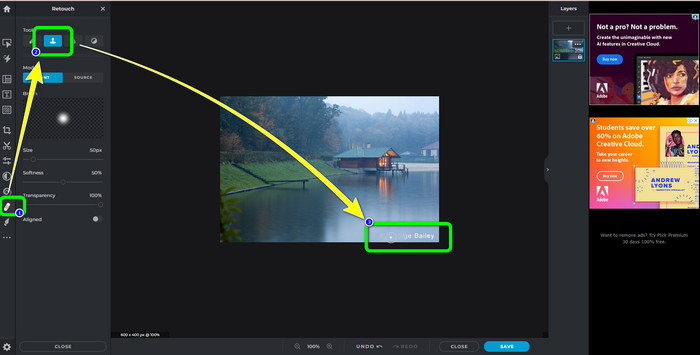
ขั้นตอนที่ 2: หลังจากอัปโหลดรูปภาพที่ต้องการแล้ว ให้เลือกปุ่ม Retouch ที่ด้านซ้ายของหน้าจอ จากนั้นจะมีเครื่องมือปรากฏขึ้น ให้เลือก Clone Stamp tool หลังจากเลือกแล้ว คุณก็สามารถใช้เมาส์คลิกลงไปบนพื้นที่ที่เป็นลายน้ำเพื่อทำการลบออกได้เลย.
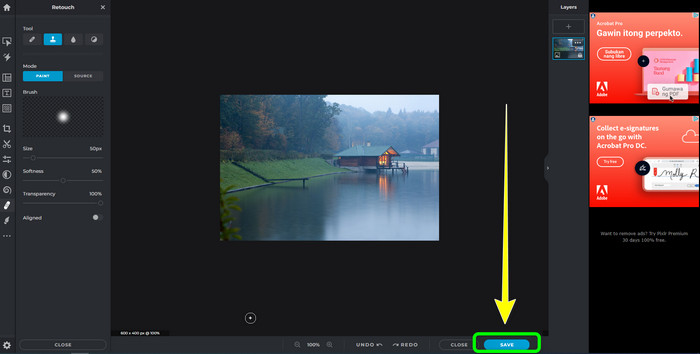
ขั้นตอนที่ 3: เมื่อคุณลบลายน้ำทั้งหมดที่ต้องการออกเรียบร้อยแล้ว ให้คลิกปุ่ม Save จากนั้นจึงบันทึกไปยังตำแหน่งที่คุณต้องการ.
ส่วนที่ 2: ทางเลือก Pixlr ที่ยอดเยี่ยมในการลบลายน้ำออกจากรูปภาพ
FVC ฟรี Watermark Remover
จะเห็นได้ว่าการใช้ Pixlr นั้นค่อนข้างยาก โดยเฉพาะสำหรับผู้เริ่มต้น หากคุณต้องการตัวลบลายน้ำที่ใช้งานง่ายกว่านี้ ทางเลือกที่ดีที่สุดที่จะแนะนำคือ FVC Free Watermark Remover ซอฟต์แวร์ออนไลน์ตัวนี้มีวิธีใช้งานและหน้าตาโปรแกรมที่เรียบง่าย เหมาะสำหรับมือใหม่เป็นอย่างยิ่ง แอปนี้สามารถลบวัตถุไม่พึงประสงค์ต่าง ๆ จากรูปภาพของคุณได้อย่างง่ายดาย เช่น ลายน้ำ โลโก้ วันที่บนภาพ เป็นต้น นอกจากนี้ยังฟรี 100% และคุณสามารถลบลายน้ำหลายตำแหน่งในภาพเดียวได้.
แต่เดี๋ยวก่อนยังมีอีกมาก FVC Free Watermark Remover ให้คุณสองวิธีในการลบลายน้ำ วิธีแรกคือใช้เครื่องมือลบลายน้ำ เครื่องมือเหล่านี้ได้แก่ Brush, Lasso และ Polygonal คุณสามารถใช้เครื่องมือเหล่านี้เพื่อเน้นและลบลายน้ำออกจากรูปภาพของคุณ วิธีที่สองคือใช้เครื่องมือการครอบตัด หากพื้นที่ลายน้ำอยู่ที่ขอบของรูปภาพ คุณจะต้องครอบตัดโดยใช้เมาส์เท่านั้น หากคุณต้องการตัวอย่างการลบลายน้ำโดยใช้สองวิธีนี้ ให้ทำตามขั้นตอนด้านล่าง
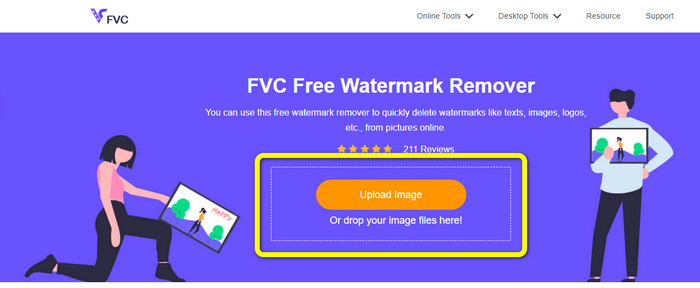
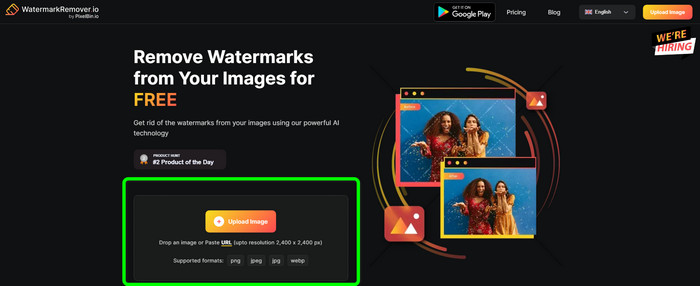
ขั้นตอนที่ 1: เปิดเบราว์เซอร์และเข้าไปที่เว็บไซต์ FVC Free Watermark Remover จากนั้นคลิกปุ่ม Upload Image แล้วอัปโหลดรูปที่มีลายน้ำที่คุณต้องการแก้ไข.
ขั้นตอนที่ 2: หลังจากนั้น คุณสามารถใช้เครื่องมือลบลายน้ำได้ เช่น Polygonal, Lasso และ Brush นอกจากนี้ยังสามารถใช้เครื่องมือ Eraser เพื่อลบส่วนที่เลือกเกินออกไปได้ คุณยังสามารถใช้เครื่องมือแว่นขยายใต้รูปของคุณเพื่อซูมเข้า–ออก เพื่อมองเห็นลายน้ำขนาดเล็กได้ชัดเจนขึ้น.
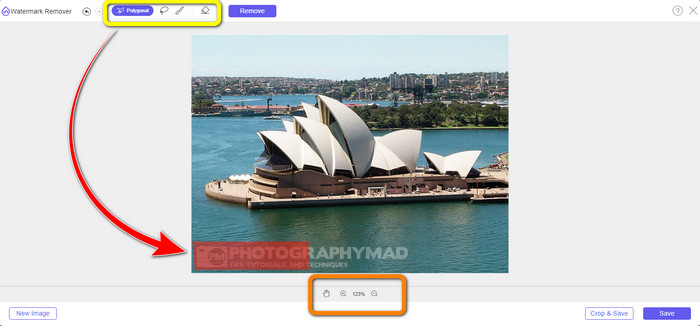
ขั้นตอนที่ 3: ในขั้นตอนนี้ เมื่อคุณทำการไฮไลต์ลายน้ำทั้งหมดบนรูปภาพเสร็จแล้ว คุณสามารถลบมันได้โดยการคลิกปุ่ม Remove จากนั้นรอให้ระบบประมวลผลการลบ.
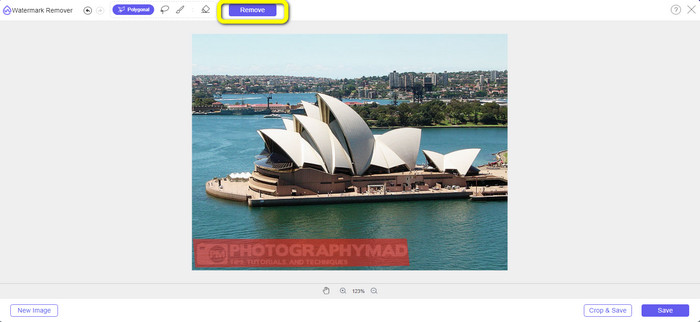
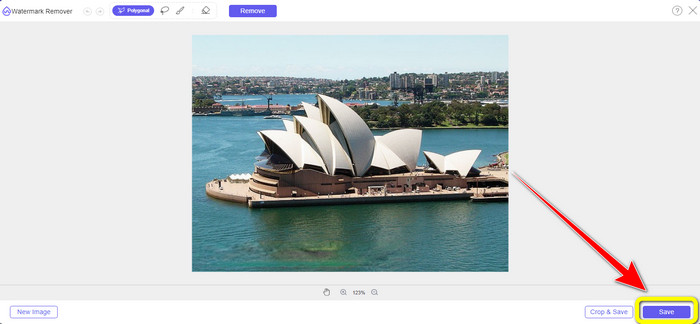
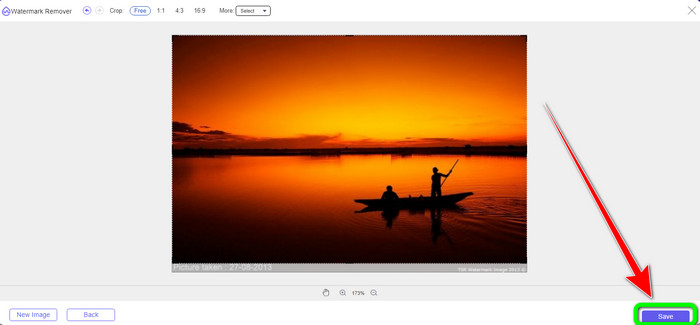
ขั้นตอนที่ 4: ตอนนี้เรามาถึงขั้นตอนสุดท้ายแล้ว หลังจากลบลายน้ำทั้งหมดออกจากรูปภาพเรียบร้อย ให้คลิกปุ่ม Save เพื่อดาวน์โหลดไฟล์ภาพขั้นสุดท้ายของคุณ.
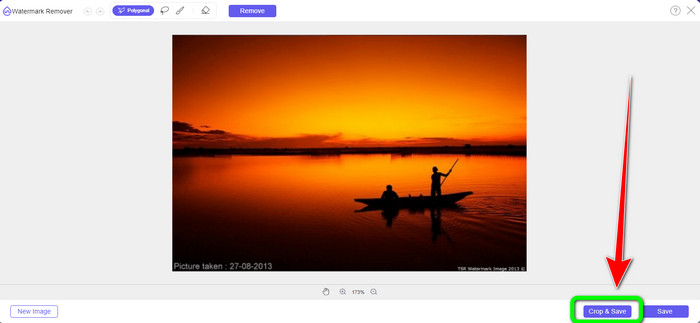
ขั้นตอนที่ 5: อีกวิธีหนึ่งในการลบลายน้ำคือการใช้เครื่องมือครอป เลือกปุ่ม Crop & Save หลังจากใส่ไฟล์ภาพเข้าไปแล้ว.
ขั้นตอนที่ 6: ในขั้นตอนนี้ คุณสามารถครอปรูปภาพเพื่อตัดส่วนที่มีลายน้ำออกได้ โดยเลื่อนเมาส์ไปพร้อมกับคลิกที่ขอบของรูปภาพ ตามที่คุณเห็นในกรอบสีเหลือง คุณจะพบตัวเลือกมากมายเกี่ยวกับรูปแบบการครอปรูปของคุณ ส่วนในกรอบสีแดง คุณสามารถปรับขนาดรูปให้ใหญ่หรือเล็กลงได้.
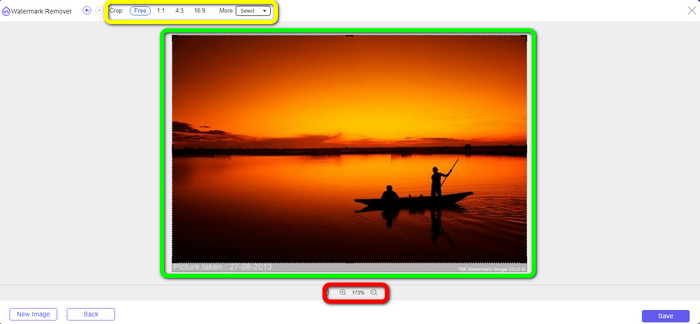
ขั้นตอนที่ 7: สำหรับขั้นตอนสุดท้าย เมื่อคุณครอปรูปภาพเสร็จแล้ว ให้คลิกปุ่ม Save เพื่อบันทึกไฟล์ จากนั้นคุณสามารถเปิดไฟล์เพื่อดูรูปภาพที่ไม่มีลายน้ำได้.
Watermark Remover.io
อีกวิธีที่ง่ายในการลบลายน้ำออกจากรูปภาพ คือการใช้ Watermark Remover.io แอปออนไลน์นี้ใช้งานง่ายกว่า Pixlr มาก มีอินเทอร์เฟซที่เรียบง่ายและขั้นตอนพื้นฐานที่แม้แต่ผู้ใช้มือใหม่ก็สามารถใช้งานได้อย่างสบาย นอกจากนี้ยังสามารถลบลายน้ำหลายตำแหน่งพร้อมกันได้ในครั้งเดียว จุดเด่นที่สุดคือรองรับลายน้ำหลายสี หมายความว่าแม้ลายน้ำจะมีหลายสีแตกต่างกัน ก็ยังสามารถลบออกได้ทันที.
แต่น่าเสียดายที่ Watermark Remover.io มีคุณสมบัติที่จำกัด ในหนึ่งเดือน ภาพสูงสุดที่คุณสามารถอัพโหลดได้คือ 50 ภาพเท่านั้น นอกจากนี้ยังสามารถให้พื้นที่เก็บข้อมูลได้เพียง 25 GB ซึ่งไม่เพียงพอ นอกจากนี้ หากคุณต้องการให้แอปพลิเคชันนี้ทำงานได้ดี คุณต้องมีการเชื่อมต่ออินเทอร์เน็ตที่รวดเร็ว
ทำตามขั้นตอนด้านล่างเพื่อลบลายน้ำออกจากรูปภาพของคุณ
ขั้นตอนที่ 1: เข้าไปที่เว็บไซต์ Watermark Remover.io ผ่านเบราว์เซอร์ของคุณ แล้วคลิกปุ่ม Upload Image ระบบจะทำการลบลายน้ำออกจากรูปภาพของคุณโดยอัตโนมัติ เพียงรอให้กระบวนการทำงานเสร็จ.
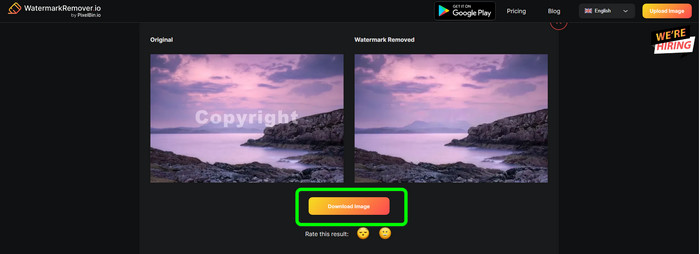
ขั้นตอนที่ 2: เมื่อระบบลบลายน้ำออกจากรูปภาพของคุณเรียบร้อยแล้ว ให้คลิกปุ่ม Download Image เพื่อบันทึกลงในคอมพิวเตอร์ คุณสามารถใช้เครื่องมือนี้เพื่อลบลายน้ำ Alamy ออกจากรูปภาพได้.
ส่วนที่ 3: คำถามที่พบบ่อยเกี่ยวกับการลบลายน้ำโดยใช้ Pixlr
1. ตัวลบลายน้ำฟรีที่ดีที่สุดคืออะไร?
ตัวลบลายน้ำที่ดีที่สุดที่คุณสามารถใช้ได้ฟรีคือ FVC Free Watermark Remover แอปนี้สามารถลบวัตถุที่น่ารำคาญทุกชนิดออกจากรูปภาพของคุณได้ โดยไม่ต้องเสียเงินเลยแม้แต่น้อย.
2. ฉันจะเพิ่มลายน้ำใน Pixlr ได้อย่างไร
คุณต้องลงชื่อเข้าใช้บัญชี Pixlr ของคุณ จากนั้นไปที่ “Pixlr Editor” แล้วเปิดใช้งาน หลังจากนั้นคลิก “สร้างภาพใหม่” จากนั้นคุณสามารถสร้างลายน้ำบนรูปภาพและกำหนดความสูงและความกว้างของรูปภาพได้
3. Pixlr เป็นเครื่องมือทางกฎหมายหรือไม่
แน่นอนใช่! Pixlr เป็นแอปพลิเคชั่นที่ถูกต้องตามกฎหมาย คุณลักษณะทั้งหมดได้รับอนุญาตและได้รับอนุญาตให้ใช้ คุณจึงใช้งานแอปพลิเคชันออนไลน์นี้ได้โดยไม่ต้องกังวล
สรุป
การได้ดูรูปภาพที่ไม่มีลายน้ำติดอยู่นั้นให้ความรู้สึกดีมากใช่ไหม? นี่คือเหตุผลหลักที่บทความนี้อธิบายวิธีใช้ Pixlr ลบลายน้ำให้คุณ นอกจากนี้ เรายังได้แนะนำเครื่องมือออนไลน์อื่น ๆ ที่ใช้ง่ายกว่ามาให้เลือกใช้ด้วย แต่ถ้าคุณต้องการซอฟต์แวร์ที่มีประสิทธิภาพและใช้งานได้จริง แนะนำให้ใช้ FVC Free Watermark Remover.
-
 3 วิธีที่ดีที่สุดในการลบลายน้ำออกจากภาพ PNG
 ค้นพบสามวิธีที่ดีที่สุดในการลบลายน้ำออกจาก PNG ทางออนไลน์ อ่านโพสต์นี้แล้วทำให้ภาพของคุณดูเรียบร้อยและดึงดูดสายตาผู้ชมมากขึ้น
-
 วิธีที่ตรงไปตรงมาในการลบลายน้ำออกจาก JPG Online
 มาค้นพบกลวิธีที่ดีที่สุดในการลบลายน้ำออกจาก JPG ทางออนไลน์โดยใช้แอปพลิเคชันที่มีประสิทธิภาพ ทำตามบทความนี้เพื่อเรียนรู้ขั้นตอน
-
 คำแนะนำฉบับสมบูรณ์เพื่อลบลายน้ำ iFunny อย่างง่ายดาย
 ค้นพบโปรแกรมลบลายน้ำ iFunny ที่ยอดเยี่ยมที่สุดสำหรับคุณ นอกจากนี้ เรียนรู้วิธีการง่ายๆ เหล่านี้ในการลบลายน้ำ iFunny ออกจากรูปภาพของคุณ
