


 Video Converter Ultimate
 บันทึกหน้าจอ
 ซ่อมวิดีโอ
 ดาวน์โหลดอย่างปลอดภัย
แนวทางที่น่าทึ่งในการแปลง TS เป็น DIVX ฟรี
รูปแบบไฟล์ TS มักใช้สำหรับออกอากาศรายการ HDTV แต่ถ้าคุณต้องการเล่นวิดีโอบนเครื่องเล่นพกพา คุณจำเป็นต้องแปลงให้เป็นรูปแบบไฟล์อื่น เช่น AVI, MPEG, WMV, DIVX, MP4 เป็นต้น เมื่อต้องพูดถึงการแปลงไฟล์ คุณสามารถเชื่อถือบทความนี้ได้ เราจะสอนคุณว่าจะแปลง TS เป็น DIVX ฟรีได้อย่างไร รวมถึงแปลงเป็นรูปแบบไฟล์อื่น ๆ นอกจากนี้ เรายังจะแนะนำโปรแกรมแปลงไฟล์แบบออฟไลน์ที่คุณสามารถดาวน์โหลดมาใช้ได้ หากคุณพร้อมแล้ว มาอ่านบทความนี้กันต่อเลย.

ตอนที่ 1: แปลง TS เป็น DIVX โดยไม่สูญเสียคุณภาพ
คุณสามารถดาวน์โหลด Video Converter Ultimate เพื่อแปลงไฟล์ TS เป็น DIVX เครื่องมือนี้มีความเร็วในการแปลงระดับอัลตร้าแฟสต์ เร็วกว่าค่าเฉลี่ยถึง 30 เท่า และยังรองรับการแปลงแบบเป็นชุด (batch conversion) ซึ่งคุณสามารถแปลงไฟล์หลาย ๆ ไฟล์ได้ในคลิกเดียว ทำให้คุณแปลงไฟล์จำนวนมากได้ในเวลาอันสั้น นอกจากนี้ยังรองรับรูปแบบวิดีโอกว่า 1000 แบบ เช่น AVI, WMV, FLV, MP4, M4V, TS, MTS และอื่น ๆ แอปพลิเคชันนี้ยังรับประกันว่าคุณภาพวิดีโอของคุณจะไม่เปลี่ยนไปหลังจากแปลงไฟล์ TS แล้วอีกด้วย อีกทั้งด้วยอินเทอร์เฟซที่เข้าใจง่ายและวิธีการใช้งานที่ไม่ซับซ้อน คุณจึงสามารถแปลงไฟล์ได้อย่างง่ายและรวดเร็ว คุณยังสามารถใช้โปรแกรมนี้ได้ทั้งบน Windows และ Mac จึงสะดวกสำหรับทั้งผู้ใช้ Windows และ Mac.
นอกจากนี้ คุณไม่รู้หรือว่า FVC Video Converter Ultimate สามารถทำได้มากกว่าการแปลง? สำหรับข้อมูลเพิ่มเติมของคุณ มันมีคุณสมบัติที่ยอดเยี่ยมมากกว่าที่คุณคิด หากคุณต้องการปรับปรุงวิดีโอ TS คุณต้องพึ่งพาแอปพลิเคชันนี้ เครื่องมือนี้มีกล่องเครื่องมือเพื่อปรับปรุงวิดีโอของคุณ เช่น การใช้โปรแกรมปรับปรุงวิดีโอเพื่อเปลี่ยนความละเอียดและความสว่างของวิดีโอของคุณ คุณยังสามารถแก้ไขสีวิดีโอเพื่อให้ถูกใจผู้ชมมากขึ้น นอกจากนี้ คุณสามารถสร้างมิวสิควิดีโอด้วยเครื่องมือนี้ คุณสามารถใช้ธีมฟรีเพื่อทำให้มิวสิควิดีโอของคุณมีเอกลักษณ์และน่าดึงดูด คุณลักษณะเหล่านี้เป็นคุณลักษณะที่ยอดเยี่ยมบางอย่างที่คุณสามารถสัมผัสได้โดยใช้ Video Converter Ultimate
คุณสมบัติเด่น
◆ สามารถแปลงไฟล์วิดีโอได้หลายรูปแบบ เช่น M4V, MP4, SWF, WMV, AVI, TS, FLV และอื่นๆ อีกกว่า 1,000 รายการ
◆ สร้างมิวสิกวิดีโอด้วยธีมที่เข้าถึงได้
◆ สามารถสร้างภาพตัดปะ นอกจากนี้ยังมีเทมเพลตและตัวกรองฟรี
◆ มีกล่องเครื่องมือสำหรับปรับปรุงวิดีโอ เช่น ตัวเพิ่มคุณภาพวิดีโอ ทริมเมอร์ ตัวหมุน ฯลฯ
คุณสามารถทำตามคำแนะนำโดยละเอียดด้านล่างเพื่อแปลงไฟล์ TS เป็น DIVX และรูปแบบอื่นๆ นอกจากนี้ เราจะแสดงขั้นตอนบางอย่างให้คุณแก้ไขวิดีโอของคุณได้ง่ายขึ้น
ขั้นตอนที่ 1: ดาวน์โหลดและติดตั้ง Video Converter Ultimate บน Windows หรือ Mac ของคุณ หากคุณใช้ Windows ให้คลิกปุ่ม Download สำหรับ Windows จากนั้นหากคุณเป็นผู้ใช้ Mac ให้คลิกเวอร์ชันสำหรับ Mac.
ดาวน์โหลดฟรีสำหรับ Windows 7 หรือใหม่กว่าดาวน์โหลดอย่างปลอดภัย
ดาวน์โหลดฟรีสำหรับ MacOS 10.7 หรือใหม่กว่าดาวน์โหลดอย่างปลอดภัย
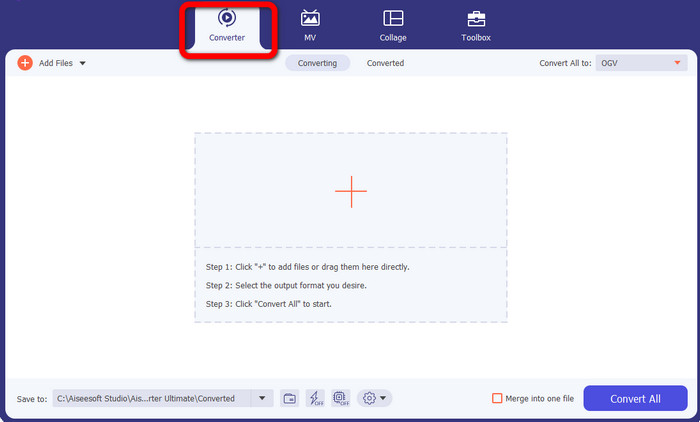
ขั้นตอนที่ 2: เมื่อดาวน์โหลดโปรแกรมเสร็จแล้ว ให้เปิดโปรแกรมขึ้นมา เลือกปุ่ม Converter จากตัวเลือกทั้งสี่ที่อยู่ด้านบนของอินเทอร์เฟซ.
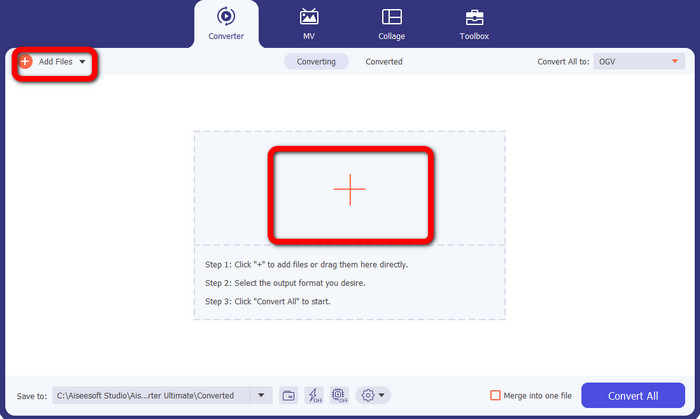
ขั้นตอนที่ 3: หลังจากเลือกตัวเลือก Converter แล้ว ให้คลิกปุ่มสัญลักษณ์ เครื่องหมายบวก (Plus) เพื่อเพิ่มไฟล์ TS ที่คุณต้องการแปลง คุณยังสามารถคลิกปุ่ม Add Files เพื่อเพิ่มไฟล์วิดีโอได้.
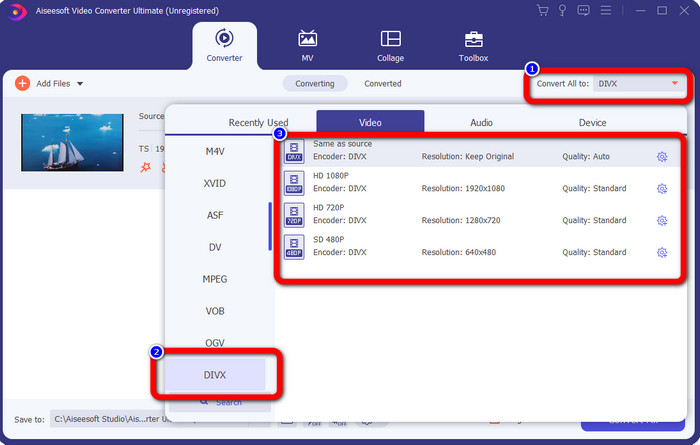
ขั้นตอนที่ 4: ไปที่ปุ่ม Convert All to หลังจากเลือกไฟล์วิดีโอ TS แล้ว เมื่อคลิกปุ่มนี้ ตัวเลือกฟอร์แมตจะปรากฏบนหน้าจอของคุณ ให้เลือกฟอร์แมตไฟล์ DIVX คุณยังสามารถเลือกระดับความละเอียดที่ต้องการได้ตั้งแต่ 480p จนถึง 1080p.
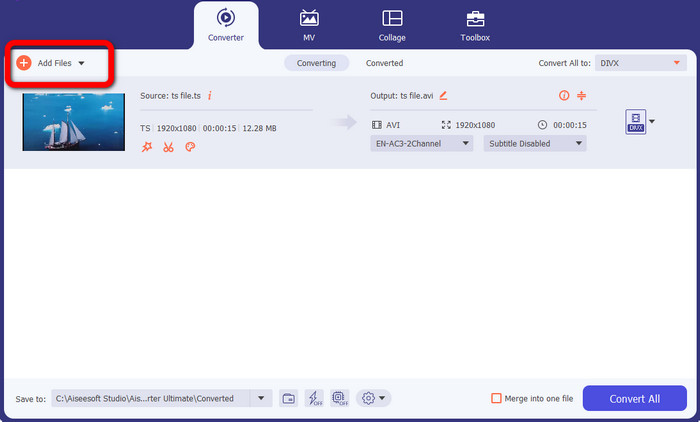
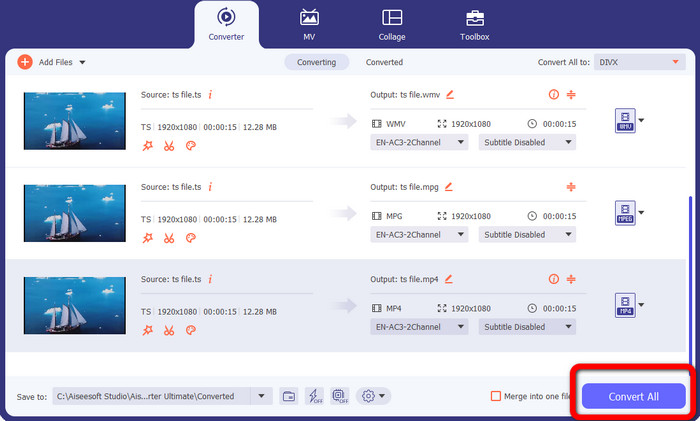
ขั้นตอนที่ 5: เครื่องมือนี้รองรับการแปลงแบบเป็นชุด ดังนั้นให้คลิกปุ่ม Add Files ที่มุมซ้ายบนของอินเทอร์เฟซ เพื่อแปลงไฟล์วิดีโอ TS ของคุณไปเป็นฟอร์แมตอื่น ๆ เช่น AVI, MPEG, WMV และ MP4.
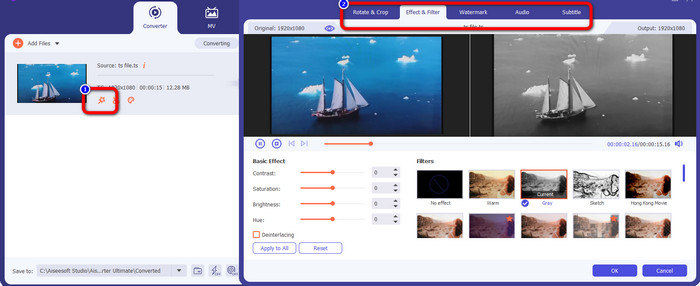
ขั้นตอนที่ 6: หากคุณต้องการแก้ไขวิดีโอ ให้คลิกไอคอน Edit จากนั้นคุณสามารถปรับแต่งวิดีโอได้ เช่น เพิ่มเอฟเฟกต์และฟิลเตอร์ หมุนและครอบตัดวิดีโอ และอื่น ๆ หลังจากนั้นให้คลิก OK.
ขั้นตอนที่ 7: เมื่อคุณเพิ่มไฟล์และเปลี่ยนเป็นฟอร์แมตไฟล์ที่ต้องการเรียบร้อยแล้ว ให้คลิกปุ่ม Convert All รอให้กระบวนการแปลงความเร็วสูงเสร็จสิ้น จากนั้นดาวน์โหลดไฟล์ลงในอุปกรณ์ของคุณ.
ส่วนที่ 2: ตัวแปลงฟรีเพื่อแปลง TS เป็น DIVX
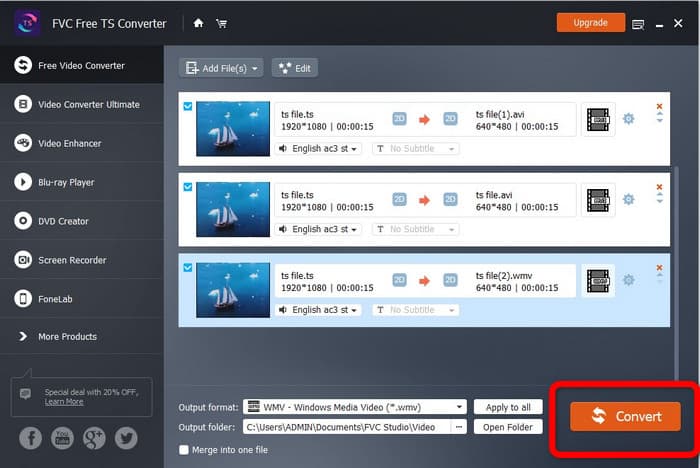
หากคุณต้องการโปรแกรมแปลงไฟล์ฟรี คุณสามารถดาวน์โหลด FVC Free TS Converter ได้ คุณสามารถแปลงวิดีโอ TS เป็นรูปแบบวิดีโอใดก็ได้ฟรี รวมถึงไฟล์ DIVX, AVI, MP4, WMV และ MPEG ไม่ว่าคุณจะเป็นมืออาชีพหรือมือใหม่ โปรแกรมนี้ช่วยคุณแปลงวิดีโอ TS เป็นวิดีโอความละเอียดสูงและเสียงแบบไม่สูญเสียคุณภาพ โดยไม่กระทบต่อคุณภาพระดับสูง นอกจากนี้ ตัวแปลง TS ตัวนี้ยังรองรับการแปลงแบบเป็นชุด หมายความว่าคุณสามารถอัปโหลดไฟล์หลายไฟล์และแปลงได้พร้อมกันในครั้งเดียว มันมีความเร็วในการแปลงเร็วกว่าโปรแกรมอื่นถึง 10 เท่า คุณจึงไม่ต้องเสียเวลามากในการแปลงไฟล์จำนวนมาก อีกทั้งยังสามารถแปลงวิดีโอ TS เป็นไฟล์เสียง เช่น MP3, AAC, AIFF, ALAC, FLAC และ WAV ได้ด้วย.
นอกจากนี้ คุณยังสามารถแก้ไขวิดีโอ TS ของคุณในโปรแกรมนี้ได้ FVC Free TS Converter ให้คุณได้ใช้เครื่องมือแก้ไขวิดีโอที่ทรงพลัง นอกเหนือจากฟังก์ชันแปลงไฟล์ ใช้งานง่ายสำหรับการตัดต่อและปรับแต่งไฟล์ TS ของคุณเอง คุณสามารถเลือกธีมพิเศษให้กับวิดีโอแต่ละคลิปได้ เช่น วันเกิด ครอบครัว กีฬา และแม้แต่โอกาสพิเศษอย่างฮาโลวีน การเปลี่ยนชื่อ ผู้สร้าง หรือระยะเวลาของวิดีโอไม่ใช่เรื่องยากอีกต่อไปด้วย FVC Free TS Converter ดังนั้น ไม่ต้องรอช้า มาเริ่มแปลงไฟล์ TS ของคุณเป็นฟอร์แมตอื่น ๆ อย่าง DIVX, WMV, AVI, MP4, MPEG และ AVI กันเลย.
ขั้นตอนที่ 1: ดาวน์โหลด FVC Free TS Converter บนพีซี Windows หรือ Mac ของคุณโดยคลิกปุ่ม Download ด้านล่าง.
ดาวน์โหลดฟรีสำหรับ Windows 7 ขึ้นไปดาวน์โหลดอย่างปลอดภัย
ดาวน์โหลดฟรีสำหรับ MacOS 10.7 ขึ้นไปดาวน์โหลดอย่างปลอดภัย
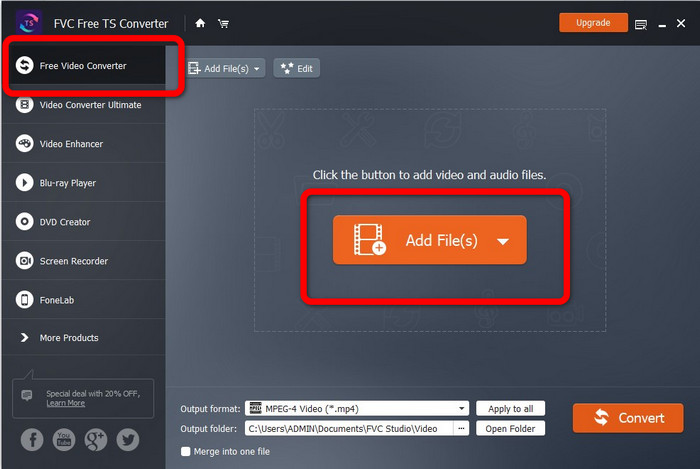
ขั้นตอนที่ 2: เปิดโปรแกรม เลือกปุ่ม Free Video Converter บนหน้าหลัก แล้วคลิก Add Files เพื่ออัปโหลดไฟล์ TS ของคุณ.
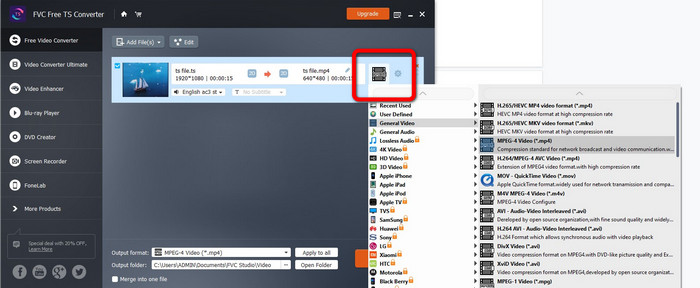
ขั้นตอนที่ 3: คลิกตัวเลือกฟอร์แมต แล้วเลือกเอาต์พุตที่คุณต้องการ เช่น DIVX, WMV, MPEG, AVI, MP4 และ AVI คุณสามารถใช้การแปลงแบบเป็นชุดเพื่อแปลงหลายไฟล์พร้อมกันได้.
ขั้นตอนที่ 4: หลังจากเพิ่มไฟล์ทั้งหมดแล้ว คุณสามารถแปลงได้ในคลิกเดียวโดยกดปุ่ม Convert หลังจากนั้น คุณก็สามารถบันทึกวิดีโอของคุณเป็นฟอร์แมตไฟล์ต่าง ๆ ได้แล้ว นอกจากนี้ คุณยังใช้โปรแกรมนี้แปลงไฟล์ WebM เป็น DIVX ได้เช่นกัน.
ส่วนที่ 3: คำถามที่พบบ่อยเกี่ยวกับการแปลง TS เป็น DIVX
ฉันสามารถเปลี่ยนชื่อ TS เป็น MP4 ได้หรือไม่
คุณไม่ควรเปลี่ยนนามสกุลไฟล์ TS เป็น 'mp4' หรือฟอร์แมตวิดีโออื่นเพียงอย่างเดียวเพื่อให้ได้การแปลงรูปแบบวิดีโอ เพราะวิธีนี้จะไม่เปลี่ยนรูปแบบไฟล์จริง ๆ แล้วจะแปลงวิดีโอ TS เป็น MP4 ได้อย่างไร วิธีที่เชื่อถือได้มากกว่าสำหรับการแปลง TS เป็น MP4 คือการใช้ FVC Free TS Converter โปรแกรมนี้สามารถแปลงไฟล์ TS ของคุณเป็น MP4 ได้อย่างง่ายดาย.
TS หรือ MP4 อันไหนดีกว่ากัน
ทั้งไฟล์ MP4 และ TS มีคุณภาพวิดีโอเท่ากัน ความแตกต่างหลักระหว่างไฟล์ TS และ MP4 คือไฟล์ TS เป็นโครงราบ ในขณะที่ไฟล์ MP4 จะเริ่มต้นด้วยดัชนี คุณภาพวิดีโอของไฟล์ TS, M2TS และ MP4 นั้นเหมือนกัน เพราะข้อมูลวิดีโอภายในไฟล์แต่ละชนิดนั้นเหมือนกันในด้านอื่น ๆ ทั้งหมด คลิกที่นี่เพื่อดูวิธีแปลง TS เป็น MP4.
ฉันจะแปลง TS เป็น DIVX อย่างรวดเร็วได้อย่างไร
หากคุณต้องการแปลงวิดีโออย่างรวดเร็ว คุณสามารถใช้ Video Converter Ultimate แอปพลิเคชั่นที่ดาวน์โหลดได้นี้มีกระบวนการแปลงที่รวดเร็วเป็นพิเศษ ซึ่งเร็วขึ้น 30 เท่า
สรุป
จากที่แสดงไว้ข้างต้น นี่คือวิธีที่ยอดเยี่ยมในการแปลง TS เป็น DIVX ได้ฟรี เครื่องมือเหล่านี้ทั้งทรงพลังและมีประโยชน์ แล้วคุณจะรออะไรอยู่ล่ะ ลองใช้ Video Converter Ultimate และ FVC Free TS Converter เพื่อแปลงไฟล์จำนวนมากกันเลย.
-
 วิธีแปลง MPG เป็น DivX โดยไม่สูญเสียคุณภาพ
 คุณกำลังมองหาแอปพลิเคชันที่ไม่มีปัญหาซึ่งคุณสามารถใช้แปลง MPG เป็น DivX ได้หรือไม่? บทความนี้จะนำเสนอวิธีการที่มีประสิทธิภาพต่างๆ ที่คุณต้องลอง
-
 วิธีแปลง DIVX เป็น 3GP บน Windows, Mac และ Online
 วิธีแปลง DIVX เป็น 3GP หากคุณกำลังมองหาคำตอบ โปรดอ่านบทความนี้ เราจะแสดงขั้นตอนที่ยอดเยี่ยมด้วยความช่วยเหลือของตัวแปลงต่างๆ
-
 แปลง VOB เป็น DIVX ด้วยวิธีที่ดีที่สุดโดยใช้เครื่องมือที่ยอดเยี่ยม
 บทความนี้จะแนะนำคุณเกี่ยวกับตัวแปลง VOB เป็น DIVX ที่ยอดเยี่ยมที่คุณสามารถใช้ได้ อย่าพลาดโอกาสนี้และเรียนรู้วิธีที่ง่ายที่สุดในการแปลง VOB เป็น DIVX
