


 Video Converter Ultimate
 บันทึกหน้าจอ
 ซ่อมวิดีโอ
 ดาวน์โหลดอย่างปลอดภัย
เทคนิคที่น่าอัศจรรย์เกี่ยวกับวิธีแปลง F4V เป็น MKV
F4V เป็นรูปแบบไฟล์ที่ใช้กับ Adobe Flash บ่อยที่สุด อย่างไรก็ตาม หากคุณต้องการเล่นวิดีโอ F4V ด้วยคุณภาพที่สูงขึ้น คุณจำเป็นต้องแปลงไฟล์ F4V ไปเป็นรูปแบบอื่นอย่างเช่น MKV ในเชิงเทคนิคแล้ว รูปแบบไฟล์ MKV มีคุณภาพวิดีโอที่ยอดเยี่ยม ซึ่งตอบโจทย์ผู้ใช้ที่ชอบดูวิดีโอเป็นพิเศษ ในกรณีนี้ เราจะนำเสนอวิธีที่ดีที่สุดในการแปลง F4V เป็น MKV โดยใช้ทั้งโปรแกรมแปลงไฟล์แบบออฟไลน์และออนไลน์ ดังนั้นหากคุณต้องการแปลงไฟล์วิดีโอให้ได้คุณภาพที่สูงขึ้น ให้รีบอ่านคู่มือนี้ทันที!

ตอนที่ 1: วิธีที่ยอดเยี่ยมในการแปลง F4V เป็น MKV ออฟไลน์
หากคุณต้องการแปลง F4V เป็น MKV อย่างรวดเร็วและง่ายดาย คุณควรใช้ Video Converter Ultimate ด้วยโปรแกรมนี้ คุณสามารถแปลงไฟล์ F4V ได้โดยไม่ทำให้คุณภาพวิดีโอลดลง นอกจากนี้ โปรแกรมแปลงไฟล์ตัวนี้ยังสามารถประมวลผลการแปลงได้รวดเร็วเป็นพิเศษ สูงสุดถึง 30 เท่าเมื่อเทียบกับโปรแกรมแปลงไฟล์ทั่วไป ด้วยฟีเจอร์การแปลงแบบแบตช์ของซอฟต์แวร์ คุณสามารถแปลงไฟล์ F4V หลายไฟล์ให้กลายเป็นไฟล์ MKV ไฟล์เดียวได้ ทำให้การเปลี่ยนรูปแบบไฟล์ของคุณเป็นเรื่องที่ง่ายและรวดเร็ว อินเทอร์เฟซที่ใช้งานง่ายของ Video Converter Ultimate ก็เหมาะกับผู้ใช้ทุกคนเช่นกัน นอกจากนี้ โปรแกรมแปลงไฟล์นี้ยังรองรับไฟล์หลากหลายประเภท รวมถึง MOV, AVI, FLV, MP4, WMV, 3GP และอื่น ๆ อีกมากมาย.
วิดีโอ F4V ของคุณสามารถใช้เพื่อวัตถุประสงค์ที่น่าสนใจนอกเหนือจากการแปลง คุณสามารถลบส่วนประกอบที่น่ารำคาญออกจากภาพยนตร์/วิดีโอ F4V ของคุณได้อย่างรวดเร็ว เช่น ลายน้ำ โลโก้ สติ๊กเกอร์ หรือคำอธิบายภาพ ความสามารถในการเปลี่ยนความเร็ววิดีโอสำหรับวิดีโอ F4V ของคุณเป็นอีกหนึ่งฟังก์ชันที่มีให้ เครื่องมือที่ดาวน์โหลดมานี้มีความสามารถเพิ่มเติมที่คุณสามารถใช้ได้ เช่น การสร้าง 3D, การตัดแต่งวิดีโอ, การแปลงรูปภาพ, การสร้าง gif, การเพิ่มระดับเสียง, การบันทึกเสียง/วิดีโอ, การเปลี่ยนวันที่ของไฟล์, การแก้ไขสี และอื่นๆ
คุณสมบัติเด่น
◆ แปลงไฟล์วิดีโอมากกว่า 100 ไฟล์ รวมถึง MP4, MKV, M4V, AVI, MOV, FLV, SWF, MTS, VOB, 3GP, WMV และอื่นๆ
◆ แปลงไฟล์หลายไฟล์ในครั้งเดียว
◆ สร้างภาพตัดปะด้วยเทมเพลตและฟิลเตอร์ฟรี
◆ มีผู้สร้างมิวสิกวิดีโอ
◆ ตัดต่อวิดีโอโดยใช้เครื่องมือต่างๆ เช่น ตัวเพิ่มคุณภาพวิดีโอ คอมเพรสเซอร์ ตัวหมุน ทริมเมอร์ และอื่นๆ
ข้อดี
- มีอินเทอร์เฟซที่ใช้งานง่ายซึ่งเหมาะสำหรับผู้เริ่มต้น
- สามารถแปลงรูปแบบวิดีโอ/รูปภาพได้ไม่จำกัด
- ขั้นตอนการดาวน์โหลดนั้นง่าย
- ใช้ได้ทั้งบน Windows และ Mac
- แอปพลิเคชั่นนี้ง่ายต่อการดาวน์โหลด
จุดด้อย
- สำหรับคุณสมบัติที่ยอดเยี่ยมเพิ่มเติม รับรุ่นที่ต้องชำระเงิน
ใช้คำแนะนำง่ายๆ ด้านล่างเพื่อแปลง F4V เป็น MKV โดยใช้ FVC Video Converter Ultimate
ขั้นตอนที่ 1: ดาวน์โหลด FVC Video Converter Ultimate ลงในอุปกรณ์ของคุณ คุณสามารถดาวน์โหลดได้ทั้งบน Mac และ Windows โดยคลิกปุ่ม ดาวน์โหลด ด้านล่าง เมื่อติดตั้งเสร็จแล้ว ให้เปิดโปรแกรมขึ้นมา.
ดาวน์โหลดฟรีสำหรับ Windows 7 หรือใหม่กว่าดาวน์โหลดอย่างปลอดภัย
ดาวน์โหลดฟรีสำหรับ MacOS 10.7 หรือใหม่กว่าดาวน์โหลดอย่างปลอดภัย
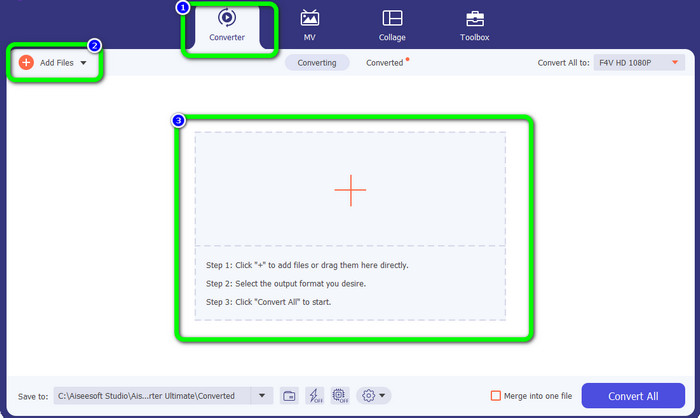
ขั้นตอนที่ 2: ไปที่ตัวเลือก Converter จากนั้นคลิกไอคอน Add Files หรือ เครื่องหมายบวก (Plus) บนอินเทอร์เฟซ จะมีหน้าต่างโฟลเดอร์ปรากฏขึ้นบนหน้าจอ แล้วเลือกไฟล์ F4V ที่คุณต้องการแปลง.
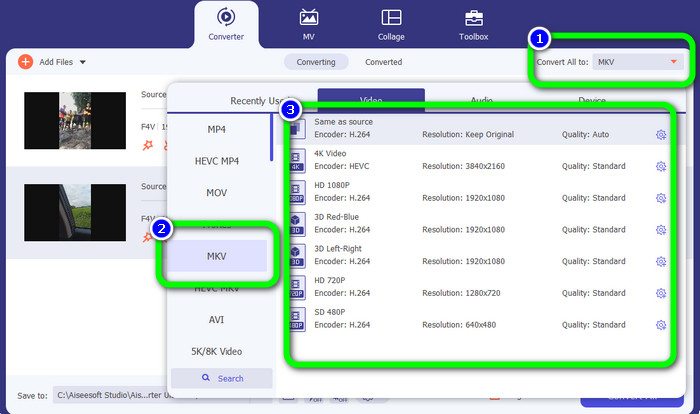
ขั้นตอนที่ 3: ไปที่ปุ่ม Convert All to ตัวเลือกไฟล์รูปแบบจะปรากฏขึ้น จากนั้นเลือก F4V เป็นรูปแบบผลลัพธ์ที่คุณต้องการ แล้วเลือกคุณภาพที่คุณต้องการสำหรับวิดีโอ.
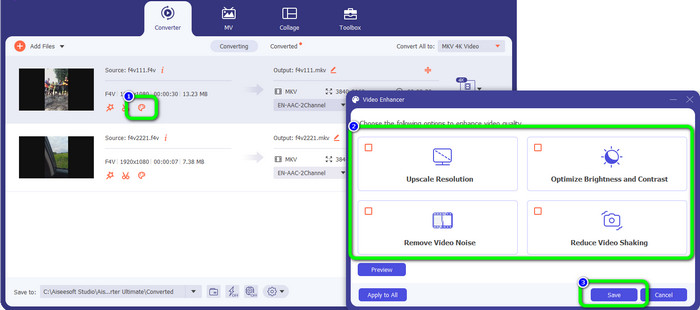
ขั้นตอนที่ 4: หากคุณต้องการลดการสั่นของวิดีโอ ปรับคอนทราสต์และความสว่าง ลบสัญญาณรบกวนในวิดีโอ และเพิ่มความละเอียดของวิดีโอของคุณ ให้คลิกไอคอน Video Enhance หลังจากเลือกตัวเลือกที่ต้องการแล้วให้กด Save.
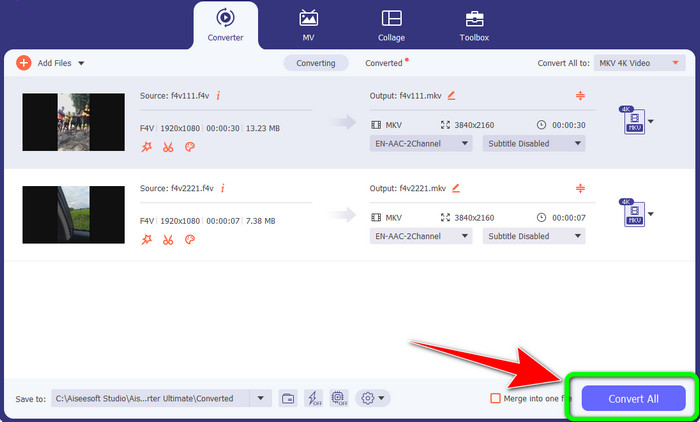
ขั้นตอนที่ 5: สำหรับขั้นตอนสุดท้าย ให้กดปุ่ม Convert All เพื่อแปลงไฟล์ F4V เป็นรูปแบบ MKV จากนั้นเมื่อกระบวนการแปลงเสร็จสิ้น ให้บันทึกวิดีโอลงในคอมพิวเตอร์ของคุณ.
ตอนที่ 2: วิธีที่ง่ายที่สุดในการแปลง F4V เป็น MKV ออนไลน์ฟรี
หนึ่งในโปรแกรมแปลงไฟล์ออนไลน์ฟรีที่คุณสามารถใช้เพื่อแปลง F4V เป็น MKV คือ FVC Free Video Converter Online เครื่องมือนี้สามารถแปลงรูปแบบยอดนิยมส่วนใหญ่ได้ เช่น MOV, MP4, AVI, FLV, MKV, F4V, WMV และอื่น ๆ แอปพลิเคชันนี้จะทำให้คุณพึงพอใจเสมอ เพราะมีฟีเจอร์ครบถ้วนสำหรับการแปลงวิดีโอ F4V ของคุณ คุณสามารถแปลงไฟล์หลายไฟล์ได้พร้อมกัน อีกทั้งยังสามารถปรับแต่งบิตเรต อัตราเฟรม ความละเอียด และพารามิเตอร์อื่น ๆ ของวิดีโอได้ นอกจากการแปลงวิดีโอแล้ว คุณยังสามารถแปลงไฟล์เสียงได้ด้วย เช่น MP3, FLAC, WAV, WMA, AAC, AC3 เป็นต้น พร้อมทั้งปรับแต่งบิตเรตเสียง อัตราการสุ่มสัญญาณ (sample rate) และอื่น ๆ ได้เช่นกัน.
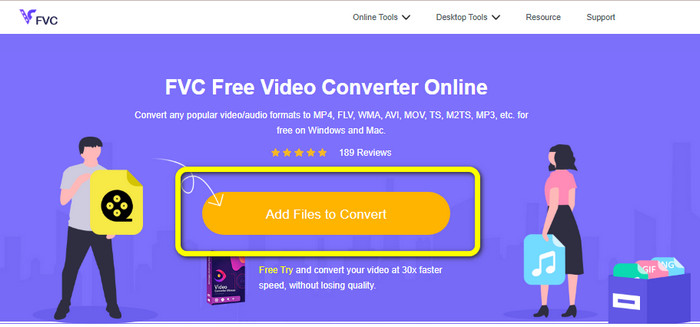
ขั้นตอนที่ 1: เปิดเบราว์เซอร์ของคุณและไปที่หน้าเว็บหลักอย่างเป็นทางการของ FVC Free Video Converter Online กดปุ่ม Add Files to Convert แล้วอัปโหลดไฟล์ F4V ของคุณ.
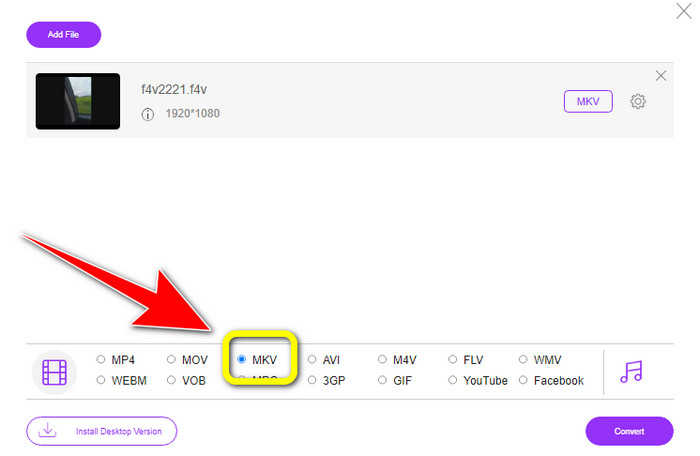
ขั้นตอนที่ 2: หลังจากอัปโหลดไฟล์ F4V แล้ว ให้เลือกไฟล์ MKV จากตัวเลือกรูปแบบที่อยู่ด้านล่างของอินเทอร์เฟซ.
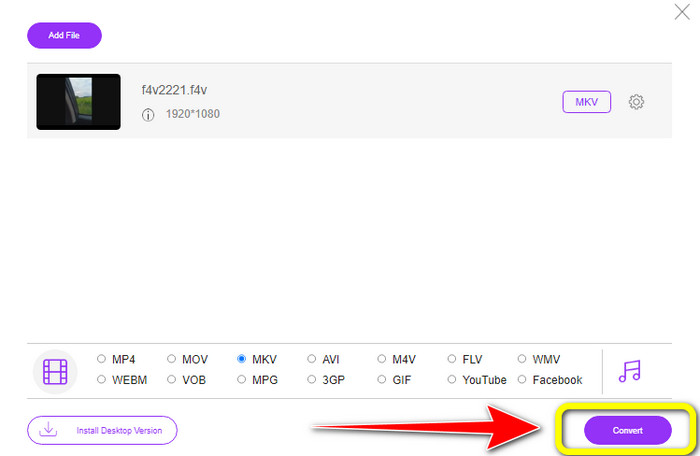
ขั้นตอนที่ 3: สุดท้ายให้กดปุ่ม Convert ตั้งค่าที่อยู่ปลายทางของไฟล์ แล้วบันทึกวิดีโอของคุณหลังจากกระบวนการแปลงเสร็จสิ้น.
ตอนที่ 3: F4V กับ MKV
| ไฟล์ | F4V | MKV |
| ชื่อไฟล์ | วิดีโอแฟลช | Matroska มัลติมีเดียคอนเทนเนอร์ |
| นามสกุลไฟล์ | .f4v | เอ็มเควี |
| คำอธิบาย | เบราว์เซอร์ทั้งหมดที่อนุญาตให้เล่นวิดีโอแฟลชและ Adobe Flash Player รองรับรูปแบบวิดีโอแฟลช F4V คอนเทนเนอร์รองรับมาตรฐานการบีบอัดวิดีโอ h.264 และเสียง AAC และใช้กล่องเพื่อจัดเก็บข้อมูล แม้ว่าไฟล์เหล่านี้ต้องการ Flash เวอร์ชันล่าสุด (9.0.115 หรือสูงกว่า) และตัวประมวลผลที่เร็วกว่า แต่ไฟล์ F4V ให้คุณภาพที่ยอดเยี่ยมกว่า FLV | MKV เป็นรูปแบบคอนเทนเนอร์ที่มีแทร็กข้อมูลข้อความ เสียง วิดีโอ และรูปภาพ รวมถึงคำบรรยาย แม้ว่า MKV จะเปิดอยู่ในข้อมูลจำเพาะ แต่ก็เทียบได้กับคอนเทนเนอร์ที่ใช้กันอย่างแพร่หลายอื่นๆ เช่น MP4 และ AVI MKV ใช้นามสกุลไฟล์ .mkv สำหรับวิดีโอ .mka สำหรับเสียง และ .mks สำหรับคำบรรยาย |
| พัฒนาโดย | สตีฟ โลมม์ | แอปเปิ้ล |
| โปรแกรมที่เกี่ยวข้อง | วินโดว์มีเดียเพลย์ ลิงมีเดีย อะโดบี แฟลช เพลเยอร์ 6 | VLC Media Player เครื่องเล่นไฟล์ MKV เอ็มพีวี MPC-HC KMPlayer |
อ่านเพิ่มเติม:
2 วิธีที่รวดเร็วที่สุดในการแปลง F4V เป็น FLV [ออนไลน์ & ออฟไลน์]
วิธีแปลง F4V เป็น MP4 ด้วยวิธีที่มีประสิทธิภาพมากที่สุด
ส่วนที่ 4: คำถามที่พบบ่อยเกี่ยวกับการแปลง F4V เป็น MKV
MKV เป็นรูปแบบวิดีโอที่เหมาะสมหรือไม่
ใช่แล้ว. ไฟล์นี้รองรับแทร็กภาษาเสียง/วิดีโอและไฟล์คำบรรยายจำนวนมาก ด้วยวิธีนี้ มันกลายเป็นรูปแบบที่เหมาะสำหรับภาพยนตร์ความละเอียดสูง รายการทีวี ฯลฯ นอกจากนี้ MKV ยังเข้ากันได้กับโปรแกรมเล่นสื่อกระแสหลักและเครื่องมือตัดต่อ เช่น Adobe Premiere Pro, VLC Media Player, KMPlayer และอื่นๆ
MKV มีความละเอียดเท่าใด
รูปแบบ MKV มีความละเอียด UHD ที่ 4K 2160p และ 8K 4320p MP4 มีความละเอียดที่แน่นอน ข้อแตกต่างที่สำคัญคือ MKV รองรับ FLAC แต่ MP4 ไม่รองรับ
ฉันจะแปลง F4V เป็น MP4 ฟรีได้อย่างไร
คุณสามารถใช้ FVC Free Video Converter Online ได้ เพียงเข้าไปที่เว็บไซต์ คลิกปุ่ม Add file to convert เพื่ออัปโหลดไฟล์ เลือกรูปแบบ MP4 เป็นรูปแบบที่คุณต้องการ แล้วคลิกปุ่ม convert เครื่องมือออนไลน์นี้ใช้งานได้บนทุกเบราว์เซอร์ รวมถึง Google, Firefox, Safari และอื่น ๆ คุณสามารถใช้โปรแกรมแปลงไฟล์นี้ได้โดยไม่ต้องเสียค่าใช้จ่าย เพราะมันเป็นบริการฟรี 100%.
สรุป
Video Converter Ultimate และ FVC Free Video Converter Online เป็นสองโปรแกรมแปลงไฟล์ที่ดีที่สุดที่คุณสามารถใช้เพื่อแปลง F4V เป็น MKV คุณสามารถแปลงไฟล์ได้อย่างง่ายดาย รวดเร็ว และฟรีด้วยเครื่องมือทั้งสองนี้ ดังนั้นลองใช้ทั้งสองแอปพลิเคชันนี้ได้เลย!
-
 คำแนะนำง่ายๆ ในการแปลง GIF เป็น MKV บนเดสก์ท็อป
 มาที่บทความนี้หากคุณกำลังมองหาวิธีที่โดดเด่นที่สุดในการแปลงรูปแบบไฟล์ GIF เป็น MKV โดยใช้ตัวแปลงที่ดาวน์โหลดได้พิเศษ
-
 โซลูชันที่ยอดเยี่ยมที่สุด 4 อันดับแรกในการแปลง MXF เป็น MKV [แก้ไขแล้ว]
 ทำความรู้จักกับสี่วิธีที่ยอดเยี่ยมเหล่านี้ในการแปลง MXF เป็น MKV ออนไลน์และออฟไลน์ได้อย่างง่ายดาย แอพที่รวมอยู่ในโพสต์นี้สามารถช่วยคุณแปลงไฟล์ได้โดยไม่ยุ่งยาก
-
 วิธีที่น่าประหลาดใจในการแปลง OGV เป็น MKV อย่างมีประสิทธิภาพและง่ายดาย
 คำแนะนำนี้จะให้ขั้นตอนที่ไม่ยุ่งยากในการแปลง OGV เป็น MKV โดยไม่สูญเสียข้อมูล ลองใช้ตัวแปลงที่น่าเชื่อถือที่สุดเหล่านี้ แล้วสัมผัสกับฟังก์ชันที่ยอดเยี่ยม
