


 Video Converter Ultimate
 บันทึกหน้าจอ
 ซ่อมวิดีโอ
 ดาวน์โหลดอย่างปลอดภัย
ปรับขนาดวิดีโอสำหรับ Instagram เพื่อเพิ่มการมีส่วนร่วมและการแสดงตนของ Instagram
คุณเบื่อและเบื่อกับการครอบตัดวิดีโอบนฟีด Instagram ของคุณอย่างงุ่มง่ามหรือไม่? ถึงเวลายกระดับเกมเนื้อหาของคุณและทำให้วิดีโอของคุณโดดเด่น! ด้วยจำนวนเนื้อหาวิดีโอที่เพิ่มขึ้น การทำให้ภาพของคุณได้รับการปรับให้เหมาะสมอย่างสมบูรณ์แบบสำหรับ Instagram จึงมีความสำคัญมากกว่าที่เคย แต่ไม่ต้องกังวล. คุณไม่จำเป็นต้องเป็นบรรณาธิการมืออาชีพในการครอบตัดวิดีโอของคุณอย่างมืออาชีพ
ในบทความคู่มือนี้ เราจะพาคุณไปทีละขั้นตอนเกี่ยวกับทุกสิ่งที่คุณจำเป็นต้องรู้ในการครอปวิดีโอให้เหมาะกับ Instagram โดยออกแบบตามสเปกที่แพลตฟอร์มกำหนด เพื่อสร้างคอนเทนต์ที่โดดเด่นสะดุดตาและดึงดูดความสนใจจากผู้ติดตามของคุณ มาเริ่มกันเลย!

ส่วนที่ 1 มาตรฐานอัตราส่วนภาพวิดีโอ Instagram
มาตรฐานอัตราส่วนวิดีโอ Instagram คือ 1:1 ซึ่งหมายความว่าความกว้างและความสูงของวิดีโอควรเท่ากัน อัตราส่วนสี่เหลี่ยมจัตุรัสนี้เป็นการตั้งค่าเริ่มต้นสำหรับวิดีโอ Instagram และเป็นรูปแบบที่ใช้มากที่สุดบนแพลตฟอร์ม อย่างไรก็ตาม Instagram ยังรองรับอัตราส่วนภาพอื่นๆ เช่น 4:5, 16:9 และ 9:16
อัตราส่วนภาพที่แตกต่างกันเหล่านี้ช่วยให้สร้างวิดีโอได้อย่างยืดหยุ่นมากขึ้น แต่สิ่งสำคัญคือต้องทราบว่าอัตราส่วนบางอย่างอาจส่งผลให้วิดีโอของคุณถูกครอบตัดหรือปรับขนาดในลักษณะที่อาจส่งผลเสียต่อคุณภาพของวิดีโอ ดังนั้น นี่อาจเป็นคำตอบที่ดีที่สุดสำหรับผู้ที่มีคำถามเช่น "ทำไม Instagram ถึงครอบตัดวิดีโอของฉัน" เมื่อปฏิบัติตามมาตรฐานอัตราส่วนวิดีโอ Instagram คุณจะมั่นใจได้ว่าวิดีโอของคุณจะดูสวยงามและเป็นมืออาชีพ และได้รับการปรับให้เหมาะสมสำหรับการรับชมบนแพลตฟอร์ม
ส่วนที่ 2 ปรับขนาดวิดีโอสำหรับ Instagram ออฟไลน์
FVC Video Converter Ultimate เป็นตัวเลือกที่ยอดเยี่ยมสำหรับการครอปวิดีโอของคุณเพื่อใช้บน Instagram โปรแกรมนี้มาพร้อมฟีเจอร์และเครื่องมือต่าง ๆ ที่ช่วยให้คุณสร้างคอนเทนต์สวยสะดุดตาและปรับให้เหมาะกับแพลตฟอร์มได้อย่างง่ายดาย หนึ่งในจุดเด่นของ FVC Video Converter Ultimate คือรองรับอัตราส่วนภาพหลากหลายรูปแบบ รวมถึง 1:1 ซึ่งเป็นอัตราส่วนมาตรฐานสำหรับ Instagram.
ซึ่งหมายความว่าคุณสามารถครอบตัดวิดีโอของคุณได้อย่างสมบูรณ์แบบสำหรับ Instagram โดยไม่ต้องกังวลเกี่ยวกับการสูญเสียคุณภาพหรือความละเอียด ยูทิลิตี้นี้เป็นแอปที่ยอดเยี่ยมในการครอบตัดวิดีโอสำหรับ Instagram โดยเฉพาะอย่างยิ่งสำหรับโพสต์ วงล้อ และเรื่องราว นอกจากนี้ คุณยังสามารถใช้ประโยชน์จากอัตราส่วนภาพอื่นๆ เช่น 16:9, 4:3, 21:9 และอื่นๆ อีกมากมาย ทำตามขั้นตอนง่ายๆ เหล่านี้เพื่อเรียนรู้วิธีการครอบตัดวิดีโอสำหรับ Instagram:
ขั้นตอนที่ 1 ดาวน์โหลดและติดตั้งโปรแกรม
ก่อนอื่น ให้ดาวน์โหลดแอปลงคอมพิวเตอร์ของคุณโดยคลิกปุ่ม ดาวน์โหลดฟรี ให้ตรงกับระบบปฏิบัติการของคอมพิวเตอร์ จากนั้นติดตั้งและเปิดโปรแกรมหลังจากกระบวนการติดตั้งเสร็จสิ้น.
ดาวน์โหลดฟรีสำหรับ Windows 7 ขึ้นไปดาวน์โหลดอย่างปลอดภัย
ดาวน์โหลดฟรีสำหรับ MacOS 10.7 ขึ้นไปดาวน์โหลดอย่างปลอดภัย
ขั้นตอนที่ 2 เข้าถึงเมนูกล่องเครื่องมือ (Toolbox) และ Video Cropper
ตอนนี้ให้ไปที่กล่องเครื่องมือของโปรแกรมโดยคลิกแท็บ Toolbox แผงนี้จะแสดงตัวเลือกต่าง ๆ ให้เลือก จากนั้นให้เลือกตัวเลือก Video Cropper.
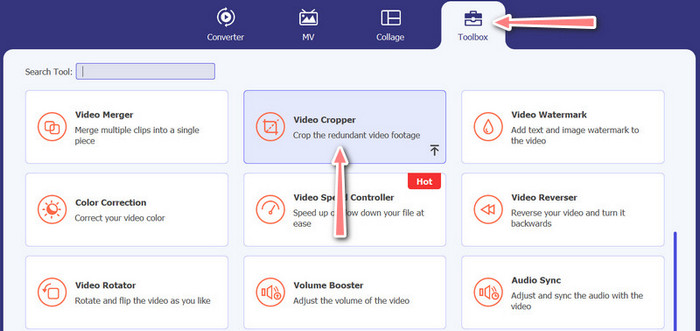
ขั้นตอนที่ 3 นำเข้าวิดีโอที่จะครอป
เพิ่มวิดีโอที่คุณต้องการครอปโดยคลิกปุ่มสัญลักษณ์ เครื่องหมายบวก ในบริเวณอัปโหลดของตัวเลือก Video Cropper แล้วคุณจะถูกนำไปยังแผงอีกหน้าหนึ่งซึ่งคุณสามารถครอปวิดีโอที่อัปโหลดได้.
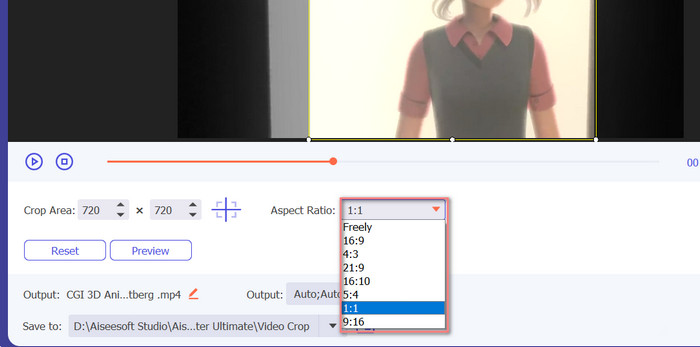
ขั้นตอนที่ 4 ครอปวิดีโอ
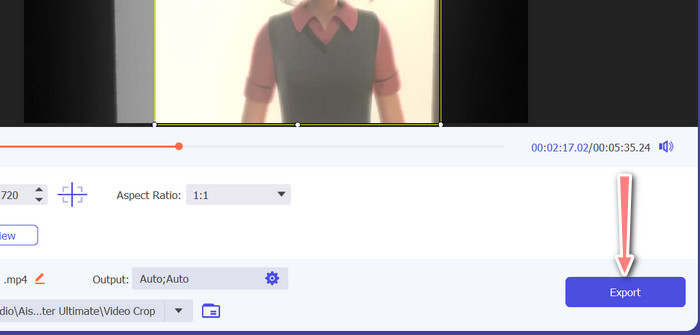
เลือกอัตราส่วนภาพที่คุณต้องการใช้กับวิดีโอ สำหรับ Instagram อัตราส่วนมาตรฐานคือ 1:1 (สี่เหลี่ยมจัตุรัส) และ 4:5 (แนวตั้ง) คุณสามารถเลือกอัตราส่วนภาพที่ต้องการได้โดยคลิกเมนูดรอปดาวน์ที่อยู่ด้านล่างหน้าตัวอย่างวิดีโอ เมื่อต้องการส่งออก ให้ติ๊กปุ่ม Export ที่มุมขวาล่างของอินเทอร์เฟซ จากนั้นคุณก็สามารถแชร์วิดีโอกับผู้ติดตามหรือโพสต์ลงบัญชี Instagram ของคุณได้.
ส่วนที่ 3 ครอบตัดวิดีโอสำหรับ Instagram ออนไลน์
Kapwing เป็นโปรแกรมตัดต่อวิดีโอออนไลน์ยอดนิยมที่สมบูรณ์แบบสำหรับทุกคนที่ต้องการครอบตัดวิดีโออย่างรวดเร็วและง่ายดายสำหรับ Instagram โดยไม่ต้องจัดการกับซอฟต์แวร์ที่ซับซ้อน ไม่ต้องพูดถึง Kapwing ได้รับการออกแบบมาให้ใช้งานง่าย ดังนั้นแม้ว่าคุณจะไม่ใช่นักตัดต่อวิดีโอที่มีประสบการณ์ คุณก็ยังสามารถใช้แพลตฟอร์มเพื่อสร้างเนื้อหาคุณภาพสูงได้ นี่คือขั้นตอนในการใช้ Kapwing เพื่อครอบตัดวิดีโอสำหรับ Instagram ฟรี:
ขั้นตอนที่ 1. ไปที่เว็บไซต์ Kapwing แล้วคลิกปุ่ม Start Editing.
ขั้นตอนที่ 2. อัปโหลดวิดีโอที่คุณต้องการครอปโดยลากและวางไฟล์ลงในตัวแก้ไขของ Kapwing หรือคลิกปุ่ม Upload แล้วเลือกไฟล์จากคอมพิวเตอร์ของคุณ.
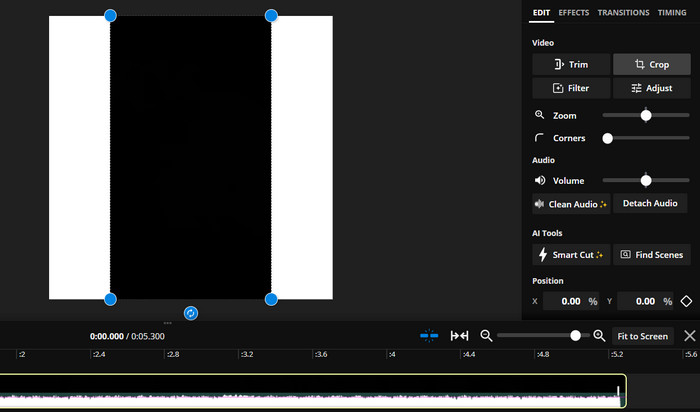
ขั้นตอนที่ 3. คลิกเครื่องมือ Crop จากเมนูด้านขวามือ จากนั้นเลือกอัตราส่วนภาพที่คุณต้องการครอปวิดีโอ โดยเลือกจากตัวเลือกอัตราส่วนสำเร็จรูปหรือกำหนดอัตราส่วนเอง ใช้จุดจับ (handles) บนหน้าตัวอย่างวิดีโอเพื่อครอปวิดีโอให้ได้ขนาดตามต้องการ ทั้งนี้ คุณยังสามารถใช้ขั้นตอนนี้เพื่อครอปวิดีโอสำหรับโพสต์บน Instagram ได้ด้วย.
ส่วนที่ 4 ครอบตัดวิดีโอสำหรับ Instagram บน Android
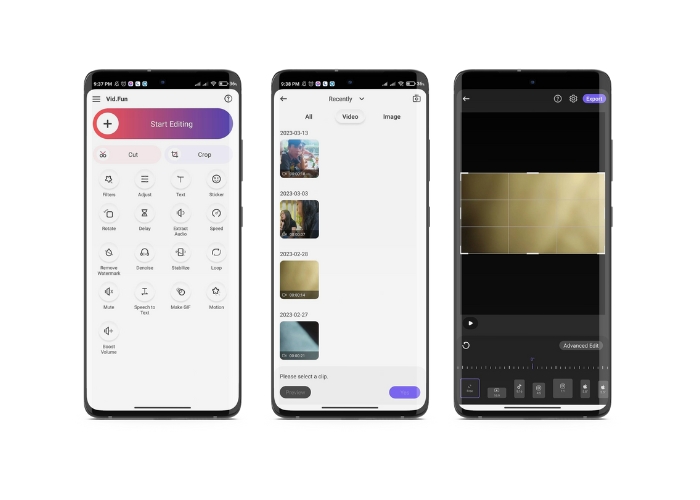
Vid.fun ช่วยให้คุณครอปวิดีโอให้มีขนาดเหมาะสมที่สุดสำหรับ Instagram ไม่ว่าคุณจะใช้สมาร์ตโฟนหรือแท็บเล็ต แอปนี้อัดแน่นด้วยฟีเจอร์สำหรับสร้างวิดีโอคุณภาพสูง รวมถึงตัวครอปวิดีโออันทรงพลังที่ช่วยให้คุณครอปวิดีโอได้ง่าย ๆ เพียงไม่กี่แตะ นอกจากนี้ยังมีอัตราส่วนภาพให้เลือกหลายแบบ ทำให้มั่นใจได้ว่าวิดีโอของคุณจะแสดงผลได้ดีบน Instagram ต่อไปนี้คือคู่มือการครอปวิดีโอสำหรับ Instagram Reels โดยใช้แอปนี้บนอุปกรณ์ Android ของคุณ.
ขั้นตอนที่ 1. ดาวน์โหลดและติดตั้ง Vid.fun จาก Google Play Store จากนั้นเปิดแอป แตะไอคอน Crop ที่อยู่บนหน้าจอหลัก.
ขั้นตอนที่ 2. เพิ่มไฟล์มีเดียโดยเลือกจากแกลเลอรีในอุปกรณ์ของคุณ จากนั้นเลือกอัตราส่วนภาพที่ต้องการจากเมนูด้านล่างหน้าจอ หรือสามารถใช้จุดจับบนหน้าตัวอย่างวิดีโอเพื่อปรับพื้นที่ครอปและจัดตำแหน่งวิดีโอตามที่คุณต้องการ.
ขั้นตอนที่ 3. ดูตัวอย่างวิดีโอที่ครอปแล้วเพื่อให้แน่ใจว่าดูเป็นแบบที่คุณต้องการ เมื่อคุณพอใจกับการครอปแล้ว ให้แตะปุ่ม Export ที่มุมขวาบน.
อ่านเพิ่มเติม:
คู่มือเชิงปฏิบัติ – 2 วิธีในการรวมวิดีโอสำหรับ Instagram
วิธีต่าง ๆ ในการโพสต์ GIF บน Instagram [เครื่องมือบนเว็บและโปรแกรมเดสก์ท็อป]
ส่วนที่ 5 คำถามที่พบบ่อยเกี่ยวกับการปรับขนาดวิดีโอสำหรับ Instagram
จะเกิดอะไรขึ้นหากวิดีโอของฉันไม่ตรงกับอัตราส่วนกว้างยาวที่กำหนดสำหรับ Instagram
หากวิดีโอของคุณไม่ตรงกับอัตราส่วนกว้างยาวที่กำหนดสำหรับ Instagram วิดีโอนั้นจะปรากฏพร้อมแถบสีดำที่ด้านข้างหรือด้านบนและด้านล่าง หรือจะถูกครอบตัดให้พอดีกับเฟรมโดยอัตโนมัติ
ฉันสามารถครอบตัดวิดีโอที่อัปโหลดไปยัง Instagram แล้วได้หรือไม่
ไม่ได้ คุณไม่สามารถครอบตัดวิดีโอที่อัปโหลดไปยัง Instagram แล้ว คุณจะต้องครอบตัดวิดีโอก่อนที่จะอัปโหลดไปยัง Instagram
ฉันสามารถครอบตัดวิดีโอโดยไม่สูญเสียคุณภาพได้หรือไม่
ได้ คุณสามารถครอปวิดีโอโดยไม่ทำให้คุณภาพลดลงได้ ตราบใดที่คุณไม่ได้ครอปมากเกินไป การครอปวิดีโอมากเกินไปจะทำให้คุณภาพลดลง เพราะจะลดความละเอียดของวิดีโอ.
สรุป
การครอปวิดีโอสำหรับ Instagram Story โพสต์ หรือ Reels เป็นสิ่งสำคัญเพื่อให้วิดีโอของคุณดูดีและตรงตามอัตราส่วนภาพที่กำหนด ด้วยเครื่องมือที่เหมาะสมอย่าง FVC Video Converter Ultimate, Kapwing หรือ Vid.fun คุณสามารถครอปวิดีโอสำหรับ Instagram ให้ได้อัตราส่วนที่ถูกต้องได้อย่างง่ายดาย.
-
 วิธีเพิ่มและสร้างฟิลเตอร์ Instagram ก่อนโพสต์ภาพ &
 ฟิลเตอร์บน Instagram คืออะไร? วิธีการสมัคร? วิธีการทำ? คำถามเหล่านี้จะมีคำตอบที่ตรงไปตรงมาในโพสต์นี้ ดังนั้นโปรดอ่าน
-
 เทคนิคที่ดีที่สุดในการเพิ่มความเร็ววิดีโอบน Instagram อย่างมืออาชีพ
 คุณต้องการอัปโหลดวิดีโอเร่งความเร็วบน Instagram หรือไม่? ในกรณีนี้ บทความนี้จะให้เทคนิคที่ดีที่สุดที่คุณสามารถใช้เพื่อเร่งความเร็ววิดีโอได้อย่างง่ายดาย
-
 ปรับขนาดรูปภาพสำหรับ Instagram บนเดสก์ท็อป iPhone หรือ Android
 หากคุณต้องการปรับขนาดรูปภาพของคุณสำหรับ Instagram เราจะแสดงขั้นตอนในการดำเนินการให้คุณดู อ่านเพื่อเรียนรู้ขั้นตอนในการปรับขนาดรูปภาพสำหรับ Instagram
