


 Video Converter Ultimate
 บันทึกหน้าจอ
 ซ่อมวิดีโอ
 ดาวน์โหลดอย่างปลอดภัย
แปลงไฟล์ CAF เป็น WAV ด้วยความแม่นยำและรักษาความถูกต้อง
ลองนึกภาพสิ่งนี้: คุณมีไฟล์เสียงที่ยอดเยี่ยมในรูปแบบ CAF แต่คุณต้องการยกระดับไปอีกขั้น รูปแบบ WAV คือคำตอบ! การแปลงไฟล์ CAF ของคุณเป็น WAV ช่วยให้คุณปลดปล่อยความเป็นเลิศด้านเสียงในระดับใหม่ทั้งหมด
ทำไมต้องเลือกสิ่งที่ดีกว่าคุณภาพเสียงที่ดีที่สุด? รูปแบบ WAV ให้ความชัดเจนที่เหนือกว่า ความเที่ยงตรง และความสมบูรณ์ ทำให้ประสบการณ์การฟังของคุณน่าทึ่งอย่างแท้จริง ไม่ว่าจะเป็นเพลง พ็อดคาสท์ หรือเนื้อหาเสียงอื่นๆ รูปแบบ WAV ช่วยให้มั่นใจได้ว่าทุกรายละเอียดจะถูกบันทึกอย่างแม่นยำ
แต่นี่แหละคือส่วนที่ยอดเยี่ยมที่สุด: กระบวนการแปลงไฟล์นั้นง่ายสุด ๆ! เพียงไม่กี่ขั้นตอนง่าย ๆ คุณก็สามารถแปลงไฟล์ CAF เป็น WAV พร้อมให้เพลิดเพลินบนอุปกรณ์ใดก็ได้ เตรียมยกระดับคุณภาพเสียงของคุณและออกเดินทางสู่ความสมบูรณ์แบบด้านเสียงกันได้เลย มาเริ่มต้นและปลดล็อกศักยภาพที่แท้จริงของคลังไฟล์เสียงของคุณกันเถอะ.

ส่วนที่ 1 5 วิธีที่ยอดเยี่ยมในการแปลง CAF เป็น WAV
1. Video Converter Ultimate
Video Converter Ultimate คือซอฟต์แวร์ตัวช่วยหลักของคุณสำหรับการแปลงไฟล์ CAF เป็น WAV ที่สะดวกและมีประสิทธิภาพ ออกแบบมาให้ใช้งานง่าย เครื่องมืออเนกประสงค์ตัวนี้ช่วยให้คุณแปลงไฟล์เสียง CAF เป็นรูปแบบ WAV ซึ่งรองรับได้อย่างแพร่หลายได้อย่างราบรื่น นอกจากนี้ คุณยังสามารถแปลงไฟล์ CAF เป็น WAV แบบแบตช์หลายไฟล์พร้อมกันด้วยเครื่องมือนี้ได้อีกด้วย.
ขั้นตอนที่ 1 คลิกปุ่ม ดาวน์โหลดฟรี เพื่อเริ่มใช้งานโปรแกรมบนอุปกรณ์ของคุณ โปรดทำตามคำแนะนำบนหน้าจอเพื่อเปิดใช้งานโปรแกรมในขั้นตอนถัดไป หลังการติดตั้ง คุณจะทำความเข้าใจกับหน้าตาโปรแกรมได้อย่างง่ายดาย เครื่องมือนี้ทำหน้าที่เป็นตัวแปลงไฟล์ CAF เป็น WAV ทั้งบนระบบปฏิบัติการ Mac และ Windows.
ดาวน์โหลดฟรีสำหรับ Windows 7 ขึ้นไปดาวน์โหลดอย่างปลอดภัย
ดาวน์โหลดฟรีสำหรับ MacOS 10.7 หรือใหม่กว่าดาวน์โหลดอย่างปลอดภัย
ขั้นตอนที่ 2 หากต้องการนำเข้าไฟล์เสียงเพื่อแก้ไข ให้คลิกปุ่ม เพิ่ม บนหน้าหลักของโปรแกรม จากนั้นจะแสดงภาพตัวอย่างย่อของไฟล์ที่นำเข้า คุณสามารถแปลงหลายไฟล์พร้อมกันได้โดยการส่งโฟลเดอร์เข้าไป เลือกตำแหน่งไดเรกทอรีที่มีไฟล์เสียงที่ต้องการ.
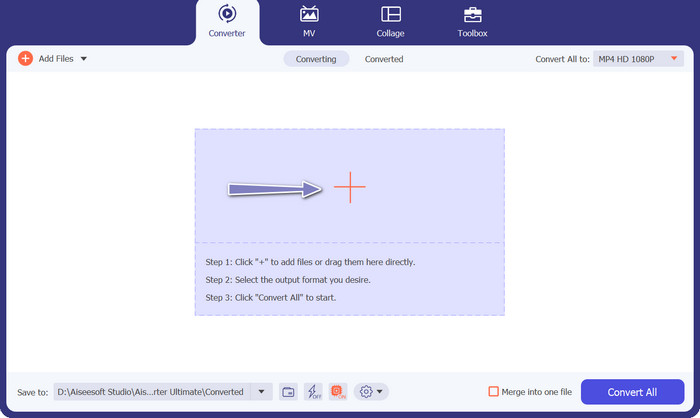
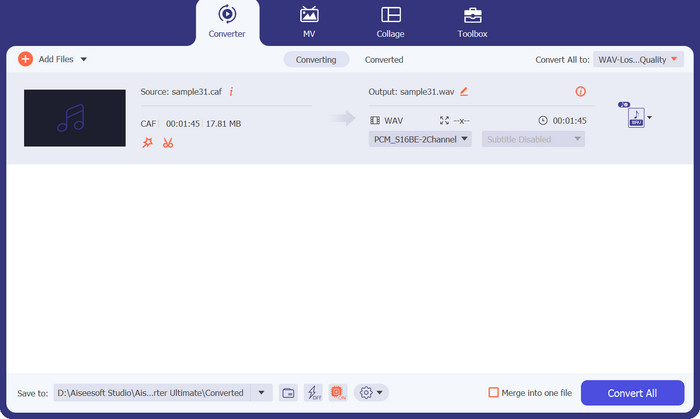
ขั้นตอนที่ 3 หากต้องการปรับรูปแบบไฟล์ผลลัพธ์ ให้เลือกเมนูดรอปดาวน์ แปลงทั้งหมด ที่อยู่ด้านบนของหน้าต่างโปรแกรม เลือก WAV จากแท็บ เสียง คุณสามารถปรับอัตราการสุ่มสัญญาณ (sample rate) และบิตเรตของไฟล์ผลลัพธ์ได้เพื่อให้ได้คุณภาพตามต้องการ.
ขั้นตอนที่ 4 เพื่อทำกระบวนการแปลงไฟล์ให้เสร็จสิ้น ให้คลิกปุ่ม แปลงทั้งหมด โปรแกรมจะเปิดโฟลเดอร์ปลายทางโดยอัตโนมัติเพื่อให้คุณตรวจสอบรูปแบบไฟล์ที่แปลงแล้ว.
ความคิดเห็นจากบรรณาธิการ:
เมื่อพูดถึงการแปลงไฟล์ CAF เป็นรูปแบบ WAV FVC Video Converter Ultimate โดดเด่นในฐานะนักแสดงชั้นนำ ด้วยประสิทธิภาพที่ยอดเยี่ยมและฟังก์ชันการทำงานที่มีคุณลักษณะมากมาย ซอฟต์แวร์นี้ทำให้มาตรฐานสูงสำหรับการแปลงไฟล์เสียง
2. FFmpeg
FFmpeg เป็นเครื่องมือบรรทัดคำสั่งที่ให้ความสามารถในการประมวลผลมัลติมีเดียที่ครอบคลุม รองรับรูปแบบเสียงและวิดีโอที่หลากหลาย รวมถึง CAF และ WAV แม้ว่าจะต้องมีความรู้ด้านเทคนิคในการใช้งาน แต่ FFmpeg เป็นโซลูชันที่มีประสิทธิภาพและเชื่อถือได้สำหรับการแปลง CAF เป็น WAV
ขั้นตอนที่ 1 ดาวน์โหลดและติดตั้ง FFmpeg จากเว็บไซต์ทางการให้ตรงกับระบบปฏิบัติการของคุณ.
ขั้นตอนที่ 2 เปิดหน้าต่าง Command Prompt หรือ Terminal.
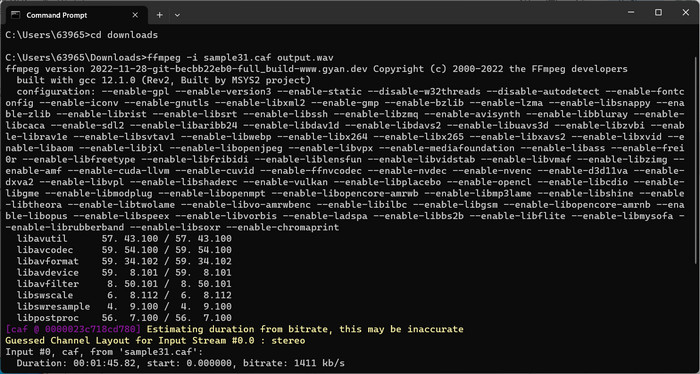
ขั้นตอนที่ 3 ใช้คำสั่ง 'cd' เพื่อไปยังโฟลเดอร์ที่เก็บไฟล์ CAF ของคุณไว้.
ขั้นตอนที่ 4 พิมพ์คำสั่งต่อไปนี้: ffmpeg -i input.caf output.wav.
ขั้นตอนที่ 5 กดปุ่ม Enter แล้วปล่อยให้โปรแกรมแปลงไฟล์ CAF เป็น WAV ด้วยตัวแปลง CAF เป็น WAV ตัวนี้.
ความคิดเห็นจากบรรณาธิการ:
FFmpeg เป็นตัวเลือกที่ต้องการสำหรับผู้ใช้ที่ต้องการการควบคุมกระบวนการแปลงอย่างแม่นยำเนื่องจากประสิทธิภาพและความยืดหยุ่นที่ยอดเยี่ยม แม้จะต้องการความคุ้นเคยกับอินเทอร์เฟซบรรทัดคำสั่ง
3. ตัวแปลงเสียง MediaHuman
MediaHuman Audio Converter เป็นซอฟต์แวร์แปลงเสียงที่เรียบง่ายแต่มีประสิทธิภาพ รองรับรูปแบบ CAF และ WAV รวมถึงรูปแบบอื่นๆ อีกมากมาย ด้วยอินเทอร์เฟซที่ใช้งานง่าย คุณสามารถแปลงไฟล์ CAF ของคุณเป็น WAV ได้ง่ายๆ ด้วยการคลิกเพียงไม่กี่ครั้ง
ขั้นตอนที่ 1 ดาวน์โหลดและติดตั้ง MediaHuman Audio Converter จากเว็บไซต์ทางการให้ตรงกับระบบปฏิบัติการของคุณ.
ขั้นตอนที่ 2 เปิดใช้งาน MediaHuman Audio Converter จากนั้นคลิกปุ่ม เพิ่ม แล้วเลือกไฟล์ CAF ของคุณ.
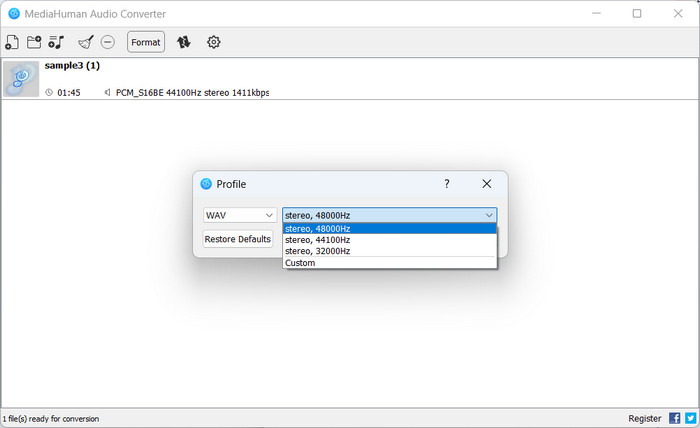
ขั้นตอนที่ 3 ต่อไป เลือก WAV เป็นรูปแบบผลลัพธ์จากเมนูดรอปดาวน์ จากนั้นเลือกโฟลเดอร์ปลายทางที่คุณต้องการบันทึกไฟล์ที่แปลงแล้ว.
ขั้นตอนที่ 4 ทำเครื่องหมายที่ปุ่ม แปลง เพื่อเริ่มกระบวนการแปลงไฟล์ MediaHuman Audio Converter จะทำการแปลงไฟล์ CAF เป็นรูปแบบ WAV ให้คุณ.
ความคิดเห็นจากบรรณาธิการ:
MediaHuman Audio Converter สร้างความประทับใจด้วยความเรียบง่ายและส่วนต่อประสานที่ใช้งานง่าย เครื่องมือนี้มอบประสบการณ์ที่ราบรื่น ช่วยให้ผู้ใช้สามารถแปลงไฟล์ CAF เป็น WAV ได้อย่างง่ายดายด้วยการคลิกเพียงไม่กี่ครั้ง
4. โปรแกรมแปลงวิดีโอออนไลน์ฟรี
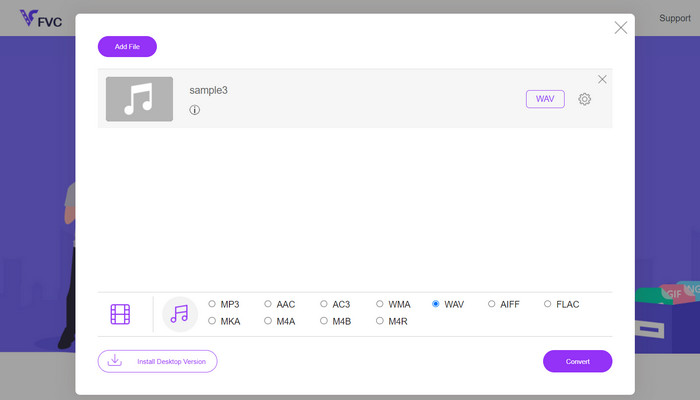
Free Video Converter Online เป็นเครื่องมือบนเว็บที่ใช้งานสะดวก ช่วยให้คุณแปลงไฟล์ CAF เป็นรูปแบบ WAV ได้อย่างราบรื่น คุณสามารถแปลงไฟล์ CAF เป็น WAV ได้อย่างง่ายดายเพียงไม่กี่คลิก นอกจากนี้ แพลตฟอร์มยังรองรับรูปแบบไฟล์เสียงและวิดีโอหลากหลาย ทำให้ใช้งานได้ยืดหยุ่นและเข้ากันได้กว้างขวาง เพียงเลือก CAF เป็นรูปแบบไฟล์นำเข้า และ WAV เป็นรูปแบบไฟล์ผลลัพธ์ที่ต้องการ คุณก็สามารถเริ่มกระบวนการแปลงไฟล์ได้ทันที.
ขั้นตอนที่ 1 เข้าเว็บไซต์ Free Video Converter Online โดยคลิกลิงก์ด้านบน หากต้องการส่งไฟล์เสียงของคุณ ให้เลือกตัวเลือก เพิ่มไฟล์เพื่อแปลง จากหน้าจอหลัก.
ขั้นตอนที่ 2 ไฟล์ที่เลือกจะแสดงบนหน้าจอในทันที หากต้องการเลือกรูปแบบไฟล์ผลลัพธ์ ให้เลื่อนไปยังส่วนล่างของแผงควบคุมในตำแหน่งที่คุณอยู่ก่อนหน้า.
ขั้นตอนที่ 3 หากต้องการแปลงไฟล์ CAF เป็นรูปแบบ WAV ให้คลิกปุ่ม แปลง หากต้องการแปลงไฟล์อื่น คุณจำเป็นต้องทำขั้นตอนเริ่มต้นซ้ำอีกครั้ง.
ความคิดเห็นจากบรรณาธิการ:
Free Video Converter Online สร้างความแตกต่างให้กับตัวเองในฐานะโซลูชั่นบนเว็บสำหรับการแปลงไฟล์เสียง การเข้าถึงซอฟต์แวร์สะดวกเนื่องจากไม่จำเป็นต้องติดตั้ง จึงช่วยประหยัดเวลา Free Video Converter Online แสดงให้เห็นถึงความสามารถที่น่าประทับใจในการแปลง CAF เป็น WAV แม้ว่าจะเน้นไปที่การแปลงวิดีโอเป็นหลัก
5. ตัวแปลงเสียงออนไลน์
หากคุณต้องการโซลูชันบนเว็บแบบอื่น Online Audio Converter เป็นตัวเลือกที่สะดวก เป็นเครื่องมือออนไลน์ฟรีที่ให้คุณแปลงไฟล์เสียงโดยไม่จำเป็นต้องติดตั้งซอฟต์แวร์ใดๆ เพียงอัปโหลดไฟล์ CAF ของคุณ เลือก WAV เป็นรูปแบบเอาต์พุต แล้วปล่อยให้เครื่องมือจัดการส่วนที่เหลือ
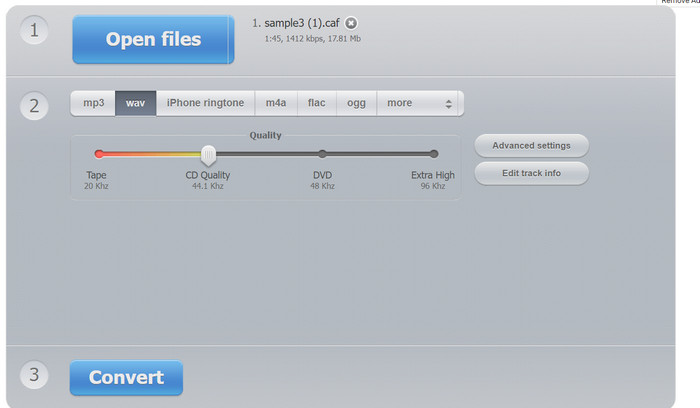
ขั้นตอนที่ 1 เปิดเว็บเบราว์เซอร์ของคุณและเข้าไปที่เว็บไซต์ Online Audio Converter จากนั้นคลิกปุ่ม Open Files.
ขั้นตอนที่ 2 เลือกไฟล์ CAF จากคอมพิวเตอร์ของคุณ จากนั้นเลือก WAV เป็นรูปแบบผลลัพธ์.
ขั้นตอนที่ 3 ทำเครื่องหมายที่ปุ่ม แปลง เพื่อเริ่มกระบวนการแปลงไฟล์ รอให้เว็บไซต์แปลงไฟล์ CAF ของคุณเป็น WAV ให้เสร็จสิ้น.
ความคิดเห็นจากบรรณาธิการ:
Online Audio Converter เป็นเครื่องมือบนเว็บที่ใช้งานง่ายและสะดวก มีอินเทอร์เฟซที่ใช้งานง่ายและรองรับรูปแบบเสียงที่หลากหลาย รวมถึง CAF และ WAV
อ่านเพิ่มเติม:
แปลงไฟล์ Caf เป็น MP3 เพื่อเพิ่มความเข้ากันได้และความสะดวกสบายในการใช้งาน
WAV Player – 5 แอปเล่นไฟล์ WAV ที่ดีที่สุดสำหรับ Android, iPhone, พีซี และ Mac
ส่วนที่ 2 คำถามที่พบบ่อยเกี่ยวกับการแปลง CAF เป็น WAV
ฉันสามารถแปลง CAF เป็น WAV บน Mac ได้หรือไม่
ได้ คุณสามารถแปลง CAF เป็น WAV บน Mac โดยใช้ตัวเลือกซอฟต์แวร์ต่างๆ แอปพลิเคชันเช่น FFmpeg, MediaHuman Audio Converter และ FVC Video Converter Ultimate มีเวอร์ชัน Mac ให้ใช้งาน เครื่องมือเหล่านี้มีวิธีง่ายๆ ในการแปลงไฟล์ CAF เป็นรูปแบบ WAV บนคอมพิวเตอร์ Mac ของคุณ
มีข้อควรพิจารณาด้านคุณภาพเมื่อแปลง WAV เป็น CAF หรือไม่
เมื่อแปลงระหว่างรูปแบบเสียง สิ่งสำคัญคือต้องคำนึงถึงการสูญเสียคุณภาพที่อาจเกิดขึ้น แม้ว่ากระบวนการแปลงเองอาจไม่ทำให้คุณภาพเสียงลดลงโดยเนื้อแท้ แต่การเลือกการตั้งค่าการแปลงและตัวแปลงสัญญาณที่เหมาะสมสามารถช่วยรักษาความเที่ยงตรงของเสียงต้นฉบับได้ ขอแนะนำให้ใช้ตัวแปลงสัญญาณเสียงแบบไม่สูญเสียหรือคุณภาพสูงในระหว่างการแปลงเพื่อลดคุณภาพเสียงที่อาจเกิดขึ้น
มีการสูญเสียคุณภาพระหว่างการแปลง CAF เป็น WAV หรือไม่
เมื่อแปลงระหว่างรูปแบบเสียง คุณภาพอาจลดลงเล็กน้อยเนื่องจากความแตกต่างของอัลกอริธึมการบีบอัดและการเข้ารหัส
ฉันสามารถปรับการตั้งค่าเสียงระหว่างการแปลง CAF เป็น WAV ได้หรือไม่
ได้ คุณอาจควบคุมพารามิเตอร์ต่างๆ เช่น อัตราการสุ่มตัวอย่าง ความลึกของบิต และช่องสัญญาณเสียง การตั้งค่าเหล่านี้ช่วยให้คุณสามารถปรับแต่งไฟล์ WAV เอาต์พุตตามความต้องการเฉพาะของคุณ หรือเพื่อให้ตรงกับลักษณะของไฟล์ CAF ต้นฉบับ
การแปลง CAF เป็น WAV จะปรับปรุงคุณภาพเสียงหรือไม่
การแปลง CAF เป็น WAV ไม่ได้ช่วยปรับปรุงคุณภาพเสียงโดยเนื้อแท้ อย่างไรก็ตาม หากไฟล์ CAF ต้นฉบับถูกเข้ารหัสด้วยการบีบอัดแบบสูญเสีย การแปลงเป็นรูปแบบที่ไม่สูญเสียข้อมูล เช่น WAV สามารถป้องกันไม่ให้คุณภาพเสียงลดลงอีก
สรุป
การแปลงไฟล์ CAF เป็นรูปแบบ WAV ช่วยเพิ่มความเข้ากันได้ของไฟล์เสียง ตัวเลือกการเล่น และการใช้ทรัพยากรได้อย่างมีประสิทธิภาพ การเลือกเครื่องมือแปลงไฟล์ที่เหมาะสม ไม่ว่าจะเป็นแบบซอฟต์แวร์หรือแบบออนไลน์ให้ตรงตามความต้องการเฉพาะของคุณ ถือเป็นสิ่งสำคัญเพื่อให้กระบวนการแปลงเป็นไปอย่างราบรื่นและมีประสิทธิภาพ พร้อมทั้งคงคุณภาพเสียงเอาไว้ให้ดีที่สุด.
-
 แนวทางในการแปลง M4A เป็น WAV [PC และ Mac]
 เรียนรู้เพิ่มเติมเกี่ยวกับวิธีการแปลง M4A เป็น WAV ด้วยขั้นตอนโดยละเอียดและเครื่องมือต่างๆ ที่คุณสามารถเลือกได้
-
 3 ตัวแก้ไขข้อมูลเมตา WAV ที่ดีที่สุดบน Windows/Mac/Online
 ต้องการมีตัวแก้ไขข้อมูลเมตา WAV บน Windows หรือไม่? แม็ก? ออนไลน์? หากเป็นเช่นนั้น โปรดอ่านบทความนี้ต่อไปในขณะที่เราตรวจสอบตัวแก้ไขเมตาที่ดีที่สุดสำหรับ WAV
-
 FLAC กับ WAV: รูปแบบเสียงใดที่เหมาะกับคุณมากกว่ากัน
 เรียนรู้เพิ่มเติมเกี่ยวกับการเปรียบเทียบเชิงลึกระหว่างคุณภาพ FLAC กับ WAV เราให้ข้อดีข้อเสียและวิธีที่มีประสิทธิภาพในการแปลงระหว่างไฟล์
