


 บันทึกหน้าจอ
 ซ่อมวิดีโอ
 ดาวน์โหลดอย่างปลอดภัย
วิธีแปลง GIF เป็น APNG: การเปรียบเทียบรูปแบบและคำแนะนำที่ครอบคลุม
ถึงแม้ว่า GIF จะอาจเป็นรูปแบบยอดนิยมตลอดกาลในการสื่อสารอารมณ์และปฏิกิริยาของเรา แต่คุณภาพของไฟล์นั้นไม่ได้ยอดเยี่ยมที่สุด แล้วทำไมต้องยอมใช้ของที่ด้อยกว่า? แปลงไฟล์ GIF ให้เป็นรูปแบบ APNG เพื่อให้ได้การเปลี่ยนภาพที่ลื่นไหลขึ้น สีสันสดใสขึ้น และคุณภาพที่เหนือกว่า มาสำรวจวิธีต่าง ๆ ในการแปลง GIF เป็น APNGกัน ที่นี่ เราจะมาทำความเข้าใจความแตกต่างระหว่าง GIF และ APNG พร้อมแนะนำ 3 เครื่องมือสุดล้ำที่ช่วยให้คุณแปลงไฟล์ได้อย่างราบรื่น.

ส่วนที่ 1 ความจำเป็นในการแปลง GIF เป็น APNG
GIF กับ APNG: แตกต่างกันอย่างไร และแบบไหนดีกว่ากัน?
Graphic Interchange Format (GIF) ได้สร้างชื่อเสียงให้กับวัฒนธรรมออนไลน์ด้วยการสื่อสารความรู้สึกในรูปแบบที่ตลกขบขันได้ดีกว่าข้อความ คุณสามารถใช้ GIF เพื่อถ่ายทอดอารมณ์และความคิดเห็นของคุณในรูปแบบที่สนุกสนานและสร้างสรรค์ได้ ตั้งแต่บรรทัดสัญลักษณ์จากซีรีส์ยอดนิยม ฉากตลกขบขันจากภาพยนตร์เรื่องโปรดตลอดกาลของคุณ และมีมตลกๆ อย่างไรก็ตาม ดังที่คุณอาจสังเกตเห็นแล้วว่า GIF ส่วนใหญ่อาจมีความละเอียดและหยาบมาก เนื่องจากไฟล์ GIF ไม่ได้ให้คุณภาพสูงสุด นั่นคือที่มาของ PNG แบบเคลื่อนไหว (APNG)! APNG เป็นรูปแบบไฟล์ที่มีประโยชน์ซึ่งสามารถใช้เป็นทางเลือกแทน GIF ได้
แล้ว GIF และ APNG แตกต่างกันอย่างไร? นี่คือการนำเสนอด้วยภาพเพื่อให้เข้าใจความแตกต่างระหว่างทั้งสองได้อย่างรวดเร็ว
| GIF | เอพีเอ็นจี |
| 8 บิตต่อพิกเซล: รองรับ 256 สีในเฟรมเดียว | รองรับ 24 บิต: ช่วงจานสีที่กว้างขึ้นและสดใสยิ่งขึ้น คุณภาพที่ดีกว่า |
| ความโปร่งใส 1 บิต พิกเซลมีความทึบแสงเต็มที่หรือโปร่งใสเต็มที่ | รูปแบบ APNG รองรับความโปร่งใสของอัลฟ่า |
| การบีบอัดแบบไม่สูญเสียข้อมูลจะทำให้ไฟล์มีขนาดใหญ่ขึ้น | การบีบอัดแบบไม่สูญเสียหรือเกือบสูญเสีย: สร้างขนาดไฟล์ที่เล็กกว่า GIF |
| รองรับและเข้ากันได้กับโปรแกรมและเบราว์เซอร์หลัก ๆ ส่วนใหญ่ (Firefox, Safari, Chrome ฯลฯ) | รูปแบบ APNG ได้รับการสนับสนุนโดยโปรแกรมที่ทันสมัยและเบราว์เซอร์ที่สำคัญเป็นหลัก: Chrome, Safari และ Firefox; อย่างไรก็ตาม คุณอาจต้องใช้ส่วนขยายเพื่อเปิดไฟล์ APNG ผ่านเบราว์เซอร์ |
ส่วนที่ 2 วิธีการแปลง GIF เป็น APNG

Video Converter Ultimate
ดาวน์โหลดมากกว่า 356 ครั้ง- แปลงวิดีโอของคุณเป็นรูปแบบยอดนิยม เช่น AVI, MOV, วิดีโอ 5K/8K และอื่นๆ
- รองรับเกือบทุกรูปแบบและเข้ากันได้กับ Windows และ Mac
- แก้ไข ปรับปรุง จับแพะชนแกะ และตกแต่งวิดีโอของพวกเขาด้วยการคลิกเพียงไม่กี่ครั้ง
- ให้ผลลัพธ์คุณภาพสูงโดยไม่มีลายน้ำ
ดาวน์โหลดฟรีสำหรับ Windows 7 ขึ้นไปดาวน์โหลดอย่างปลอดภัย
ดาวน์โหลดฟรีสำหรับ MacOS 10.7 ขึ้นไปดาวน์โหลดอย่างปลอดภัย
1. EXGIF
EZGIF เป็นแพลตฟอร์มออนไลน์ที่ให้คุณสร้าง แก้ไข และแปลง GIF และรูปภาพอื่นๆ สมมติว่าคุณต้องการเปลี่ยน GIF เป็น APNG ในกรณีดังกล่าว ชุดเครื่องมือออนไลน์นี้เป็นตัวเลือกที่ยอดเยี่ยมสำหรับการแปลง GIF เป็น APNG ออนไลน์อย่างง่ายดาย เนื่องจากมีเครื่องมือที่ง่ายและสะดวกสำหรับผู้ใช้ในการปรับปรุงคุณภาพการแก้ไข GIF ของตน
การแปลง GIF เป็น APNG โดยใช้ EZGIF นั้นค่อนข้างง่าย ทำตามขั้นตอนที่ง่ายและรวดเร็วเหล่านี้:
ขั้นตอนที่ 1. ก่อนอื่น ให้เปิดเบราว์เซอร์ที่คุณใช้ประจำ แล้วพิมพ์ค้นหา EZGIF จากนั้นเลือกผลการค้นหาอันแรกที่ปรากฏขึ้น.
ขั้นตอนที่ 2. จากนั้นมองหาเมนู APNG ในแถบเมนูด้านบนแล้วคลิก.
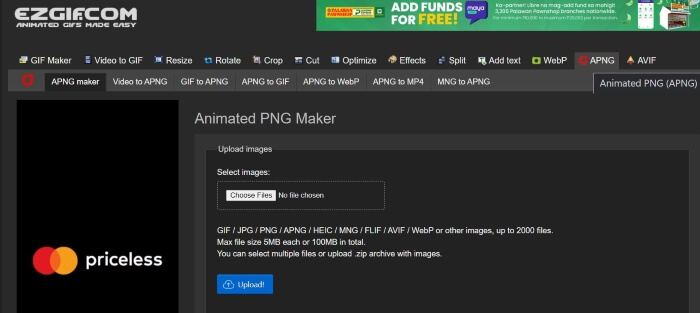
ขั้นตอนที่ 3. เมื่อถูกเปลี่ยนหน้าไปยังหน้าเว็บ Animated PNG maker ของ EZGIF แล้ว ให้คลิกปุ่ม Choose Files แล้วเลือกไฟล์ที่คุณต้องการแปลง เมื่อไฟล์ถูกโหลดขึ้นเสร็จแล้ว ให้คลิกปุ่ม Upload เพื่ออัปโหลดไฟล์ของคุณ.
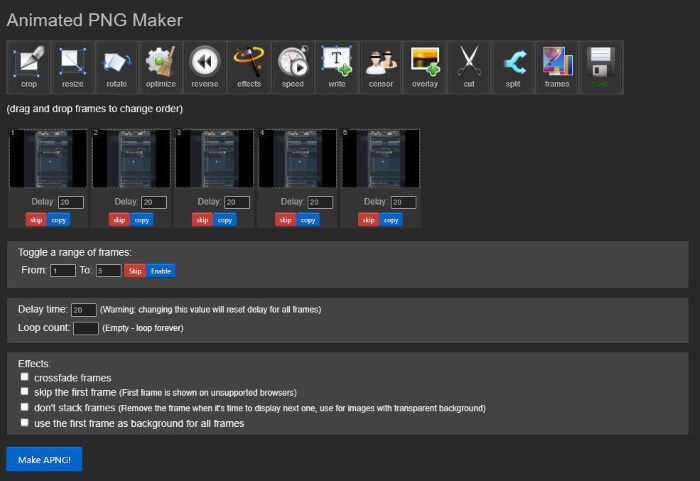
ขั้นตอนที่ 4. หลังจากนั้น จะมีหน้าเว็บใหม่แสดงขึ้นมา ให้คุณปรับแต่งและแก้ไขไฟล์ APNG ได้ตามต้องการ จากนั้นเพื่อดำเนินการแปลงต่อ ให้เลื่อนลงมาจนพบปุ่ม Make APNG แล้วคลิก จากนั้น EZGIF จะโชว์ตัวอย่างไฟล์ APNG ของคุณ หากคุณพอใจกับผลลัพธ์แล้ว ให้เลื่อนลงไปและคลิกปุ่ม Save เพื่อดาวน์โหลดไฟล์ APNG เพียงเท่านี้! คุณก็แปลงไฟล์ GIF เป็น APNG ได้สำเร็จแล้ว
2. เวอร์โทพอล
ขั้นตอนที่ 1. เปิดเบราว์เซอร์ที่คุณใช้ และค้นหา Vertopal จากนั้นเลือกผลการค้นหาอันแรก.
ขั้นตอนที่ 2. เมื่อถูกพาไปยังหน้าแรกของ Vertopal แล้ว ให้กดปุ่ม Choose your File หรือจะลากและวางไฟล์ของคุณลงไปเพื่ออัปโหลดก็ได้.
ขั้นตอนที่ 3. เมื่ออัปโหลดไฟล์เรียบร้อยแล้ว ให้เลือกนามสกุลไฟล์ที่คุณต้องการแปลง คุณสามารถเลือกได้จากหลายตัวเลือกหรือจะค้นหารูปแบบไฟล์ที่ต้องการแล้วคลิก เมื่อเลือกฟอร์แมตเสร็จแล้ว ระบบจะมีข้อความยืนยันถามว่าคุณต้องการเพิ่มไฟล์ เปลี่ยนรูปแบบผลลัพธ์ หรือดำเนินการแปลงต่อไป ให้คลิกปุ่ม Continue เพื่อไปต่อในขั้นตอนการแปลง.
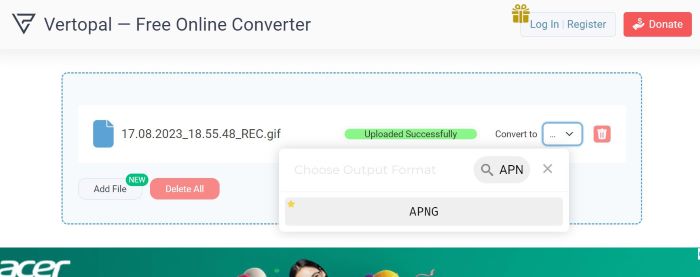
ขั้นตอนที่ 4. หลังจากอัปโหลดไฟล์แล้ว Vertopal จะแสดงตัวอย่างไฟล์ที่ถูกแปลง ในมุมซ้ายบนให้มองหาและคลิกปุ่ม Convert เพื่อดำเนินการต่อ เมื่อแปลงเสร็จ จะมีหน้าใหม่แสดงขึ้นมา ให้กดปุ่ม Download เพื่อบันทึกไฟล์ APNG ของคุณ แค่นั้นเอง! ตอนนี้คุณก็มีไฟล์ APNG ที่แปลงเรียบร้อยแล้ว
3. แปลง RedKetchup GIF
RedKetchup เป็นอีกหนึ่งชุดเครื่องมือออนไลน์ที่ใช้งานได้จริงสำหรับนักตัดต่อวิดีโอ โปรแกรมแก้ไขรูปภาพ และผู้สร้างเนื้อหา มีเครื่องมือมากมายเพื่อให้ผู้ใช้สามารถสร้าง แก้ไข และขัดเกลารูปภาพ แอนิเมชั่น และวิดีโอได้ นอกจากนั้น ยังมีเครื่องมือแปลง GIF ที่คุณสามารถใช้เพื่อแปลงไฟล์ GIF เป็น APNG, WEBP และ MP4 ต่อไปนี้คือวิธีที่คุณสามารถใช้ตัวแปลง GIF ของ RedKetchup เพื่อเปลี่ยน GIF เป็น APNG:
ขั้นตอนที่ 1. เปิดเบราว์เซอร์ที่คุณใช้ประจำ แล้วค้นหา RedKetchup GIF Converter จากนั้นคลิกลิงก์ที่ปรากฏเป็นอันดับต้น ๆ ในผลการค้นหา.
ขั้นตอนที่ 2. เมื่อเข้าสู่หน้าเว็บแล้ว ให้อัปโหลดไฟล์ของคุณโดยกดปุ่ม Browse แล้วเลือกไฟล์ที่ต้องการอัปโหลด.
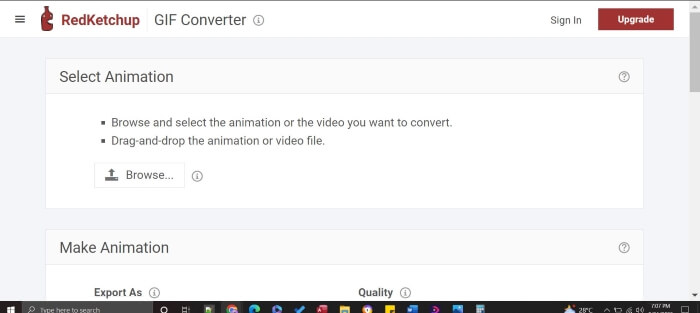
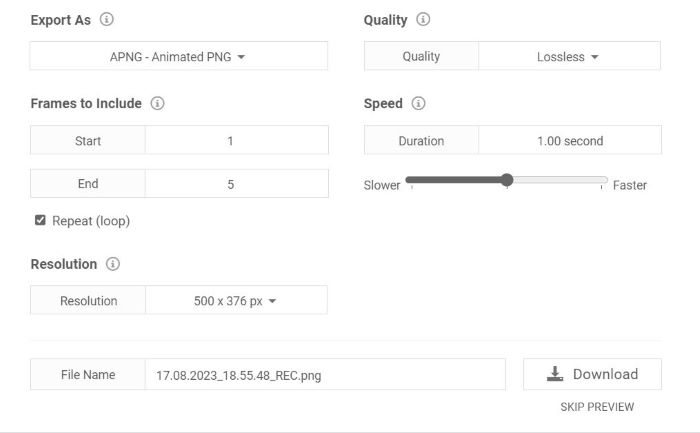
ขั้นตอนที่ 3. RedKetchup จะแสดงตัวอย่างผลลัพธ์ให้คุณเห็นทันที เลื่อนลงด้านล่างเพื่อดูส่วนตั้งค่า ซึ่งคุณสามารถปรับคุณภาพ จำนวนเฟรม ความละเอียด และความเร็วได้ เมื่อต้องการดำเนินการต่อ ให้มองหาหัวข้อ Export As แล้วตั้งค่ารูปแบบเป็น APNG เมื่อปรับแต่งทุกอย่างเสร็จและพอใจแล้ว ให้กดปุ่ม Download จากนั้นบันทึกไฟล์ผลงานของคุณ เพียงไม่กี่คลิก คุณก็จะได้ไฟล์ APNG คุณภาพสูงเรียบร้อยแล้ว
อ่านเพิ่มเติม:
วิธีแปลง GIF ให้เป็น JPG โดยไม่เสียคุณภาพ
คู่มือที่ดีที่สุดเกี่ยวกับวิธีตัด GIF เพื่อเพิ่มสีสันให้คอนเทนต์ของคุณ
ส่วนที่ 3 คำถามที่พบบ่อยเกี่ยวกับการแปลง GIF เป็น APNG
ฉันสามารถแปลง APNG กลับเป็น GIF ได้หรือไม่
ใช่คุณสามารถ! ตัวแปลงส่วนใหญ่ที่กล่าวถึงข้างต้นมีเครื่องมือในการแปลงไฟล์ APNG ของคุณเป็น GIF
เบราว์เซอร์ทั้งหมดสามารถรองรับ APNG ได้หรือไม่
เบราว์เซอร์เวอร์ชันล่าสุดสามารถรองรับ APNG โดยเฉพาะเบราว์เซอร์ยอดนิยมอย่าง Chrome, Edge, Safari, Firefox และ Opera อย่างไรก็ตาม เบราว์เซอร์อื่นอาจต้องใช้ส่วนขยายเพื่อเปิด APNG จากคอมพิวเตอร์ของคุณผ่านเบราว์เซอร์
การแปลง GIF เป็น APNG ช่วยปรับปรุงคุณภาพหรือไม่
ไม่ การแปลง GIF เป็น APNG อาจไม่ได้ปรับปรุงคุณภาพเสมอไป เว้นแต่ตัวแปลงจะอนุญาตให้คุณปรับแต่งการตั้งค่าเพื่อปรับปรุงคุณภาพของเอาต์พุตเพิ่มเติม อย่างไรก็ตาม มันสามารถให้ภาพเคลื่อนไหวที่นุ่มนวลกว่าได้เนื่องจากใช้ความโปร่งใส 24 บิต เมื่อเทียบกับ GIF ซึ่งมีความโปร่งใสเพียง 8 บิตเท่านั้น
เครื่องมือทั้งหมดรองรับการแปลง GIF เป็นชุดเป็น APNG หรือไม่
ใช่ เครื่องมือทั้งหมดที่กล่าวถึงรองรับการแปลงเป็นกลุ่ม
APNG ดีกว่า GIF หรือไม่
แม้ว่า GIF จะใช้กันอย่างแพร่หลายมากกว่า APNG แต่ในแง่ของคุณภาพวิดีโอ APNG นั้นดีกว่า GIF เนื่องจากสามารถรองรับสีได้มากกว่า มันสามารถให้ภาพเคลื่อนไหวที่สดใสและนุ่มนวลกว่า GIF เกี่ยวกับความเข้ากันได้ เบราว์เซอร์รุ่นใหม่ส่วนใหญ่รองรับรูปแบบ APNG แล้ว แต่เบราว์เซอร์บางตัวอาจต้องใช้ส่วนขยายเพื่อเปิดไฟล์ APNG
สรุป
ถึงแม้ GIF จะเป็นตัวเลือกยอดนิยมในการสื่อสารความขำขันและอารมณ์ แต่ก็มักจะมีภาพแตกและคุณภาพจำกัด ดังนั้น APNG จึงกลายเป็นทางเลือกที่มีคุณค่า ด้วยสีสันที่มากกว่า การเปลี่ยนภาพที่ลื่นไหลกว่า และคุณภาพที่เหนือกว่า บทความนี้จัดทำขึ้นมาเป็นพิเศษสำหรับคนที่มองหาวิธีที่ตรงไปตรงมาและมีประสิทธิภาพในการแปลง GIF เป็น APNG และเราพร้อมช่วยให้การแปลง GIF เป็น APNG ของคุณเป็นเรื่องง่าย!
-
 5 ตัวเลือกที่ดีที่สุดในการบันทึกรูปแบบ GIF ด้วยเครื่องบันทึก GIF สำหรับพีซีและ Mac
 เครื่องบันทึก GIF ที่ดีที่สุดที่คุณควรใช้บันทึก GIF คืออะไร รายการด้านล่างแสดงหลักฐานว่าเครื่องบันทึกหน้าจอใดดีที่สุด
-
 [อัปเดตปี 2023] 9 โปรแกรมแก้ไข GIF ที่ดีที่สุดสำหรับพีซี, Mac, iOS และ Android
 ต้องการเพิ่มความรู้สึกส่วนตัวบน GIF เพื่อให้สามารถแสดงออกได้มากขึ้นหรือไม่? อ่านบทความนี้ต่อเพื่อทราบวิธีการแก้ไขและเครื่องมือที่ดีที่สุดสำหรับงาน
-
 เปลี่ยน GIF เป็นรูปแบบวิดีโอ: แปลง GIF Memes เป็นวิดีโอ [2023]
 สงสัยเกี่ยวกับการแปลง GIF เป็นวิดีโอด้วยเครื่องมือตามรายการด้านล่าง เลือกหนึ่งรายการและเรียนรู้วิธีดำเนินการเพื่อให้มีหลักฐานเพียงพอ
