


 Video Converter Ultimate
 บันทึกหน้าจอ
 ซ่อมวิดีโอ
 ดาวน์โหลดอย่างปลอดภัย
การอัปโหลดวิดีโอไปยัง Google Drive ลดคุณภาพหรือไม่ ตรวจสอบที่นี่
Google Drive คือระบบรับฝากบนคลาวด์ที่ให้ผู้ใช้สามารถแชร์ จัดเก็บ บันทึก และเข้าถึงไฟล์จากอุปกรณ์ต่างๆ ที่มีการเชื่อมต่ออินเทอร์เน็ต แพลตฟอร์มนี้ช่วยให้ผู้ใช้ทำงานร่วมกับเพื่อนร่วมงานและเพื่อน ๆ ได้อย่างง่ายดายเมื่อสร้างเอกสาร สเปรดชีต และการนำเสนอแบบเรียลไทม์ บริการนี้มีพื้นที่เก็บข้อมูลฟรี 15GB พร้อมโอกาสในการอัปเกรดเป็นแผนพื้นที่จัดเก็บเพิ่มเติมโดยมีค่าธรรมเนียม
โดยรวมแล้ว ที่เก็บข้อมูลบนระบบคลาวด์นี้เป็นโซลูชันพื้นที่เก็บข้อมูลบนคลาวด์ที่ใช้งานได้หลากหลายและเป็นมิตรต่อผู้ใช้ ซึ่งให้ประโยชน์ได้ทั้งกับผู้ใช้ทั่วไปและธุรกิจ ไม่ว่าคุณจะต้องการเก็บเอกสารสำคัญหรือทำงานร่วมกับผู้อื่นในโปรเจกต์ต่าง ๆ Google Drive ก็มีแพลตฟอร์มที่สะดวกและเชื่อถือได้ ไฟล์ที่ถูกจัดเก็บมากที่สุดบนแพลตฟอร์มนี้คือไฟล์วิดีโอ อย่างไรก็ตาม ด้วยความจุพื้นที่ที่ไม่มากนัก จะสามารถบันทึกไฟล์ได้หลายไฟล์อย่างไร? Google Drive บีบอัดวิดีโอหรือไม่? คำถามทั้งหมดนี้จะได้รับคำตอบในบทความนี้.

ส่วนที่ 1 การอัปโหลดวิดีโอไปยัง Google Drive ลดคุณภาพหรือไม่
การอัปโหลดวิดีโอไปยัง Google Drive อาจลดคุณภาพของวิดีโอของคุณ เป็นเพราะ Google Drive บีบอัดไฟล์วิดีโอเพื่อประหยัดพื้นที่เซิร์ฟเวอร์ นอกจากนี้ยังช่วยให้แชร์วิดีโอกับผู้อื่นได้ง่ายขึ้นอีกด้วย เมื่อวิดีโอถูกบีบอัด รายละเอียดบางส่วนจะหายไป และบางครั้งคุณภาพโดยรวมของไฟล์อาจลดลง จำนวนการสูญเสียคุณภาพขึ้นอยู่กับปัจจัยต่างๆ เช่น ความละเอียดของวิดีโอต้นฉบับ รูปแบบไฟล์ และการตั้งค่าการบีบอัดที่ใช้โดย Google Drive ตัวอย่างเช่น เมื่อบีบอัด วิดีโอที่มีความละเอียดสูงอาจสูญเสียคุณภาพมากกว่าวิดีโอที่มีความละเอียดต่ำ ขอแนะนำให้ใช้รูปแบบวิดีโอและการตั้งค่าการบีบอัดที่แนะนำเพื่อลดการสูญเสียคุณภาพเมื่ออัปโหลดวิดีโอไปยัง Google Drive คุณสามารถใช้รูปแบบวิดีโอ เช่น MP4 ซึ่งมี AVC (H.264) และ HEVC (H.265) ที่บีบอัดขนาดไฟล์วิดีโอแต่ยังคงรักษาคุณภาพของวิดีโอไว้
ส่วนที่ 2 ฉันสามารถใช้ Google Drive เพื่อบีบอัดวิดีโอได้หรือไม่
ใช่ ดังที่เราได้กล่าวไปแล้วข้างต้น วิดีโอที่บีบอัดของ Google Drive ซึ่งช่วยให้ผู้ใช้สามารถจัดเก็บวิดีโอหลายรายการบนเซิร์ฟเวอร์ได้ ข้อเสียเพียงอย่างเดียวของกระบวนการนี้คือสามารถลดคุณภาพของไฟล์ได้อย่างมากเมื่อผู้ใช้อัปโหลดวิดีโอคุณภาพสูงกว่า เช่น 4K ต่อไปนี้เป็นวิธีบีบอัดวิดีโอโดยใช้ Google Drive
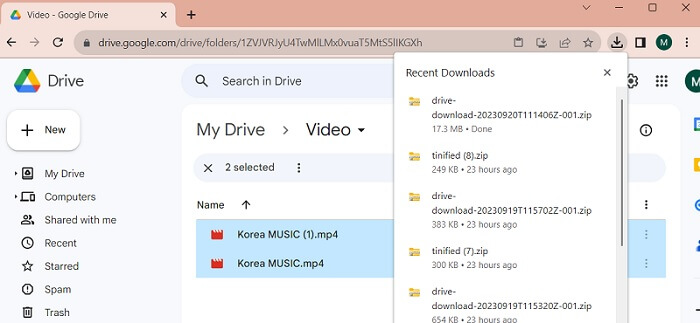
ขั้นตอนที่ 1. อัปโหลดไฟล์ที่คุณต้องการลดขนาดไปยังบัญชี Google Drive ของคุณ คุณสามารถลากวิดีโอแล้ววางลงใน Google Drive เพื่ออิมพอร์ตไฟล์ขึ้นสู่เซิร์ฟเวอร์ได้.
ขั้นตอนที่ 2. เมื่ออัปโหลดไฟล์วิดีโอขึ้นไปบน Google Drive แล้ว ระบบจะทำการบีบอัดไฟล์โดยอัตโนมัติตามรูปแบบไฟล์ที่แนะนำ คุณสามารถเล่นไฟล์วิดีโอได้ด้วยเครื่องเล่นมีเดียในตัว.
ขั้นตอนที่ 3. สุดท้าย คุณสามารถดาวน์โหลดไฟล์วิดีโอหรือบีบอัดเป็นไฟล์ ZIP เพื่อให้มีขนาดไฟล์เล็กลงได้ คุณสามารถเลือกไฟล์วิดีโอหลายไฟล์พร้อมกันแล้วคลิกขวาที่เมาส์ จะมีเมนูหลายรายการปรากฏขึ้น เลือกปุ่ม ดาวน์โหลด (Download) จากนั้น Google Drive จะดาวน์โหลดวิดีโอที่ถูก ZIP แล้วและบันทึกลงในพีซีของคุณ.
ส่วนที่ 3 วิธีบีบอัดวิดีโอสำหรับ Google Drive
คุณกำลังมองหาเครื่องมือที่มีประสิทธิภาพในการบีบอัดไฟล์วิดีโอบนเครื่องของคุณอยู่หรือไม่? คุณสามารถใช้ Video Converter Ultimate เพื่อลดและปรับขนาดไฟล์วิดีโอบนพีซีของคุณได้เสมอ แอปพลิเคชันนี้รองรับทั้ง Mac และ Windows ดังนั้นคุณจึงสามารถใช้งานได้บนอุปกรณ์ต่าง ๆ เช่น แล็ปท็อป พีซี และอื่น ๆ มีรูปแบบไฟล์วิดีโอให้เลือกหลากหลาย ได้แก่ MP4, MOV, MKV, WebM, AVI และอื่น ๆ มาพร้อมแถบเลื่อนที่ให้ผู้ใช้บีบอัดขนาดไฟล์วิดีโอได้ตามเปอร์เซ็นต์ที่ต้องการโดยไม่ต้องตัดช่วงเวลาของวิดีโอ นอกจากนี้ แอปนี้ยังสามารถประมวลผลวิดีโอ 4K ได้อย่างไม่ติดขัด โดยใช้เทคโนโลยีขั้นสูงในการประมวลผลและบีบอัดวิดีโอ ความสามารถในการลดขนาดไฟล์โดยไม่มีข้อจำกัดและข้อกำหนดที่ยุ่งยากทำให้เครื่องมือนี้โดดเด่นในฐานะโปรแกรมบีบอัด ตรวจสอบและทำตามคู่มือแบบละเอียดเกี่ยวกับวิธีใช้เครื่องมือนี้ได้ด้านล่าง.
ขั้นตอนที่ 1. ติดตั้งแอป
สิ่งแรกที่คุณต้องทำคือดาวน์โหลด Video Converter Ultimate ลงในคอมพิวเตอร์หรือแล็ปท็อปของคุณ เพื่อให้ติดตั้งแอปได้อย่างง่ายดาย ให้คลิกไอคอน ดาวน์โหลดฟรี (Free Download) ที่แสดงด้านล่าง.
ดาวน์โหลดฟรีสำหรับ Windows 7 ขึ้นไปดาวน์โหลดอย่างปลอดภัย
ดาวน์โหลดฟรีสำหรับ MacOS 10.7 หรือใหม่กว่าดาวน์โหลดอย่างปลอดภัย
ขั้นตอนที่ 2. นำเข้าไฟล์วิดีโอ
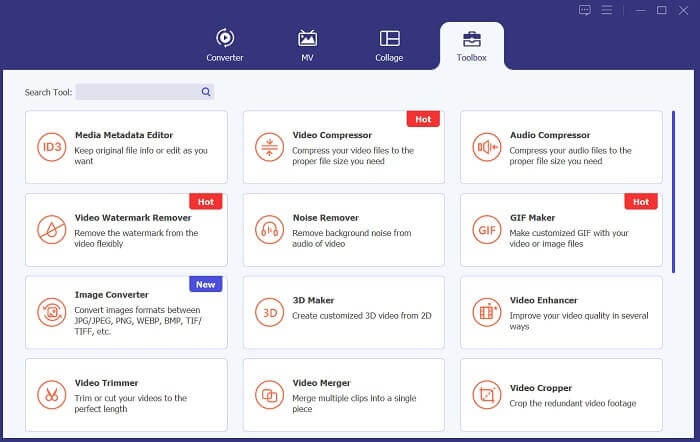
ขั้นตอนถัดไปคือการนำเข้าวิดีโอของคุณไปยังอินเทอร์เฟซของแอป คุณสามารถทำได้โดยเข้าไปที่อินเทอร์เฟซของเครื่องมือแล้วคลิกที่ตัวเลือก กล่องเครื่องมือ (Toolbox) เลือกฟีเจอร์ Video Compressor จากรายการ แล้วกดไอคอน +.
ขั้นตอนที่ 3. บีบอัดวิดีโอ
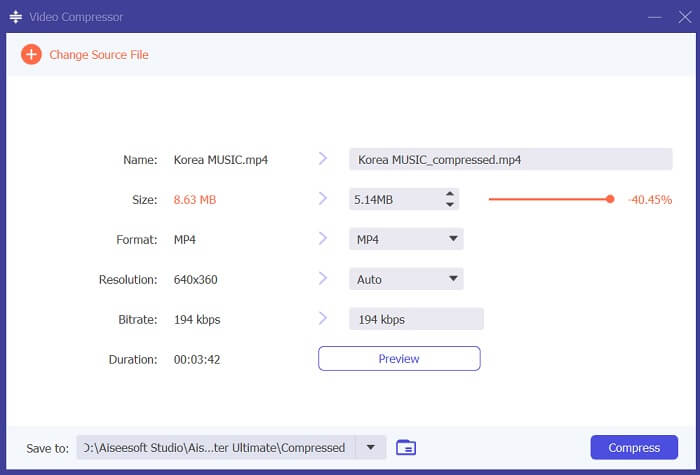
จากนั้นคุณจะสามารถเปิดดูโฟลเดอร์ในพีซีของคุณได้ เลือกวิดีโอที่คุณต้องการแปลงแล้วคลิก เปิด (Open) เพื่อนำเข้าไฟล์ จะมีหน้าใหม่ปรากฏขึ้นซึ่งคุณสามารถลดขนาดไฟล์ได้ เลื่อน แถบเลื่อน (slider) หรือเปลี่ยนค่าพารามิเตอร์ของวิดีโอ เช่น ความละเอียด (Resolutions), รูปแบบไฟล์ (Formats) และ บิตเรต (Bitrate) จากนั้นคลิกตัวเลือก บีบอัด (Compress) เพื่อเริ่มกระบวนการ.
ขั้นตอนที่ 4. เล่นไฟล์เอาต์พุต
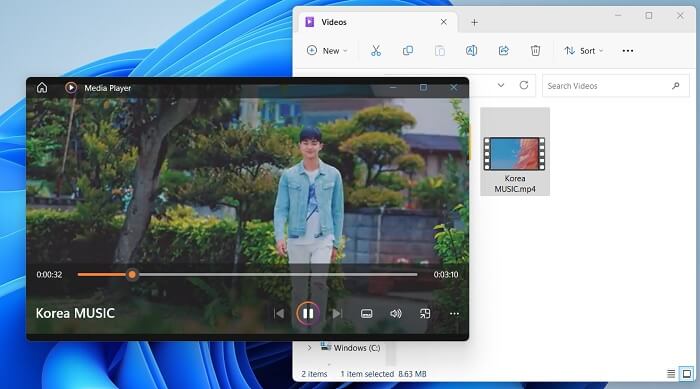
ขั้นตอนสุดท้ายคือการรอให้กระบวนการบีบอัดเสร็จสิ้น ไปที่โฟลเดอร์เอาท์พุตและดูตัวอย่างไฟล์ คุณสามารถแตะสองครั้งที่วิดีโอเพื่อเปิดใช้งานด้วยเครื่องเล่นสื่อของพีซีของคุณ
อ่านเพิ่มเติม:
[แก้ไขแล้ว] วิธีเล่นไฟล์ MP4 ใน Google Drive
คู่มือบีบอัดวิดีโอเพื่อส่งอีเมลบน iPhone/Android/ออนไลน์
ส่วนที่ 4 คำถามที่พบบ่อยเกี่ยวกับ Google Drive บีบอัดวิดีโอ
คุณสามารถอัปโหลดวิดีโอ 4K ไปยัง Google Drive ได้หรือไม่
ใช่ คุณสามารถอัปโหลดวิดีโอ 4K ไปยัง Google Drive ได้! เป็นวิธีที่ดีเยี่ยมในการจัดเก็บและแบ่งปันวิดีโอคุณภาพสูงของคุณกับผู้อื่น ตรวจสอบให้แน่ใจว่าคุณมีพื้นที่จัดเก็บข้อมูลเพียงพอ เนื่องจากวิดีโอ 4K อาจใช้พื้นที่ได้มาก เมื่อคุณอัปโหลดวิดีโอแล้ว คุณไม่จำเป็นต้องแชร์สำเนาต้นฉบับของไฟล์วิดีโอของคุณ เพียงส่งลิงก์ไปยังไดรฟ์เพื่อเข้าถึงไฟล์วิดีโอ ด้วยแพลตฟอร์มบนเว็บนี้ คุณสามารถแชร์ไฟล์วิดีโอได้อย่างง่ายดาย
คุณจะบันทึกวิดีโอลงใน Google Drive โดยไม่สูญเสียคุณภาพได้อย่างไร
ทำตามขั้นตอนเหล่านี้เพื่ออัปโหลดวิดีโอไปยัง Google Drive โดยไม่สูญเสียคุณภาพ ขั้นแรก ให้แน่ใจก่อนว่าวิดีโอของคุณอยู่ในความละเอียด 4K จากนั้นเข้าสู่บัญชี Google Drive ของคุณและคลิกปุ่ม ใหม่ (New) ที่มุมซ้ายบน เลือก อัปโหลดไฟล์ (File Upload) จากนั้นเลือกวิดีโอที่คุณต้องการอัปโหลด เมื่ออัปโหลดเสร็จแล้ว คุณสามารถแชร์วิดีโอกับผู้อื่นได้อย่างง่ายดายด้วยการส่งลิงก์ไปยังไฟล์นั้น ด้วยขั้นตอนที่ไม่ซับซ้อนเหล่านี้ คุณก็สามารถมั่นใจได้ว่าวิดีโอของคุณจะถูกอัปโหลดไปยัง Google Drive โดยไม่ต้องสูญเสียคุณภาพ.
ความละเอียดวิดีโอสูงสุดสำหรับ Google Drive คือเท่าใด
ความละเอียดวิดีโอสูงสุดสำหรับ Google Drive คือ 4K ดังนั้น หากคุณต้องการอัปโหลดวิดีโอโดยไม่สูญเสียคุณภาพ ตรวจสอบให้แน่ใจว่าวิดีโอนั้นมีความละเอียด 4K คุณสามารถทำตามขั้นตอนก่อนหน้านี้เพื่ออัปโหลดไฟล์สื่อของคุณไปยังบัญชี Google Drive ของคุณและแบ่งปันกับผู้อื่นได้อย่างง่ายดาย
สรุป
วิดีโอเป็นข้อมูลดิจิทัลที่มีค่าที่เราทุกคนเก็บรักษาไว้ในอุปกรณ์ต่าง ๆ ไม่ว่าจะเป็นโทรศัพท์มือถือ กล้องดิจิทัล คอมพิวเตอร์ส่วนบุคคล หรือแท็บเล็ต เรามักจะมองหาวิธีและแผนสำรองในการจัดเก็บและบันทึกไฟล์วิดีโอของเราอยู่เสมอ โชคดีที่ Google Drive เป็นหนึ่งในแพลตฟอร์มสำหรับแชร์และจัดเก็บสื่อที่สะดวกที่สุด นอกจากนี้เรายังได้เรียนรู้แล้วว่าบริการนี้สามารถลดและบีบอัดไฟล์วิดีโอให้เหมาะกับผู้ใช้ได้ ดังนั้นหากคุณยังคงสงสัยอยู่ว่า Google Drive บีบอัดวิดีโอหรือไม่? ลองทบทวนวิธีแก้ปัญหาและข้อมูลที่กล่าวถึงข้างต้นอีกครั้ง.
-
 วิธีบีบอัดวิดีโอสำหรับเว็บอย่างมีประสิทธิภาพโดยไม่สูญเสียคุณภาพ
 เมื่อวิดีโอบนเว็บไซต์ของคุณได้รับการร้องเรียนจำนวนมากจากลูกค้าว่ามีการบัฟเฟอร์อยู่เสมอคุณสามารถลองบีบอัดวิดีโอสำหรับเว็บได้ 2 วิธีที่มีประสิทธิภาพซึ่งจะช่วยลดเวลาในการบัฟเฟอร์ของเว็บไซต์เพื่อรักษาลูกค้าไว้
-
 [คำแนะนำโดยละเอียด] วิธีแก้ไข Google Drive Video ไม่เล่นบนคอมพิวเตอร์
 วิดีโอบน Google ไดรฟ์ไม่เล่นโดยมีข้อผิดพลาด "เกิดปัญหาในการเล่นวิดีโอนี้" อาจเกิดจาก Google Drive เองหรือปัญหาของ Chrome บทความนี้จะแนะนำโซลูชัน 6 รายการโดยละเอียด
-
 วิธีที่ดีที่สุดในการแปลง HEIC เป็น JPG บน Google Drive
 หากคุณต้องการเรียนรู้วิธีแปลง HEIC เป็น JPG บน Google Drive โปรดอ่านโพสต์คู่มือนี้เพื่อเรียนรู้วิธีแปลง HEIC เป็น JPG บน Google Drive บนพีซีที่ง่ายที่สุด
