


 Video Converter Ultimate
 บันทึกหน้าจอ
 ซ่อมวิดีโอ
 ดาวน์โหลดอย่างปลอดภัย
วิธีเพิ่มสีสันในวิดีโอ: วิธีที่น่าทึ่งที่คุณสามารถลองได้
การเติมแต่งศิลปะให้กับวิดีโอของคุณไม่ใช่แค่การปรับทรานซิชันและเอฟเฟกต์พิเศษเท่านั้น บางครั้งเพียงแค่เปลี่ยนสีของวัตถุหรือพื้นหลังบางอย่างก็สามารถสร้างความแตกต่างได้อย่างมาก ด้วยเหตุนี้ หลายคนจึงนิยมเปลี่ยนสีของวิดีโอด้วยการใส่ฟิลเตอร์ลงในสตอรี่ของตน หรือเลือกใช้โปรแกรมตัดต่อวิดีโอที่เชื่อถือได้ให้ช่วยจัดการ หากคุณมีฟุตเทจเก่าเก็บอยู่ในสตอเรจดิจิทัล ก็นำกลับมาใช้ในขั้นตอนงานของคุณได้ด้วยโปรแกรมตัดต่อวิดีโอตัวท็อปที่มีอยู่ในตลาดตอนนี้.

ส่วนที่ 1: เปลี่ยนสีของวิดีโอ
FVC Video Converter Ultimate ไม่ได้โดดเด่นแค่เรื่องการแปลงไฟล์เสียงและวิดีโอไปเป็นฟอร์แมตอื่นเท่านั้น เครื่องมืออเนกประสงค์ตัวนี้ยังทำงานได้ยอดเยี่ยมในการตัดต่อคลิปวิดีโอ ทำให้วิดีโอดูคมชัดและน่าชมมากขึ้น อีกทั้งวิดีโอเอดิเตอร์ในโปรแกรมไม่ได้มีเพียงเครื่องมือตัดต่อพื้นฐานเท่านั้น แต่ยังเปิดโอกาสให้ผู้ใช้ได้ใช้งานฟีเจอร์ระดับสูงอย่างการใส่เอฟเฟกต์พิเศษ ฟิลเตอร์ ลายน้ำ ซับไตเติล และอื่น ๆ อีกมากมาย ที่สำคัญ เครื่องมือนี้ได้รับความนิยมเพราะมีขนาดเบาและใช้งานง่าย คุณสามารถเรียนรู้วิธีปรับแต่งและเพิ่มสีสันให้วิดีโอด้วย FVC Video Converter Ultimate ได้ในสี่ขั้นตอนง่าย ๆ.
ขั้นตอนที่ 1: ติดตั้ง Video Converter Ultimate
เริ่มต้นด้วยการเปิดโปรแกรมบนอุปกรณ์ของคุณโดยคลิกปุ่ม ดาวน์โหลด ด้านล่าง จากนั้นทำตามขั้นตอนการติดตั้งที่วิซาร์ดแนะนำให้เรียบร้อย เสร็จแล้วลองทำความคุ้นเคยกับหน้าตาโปรแกรมก่อน.
ดาวน์โหลดฟรีสำหรับ Windows 7 ขึ้นไปดาวน์โหลดอย่างปลอดภัย
ดาวน์โหลดฟรีสำหรับ MacOS 10.7 หรือใหม่กว่าดาวน์โหลดอย่างปลอดภัย
ขั้นตอนที่ 2 นำเข้าคลิป
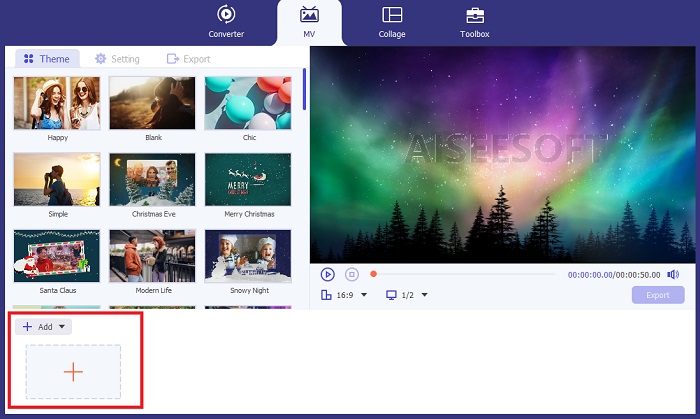
ไปที่ส่วน MV ของ Video Converter Ultimate เพื่อเริ่มกระบวนการเปลี่ยนสี คลิกปุ่ม เครื่องหมายบวก เลือกไฟล์เป้าหมายจากโฟลเดอร์ในเครื่อง แล้วรอให้ไฟล์แสดงบนส่วน ไทม์ไลน์.
ขั้นตอนที่ 3 ปรับสีวิดีโอ
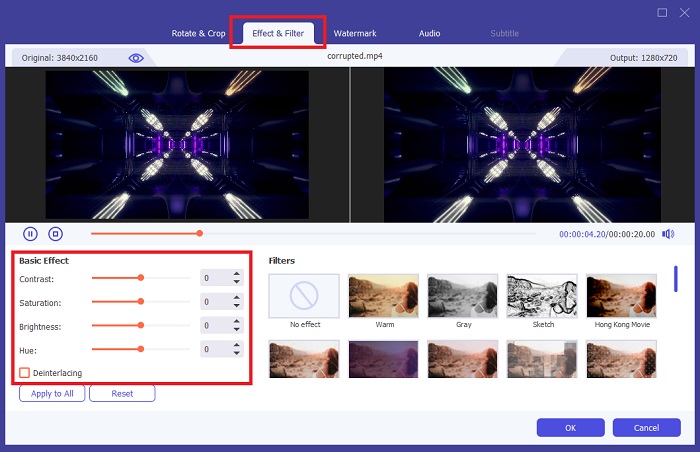
ในส่วน ไทม์ไลน์ ให้ไปที่คลิปของคุณแล้วคลิกปุ่ม Magic ที่อยู่ถัดจากเครื่องมือตัดคลิป จะมีหน้าต่างใหม่เด้งขึ้นมา จากนั้นคลิกแท็บ Effect and Filter หากคุณต้องการเปลี่ยนสีวิดีโอด้วยการใส่ฟิลเตอร์ ก็สามารถเลือกจากฟิลเตอร์มากมายที่มีให้ในเครื่องมือ ในทางกลับกัน หากต้องการเปลี่ยนสีแบบปรับเอง ก็ไปที่ส่วน Basic Effect แล้วปรับที่ Color Settings.
ขั้นตอนที่ 4 บันทึกผลงาน
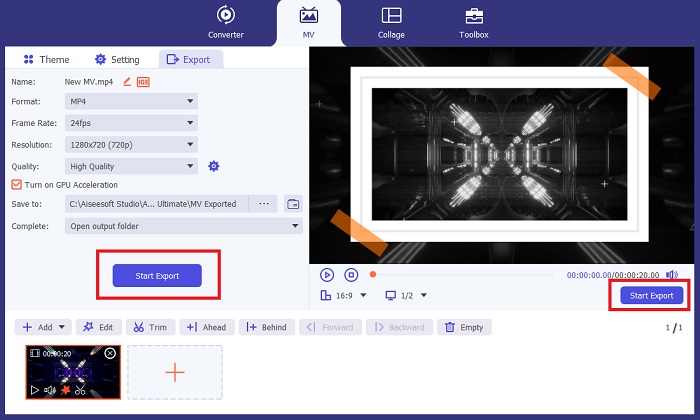
เมื่อเสร็จแล้ว คลิกปุ่ม Apply to All เพื่อบันทึกการเปลี่ยนแปลง จากนั้นหากต้องการบันทึกงานลงในโฟลเดอร์ภายในเครื่อง ให้คลิกปุ่ม Export ตั้งชื่อไฟล์ กำหนดความละเอียดของวิดีโอผลลัพธ์ แล้วจึงคลิก Start Export.
ข้อดี
- มีรูปแบบวิดีโอและเสียงที่หลากหลายเพื่อให้มั่นใจถึงความเข้ากันได้สูง
- FVC Video Converter สามารถแสดงเอาต์พุตคุณภาพสูงตั้งแต่ความละเอียด 1080p จนถึง 8k
จุดด้อย
- โปรแกรมตัดต่อวิดีโอจำกัดอยู่เพียงเครื่องมือแก้ไขขั้นพื้นฐานเท่านั้น
- ไม่สามารถติดตั้งบนระบบปฏิบัติการ Linux ได้
ส่วนที่ 2: Adobe Premiere Pro เปลี่ยนสีวิดีโอ
ผู้ที่ทำงานกับผลงานที่ผลิตอย่างมืออาชีพควรพึ่งพาชุดโปรแกรมตัดต่อวิดีโอขั้นสูง เช่น Adobe Premiere Pro เป็นอย่างมาก ในขั้นตอนหลังการผลิต โปรแกรมนี้สามารถปรับสีวิดีโอของวัตถุเฉพาะหรือทั้งวิดีโอได้โดยใช้เครื่องมือ Filter Effect ด้วยการเปลี่ยนคอนทราสต์และความอิ่มตัวของสีของวัตถุที่เลือก Adobe Premiere จะทำงานในส่วนของคุณ ทำให้เอาต์พุตของคุณพร้อมสำหรับการดูเนื้อหาบนแพลตฟอร์มโซเชียลมีเดีย
ในทางกลับกัน เครื่องมือนี้มีความเป็นมืออาชีพในการเปลี่ยนสีวิดีโอและมีกิจกรรมตัดต่อวิดีโอขั้นพื้นฐาน หากคุณต้องการทราบเทคนิคในการเปลี่ยนสีวิดีโอใน Adobe Premiere นี่คือสิ่งที่คุณต้องทำ
ขั้นตอนที่ 1 เริ่มต้นโดยสร้างโปรเจ็กต์ใหม่ในเครื่องมือ เปิด Adobe Premiere Pro คลิก File > Import แล้วอัปโหลดวิดีโอที่คุณต้องการแก้ไขเพื่อเปลี่ยนสี.
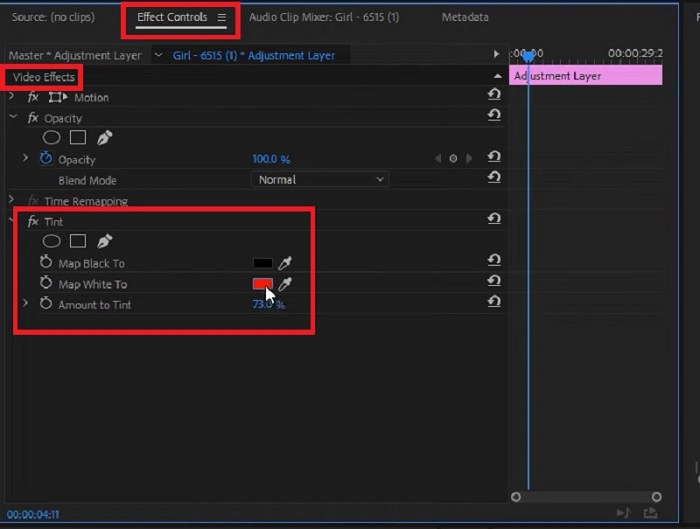
ขั้นตอนที่ 2 จากนั้นกดปุ่ม F7 บนคีย์บอร์ดเพื่อเปิดแผง Effects ในช่องค้นหาให้พิมพ์ Change to Color แล้วเลือก Video Effects > Color Correction > Change to Color จากนั้นลากเอฟเฟกต์ไปวางบนไทม์ไลน์.
ขั้นตอนที่ 3 ต่อมาให้เลือกไอคอน Eyedropper ในแผง Change to Color แล้วเลื่อนไปยังวัตถุที่คุณต้องการปรับสีวิดีโอ เมื่อเลือกบริเวณที่ต้องการเปลี่ยนสีแล้ว ให้เปลี่ยนค่าสีที่ตั้งไว้ในส่วนการตั้งค่า Hue.
ข้อดี
- เครื่องมือนี้เป็นโซลูชันที่ยอดเยี่ยมสำหรับคลิปที่ต้องการการแก้ไขขั้นสูง
- สามารถเปลี่ยนสีได้ด้วยการไล่ระดับสีและความแม่นยำที่แตกต่างกัน
จุดด้อย
- การใช้งานเครื่องมือตัดต่อวิดีโอต้องใช้ทักษะทางเทคนิคอย่างมาก
- โปรแกรมนี้มีค่าใช้จ่ายสูงเมื่อเปรียบเทียบกับคู่แข่ง
ส่วนที่ 3: After Effects เปลี่ยนสีวิดีโอ
คุณอาจต้องพิจารณา After Effects เมื่อคุณต้องการเปลี่ยนสีของวิดีโอ โปรแกรมนี้เป็นอีกหนึ่งโปรแกรมแก้ไขที่สร้างโดย Adobe ซึ่งเป็นตัวเลือกที่ยอดเยี่ยมสำหรับการแสดงภาพเคลื่อนไหวกราฟิกและเวกเตอร์ใน 2.5 มิติ มืออาชีพจำนวนมากมักใช้ Adobe After Effects เมื่อเรนเดอร์เอาท์พุตสำหรับเว็บแอปพลิเคชัน ภาพยนตร์ และแม้แต่รายการโทรทัศน์ เครื่องมือนี้จะช่วยให้คุณปรับสีของวิดีโอโดยใช้วิธีการต่างๆ ในโปรแกรมได้แม้จะดูมีแนวโน้มดีก็ตาม แต่สำหรับบทช่วยสอนนี้ คุณสามารถเปลี่ยนพื้นหลังวิดีโอที่ต้องการได้โดยใช้ Fill Effect
ขั้นตอนที่ 1 ก่อนอื่นให้นำเข้าคลิปของคุณมายังไทม์ไลน์ของ After Effects โดยไปที่ File > Import.
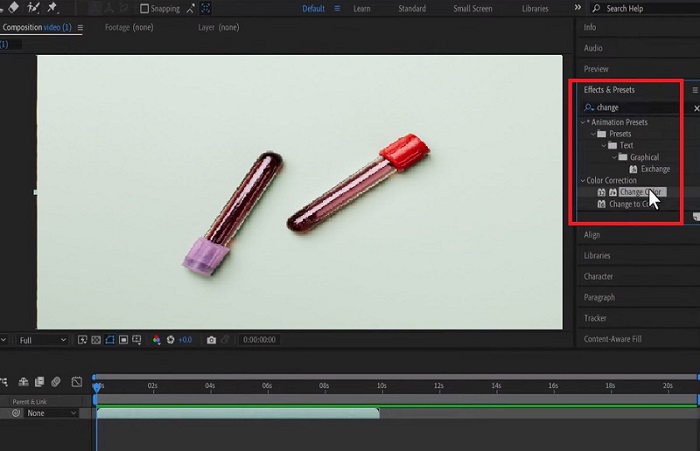
ขั้นตอนที่ 2 จากนั้นไปที่ส่วน Effects and Preset ที่มุมซ้ายของโปรแกรม แล้วคลิก Color Correction > Change Color เมื่อเลือกเรียบร้อยแล้ว ให้รอสักครู่จนไอคอนดรอปเปอร์ปรากฏขึ้น แล้วลากไปยังวัตถุที่คุณต้องการเปลี่ยนสี.
เมื่อถึงขั้นตอนนี้ คุณจะเห็นช่อง Set color ในกล่อง Change Color ซึ่งจะแสดงสีปัจจุบันที่ตรงกับวัตถุที่คุณเลือกไว้.
ขั้นตอนที่ 3 สุดท้ายให้ปรับการตั้งค่าสีในแผง Effect Controls เช่น Hue, Lightness, Saturation, Tolerance และ Softness จนกว่าจะได้สีตามที่คุณต้องการ.
ข้อดี
- โปรแกรมเปลี่ยนสีวิดีโอนี้เป็นโปรแกรมที่ใช้งานง่ายสำหรับผู้เริ่มต้น
- การเลือกสีในเครื่องมือแก้ไขก็มีมากมายเช่นกัน
- After Effects เข้ากันได้กับระบบปฏิบัติการ Windows และ Mac
จุดด้อย
- ค่าเครื่องมือมีราคาแพง
อ่านเพิ่มเติม:
3 วิธีอันดับต้น ๆ ในการใส่สีสันให้วิดีโอ (รองรับทุกแพลตฟอร์ม)
อะไรอยู่เบื้องหลังพาเลตต์การปรับแต่งสีวิดีโอ? คู่มือฉบับสมบูรณ์
ส่วนที่ 4: คำถามที่พบบ่อยเกี่ยวกับวิธีการปรับสีวิดีโอ
เหตุใด Instagram จึงเปลี่ยนสีวิดีโอของฉัน
Instagram เป็นแอปโซเชียลมีเดียที่ให้คุณแชร์วิดีโอผ่านม้วนหรืออัปโหลดโดยตรงบนไทม์ไลน์ อย่างไรก็ตาม แพลตฟอร์มนี้สามารถเปลี่ยนวิดีโอผ่านตัวกรองวิดีโอเท่านั้น ด้วยวิธีนี้ คุณสามารถดูวิดีโอในโทนสีอื่นได้
มีแอพเปลี่ยนสีตาในวีดีโอมั้ย?
แน่นอน ใช่แล้ว! แอปพลิเคชันบางตัวอาจช่วยให้คุณเปลี่ยนสีตาในวิดีโอบนโทรศัพท์มือถือได้ด้วยวิธีง่ายๆ ไม่กี่ขั้นตอน YouCam Video สามารถทำงานได้และสามารถดาวน์โหลดได้ที่ App Store และ Play Store
ฉันจะเปลี่ยนสีเสื้อผ้าในวิดีโอได้อย่างไร
เมื่อใช้โปรแกรมตัดต่อวิดีโอ คุณสามารถเปลี่ยนสีของเสื้อผ้าหรือวัตถุใดๆ ได้อย่างแม่นยำโดยการแยกวัตถุโดยใช้เครื่องมือการเลือก เมื่อวัตถุถูกไฮไลต์แล้ว ให้ไปที่เครื่องมือ EyeDropper และเลือกสีที่คุณต้องการเปลี่ยนสีของวัตถุ หลังจากนั้น คุณสามารถปรับแต่งรายละเอียดเพื่อให้ตรงกับความต้องการและความต้องการของคุณโดยการปรับเฉดสีและความอิ่มตัว
คุณสามารถเปลี่ยนสีของวิดีโอออนไลน์ได้หรือไม่?
มีเครื่องมือออนไลน์มากมายที่สามารถช่วยปรับสีของวิดีโอได้อย่างรวดเร็ว เช่น โปรแกรมตัดต่อวิดีโอออนไลน์ VEED.IO เครื่องมือนี้ไม่มีค่าใช้จ่ายและช่วยให้คุณสามารถแก้ไขขั้นพื้นฐานได้ ช่วยให้คุณเปลี่ยนสีวิดีโอโดยการวางตัวกรอง อย่างไรก็ตาม เครื่องมือออนไลน์มักจะไม่สามารถเปลี่ยนแปลงวัตถุเฉพาะในคลิปได้ ซึ่งอาจเป็นปัญหาได้หากนั่นคือเป้าหมายของคุณ
สรุป
เครื่องมือที่ลื่นไหลย่อมให้ผลลัพธ์ที่ลื่นไหลเช่นกัน ในบทแนะนำนี้ คุณได้เรียนรู้ฟีเจอร์การตัดต่อขั้นสูงของ Adobe และ After Effects แล้ว เมื่อคุณวางแผนจะปรับสีวิดีโอด้วยเครื่องมือเหล่านี้ การทำความเข้าใจรายละเอียดเชิงเทคนิคของชุดโปรแกรมตัดต่อแต่ละตัวถือเป็นสิ่งจำเป็นเพื่อให้ได้ผลลัพธ์ตามที่ต้องการ อย่างไรก็ตาม หากคุณกำลังมองหาเครื่องมือที่ใช้งานง่ายและเป็นตัวเลือกทดแทนได้ FVC Video Converter Ultimate ก็คือสิ่งที่คุณควรเลือกใช้.
-
 ตัวแก้ไขสีวิดีโอ 5 อันดับแรกที่คุณต้องมีในปี 2025
 ต้องการความช่วยเหลือเกี่ยวกับวิธีแก้ไขสีวิดีโอของคุณหรือไม่? ไม่ต้องมองหาที่ไหนอีกแล้วเพราะเรามีเครื่องมือมาให้คุณแล้ว คลิกที่นี่เพื่อเจาะลึกเข้าไปในเครื่องมือเหล่านี้
-
 จะเปลี่ยนสีของวิดีโอได้อย่างไร? สำรวจความเป็นไปได้ที่สร้างสรรค์
 ในโพสต์ที่เป็นลายลักษณ์อักษรนี้ เรารวบรวมโซลูชันที่เป็นไปได้ที่สามารถช่วยและแนะนำผู้ที่ชื่นชอบวิดีโอในการเปลี่ยนสีในโครงการวิดีโอ
-
 ตัวกรองวิดีโอ: ปรับปรุงวิดีโอของคุณด้วยตัวกรองและเอฟเฟกต์บนเดสก์ท็อป
 ตัวกรองวิดีโอที่ดีที่สุดคืออะไร? จะเพิ่มตัวกรองวิดีโอได้อย่างไร? ทุกคำถามของคุณจะมีคำตอบในโพสต์นี้ คุณกำลังรออะไรอยู่? คลิกที่นี่
