


 Video Converter Ultimate
 บันทึกหน้าจอ
 ซ่อมวิดีโอ
อัปโหลดภาพถ่ายคุณภาพสูง (HD) ไปยัง Facebook เพื่อยกระดับโปรไฟล์
ความสำคัญของการอัปโหลดรูปภาพแบบ HD ลงบน Facebook นั้นไม่อาจกล่าวเกินจริงได้ โปรไฟล์ Facebook ของคุณทำหน้าที่เป็นตัวแทนดิจิทัลของตัวคุณเองหรือแบรนด์ของคุณ และคุณภาพของรูปภาพที่คุณอัปโหลดส่งผลอย่างมากต่อมุมมองของผู้ชมที่มีต่อคุณ ไม่มีใครอยากแนะนำตัวเองในโลกดิจิทัลด้วยรูปภาพคุณภาพต่ำ แม้ว่าปัญหาอย่างรูปเบลอหรือความละเอียดต่ำจะหลีกเลี่ยงได้ยาก แต่ก็ยังเป็นเรื่องของการมองหาเครื่องมือที่เหมาะสมเพื่อหลีกเลี่ยงหรือแก้ไขปัญหาเหล่านี้เมื่อต้องอัปโหลดรูปภาพแบบ HD ลงบน Facebook.
ในบทความนี้ เราจะเจาะลึกในการเพิ่มขนาดคุณภาพของภาพ โดยนำเสนอเคล็ดลับและเทคนิคอันทรงคุณค่าในการยกระดับโปรไฟล์ของคุณไปสู่อีกระดับ ตั้งแต่การให้โซลูชันไปจนถึงการปรับการตั้งค่า Facebook ของคุณเพื่อให้แน่ใจว่าการอัพโหลดมีคุณภาพสูง ดังนั้นให้เริ่มอ่านบทความนี้ และเรียนรู้ที่จะปรับปรุงและแก้ไขคุณภาพที่ไม่ดีของรูปภาพ Facebook ของคุณ

ส่วนที่ 1 วิธีอัปโหลดรูปภาพคุณภาพสูงไปยัง Facebook
จะอัปโหลดรูปภาพแบบ HD บน Facebook ได้อย่างไร? การอัปโหลดรูปภาพคุณภาพสูงบนแพลตฟอร์มอย่าง Facebook บางครั้งอาจทำให้เกิดปัญหา เช่น ระบบลดคุณภาพอัตโนมัติ ทำให้รูปภาพดูเบลอหรือรายละเอียดน้อยลงเมื่อมองบนโปรไฟล์ของคุณ เมื่อต้องอัปโหลดรูปภาพคุณภาพสูงลงใน Facebook ให้แน่ใจว่าคุณใช้ขนาดรูปภาพที่ดีที่สุดเท่าที่คุณมี และเลือกรูปแบบที่ช่วยรักษาคุณภาพของภาพให้ดีได้มากที่สุด นั่นคือการใช้ตัวขยายความคมชัดรูปภาพออนไลน์ (online image upscaler) และเครื่องมือนั้นก็คือ FVC Free Image Upscaler โดยใช้เทคโนโลยี AI ขั้นสูง เครื่องมือนี้ช่วยให้ผลลัพธ์มีความแม่นยำสูง ทำงานได้รวดเร็วและปลอดภัย ที่สำคัญคือไม่จำเป็นต้องสมัครบัญชีผู้ใช้ก็สามารถเข้าถึงฟีเจอร์ต่าง ๆ ได้อย่างอิสระ รองรับไฟล์รูปภาพได้หลายรูปแบบบนทุกอุปกรณ์และเว็บเบราว์เซอร์ ด้วยหน้าตาอินเทอร์เฟซที่ใช้งานง่ายและขั้นตอนที่ไม่ซับซ้อน จึงทำให้การปรับแต่งรูปภาพของคุณเป็นเรื่องที่สะดวกสบายไร้ความยุ่งยาก.
ขั้นตอนการใช้ FVC Free Image Upscaler:
ขั้นตอนที่ 1 ก่อนอัปโหลดรูปภาพของคุณไปยัง Facebook ให้ปรับคุณภาพรูปภาพให้ดีขึ้นโดยเข้าไปที่เว็บไซต์ FVC Free Image Upscaler.
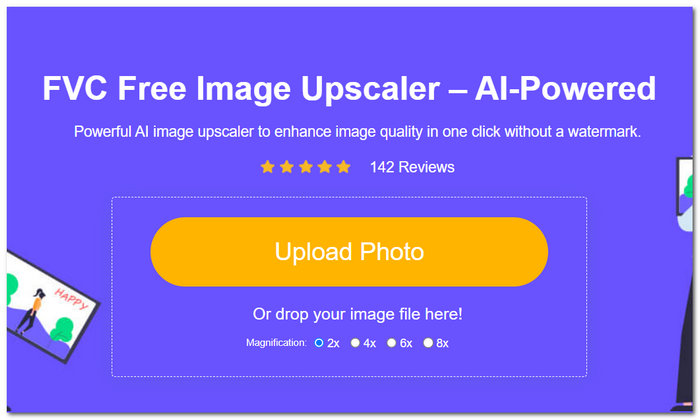
ขั้นตอนที่ 2 บนหน้าอินเทอร์เฟซของเครื่องมือ ให้คลิกที่ช่อง Upload Photo จากนั้นเมื่อรูปของคุณถูกอัปโหลดเข้าเครื่องมือแล้ว ให้ระบุและคลิกเลือกระดับการขยาย (Magnification) ที่ต้องการบริเวณด้านบนของหน้าจอ ตั้งแต่ 2x ถึง 8x.
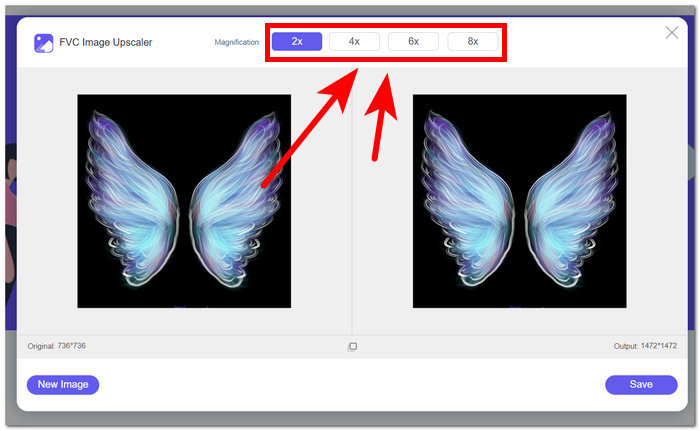
ขั้นตอนที่ 3 เมื่อคุณเลือกระดับการขยายที่ต้องการแล้ว ระบบจะเริ่มประมวลผลเพื่อเพิ่มคุณภาพของรูปภาพให้ดีขึ้น.
ขั้นตอนที่ 4 เมื่อกระบวนการเสร็จสิ้น ให้ดาวน์โหลดรูปภาพที่ขยายและปรับคุณภาพแล้วโดยคลิกที่ปุ่ม Save.
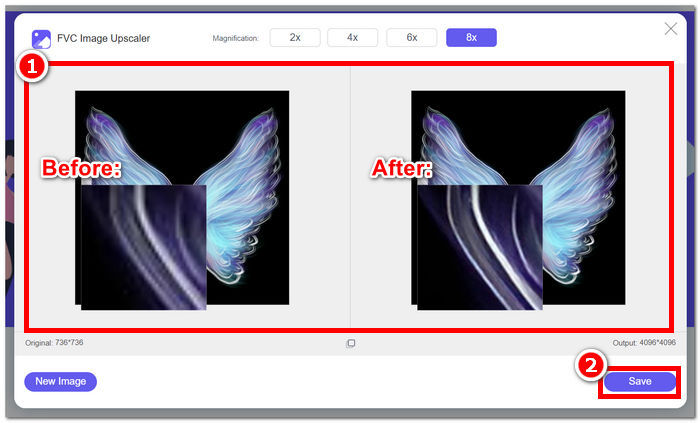
ขั้นตอนการอัปโหลดรูปภาพที่ขยายแล้วของคุณลงบน Facebook:
ขั้นตอนที่ 1 เมื่อต้องการอัปโหลดรูปภาพที่ปรับคุณภาพแล้วโดยใช้ FVC Free Image Upscaler ให้ไปที่บัญชี Facebook ของคุณ.
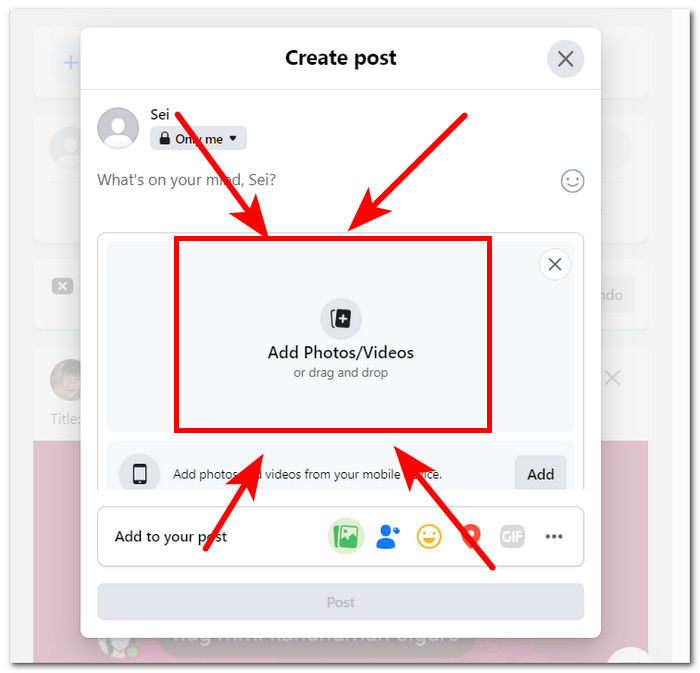
ขั้นตอนที่ 2 คลิกที่ส่วน Photo/Video ซึ่งจะอยู่ด้านล่างของส่วนสร้างโพสต์ (Create Post).
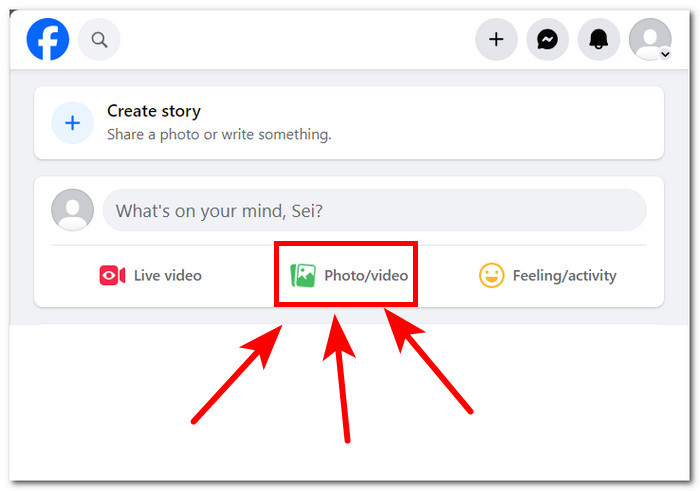
ขั้นตอนที่ 3 อัปโหลดรูปภาพที่ขยายแล้วของคุณโดยคลิกที่ส่วน Add Photos/Videos.
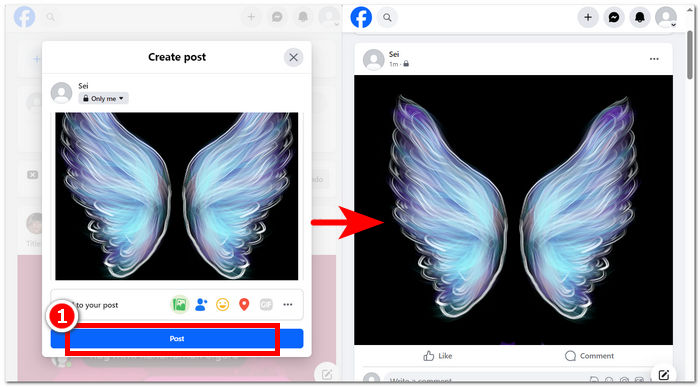
ขั้นตอนที่ 4 เมื่อรูปภาพของคุณโหลดขึ้นมาเพื่อเตรียมโพสต์แล้ว ให้คลิกปุ่ม Post และเพลิดเพลินกับการรับชมรูปภาพคุณภาพสูงไร้การสูญเสียรายละเอียด.
โดยสรุป การใช้เครื่องมือออนไลน์ เช่น FVC Free Image Upscaler สามารถรับประกันกระบวนการประหยัดเวลาเมื่อต้องการอัปโหลดรูปภาพในความละเอียด HD บน Facebook ใช้งานฟรีโดยไม่ต้องสมัครหรือชำระค่าเครื่องมือ เพียงทำให้เครื่องมือนี้เป็นเครื่องมือที่เหมาะสำหรับผู้ใช้ทุกคน การทำตามขั้นตอนข้างต้นจะตอบข้อกังวลเช่นวิธีอัปโหลดภาพถ่ายที่มีความคมชัดสูงบน Facebook ได้อย่างแน่นอน
ส่วนที่ 2 ปรับการตั้งค่าคุณภาพการอัพโหลดรูปภาพ Facebook
การอัพโหลดรูปภาพของคุณไปยัง Facebook บางครั้งอาจทำให้คุณภาพไม่ชัดเจน ส่งผลให้ผู้ใช้ไม่เพลิดเพลินกับเวลาบนแพลตฟอร์มเนื่องจากการอัพโหลดรูปภาพ Facebook เบลอและบางครั้งก็เป็นพิกเซลตามการตั้งค่าคุณภาพการอัพโหลดของคุณ ส่วนนี้จะช่วยให้คุณสามารถปรับการตั้งค่าคุณภาพในการอัปโหลดรูปภาพและวิดีโอได้
ขั้นตอนที่ 1 ไปยังบัญชีของคุณในแอปหรือเว็บไซต์ Facebook.
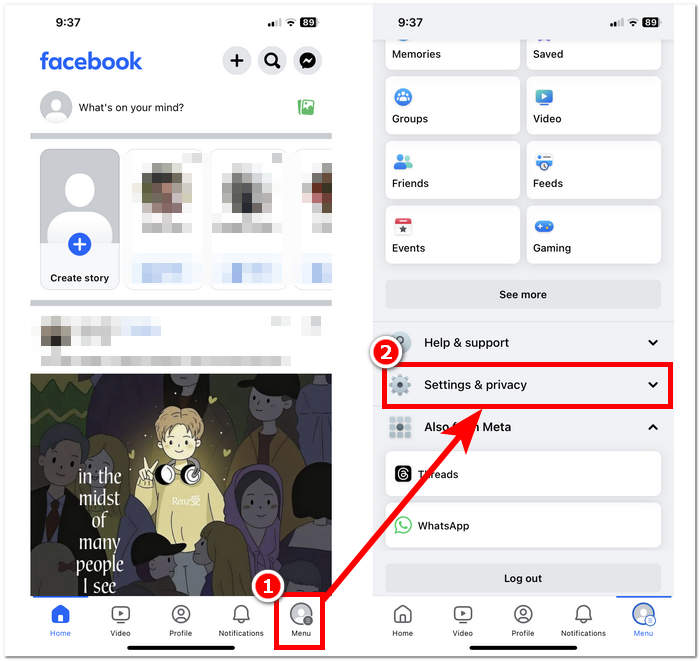
ขั้นตอนที่ 2 คลิกที่ส่วนเมนู (Menu) แล้วเลื่อนลงเพื่อค้นหาและคลิกที่ Settings & Privacy.
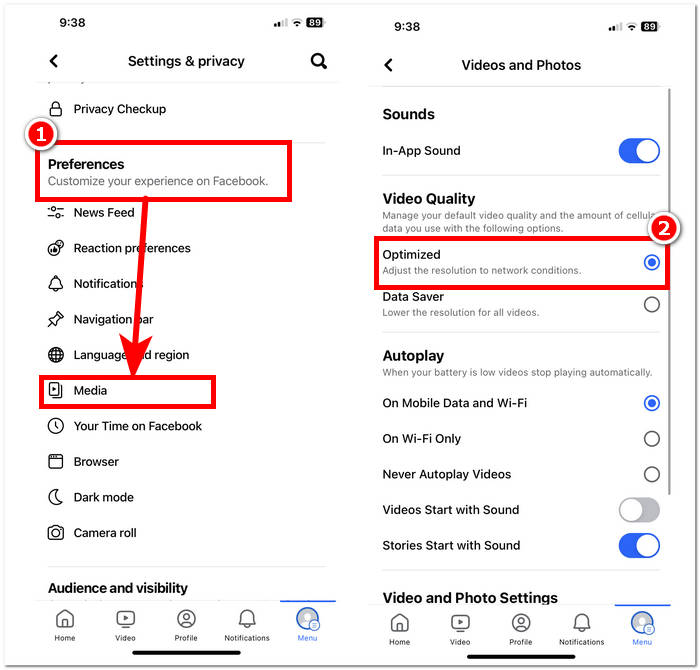
ขั้นตอนที่ 3 ภายใต้เมนู Settings & Privacy ให้ค้นหาแล้วคลิกที่ส่วน Media ในหัวข้อการตั้งค่า Preferences.
ขั้นตอนที่ 4 หากต้องการเปลี่ยนคุณภาพการอัปโหลดรูปภาพและวิดีโอ ให้เลือกการตั้งค่า Optimized ในหัวข้อ Video Quality การตั้งค่านี้จะช่วยให้การอัปโหลดไม่เฉพาะแค่วิดีโอแต่ยังรวมถึงรูปภาพของคุณอยู่ในคุณภาพที่ดีที่สุดเท่าที่เป็นไปได้ ทั้งนี้ก็ขึ้นอยู่กับการเชื่อมต่ออินเทอร์เน็ตของคุณด้วย.
ขั้นตอนต่าง ๆ ที่กล่าวมาข้างต้นใช้งานได้ง่ายกว่าที่คุณคิด ดังนั้นจึงช่วยตอบคำถามเกี่ยวกับวิธีอัปโหลดรูปภาพคุณภาพสูงลงบน Facebook บนมือถือได้อย่างชัดเจน การทำตามขั้นตอนเหล่านี้จะช่วยให้คุณมีแนวทางในการแก้ไขหรือเพิ่มประสิทธิภาพคุณภาพของรูปภาพที่อัปโหลดบน Facebook รวมถึงวิดีโอด้วย.
ส่วนที่ 3 คำถามที่พบบ่อยเกี่ยวกับการอัปโหลดรูปภาพ HD ไปยัง Facebook
คุณภาพรูปภาพสูงสุดที่ Facebook รองรับคือเท่าใด
คุณภาพรูปภาพสูงสุดที่ Facebook รองรับคือ 2048 พิกเซลในด้านที่ยาวที่สุดสำหรับรูปภาพที่อัพโหลดจากคอมพิวเตอร์ อย่างไรก็ตาม สำหรับรูปภาพที่อัพโหลดจากอุปกรณ์พกพา Facebook รองรับความละเอียดสูงสุด 960 พิกเซลในด้านที่ยาวที่สุด
คุณสามารถอัพโหลดภาพถ่ายสดบน Facebook ได้หรือไม่?
ใช่ คุณสามารถอัพโหลด Live Photos บน Facebook ได้ Live Photos เป็นคุณสมบัติที่ใช้งานได้บนอุปกรณ์ iOS ที่จะถ่ายวิดีโอไม่กี่วินาทีก่อนและหลังคุณถ่ายรูป เมื่อคุณอัปโหลด Live Photo ไปยัง Facebook รูปภาพนั้นจะปรากฏเป็นภาพนิ่ง แต่ผู้ใช้สามารถกดที่รูปภาพค้างไว้เพื่อดูการเคลื่อนไหวที่ถ่ายใน Live Photo
ทำไมรูปภาพ Facebook ของฉันถึงเบลอ?
อาจมีสาเหตุหลายประการที่ทำให้รูปภาพ Facebook ของคุณดูพร่ามัว สาเหตุทั่วไปบางประการ ได้แก่ การอัปโหลดรูปภาพที่มีความละเอียดต่ำหรือบีบอัดมากเกินไป การอัปโหลดรูปภาพที่เล็กเกินไปสำหรับพื้นที่บน Facebook หรือการดูรูปภาพในโหมดความละเอียดต่ำบนการเชื่อมต่ออินเทอร์เน็ตที่ช้า เพื่อให้แน่ใจว่าภาพถ่ายของคุณจะปรากฏคมชัดบน Facebook ให้ลองอัปโหลดภาพที่มีความละเอียดสูงขึ้นและหลีกเลี่ยงการบีบอัดมากเกินไป นอกจากนี้ ตรวจสอบให้แน่ใจว่าคุณกำลังดูภาพถ่ายบนการเชื่อมต่ออินเทอร์เน็ตที่เสถียร เพื่อป้องกันไม่ให้โหลดด้วยความละเอียดต่ำ
เหตุใดฉันจึงควรอัพโหลดภาพถ่าย HD ไปยัง Facebook
การอัปโหลดรูปภาพ HD ไปยัง Facebook ช่วยให้มั่นใจได้ว่ารูปภาพของคุณคงคุณภาพและความชัดเจนไว้ โดยมอบประสบการณ์การรับชมที่ดียิ่งขึ้นแก่ผู้ชมของคุณ รูปภาพที่มีความละเอียดสูงยังโดดเด่นมากขึ้นในฟีดข่าวของผู้ใช้ ซึ่งเพิ่มโอกาสในการมีส่วนร่วมกับเนื้อหาของคุณ
การอัปโหลดภาพถ่าย HD จะส่งผลต่อขีดจำกัดพื้นที่เก็บข้อมูลของฉันบน Facebook หรือไม่
การอัปโหลดรูปภาพ HD อาจใช้พื้นที่จัดเก็บข้อมูลบน Facebook มากกว่าเมื่อเปรียบเทียบกับรูปภาพที่มีความละเอียดมาตรฐาน อย่างไรก็ตาม Facebook มีพื้นที่จัดเก็บข้อมูลที่เพียงพอสำหรับรูปภาพและวิดีโอ ดังนั้นคุณจึงไม่น่าจะประสบปัญหาในการจัดเก็บข้อมูลเว้นแต่คุณจะอัปโหลดเนื้อหาจำนวนมาก
สรุป
ควรเน้นย้ำว่าการโพสต์รูปภาพแบบ HD ลงบน Facebook นั้นสำคัญมาก รูปภาพที่คุณอัปโหลดไปยังโปรไฟล์ Facebook คือเวอร์ชันดิจิทัลของตัวคุณหรือแบรนด์ของคุณ และมุมมองของผู้ชมที่มีต่อคุณย่อมได้รับอิทธิพลอย่างมากจากคุณภาพของรูปภาพที่คุณโพสต์ โดยสรุปแล้ว การให้ความสำคัญกับการอัปโหลดไฟล์คุณภาพสูงบน Facebook จะช่วยยกระดับทั้งโปรไฟล์ของคุณและประสบการณ์ของผู้ชม ทำให้โปรไฟล์ดูสวยงามและน่าสนใจยิ่งขึ้น ในโลกดิจิทัลปัจจุบัน การรู้วิธีอัปโหลดรูปภาพคุณภาพสูงถือเป็นสิ่งสำคัญสำหรับทุกคนที่ต้องการสร้างตัวตนออนไลน์ที่ดูเป็นมืออาชีพ หรือสำหรับธุรกิจที่ต้องการสะท้อนภาพลักษณ์ที่น่าเชื่อถือและเป็นทางการ.
-
 วิธีเพิ่มขนาดภาพออนไลน์และออฟไลน์
 ค้นพบวิธีที่ง่ายที่สุดในการเพิ่มขนาดภาพโดยไม่สูญเสียคุณภาพ ดูเครื่องมือและซอฟต์แวร์ปรับขนาดของเราเพื่อให้แน่ใจว่ารูปภาพของคุณมีคุณภาพดีที่สุด
-
 รีวิว Fotor สำหรับการลบพื้นหลังและเครื่องมือเพิ่มประสิทธิภาพภาพถ่าย
 ทุกสิ่งที่คุณต้องรู้เกี่ยวกับ Fotor Background Remover และ Photo Enhancer ดูคุณสมบัติบางอย่างและดูทางเลือกที่แนะนำที่เหมาะกับความต้องการของคุณ
-
 Cutout Pro Image Enhancer: อัปโหลด ยกระดับให้น่าหลงใหล
 สัมผัสประสบการณ์อีกระดับของการปรับปรุงภาพด้วยโปรแกรมเพิ่มประสิทธิภาพภาพถ่าย Cutout Pro ค้นหาคุณสมบัติหลัก คุณภาพงานพิมพ์ และรูปแบบภาพที่รองรับ
