


 Video Converter Ultimate
 บันทึกหน้าจอ
 ซ่อมวิดีโอ
วิธีแปลง HTML เป็น MP4 ออนไลน์: ตัวแปลง 3 อันดับแรกที่ควรค่าแก่การพิจารณา
ผู้คนมักดาวน์โหลดวิดีโอ HTML จากอินเทอร์เน็ตด้วยเหตุผลที่หลากหลาย เหตุผลหลักประการหนึ่งคือเพื่อจะได้ดูในภายหลังโดยไม่จำเป็นต้องใช้อินเทอร์เน็ตความเร็วดี วิธีนี้มีประโยชน์อย่างยิ่งในระหว่างการเดินทางหรือเมื่อการเชื่อมต่ออินเทอร์เน็ตไม่เสถียร อีกเหตุผลหนึ่งที่พบได้บ่อยคือเพื่อเก็บวิดีโอไว้และแชร์ต่อให้ผู้อื่นที่อาจเข้าถึงแหล่งออนไลน์นั้นไม่ได้ ไม่ว่าคุณจะมีเหตุผลใดก็ตามในการเก็บไฟล์ HTML การแปลงให้เป็นรูปแบบวิดีโอที่เข้าถึงได้ง่ายกว่ามากอย่าง MP4 ก็เป็นสิ่งจำเป็น เพื่อให้สามารถใช้งานร่วมกับอุปกรณ์ต่าง ๆ ได้อย่างราบรื่นและไม่เกิดปัญหา ดังนั้นในการแปลงไฟล์ HTML เป็น MP4 คุณจะต้องใช้เครื่องมือที่มีชื่อเสียงด้านการจัดการไฟล์ HTML โชคดีที่เราได้รวบรวมตัวแปลงออนไลน์ที่ดีที่สุดที่คุณสามารถพิจารณาใช้งานมาให้แล้ว.

ส่วนที่ 1 เหตุใดจึงต้องแปลงวิดีโอ HTML เป็น MP4
ตามที่กล่าวไว้ก่อนหน้านี้ มีเหตุผลหลายประการในการแปลงวิดีโอบนเว็บ เช่น HTML ให้เป็นรูปแบบวิดีโอสากล เช่น MP4 แต่เพื่ออธิบายความต้องการนี้โดยละเอียด ต่อไปนี้เป็นคำอธิบายโดยละเอียดเพิ่มเติม การแปลงประเภทนี้อาจจำเป็นเมื่อคุณต้องการรักษาเนื้อหาของไฟล์ HTML โดยเฉพาะอย่างยิ่งในองค์ประกอบมัลติมีเดีย เช่น วิดีโอในรูปแบบที่สามารถเข้าถึงได้จากเครื่องเล่นสื่อและแพลตฟอร์มต่างๆ
คุณจะเห็นว่าไฟล์ HTML มีข้อมูลหลายประเภทที่เว็บเบราว์เซอร์สามารถแสดงผลได้ แต่ไม่ใช่เครื่องเล่นสื่อทั้งหมดที่รองรับ ดังนั้นเหตุผลหลักในการค้นหาตัวแปลง HTML เป็น MP4 เพื่อการแปลงที่มีประสิทธิภาพคือคุณสามารถสรุปเนื้อหามัลติมีเดียให้เป็นรูปแบบวิดีโอมาตรฐานที่สามารถเล่นบนเครื่องเล่นต่างๆ ได้อย่างง่ายดาย นอกจากนี้ การแปลงนี้ยังช่วยให้มั่นใจถึงความเหมาะสมสำหรับการแบ่งปันและการบริโภคเนื้อหามัลติมีเดียบนหลายแพลตฟอร์มเช่นกัน
ส่วนที่ 2 วิธีแปลง HTML เป็น MP4 ออนไลน์
มาตัดเรื่องโดยพบกับตัวแปลงออนไลน์ที่มีประสิทธิภาพซึ่งจะช่วยให้คุณได้รับเอาต์พุต MP4 ที่ดีที่สุดจากไฟล์ HTML ของคุณ
1. ออนไลน์-Convert.com
ตัวแปลงแรกในรายการคือ Online-Convert.com เป็นตัวแปลงไฟล์ที่มีประโยชน์แต่ใช้งานได้หลากหลาย ซึ่งคุณสามารถใช้บนเว็บเพื่อเปลี่ยนไฟล์ HTML ของคุณเป็นรูปแบบเอาต์พุตต่างๆ ได้อย่างรวดเร็ว นอกเหนือจากการแปลงเป็นและจากไฟล์ HTML แล้ว คุณยังสามารถปรับแต่งการตั้งค่าอื่นๆ ได้ เช่น การเลือกค่าที่ตั้งไว้ล่วงหน้าที่เหมาะสมและการเปลี่ยนขนาดหน้าจอ บิตเรตของวิดีโอ และอัตราเฟรม นอกจากนี้ยังช่วยให้คุณหมุน ตัด มิเรอร์ พลิก ครอบตัด และตั้งค่าเสียงของโปรเจ็กต์วิดีโอของคุณ แน่นอนว่าตัวแปลง HTML เป็น MP4 นี้มีตัวเลือกสำเร็จรูปมากมายสำหรับความต้องการที่แตกต่างกัน ส่วนที่ดีที่สุดคือไม่มีค่าใช้จ่ายแม้แต่เพนนีในการใช้งาน โดยไม่มีโฆษณาน่ารำคาญโผล่มารบกวนคุณ! อย่างไรก็ตาม มีการจำกัดขนาดไฟล์ และไม่รองรับการแปลงไฟล์จำนวนมาก ต่อไปนี้เป็นขั้นตอนในการแปลงอย่างรวดเร็ว
ขั้นตอนที่ 1. บนหน้าเว็บไซต์หลัก เลือกเครื่องมือแปลงไฟล์ที่เหมาะสมที่มีให้สำหรับความต้องการแปลงไฟล์ในครั้งนี้ จากนั้นอัปโหลดไฟล์ HTML ของคุณโดยคลิกปุ่ม Choose File.
ขั้นตอนที่ 2. เมื่ออัปโหลดไฟล์เรียบร้อยแล้ว คุณสามารถเลื่อนลงด้านล่างเพื่อแก้ไขบางส่วนตามที่ต้องการสำหรับไฟล์ผลลัพธ์ได้ หากไม่ต้องการแก้ไขให้คลิกปุ่ม START เพื่อเริ่มกระบวนการแปลงไฟล์.
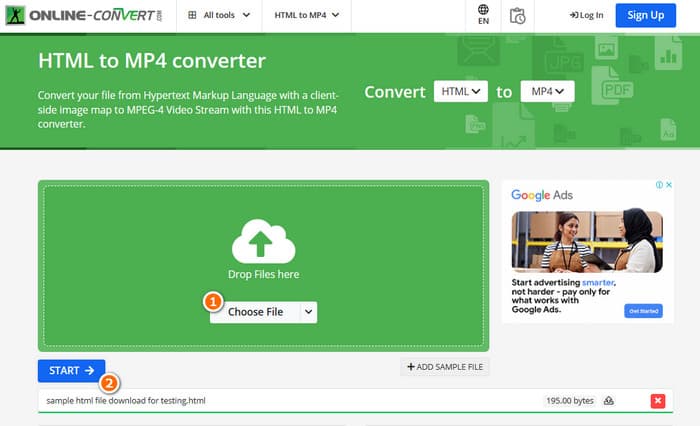
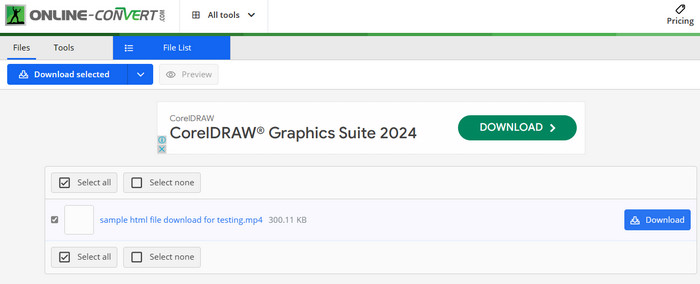
ขั้นตอนที่ 3. เมื่อการแปลงเสร็จสมบูรณ์ คุณจะต้องดาวน์โหลดไฟล์ที่แปลงแล้วเพื่อบันทึกลงในอุปกรณ์ของคุณ.
2. แปลง
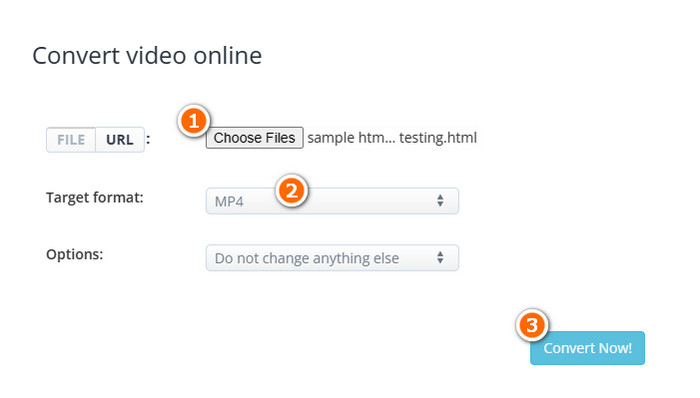
ตัวแปลงที่ยืดหยุ่นอีกตัวที่ช่วยให้คุณสามารถแปลง HTML เป็น MP4 ออนไลน์ได้คือ AConvert ตัวแปลงเฉพาะนี้เป็นเครื่องมือที่ใช้งานง่ายสำหรับการแปลงไฟล์รูปแบบต่างๆ โดยไม่มีค่าใช้จ่าย นอกจากนี้ AConvert ยังได้รับการออกแบบมาเพื่อรองรับทุกคนที่มีหรือไม่มีประสบการณ์ที่ต้องการบริการแปลงไฟล์ออนไลน์ หนึ่งในคุณสมบัติที่โดดเด่นของมันคือการแปลงเป็นกลุ่ม ซึ่งช่วยให้คุณสามารถแปลงไฟล์หลายไฟล์ได้ในคราวเดียว ซึ่งช่วยประหยัดเวลาเมื่อคุณมีไฟล์จำนวนมากที่ต้องดำเนินการ อย่างไรก็ตาม กระบวนการแปลงอาจใช้เวลานานกว่าที่คาดไว้เล็กน้อย และโฆษณาบนเว็บไซต์อาจรบกวนเล็กน้อย ในขณะเดียวกัน ต่อไปนี้เป็นคำแนะนำโดยย่อเพื่อช่วยคุณแปลงไฟล์ HTML โดยใช้ AConvert
ขั้นตอนที่ 1. เมื่อเข้าสู่หน้าเครื่องมือแปลงไฟล์อย่างเป็นทางการแล้ว ให้คลิกปุ่ม Choose Files จากนั้นเลือกไฟล์ HTML ที่คุณต้องการจะแปลง.
ขั้นตอนที่ 2. หลังจากนั้นไปที่ส่วน Target format แล้วเลือก MP4 เป็นรูปแบบเอาต์พุตของคุณ.
ขั้นตอนที่ 3. เมื่อทุกอย่างตั้งค่าเรียบร้อยแล้ว ให้คลิกปุ่ม Convert Now เพื่อเริ่มกระบวนการ เมื่อการแปลงสำเร็จ ให้ดาวน์โหลดไฟล์ที่แปลงแล้วออกมาเก็บไว้.
3. Converterpoint - แปลงวิดีโอออนไลน์ HTML5
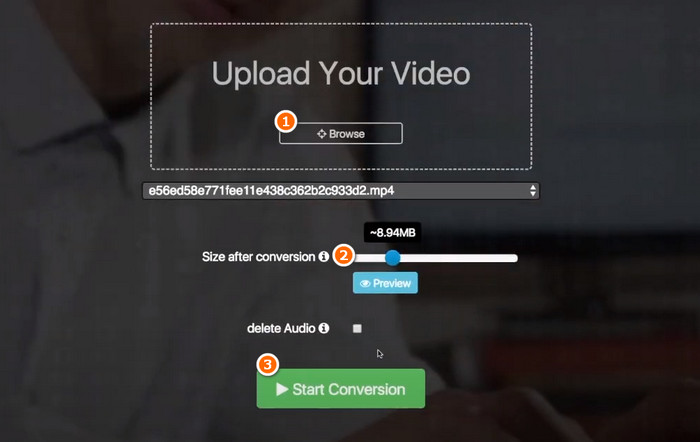
เพื่อให้ชุดตัวแปลงออนไลน์อันทรงพลังทั้ง 3 ตัวของเราสำหรับ HTML เสร็จสมบูรณ์ นี่คือ Converterpoint เครื่องมือออนไลน์นี้อาจมีประโยชน์ไม่เฉพาะสำหรับผู้ใช้ทั่วไปเท่านั้น แต่ยังรวมถึงบุคคลหรือธุรกิจที่ต้องการแปลงวิดีโอเพื่อใช้บนเว็บไซต์ แพลตฟอร์มโซเชียลมีเดีย หรือช่องทางดิจิทัลอื่น ๆ ที่รองรับ HTML5
ขั้นตอนที่ 1. อัปโหลดวิดีโอของคุณโดยคลิกปุ่ม Browse.
ขั้นตอนที่ 2. เมื่ออัปโหลดเสร็จแล้ว ให้ตั้งค่าขนาดไฟล์เอาต์พุตตามที่คุณต้องการหลังการแปลง.
ขั้นตอนที่ 3. จากนั้นคลิกปุ่ม Start Conversion เพื่อเริ่มกระบวนการ.
ส่วนที่ 3 เคล็ดลับโบนัส: แปลงรูปแบบสื่อเป็น MP4 ออนไลน์ฟรี
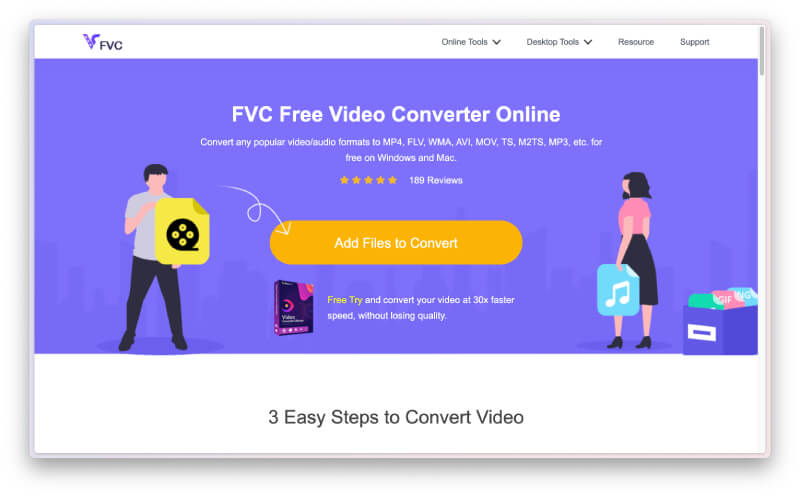
ยังไม่จุใจและต้องการมากกว่าตัวแปลงไฟล์ออนไลน์ธรรมดา ๆ สำหรับแปลง HTML เป็น MP4 ใช่ไหม ลองดูว่า FVC Free Video Converter Online จะช่วยคุณจัดการงานแปลงไฟล์วิดีโอและเสียงต่าง ๆ ได้อย่างไร นี่คือโปรแกรมแปลงไฟล์มีเดียที่ยอดเยี่ยมซึ่งให้คุณแปลงไฟล์ได้ไม่จำกัดจำนวนโดยไม่มีข้อจำกัดใด ๆ อีกทั้งยังมีความรวดเร็วในการประมวลผลการแปลง เพราะทำงานด้วยเทคโนโลยีพิเศษที่ช่วยให้การแปลงไฟล์เร็วกว่าตัวอื่น ๆ อย่างเห็นได้ชัด ดังนั้น หากคุณมีไฟล์เสียงหรือวิดีโอจำนวนมากที่ต้องแปลงเป็น MP4 ให้ทำตามขั้นตอนด้านล่างนี้.
ขั้นตอนที่ 1. คลิกปุ่ม Add Files to Convert เมื่อคุณเข้าสู่เว็บไซต์อย่างเป็นทางการของเครื่องมือนี้ การคลิกจะทำให้คุณสามารถอัปโหลดไฟล์แรกได้.
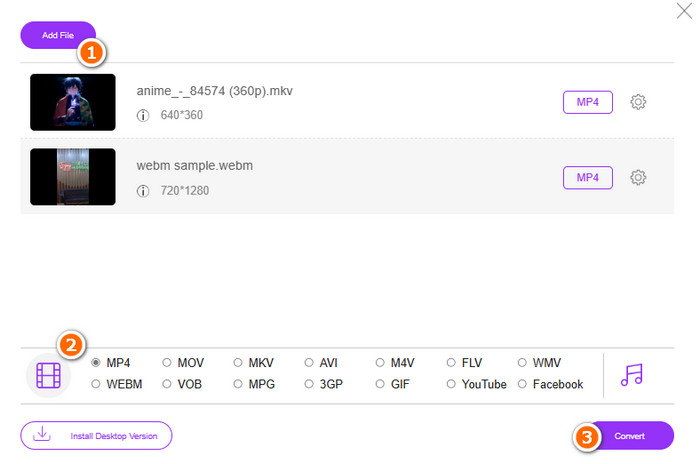
ขั้นตอนที่ 2. หลังจากเลือกไฟล์แรกเพื่ออัปโหลดแล้ว คุณสามารถอัปโหลดเพิ่มเติมได้ด้วยการคลิกปุ่ม Add file ในหน้าต่างหลัก จากนั้นตั้งค่าให้ไฟล์เป็นรูปแบบ MP4 โดยสลับเลือกฟอร์แมตจากตำแหน่งที่ด้านล่าง.
ขั้นตอนที่ 3. สุดท้าย คลิกปุ่ม Convert เพื่อเริ่มกระบวนการแปลงไฟล์แบบกลุ่ม.
ส่วนที่ 4. คำถามที่พบบ่อยเกี่ยวกับไฟล์ HTML เป็นการแปลง MP4
ไฟล์ HTML สามารถแปลงเป็นรูปแบบ MP4 ได้หรือไม่
ได้ ไฟล์ HTML สามารถแปลงเป็นรูปแบบ MP4 ได้โดยการคัดลอกมาเป็นไฟล์ของคุณเองแล้วแปลงให้เป็น MP4.
การแปลงไฟล์ HTML เป็นรูปแบบ MP4 ใช้เวลานานเท่าใด
ระยะเวลาขึ้นอยู่กับหลายสิ่งเสมอ เช่น ขนาดไฟล์ใหญ่แค่ไหน และเครื่องมือแปลงไฟล์มีความน่าเชื่อถือเพียงใด
ฉันสามารถบันทึกวิดีโอ HTML ได้หรือไม่
ได้ ทำได้เช่นกัน คุณยังสามารถหา โปรแกรมบันทึกวิดีโอ MP4 แบบฟรีออนไลน์ เพื่อช่วยบันทึกหน้าจอในขณะที่วิดีโอ HTML กำลังเล่นอยู่ได้ด้วย.
สรุป
ด้านบนคือเครื่องมือแปลงไฟล์ออนไลน์ที่มีชื่อเสียงในการแปลงHTML เป็น MP4 ตอนนี้คุณมีตัวเลือกมากมายสำหรับใช้ในการแปลงไฟล์ ในทางกลับกัน หากคุณต้องการโปรแกรมแปลงไฟล์เสียงและวิดีโอที่มีชื่อเสียง ซึ่งโดดเด่นทั้งในกระบวนการแปลงและสามารถผลิตไฟล์เอาต์พุตคุณภาพสูงได้ FVC Free Video Converter Online คือทางเลือกที่ดีที่สุด.
-
 วิธีแปลง RAR เป็น MP4 ทั้งแบบออนไลน์และออฟไลน์
 หากคุณกำลังมองหาตัวแปลง RAR เป็น MP4 ที่มีประสิทธิภาพ แสดงว่าคุณมาถูกที่หน้าแล้ว โพสต์นี้ให้ช่องทางออนไลน์และออฟไลน์ในการซื้อ
-
 AVCHD กับ MP4: ทบทวนว่าควรเลือกอันไหนดีกว่า
 ดูโพสต์ AVCHD กับ MP4 และเรียนรู้ว่ารูปแบบวิดีโอใดที่เหมาะกับคุณที่สุด ขุดข้อมูลเพิ่มเติมเพื่อทราบคำอธิบาย ความแตกต่าง ฯลฯ
-
 เทคนิคที่ดีที่สุดในการแปลง HEIC เป็น MP4 อย่างมีประสิทธิภาพ
 เรียนรู้วิธีที่ดีที่สุดในการแปลง HEIC เป็น MP4 บนคอมพิวเตอร์และอุปกรณ์ iPhone ของคุณ โพสต์นี้มีเทคนิคสำหรับการแปลงที่มีประสิทธิภาพ
