


 Video Converter Ultimate
 บันทึกหน้าจอ
 ซ่อมวิดีโอ
 ดาวน์โหลดอย่างปลอดภัย
ซ่อมแซมไฟล์ AVI ด้วยการแก้ไขด่วนและด้วยตนเอง
ไฟล์ Audio Video Interleave หรือ AVI ได้รับความนิยมอย่างมากในการรับชมสื่อในยุคปัจจุบัน โดยทำหน้าที่เป็นวิธีที่ได้รับความนิยมในการแชร์เพลงและภาพยนตร์ในหมู่ผู้ที่ชื่นชอบวิดีโอ อย่างน่าทึ่ง ไฟล์ AVI ทำงานเป็นรูปแบบคอนเทนเนอร์ดิจิทัลที่ออกแบบมาเฉพาะสำหรับจัดเก็บเนื้อหาเสียงและวิดีโอ นอกจากนี้ ไฟล์เหล่านี้ยังสามารถเล่นได้ผ่านแพลตฟอร์มและแอปพลิเคชันหลากหลาย ทำให้เข้ากันได้กับเครื่องเล่นสื่อดิจิทัลหลายประเภท แม้จะมีจุดเด่นมากมาย แต่ไฟล์ AVI ก็อาจเกิดความเสียหายหรือถูกทำลายได้เป็นครั้งคราว อย่างไรก็ตาม ไม่จำเป็นต้องกังวล! มีหลายวิธีที่จะช่วยคุณซ่อมแซมไฟล์ AVI ให้กลับมาเล่นได้อีกครั้ง และต่อไปนี้คือวิธีแก้ไขที่พบบ่อยซึ่งคุณควรลองใช้.

ส่วนที่ 1 ทำไมคุณต้องแก้ไขไฟล์วิดีโอ AVI
การแก้ไขไฟล์วิดีโอ AVI กลายเป็นสิ่งจำเป็นด้วยเหตุผลสำคัญบางประการ การทำความเข้าใจเหตุผลเหล่านี้จะช่วยให้คุณเห็นความสำคัญของวิธีการแก้ไขไฟล์ที่มีประสิทธิภาพ
• เนื่องจากไฟล์เสียหาย
การทุจริตสามารถเกิดขึ้นได้ในไฟล์วิดีโอทุกประเภทเนื่องจากปัจจัยต่างๆ เช่น การดาวน์โหลดที่ไม่สมบูรณ์ ระบบล่ม หรือข้อผิดพลาดระหว่างการถ่ายโอนไฟล์ ไฟล์ AVI เช่นเดียวกับไฟล์อื่นๆ มีความเสี่ยงที่จะเกิดความเสียหาย
• เนื่องจากปัญหาเครื่องเล่นสื่อ
ความเข้ากันไม่ได้กับเครื่องเล่นเวอร์ชันเก่าหรือเครื่องเล่นมีเดียบางตัวอาจทำให้ไฟล์ AVI ทำงานผิดปกติได้
• เนื่องจากมัลแวร์หรือไวรัส
อีกเหตุผลหนึ่งก็คือไฟล์ AVI อาจเสี่ยงต่อการโจมตีของไวรัสหรือมัลแวร์ ซึ่งอาจนำไปสู่ความเสียหายหรือเสียหายได้
• เนื่องจากปัญหาการดาวน์โหลดและการโอนไฟล์
นี่เป็นสาเหตุทั่วไปที่ทำให้ไฟล์หยุดชะงัก: เกิดข้อผิดพลาดระหว่างกระบวนการถ่ายโอนไฟล์ AVI จากอุปกรณ์เครื่องหนึ่งไปยังอีกเครื่องหนึ่ง อาจมีข้อผิดพลาดที่ส่งผลให้ไฟล์เสียหาย
ส่วนที่ 2 แก้ไขด่วนเพื่อซ่อมแซมไฟล์วิดีโอ AVI
ตามที่สัญญาไว้ นี่คือวิธีแก้ปัญหาอย่างรวดเร็วสำหรับขั้นตอนการซ่อมไฟล์ AVI FVC-picked Video Repair เป็นเครื่องมือที่ใช้งานสะดวก ออกแบบมาโดยเฉพาะเพื่อซ่อมแซมวิดีโอ AVI ที่ประสบปัญหาซับซ้อนต่าง ๆ นอกจากนี้ ยังยอดเยี่ยมในการจัดการกับปัญหาที่ซับซ้อนมากขึ้น เช่น ความเสียหายและข้อผิดพลาดในส่วนดัชนี (index chunk) ของวิดีโอ เครื่องมือนี้จะซ่อมข้อผิดพลาดเหล่านั้นและปรับโครงสร้างส่วนต่าง ๆ ของวิดีโอที่อาจผิดเพี้ยนไป จากนั้นจึงประกอบให้เป็นสตรีมวิดีโอที่เล่นได้ แม้ว่าไฟล์จะเสียหายบางส่วนหรือไม่สมบูรณ์ก็ตาม.
สิ่งที่ทำให้มันแตกต่างก็คือ การซ่อมแซมวิดีโอนี้ใช้อัลกอริธึมการซ่อมแซมที่ซับซ้อนเพื่อซ่อมแซมไฟล์ AVI ที่เสียหาย โดยไม่กระทบต่อคุณภาพของวิดีโอและเสียง และนี่คือสิ่งที่ทำให้มันเป็นวิธีแก้ปัญหาที่รวดเร็วสำหรับการซ่อมแซมไฟล์ AVI หลังจากกระบวนการซ่อมแซม ไฟล์วิดีโอจะสามารถเล่นได้อีกครั้งในซอฟต์แวร์มีเดียต่างๆ
ขั้นตอนที่ 1 ก่อนอื่น ให้เลื่อนเคอร์เซอร์ของคุณแล้วคลิกปุ่ม ดาวน์โหลด ด้านล่าง จากนั้นทำการติดตั้งซอฟต์แวร์บนคอมพิวเตอร์ของคุณให้เรียบร้อย.
ดาวน์โหลดฟรีสำหรับ Windows 7 หรือใหม่กว่าดาวน์โหลดอย่างปลอดภัย
ดาวน์โหลดฟรีสำหรับ macOS 10.7 หรือใหม่กว่าดาวน์โหลดอย่างปลอดภัย
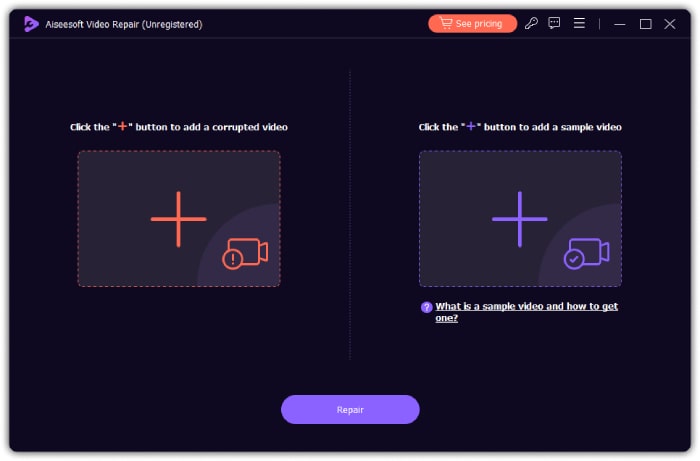
ขั้นตอนที่ 2 หลังจากติดตั้งลงคอมพิวเตอร์แล้ว ให้เปิดโปรแกรมขึ้นมาและเริ่มนำเข้าไฟล์ AVI ที่เสียหายของคุณ วิธีทำคือคลิกปุ่ม เครื่องหมายบวกสีแดง ทางด้านซ้าย จากนั้นคุณต้องคลิกปุ่มเพิ่มไฟล์อีกปุ่มเพื่ออัปโหลดไฟล์วิดีโอตัวอย่าง ซึ่งอาจเป็นไฟล์ AVI หรือวิดีโอรูปแบบอื่นก็ได้.
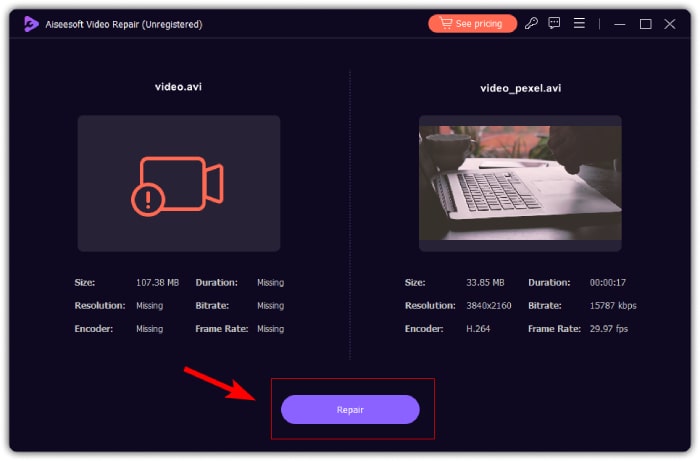
ขั้นตอนที่ 3 เมื่อเตรียมวิดีโอเสร็จแล้ว ให้คลิกปุ่ม ซ่อมแซม สิ่งที่คุณต้องทำต่อจากนี้คือรอสักครู่ไม่กี่วินาที แล้วจึงดำเนินการส่งออกไฟล์ AVI ที่ซ่อมแซมเรียบร้อยแล้ว.
ส่วนที่ 3 การแก้ไขด้วยตนเองเพื่อแก้ไขไฟล์ AVI (แนวทางแก้ไขปัญหาทั่วไป)
หากคุณต้องการลองใช้วิธีแก้ไขปัญหาทั่วไปหรือการแก้ไขด้วยตนเองเพื่อแก้ไขไฟล์วิดีโอของคุณใน AVI
1. ค้นหาและใช้เครื่องเล่นสื่ออื่น
ผู้ใช้ส่วนใหญ่มักใช้โปรแกรมเล่นวิดีโอเริ่มต้นของเครื่องเมื่อดูวิดีโอบนพีซี ดังนั้น เมื่อวิดีโอไม่เล่นบน Windows Media Player ของคุณ ให้ลองใช้โปรแกรมเล่นสื่ออื่นแทนโปรแกรมที่ใช้อยู่ เพราะปัญหาในไฟล์ AVI อาจไม่ได้อยู่ที่ตัวไฟล์เสมอไป แต่อาจเกิดจากโปรแกรมเล่นสื่อที่ใช้ ดังนั้นการทดสอบเปิดไฟล์กับโปรแกรมเล่นวิดีโอหลาย ๆ ตัวจะช่วยให้คุณระบุได้ว่าปัญหาอยู่ที่โปรแกรมเล่นตัวใด และช่วยชี้ทางไปสู่การแก้ไขที่เหมาะสมเพื่อให้เล่นวิดีโอได้อย่างราบรื่นที่สุด.
2. ตรวจสอบปัญหาดิสก์
ถัดไปคือการตรวจสอบยูทิลิตี้ดิสก์และแก้ไขข้อผิดพลาดของดิสก์ที่อาจเกิดขึ้น โดยเฉพาะอย่างยิ่งเมื่อไฟล์ AVI ของคุณถูกบันทึกลงในคอมพิวเตอร์ของคุณ การจัดการกับเซกเตอร์เสียบนฮาร์ดไดรฟ์เป็นสิ่งสำคัญ เนื่องจากมีศักยภาพที่จะทำให้ไฟล์เสียหายได้ โดยเฉพาะในกรณีของวิดีโอ AVI นอกจากนี้ การใช้ยูทิลิตี้ดิสก์เป็นประจำเพื่อระบุและแก้ไขปัญหาเหล่านี้จะส่งผลต่อสุขภาพโดยรวมและความสมบูรณ์ของไฟล์ AVI ที่จัดเก็บไว้ของคุณ
3. ตรวจสอบตัวแปลงสัญญาณของ AVI
โค้เดก (codec) ทำหน้าที่เป็นกรอบการทำงานที่กำหนดกระบวนการบีบอัดและคลายการบีบอัด (compression & decompression) สำหรับไฟล์ AVI ซึ่งครอบคลุมทั้งส่วนของเสียงและวิดีโอ โดยจะผ่านตัวบีบอัดเพื่อสร้างไฟล์ที่ถอดรหัสแล้วในระหว่างขั้นตอนการคลายการบีบอัด หากไฟล์ AVI ของคุณเสียหาย หรือโค้ดกวิดีโอไม่รองรับโดยโปรแกรมเล่นของคุณ การตรวจสอบว่าใช้โค้เดกตัวใดจึงเป็นเรื่องสำคัญ การใช้เครื่องมือเฉพาะทางสำหรับระบุโค้เดกจะช่วยให้คุณวิเคราะห์และแก้ไขปัญหาที่อาจเกิดขึ้นกับไฟล์ AVI ของคุณได้.
4. ดาวน์โหลดไฟล์ AVI อีกครั้ง
ครั้งแรกที่คุณดาวน์โหลดไฟล์ AVI ไฟล์นั้นถูกขัดจังหวะ มีโอกาสที่ข้อมูลวิดีโอและเสียงจะไม่ซิงโครไนซ์หรือเสียหาย ดังนั้นวิธีหนึ่งที่ใช้กันทั่วไปและมีประสิทธิภาพในการซ่อมแซมไฟล์ AVI ดังกล่าวคือการเรียกคืนไฟล์เหล่านั้น ดังนั้น ให้กลับมาที่แหล่งที่มาดั้งเดิมของไฟล์และเริ่มการดาวน์โหลดใหม่เพื่อให้แน่ใจว่ามีการผสานรวมระหว่างส่วนประกอบเสียงและวิดีโอในระบบของคุณได้อย่างราบรื่น
ส่วนที่ 4 คำถามที่พบบ่อยเกี่ยวกับการแก้ไขวิดีโอ AVI
เครื่องมือซ่อมแซม AVI ที่ดีที่สุดคืออะไร?
ตัวเลือกการซ่อมแซมไฟล์ AVI ที่ดีที่สุดอาจแตกต่างกันไป แต่หากคุณต้องการทราบเครื่องมือวิดีโอที่แนะนำมากที่สุดเนื่องจากความทนทาน เครื่องมือซ่อมวิดีโอที่แนะนำคือ FVC
ฉันจะแก้ไขดัชนี AVI อย่างถาวรได้อย่างไร
ซ่อมแซมดัชนี AVI คุณสามารถใช้เครื่องมือพิเศษที่ออกแบบมาเพื่อซ่อมแซมหรือสร้างดัชนีของไฟล์ AVI ใหม่ เพื่อแก้ไขปัญหาที่เกี่ยวข้องกับดัชนี
ฉันจะตรวจสอบข้อผิดพลาดในไฟล์ AVI ได้อย่างไร
ใช้เครื่องมือวินิจฉัยเพื่อตรวจสอบข้อผิดพลาดในไฟล์ AVI ของคุณ เครื่องมือที่สามารถระบุและรายงานข้อผิดพลาดหรือความไม่สอดคล้องกันในไฟล์ AVI ซึ่งช่วยให้คุณประเมินความสมบูรณ์ของไฟล์ได้
สรุป
บทความนี้ได้รวบรวมวิธีแก้ไขที่รวดเร็วและพบได้บ่อยในการซ่อมแซมไฟล์ AVI นอกจากนี้ ยังอธิบายเหตุผลที่ต้องซ่อมแซมไฟล์วิดีโอดังกล่าวเพื่อช่วยให้คุณเข้าใจถึงความสำคัญของงานซ่อมแซมนี้ ในขณะเดียวกัน หากคุณมีไฟล์วิดีโอที่เสียหายและไม่สามารถดาวน์โหลดใหม่ได้อีก FVC-picked Video Repair ก็สามารถเป็นตัวช่วยที่รวดเร็วให้คุณได้ เป็นเครื่องมือซ่อมวิดีโอที่ทรงพลัง เหมาะอย่างยิ่งในการช่วยเปลี่ยนไฟล์วิดีโอที่เสียหายของคุณให้กลับคืนสู่สภาพต้นฉบับ!
-
 รหัสข้อผิดพลาด 232011: คืออะไรและจะแก้ไขได้อย่างไร
 เรียนรู้วิธีแก้ไขและแก้ไขรหัสข้อผิดพลาด 232011 บนคอมพิวเตอร์ของคุณด้วยเคล็ดลับที่ง่ายและมีประสิทธิภาพเหล่านี้ อย่าปล่อยให้ข้อผิดพลาดนี้รบกวนการใช้งานคอมพิวเตอร์ของคุณอีกต่อไป!
-
 วิธีแก้ไขรหัสข้อผิดพลาด 102630 อย่างรวดเร็วและด้วยตนเอง
 อย่าปล่อยให้รหัสข้อผิดพลาด 102630 มาทำลายประสบการณ์การรับชมของคุณ! เรียนรู้วิธีแก้ไขด้วยคำแนะนำที่เป็นประโยชน์ของเรา ปฏิบัติตามคำแนะนำที่ครอบคลุมเหล่านี้เพื่อการแก้ไขอย่างรวดเร็ว
-
 วิธีซ่อมแซมไฟล์ MP4: กู้คืนวิดีโอของคุณในไม่กี่นาที
 ไขความลับของการซ่อม MP4! ปฏิบัติตามบทช่วยสอนที่เข้าใจง่ายของเราเพื่อแก้ไขปัญหาและแก้ไข อย่าปล่อยให้วิดีโอที่เสียหายมาทำลายประสบการณ์สื่อของคุณ
