


 Video Converter Ultimate
 บันทึกหน้าจอ
 ซ่อมวิดีโอ
 ดาวน์โหลดอย่างปลอดภัย
วิธีบีบอัดรูปภาพสำหรับ Discord Emoji [คู่มือสำหรับผู้เริ่มต้น]
ปัจจุบัน Discord ได้รับความนิยมและถูกนำไปใช้ในหลากหลายจุดประสงค์ทั่วโลก โดย Discord ได้กลายเป็นศูนย์กลางของชุมชนประเภทต่างๆ เช่น เกมเมอร์ นักเรียน ผู้เชี่ยวชาญ และอื่นๆ
หนึ่งในข้อดีของการใช้ Discord คือฟีเจอร์เชิงโต้ตอบ ที่ให้ผู้ใช้ส่งอีโมจิแบบกำหนดเองได้ ทำให้การสนทนาดูมีเอกลักษณ์และสร้างสรรค์มากขึ้น อย่างไรก็ตาม แพลตฟอร์มนี้มีการจำกัดขนาดไฟล์สำหรับอีโมจิเหล่านี้ โดยต้องมีขนาดไม่เกิน 128x128 พิกเซล และมีขนาดไฟล์น้อยกว่า 256KB ดังนั้น เพื่อให้อัปโหลดได้ราบรื่นและโหลดอีโมจิแบบกำหนดเองได้อย่างรวดเร็ว ผู้ใช้จึงจำเป็นต้องบีบอัดรูปภาพสำหรับ Discordให้ตรงตามข้อกำหนดดังกล่าว หากต้องการคำแนะนำที่ชัดเจนยิ่งขึ้น โปรดอ่านต่อด้านล่าง.

ตอนที่ 1. วิธีบีบอัดรูปภาพสำหรับ Discord Emoji ด้วยการคลิกเพียงครั้งเดียว (Batch Compress)
วิธีที่ง่ายที่สุดในการบีบอัดรูปภาพสำหรับอีโมจิ Discord โดยเฉพาะอย่างยิ่งเมื่อคุณมีไฟล์รูปภาพจำนวนมากที่ต้องบีบอัด คือการใช้เครื่องมือ FVC Free Image Compressor ซึ่งเป็นตัวบีบอัดภาพออนไลน์ฟรีที่สามารถบีบอัดภาพได้พร้อมกันสูงสุดถึง 40 รูป ช่วยให้ไม่ต้องบีบอัดทีละรูปซ้ำไปมา นอกจากนี้ เครื่องมือนี้ยังมีอินเทอร์เฟซที่ใช้งานง่ายมาก เพียงอัปโหลดไฟล์ ระบบก็จะประมวลผลการบีบอัดให้อัตโนมัติ สุดท้าย เครื่องมือนี้ยังรองรับไฟล์ภาพยอดนิยมหลายประเภท เช่น รูป JPEG, PNG, SVG และภาพ GIF เคลื่อนไหว.
วิธีบีบอัดรูปภาพสำหรับอีโมจิ Discord ด้วย FVC Free Image Compressor
ขั้นตอนที่ 1 ก่อนอื่น คุณต้องเข้าไปที่เว็บไซต์ทางการของเครื่องมือนี้ก่อน.
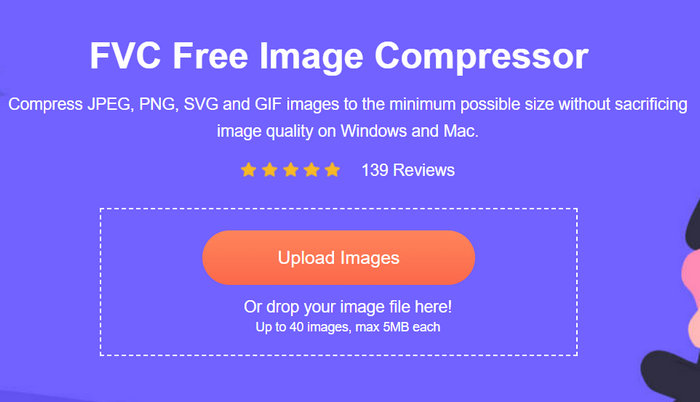
ขั้นตอนที่ 2 จากนั้นคลิก Upload Images เพื่อนำเข้ารูปภาพที่คุณต้องการบีบอัดแบบเป็นชุดสำหรับอีโมจิ Discord.
ขั้นตอนที่ 3 หลังจากบีบอัดเสร็จแล้ว คุณสามารถดูตัวอย่างขนาดไฟล์ใหม่ของรูปภาพที่ถูกบีบอัดได้ จากนั้นคลิก Download All เพื่อบันทึกรูปภาพของคุณ.
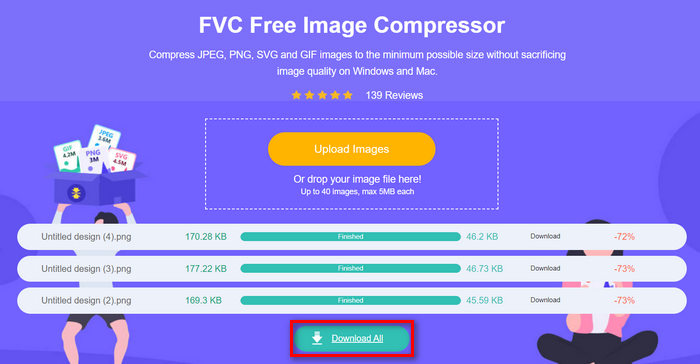
เห็นไหม ว่าง่ายสุด ๆ เครื่องมือนี้เหมาะมากสำหรับผู้ใช้ Discord ที่ต้องการเครื่องมือบีบอัดสำหรับอีโมจิของตนเอง และถึงแม้ว่าขนาดไฟล์จะลดลงอย่างมาก แต่คุณภาพของรูปภาพก็แทบไม่ต่างจากเดิม นอกจากนี้ ยังมีตัวบีบอัดวิดีโอสำหรับ Discord ให้คุณเลือกใช้ด้วย.
ส่วนที่ 2. บีบอัดภาพสำหรับ Discord Emoji ด้วยคุณภาพที่ปรับได้
ในขณะเดียวกัน หากคุณกำลังมองหาเครื่องมือบีบอัดที่สามารถบีบอัดรูปภาพสำหรับ Discord Emoji ด้วยคุณภาพที่ปรับได้ Shrink Media อาจเป็นตัวเลือกที่ดีที่สุดสำหรับคุณ หนึ่งในคุณสมบัติที่โดดเด่นของ Shrink Media คือความสามารถในการรักษาคุณภาพของรูปภาพระหว่างการบีบอัด เครื่องมือนี้จะแสดงข้อมูลอย่างชัดเจนว่าขนาดรูปภาพลดลงไปเท่าใด ช่วยให้คุณปรับสมดุลระหว่างขนาดไฟล์และคุณภาพได้
สุดท้ายนี้ แตกต่างจากเครื่องมือปรับขนาดรูปภาพอื่นๆ Shrink Media ช่วยให้ผู้ใช้ปรับคุณภาพเมื่อบีบอัดรูปภาพได้
วิธีบีบอัดรูปภาพสำหรับอีโมจิ Discord ด้วย Shrink media
ขั้นตอนที่ 1 เริ่มจากนำเข้าไฟล์รูปภาพที่คุณต้องการบีบอัดสำหรับอีโมจิ Discord โดยคลิกปุ่ม Upload Image หรือจะลากรูปภาพมาวาง หรือติดลิงก์ URL เพื่อดึงไฟล์เข้าสู่ระบบก็ได้.
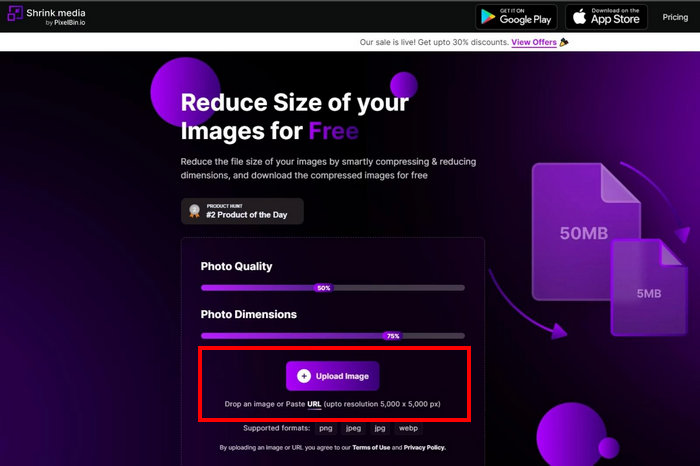
ขั้นตอนที่ 2 จากนั้นระบบจะบีบอัดรูปภาพของคุณโดยอัตโนมัติ.
ขั้นตอนที่ 3 หลังจากบีบอัดเสร็จแล้ว จะมีตัวอย่างรูปภาพที่ถูกบีบอัดให้ดู ซึ่งคุณสามารถปรับ Photo Quality และ Photo Dimension ได้ เมื่อปรับเสร็จแล้วเพียงคลิกปุ่ม Download เพื่อบันทึกลงในอุปกรณ์ของคุณ.
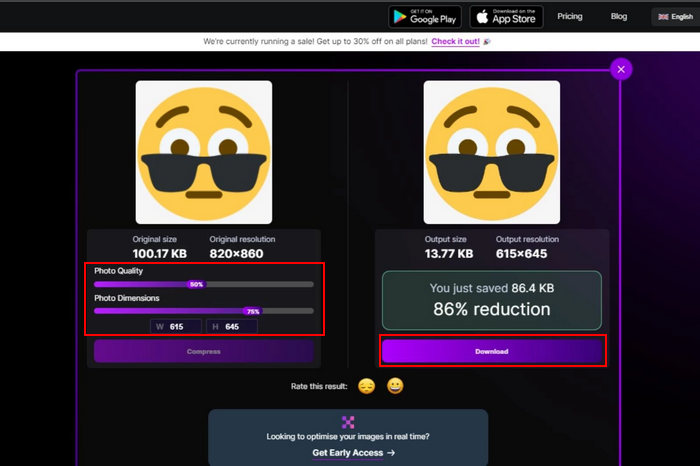
Shrink Media เป็นเครื่องมือที่ยอดเยี่ยมในการบีบอัดรูปภาพสำหรับอีโมจิ Discord โดยเฉพาะอย่างยิ่งเนื่องจากความสามารถในการปรับคุณภาพ อย่างไรก็ตาม การบีบอัดข้อมูลอาจใช้เวลานาน คุณสามารถบีบอัดรูปภาพได้ครั้งละภาพเท่านั้น อย่างไรก็ตาม หากคุณต้องการบีบอัดรูปภาพเพียงไม่กี่ภาพ เครื่องมือนี้อาจเป็นวิธีแก้ปัญหาที่ยอดเยี่ยมสำหรับความต้องการบีบอัดข้อมูลของคุณ
ส่วนที่ 3. บีบอัดภาพสำหรับ Discord ด้วยการตั้งค่าขั้นสูง
เมื่อคุณกำลังมองหาเครื่องมือที่มีการตั้งค่าขั้นสูงเพื่อบีบอัดรูปภาพของคุณสำหรับอีโมจิ Discord แล้ว Compress-or-Die คือเครื่องมือบีบอัดที่สมบูรณ์แบบสำหรับคุณ เครื่องมือบีบอัดรูปภาพออนไลน์นี้ไม่เพียงแต่ลดขนาดรูปภาพของไฟล์ของคุณเท่านั้น แต่ยังวิเคราะห์และซ่อมแซมไฟล์เหล่านั้นอีกด้วย
ขั้นตอนที่ 1 ก่อนอื่นให้นำเข้าไฟล์รูปภาพโดยคลิกปุ่ม Select File คุณยังสามารถลากแล้ววางไฟล์ หรือวาง URL ได้เช่นกัน.
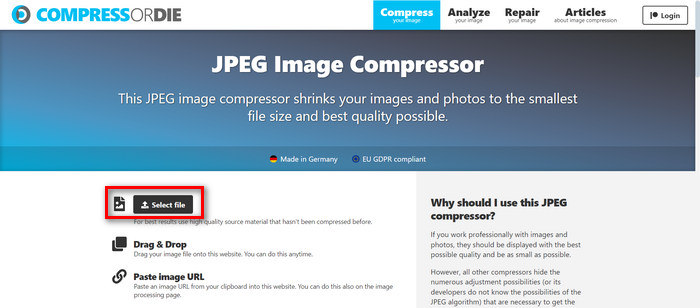
ขั้นตอนที่ 2 เมื่อคุณเลือกไฟล์รูปภาพแล้ว ระบบจะบีบอัดให้โดยอัตโนมัติ.
ขั้นตอนที่ 3 หลังจากบีบอัดเสร็จ คุณจะเห็นขนาดไฟล์ใหม่ของรูปภาพนั้น.
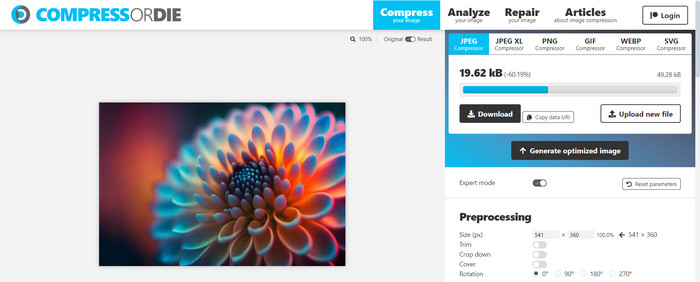
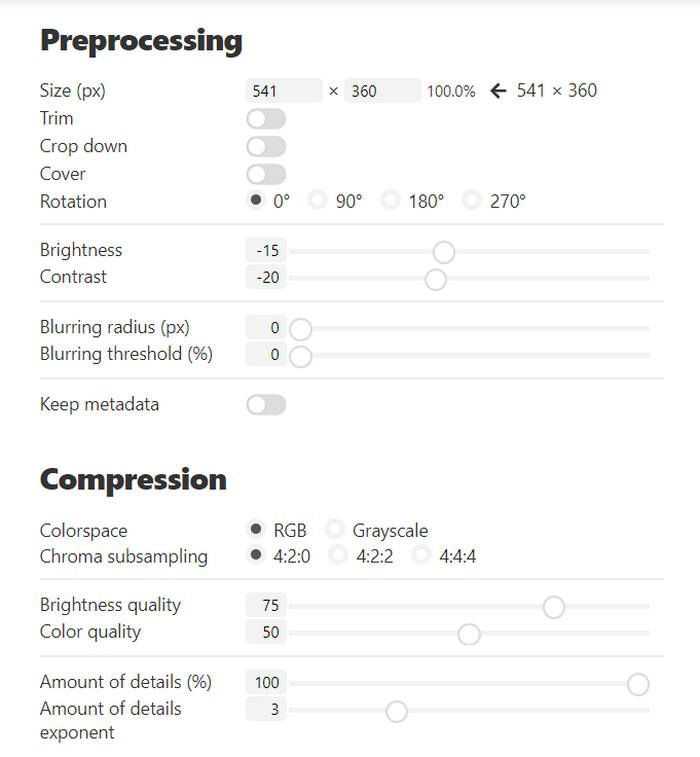
ขั้นตอนที่ 4 จากนั้น หากต้องการปรับแต่งรูปภาพที่บีบอัดไว้สำหรับอีโมจิ Discord คุณสามารถเปลี่ยนขนาด ตัด ขยาย ครอบตัด หมุน รวมถึงปรับความสว่างหรือความคมชัดได้ในส่วน Preprocessing นอกจากนี้ คุณยังสามารถปรับ colorspace และรายละเอียดอื่น ๆ ของรูปภาพได้ในส่วน Compression.
ขั้นตอนที่ 5 สุดท้ายให้เลื่อนกลับขึ้นไปด้านบน คลิก Generate optimized image แล้วคลิก Download เพื่อบันทึกไฟล์รูปภาพ.
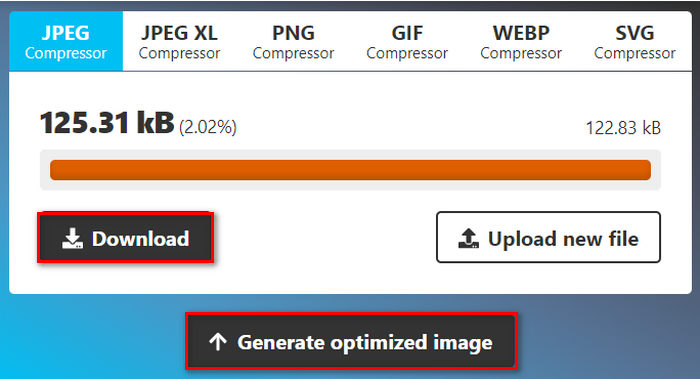
เครื่องมือนี้โดดเด่นตรงที่มีวิธีการบีบอัดรูปภาพสำหรับอีโมจิ Discord แบบครบวงจร เพียงแต่เนื่องจากปัญหาหลักของการส่งหรืออัปโหลดอีโมจิใน Discord คือข้อจำกัดด้านขนาดไฟล์ ดังนั้นฟีเจอร์บีบอัดเพียงอย่างเดียวก็มักจะเพียงพอแล้ว แต่หากคุณต้องการปรับแต่งและเพิ่มคุณภาพรูปภาพที่บีบอัด เครื่องมือนี้ก็ถือว่าเหมาะกับคุณ นอกจากนี้ คุณยังสามารถคลิกที่นี่เพื่อเรียนรู้วิธีลบอีโมจิออกจากรูปภาพ ได้อีกด้วย.
ตอนที่ 4. การเปรียบเทียบเครื่องมือบีบอัดรูปภาพ 3 ตัวสำหรับ Discord Emoji
| เครื่องมือบีบอัดภาพ | รูปแบบ | คุณสมบัติ | ขนาดจำกัด | คุณภาพ |
| FVC Free Image Compressor | รูปภาพ JPEG, PNG, SVG และ GIF เคลื่อนไหว | การบีบอัดแบบแบตช์ ใช้อัลกอริธึมการเพิ่มประสิทธิภาพและการบีบอัดขั้นสูง กระบวนการบีบอัดที่รวดเร็วและมีประสิทธิภาพ บีบอัดรูปภาพโดยอัตโนมัติ | 5MB | คุณภาพสูง |
| สื่อหด | PNG, JPEG, WEBP และ HEIC | ควบคุมคุณภาพและขนาดของภาพถ่ายได้อย่างแม่นยำ บีบอัดภาพโดยอัตโนมัติ | 3MB | คุณภาพมาตรฐาน |
| คอมเพรสเซอร์หรือได | JPEG, PNG, GIF, WebP และ SVG | คุณสมบัติการแก้ไขการประมวลผลล่วงหน้าและการบีบอัด บีบอัดภาพโดยอัตโนมัติ | 8MB | คุณภาพมาตรฐาน |
ส่วนที่ 5 คำถามที่พบบ่อยเกี่ยวกับการบีบอัดรูปภาพสำหรับ Discord Emoji
อิโมจิตัวไหนต้องมีขนาดไม่เกิน 256KB?
Discord กำหนดขีดจำกัดขนาดไฟล์สำหรับอีโมจิที่กำหนดเองทุกตัวที่ใช้บนแพลตฟอร์มของตน โดยต้องอัปโหลดทั้งหมดไปยัง Discord ด้วยขนาด 256KB ด้านล่าง การจำกัดนี้ช่วยให้โหลดอีโมจิได้อย่างรวดเร็วและไม่ใช้แบนด์วิดท์มากเกินไป จึงมอบประสบการณ์ผู้ใช้ที่ราบรื่น
ขนาดรูปภาพที่ดีที่สุดสำหรับอิโมติคอน Discord คือเท่าไร?
ขนาดรูปภาพที่ดีที่สุดสำหรับอิโมติคอน Discord คือ 128x128 พิกเซล แม้ว่าคุณจะอัปโหลดรูปภาพที่มีขนาดใหญ่กว่านี้ได้ แต่ Discord จะปรับขนาดรูปภาพให้พอดีภายใน 128x128 พิกเซลโดยอัตโนมัติ
อิโมจิ Discord จำเป็นต้องเป็นรูปสี่เหลี่ยมหรือไม่?
ใช่ อีโมจิ Discord ควรอยู่ในรูปสี่เหลี่ยม แม้ว่าผู้ใช้จะยังสามารถอัปโหลดอีโมจิที่ไม่ใช่รูปสี่เหลี่ยมได้ แต่ระบบจะปรับขนาดและครอบตัดให้พอดีกับรูปแบบสี่เหลี่ยม ซึ่งอาจส่งผลให้สูญเสียรายละเอียดสำคัญหรือองค์ประกอบที่ไม่ได้ตั้งใจ เพื่อหลีกเลี่ยงปัญหานี้ ขอแนะนำให้คุณแน่ใจว่าอีโมจิของคุณอยู่ในรูปสี่เหลี่ยม
สรุป
ความจำเป็นในการบีบอัดรูปภาพสำหรับอีโมจิ Discordมีสาเหตุมาจากข้อกำหนดด้านขนาดไฟล์ของแพลตฟอร์ม เพื่อให้แน่ใจว่าโหลดได้อย่างรวดเร็ว ดังนั้น ไม่ว่าคุณจะชอบโซลูชันแบบคลิกครั้งเดียวอย่าง FVC Free Image Compressor การปรับคุณภาพได้เองด้วย Shrink media หรือการตั้งค่าขั้นสูงด้วย Compress-or-Die ก็มีเครื่องมือที่ตอบโจทย์ความต้องการของคุณได้.
พร้อมที่จะเริ่มบีบอัดรูปภาพของคุณหรือยัง ลองใช้เครื่องมือเหล่านี้วันนี้ และทำให้การสนทนาใน Discord ของคุณสนุกและเป็นส่วนตัวมากขึ้น! บีบอัดให้สนุก!
-
 วิธีที่ยอดเยี่ยมในการลบสติกเกอร์ออกจากรูปภาพและวิดีโอ
 คุณต้องการเอาสติกเกอร์ออกจากวิดีโอและรูปภาพอย่างง่ายดายหรือไม่? ต่อไปนี้คือวิธีที่มีประสิทธิภาพ รวมถึงวิธีที่ง่ายที่สุดและน่าเชื่อถือที่สุดที่คุณสามารถลองได้
-
 วิธีที่ตรงไปตรงมาในการลบลายน้ำออกจาก JPG Online
 มาค้นพบกลยุทธ์ที่ดีที่สุดในการลบลายน้ำออกจาก JPG ทางออนไลน์โดยใช้แอปพลิเคชันที่มีประสิทธิภาพ ทำตามบทความนี้เพื่อเรียนรู้ขั้นตอน
-
 คำแนะนำฉบับสมบูรณ์เพื่อลบลายน้ำ iFunny อย่างง่ายดาย
 ค้นพบโปรแกรมลบลายน้ำ iFunny ที่ยอดเยี่ยมที่สุดสำหรับคุณ นอกจากนี้ เรียนรู้วิธีการง่ายๆ เหล่านี้ในการลบลายน้ำ iFunny ออกจากรูปภาพของคุณ
