


 Video Converter Ultimate
 บันทึกหน้าจอ
 ซ่อมวิดีโอ
 ดาวน์โหลดอย่างปลอดภัย
ปรับขนาดรูปภาพเป็น 20KB: 3 วิธีการบีบอัดที่มีประสิทธิภาพ [2024]
มันน่ารำคาญจริงๆ เมื่อคุณส่งไฟล์รูปภาพหรืออัปโหลดไฟล์ใดๆ แล้วพบว่าไม่สามารถประมวลผลได้เนื่องจากไฟล์มีขนาดใหญ่ เป็นที่เข้าใจได้ว่ารูปภาพส่วนใหญ่ในปัจจุบันมีขนาดใหญ่เนื่องจากความละเอียดและคุณภาพสูง แต่ไม่ได้หมายความว่าเราต้องยอมรับความไม่สะดวกนี้
ในบทความนี้ เราจะช่วยคุณแก้ปัญหานี้ เราได้เตรียมวิธีที่มีประสิทธิภาพ 3 วิธีที่จะช่วยให้คุณย่อขนาดรูปภาพให้เหลือ 20KBได้อย่างง่ายดาย ไม่ว่าคุณจะจัดการกับภาพถ่ายส่วนตัวหรือกราฟิกสำหรับงานมืออาชีพ เทคนิคเหล่านี้จะช่วยบีบอัดรูปภาพของคุณโดยที่คุณภาพไม่ลดลงมากนัก มาดูแต่ละวิธีกันเพื่อทำให้การแชร์ไฟล์และการอัปโหลดของคุณราบรื่นยิ่งขึ้น.

ส่วนที่ 1. ปรับขนาดภาพเป็น 20KB ด้วยการคลิกเพียงครั้งเดียว [รวดเร็วและง่ายดาย]
FVC Free Image Compressor เป็นเครื่องมือบีบอัดรูปภาพออนไลน์ฟรีที่ใช้ได้ทั้งบน Mac และ Windows ด้วยเครื่องมือนี้ ผู้ใช้สามารถย่อขนาดรูปภาพให้เหลือ 20KB ได้ง่าย ๆ เพียงคลิกเดียว เพียงอัปโหลดรูปภาพของคุณ จากนั้นเครื่องมือจะทำการบีบอัตโนมัติ นอกจากนี้ รูปภาพที่บีบอัดแล้วยังคงคุณภาพไว้ได้เกือบดีที่สุดด้วยอัลกอริทึมการเพิ่มประสิทธิภาพและการบีบอัดของเครื่องมือนี้.
รูปแบบไฟล์รูปภาพที่รองรับ: รูปภาพ JPEG, PNG, SVG และไฟล์ GIF แบบเคลื่อนไหว
ขีดจำกัดการบีบอัดแบบกลุ่ม: สามารถบีบอัดได้สูงสุดครั้งละ 40 รูปพร้อมกัน
อัตราส่วนการบีบอัด: คงอัตราส่วนดั้งเดิมของรูปภาพเอาไว้.
ขนาดไฟล์สูงสุด: สามารถบีบอัดรูปภาพที่มีขนาดสูงสุด 5MB
วิธีย่อขนาดรูปภาพให้เหลือ 20KB ด้วย FVC Free Image Compressor
ขั้นตอนที่ 1 บนเบราว์เซอร์ของคุณ ค้นหา FVC Free Image Compressor.
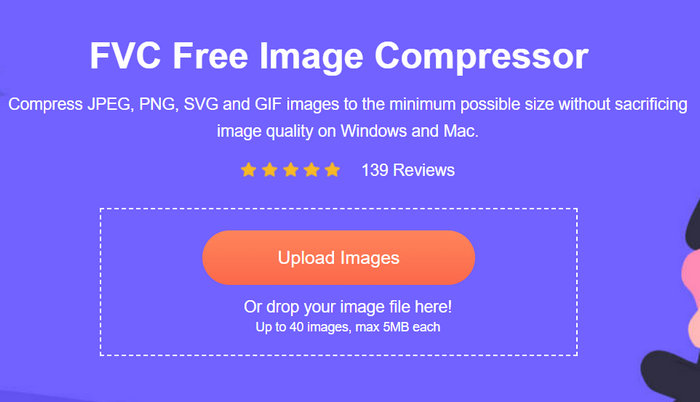
ขั้นตอนที่ 2 เมื่อเข้าสู่เว็บไซต์แล้ว บนหน้าอินเทอร์เฟซหลัก ให้คลิก Upload Images เพื่ออิมพอร์ตภาพที่คุณต้องการย่อให้เหลือ 20KB หลังจากนั้นระบบจะทำการบีบอัดรูปภาพให้โดยอัตโนมัติ.
ขั้นตอนที่ 3 หลังจากบีบอัดรูปภาพแล้ว คุณสามารถดูขนาดไฟล์ใหม่ของรูปภาพที่บีบอัดและตรวจสอบได้ว่ารูปนั้นถูกย่อให้เหลือ 20KB หรือไม่ สุดท้ายให้คลิก Download All เพื่อบันทึกรูปภาพของคุณ.
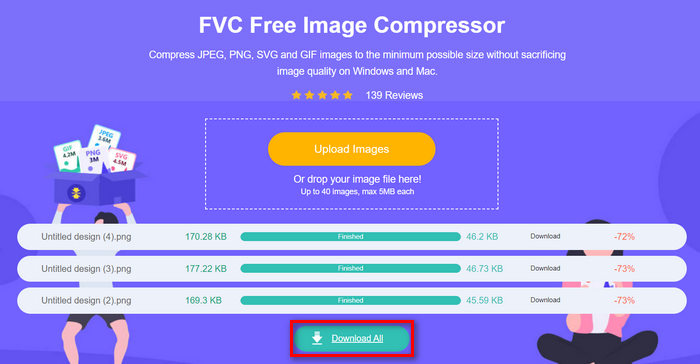
ด้วย FVC Free Image Compressor คุณสามารถลดขนาดรูปภาพให้เหลือ 20KB ได้อย่างง่ายดายด้วยอินเทอร์เฟซที่ใช้งานง่ายและเข้าใจได้ไม่ยาก นอกจากนี้ รูปภาพที่ย่อขนาดแล้วยังผ่านการบีบอัดด้วยอัลกอริทึมการเพิ่มประสิทธิภาพและการบีบอัดที่ยอดเยี่ยม ช่วยรักษาความละเอียดและคุณภาพของภาพไว้ได้อย่างดี สุดท้าย เครื่องมือย่อขนาดรูปภาพ ตัวนี้ยังให้ใช้งานฟรี ทำให้เป็นเครื่องมือบีบอัดรูปภาพที่ผู้ใช้ชื่นชอบมากกว่าตัวอื่น ๆ เพราะทำงานได้ดีไม่แพ้เครื่องมือเฉพาะทางแบบเสียค่าสมัครสมาชิก.
ส่วนที่ 2. เปลี่ยนรูปภาพเป็น 20KB ด้วยการตั้งค่าแบบกำหนดเอง
Duplichecker คือเครื่องมือสำหรับคุณหากคุณต้องการตัวเลือกคุณภาพส่วนบุคคลสำหรับการบีบอัดรูปภาพ เครื่องมือนี้มอบวิธีแก้ปัญหาที่รวดเร็วและไม่ยุ่งยากสำหรับการปรับขนาดรูปภาพเป็น 20KB โดยยังคงความสมบูรณ์ของภาพไว้ ด้วยอินเทอร์เฟซที่ปรับปรุงใหม่ เครื่องมือนี้ช่วยให้ผู้ใช้สามารถลดขนาดไฟล์รูปภาพได้อย่างรวดเร็วและมีประสิทธิภาพ สุดท้าย เครื่องมือนี้ใช้งานได้ฟรีอย่างสมบูรณ์
รูปแบบไฟล์รูปภาพที่รองรับ: รูปแบบ JPEG, PNG และ GIF.
ขีดจำกัดการบีบอัดแบบกลุ่ม: สามารถบีบอัดได้สูงสุดครั้งละ 10 รูปพร้อมกัน
อัตราส่วนการบีบอัด: คงอัตราส่วนดั้งเดิมของรูปภาพเอาไว้.
ขนาดไฟล์สูงสุด: สามารถบีบอัดรูปภาพที่มีขนาดสูงสุด 5MB
วิธีย่อขนาดรูปภาพให้เหลือ 20KB ด้วย Duplichecker
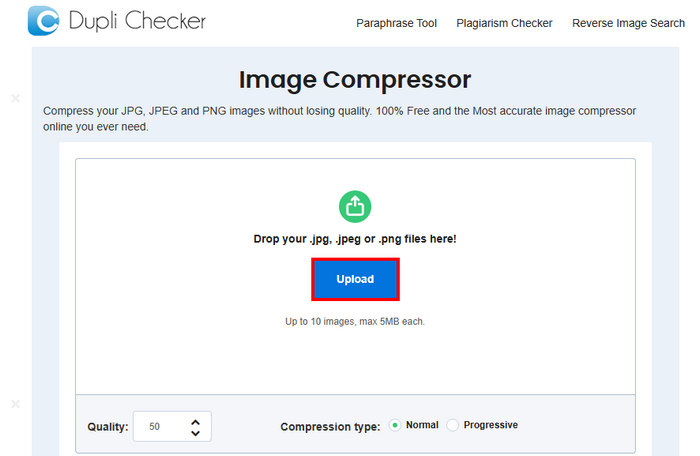
ขั้นตอนที่ 1 เพื่ออัปโหลดรูปภาพที่คุณต้องการลดให้เหลือ 20KB ให้คลิกปุ่ม Upload.
ขั้นตอนที่ 2 จากนั้นคุณจะเห็นตัวเลือก Quality ด้านล่างมุมซ้าย ให้เลือกหรือตั้งค่าคุณภาพของไฟล์ที่ต้องการบีบอัด ในที่นี้ให้พิมพ์ค่า 20.
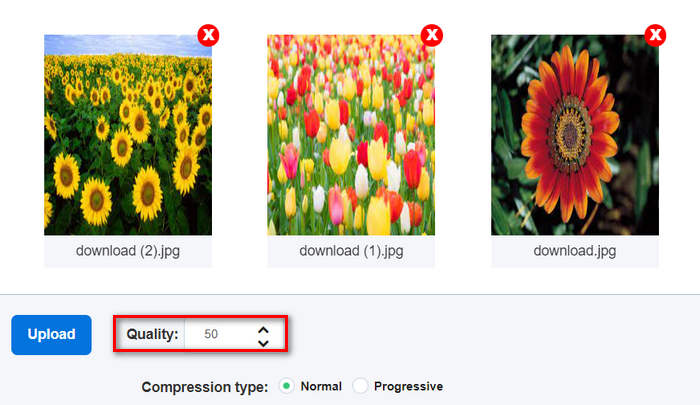
คุณภาพของภาพจะมีหน่วยเป็น KB หรือ กิโลไบต์
ขั้นตอนที่ 3 หลังจากเลือกคุณภาพแล้ว คุณสามารถเลือกประเภทของการบีบอัดที่คุณต้องการได้.
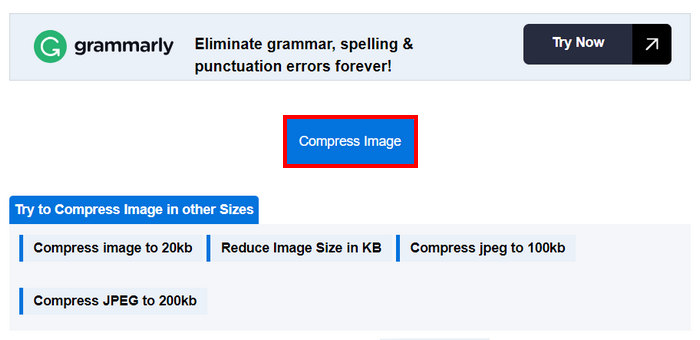
ขั้นตอนที่ 4 เมื่อตั้งค่าเสร็จแล้ว ให้เลื่อนลงเล็กน้อยแล้วคลิกปุ่ม Compress Image เพื่อย่อขนาดภาพของคุณให้เหลือ 20KB.
ขั้นตอนที่ 5 สุดท้าย เพื่อบันทึกรูปภาพที่บีบอัดแล้ว ให้คลิกปุ่ม Download All เพื่อบันทึกทั้งหมด ไฟล์เหล่านี้จะถูกบันทึกลงในอุปกรณ์ของคุณโดยตรง.
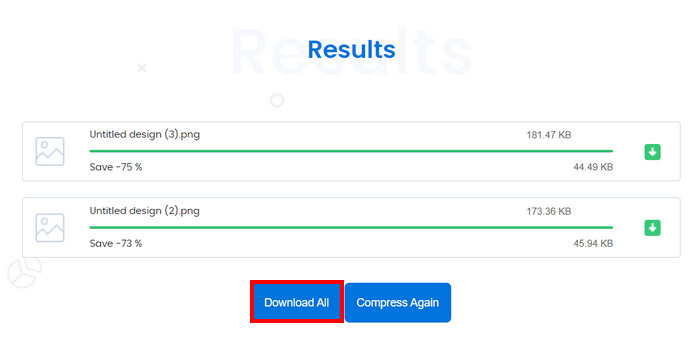
ดังนั้น หากคุณต้องการปรับขนาดรูปภาพเป็น 20KB พร้อมควบคุมการตั้งค่าต่างๆ ของรูปภาพได้ อย่างไรก็ตาม การบีบอัดรูปภาพครั้งละมากกว่า 10 รูปพร้อมกันอาจไม่ใช่ทางเลือกที่ดี นอกจากนี้ ยังมีปัญหาความล่าช้าเมื่อบีบอัดไฟล์หลายไฟล์
ส่วนที่ 3. ปรับขนาดรูปภาพไม่จำกัดให้เหลือ 20KB ในครั้งเดียว
เครื่องมือ Bulk Image Compressor คือเครื่องมือบีบอัดข้อมูลแบบออนไลน์ที่ช่วยให้คุณสามารถปรับขนาดรูปภาพได้ไม่จำกัดจำนวนเป็น 20KB ในครั้งเดียว
รูปแบบไฟล์รูปภาพที่รองรับ: ไฟล์ภาพ JPG, JPEG, PNG และ BMP.
ขีดจำกัดการบีบอัดแบบกลุ่ม: สามารถบีบอัดภาพแบบไม่จำกัดจำนวนเมื่อสมัครแพ็กเกจพรีเมียมแบบตลอดชีพ หากไม่ได้สมัคร คุณยังสามารถบีบอัดภาพพร้อมกันได้ถึง 150 รูปต่อหนึ่งคลิก.
อัตราส่วนการบีบอัด: คงอัตราส่วนดั้งเดิมของรูปภาพเอาไว้.
ขนาดไฟล์สูงสุด: สามารถบีบอัดรูปภาพที่มีขนาดสูงสุด 5MB
วิธีย่อขนาดรูปภาพให้เหลือ 20KB ด้วย Bulk Image Compressor
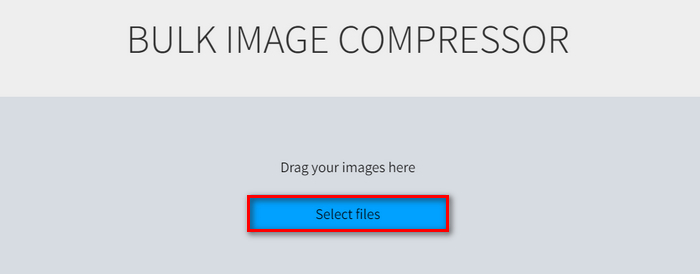
ขั้นตอนที่ 1 ลากไฟล์รูปภาพที่คุณต้องการย่อให้เหลือ 20KB มาวาง หรือคลิกปุ่ม Select Files ได้อย่างสะดวก.
ขั้นตอนที่ 2 ตอนนี้คุณสามารถปรับค่า Quality ได้โดยเลื่อนแถบสไลด์ไปยังเปอร์เซ็นต์ที่ต้องการ นอกจากนี้ยังสามารถตั้งค่าความกว้างและความสูงใหม่ได้โดยปรับที่ตัวเลือกด้านล่างขนาด Maximum.
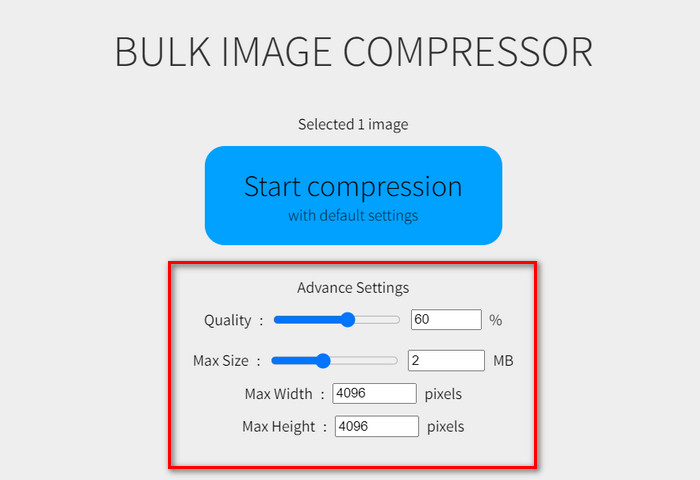
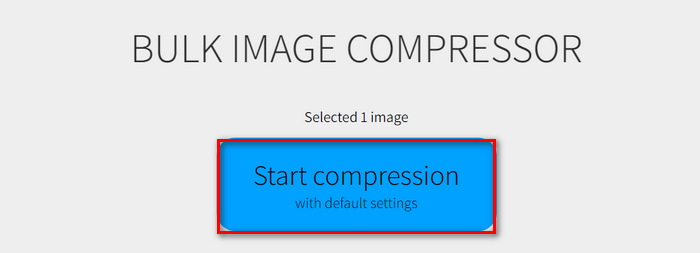
ขั้นตอนที่ 3 หลังจากปรับการตั้งค่าตามที่ต้องการแล้ว ให้คลิกปุ่ม Start Compression.
เครื่องมือบีบอัดรูปภาพนี้เหมาะสำหรับการปรับขนาดรูปภาพไม่จำกัดให้เหลือ 20KB อย่างไรก็ตาม คุณต้องชำระเงินแบบพรีเมียม 1 ครั้งจึงจะใช้งานได้
ส่วนที่ 4. คำถามที่พบบ่อยเกี่ยวกับการปรับขนาดรูปภาพเป็น 20KB
การใช้เครื่องมือบีบอัด JPEG ออนไลน์สำหรับเนื้อหาที่ละเอียดอ่อนปลอดภัยหรือไม่?
การใช้โปรแกรมบีบอัด JPEG ออนไลน์สำหรับเนื้อหาที่ละเอียดอ่อนอาจปลอดภัย แต่สิ่งสำคัญคือต้องแน่ใจว่าเครื่องมือที่คุณใช้มีนโยบายความเป็นส่วนตัวที่เชื่อถือได้ มองหาโปรแกรมบีบอัดที่ไม่จัดเก็บรูปภาพของคุณบนเซิร์ฟเวอร์หลังจากประมวลผลแล้ว
ฉันจะบีบอัด PNG ให้เป็น 20KB ได้อย่างไร?
หากต้องการบีบอัดไฟล์ PNG ให้เหลือ 20KB คุณสามารถใช้เครื่องมือออนไลน์ เช่น FVC Free Image Compressor, Duplichecker หรือ Bulk Image Compressor เครื่องมือเหล่านี้ช่วยให้คุณสามารถปรับขนาดไฟล์ PNG ให้เหลือ 20KB โดยยังคงคุณภาพเอาไว้ได้ ทำตามขั้นตอนเฉพาะที่เครื่องมือแต่ละตัวให้มาเพื่อให้ได้ขนาดไฟล์ตามต้องการ
20KB เท่ากับกี่พิกเซล?
ขนาดไฟล์ 20KB ไม่สัมพันธ์โดยตรงกับขนาดพิกเซลที่เฉพาะเจาะจง เนื่องจากขนาดเป็นกิโลไบต์นั้นขึ้นอยู่กับความละเอียดของภาพ ความลึกของสี และระดับการบีบอัด ตัวอย่างเช่น รูปภาพขนาด 20KB อาจมีขนาดที่แตกต่างกันไปขึ้นอยู่กับวิธีการบีบอัด โดยทั่วไป การลดขนาดของรูปภาพและใช้การบีบอัดจะช่วยให้ได้ขนาดไฟล์ที่เล็กลง แต่ไม่มีขนาดพิกเซลคงที่สำหรับขนาด 20KB
ฉันสามารถปรับขนาดภาพเคลื่อนไหว GIF เป็น 20KB ได้หรือไม่?
คุณสามารถย่อขนาดไฟล์ GIF แบบเคลื่อนไหวให้เหลือ 20KB ได้ด้วยเครื่องมืออย่าง FVC Free Image Compressor ซึ่งรองรับการบีบอัดไฟล์ รูปแบบ GIF เพียงอัปโหลดไฟล์ GIF ของคุณ แล้วเครื่องมือจะทำการบีบอัดให้อัตโนมัติ.
การบีบอัดรูปภาพให้เหลือ 20KB จะส่งผลต่อคุณภาพของรูปภาพหรือไม่
การบีบอัดรูปภาพให้เหลือ 20KB อาจส่งผลต่อคุณภาพของภาพ แต่การใช้เครื่องมือบีบอัดขั้นสูง เช่น FVC Free Image Compressor จะช่วยรักษาความสมบูรณ์ของภาพได้ เครื่องมือนี้ใช้ขั้นตอนวิธีการเพิ่มประสิทธิภาพเพื่อลดการสูญเสียคุณภาพระหว่างการบีบอัด
สรุป
การย่อขนาดรูปภาพให้เหลือ 20KBทำได้ไม่ยากหากมีเครื่องมือที่เหมาะสม FVC Free Image Compressor, Duplichecker และ Bulk Image Compressor ช่วยให้คุณลดขนาดรูปภาพได้อย่างรวดเร็วโดยที่คุณภาพแทบไม่ลดลง ลองใช้วิธีเหล่านี้เพื่อทำให้การแชร์และการอัปโหลดรูปภาพเป็นเรื่องง่ายไร้ความยุ่งยาก ลองใช้หนึ่งในเครื่องมือเหล่านี้ได้เลยตอนนี้
-
 Canve Image Enhancer: ตัวเร่งคุณภาพของภาพใหม่ได้หรือไม่ [ทบทวน]
 ค้นพบว่า Canve Image Enhancer สามารถยกระดับภาพถ่ายของคุณไปอีกระดับได้อย่างไร ตรวจสอบการตรวจสอบโดยละเอียดของเราซึ่งครอบคลุมฟีเจอร์ ข้อดีและข้อเสียทั้งหมดของเครื่องมือนี้
-
 วิธีลบพื้นหลังออกจากรูปภาพโดยใช้ GIMP
 เริ่มต้นใช้งาน GIMP และกระบวนการลบพื้นหลังออกจากรูปภาพทีละขั้นตอน ค้นพบวิธีที่มีประสิทธิภาพในการสร้างภาพที่โปร่งใสโดยใช้ GIMP วันนี้!
-
 วิธีเพิ่มขนาดภาพออนไลน์และออฟไลน์
 ค้นพบวิธีที่ง่ายที่สุดในการเพิ่มขนาดภาพโดยไม่สูญเสียคุณภาพ ดูเครื่องมือและซอฟต์แวร์ปรับขนาดของเราเพื่อให้แน่ใจว่ารูปภาพของคุณมีคุณภาพดีที่สุด
