


 Video Converter Ultimate
 บันทึกหน้าจอ
 ซ่อมวิดีโอ
 ดาวน์โหลดอย่างปลอดภัย
วิธีผสานไฟล์ MPG บนคอมพิวเตอร์
เมื่อคุณพยายามริปภาพยนตร์จากดีวีดีลงคอมพิวเตอร์ โดยทั่วไปไฟล์จะถูกบันทึกเป็นรูปแบบ MPG เนื่องจากภาพยนตร์ที่ถูกริปมักถูกแยกออกเป็นคลิป MPG สั้น ๆ หลายไฟล์ คุณจึงอาจต้องการรวมคลิปภาพยนตร์หลายคลิปที่เป็นไฟล์ MPG ให้เป็นไฟล์เดียวเพื่อให้ได้ไฟล์ภาพยนตร์ฉบับสมบูรณ์ ในบทความนี้ เราจะอธิบายให้คุณทราบวิธีการรวมไฟล์ MPG 2 วิธีด้วยกัน.

ส่วนที่ 1 วิธีการเข้าร่วมไฟล์ MPG กับ Video Converter Ultimate
หากต้องการรวมภาพยนตร์ MPG และตัดต่อคุณอาจต้องใช้ซอฟต์แวร์การเข้าร่วมวิดีโอระดับมืออาชีพ Video Converter Ultimate เป็นวิธีที่ดีที่สุดในการแก้ปัญหาของคุณ ด้วยคุณสมบัติการรวมการแปลงและการแก้ไขวิดีโอที่มีประสิทธิภาพคุณสามารถเข้าร่วมไฟล์ MPG จำนวนมากและปรับแต่งบนคอมพิวเตอร์ของคุณได้
- 1. เข้าร่วมและแปลงรูปแบบวิดีโอประเภทต่างๆรวมถึงไฟล์ MPG ได้ด้วยคลิกเดียว
- 2. คุณสมบัติการตัดต่อวิดีโอ MPG หลายรายการรวมถึงการตัดแต่งการแยกการหมุนและการเพิ่มลายน้ำและคำบรรยาย
- 3. กล่องเครื่องมือพิเศษที่ให้คุณเพิ่มวิดีโอ MPG เพื่ออัพเกรดคุณภาพวิดีโอ
- 4. เพิ่มธีมและฟิลเตอร์เพื่อตกแต่งคลิปภาพยนตร์ mpg ของคุณ
ดาวน์โหลดฟรีสำหรับ Windows 7 หรือใหม่กว่าดาวน์โหลดอย่างปลอดภัย
ดาวน์โหลดฟรีสำหรับ MacOS 10.7 หรือใหม่กว่าดาวน์โหลดอย่างปลอดภัย
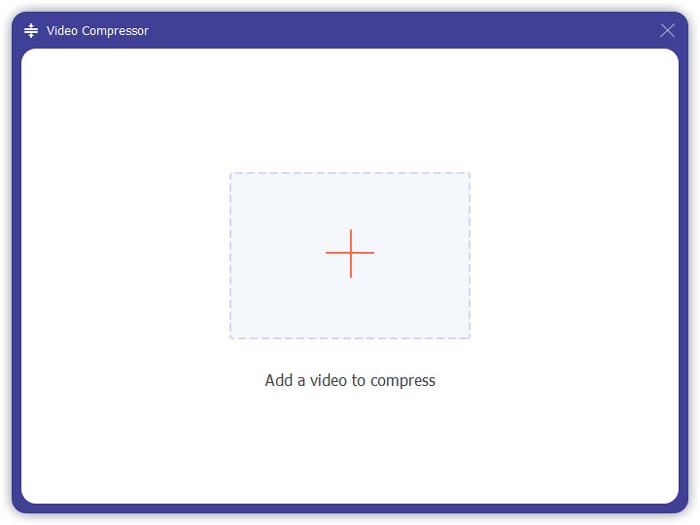
ขั้นตอนที่ 1. ดาวน์โหลดและติดตั้งโปรแกรม Video Converter Ultimate จากนั้นเลือกอินเทอร์เฟซ Converter จากนั้นคุณสามารถเพิ่มไฟล์ MPG ที่ต้องการรวมได้โดยคลิกที่ช่อง Add Files ตรงกลางหน้าจอ คุณยังสามารถลากไฟล์ MPG หลายไฟล์มาวางในช่องนี้เพื่อเพิ่มไฟล์ได้ โปรแกรมรองรับการเพิ่มไฟล์ MPG หลายไฟล์และสามารถรวมให้เป็นไฟล์เดียวได้.
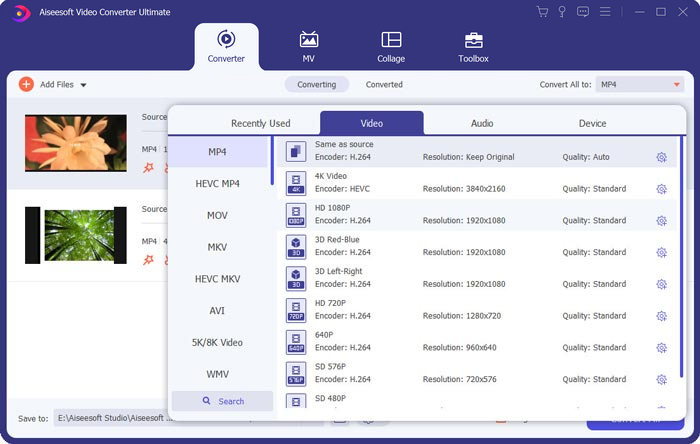
ขั้นตอนที่ 2. จากนั้นเลือกฟอร์แมตวิดีโอที่คุณต้องการส่งออกโดยคลิกที่ช่อง Convert All to ทางด้านขวา คุณสามารถเลือกฟอร์แมตได้หลากหลายในเมนู เช่น MP4, MOV, MKV เป็นต้น คุณยังสามารถปรับค่าพารามิเตอร์ของฟอร์แมตได้เองโดยคลิกที่ไอคอนรูปเฟือง.
ขั้นตอนที่ 3. หากต้องการตัดต่อวิดีโอของคุณ ให้คลิกไอคอนรูปกรรไกร เพื่อเปิดหน้าต่างตัดต่อ คุณสามารถกำหนดเวลาเริ่มและเวลาสิ้นสุดของวิดีโอเพื่อทำการตัดได้ ไฟล์วิดีโอ MPG ในแถบด้านซ้ายจะแสดงตามลำดับเวลา หากคุณต้องการเปลี่ยนลำดับของวิดีโอ คุณสามารถลากไฟล์เพื่อจัดเรียงใหม่ได้ วิดีโอที่อยู่ด้านบนจะเล่นก่อนวิดีโอที่อยู่ด้านล่างในไฟล์วิดีโอที่ถูกรวมขั้นสุดท้าย.
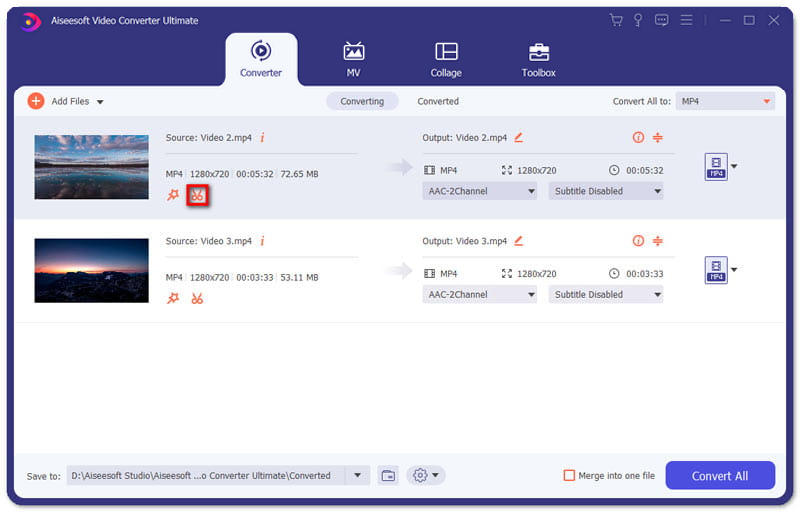
ขั้นตอนที่ 4. เมื่อคุณตัดต่อเรียบร้อยแล้ว คุณสามารถรวมและส่งออกโปรเจกต์ขั้นสุดท้ายได้ คุณควรทราบว่าวิดีโอจะถูกผสานรวมตามลำดับเวลาตามลำดับที่แสดงในหน้าตัดต่อ เมื่อต้องการเริ่มรวม ให้คลิกที่ช่อง Merge into One File แล้วจึงคลิกปุ่ม Convert All เมื่อทำงานเสร็จแล้ว คุณสามารถหาไฟล์วิดีโอที่ถูกรวมแล้วได้ในโฟลเดอร์ปลายทาง.
จากนั้นคุณสามารถเล่นไฟล์ MPG ได้โดยตรงด้วยโปรแกรมเล่นไฟล์ MPG MPEG.
ตอนที่ 2. วิธีเข้าร่วมไฟล์ MPG ออนไลน์ฟรี
หากคุณต้องการรวมไฟล์ MPG ออนไลน์ฟรี คุณสามารถใช้ Free Online Video Merger อินเทอร์เฟซที่เรียบง่ายและออกแบบมาอย่างดีใช้งานง่ายสำหรับผู้ใช้ทุกคน.
ขั้นตอนที่ 1. ดาวน์โหลดตัวเรียกใช้งาน (launcher) และติดตั้งโปรแกรมรวมวิดีโอ จากนั้นคุณสามารถเพิ่มไฟล์ MPG ได้โดยคลิกที่สัญลักษณ์ + บนหน้าจอ ที่ด้านล่างของหน้าจอ คุณสามารถปรับความละเอียดและฟอร์แมตของวิดีโอที่ถูกรวมได้จากเมนู ลำดับของวิดีโอจะเรียงจากซ้ายไปขวาตามลำดับเวลา.
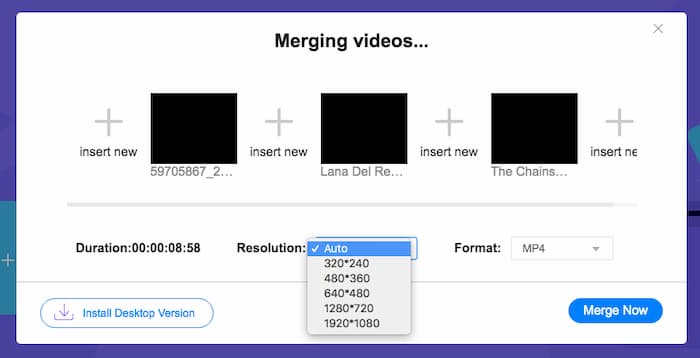
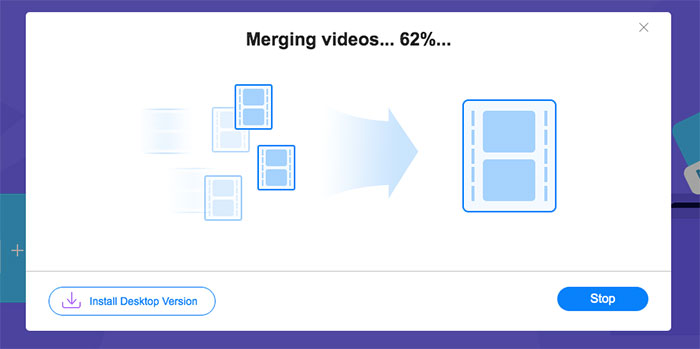
ขั้นตอนที่ 2. เมื่อต้องการเริ่มรวมไฟล์ ให้คลิกปุ่ม Merge Now เมื่อการรวมเสร็จสิ้น คุณจะพบไฟล์วิดีโอได้ในโฟลเดอร์เริ่มต้น Download บนคอมพิวเตอร์ของคุณ.
ส่วนที่ 3 คำถามที่พบบ่อยเกี่ยวกับการเข้าร่วมไฟล์ MPG
1. ฉันจะเปิดไฟล์วิดีโอ MPG ได้อย่างไร?
โดยปกติไฟล์วิดีโอ MPG จะเป็นเวอร์ชัน MPEG-1 และ MPEG-2 MPEG-1 เข้ากันได้กับเครื่องเล่นสื่อกระแสหลักส่วนใหญ่เช่น Windows Media Player และ VLC Media Player MPEG-2 ออกแบบมาสำหรับวิดีโอดีวีดี คุณสามารถดาวน์โหลดตัวถอดรหัสดีวีดีของ บริษัท อื่นเพื่อเปิดได้
2. ไฟล์ MPG คืออะไร?
ไฟล์ MPG เป็นไฟล์วิดีโอที่ใช้กันอย่างแพร่หลายในการบันทึกข้อมูลวิดีโอและเสียง สามารถบันทึกและบีบอัดข้อมูลเสียงและวิดีโอขนาดใหญ่ในขนาดเล็กโดยไม่สูญเสียคุณภาพ เป็นมาตรฐานโดยกลุ่มผู้เชี่ยวชาญด้านภาพเคลื่อนไหว (MPEG) MPG ใช้สำหรับบันทึกและเผยแพร่ภาพยนตร์บนอินเทอร์เน็ต ไฟล์ MPG จะถูกบันทึกเป็น PS หรือ MPEG-PS ในรูปแบบคอนเทนเนอร์สตรีมโปรแกรม
3. ฉันจะรวมไฟล์วิดีโอ MPG ฟรีได้อย่างไร?
มีเครื่องมือเข้าร่วมวิดีโอฟรีมากมายบนอินเทอร์เน็ต การรวมวิดีโอออนไลน์ฟรีที่กล่าวถึงข้างต้นเป็นเครื่องมือฟรีที่มีอินเทอร์เฟซที่ง่ายและชัดเจนซึ่งสามารถตอบสนองความต้องการของคุณได้
สรุป
เมื่อคุณต้องการรวมไฟล์ MPG หลายไฟล์ให้เป็นไฟล์เดียว คุณจำเป็นต้องใช้โปรแกรมรวมวิดีโอแบบมืออาชีพ ในบทความนี้ คุณจะได้เรียนรู้วิธีใช้โปรแกรมรวมวิดีโอเพื่อตอบโจทย์ความต้องการของคุณ หากคุณมีคำถามเกี่ยวกับเครื่องมือรวมวิดีโอเหล่านี้ หรืออยากทราบข้อมูลเพิ่มเติมเกี่ยวกับการรวมไฟล์ MPG เข้าด้วยกัน โปรดแสดงความคิดเห็นไว้ด้านล่าง.
-
 2 วิธีขั้นสูงสุดในการเข้าร่วมวิดีโอ MXF จาก Sony X70
 หากคุณถ่ายวิดีโอ MXF จาก Sony X70 วิธีใดดีที่สุดในการเข้าร่วมไฟล์ MXF ต่อไปนี้คือ 2 วิธีที่มีประสิทธิภาพในการรวมวิดีโอคุณภาพสูง
-
 2 วิธีในการบีบอัดวิดีโอสำหรับ YouTube
 วิดีโอ YouTube มีขนาดใหญ่และอัปโหลดช้า? เพียงบีบอัดขนาดไฟล์วิดีโอให้เล็กลงสำหรับ YouTube ได้ 2 วิธีทางออนไลน์และบนคอมพิวเตอร์
-
 GIF Player - 5 เครื่องเล่น GIF ที่ดีที่สุดสำหรับ Windows PC, Mac, Android และ iPhone
 โปรแกรมอะไรเปิดไฟล์ GIF ฉันจะดู GIF บน Android ได้อย่างไร iPhone มีเครื่องเล่น GIF เพื่อเปิด GIF หรือไม่? โพสต์นี้แบ่งปัน 5 เครื่องเล่น GIF ที่ดีที่สุดสำหรับคุณ
