


 Video Converter Ultimate
 บันทึกหน้าจอ
 ซ่อมวิดีโอ
 ดาวน์โหลดอย่างปลอดภัย
วิธีแปลงไฟล์วิดีโอ FLV ของคุณเป็นรูปแบบ AVI บน PC/Mac
คู่มือนี้มุ่งเน้นที่วิธีการแปลงไฟล์ FLV เป็น AVI ด้วยซอฟต์แวร์บนเดสก์ท็อปและแอปออนไลน์ มีเหตุผลมากมายที่คุณจำเป็นต้องแปลงวิดีโอ FLV ของคุณ FLV ถูกพัฒนาขึ้นมาเพื่อใช้กระจายคอนเทนต์วิดีโอบนออนไลน์ ไม่ได้ออกแบบมาสำหรับการเล่นบนอุปกรณ์ดิจิทัลโดยตรง เมื่อคุณต้องการดูไฟล์ FLV บนคอมพิวเตอร์ คุณจึงจำเป็นต้องแปลงเป็นรูปแบบวิดีโออื่น นอกจากนี้ การแปลง FLV ไปเป็นรูปแบบวิดีโอที่ไม่บีบอัดเพื่อเตรียมไว้แก้ไขก็เป็นความคิดที่ดีเช่นกัน.

ส่วนที่ 1: วิธีฟรี 2 อันดับแรกในการแปลง FLV เป็น AVI
วิธีที่ 1: แปลง FLV เป็น AVI ด้วย FLV Converter ฟรี
เมื่อแปลง FLV เป็น AVI คุณอาจกังวลเกี่ยวกับหลายปัจจัย เช่น คุณภาพไฟล์ที่ได้ ความง่ายในการใช้งาน เป็นต้น FVC Free FLV Converter จึงเป็นตัวเลือกที่ดีที่สุด แม้จะเป็นโปรแกรมฟรี แต่คุณก็จะได้รับฟีเจอร์ระดับมืออาชีพมากมายโดยไม่ต้องมีทักษะทางเทคนิคมากนัก แถมยังมีเครื่องมือเสริมต่าง ๆ เช่น การตัดต่อวิดีโอ.
คุณสมบัติหลักของตัวแปลง FLV ที่ดีที่สุด
- 1. แปลงวิดีโอ FLV เป็นรูปแบบมัลติมีเดียอื่น ๆ ได้อย่างง่ายดาย
- 2. รองรับรูปแบบวิดีโอเกือบทั้งหมด เช่น AVI, MP4, MKV เป็นต้น
- 3. แบทช์ประมวลผลไฟล์ FLV หลายร้อยไฟล์ต่อการแปลง
ดาวน์โหลดฟรีสำหรับ Windows 7 ขึ้นไปดาวน์โหลดอย่างปลอดภัย
ดาวน์โหลดฟรีสำหรับ MacOS 10.7 ขึ้นไปดาวน์โหลดอย่างปลอดภัย
วิธีแปลง FLV เป็น AVI บนเดสก์ท็อปฟรี
ขั้นตอนที่ 1: เพิ่มไฟล์ FLV
เมื่อคุณติดตั้งโปรแกรมแปลง FLV ฟรีที่ดีที่สุดลงในคอมพิวเตอร์แล้ว ให้เปิดโปรแกรมขึ้นมา โปรแกรมนี้รองรับทั้ง PC และ Mac คลิกที่เมนู Add File(s) ที่มุมบนซ้ายเพื่อเปิดหน้าต่างเลือกไฟล์ จากนั้นค้นหาและเลือกวิดีโอ FLV บนคอมพิวเตอร์ของคุณ แล้วคลิกปุ่ม Open เพื่อเพิ่มไฟล์.

ขั้นตอนที่ 2: แก้ไขวิดีโอและกำหนดรูปแบบ
หากต้องการแก้ไขไฟล์วิดีโอของคุณ ให้เลือกไฟล์ FLV แล้วคลิกเมนู Edit จากนั้นคุณจะถูกพาไปยังหน้าต่างตัวแก้ไขวิดีโอ ทำตามคำแนะนำบนหน้าจอเพื่อแก้ไข แล้วจึงกลับไปยังหน้าต่างหลักของโปรแกรม.
คลิกเมนูดรอปดาวน์รูปแบบเอาต์พุตที่ด้านล่างของอินเทอร์เฟซหลักเพื่อเปิดกล่องโต้ตอบโปรไฟล์ จากนั้นค้นหา AVI และเลือกในแท็บวิดีโอทั่วไป

ขั้นตอนที่ 3: แปลง FLV เป็น AVI
คลิกไอคอนจุดสามจุดถัดจากช่อง Output folder แล้วเลือกโฟลเดอร์ปลายทางที่ต้องการบันทึกไฟล์ AVI สุดท้ายให้คลิกปุ่ม Convert เพื่อเริ่มแปลงไฟล์ FLV เป็น AVI ทันที.

วิธีที่ 2: วิธีการแปลง FLV เป็น AVI ด้วย VLC
VLC เป็นมากกว่าเครื่องเล่นสื่อทั่วไป คุณสามารถค้นหาคุณสมบัติที่มีประโยชน์มากมายรวมถึงการแปลงวิดีโอ ในฐานะที่เป็นโครงการโอเพ่นซอร์ส VLC ช่วยให้คุณสามารถแปลง FLV เป็น AVI ได้ฟรี นอกจากนี้ VLC ยังสามารถซ่อมแซมวิดีโอ AVI ที่เสียหายได้
ขั้นตอนที่ 1: เปิดโปรแกรมแปลง FLV ฟรี หากคุณยังไม่มี VLC ให้ดาวน์โหลดได้ฟรีจากเว็บไซต์ทางการ.
ขั้นตอนที่ 2: ไปที่เมนู Media จากริบบอนด้านบนแล้วเลือก Convert/Save สำหรับ Mac ให้เลือก Convert/Stream จากเมนู File.
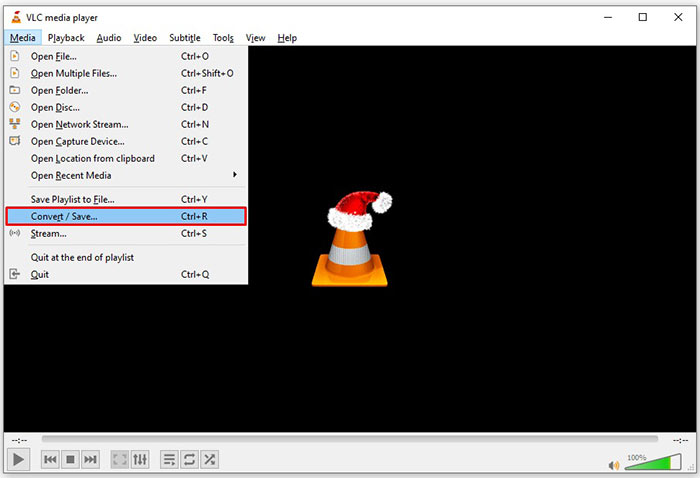
ขั้นตอนที่ 3: คลิกปุ่ม Add บนหน้าต่าง Open Media แล้วเพิ่มไฟล์ FLV ที่คุณต้องการแปลง.
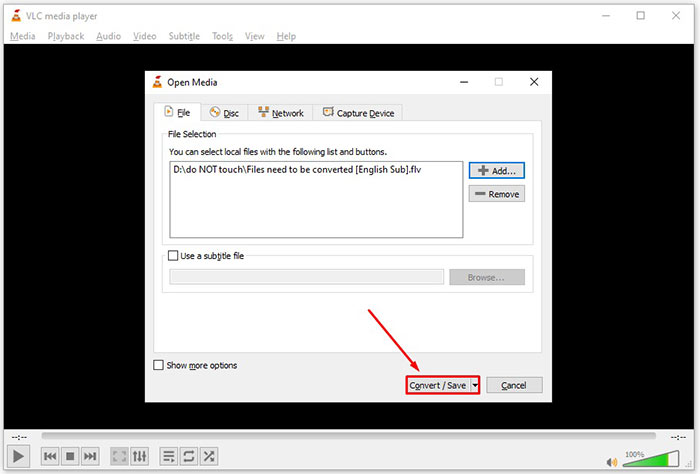
ขั้นตอนที่ 4: จากนั้นกดปุ่ม Convert/Save เพื่อไปยังหน้าต่างถัดไป.
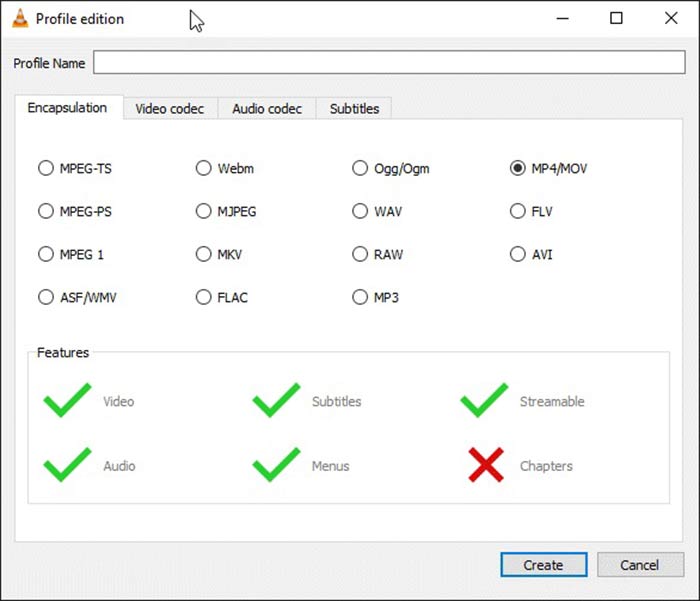
ขั้นตอนที่ 5: เปิดรายการดรอปดาวน์ Profile แล้วเลือก AVI หากหาไม่พบ ให้คลิกปุ่มที่สามถัดจาก Profile จะมีหน้าต่าง Profile edition เปิดขึ้นมา เลือก AVI แล้วตั้งค่า Profile Name จากนั้นคลิก Create เพื่อยืนยัน แล้วจึงเลือกโปรไฟล์รายการใหม่จากเมนู Profile
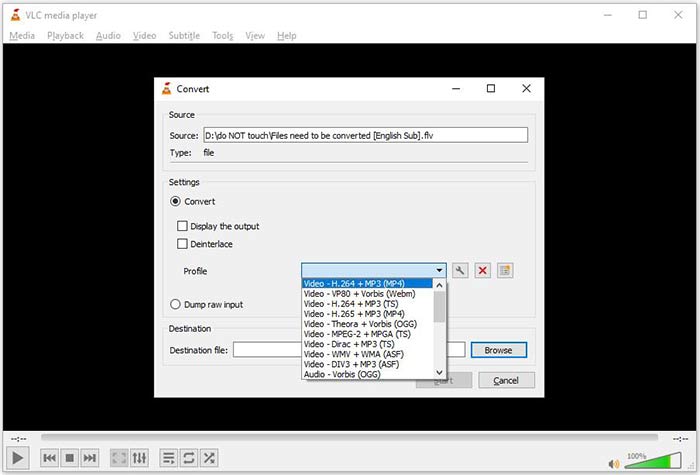
ขั้นตอนที่ 6: ตั้งค่าโฟลเดอร์ปลายทางโดยคลิกปุ่ม Browse จากนั้นคลิกปุ่ม Start แล้ว VLC จะเริ่มแปลงไฟล์ FLV เป็น AVI.
ห้ามพลาด:
- • 3 วิธียอดนิยมในการแปลง FLV เป็น MOV
- • วิธีการแปลงวิดีโอ FLV ของคุณเป็นไฟล์เสียง MP3 บนเดสก์ท็อปและออนไลน์
ส่วนที่ 2: วิธีการแปลง FLV เป็น AVI Online
บางครั้งคุณอาจต้องการแปลง FLV เป็น AVI แบบออนไลน์เป็นครั้งคราว อีกทั้งบางคนก็ไม่ต้องการติดตั้งซอฟต์แวร์ FVC Free Online Video Converter สามารถตอบโจทย์นี้ได้ แม้จะทำงานบนออนไลน์ แต่ก็เพียงพอสำหรับการแปลงไฟล์ FLV หลายไฟล์เป็น AVI ที่สำคัญไม่เหมือนเว็บแอปอื่น ๆ ตรงที่ไม่มีการจำกัดขนาดไฟล์ ไม่มีลายน้ำ และข้อจำกัดอื่น ๆ.
ขั้นตอนที่ 1: เข้าไปที่ https://www.free-videoconverter.net/free-online-video-converter/ ผ่านเบราว์เซอร์เมื่อคุณต้องการแปลงวิดีโอ คลิกปุ่ม Add Files to Convert และดาวน์โหลดตัวเรียกใช้งาน (launcher).
ดาวน์โหลดเวอร์ชันเดสก์ท็อปเพื่อแปลงไฟล์แบบเป็นชุดได้.
ขั้นตอนที่ 2: หลังจากดาวน์โหลดแล้ว ตัวเรียกใช้งานจะเด้งขึ้นมาโดยอัตโนมัติ คลิกปุ่ม Add File ที่มุมบนซ้ายเพื่ออัปโหลดไฟล์ FLV ที่คุณต้องการแปลง จากนั้นเลือก AVI ที่ด้านล่าง.
หากต้องการเปลี่ยนความละเอียด อัตราเฟรม และพารามิเตอร์อื่น ๆ ให้คลิกไอคอนรูปเฟือง เพื่อเปิดหน้าต่างตั้งค่าโปรไฟล์.
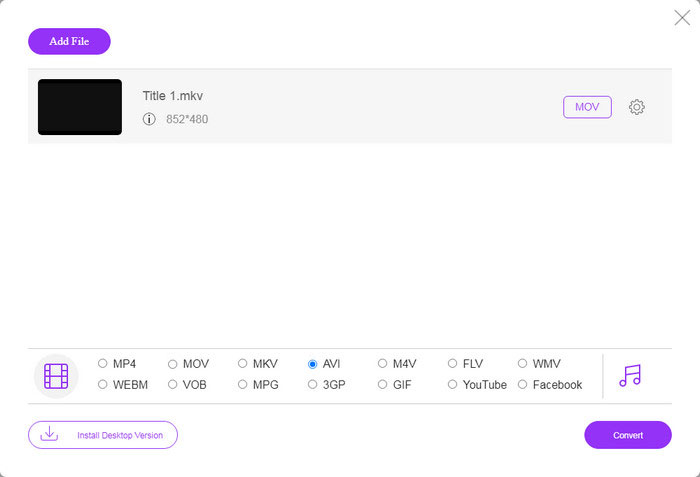
ขั้นตอนที่ 3: เมื่อคุณคลิกปุ่ม Convert เว็บแอปจะเริ่มทำงานตามที่คุณตั้งค่าไว้ เมื่อมีหน้าต่างแจ้งเตือน ให้ดาวน์โหลดไฟล์วิดีโอ AVI ลงในฮาร์ดไดรฟ์ของคุณ.
เมื่อเทียบกับตัวแปลงวิดีโอบนเว็บอื่น ๆ Free Online Video Converter ทำงานได้อย่างรวดเร็ว แต่คุณต้องมีการเชื่อมต่ออินเทอร์เน็ตที่ดีด้วย
FLV เทียบกับ AVI
Adobe Flash Player ใช้ FLV เพื่อส่งเนื้อหาวิดีโอ เช่น ภาพยนตร์และรายการทีวี ปัจจุบัน Adobe ไม่ได้พัฒนาโปรแกรมเล่นอีกต่อไปและแนะนำให้ผู้ใช้ถอนการติดตั้งโปรแกรมดังกล่าวด้วยเหตุผลด้านความปลอดภัย อย่างไรก็ตาม คุณยังคงสามารถใช้รูปแบบ FLV ในโปรแกรมที่ไม่ใช่ Adobe/Macromedia จำนวนมากได้
ตามรูปแบบไฟล์การแลกเปลี่ยนทรัพยากร (RIFF) รูปแบบ AVI ถูกนำมาใช้โดย Microsoft ในปี 1992 สามารถบันทึกวิดีโอ/เสียงคุณภาพสูงได้ เนื่องจากใช้การบีบอัดน้อยกว่า แต่นั่นก็ทำให้ไฟล์ AVI มีขนาดใหญ่ขึ้นด้วย ซึ่งอาจเป็นปัญหาได้เมื่อมีเนื้อที่จำกัด
ส่วนที่ 3: คำถามที่พบบ่อยเกี่ยวกับ FLV ถึง AVI
ฉันควรรอนานแค่ไหนเพื่อแปลง FLV เป็น AVI
ขึ้นอยู่กับสถานการณ์ของคุณ โดยทั่วไป การแปลงวิดีโอบนเดสก์ท็อปทำได้เร็วมาก สำหรับเครื่องมือออนไลน์ การเชื่อมต่ออินเทอร์เน็ตของคุณจะเป็นตัวกำหนดประสิทธิภาพ
การแปลง FLV เป็น AVI ออนไลน์ปลอดภัยหรือไม่
แอพแปลง FLV ออนไลน์ส่วนใหญ่สัญญาว่าจะลบวิดีโอของคุณหลังจากแปลงแล้ว อย่างไรก็ตาม คุณไม่ควรอัปโหลดวิดีโอส่วนตัวทางออนไลน์ เว้นแต่คุณจะแน่ใจว่าเว็บแอปนั้นปลอดภัยในการใช้งาน 100%
AVI ดีกว่า FLV หรือไม่?
FLV เป็นรูปแบบวิดีโอที่มีการสูญเสียในขณะที่ AVI เป็นรูปแบบวิดีโอที่ไม่มีการบีบอัด หมายความว่าไฟล์ FLV มีขนาดเล็กกว่า AVI ในสภาพเดียวกัน อย่างไรก็ตาม AVI ให้คุณภาพวิดีโอที่ดีกว่า FLV ใช้เพื่อแชร์วิดีโอออนไลน์ ในขณะที่ AVI เป็นตัวเลือกที่ดีในการตัดต่อวิดีโอ
สรุป
คู่มือนี้ได้แบ่งปันสามวิธีในการแปลงไฟล์วิดีโอ FLV เป็นรูปแบบ AVI ด้วยซอฟต์แวร์เดสก์ท็อปและเว็บแอป VLC เป็นทั้งโปรแกรมเล่นสื่อและตัวแปลงวิดีโอฟรี แม้ว่าจะใช้งานยาก นอกจากนี้ คุณสามารถทำงานออนไลน์ได้โดยไม่ต้องติดตั้งซอฟต์แวร์ใดๆ อย่างไรก็ตาม เราขอแนะนำให้คุณลองใช้ FVC Free FLV Converter เนื่องจากคุณภาพของผลลัพธ์นั้นยอดเยี่ยมมาก นอกจากนี้ยังใช้งานง่ายและนำทาง หากคุณมีคำถามอื่น ๆ เกี่ยวกับการแปลง FLV เป็น AVI โปรดฝากข้อความไว้ด้านล่างโพสต์นี้
-
 3 วิธีฟรีในการแปลง FLV เป็น WAV
 ฉันจะแปลงไฟล์ FLV ได้อย่างไร VLC สามารถแปลง FLV เป็น WAV ได้หรือไม่ โพสต์นี้บอก 3 วิธีฟรีในการแปลง FLV เป็น WAV โดยไม่สูญเสียคุณภาพ
-
 3 วิธีฟรีในการแปลง FLV เป็น MPG
 วิธีแปลง FLV เป็น MPEG ฉันสามารถแปลง FLV เป็น MPG ได้ฟรีหรือไม่ โพสต์นี้แชร์ตัวแปลงวิดีโอฟรี 3 รายการเพื่อช่วยคุณแปลง FLV เป็น MPG โดยไม่สูญเสียคุณภาพ
-
 3 วิธีฟรีในการแปลง FLV สำหรับเล่นบน Xbox
 ไม่สามารถเล่นไฟล์ FLV บน Xbox One หรือ Xbox 360 ได้? ต้องการแปลง FLV เป็นรูปแบบที่รองรับ Xbox เช่น MP4, AVI, MOV หรือ WMV หรือไม่ โพสต์นี้แสดงรายการตัวแปลง FLV เป็น Xbox ฟรี 3 รายการเพื่อให้คุณเล่น FLV บน Xbox

