


 Video Converter Ultimate
 บันทึกหน้าจอ
 ซ่อมวิดีโอ
วิธีทำให้อีโมจิใหญ่ขึ้นบน iPhone, Android และออนไลน์
การทำให้อิโมจิใหญ่ขึ้นเป็นไปได้จริงหรือ? คงมีบางคนเคยคิดแบบนี้มาก่อน คำตอบคือใช่ อิโมจิดูใหญ่ขึ้นได้เพราะถูกมองว่าเป็นรูปภาพหรือตัวอักษรที่สามารถปรับขนาดได้ตามการใช้งาน
อีโมจิเป็นวิธีสุดสนุกในการแสดงอารมณ์ แต่บางครั้งอาจมีขนาดเล็กเกินไป โดยเฉพาะในแชทหรือโพสต์ที่คุณอยากให้มันเด่นขึ้นมา โชคดีที่มีหลายวิธีในการทำให้อีโมจิตัวใหญ่ขึ้น ไม่ว่าคุณจะส่งข้อความบน iPhone หรือ Android หรือแม้แต่สร้างอีโมจิออนไลน์ การเรียนรู้เรื่องนี้ทั้งสนุกและง่ายดาย งั้นมาเริ่มสำรวจวิธีทำให้อีโมจิดูใหญ่ขึ้นได้เลยจากอุปกรณ์ของคุณเอง.

ส่วนที่ 1. วิธีทำให้อีโมจิมีขนาดใหญ่ขึ้นทางออนไลน์
เนื่องจากสามารถทำให้อีโมจิมีขนาดใหญ่ขึ้นได้ นี่คือวิธีแรกที่คุณสามารถใช้เพื่อขยายภาพได้อย่างง่ายดาย มีเครื่องมือออนไลน์มากมายที่สามารถขยายภาพได้ อีโมจิถือเป็นรูปภาพ ดังนั้นด้วยเครื่องมือนี้ ผู้ใช้สามารถขยายภาพอีโมจิได้ภายในไม่กี่คลิก
FVC Free Image Upscaler จากชื่อก็พอเดาได้ว่าเป็นเครื่องมือขยายขนาดรูปภาพออนไลน์ที่ให้ผู้ใช้ขยายรูปของตนเองได้ ซึ่งรวมถึงการทำให้อีโมจิมีขนาดใหญ่กว่าปกติด้วย.
คุณสมบัติหลัก:
• เทคโนโลยีความละเอียด AI ขั้นสูงสำหรับการอัปสเกลภาพ
• การจดจำและปรับปรุงส่วนของภาพที่เบลอโดยอัตโนมัติ
• การฟื้นฟูพิกเซล สี พื้นผิว และรายละเอียดที่ละเอียดอ่อนอย่างแม่นยำ
• มีความสามารถในการจดจำและฟื้นฟูคุณลักษณะของภาพได้อย่างเป็นธรรมชาติ
• ความหลากหลายในตัวเลือกการขยายภาพ: 2×, 4× หรือ 8× พร้อมคุณภาพสูง
• อินเทอร์เฟซออนไลน์ที่ใช้งานง่ายสำหรับการปรับปรุงและขยายภาพอย่างราบรื่น
ขั้นตอนในการทำให้อีโมจิใหญ่ขึ้นด้วย FVC Free Image Upscaler:
ขั้นตอนที่ 1 ไปที่เว็บไซต์ทางการของ FVC Free Image Upscaler.
ขั้นตอนที่ 2 คลิกปุ่ม Upload Photo เพื่อเลือกรูปภาพที่คุณต้องการเพิ่มคุณภาพ.
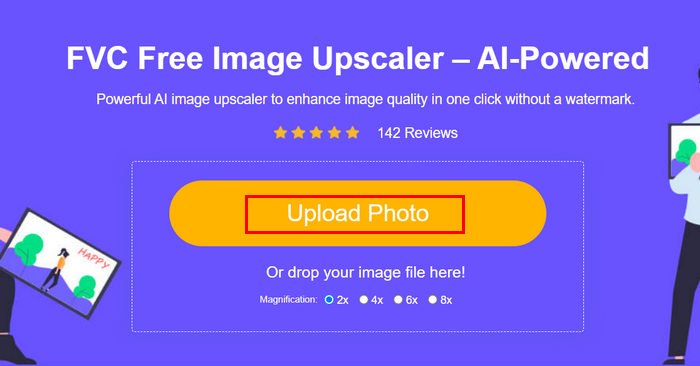
ขั้นตอนที่ 3 หลังจากอัปโหลดแล้ว เครื่องมือจะแสดงตัวอย่างรูปภาพของคุณ หากต้องการตรวจสอบรายละเอียดอย่างใกล้ชิด ให้ใช้ตัวเลือก Magnifier.
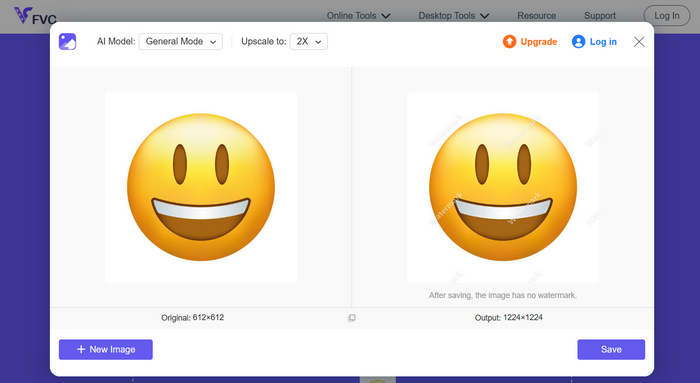
ขั้นตอนที่ 4 เมื่อคุณพอใจกับตัวอย่างแล้ว ให้คลิกปุ่ม Save เพื่อดาวน์โหลดรูปที่เพิ่มคุณภาพแล้ว.
ด้วย FVC Image Upscaler คุณสามารถขยายภาพอิโมจิได้อย่างง่ายดายเพียงไม่กี่คลิก ยิ่งไปกว่านั้น ความเรียบง่ายและอินเทอร์เฟซที่ใช้งานง่ายทำให้เป็นเครื่องมือที่ผู้ใช้ทุกประเภทเลือกใช้
หากสนใจ คลิกที่นี่เพื่อเรียนรู้วิธีลบอีโมจีออกจากรูปภาพ.
ส่วนที่ 2. วิธีทำให้อีโมจิใหญ่ขึ้นบน iPhone
หากคุณไม่ต้องการใช้แอปของบุคคลที่สาม คุณสามารถขยายขนาดอิโมจิได้โดยตรงผ่านการตั้งค่าของ iPhone วิธีนี้จะเพิ่มขนาดหน้าจอโดยรวมเล็กน้อย ซึ่งยังทำให้ข้อความและอิโมจิในข้อความและแอปของคุณมีขนาดใหญ่ขึ้นด้วย
วิธีทำให้ Emoji ใหญ่ขึ้นบน iPhone:
ขั้นตอนที่ 1 เปิดแอปการตั้งค่า (Settings) บน iPhone ของคุณ ที่นี่คือส่วนที่คุณสามารถปรับแต่งตัวเลือกการแสดงผลและการช่วยการเข้าถึงทั้งหมดได้.
ขั้นตอนที่ 2 เลื่อนลงแล้วแตะที่ จอภาพและความสว่าง (Display & Brightness) เพื่อเข้าสู่การตั้งค่าการแสดงผลของโทรศัพท์.
ขั้นตอนที่ 3 ในหัวข้อนี้ ให้มองหา การซูมจอภาพ (Display Zoom) แล้วแตะเข้าไป ฟีเจอร์นี้ช่วยให้คุณเปลี่ยนลักษณะการแสดงผลของคอนเทนต์บนหน้าจอได้.
ขั้นตอนที่ 4 เลือกตัวเลือก ตัวอักษรขนาดใหญ่ (Larger Text) หรือมุมมองแบบซูม (Zoomed view) การทำเช่นนี้จะทำให้ทุกอย่างบนหน้าจอ รวมทั้งอีโมจิ มีขนาดใหญ่ขึ้น.
ขั้นตอนที่ 5 แตะที่ เสร็จสิ้น (Done) เพื่อบันทึกการเปลี่ยนแปลง เมื่อกำหนดแล้ว iPhone ของคุณจะรีสตาร์ตสั้น ๆ และคุณจะสังเกตได้ว่าอีโมจิ ตัวอักษร และไอคอนต่าง ๆ ดูใหญ่ขึ้นและมองเห็นได้ชัดเจนกว่าเดิม.
แม้ว่าวิธีนี้จะทำให้อิโมจิมีขนาดใหญ่ขึ้น แต่ก็ทำให้ส่วนอื่นๆ บนหน้าจอของคุณใหญ่ขึ้นด้วย รวมถึงไอคอนแอปและข้อความ ดังนั้น หากคุณต้องการทำให้อิโมจิมีขนาดใหญ่ขึ้นโดยไม่เปลี่ยนแปลงการแสดงผลโดยรวม ตัวเลือกนี้อาจไม่เหมาะสม
ส่วนที่ 3 วิธีทำให้ Emoji ใหญ่ขึ้นบน Android
หากคุณใช้อุปกรณ์ Android และต้องการขยายภาพอิโมจิให้ใหญ่ขึ้น คุณสามารถใช้ PicWish AI Photo Editor ได้ แอปนี้ช่วยให้คุณขยายภาพอิโมจิได้อย่างง่ายดายโดยไม่สูญเสียคุณภาพ คุณสามารถอัปโหลดอิโมจิหรือภาพหน้าจอ แล้วใช้เครื่องมือปรับขนาดหรืออัปสเกลเพื่อขยายภาพให้ใหญ่ขึ้น โดยยังคงความคมชัดและรายละเอียดไว้
ขั้นตอนในการทำให้ Emoji ใหญ่ขึ้นบน Android:
ขั้นตอนที่ 1 บนโทรศัพท์ Android ของคุณ ค้นหาแอป PicWish AI Photo Editor ในร้านค้าแอปแล้วดาวน์โหลด.
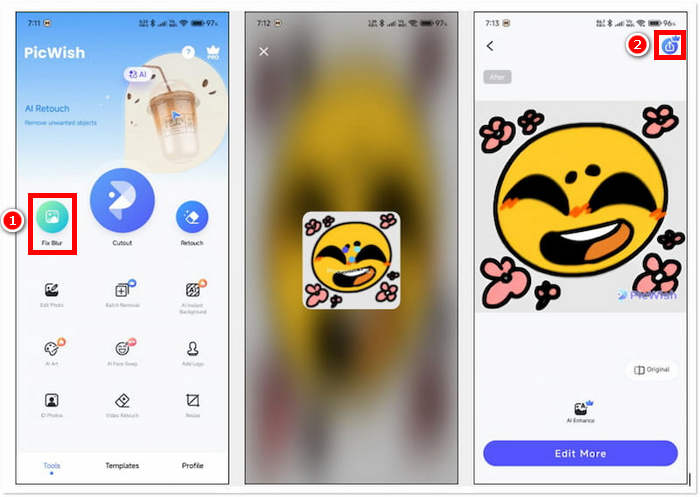
ขั้นตอนที่ 2 จากนั้นเปิดแอป แล้วบนหน้าจอหลักให้มองหาตัวเลือก Fix Blur จากนั้นแตะเพื่อดำเนินการต่อ.
ขั้นตอนที่ 3 หลังจากนั้น เลือกอีโมจิที่คุณต้องการขยาย โดยเลือกรูปจากแกลเลอรีในเครื่องของคุณ.
ขั้นตอนที่ 4 เมื่อกระบวนการขยายเสร็จสิ้น ให้แตะปุ่ม บันทึก (Save) เพื่อบันทึกอีโมจิที่ขยายแล้วลงในแกลเลอรีของอุปกรณ์.
หลังจากแอปวิเคราะห์อีโมจิเสร็จ คุณจะพบว่าไม่มีตัวเลือกให้ปรับการขยายเพิ่มเติม ดังนั้นคุณจึงทำได้แค่บันทึกอีโมจิที่ขยายแล้วโดยตรง วิธีนี้ช่วยให้ขั้นตอนรวดเร็วและไม่ยุ่งยาก แต่อาจเป็นข้อเสียหากคุณต้องการควบคุมขนาดสุดท้ายหรือคุณภาพมากกว่านี้ อย่างไรก็ตาม PicWish ก็ยังเป็นตัวเลือกที่สะดวกสำหรับการทำให้อีโมจิบน iPhone มีขนาดใหญ่ขึ้นได้ทันที โดยไม่ต้องมีทักษะการตัดต่อขั้นสูง.
ส่วนที่ 4. คำถามที่พบบ่อยเกี่ยวกับการทำให้อีโมจิใหญ่ขึ้น
ทำไมอีโมจิถึงดูใหญ่ขึ้นเมื่อส่งเพียงอย่างเดียวในข้อความ?
เมื่อคุณส่งอีโมจิแบบเดี่ยวๆ ในแอปส่งข้อความอย่าง iMessage, WhatsApp หรือ Messenger แอปจะขยายขนาดอีโมจิโดยอัตโนมัติเพื่อให้มองเห็นและเน้นได้ชัดเจนยิ่งขึ้น ฟีเจอร์นี้สร้างขึ้นมาเพื่อให้อีโมจิสื่อความหมายและโดดเด่นยิ่งขึ้น แต่จะใช้งานได้เฉพาะเมื่ออีโมจิไม่ได้มาพร้อมกับข้อความหรืออีโมจิอื่นๆ
ฉันสามารถทำให้อีโมจิใหญ่ขึ้นโดยไม่ต้องเปลี่ยนหน้าจอทั้งหมดได้ไหม
ใช่ คุณสามารถใช้เครื่องมือออนไลน์หรือแอปอย่าง FVC Free Image Upscaler และ PicWish เพื่อทำให้อีโมจิมีขนาดใหญ่ขึ้นเท่านั้น แทนที่จะต้องปรับการตั้งค่าหน้าจอโทรศัพท์ของคุณ
ฉันสามารถคัดลอกและวางอีโมจิขนาดใหญ่ลงในแชทของฉันได้ไหม
ใช่ค่ะ หลังจากขยายภาพอีโมจิโดยใช้เครื่องมือหรือแอปออนไลน์แล้ว คุณสามารถบันทึกเป็นรูปภาพ แล้วคัดลอกหรือแทรกลงในข้อความหรือโพสต์บนโซเชียลมีเดียได้
ทำไมอีโมจิบางตัวถึงดูเล็กแม้จะอยู่ในหน้าจอขนาดใหญ่?
ขนาดของอีโมจิขึ้นอยู่กับแอปและรูปแบบฟอนต์ที่อุปกรณ์ของคุณใช้ บางแพลตฟอร์มจะปรับขนาดอีโมจิให้ตรงกับข้อความโดยอัตโนมัติ ดังนั้นแม้ในหน้าจอขนาดใหญ่ อีโมจิอาจยังดูเล็กอยู่ เว้นแต่คุณจะปรับการแสดงผลหรือใช้เครื่องมือขยายภาพ
สรุป
เห็นไหมว่าการทำให้อีโมจิตัวใหญ่ขึ้นนั้นทำได้จริงและง่ายมาก ตอนนี้เมื่อคุณรู้วิธีแล้ว สิ่งที่ต้องทำก็แค่ลองเลือกใช้วิธีที่คุณถนัด ไม่ว่าจะผ่านการตั้งค่าในโทรศัพท์ แอป หรือเครื่องมือออนไลน์ แต่ละตัวเลือกช่วยให้คุณแสดงออกได้สนุกและสร้างสรรค์ยิ่งขึ้น เพียงจำไว้ว่าบางวิธีอาจมีข้อจำกัดเล็กน้อย แต่โดยรวมแล้ว การเรียนรู้วิธีทำให้อีโมจิตัวใหญ่ขึ้นเป็นทริกง่าย ๆ ที่ทำให้การสนทนาของคุณโดดเด่นยิ่งกว่าเดิม.
-
 3 วิธีในการบีบอัดรูปภาพสำหรับ Discord Emoji [คู่มือ]
 หากคุณกำลังมองหาวิธีบีบอัดรูปภาพสำหรับอิโมจิ Discord เนื่องจากมีข้อจำกัดด้านขนาดไฟล์ที่เข้มงวด โปรดอ่านบทความนี้และรับคำแนะนำง่ายๆ 3 วิธี
-
 คำแนะนำทีละขั้นตอนเกี่ยวกับวิธีการลบ Emojis จากวิดีโอ
 รู้สึกรำคาญกับอีโมจิในวิดีโอของคุณหรือไม่? โพสต์นี้จะนำขั้นตอนที่ดีที่สุดในการลบอิโมจิออกจากวิดีโอของคุณทันทีโดยใช้เครื่องมือที่ยอดเยี่ยม
-
 วิธีการลบลายน้ำออกจากวิดีโอใน After Effects ได้อย่างง่ายดาย
 บทความนี้จะช่วยลบลายน้ำออกจากวิดีโอโดยใช้ After Effects นอกจากนี้ยังเป็นทางเลือกที่ดีที่สุดสำหรับการกำจัดวัตถุที่รบกวน
