


 Video Converter Ultimate
 บันทึกหน้าจอ
 ซ่อมวิดีโอ
 ดาวน์โหลดอย่างปลอดภัย
วิธีการรวมไฟล์วิดีโอ MPEG เป็นหนึ่ง – 2 วิธีขั้นสูงสุดที่คุณควรรู้
How to join MPEG files? You just downloaded an old TV series in the MPEG format, such as 8 short episodes and each of them has a redundant opening and ending. How to merge these MPEG files into one like a movie? Whether you simply need to combine the videos into one, or merge the MPEG files with advanced features, here are 2 efficient methods you should never miss.

ส่วนที่ 1: วิธีการรวมไฟล์ MPEG ออนไลน์ฟรี
FVC Free Online Video Merger is a free online MPEG combiner that enables you to merge MPEG, MP4, AVI, and more video files without size limitations. It allows you to combine multiple MPEG files to impressive videos with no watermark added. Moreover, the uploaded files will be deleted within 24 hours to protect your privacy.
Step 1: Go to the FVC Free Online Video Merger with any web browser. Click the Upload Videos to Merge button in the middle webpage to get the installer. After that, you can click the button again to upload the MPEG files you want to combine into the online program.

Step 2: When you get into the Merging videos interface, you can arrange the sequence of the MPEG videos you want to merge. It enables you to manage the position of the video, delete the file, or add more MPEG files by clicking the insert new button in the proper place.
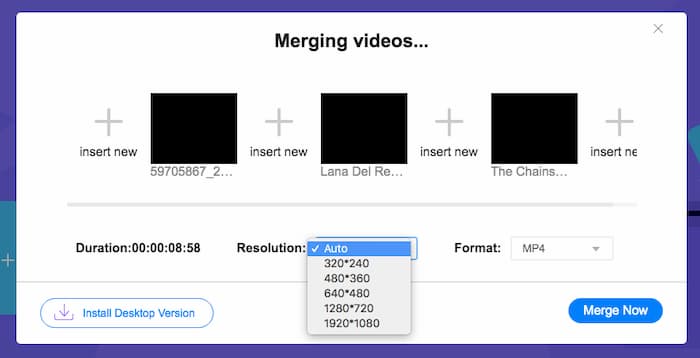
Step 3: After that, you can decide the resolution and format of the output video. You can combine the MPEG files into an MP4 file before clicking the Merge now button to start the process. It enables you to get the desired video within a short period.

เครื่องมือรวมวิดีโอออนไลน์ใช้งานง่าย อย่างไรก็ตาม หากคุณต้องการตัดช่องเปิดและตอนจบที่ซ้ำซ้อนของตอนต่างๆ ออก วิธีนี้ช่วยคุณไม่ได้อีกต่อไป คุณต้องใช้การควบรวม MPEG ที่ทรงพลังกว่านี้
Further Reading:
ส่วนที่ 2: วิธีการที่หลากหลายในการผสาน MPEG Videos
Aiseesoft Video Converter Ultimate is a professional MPEG joiner that enables you to combine the desired parts of MPEG files into one movie. It enables you to trim the desired part of the MPEG files, adjust the video quality, customize the watermark, or even make a movie with different themes.
- 1. รวมไฟล์ MPEG เป็น MPEG, MP4 และรูปแบบวิดีโอมากกว่า 300 รูปแบบ
- 2. ปรับแต่งความละเอียดของวิดีโอ หรือแม้แต่ปรับปรุงคุณภาพวิดีโอสำหรับการรวมไฟล์
- 3. ตัดส่วนที่ต้องการของไฟล์ MPEG และรวมเป็นวิดีโอเดียว
- 4. เพิ่มเอฟเฟกต์และฟิลเตอร์ และปรับแต่งลายน้ำลงในวิดีโอ MPEG
ดาวน์โหลดฟรีสำหรับ Windows 7 หรือใหม่กว่าดาวน์โหลดอย่างปลอดภัย
ดาวน์โหลดฟรีสำหรับ MacOS 10.7 หรือใหม่กว่าดาวน์โหลดอย่างปลอดภัย
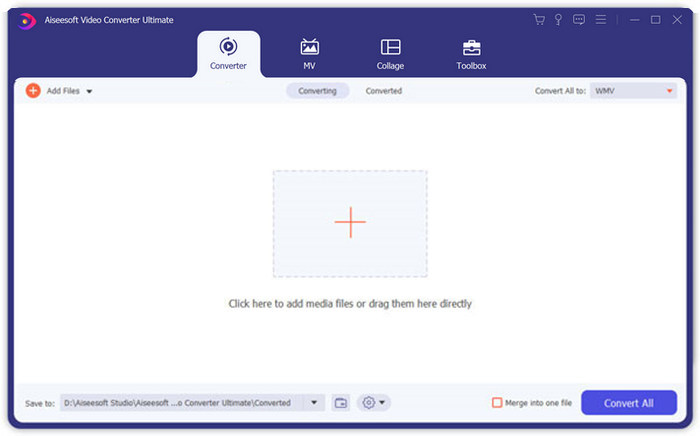
Step 1: Launch the Aiseesoft Video Converter Ultimate on your computer. Go to the Converter menu and click the big “+” button in the middle of the main interface to add the MPEG files you want to merge. Click the Add Files button to import all the files you want to combine.
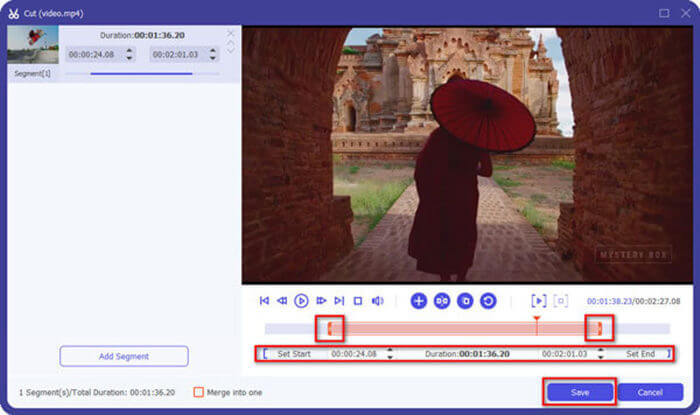
Step 2: For the MPEG clips that need to be trimmed, click the Cut button next to the video. You can set up the start and end points to delete the openings and endings of your MPEG videos. After that, you can click the Save button at the bottom to save the file.
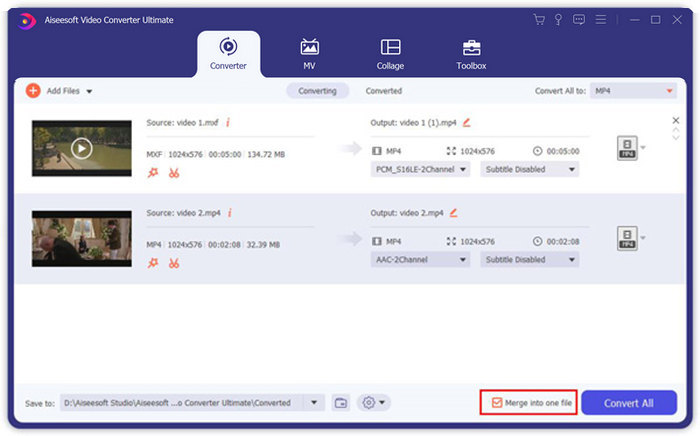
Step 3: After that, you can drag the trimmed video into the program. Adjust the sequence of the MPEG videos. When everything is ready, you need to check the Merge into one file box beside the Convert All. Click the Convert All button to start merging the MPEG files.
ส่วนที่ 3: คำถามที่พบบ่อยเกี่ยวกับการเข้าร่วมไฟล์ MPEG
วิธีการรวมไฟล์ MPEG ที่มีคุณภาพดีที่สุด?
เมื่อคุณต้องการรวมไฟล์ MPEG ที่มีคุณภาพใกล้เคียงกัน คุณสามารถเลือกพารามิเตอร์เป็นวิดีโอต้นฉบับได้ แต่ถ้าไฟล์ MPEG มีคุณภาพวิดีโอต่างกัน คุณต้องอัพสเกลไฟล์ MPEG บางไฟล์ด้วยคุณภาพต่ำก่อนด้วยโปรแกรมผสมวิดีโอระดับมืออาชีพ
ฉันสามารถรวมไฟล์ MPEG กับโทรศัพท์ iPhone หรือ Android ได้หรือไม่
ใช่. ก่อนดาวน์โหลดแอปรวมวิดีโอเพื่อเข้าร่วมไฟล์ MPEG คุณควรตรวจสอบให้แน่ใจว่าแอปเข้ากันได้กับ MPEG หรือวิดีโออื่นๆ ที่คุณต้องการรวม Adobe Premiere Clip, Viva Video และ Splice Video คือรายการแนะนำที่คุณสามารถนำไปพิจารณาได้
รูปแบบไฟล์ MPEG คืออะไร?
MPEG เป็นรูปแบบไฟล์วิดีโอที่ใช้การบีบอัดไฟล์ MPEG-1 หรือ MPEG-2 เป็นรูปแบบยอดนิยมสำหรับภาพยนตร์ที่เผยแพร่บนอินเทอร์เน็ตที่ทำให้การสตรีมและดาวน์โหลดเร็วกว่ารูปแบบวิดีโอยอดนิยมอื่นๆ
สรุป
บทความนี้แนะนำ 2 วิธีที่มีประสิทธิภาพในการผสานไฟล์วิดีโอ MPEG โดยเฉพาะอย่างยิ่งเมื่อคุณต้องการตัดแต่งส่วนพิเศษ FVC Free Online Video Merger เป็นวิธีที่ง่ายในการรวมไฟล์ MPEG ออนไลน์ แต่คุณไม่สามารถแก้ไขคลิปวิดีโอได้ ดังนั้น หากคุณต้องการตัดแต่งและแก้ไขวิดีโอ MPEG Aiseesoft Video Converter Ultimate ควรเป็นทางออกที่ดีที่สุด
-
 ผู้เข้าร่วมวิดีโอ MP4 ที่ดีที่สุด 6 อันดับแรกเพื่อรวมวิดีโอ MP4 ฟรี
 มีตัวเชื่อม MP4 จำนวนมากสำหรับการเชื่อมต่อคลิป MP4 ต่างๆ ในบทความนี้เราได้เลือกตัวเชื่อม MP4 ฟรีสำหรับ Windows 10/8/7 และ Mac
-
 จะรวมไฟล์ M4V ได้อย่างไร? นี่คือ 2 วิธีแก้ปัญหาที่เร็วที่สุด
 หากคุณกำลังมองหาวิธีแก้ปัญหาในการรวมไฟล์วิดีโอ M4V เป็นไฟล์เดียว อย่าพลาดข้อความนี้ เราจะพูดถึงสองวิธีที่ดีที่สุดในการรวมไฟล์วิดีโอ M4V
-
 วิธีผสานวิดีโอ 3GP จากโทรศัพท์มือถือเป็นไฟล์เดียว
 เมื่อคุณต้องการรวมวิดีโอ 3GP บางรายการจาก BlackBerry ของคุณเป็นวิดีโอเดียว คุณสามารถเรียนรู้เพิ่มเติมเกี่ยวกับ 2 วิธีที่มีประสิทธิภาพในการรวมไฟล์ 3GP จากบทความ
