


 Video Converter Ultimate
 บันทึกหน้าจอ
 ซ่อมวิดีโอ
 ดาวน์โหลดอย่างปลอดภัย
FLV เป็น WMA Converter - วิธีการแยกเสียง WMA จากวิดีโอ FLV ฟรี
เมื่อคุณดาวน์โหลดไฟล์วิดีโอ Flash จากเว็บไซต์ YouTube แล้ว คุณสามารถแปลงไฟล์ FLV เป็น WMA แบบไม่สูญเสียข้อมูลได้ WMA (Windows Media Audio) คือชุดของตัวแปลงสัญญาณเสียงและรูปแบบการเข้ารหัสเสียงที่เกี่ยวข้องซึ่งพัฒนาโดย Microsoft เสียง WMA รองรับเสียงหลายช่องสัญญาณและเสียงความละเอียดสูง จากบทความนี้ คุณจะได้เรียนรู้ 2 วิธีในการแปลงวิดีโอ FLV เป็นเสียง WMA บน Windows และ Mac

ส่วนที่ 1 วิธีที่ดีที่สุดในการแยก WMA Audio จาก FLV ฟรี
FVC Free FLV Converter is a free, easy & fast FLV to WMA converter that supports batch convert FLV files to WMA on your Windows and Mac. Meanwhile, you can convert the FLV videos to other video and audio formats like HD MP4, AVI, WMV, MKV, 3GP, MP3, AAC, AC3, etc. With the built-in editing feature, you can edit the metadata data in WMA for free.

FVC แปลง FLV ฟรี
145000+ ดาวน์โหลด- แปลง FLV เป็น WMA บน Windows 10/8/7/Vista/XP และ Mac OS X
- บีบอัด ผสาน เพิ่มธีม และแก้ไขข้อมูลเมตาของไฟล์ WMA
- เพิ่มธีมพิเศษให้กับไฟล์ FLV ของคุณ เช่น วันหยุด ครอบครัว วันเกิด
- ชุดแปลง FLV เป็น WMA, MP3, AAC, FLAC, M4R, OGG, WAV
ดาวน์โหลดฟรีสำหรับ Windows 7 ขึ้นไปดาวน์โหลดอย่างปลอดภัย
ดาวน์โหลดฟรีสำหรับ MacOS 10.7 ขึ้นไปดาวน์โหลดอย่างปลอดภัย
ขั้นตอนที่ 1. เพิ่มไฟล์ FLV
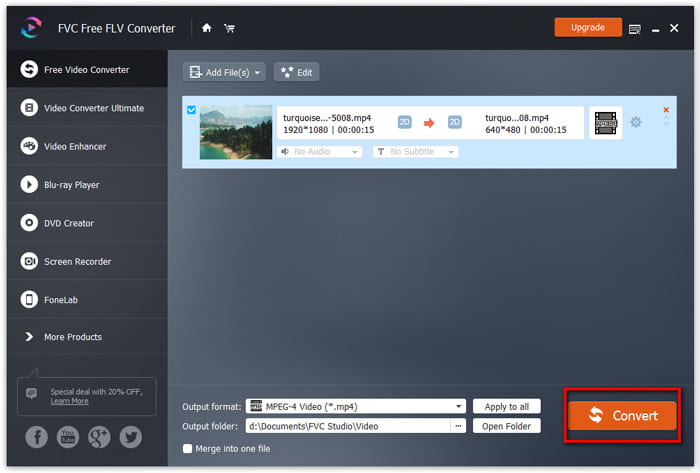
After free downloading FVC Free FLV Converter, you can install and run the program on your computer. Click Add File(s) button to import the Flash video file. You can also drag and drop more FLV files into the program at one time.

ขั้นตอนที่ 2. แก้ไขไฟล์ FLV
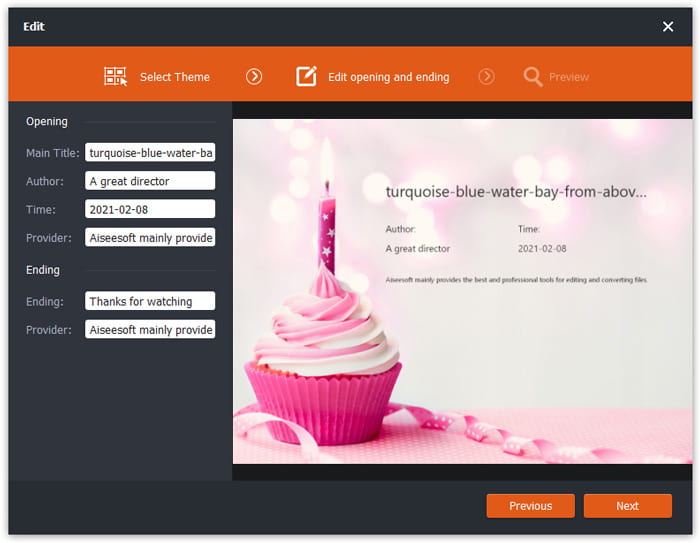
Click the Edit button to start editing your FLV file. You can select a certain theme, edit the data information like title, author, time at the opening and ending.
ขั้นตอนที่ 3 ตั้งค่า WMA เป็นเอาต์พุต
Then go to the Output format area and type WMA in the search box. Here you can select WMA - Windows Media Audio (*.wma) as the output format.

ขั้นตอนที่ 4 แปลง FLV เป็น WMA
Go to the Output folder area and choose the destination where the WMA file will be saved. You can click the Convert button to start converting FLV to WMA audio file for free.
ส่วนที่ 2 วิธีการแปลง FLV เป็น WMA ออนไลน์ฟรี
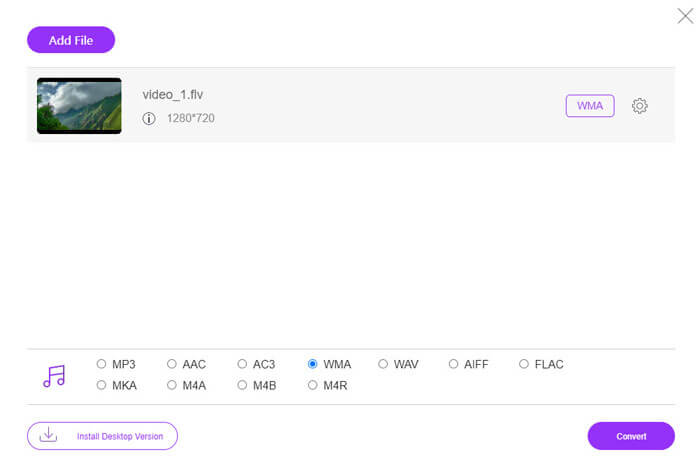
If you are tired of downloading any software package, you can try FVC Free Audio Converter. It is a powerful web-based FLV to WMA converter that helps convert any popular video/audio file to WMA, MP3, AAC, FLAC, WAV, etc. You can learn how to convert FLV to WMA in details with FVC Free Audio Converter.
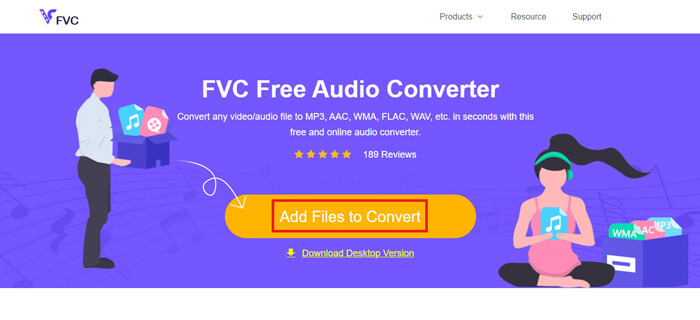
Step 1. Visit the official website of FVC Free Audio Converter (https://www.free-videoconverter.net/free-audio-converter/). Click Add Files to Convert button to download and install the launcher. You can upload the FLV files from local computer.
Step 2. Check WMA at the bottom and set it as the output format. If you want to adjust more settings, you can click the gear icon to audio encoder, channel, sample rate and bitrate. Click OK button to save the changes.
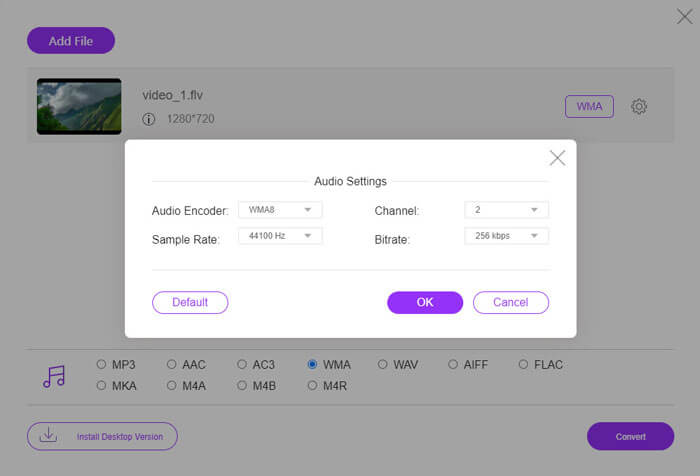
Step 3. At last, you can click the Convert button to start converting your FLV to WMA file online for free.
ส่วนที่ 3 คำถามที่พบบ่อยเกี่ยวกับการแปลง FLV เป็น WMA
ไฟล์ FLV คืออะไรและฉันจะเล่นได้อย่างไร
FLV เป็นรูปแบบไฟล์วิดีโอแฟลชที่พัฒนาโดย Adobe สามารถจัดเก็บวิดีโอเสียงข้อความตัวห้อยและอื่น ๆ ทั้ง Windows Media Player และ QuickTime ไม่รองรับ FLV ดังนั้นคุณต้องใช้โปรแกรมเล่นสื่อของ บริษัท อื่นเพื่อเปิด FLV เช่น VLC
รูปแบบ WMA ใช้สำหรับอะไร?
WMA เป็นรูปแบบเสียงที่สูญเสียซึ่งสร้างโดย Microsoft เพื่อแข่งขันกับ MP3 WMA ใช้สำหรับสตรีมเพลงออนไลน์เป็นหลัก ไฟล์ WMA ที่มีนามสกุล. wma คือ Windows Media Audio Windows Media Player สามารถรองรับได้อย่างสมบูรณ์แบบ
มีเครื่องเล่นเพลง WMA หรือไม่?
Yes. There are WMA music players you can choose, like FVC Free Video Player, KMPlayer, Elmedia Video Player, Macgo Free Mac Media Player, VOX Music Player, VLC Media Player, GOM Media Player, foobar2000, AIMP, Samsung Music, etc.
สรุป
ในบทความนี้ เราพูดถึง 2 วิธีฟรีในการแปลงวิดีโอ FLV เป็น WMA บน Windows 10 PC และ Mac หวังว่าโซลูชันทั้งหมดเหล่านี้จะช่วยคุณแก้ปัญหาของคุณ ครั้งต่อไปที่คุณดาวน์โหลดวิดีโอแฟลชจากเว็บไซต์ คุณสามารถลองใช้ FVC Free FLV Converter เพื่อแปลงวิดีโอ FLV เป็น WMA, MP3, AAC, MP4, AVI, VOB เป็นต้น
-
 FLV เป็น WAV - แปลง FLV เป็น WAV ออนไลน์ฟรีและบน Mac / PC
 ฉันจะแปลงไฟล์ FLV ได้อย่างไร VLC สามารถแปลง YouTube FLV เป็น WAV ได้หรือไม่ โพสต์นี้บอก 3 วิธีฟรีในการแปลง FLV เป็น WAV โดยไม่สูญเสียคุณภาพ
-
 2 วิธีง่ายๆ ในการแปลงไฟล์ MOV เป็น FLV บน Windows/Mac
 วิธีแปลง MOV เป็น FLV ฟรี นี่คือตัวแปลงวิดีโอที่ดีที่สุดบนเดสก์ท็อปและออนไลน์เพื่อแปลงไฟล์ MOV ของคุณเป็น FLV ในไม่กี่วินาทีโดยไม่ต้องเสียเงิน
-
 วิธีการแปลง WMA เป็น MP3 บน Mac / Windows / Online
 สามารถแปลง WMA เป็น MP3 ด้วย Windows Media Player ได้หรือไม่? วิธีแปลง WMA เป็น MP3 ฟรี โพสต์นี้แบ่งปัน 4 วิธีง่ายๆที่จะช่วยคุณในการแปลงเสียงจาก WMA เป็น MP3 บน Mac, Windows PC และออนไลน์
