


 Video Converter Ultimate
 บันทึกหน้าจอ
 ซ่อมวิดีโอ
 ดาวน์โหลดอย่างปลอดภัย
2 วิธีที่ดีที่สุดในการเล่นดีวีดีบน Nintendo Wii/Wii U โดยไม่ต้องใช้ Homebrew Hack
Wii สามารถเล่นดีวีดีได้ไหม? ฉันรู้ว่า Wii เป็นเครื่องเล่นเกมที่ดีที่สุดตลอดกาล แต่สิ่งที่ฉันกังวลมากที่สุดคือมันอาจจะไม่สามารถเล่นแผ่นดีวีดีได้ ดังนั้นถ้าใครรู้คำตอบ กรุณาตอบกลับมาให้เร็วที่สุดด้วยนะคะ/ครับ.
ในฐานะที่เป็นเกมคอนโซลยอดนิยมสำหรับโทรทัศน์ Nintendo Wii/Wii U รองรับการเล่นเกมนับพันโดยใส่แผ่นดิสก์เกมลงในอุปกรณ์ และหลายคนคงนึกถึงการใส่แผ่น DVD และเล่น DVD บน Wii ด้วยหน้าจอขนาดใหญ่และประสบการณ์การรับชมที่ดีขึ้น อย่างไรก็ตาม Wii หรือ Wii U สามารถอ่านได้เฉพาะแผ่นดิสก์ที่มีข้อกำหนดเดียวกันกับตัวมันเอง (เช่น Wii เวอร์ชันสหรัฐอเมริกาสามารถอ่านแผ่นดิสก์เกมในสหรัฐฯ เท่านั้น) ดังนั้น Wii จึงไม่สามารถเล่นแผ่น DVD โดยตรงได้ แต่ไม่ต้องกังวล! ยังมีอีกสองวิธีที่ง่ายและมีประสิทธิภาพสำหรับคุณ โปรดอ่านบทความนี้ต่อไปและเรียนรู้เพิ่มเติมเกี่ยวกับพวกเขา

ส่วนที่ 1: Wii/Wii U สามารถอ่านและเล่น DVD ได้หรือไม่ ทำไม?
คำตอบคือไม่ Nintendo Wii/Wii U ไม่สามารถอ่านและเล่นดีวีดีได้ นั่นเป็นเพราะว่าข้อกำหนดของแผ่นดิสก์นั้นถูกจำกัดโดยภูมิภาคของ Wii และแม้แต่แผ่นเกมจากประเทศอื่น ๆ ก็ไม่สามารถอ่านได้โดย Wii ในกรณีนี้ ช่อง Homebrew ถูกสร้างขึ้นเพื่อหลีกเลี่ยงการล็อกเอาต์ระดับภูมิภาคและเปิดแผ่นดิสก์หรือโปรแกรมที่ไม่เป็นทางการเหล่านั้น แต่ Nintendo ถูกห้ามและการแฮ็กค่อนข้างเสี่ยง
ทำไมไม่ลองใช้วิธีการที่ง่ายกว่าและปลอดภัยกว่าด้านล่างล่ะ ด้วยการคลิกง่ายๆ คุณสามารถริปหรือแปลงวิดีโอ DVD เป็นรูปแบบที่รองรับและเล่น DVD บน Wii ผ่านการ์ด SD คุณควรรู้ว่า AVI และ MOV เป็นรูปแบบที่สนับสนุนอย่างเป็นทางการโดย Wii และความละเอียดสูงสุดคือ 1080p
ส่วนที่ 2: วิธีการเล่นดีวีดีบน Nintendo Wii โดยการริปวิดีโอดีวีดี
Blu-ray Master Free DVD Ripper เป็นซอฟต์แวร์ที่ดีที่สุดสำหรับริปแผ่นดีวีดีให้เป็นมากกว่า 200+ รูปแบบไฟล์ เพื่อใช้เล่นดีวีดีบน Wii/Wii U นอกจากนี้ ยังมีฟีเจอร์แก้ไขวิดีโอหลากหลายแบบเพื่อใส่เอฟเฟกต์ต่าง ๆ ให้กับวิดีโอได้ด้วย ต่อไปนี้คือขั้นตอนโดยละเอียด:
ขั้นตอนที่ 1: ดาวน์โหลดและเปิดใช้งาน Free DVD Ripper บนคอมพิวเตอร์ของคุณ และตรวจสอบให้แน่ใจว่าคุณได้ใส่แผ่นดีวีดีลงในคอมพิวเตอร์แล้ว จากนั้นคลิกปุ่ม Load Disc แล้วเลือกโหมด DVD Navigator หลังจากนั้นคลิกปุ่ม OK เพื่อเริ่มอ่านและโหลดแผ่นดีวีดีของคุณ.
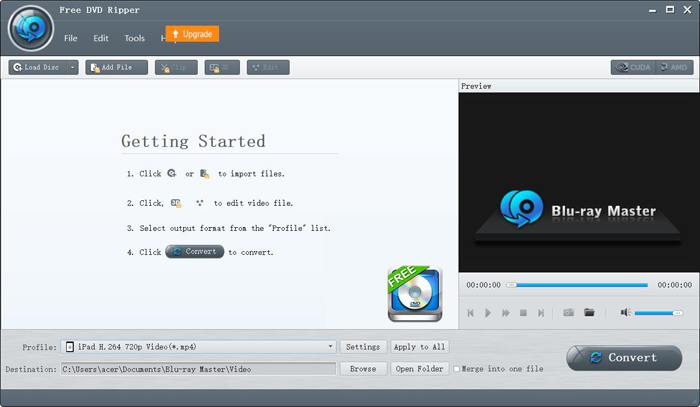
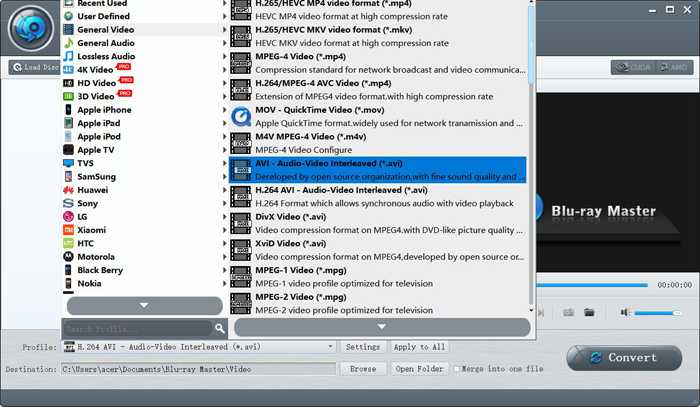
ขั้นตอนที่ 2: คลิกเมนู Profile แล้วเลือกฟอร์แมต AVI/MOV ในรายการ General Video หากคุณมีวิดีโอหลายไฟล์ คุณสามารถคลิกปุ่ม Apply to All เพื่อริปวิดีโอทั้งหมดได้ในครั้งเดียว.
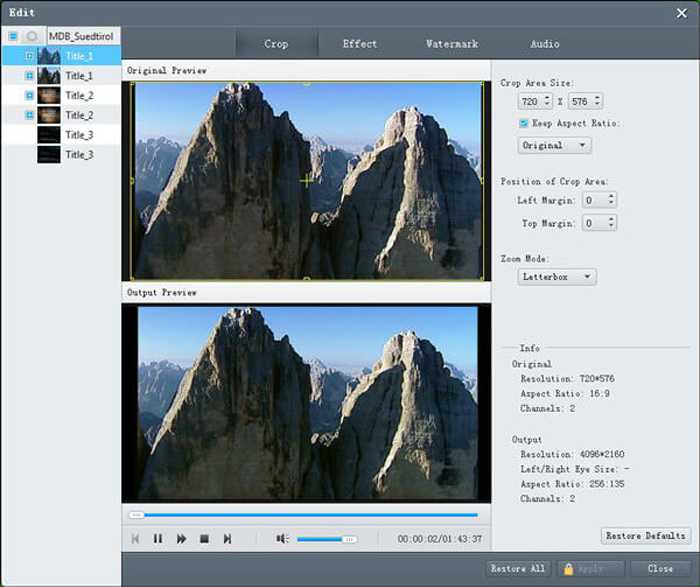
ขั้นตอนที่ 3: หากต้องการใส่เอฟเฟกต์และลายน้ำในวิดีโอ คุณสามารถคลิกปุ่ม Edit แล้วเลือกธีมที่ต้องการตามความต้องการของคุณ จากนั้นกลับไปที่หน้าหลักแล้วคลิกปุ่ม Convert เพื่อริปวิดีดีโอสำหรับนำไปเล่นบน Wii.
ส่วนที่ 3: คำถามที่พบบ่อยเกี่ยวกับการเล่นดีวีดีบน Nintendo Wii/Wii U
1. ทำไม Nintendo Wii ถึงอ่านและเล่น DVD ไม่ได้
เนื่องจาก Nintendo ให้ความสำคัญกับลิขสิทธิ์เป็นอย่างมาก ดังนั้น Nintendo Wii/Wii U จึงเล่นได้เฉพาะแผ่นดิสก์เกมในภูมิภาคเดียวกันเท่านั้น อย่างไรก็ตาม ไม่สามารถอ่านและเล่นแผ่น DVD ในภูมิภาคเดียวกันบน Wii ได้เนื่องจากข้อกำหนดที่ไม่เหมาะสม
2. Wii รองรับรูปแบบวิดีโอใดบ้าง
Nintendo Wii รองรับได้เฉพาะไฟล์วิดีโอรูปแบบ AVI และ MOV และความละเอียดต้องไม่เกิน 1080p คุณสามารถแปลงฟอร์แมตของเครื่องเล่นดีวีดี ให้เป็น AVI หรือ MOV แล้วจึงนำไปเล่นดีวีดีบน Nintendo Wii ผ่านการ์ด SD ได้.
3. การใช้ Homebrew ในการเล่นดีวีดีบน Nintendo Wii มีความเสี่ยงหรือไม่
ใช่ การใช้ Homebrew เพื่อแฮ็ค Nintendo Wii/Wii U นั้นค่อนข้างเสี่ยง ตามความเป็นจริงแล้ว Homebrew สามารถเลี่ยงการล็อกภูมิภาคเพื่อเล่นดีวีดีบน Wii ได้ แต่ Nintendo ห้ามไว้ ดังนั้น วิธีที่ง่ายที่สุดคือการแปลงดีวีดีเพื่อเล่นบน Nintendo Wii/Wii U
สรุป
จากบทความนี้ คุณได้เรียนรู้ว่า Nintendo Wii/Wii U ไม่สามารถเล่น DVD ได้โดยตรงเนื่องจากการล็อกระดับภูมิภาค แม้ว่าคุณจะสามารถแฮ็คเพื่อเล่นดีวีดีบน Wii ผ่านช่อง Homebrew ได้ แต่ก็ซับซ้อนและเสี่ยงมาก ดังนั้น คุณควรแปลงหรือริพวิดีโอดีวีดีเป็นรูปแบบที่รองรับเพื่อเล่นดีวีดีบน Nintendo Wii/Wii U
-
 2021 รีวิวเครื่องเล่น DVD ฟรี 5 เครื่องสำหรับ Windows 10
 เครื่องเล่นดีวีดีฟรีที่ดีที่สุดสำหรับ Windows 10 คืออะไร วิธีรับ Windows Media Player เล่น DVD โพสต์นี้แสดงรายการเครื่องเล่นดีวีดีฟรีที่ดีที่สุด 5 รายการสำหรับ Windows 10
-
 เครื่องเล่นดีวีดีสำหรับ iPad: วิธีการเล่นวิดีโอดีวีดีบน iPad Air/Mini/Pro
 เมื่อคุณต้องการเล่น DVD บน iPad Pro คุณจะพบว่าไม่มีอินเทอร์เฟซที่สามารถเชื่อมต่อเครื่องเล่น DVD ภายนอกกับ iPad ของคุณได้ คุณสามารถเรียนรู้วิธีริปหรือแปลงดีวีดีเป็นรูปแบบที่รองรับได้จากบทความนี้
-
 วิธีเล่น DVD บน Windows Media Player ในปี 2021
 ทำไมดีวีดีของฉันไม่เล่นบน Windows Media Player จะเล่น DVD บนเครื่องเล่นสื่อ Windows 7 ได้อย่างไร? โพสต์นี้แชร์ 3 วิธีในการเล่นดีวีดีที่มีหรือไม่มี WMP
