


 Video Converter Ultimate
 บันทึกหน้าจอ
 ซ่อมวิดีโอ
 ดาวน์โหลดอย่างปลอดภัย
สุดยอดเครื่องบันทึก M4B พร้อมเครื่องมือ ขั้นตอน และรายละเอียดที่สมบูรณ์
M4B format is used to store audiobooks that are downloaded from the Apple iTunes Store. Also, it allows you to bookmark along with the recorded audio as well pause, play and stop if it is needed. Because some of the audiobooks are almost an hour or two long so it is perfect to have that feature. Another feature that is incredible about this is that you can split the audiobook to have a different chapter like normal books have. In this situation this is the best opportunity for the users to know more about this file format. If you’re looking for an M4B recorder then in case this is for you. In the list below are the best audio recorders that will fit your demand as their user and maybe in the future as the customer as well. So, without any more explanation let's continue below and know what are the tools you may use.
ส่วนที่ 1 ตัวบันทึก M4B ยอดนิยมสำหรับ Windows และ Mac
FVC เครื่องบันทึกเสียงฟรี

One of the best online recordings which allows the user to do the audio recording as beautifully as ever. FVC Free Audio Recorder is the best online recorder you may use. Also, it is available on all different platforms. And the success rate of this tool is super high so expect nothing less with this tool. If you’re looking for the best online audio recorder then this is for you. So, without any further explanation let's proceed to the steps below. It is a must to read it carefully and follow the instructions.
Step 1. Click the link to proceed to the webpage. Click Start Recording to launch the tool.
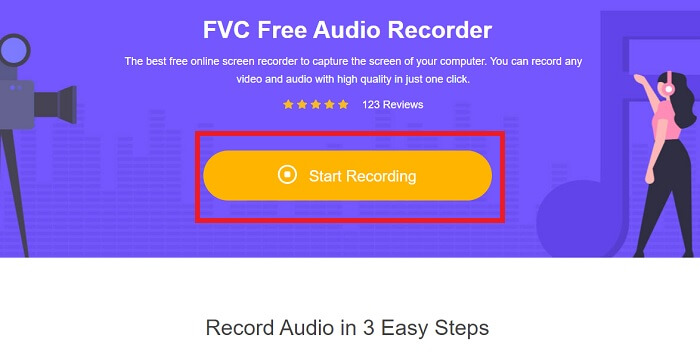
Step 2. A toolbar like this will show in the display like this.
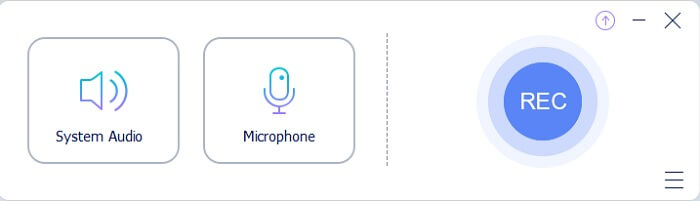
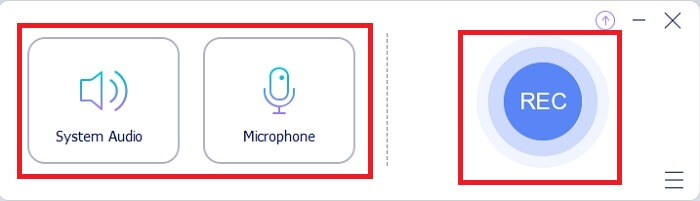
Step 3. Click the Speaker and Microphone to add your voice and audio sound.
Step 4. Click the round button to start recording.
Step 5. After recording click the square button to stop. After that it will automatically be saved in your pc. To check the recording, you may check it in the parallel lines the top is the latest.
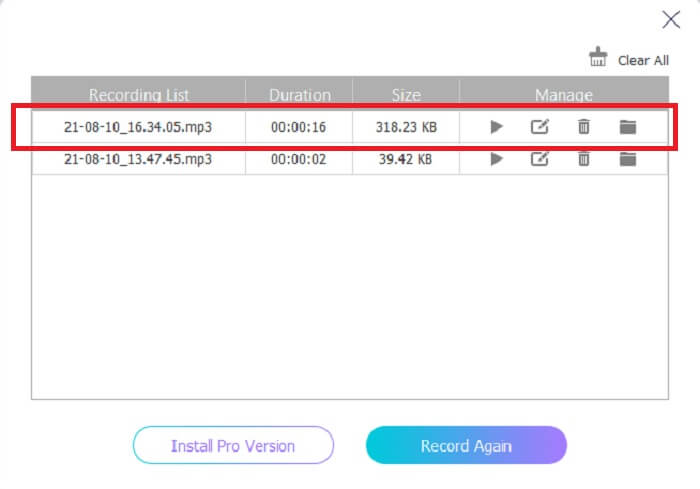
ส่วนที่ 2 อื่นๆ 4 เครื่องบันทึก M4B ที่แนะนำสำหรับ Windows และ Mac
1. เครื่องบันทึกหน้าจอ FVC
If the free tool makes you happy then this FVC Screen Recorder will make you the best output that you ever dream of. This tool allows the user to be more creative with the touch of magic for the best output you may produce. So, if you want your Sony digital recorder to play in M4B format then this is the best choice for you. Completely follow these steps all tell yourself it is easy-peasy lemon squeezy to do the recording.
Step 1. Click the download button that supports your currently using program. After downloading it, install the tool. Change the Preference according to your wants and click Finish to proceed.
ดาวน์โหลดฟรีสำหรับ Windows 7 ขึ้นไปดาวน์โหลดอย่างปลอดภัย
ดาวน์โหลดฟรีสำหรับ MacOS 10.7 ขึ้นไปดาวน์โหลดอย่างปลอดภัย
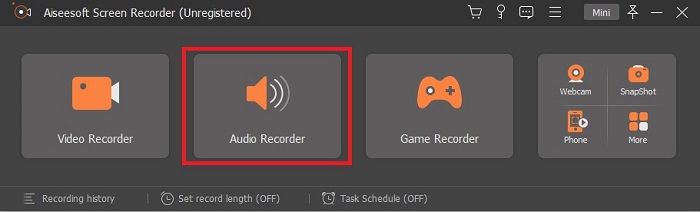
Step 2. A floating toolbar like this will show in your display. Click the Audio Recorder then proceed.
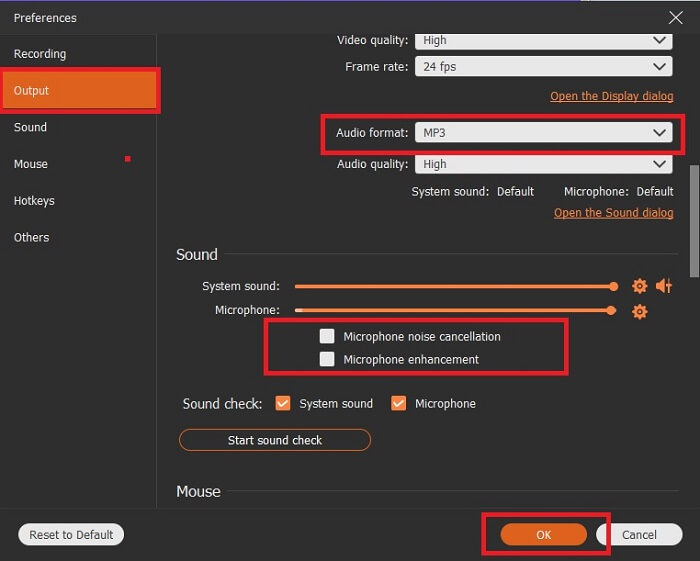
Step 3. In the upper-mid of the toolbar you will notice a cog icon then click it. Then adjust the Output settings based on your needs. Click OK to save it.
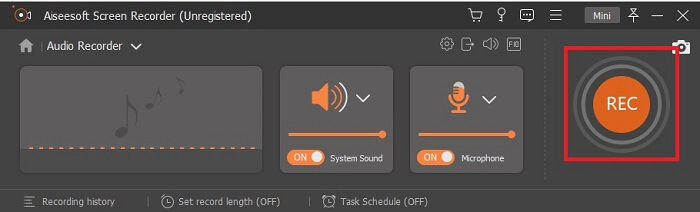
Step 4. Click the Speaker icon to add the system sound and Mic to add your voice. If everything is fine, click the disk-shape to start recording.
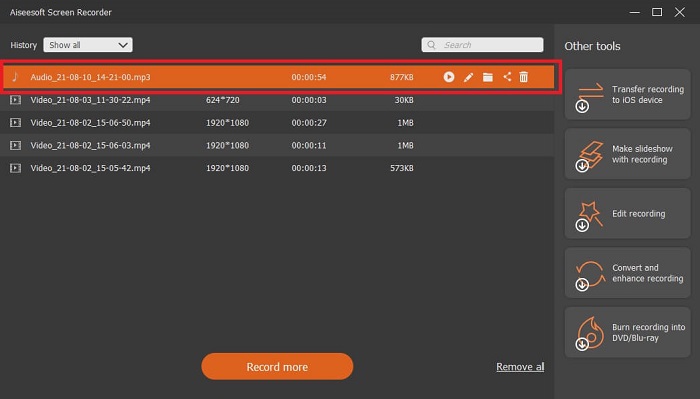
Step 5. If recording is finished click the Square button to stop. Click Save and Next to proceed. After that history list will show into your screen and click the first output to listen to your recording.
2. เสียง Boo
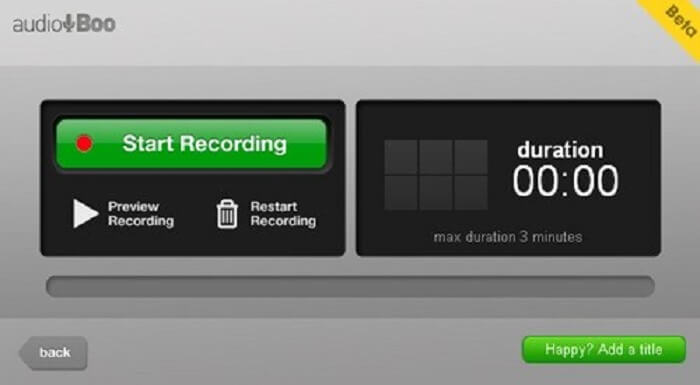
Another incredible tool that allows you to record is this. Audio Boo allows the user to record any audio recording that is needed based on your specification. But the recording will automatically stop because it is limited. So, if you’re recording a short song for your loved one then you might like to use this tool.
3. เวฟแพด
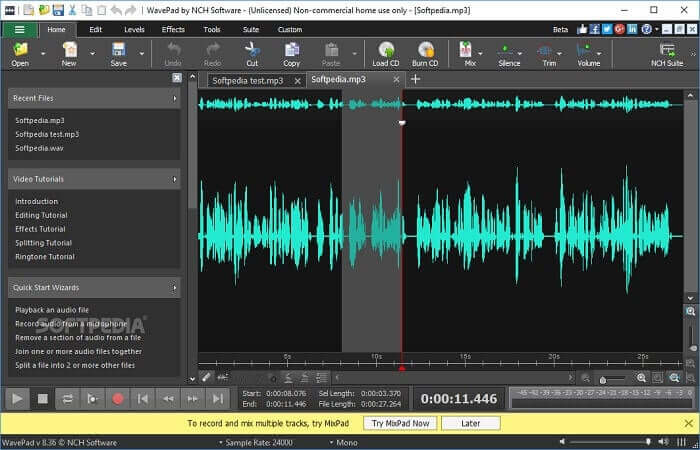
One of the best audio tools you may use to record a fancy music recording. Wavepad is most commonly used as a complicated audio recording. As well, you may pan up and down, change the tempo and edit. It provides tutorials in the toolbar.
4. สวนกุหลาบ
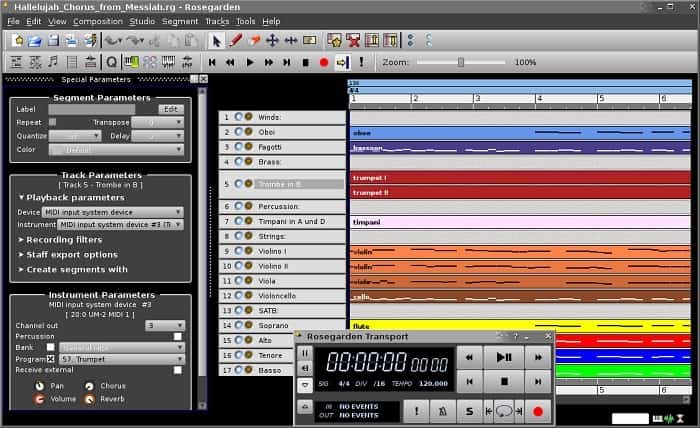
เป็นเครื่องบันทึกเสียงดิจิตอลพร้อม MIDI และการแก้ไข เครื่องมือนี้เป็นอีกทางเลือกหนึ่งหากคุณเป็นนักดนตรีที่ชอบบันทึกเสียง เป็นเครื่องมือง่ายๆ ที่คุณสามารถใช้บันทึกและแต่งเพลงได้เช่นกัน
Further Reading
ส่วนที่ 3 แผนภูมิเปรียบเทียบ
| คุณสมบัติเครื่องมือ/s | FVC เครื่องบันทึกเสียงฟรี | เครื่องบันทึกหน้าจอ FVC | เสียง Boo | WavePad | สวนกุหลาบ |
| บันทึกเสียง |  | | | | |
| ตัดเสียงรบกวน |  | | | | |
| เครื่องมือแก้ไข | | | | | |
| การเพิ่มประสิทธิภาพไมโครโฟน | | | | | |
| ซอฟต์แวร์ที่มีจำหน่าย | ทุกแพลตฟอร์ม | ทุกแพลตฟอร์ม | iPhone, iPod touch และ iPad | อุปกรณ์ Mac, Windows, Android และ iOS | ลินุกซ์ |
| รูปแบบที่ใช้ได้/s | MP3 และ M4B | MP3, WMA, AAC, M4B, M4A FLAC, OGG, Opus และอีกมากมาย | MP3 | AAC, M4A, MP4, DCT | WAV, OGG, FLAC และ MP3 |
| ช่วงราคา | เครื่องมือออนไลน์ฟรี | เป็นเวลา 1 เดือน: $25.00 หนึ่งปี: $31.20 สำหรับใบอนุญาตตลอดชีพ: $55.20 | ซอฟต์แวร์ดาวน์โหลดฟรี | $3.88 ต่อเดือน ต่อผู้ใช้ $69.95 ต่อปี ต่อผู้ใช้ ฟรีสำหรับงานที่ไม่ใช่เชิงพาณิชย์ | ซอฟต์แวร์ดิจิทัลฟรี |
ส่วนที่ 4. คำถามที่พบบ่อยเกี่ยวกับ M4B Recorder
ทำไมฉันถึงเล่นไฟล์ M4B บน Android ไม่ได้
M4B files can’t be played in the android devices and also in some PC media players. But you can use this M4B Player Online, it supports different formats like this M4B and many other file formats. Basically, drag-and-drop or you may as well find it to your file explorer.
ไหนดีกว่ากัน? MP3 หรือ M4B?
ดีทั้งคู่ แต่ M4B ให้คุณภาพเสียงมากกว่า นอกจากเสียงแล้ว ยังเก็บข้อมูล เครื่องหมายบท รูปภาพ และไฮเปอร์ลิงก์ แต่วิธีนี้ไม่ใช่วิธีที่ดีที่สุดสำหรับการบันทึก
หนังสือเสียงคืออะไร? จุดประสงค์ของมันคืออะไร?
หนังสือเสียงเป็นการบันทึกเสียงของหนังสือเรียน มันอ่านออกเสียงทุกคำแทนที่จะอ่านในความเงียบ ซึ่งจะทำให้ผู้ใช้รายอื่นทำสิ่งอื่นขณะฟังได้ รวมถึงการออกเสียงที่ถูกต้อง ความคล่องแคล่ว การรับรู้สัทศาสตร์ และอื่นๆ
สรุป
ในการวิเคราะห์ขั้นสุดท้าย เราเข้าใจว่าเครื่องบันทึก M4B คืออะไรและมีอะไรอยู่ในรูปแบบนี้ หากคุณเหนื่อยกับการอ่านหนังสือและคุณเป็นผู้เรียนการได้ยินมากขึ้น รูปแบบไฟล์ประเภทนี้จะดีที่สุดสำหรับคุณ อย่างที่พวกเขาพูดกัน การฟังเป็นหนึ่งในวิธีที่ดีที่สุดในการเรียนรู้สิ่งต่างๆ เนื่องจากเอาต์พุตเสียง
As it's explained that all of the tools available in the list can do the work but one of them stands out the most. Guess what that tool is, to give you a hint this tool is the most commercialized rather than the other tool it is a pay-to use tool but it is not inexpensive. This tool is the easiest way to do the recording whether anytime or anywhere. If this clue doesn’t give you the idea of it then let's say what it is. It is the FVC Screen Recorder that allows you to do the recording in the best way possible yet it provides on point instructions so no need to worry if you are a beginner or even pro may as well use this because of some features.
-
 คอมพิวเตอร์ Windows/Mac เครื่องบันทึกวิดีโอ AMV ที่ดีที่สุด 4 อันดับแรก
 ค้นพบเพิ่มเติมเกี่ยวกับไฟล์ AMV และเรียนรู้เกี่ยวกับวิธีการที่ใช้งานได้จริงที่สุดในการบันทึกวิดีโอใน AMV และรูปแบบวิดีโออื่นๆ
-
 วิธีบันทึกหน้าจอโดยใช้ AirShou: การตรวจสอบโดยละเอียดและทางเลือก Airshou
 บทความนี้เป็นการทบทวนโดยละเอียดของ AirShou และประโยชน์ที่คุณจะได้รับจากบทความ นอกจากนี้ คุณจะพบทางเลือกที่ดีที่สุดสำหรับ Airshou เมื่อคุณอ่าน
-
 เครื่องบันทึก MOV 5 อันดับแรกสำหรับ Windows PC และ Mac
 หากคุณต้องการบันทึกวิดีโอ MOV ในขนาดไฟล์ที่เล็กกว่าซึ่งเข้ากันได้กับอุปกรณ์ iOS โปรดอ่านต่อในบทความ
