


 Video Converter Ultimate
 บันทึกหน้าจอ
 ซ่อมวิดีโอ
 ดาวน์โหลดอย่างปลอดภัย
ทำความรู้จักกับพื้นฐานเกี่ยวกับแอปตัวบันทึกรูปแบบ AMR
AMR หรือที่รู้จักกันในชื่อ Adaptive Multi-Rate เป็นรูปแบบไฟล์แบบสูญเสียข้อมูล (lossy format) ไฟล์ประเภทนี้มักใช้เก็บบันทึกเสียง การส่งข้อความแบบ MMS และอื่น ๆ เดิมทีถูกออกแบบมาสำหรับโทรศัพท์ 3G เท่านั้น แต่ปัจจุบันคุณสามารถเปิดด้วยโปรแกรมเล่นสื่ออื่น ๆ ที่รองรับรูปแบบนี้ได้ นอกจากนี้ ผู้ใช้มักประสบปัญหาในการเลือกว่า โปรแกรมบันทึกเสียง AMR ตัวไหนดีที่สุดและเหมาะกับความต้องการของตนเอง บทความนี้จึงมาพูดถึงเครื่องมือต่าง ๆ ที่อ้างอิงจากสเปก ขั้นตอน ข้อมูลการใช้งาน และอื่น ๆ อีกมากมาย ลองอ่านบทความนี้เพื่อดูว่าในฐานะว่าที่ลูกค้าของเขา อะไรคือสิ่งที่เหมาะที่สุดสำหรับคุณ โดยไม่เสียเวลา ไปดูกันเลย.
ส่วนที่ 1 AMR Recorder ที่ดีที่สุดสำหรับ Windows และ Mac
FVC เครื่องบันทึกเสียงฟรี

เครื่องมือออนไลน์ที่ให้คุณอัดเสียงสนทนา การแจมดนตรี งานพากย์เสียง และอื่น ๆ อีกมากมาย FVC Free Audio Recorder เป็นเครื่องมือที่พัฒนาโดย FVC ซึ่งเปิดโอกาสให้ผู้ใช้สัมผัสประสบการณ์บันทึกเสียงออนไลน์ที่ดียิ่งขึ้น เครื่องมือนี้ทำหน้าที่เป็นโปรแกรมบันทึกเสียง หากคุณยังลังเลกับเครื่องมือนี้ ทำไมไม่ลองใช้ด้วยตัวเองดูก่อน ดังนั้นโดยไม่ต้องอธิบายยืดยาว มาสำรวจเครื่องมือที่ยอดเยี่ยมนี้และเรียนรู้วิธีใช้ไปพร้อมกับการทำตามขั้นตอนง่าย ๆ ต่อไปนี้.
ขั้นตอนที่ 1 กดที่ ลิงก์ เพื่อไปยังหน้าเว็บไซต์หลัก ไม่ต้องกังวล ไม่มีมัลแวร์.
ขั้นตอนที่ 2 เปิดใช้งานเครื่องมือโดยคลิกที่ Start Recording.
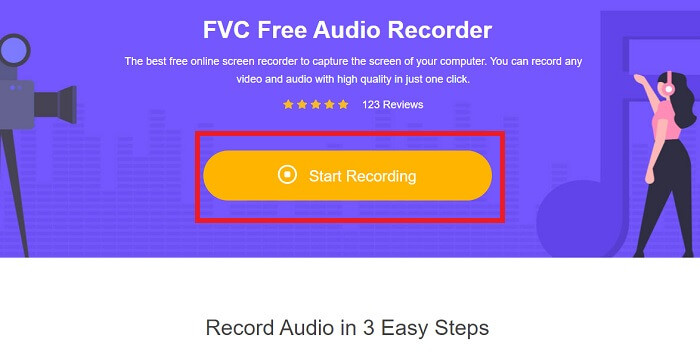
ขั้นตอนที่ 3 แถบเครื่องมือแบบนี้จะปรากฏบนหน้าจอของคุณ ซึ่งหมายความว่าเครื่องมือเริ่มทำงานแล้ว.
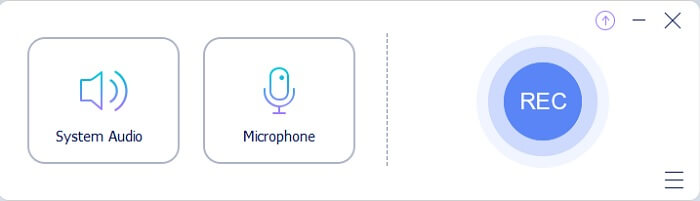
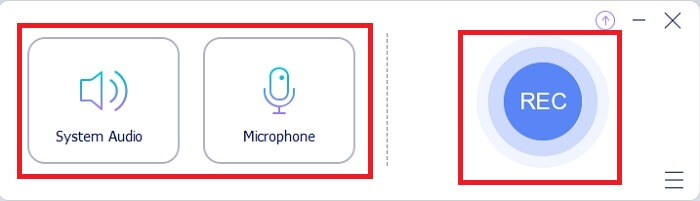
ขั้นตอนที่ 4 ที่แถบเครื่องมือจะมีปุ่ม Speaker สำหรับเพิ่มเสียงจากระบบ และ Mic สำหรับเสียงของคุณ เมื่อพร้อมแล้วให้คลิกปุ่มวงกลมเพื่อ Start.
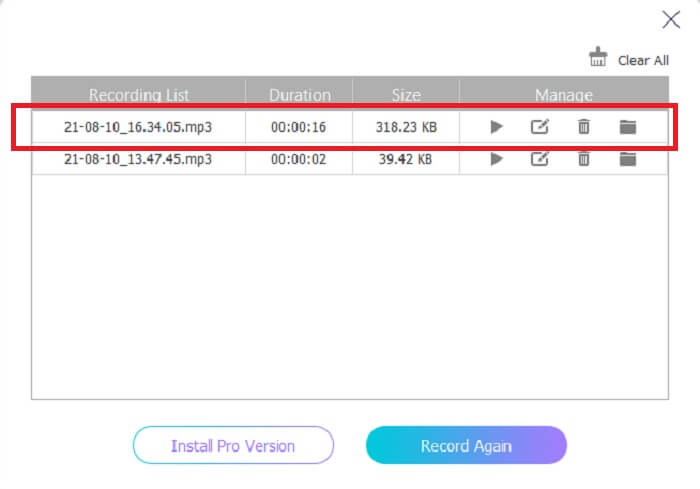
ขั้นตอนที่ 5 เมื่อบันทึกเสร็จแล้ว ให้คลิกปุ่มรูป cube เพื่อหยุดการบันทึก ไฟล์จะถูกบันทึกลงในที่เก็บข้อมูลของคุณโดยอัตโนมัติ หากต้องการฟังซ้ำ ให้คลิกสัญลักษณ์ สามขีด ด้านล่าง แล้วหน้า recording list จะแสดงไฟล์ล่าสุดไว้เป็นรายการแรก.
ส่วนที่ 2 4 เครื่องมือทางเลือกที่ดีที่สุดสำหรับ AMR Recorder สำหรับ Windows และ Mac
1. เครื่องบันทึกหน้าจอ FVC
หากคุณกำลังมองหา โปรแกรมบันทึกเสียง mp3, amr, wav, ac3 ที่ดีที่สุด นี่คือคำตอบของคุณ ไม่จำเป็นต้องมองหาเครื่องมืออื่น ให้ลองโฟกัสดูว่าเครื่องมือนี้ให้คุณได้อะไรบ้าง เพราะนี่คือ FVC Screen Recorder เพียงหนึ่งเดียว โปรแกรมบันทึกวิดีโอและเสียงระดับพรีเมียมที่ผู้คนส่วนใหญ่เลือกใช้เป็นตัวแรก ไม่เพียงเท่านั้น หากคุณกำลังสงสัยว่าทำไมถึงควรใช้เครื่องมือนี้เป็นโปรแกรมบันทึกส่วนตัวของคุณ เราขอแนะนำเครื่องมือนี้อย่างเป็นทางการ พร้อมทั้งขั้นตอนการใช้งานง่าย ๆ ด้านล่าง โดยไม่รอช้า ไปดูขั้นตอนกันเลย ทำตามอย่างละเอียดแล้วคุณจะกลายเป็นมือโปรในการบันทึก.
ขั้นตอนที่ 1 เลือกเวอร์ชันให้ตรงกับแพลตฟอร์มที่คุณใช้งานอยู่ จากนั้นดาวน์โหลดและติดตั้ง ปรับค่า Preferences ตามที่คุณต้องการ แล้วคลิก Finish เพื่อบันทึก.
ดาวน์โหลดฟรีสำหรับ Windows 7 ขึ้นไปดาวน์โหลดอย่างปลอดภัย
ดาวน์โหลดฟรีสำหรับ MacOS 10.7 ขึ้นไปดาวน์โหลดอย่างปลอดภัย
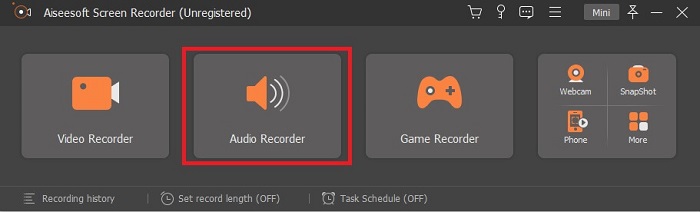
ขั้นตอนที่ 2 หลังจากเปิดโปรแกรมแล้ว จะมีแถบเครื่องมือลอยขึ้นมาแบบนี้บนหน้าจอ จากนั้นคลิก Audio Recorder เพื่อไปต่อ.
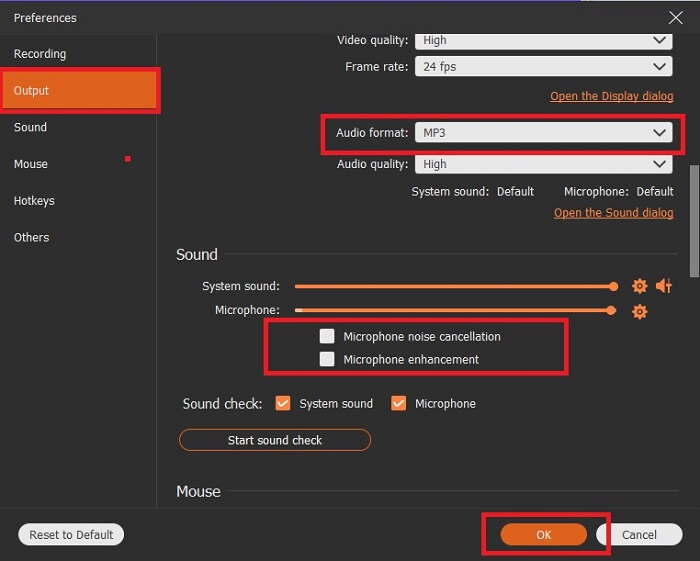
ขั้นตอนที่ 3 หาไอคอนรูป gear เพื่อเข้าไปที่การตั้งค่า เปลี่ยน Audio output ให้เป็นรูปแบบไฟล์ที่คุณต้องการ และปรับตัวเลือกอื่น ๆ จากนั้นคลิก OK เพื่อบันทึก.
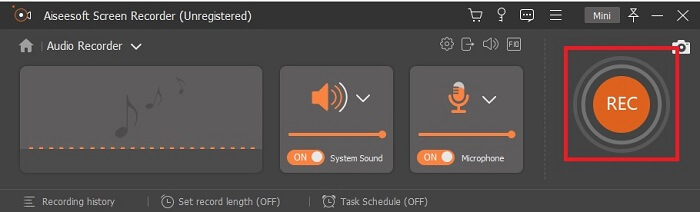
ขั้นตอนที่ 4 บนแถบเครื่องมือ ให้คลิก System Sound และ Microphone เพื่อเปิดเสียงจากระบบและเสียงพูดของคุณ เมื่อทุกอย่างพร้อมแล้ว ให้คลิกปุ่มวงกลมที่เขียนว่า REC เพื่อเริ่มบันทึก.
ขั้นตอนที่ 5 เมื่อทุกอย่างเรียบร้อยดีแล้ว ให้คลิกปุ่มรูป box เพื่อหยุดการบันทึก จากนั้นคลิก Save และ Next เพื่อบันทึกผลลัพธ์สุดท้าย หากต้องการย้อนดูไฟล์บันทึก ให้คลิกสัญลักษณ์ขีดคู่ขนานแล้วหน้า history ของไฟล์บันทึกจะปรากฏขึ้น.
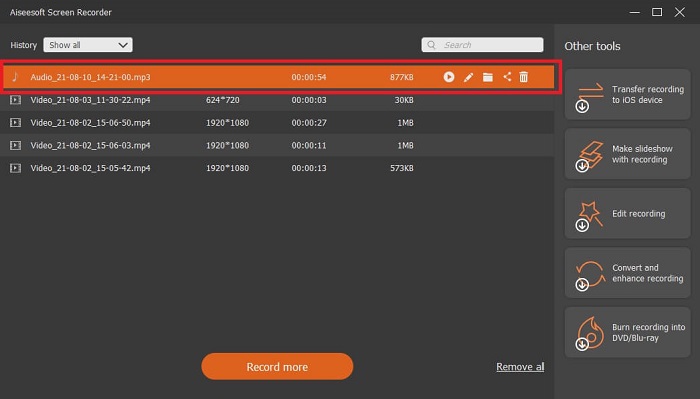
2. ความกล้า
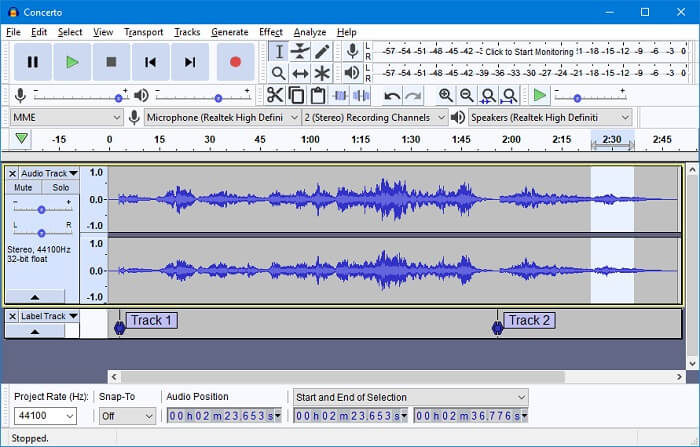
อีกหนึ่งเครื่องมือสำหรับบันทึกเสียง Audacity อาจดูค่อนข้างซับซ้อนหากคุณยังไม่คุ้นกับหน้าตาโปรแกรม แต่พอใช้ไปสักพักคุณก็จะชิน คุณสามารถบันทึกและตัดต่อเสียงได้ เช่น การผสานแทร็กเสียง อย่างไรก็ตาม โปรแกรมนี้มีความสามารถด้านมิกซ์เสียงจำกัด และไฟล์ที่ใช้ติดตั้งปลั๊กอินและเอนโค้ดเดอร์ต่างหากจากตัวโปรแกรมหลัก.
3. วาโวซอรัส
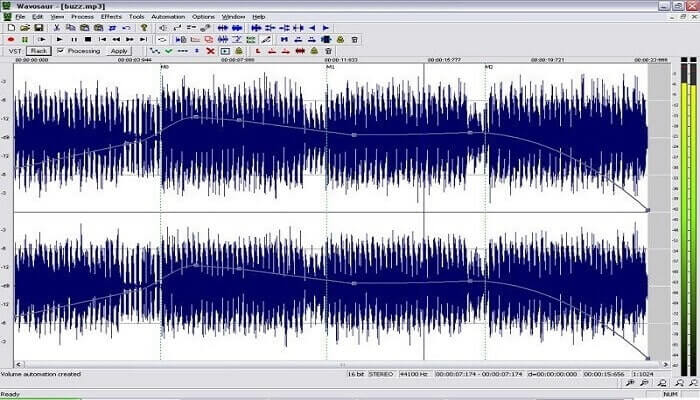
Wavosaur มีเครื่องมือสำหรับบันทึกและแก้ไขเสียง เช่น คัดลอก ตัด แยกไฟล์ เป็นต้น เครื่องมือนี้สามารถทำงานที่ซับซ้อนยิ่งขึ้นได้ เช่น การเรียบเรียงดนตรี จัดบีตที่ซับซ้อน และอื่น ๆ อีกมากมาย หากคุณใช้งานเครื่องมือนี้แล้วยังสับสนเพราะไม่คุ้นเคย มันก็มีวิดีโอสอนการใช้งานให้คุณศึกษาเพิ่มเติมด้วย.
4. Adobe Audition
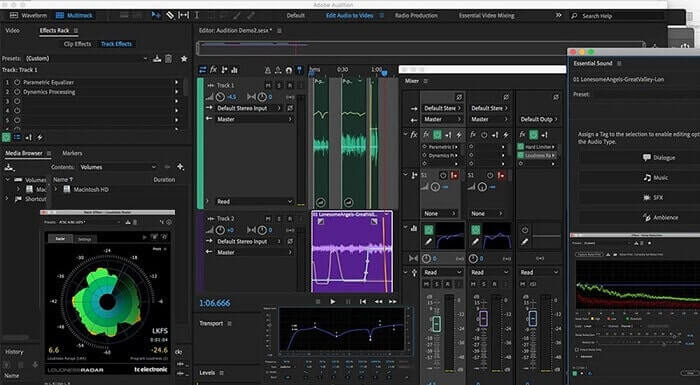
เครื่องมือนี้มักถูกใช้ในงานบันทึกเสียงระดับมืออาชีพ หากเรื่องงบประมาณไม่ใช่ปัญหาสำหรับคุณ Adobe Audition ก็เป็นตัวเลือกที่ดีสำหรับการผลิตเพลง เพราะสามารถตัดต่อเพลงได้อย่างละเอียด ทำความสะอาดเสียง ออกแบบซาวนด์ และอื่น ๆ อย่างไรก็ตาม เครื่องมือนี้ไม่รองรับการซื้อแบบจ่ายครั้งเดียว และมีหน้าตาโปรแกรมที่อาจดูเยอะและซับซ้อน คุณจึงควรเตรียมตัวให้พร้อมหากต้องการลองใช้.
ส่วนที่ 3 แผนภูมิเปรียบเทียบ
| คุณสมบัติ | FVC เครื่องบันทึกเสียงฟรี | เครื่องบันทึกหน้าจอ FVC | ความกล้า | วาโวซอรัส | Adobe Audition |
| บันทึกเสียง |  | | | | |
| ตัดเสียงรบกวน |  | | | | |
| เครื่องมือแก้ไข | | | | | |
| การเพิ่มประสิทธิภาพไมโครโฟน | | | | | |
| พิเศษ | การบันทึกที่เรียบง่ายแต่มีประสิทธิภาพ | มีตัวเลือกเพิ่มเติมให้กับผู้ใช้มากกว่าเวอร์ชันฟรีพร้อมเอาต์พุตระดับมืออาชีพ ทว่าใช้งานง่ายด้วยผลงานระดับมืออาชีพ | เอฟเฟกต์พื้นฐาน การแก้ไข และการเพิ่ม | เครื่องมือแก้ไขเพื่อเล่น หยุด บันทึก กรอกลับ และอื่นๆ | ชุดเครื่องมือที่ครอบคลุม |
| รูปแบบที่ใช้ได้/s | MP3 และ AMR | MP3, WMA, AAC, M4A, FLAC, OGG, AMR, Opus และอีกมากมาย | WAV, AIFF และ MP3 | WAV และ MP3 | AC-3, M4A, MAT, VOX, W64, WAV และอีกมากมาย |
| ช่วงราคา | เป็นเครื่องมือออนไลน์ฟรี | เป็นเวลา 1 เดือน: $25.00 หนึ่งปี: $31.20 สำหรับใบอนุญาตตลอดชีพ: $55.20 | ซอฟต์แวร์ดาวน์โหลดฟรี | ซอฟต์แวร์ดาวน์โหลดฟรี | $27.62/โมเมนต์ ต่อปี $315.61/ปี ต่อปี $41.43/แผนรายเดือน |
ส่วนที่ 4. คำถามที่พบบ่อยเกี่ยวกับ AMR Recorder
ไฟล์ AMR ประเภทต่าง ๆ มีอะไรบ้าง
AMR มีมาตรฐานรูปแบบไฟล์อยู่สองประเภทคือ AMR-NB และ AMR-WB
AMR-NB เป็นเวอร์ชันแบนด์แคบ หรือที่รู้จักกันว่าเวอร์ชันพื้นฐาน ใช้บิตเรตต่ำใกล้เคียงกับที่พบใน MP3 ช่วงความถี่ประมาณ 300 ถึง 3400 Hz ซึ่งนิยมใช้กับโทรศัพท์แบบดั้งเดิม ตัวอย่างบิตเรต เช่น 06.70 kbps, 07.40 kbps, 07.95 kbps, 10.20 kbps, 12.20 kbps
ส่วน AMR-WB ใช้แบนด์วิดท์ที่กว้างกว่า สามารถเก็บเสียงคุณภาพสูงกว่า NB โดยมีช่วงความถี่ตั้งแต่ 50 ถึง 7000 Hz ด้วยช่วงความถี่ที่กว้างนี้ GSM และ UMTS จึงนำไปใช้เพื่อเพิ่มประสิทธิภาพ ต่อไปนี้เป็นตัวอย่างบิตเรตที่ใช้: 15.85 kbps, 18.25 kbps, 19.85 kbps, 23.05 kbps, 23.85 kbps.
เหตุใดจึงไม่สามารถเปิด AMR ในเครื่องเล่นสื่อของฉันได้
เช่นเดียวกับรูปแบบไฟล์อื่น ๆ โปรแกรมเล่นสื่อบางตัวไม่รองรับไฟล์ประเภทนี้ ดังนั้นหากคุณต้องการเล่นไฟล์บันทึกเสียง AMR ของคุณ FVC Free Video Player อาจช่วยให้คุณเล่นไฟล์เหล่านี้ได้.
AMR เป็นรูปแบบไฟล์บีบอัดหรือไม่
ใช่ เป็นรูปแบบการบีบอัดข้อมูลเสียงสำหรับการเข้ารหัสเสียงพูด
สรุป
เพื่อยุติการเขียน เครื่องมือดังกล่าวนี้มีความสามารถและเอกลักษณ์ที่แตกต่างกันไป แต่ไม่ใช่ทุกตัวเลือกที่ดีที่สุดสำหรับผู้เริ่มต้น ดังนั้นหากคุณต้องการทราบเครื่องบันทึกที่ดีที่สุดที่ผู้เริ่มต้นและผู้เชี่ยวชาญเลือกไว้ด้วย FVC Screen Recorder เป็นเครื่องมือมัลติฟังก์ชั่นที่ให้คุณทำสิ่งที่คุณต้องการทำ ไม่จำกัดผู้ใช้ที่ชายแดนของคุณ แต่มันช่วยให้คุณก้าวออกไปในเซฟโซนได้มากขึ้น ดังนั้นคุณจะรออะไรอีก เครื่องมือพิเศษนี้จะไม่สร้างภาระให้คุณ แต่จะช่วยคุณได้มาก
-
 เครื่องบันทึกหน้าจอ WebM ที่ดีที่สุด 5 อันดับแรกสำหรับ Windows/Mac: การตรวจสอบเชิงลึก
 เรียนรู้เพิ่มเติมเกี่ยวกับไฟล์ส่วนขยาย WebM โดยการอ่านบทความและค้นพบแอปตัวบันทึกหน้าจอ WebM ที่คุณสามารถใช้เพื่อคัดกรองวิดีโอ WebM
-
 4 เครื่องบันทึกวิดีโอ SWF ที่ดีที่สุดที่เข้าถึงออนไลน์ได้ฟรี
 คุณเคยได้ยินเกี่ยวกับไฟล์ SWF หรือไม่ เรียนรู้เพิ่มเติมเกี่ยวกับรูปแบบไฟล์นี้และค้นพบวิธีบันทึกไฟล์ SWF โดยใช้เครื่องมือออนไลน์ฟรี
-
 เครื่องบันทึกวิดีโอ MTV ที่ไม่มีใครเทียบได้กับ Mac/Windows Computer
 บทความนี้จะช่วยให้คุณเรียนรู้เกี่ยวกับรูปแบบไฟล์ MTV และรายการเครื่องบันทึกวิดีโอ MTV ที่คุณสามารถใช้เพื่อบันทึกหน้าจอคอมพิวเตอร์ได้อย่างง่ายดาย
