


 Video Converter Ultimate
 บันทึกหน้าจอ
 ซ่อมวิดีโอ
เครื่องบันทึก AIFF ที่ดีที่สุด 4 เครื่องที่รองรับคุณภาพเสียงแบบไม่สูญเสียข้อมูล
คนส่วนใหญ่คิดว่าอุปกรณ์ iPhone นั้นเกือบจะสมบูรณ์แบบ ทั้งในด้านความปลอดภัยของโทรศัพท์ คุณภาพวิดีโอและเสียง รวมถึงประสิทธิภาพการทำงานที่เสถียร ซึ่งก็ถือว่าเป็นเรื่องจริง เช่นเดียวกันกับคุณภาพหน้าจอ ด้วยเหตุนี้ Apple จึงพยายามพัฒนาฟีเจอร์ต่าง ๆ ให้เข้ากันได้กับอุปกรณ์ iOS ให้มากที่สุด ไม่ว่าจะเป็นรูปแบบไฟล์ (format) ตัวแปลงรหัส (codec) และการตั้งค่าวิดีโอ ทั้งหมดนี้ก็เหมือนตอนที่พวกเขาพัฒนาไฟล์รูปแบบ AIFF ขึ้นมา เพื่อมอบไฟล์เสียงคุณภาพสูงแบบไม่บีบอัด เมื่อตัวไฟล์ไม่ถูกบีบอัด ก็มักจะให้คุณภาพเสียงที่ดีกว่าเพราะไม่มีการจำกัดข้อมูล ด้วยเหตุนี้ คุณอาจมองเห็นความจำเป็นที่จะใช้โปรแกรมอัดเสียง AIFF ฟรีเพื่อผลิตไฟล์ลักษณะนี้ การสร้างไฟล์แบบนี้ไม่ใช่เรื่องยาก มีแอปและเครื่องมือออนไลน์ให้ใช้งานได้ฟรีบนเว็บ ถัดจากนี้ บทความนี้เหมาะสำหรับคุณมาก ลองดูรายชื่อโปรแกรมอัดเสียง AIFF ที่ดีที่สุดด้านล่างเพื่อศึกษาข้อมูลเพิ่มเติม.

ส่วนที่ 1.เครื่องบันทึก AIFF ออนไลน์ 2 อันดับแรก
FVC เครื่องบันทึกเสียงฟรี
ด้วยการใช้ FVC Free Audio Recorder ตอนนี้คุณก็สามารถได้คุณภาพเสียงที่คมชัดไม่ต่างจาก AIFF แม้ว่าเครื่องมือนี้จะไม่สามารถบันทึกออกมาเป็นไฟล์สกุลเดียวกันได้ แต่คุณภาพเสียงที่ได้ก็ยอดเยี่ยมไม่แพ้กัน เครื่องมือนี้ใช้งานผ่านเบราว์เซอร์ได้ และใช้ได้ทุกเวลา ตราบใดที่คุณมีการเชื่อมต่ออินเทอร์เน็ต ไม่ว่าจะที่บ้านหรือที่ไหนก็ตาม ดังนั้นหากคุณต้องเดินทางและจำเป็นต้องอัดเสียงสำหรับวล็อก นี่ก็เป็นตัวเลือกที่ดี แม้จะอยู่นอกบ้านคุณก็สามารถอัดเสียงได้โดยไม่ต้องกังวลเรื่องเสียงรบกวนรอบข้าง แถมยังสามารถฟังเสียงบันทึกที่ลื่นไหลต่อเนื่องได้บน iPhone ของคุณ ด้วยเหตุนี้เริ่มใช้งานได้เลย ลองใช้เครื่องมือนี้และทำตามคำแนะนำด้านล่าง.
คุณจะได้อะไรจากเครื่องมือนี้?
● เป็นเว็บไซต์ที่เข้าถึงได้ฟรี
● คุณสามารถบันทึกไฟล์เพลงได้จาก YouTube เพื่อสร้างเพลย์ลิสต์ในแกลเลอรีเพลงของคุณ
● บันทึกเสียงโดยไม่ จำกัด เวลาและไม่ จำกัด ระยะเวลา
● เข้าถึงได้ทุกที่ทุกเวลา
ขั้นตอนที่ 1 เข้าใช้งานและเปิดเครื่องมือโดยไปที่ FVC Free Audio Recorder แล้วคลิกปุ่ม Start Recording.
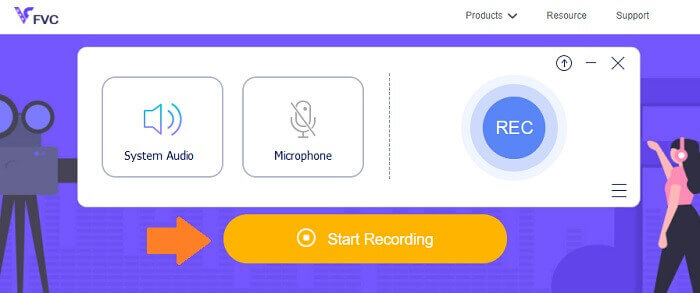
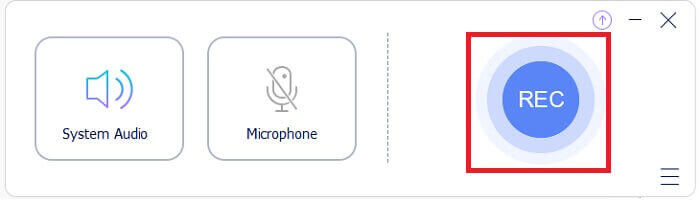
ขั้นตอนที่ 2 จากนั้นเปิดใช้งานเสียง หากยังไม่ถูกเปิดไว้ แต่ตามค่าเริ่มต้นควรจะเปิดอยู่แล้ว เมื่อต้องการเริ่มบันทึกให้คลิกปุ่ม REC.
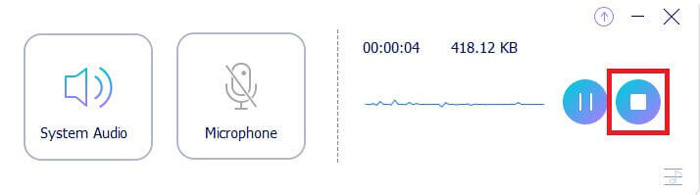
ขั้นตอนที่ 3 เมื่อบันทึกเสร็จแล้ว ให้คลิกปุ่ม Square สีน้ำเงิน ไฟล์จะถูกบันทึกลงในคอมพิวเตอร์ของคุณโดยอัตโนมัติ.
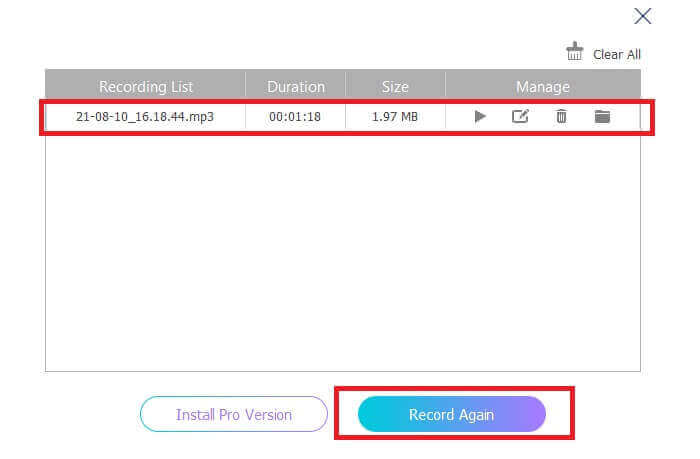
ขั้นตอนที่ 4 หากต้องการเล่นไฟล์ดู ให้คลิกรายการที่อยู่ด้านล่างแถบลอย.
Screencapture.com
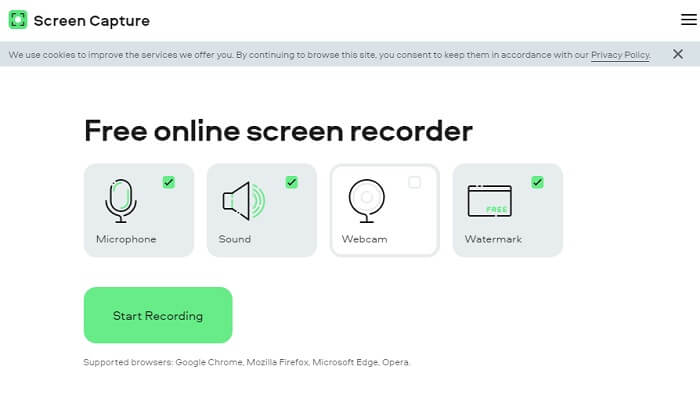
อีกหนึ่งเครื่องมือออนไลน์ที่คุณสามารถใช้บันทึกเสียงได้คือ Screencapture.com เช่นเดียวกัน นี่เป็นเว็บไซต์ที่ให้ใช้งานฟรี โดยสามารถบันทึกเสียงและหน้าจอได้โดยไม่ต้องสมัครบัญชี เมื่อคุณคลิกปุ่มเริ่มบันทึก เครื่องมือจะเริ่มอัดหน้าจอและเสียงระบบของคอมพิวเตอร์โดยอัตโนมัติ ทันทีที่เข้าสู่หน้าแรกจะมี 4 แท็บให้เลือกตามความต้องการ เนื่องจากเราต้องการอัดเสียง ให้ยกเลิกเลือกทุกอย่างแล้วเปิดใช้เฉพาะเสียง จากนั้นคลิกปุ่ม Start Recording แล้วดาวน์โหลดไฟล์เมื่อบันทึกเสร็จ.
คุณจะได้อะไรจากเครื่องมือนี้?
● เข้าใช้ฟรี
● เว็บไซต์ที่เข้าถึงได้และเชื่อถือได้
● ปลอดภัย
● สามารถบันทึก เสียง วิดีโอ และทั้งสองอย่างพร้อมกัน
ส่วนที่ 2.ซอฟต์แวร์บันทึก AIFF 2 อันดับแรกสำหรับ Windows และ Mac
เครื่องบันทึกหน้าจอ FVC
เมื่อพูดถึงเครื่องมือสำคัญ FVC Screen Recorder เป็นซอฟต์แวร์ที่เหมาะที่สุดสำหรับการบันทึกหน้าจอและการบันทึกเสียง ได้รับการพัฒนาขึ้นเป็นพิเศษเพื่อให้ครอบคลุมความต้องการประเภทนี้ เพียงสามขั้นตอนง่ายๆ คุณจะสามารถสร้างคุณภาพเสียงที่คล้ายกับ AIFF และรูปแบบได้เอง ด้วย FVC Screen Recorder คุณสามารถบันทึกได้โดยไม่ถูกจำกัด และมีอิสระในการปรับบิตเรตเพื่อให้ได้คุณภาพสูงสุดที่คุณต้องการ ยิ่งไปกว่านั้น ไม่จำกัดจำนวนครั้งในการใช้งานต่อวัน ใช้งานได้ไม่จำกัดตราบใดที่คุณลงทะเบียน
คุณจะได้อะไรจากเครื่องมือนี้?
● การบริการลูกค้าที่ดี
● ด้วยการสนับสนุนทางเทคนิคที่ดีที่สามารถแก้ไขปัญหาของคุณได้
● อัปเดตเครื่องมือต่อไป
● ด้วยคุณสมบัติล็อคหน้าต่างที่ให้คุณบันทึกหน้าต่างเฉพาะโดยไม่รบกวนสิ่งที่คุณกำลังทำ
ขั้นตอนที่ 1 ดาวน์โหลดและติดตั้งแอปโดยใช้ปุ่มด้านล่างนี้.
ดาวน์โหลดฟรีสำหรับ Windows 7 ขึ้นไปดาวน์โหลดอย่างปลอดภัย
ดาวน์โหลดฟรีสำหรับ MacOS 10.7 ขึ้นไปดาวน์โหลดอย่างปลอดภัย
ขั้นตอนที่ 2 เปิดแอปแล้วเปิดใช้งานเสียงระบบ จากนั้นคลิกปุ่ม REC เพื่อเริ่มบันทึก.
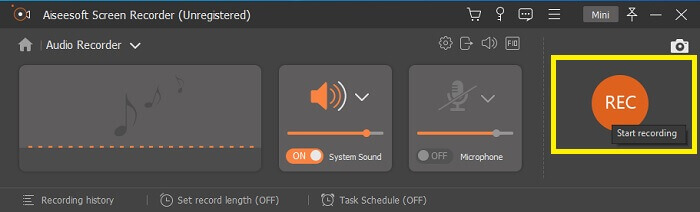
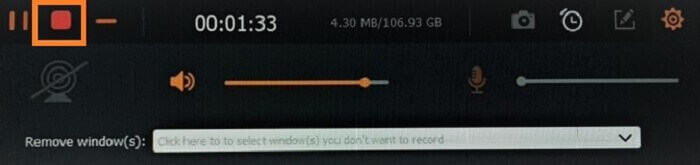
ขั้นตอนที่ 3 เมื่อบันทึกเสร็จ ให้คลิกปุ่มหยุดเพื่อหยุดการบันทึก ไอคอนคือปุ่ม square สีแดง.
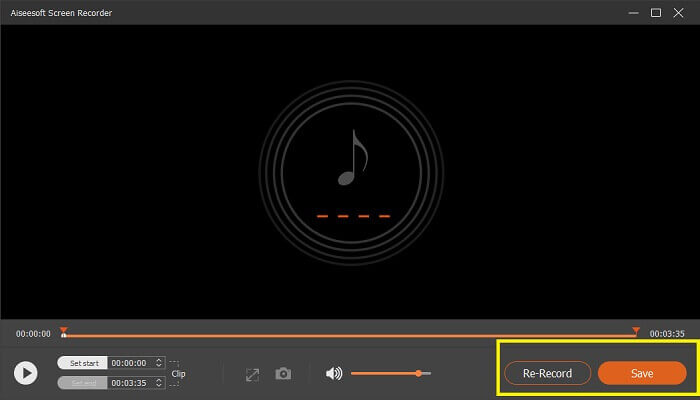
ขั้นตอนที่ 4 จากนั้นเครื่องมือจะให้ตัวเลือกให้คุณ save หรือ re-record.
ความกล้า
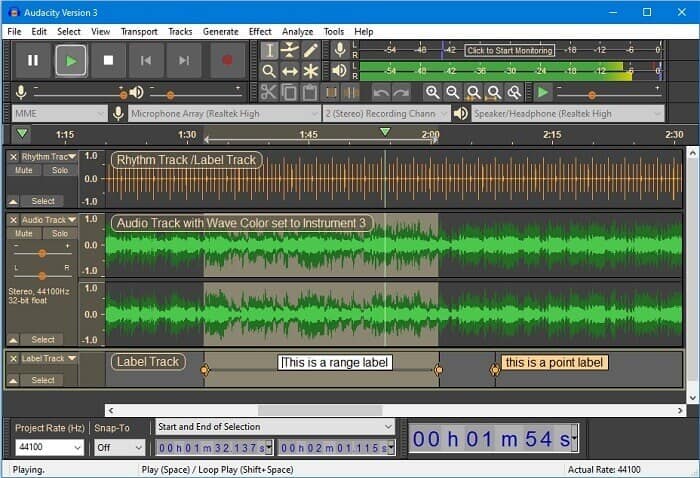
ในที่สุดเราก็มีความกล้า ถือว่าเป็นหนึ่งในเครื่องบันทึกเสียงที่มีความต้องการมากที่สุดในขณะนี้ เนื่องจากเครื่องมือมีความยืดหยุ่น ผู้เชี่ยวชาญส่วนใหญ่ใช้การบันทึกนี้เนื่องจากความน่าเชื่อถือในการบันทึกเสียงแม้กับการเชื่อมต่อของบุคคลที่สาม เช่น เสียงจากมิกเซอร์ คอมพิวเตอร์ จากเทปคาสเซ็ตต์ และอื่นๆ อีกมากมาย
คุณจะได้อะไรจากเครื่องมือนี้?
● เป็นซอฟต์แวร์โอเพ่นซอร์ส
● เป็นเครื่องบันทึกและบรรณาธิการ
● รองรับระบบปฏิบัติการส่วนใหญ่
ส่วนที่ 3 แผนภูมิเปรียบเทียบ
| คุณสมบัติ | FVC เครื่องบันทึกเสียงฟรี | เครื่องบันทึกหน้าจอ FVC | จับภาพหน้าจอ.com | ความกล้า |
| แพลตฟอร์ม | บนเว็บ | แอพเดสก์ท็อป | บนเว็บ | แอพเดสก์ท็อป |
| ราคา | ฟรี | จ่าย | ฟรี | จ่าย |
| รองรับคุณภาพเสียงสูง |  | | | |
| บิตเรตที่ปรับได้ | | |  | |
| ที่แนะนำ | | | | |
| ใช้งานได้ไม่จำกัด | | | | |
| ไม่จำกัดระยะเวลา | | ใช่เมื่อสมัครสมาชิก | | ใช่เมื่อสมัครสมาชิก |
ส่วนที่ 4. คำถามที่พบบ่อยเกี่ยวกับ AIFF Recorder
ความแตกต่างระหว่าง AIFF และ WAV คืออะไร?
ดังที่กล่าวไว้ ผู้ใช้ Apple ส่วนใหญ่ใช้ AIFF อย่างไรก็ตาม ก็ไม่ได้หมายความว่ามันเป็นข้อจำกัด เนื่องจากรูปแบบไฟล์นี้ได้รับการสนับสนุนโดยเครื่องเล่นสื่ออื่น ๆ ในขณะเดียวกัน WAV ได้รับการพัฒนาโดยเฉพาะสำหรับพีซี จำกัดไว้เฉพาะเดสก์ท็อปพีซีเท่านั้น เมื่อพูดถึงเทคนิคและประเภทของการเข้ารหัส ทั้งคู่มีขนาดไฟล์ค่อนข้างใหญ่ ดังนั้นจึงเป็นสิ่งที่ตรงกันข้ามกับ MP3 และ MP4
AIFF มันไม่สูญเสีย?
คำตอบคือไม่มีการสูญเสียแต่ไม่มีการบีบอัด รูปแบบไฟล์นี้ไม่มีการบีบอัด ไม่สูญเสียคุณภาพและวิธีพัฒนาเพื่อให้ได้ผลลัพธ์เสียงที่ดีแทนที่จะประนีประนอมกับคุณภาพ
Windows Media Player สามารถเล่นไฟล์ AIFF ได้หรือไม่?
เพื่อตอบคำถามของคุณ ใช่! คุณยังสามารถเล่นได้โดยใช้เครื่องเล่น VLC และเครื่องเล่นเพลงอื่นๆ
AIF กับ AIFF ต่างกันอย่างไร?
จะใช้อันไหนก็ไม่สำคัญและเหมือนกันหมด ไม่ว่าคุณจะเพิ่มส่วนต่อท้ายหรือส่วนต่อท้าย
สรุป
สรุปได้ว่า AIFF เป็นรูปแบบที่ดีสำหรับคอมพิวเตอร์ Mac เนื่องจากสร้างขึ้นสำหรับ Mac โดยเฉพาะ แม้ว่าไฟล์นี้จะดี แต่เราไม่สามารถปฏิเสธความจริงที่ว่าไฟล์นี้กินหน่วยความจำจำนวนมากในคอมพิวเตอร์ของคุณ แอพที่รีวิวด้านบนอาจรองรับและไม่รองรับ แต่บางแอพก็มีทางเลือกที่ดีสำหรับไฟล์ประเภทนี้ ในขณะเดียวกัน หากคุณต้องการมีไฟล์ประเภทนี้จริงๆ คุณสามารถลองใช้ตัวแปลงฟรีได้
FVC ยังมี Free Audio Online Converter ให้ใช้งานอีกด้วย คุณเพียงแค่เพิ่มไฟล์เข้าไปแล้วรอให้กระบวนการแปลงเสร็จ เท่านี้คุณก็ได้ไฟล์เสียงที่ถูกแปลงเรียบร้อยแล้ว หากต้องการทราบรายละเอียดเพิ่มเติมสามารถเข้าไปดูได้ที่หน้าเว็บอย่างเป็นทางการ เพื่อให้เห็นภาพคร่าว ๆ นี่คือบางส่วนของรูปแบบไฟล์ที่รองรับ: MP3, WMA, AAC, WAV, AC3, AIFF และ FLAC.
-
 สุดยอดเครื่องบันทึก 3GP เพื่อจับภาพ 3GP ในรูปแบบใหม่บน Windows & Mac
 รูปแบบไฟล์ 3GP จัดเก็บมัลติมีเดียรุ่นที่ 3 และพัฒนาโดยโครงการความร่วมมือรุ่นที่สาม สำหรับข้อมูลรายละเอียดเพิ่มเติมดำเนินการด้านล่าง
-
 7 ของ Best AAC Recorder สำหรับ Windows และ Mac [2021]
 ค้นพบว่าอะไรคือ AAC และเครื่องบันทึก AAC ที่ได้รับคะแนนสูงสุด ซึ่งคุณสามารถใช้ได้ฟรีและสามารถดาวน์โหลดได้ทั้งบนคอมพิวเตอร์ Mac และ Windows
-
 คู่มือเฉพาะจุด: เครื่องบันทึก M4A ที่ดีที่สุดสำหรับ Windows & Mac คืออะไร
 M4A เป็นไฟล์คอนเทนเนอร์ ACA และ ALAC ที่เข้ารหัสสำหรับการบีบอัดแบบสูญเสีย รายการด้านล่างเป็นเครื่องมือบันทึก M4A ที่คุณอาจใช้ อ่านต่อไปนี้อย่างละเอียด
