


 Video Converter Ultimate
 บันทึกหน้าจอ
 ซ่อมวิดีโอ
ตัวแปลงในอุดมคติ 3 อันดับแรกเพื่อแปลงไฟล์ VOB เป็นรูปแบบ GIF
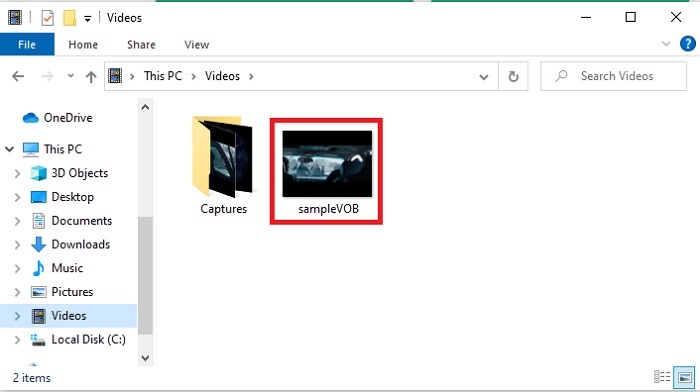
ไฟล์ VOB เป็นไฟล์ที่พบเห็นได้ทั่วไปในดีวีดี ซึ่งสามารถมีข้อมูลเกือบทั้งหมด เช่น การนำทาง เมนู คำบรรยาย วิดีโอ เสียง ฯลฯ นอกจากนี้ รูปแบบนี้สามารถจัดเก็บโปรแกรมที่เล่นได้อย่างง่ายดาย แต่ยังบันทึกได้ยาก เดสก์ท็อปของคุณ เพื่อแบ่งปันวิดีโอไฮไลท์ในรูปแบบ VOB ไปยังแพลตฟอร์มโซเชียลมีเดียอื่น ๆ ได้อย่างง่ายดายและมีประสิทธิภาพ รูปแบบที่ดีที่สุดที่คุณสามารถใช้ได้คือรูปแบบ GIF แม้ว่ารูปแบบนี้จะไม่สนับสนุนไฟล์เสียง แต่ก็ยังเป็นรูปแบบที่ดีที่สุดในการแชร์ทั่วโลก ดังนั้น เพื่อให้เข้าใจมากขึ้นว่าเรากำลังพูดถึงอะไร มาต่อกันด้วยเครื่องมือที่คุณสามารถใช้แปลงไฟล์ VOB เป็น GIF เพื่อให้คุณสามารถดูและแบ่งปันให้โลกได้

ส่วนที่ 1 3 วิธีการที่แตกต่างกันเกี่ยวกับวิธีการเปิดไฟล์ VOB เป็น GIF
วิธีที่ 1. ใช้ซอฟต์แวร์เดสก์ท็อป – FVC Free Video Converter
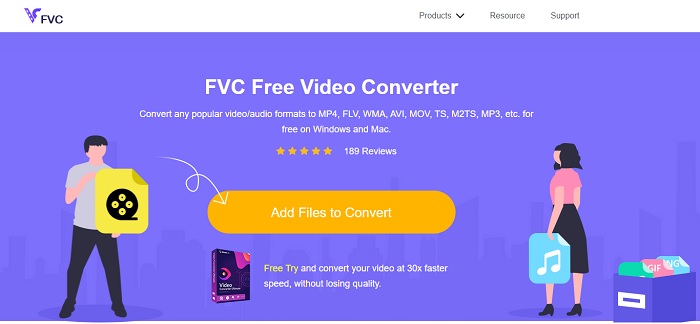
ตัวแปลงไฟล์ออนไลน์ที่ดีที่สุดที่พัฒนาโดย FVC เพื่อแปลงไฟล์ VOB เป็น GIF คือ FVC Free Video Converter แม้ว่าเครื่องมือนี้จะให้ใช้งานฟรี แต่ก็ยังขาดการรองรับไฟล์บางรูปแบบ อย่างไรก็ตามรูปแบบพื้นฐานที่ใช้บ่อยมีครบถ้วน นอกจากนี้ คุณยังสามารถเปลี่ยนบิตเรต fps และความละเอียดของไฟล์วิดีโอได้บนเว็บทูลนี้ แต่ฟีเจอร์ตัดต่อหลัก ๆ เช่น ปรับแต่งคุณภาพวิดีโอและเสียง สร้าง GIF หรือเพิ่มระดับเสียง ยังไม่มีให้ใช้งานที่นี่ ทว่าความเร็วในการแปลงไฟล์นั้นเร็วกว่าบน fConvert มาก และหน้าเว็บของเครื่องมือนี้ก็ไม่มีโฆษณาน่ารำคาญ ดังนั้นหากต้องการรู้ว่าเครื่องมือนี้ทำงานอย่างไร คุณต้องทำตามขั้นตอนด้านล่างนี้และเรียนรู้จากหนึ่งในเครื่องมือออนไลน์ที่ดีที่สุดที่คุณสามารถใช้ได้ฟรี.
ขั้นตอนการใช้ FVC Free Video Converter เพื่อแปลงไฟล์ออนไลน์
ขั้นตอนที่ 1. คลิกลิงก์ด้านบนเพื่อเข้าสู่เว็บไซต์หลักของ FVC Free Video Converter
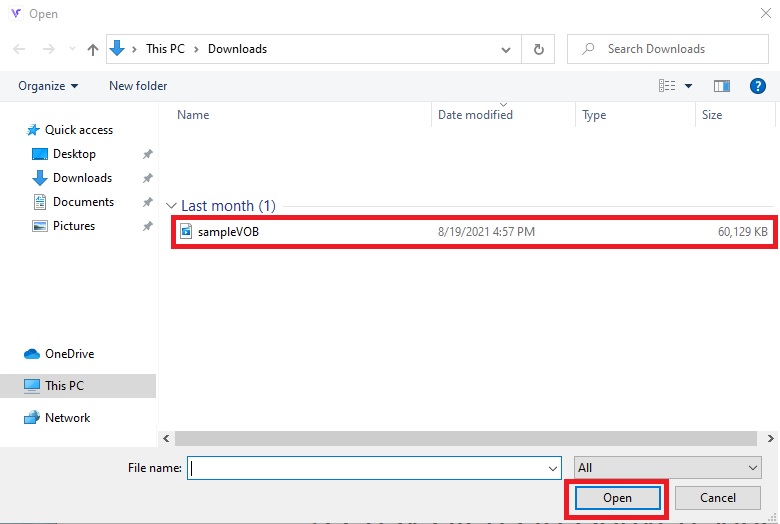
ขั้นตอนที่ 2. คลิกปุ่ม Add Files to Convert แล้วค้นหาไฟล์ VOB จากนั้นคลิก open เพื่อเปิดไฟล์.
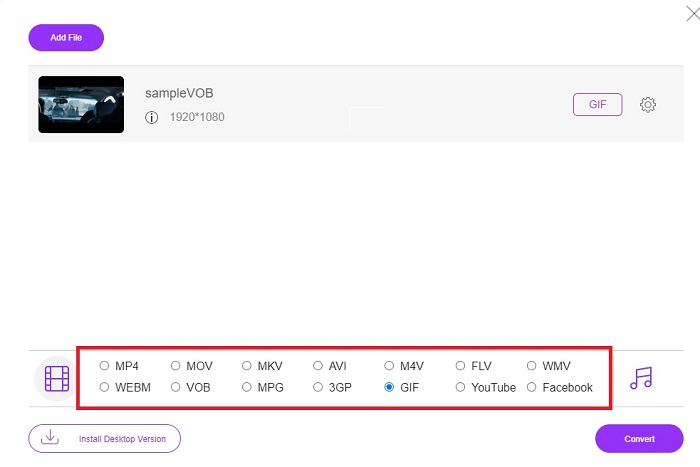
ขั้นตอนที่ 3. เลือกรูปแบบไฟล์ที่คุณต้องการให้เป็นผลลัพธ์สุดท้ายที่ด้านล่าง จากนั้นคลิกเลือกรูปแบบนั้น.
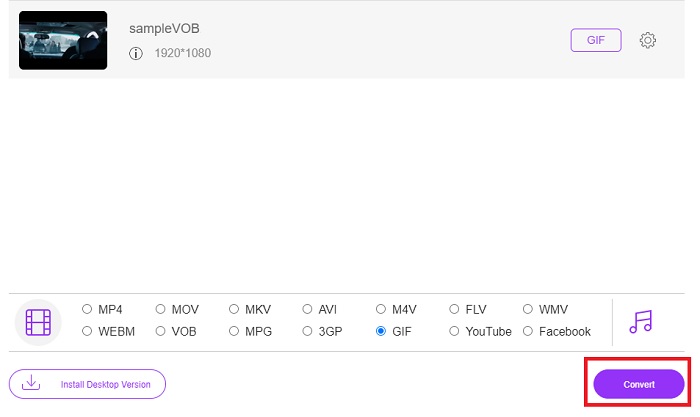
ขั้นตอนที่ 4. เพื่อเริ่มการแปลงไฟล์ ให้คลิกปุ่ม Convert.
ขั้นตอนที่ 5. หากต้องการค้นหาไฟล์ VOB ที่แปลงเรียบร้อยแล้ว ให้คลิกปุ่มที่มีลักษณะเหมือนโฟลเดอร์ เพื่อเปิดโฟลเดอร์ที่เก็บไฟล์ที่แปลงแล้ว.
วิธีที่ 2. ใช้ฟรีแวร์ – วิดีโอฟรี FVC ไปยัง GIF Maker
หากคุณคิดว่าเครื่องมือออนไลน์นั้นยอดเยี่ยมอยู่แล้ว ลองมาเรียนรู้วิธีแปลงไฟล์ .vob เป็น GIF ด้วยความช่วยเหลือของ FVC Free Video to GIF Maker หากการแปลงไฟล์เป็นปัญหาของคุณ เรามาแก้ปัญหานี้ด้วยเครื่องมือดาวน์โหลดฟรีตัวนี้กัน เพราะมันรองรับรูปแบบไฟล์มากกว่าเครื่องมือออนไลน์ฟรี และยังมีฟีเจอร์ตัดต่อพื้นฐานด้วย อย่างไรก็ตาม เครื่องมือนี้ยังไม่มีฟีเจอร์ตัดต่อขั้นสูงแบบเดียวกับโปรแกรมตัวเต็มที่ FVC มีให้ แต่ถึงจะมีตัวแปลงขั้นสูงอยู่แล้ว คุณก็ยังสามารถใช้โปรแกรมนี้ได้ เพราะมันกลายเป็นหนึ่งในเครื่องมือที่ดีที่สุดสำหรับการแปลงไฟล์อย่างปลอดภัยและมีประสิทธิภาพ อีกทั้งยังทำงานได้เร็วกว่าเครื่องมือออนไลน์ใด ๆ ที่คุณเข้าถึงได้บนเว็บ ดังนั้น หากคุณต้องการการแปลงไฟล์ที่รวดเร็วและมีประสิทธิผล ให้ทำตามขั้นตอนที่ระบุด้านล่างนี้.
ขั้นตอนเกี่ยวกับวิธีการใช้ FVC Free Video to GIF Maker เพื่อแปลงออฟไลน์
ขั้นตอนที่ 1. ดาวน์โหลด FVC Free Video to GIF Maker ลงในไดรฟ์ PC หรือ Mac ของคุณ จากนั้นตั้งค่าการติดตั้ง และคลิก Finish หลังติดตั้งเสร็จเพื่อบันทึกการตั้งค่า.
ดาวน์โหลดฟรีสำหรับ Windows 7 หรือใหม่กว่าดาวน์โหลดอย่างปลอดภัย
ดาวน์โหลดฟรีสำหรับ MacOS 10.7 หรือใหม่กว่าดาวน์โหลดอย่างปลอดภัย
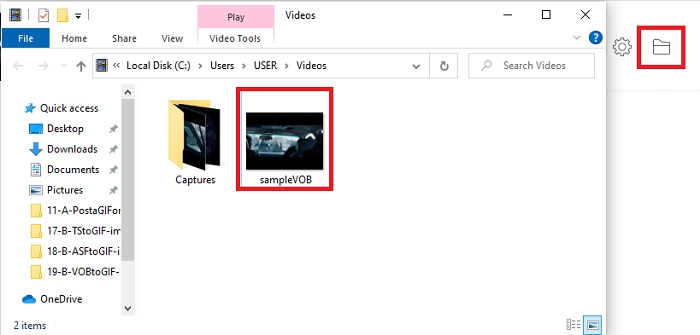
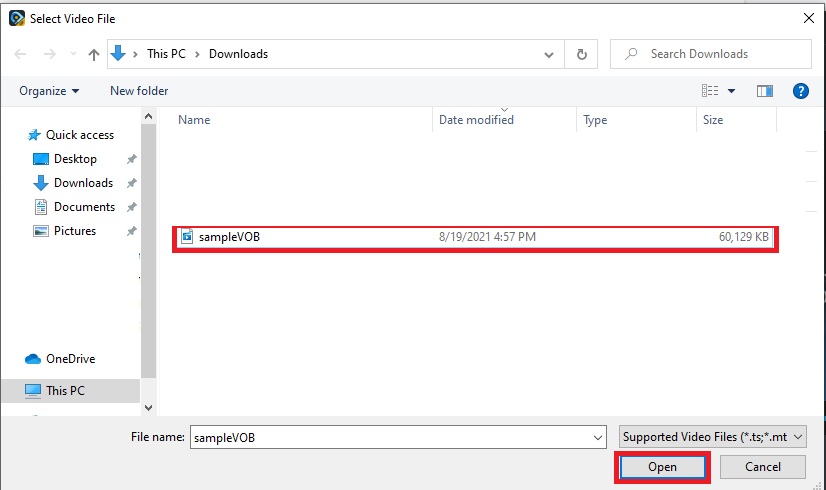
ขั้นตอนที่ 2. เมื่อต้องการเพิ่มไฟล์เข้าสู่หน้าต่างโปรแกรม ให้คลิกปุ่ม Add File ที่มุมซ้ายบนของอินเทอร์เฟซ จากนั้นคลิก open เพื่อเพิ่มไฟล์ VOB เข้าสู่หน้าต่างหลัก.
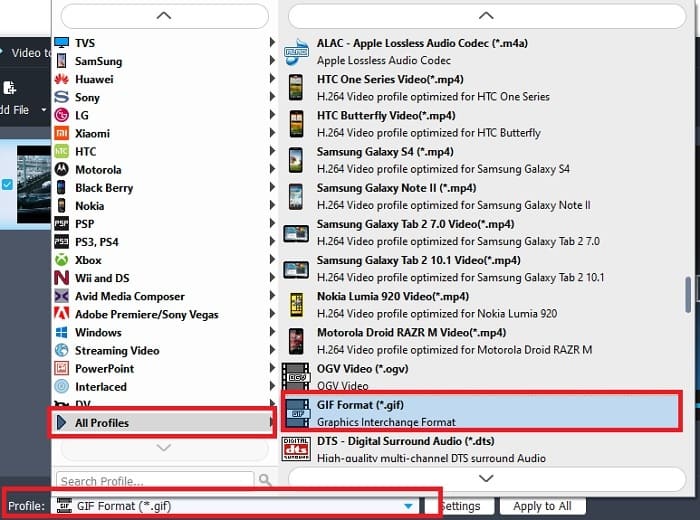
ขั้นตอนที่ 3. เปลี่ยนรูปแบบไฟล์โดยคลิก Profile แล้วเลือกประเภทไฟล์ผลลัพธ์สุดท้ายที่คุณต้องการ.
ขั้นตอนที่ 4. เริ่มการแปลงไฟล์ VOB โดยกดปุ่ม Convert.
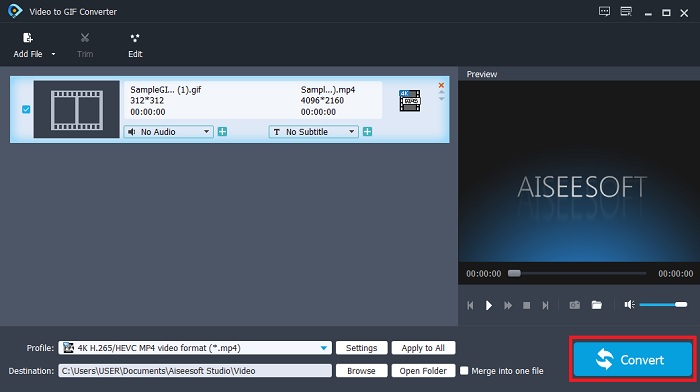
ขั้นตอนที่ 5. ค้นหาไฟล์ในตัวจัดการไฟล์ของคุณ แล้วเปิดชมไฟล์ VOB ที่คุณเพิ่งแปลงเสร็จ.
วิธีที่ 3 ใช้เครื่องมือออนไลน์ – fConvert
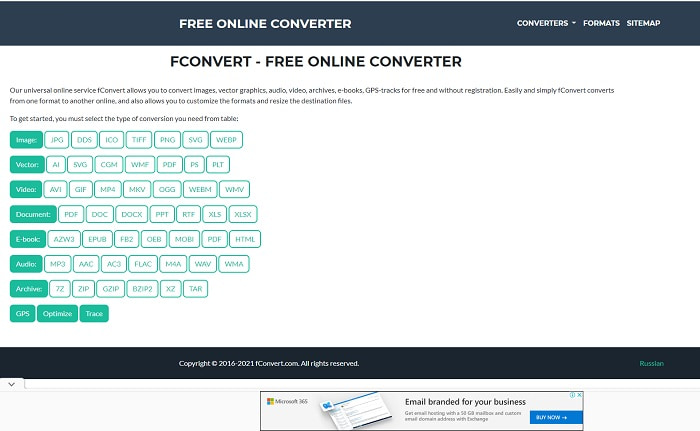
อีกหนึ่งเครื่องมือออนไลน์ที่คุณสามารถใช้เพื่อแปลงไฟล์ VOB คือ fConvert เว็บทูลนี้ช่วยให้ผู้ใช้สามารถแปลงไฟล์มีเดียเกือบทุกประเภทไปเป็นรูปแบบใหม่เพื่อใช้งานต่อได้ แต่เว็บไซต์มีโฆษณาน่ารำคาญอยู่รอบ ๆ แม้ว่าโฆษณาจะยังพอรับได้ แต่โฆษณาบนหน้าเว็บหลักก็สร้างความรำคาญไม่น้อย แม้ว่า fConvert จะรองรับการแปลงไฟล์แทบทุกแบบที่คุณต้องการ แต่จำนวนรูปแบบไฟล์ก็ยังน้อยกว่า FVC Free Video Converter ข้อมูลเพิ่มเติมคือ เมื่อคุณเริ่มใช้งานตัวแปลงไฟล์ จะมีโฆษณาขึ้นมามากกว่าบนหน้าเว็บ ดังนั้นควรระวังอย่าคลิกพาไปยังเว็บไซต์อื่นโดยไม่ตั้งใจ.
ขั้นตอนที่ 1. เปิดโปรแกรมค้นหาบนอินเทอร์เน็ตของคุณ แล้วค้นหาเว็บไซต์หลักของเครื่องมือนี้.
ขั้นตอนที่ 2. เลือกประเภทการแปลงไฟล์ที่คุณต้องการให้ระบบทำงาน.
ขั้นตอนที่ 3. จากนั้นเพิ่มไฟล์ที่ต้องการแปลงแล้วรอจนกระบวนการเสร็จสมบูรณ์.
ส่วนที่ 2 คำถามที่พบบ่อยเกี่ยวกับ VOB เป็น GIF Conversion
ไฟล์ VOB คืออะไร?
VOB สามารถมีรูปแบบข้อมูลสตรีมมัลติเพล็กซ์ลงในดีวีดีและส่วนใหญ่รูปแบบนี้จะถูกเข้ารหัสด้วย อย่างที่กล่าวไปแล้ว ไฟล์ VOB ไม่สามารถริปลงดีวีดีได้ง่ายๆ เนื่องจากข้อจำกัดของรูปแบบนี้ หากคุณบังคับให้ริพไฟล์ .vob มีโอกาสที่ผลลัพธ์จะมีข้อมูลที่สูญหายจำนวนมาก หรือหากคุณโชคดีพอ โอกาสที่จะถูกริปอย่างถูกต้องจะมีน้อยมาก แต่คุณสามารถดาวน์โหลดไฟล์ VOB ทางอินเทอร์เน็ตได้ แต่คุณไม่สามารถเล่นได้บนโทรศัพท์หรือเดสก์ท็อปของคุณ หากคุณไม่มีไฟล์ที่เหมาะสม มีโอกาสที่การแจ้งเตือนเช่นไฟล์นี้ไม่ได้รับการสนับสนุนหรือไฟล์นี้ได้รับการเข้ารหัสจะปรากฏในหน้าจอของคุณ
ฉันจะเล่นไฟล์ VOB โดยไม่ต้องแปลงได้ที่ไหน
การแปลงไฟล์ถือเป็นทางออกที่เหมาะสมในการแก้ปัญหานี้ แต่ถ้าคุณไม่อยากยุ่งยากกับการแปลงไฟล์ คุณก็ยังสามารถเปิดเล่นไฟล์ได้ที่นี่ เครื่องเล่นมีเดียตัวนี้ก็พัฒนาโดย FVC เช่นกัน เพื่อให้คุณเล่นไฟล์รูปแบบแปลก ๆ ที่คุณเคยเปิดไม่ได้ Blu-ray Player เป็นหนึ่งในทางออกสำหรับการเปิดไฟล์ VOB ที่เล่นไม่ได้ โดยไม่ต้องใช้ซอฟต์แวร์อื่นเพิ่มเติม ดังนั้นหากต้องการดาวน์โหลดเครื่องมือนี้ ให้คลิกลิงก์ด้านล่างนี้ ดาวน์โหลด Blu-ray Player สำหรับ PC ดาวน์โหลด Blu-ray Player สำหรับ Mac
ไหนดีกว่า: VOB หรือ MP4
หากเราจะเก็บไฟล์ไว้ในดีวีดีหรือซีดี ควรใช้ไฟล์ VOB มากกว่า MP4 เนื่องจากไฟล์นี้มีขนาดเล็กกว่ามาก ซึ่งหมายความว่าคุณสามารถจัดเก็บได้มากขึ้นโดยไม่สูญเสียคุณภาพ แต่ถ้าคุณต้องการเก็บไว้ในโทรศัพท์หรือเดสก์ท็อป MP4 นั้นดีกว่าไฟล์ VOB มาก ในการแปลง MP4 เป็น VOB หรือในทางกลับกัน คุณสามารถใช้ประโยชน์จากเครื่องมือแปลงวิดีโอ เช่น FVC Free Video Converter เพื่อให้ได้การแปลงรูปแบบ
หลังจากแปลง VOB คุณภาพของมันจะหายไปหรือไม่?
สิ่งนี้จะเกิดขึ้นได้ก็ต่อเมื่อคุณใช้ตัวแปลงไฟล์ที่ไม่เหมาะสม แม้ว่าการแปลงไฟล์จะดูเหมือนทำได้ง่าย แต่การเลือกตัวแปลงไฟล์ที่ดีนั้นยากกว่าที่คิด หากคุณอยากสัมผัสประสบการณ์การแปลงไฟล์ที่ยอดเยี่ยม คุณต้องดาวน์โหลด FVC Video Converter Ultimate แล้วทดลองใช้งานด้วยตัวคุณเอง ดาวน์โหลด FVC Video Converter Ultimate สำหรับ PC ดาวน์โหลด FVC Video Converter Ultimate สำหรับ Mac
สรุป
เพื่อยุติการสนทนา หากคุณพบไฟล์ VOB ที่ไม่สามารถเล่นได้อีกครั้ง คุณต้องพิจารณาแปลงให้อยู่ในรูปแบบที่เล่นได้ แม้ว่า FVC Video Converter Ultimate จะไม่ได้กล่าวถึงในที่นี้ แต่กระบวนการแปลงที่เครื่องมือนี้มีให้นั้นรวดเร็ว ง่าย มีประสิทธิภาพและประสิทธิผลไม่เหมือนกับเครื่องมืออื่นๆ ในการสำรวจเครื่องมือ คุณต้องดาวน์โหลดลงในพีซีหรือ Mac ของคุณทันที
-
 [2 โซลูชั่น] วิธีแปลงไฟล์ SWF เป็น GIF อย่างง่ายดายฟรี
 เมื่อคุณล้มเหลวในการส่งออกรูปแบบ GIF ผ่านซอฟต์แวร์ Flash คุณสามารถลองบันทึกไฟล์ในรูปแบบ SWF ในตอนแรกได้ จากนั้น คุณสามารถเรียนรู้ 2 วิธีง่ายๆ ในการแปลงไฟล์ SWF เป็น GIF จากบทความนี้
-
 [2 โซลูชั่น] วิธีแปลงวิดีโอ WMV เป็นไฟล์ GIF ฟรี
 ถ้าคุณต้องการตัดส่วนที่ยอดเยี่ยมของวิดีโอ WMV และสร้าง GIF จากวิดีโอเหล่านั้น คุณสามารถเรียนรู้เกี่ยวกับวิธีการง่ายๆ 2 วิธีในการถ่ายโอนวิดีโอ WMV ไปยัง GIF ในบทความนี้
-
 MOV เป็น GIF – วิธีแปลง MOV เป็น GIF แบบเคลื่อนไหวบน Mac, PC และออนไลน์ฟรี
 GIF คืออะไร? วิธีแปลงวิดีโอเป็น GIF จะเปลี่ยน MOV เป็น GIF แบบเคลื่อนไหวออนไลน์ได้อย่างไร โพสต์นี้บอก 3 วิธีในการแปลง MOV เป็น GIF ออนไลน์บน Mac/PC
