


 Video Converter Ultimate
 บันทึกหน้าจอ
 ซ่อมวิดีโอ
วิธีที่โดดเด่นและเป็นประโยชน์ในการแปลง 3GP เป็น FLV [พิสูจน์แล้ว]
ไฟล์เสียงและวิดีโอสามารถจัดเก็บในรูปแบบ 3GP ซึ่งใช้งานกันทั่วไปในโทรศัพท์ 3G และยังสามารถใช้งานได้บนโทรศัพท์ 2G และ 4G ด้วย ผ่านทางอินเทอร์เน็ต คอนเทนเนอร์ที่อิงกับ MP4 นี้จะใช้ส่งและรับไฟล์มัลติมีเดีย แม้ว่าบริการวิดีโอออนไลน์และสตรีมมิงเสียงหลายแห่งจะใช้ FLV ซึ่งเป็นคอนเทนเนอร์วิดีโอที่รองรับ Flash นอกจาก Adobe Flash Player แล้ว ยังมีโปรแกรมเล่นวิดีโออื่น ๆ อีกมากที่สามารถเล่นไฟล์ FLV ได้ เพื่อให้ไฟล์ 3GP เข้าถึงได้ง่ายขึ้นและมีขนาดเล็กลง มีหลายวิธีง่าย ๆ ในการแปลงไฟล์เหล่านี้เป็น FLV ด้านล่างคือโปรแกรมแปลงไฟล์ที่คุณควรพิจารณาใช้เพื่อแปลง 3GP เป็น FLV.

ส่วนที่ 1 วิธีการที่ยอดเยี่ยมในการแปลง 3GP เป็น FLV [ออฟไลน์]
Video Converter Ultimate เป็นเครื่องมือที่สมบูรณ์แบบสำหรับการแปลงไฟล์ 3GP เป็น FLV โดยไม่สูญเสียคุณภาพ ด้วยการใช้เทคโนโลยี SuperSpeed ของโปรแกรม ผู้ใช้สามารถแปลงไฟล์ขนาดใหญ่ได้ภายในไม่กี่นาที นอกจากนี้ แอพนี้ยังให้คุณแก้ไขไฟล์ได้ตามที่เห็นสมควร: ครอบตัด หมุน และตัดแต่งวิดีโอของคุณ ปรับพารามิเตอร์สี เปลี่ยนความละเอียดและบิตเรตของวิดีโอ หรือเพิ่มคำบรรยาย ซอฟต์แวร์นี้รองรับอุปกรณ์ยอดนิยมทั้งหมด รวมถึง iPhone, iPad, อุปกรณ์ที่ใช้ Android, Xbox และ PlayStation ตอนนี้ คุณรู้คำแนะนำสั้น ๆ เกี่ยวกับซอฟต์แวร์นี้แล้ว ก็ถึงเวลาที่คุณจะเข้าใจวิธีการแปลง 3GP เป็น FLV โดยใช้ซอฟต์แวร์นี้
ขั้นตอนที่ 1: ดาวน์โหลดซอฟต์แวร์ก่อนโดยคลิกที่ปุ่ม ดาวน์โหลดฟรี ด้านล่าง คุณสามารถดาวน์โหลดได้ทั้งบน Windows หรือ Mac หลังจากดาวน์โหลดแล้ว ให้ติดตั้งซอฟต์แวร์ลงในคอมพิวเตอร์ของคุณ และเปิดใช้งานโดยคลิก เริ่มเลย ที่หน้าต่างซึ่งจะเด้งขึ้นมาบนหน้าจอหลังจากติดตั้งเสร็จแล้ว.
ดาวน์โหลดฟรีสำหรับ Windows 7 หรือใหม่กว่าดาวน์โหลดอย่างปลอดภัย
ดาวน์โหลดฟรีสำหรับ MacOS 10.7 หรือใหม่กว่าดาวน์โหลดอย่างปลอดภัย
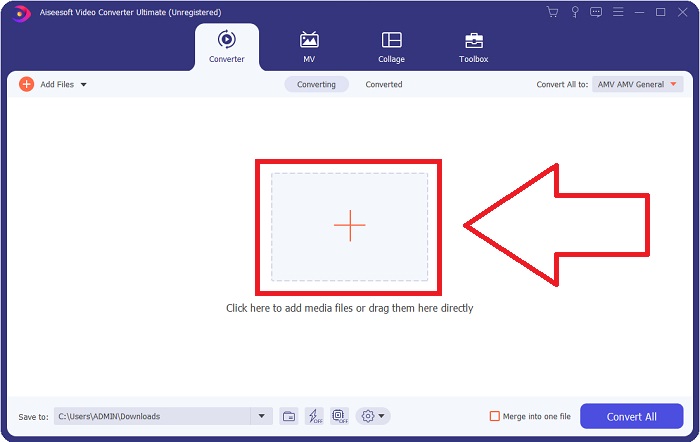
ขั้นตอนที่ 2: ในการเริ่มแปลงไฟล์ คุณต้องอัปโหลดไฟล์ก่อน โดยทำได้โดยการคลิกปุ่ม + ตรงกลางหน้าต่างโปรแกรม หรือคุณสามารถลากไฟล์วิดีโอจากคอมพิวเตอร์มาปล่อยได้อย่างง่ายดาย.
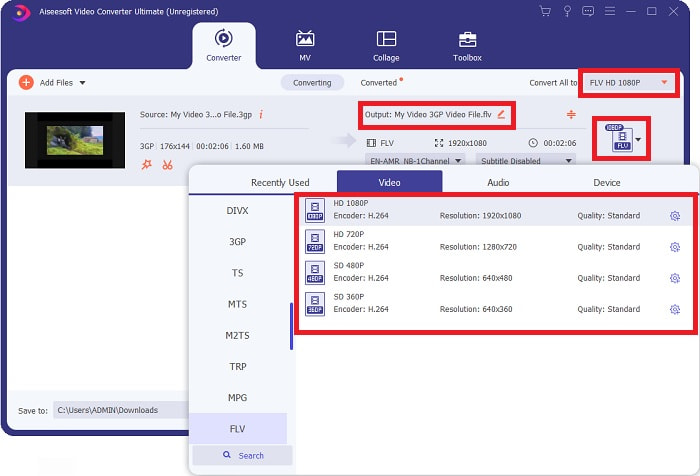
ขั้นตอนที่ 3: หลังจากคุณอัปโหลดไฟล์เรียบร้อยแล้ว คุณก็สามารถเลือกฟอร์แมต FLV ได้ในส่วนเลือกฟอร์แมตที่มุมขวาของหน้าจอ คุณสามารถเลือกคุณภาพที่ต้องการได้ เพราะระบบจะแสดงคุณสมบัติทั้งหมดที่เป็นไปได้ให้คุณเลือกใช้.
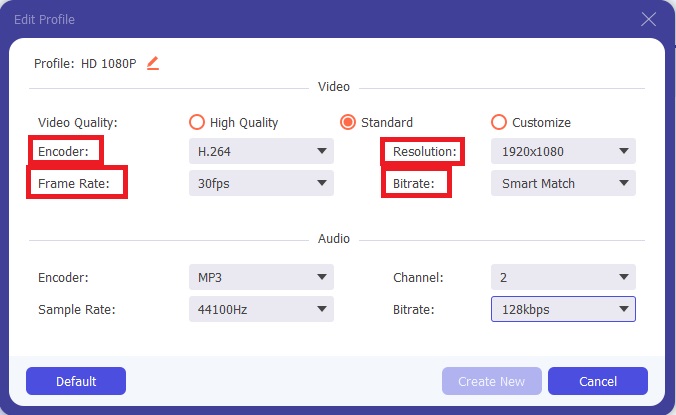
ขั้นตอนที่ 4: ถึงแม้จะมีตัวเลือกคุณภาพให้เลือกหลายแบบ คุณก็สามารถสร้างคุณภาพตามที่ต้องการเองได้ หากไม่มีคุณภาพที่คุณต้องการอยู่ในตัวเลือก ให้คลิกไอคอนรูปเฟือง แล้วปรับตั้งค่าทั้งหมดที่ปรากฏหลังจากหน้าต่างใหม่เด้งขึ้น ความละเอียด (Resolution) คือคุณภาพการแสดงผลของหน้าจอ อัตราเฟรมคือความถี่ของการเล่นวิดีโอ อัตราบิตคือปริมาณข้อมูลที่เข้ารหัสต่อหน่วยเวลา และสุดท้ายตัวเข้ารหัส (Encoder) คือการกำหนดรูปแบบการส่งออกของวิดีโอ.
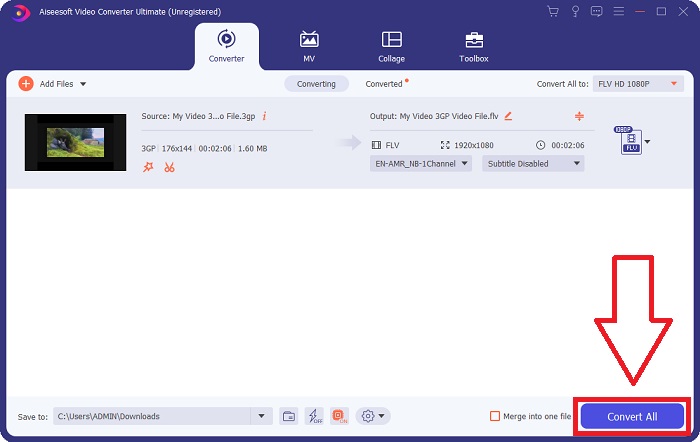
ขั้นตอนที่ 5: ในที่สุด เมื่อคุณปรับแต่งค่าทั้งหมดของวิดีโอเอาต์พุตเรียบร้อยแล้ว คุณสามารถเริ่มแปลงไฟล์ได้โดยคลิก แปลงทั้งหมด.
ส่วนที่ 2 อีกวิธีที่น่าสนใจในการแปลง 3GP เป็น FLV [ออนไลน์]
พอเท่านี้กับซอฟต์แวร์บนเดสก์ท็อป มาดูเครื่องมือออนไลน์ที่จะช่วยคุณแปลง 3GP เป็น FLV กันต่อ ขอแนะนำ Free Video Converter Online ซึ่งรองรับฟอร์แมตมากมาย รวมถึง 3GP และ FLV คุณสามารถแปลงไฟล์ได้โดยตรงจากคอมพิวเตอร์ด้วยการอัปโหลดไฟล์ หากต้องการอัปโหลดไฟล์ที่มีขนาดใหญ่กว่า 500 MB คุณสามารถใช้เครื่องมือออนไลน์นี้เพื่อแปลง 3GP เป็น FLV ได้ ผู้ใช้ยังสามารถเปลี่ยนการตั้งค่าหลายอย่างก่อนเริ่มการแปลง เช่น เปลี่ยนตัวแปลงสัญญาณเสียง (audio codec) และระดับเสียง ตลอดจนปรับความละเอียดวิดีโอได้เช่นกัน หลังจากได้ความรู้เบื้องต้นแล้ว มาศึกษาขั้นตอนทั้งหมดที่คุณจำเป็นต้องรู้กันต่อ.
ขั้นตอนที่ 1: นี่คือลิงก์สำหรับใช้เครื่องมือออนไลน์นี้ คลิกเพื่อเปิดหน้าเว็บหลักในเบราว์เซอร์ของคุณ จากนั้นคลิก เพิ่มไฟล์เพื่อแปลง เพื่อดาวน์โหลดตัวเรียกใช้งาน (launcher) ที่ใช้ควบคุมเครื่องมือออนไลน์นี้ ติดตั้งตัวเรียกใช้งานแล้วเริ่มอัปโหลดไฟล์.
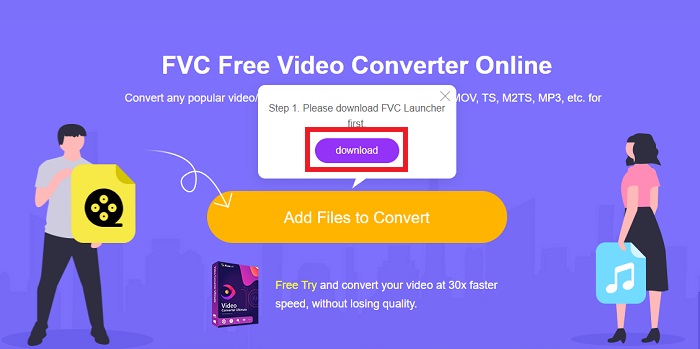
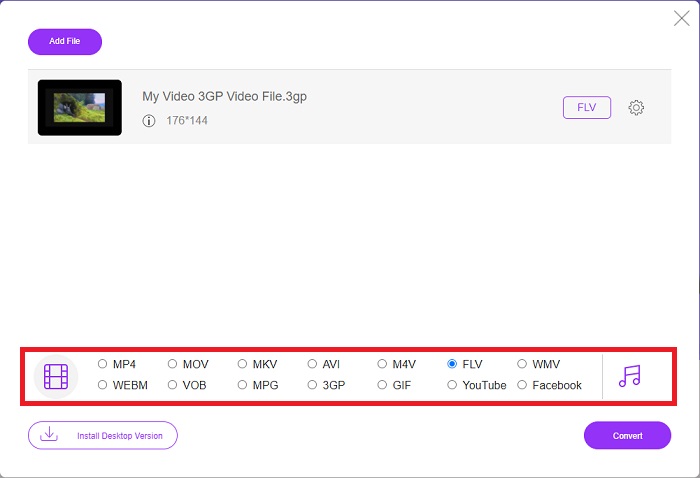
ขั้นตอนที่ 2: ในการอัปโหลดไฟล์ ให้คลิก เพิ่มไฟล์เพื่อแปลง อีกครั้ง หลังจากอัปโหลดไฟล์แล้ว คุณสามารถเลือกฟอร์แมตวิดีโอ FLV จากรายการฟอร์แมตวิดีโอที่มุมล่างของหน้าต่างได้.
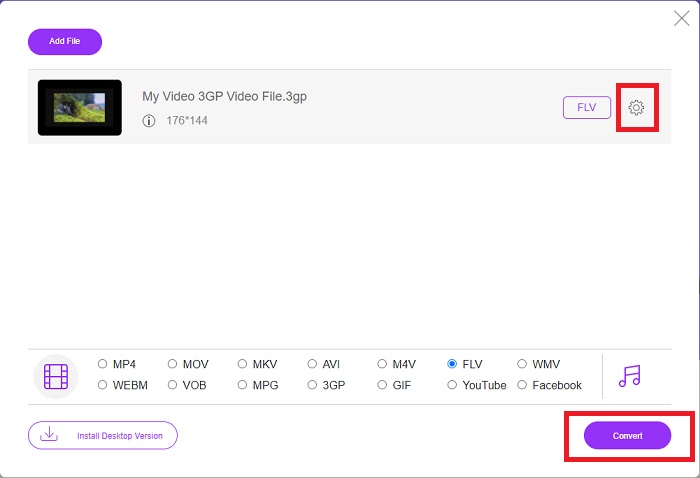
ขั้นตอนที่ 3: คุณยังสามารถแก้ไขคุณภาพวิดีโอหรือคุณสมบัติอื่น ๆ เช่น ความละเอียด อัตราเฟรม หรืออัตราบิต ได้ด้วยการคลิกไอคอนรูปเฟืองที่อยู่ถัดจากฟอร์แมตวิดีโอที่คุณเลือก ตรงมุมขวาของหน้าต่าง หลังจากปรับตั้งค่าทุกอย่างตามที่ต้องการแล้ว คุณก็สามารถแปลงไฟล์ได้โดยคลิก แปลง.
ส่วนที่ 3 ภาพรวม: 3GP กับ FLV
หากคุณเคยต้องการบันทึกคลิปเสียงและวิดีโอในรูปแบบ 3GP คุณมาถูกที่แล้ว! (3GPP). รูปแบบไฟล์สื่อ ISO ทำหน้าที่เป็นพื้นฐานสำหรับ 3GPP ซึ่งเป็นรูปแบบคอนเทนเนอร์มัลติมีเดีย รองรับสตรีมวิดีโอ H.263 หรือ H.264 และ AMR-WB, AMR-WB+, AMR-NB, HE-AAC v1, AAC-LC หรือสตรีมเสียง aacPlus ที่ปรับปรุงแล้วทั้งหมด โดยทั่วไป ไฟล์ 3GP จะใช้โทรศัพท์มือถือ 3G ในการจับภาพวิดีโอ แต่ผู้ใช้ยังสามารถเล่นไฟล์เหล่านี้บนโทรศัพท์ 2G และ 4G บางรุ่นได้อีกด้วย แม้ว่าไฟล์ 3GP จะยังคงใช้งานอยู่ แต่ความนิยมของพวกเขาลดลงเนื่องจากรูปแบบวิดีโอที่มีประสิทธิภาพมากขึ้นได้แทนที่รูปแบบ 3GPP
อย่างไรก็ตาม ไฟล์วิดีโอที่บันทึกในรูปแบบคอนเทนเนอร์ Adobe Flash Video (FLV) จะเป็นเอกสาร FLV สตรีมเสียงและวิดีโอสามารถเข้ารหัสในลักษณะเดียวกับ Flash มาตรฐาน รูปแบบ SWF และแพ็กเก็ตข้อมูลเมตามีส่วนหัวแบบสั้น ปลั๊กอิน Flash Video Exporter (ใช้ได้กับ Adobe Animate) หรือแอปพลิเคชันที่รองรับไฟล์ FLV สามารถสร้างเนื้อหา Flash Video และส่งออกเป็นไฟล์ FLV Adobe Media Encoder อาจเข้ารหัสวิดีโอในรูปแบบ QuickTime หรือ Windows Media ตอนนี้ คุณมีแนวคิดเกี่ยวกับ 3GP และ FLV แล้ว เราจึงจัดทำแผนภูมิเปรียบเทียบเพื่อทราบรายละเอียดในเรื่องที่เฉพาะเจาะจง
| นามสกุลไฟล์ | 3GP | FLV |
| ประเภทไฟล์ | ไฟล์สื่อ ISO | ไฟล์วิดีโอแฟลช |
| พัฒนาโดย | โครงการความร่วมมือรุ่นที่สาม | Adobe System |
| ข้อดี | ผู้ใช้มือถือสามารถแชร์และจัดเก็บไฟล์วิดีโอได้ง่ายขึ้น เนื่องจากรูปแบบไฟล์ 3GP จะลดขนาดวิดีโอและส่วนประกอบเสียง แม้ว่ารูปแบบไฟล์ที่ออกแบบโดย 3GP จะใช้อุปกรณ์ที่รองรับ 3G แต่อุปกรณ์ 2G และ 4G จำนวนมากสามารถเล่นรูปแบบนี้ได้ | สำหรับเว็บไซต์ที่ต้องการรวมแอนิเมชั่นและองค์ประกอบเชิงโต้ตอบ Adobe Flash เป็นตัวเลือกที่ยอดเยี่ยม ในระยะยาวอาจส่งผลกระทบอย่างมาก ในช่วงพีค แฟลชใช้เกมง่ายๆ |
| จุดด้อย | แม้ว่าการสตรีมวิดีโอและเสียงสามารถบีบอัดเป็นไฟล์เดียวได้ แต่คุณภาพและความละเอียดลดลง ผู้ใช้อาจปรับปรุงประสบการณ์การใช้งานของผู้ใช้ได้อย่างมากเมื่อเทียบกับรูปแบบอื่นๆ เช่น คุณภาพเสียง ความละเอียดหน้าจอ ความเร็วในการเล่น เป็นต้น | แน่นอนว่ามันเป็นข้อเสียที่ความนิยมของ FLV ลดลงในช่วงไม่กี่ปีที่ผ่านมา ต้องใช้เวลาและเงินเป็นจำนวนมากในการสร้างเนื้อหา FLV ข้อเสียอีกประการหนึ่งของ Flash คือไม่สามารถดูได้บนอุปกรณ์ iOS ซึ่งทำให้ความสามารถในการดึงดูดแฟนใหม่ๆ ลดลงอย่างมาก |
| โปรแกรมเปิดรูปแบบวิดีโอ | ◆ผู้เล่นควิกไทม์ ◆วินโดวส์มีเดียเพลเยอร์ | ◆เครื่องเล่นสื่อ VLC ◆อะโดบีแฟลชเพลเยอร์ |
ส่วนที่ 4 คำถามที่พบบ่อยเกี่ยวกับการแปลง 3GP เป็น FLV
3GP คุณภาพดีหรือไม่?
อัตราบิตและอัตราเฟรมที่เปลี่ยนแปลงได้รองรับ 3GP เช่นเดียวกับใน MP4 3GP เป็นรูปแบบที่นิยมสำหรับฟีเจอร์โฟนเมื่อยังคงเป็นรูปแบบการสื่อสารที่พบบ่อยที่สุด เราต้องการวิดีโอที่มีขนาดเล็กเนื่องจากพื้นที่เคยเป็นความหรูหราในอดีต คุณภาพเทียบเท่ากับกล้องคุณภาพมันฝรั่งที่เรามีในโทรศัพท์ในขณะนั้น จึงไม่น่าแปลกใจเลย
ทำไม 3GP ถึงเล่นไม่ได้?
ลองเล่นไฟล์ 3GP บน VLC Media Player แทนโปรแกรมเล่นสื่อเริ่มต้นของคุณ หากโปรแกรมนั้นไม่รองรับตัวถอดรหัส (codec) ของ 3GP VLC เป็นโปรแกรมเล่นวิดีโอแบบโอเพนซอร์สที่ยอดเยี่ยม เพราะสามารถเล่นได้แทบทุกไฟล์วิดีโอ นอกจาก Windows และ iOS แล้ว VLC ยังมีให้ใช้งานบน Linux และ Android อีกด้วย.
FLV เป็นรูปแบบการบันทึกที่เหมาะสมหรือไม่?
Adobe Flash Player ใช้รูปแบบไฟล์ FLV ในฐานะฟอร์แมตวิดีโอที่ได้รับการรองรับอย่างแพร่หลาย จึงเป็นหนึ่งในฟอร์แมตที่ใช้งานมากที่สุด แพลตฟอร์มสตรีมมิงวิดีโอออนไลน์อย่าง YouTube ก็ได้รับประโยชน์จากการใช้ฟอร์แมต FLV เพราะมีขนาดไฟล์เล็กและสะดวกมาก นี่คือโปรแกรมอัดวิดีโอเป็นไฟล์ FLV ที่ดีที่สุดที่คุณสามารถลองใช้ได้.
สรุป
โดยทั่วไป ตัวแปลงทั้งหมดที่มีให้สำหรับคุณคือซอฟต์แวร์และตัวแปลงออนไลน์ที่ดีที่สุดและแนะนำมากที่สุดที่คุณควรพิจารณาใช้ เนื่องจากมีคุณสมบัติที่ชาญฉลาดและเป็นมิตรกับผู้ใช้ คุณจึงไม่สามารถเปรียบเทียบทั้งสองสิ่งนี้กับซอฟต์แวร์และเครื่องมือออนไลน์อื่นๆ สนุกกับการใช้ และอย่าลืมรีวิวหลังใช้
-
 4 วิธีที่มีประสิทธิภาพที่สุดในการแปลงไฟล์ 3GP เป็นรูปแบบ AVI [2025]
 ฉันสามารถแปลงไฟล์ 3GP เป็น AVI ได้หรือไม่ คุณสามารถแปลงได้อย่างง่ายดายหากคุณลองใช้เครื่องมือเหล่านี้ในขณะที่เรารวบรวมวิธีแก้ปัญหาที่เป็นไปได้ทั้งหมดสำหรับปัญหาการแปลง 3GP เป็น AVI ของคุณ
-
 วิธีที่ดีที่สุดในการแปลง VOB เป็น FLV [รวมฟรีและออนไลน์]
 ต้องการแปลงไฟล์ VOB เป็นไฟล์ FLV หรือไม่? คุณสามารถทำงานให้เสร็จสมบูรณ์ได้อย่างง่ายดายด้วยตัวแปลงเดสก์ท็อปหรือออนไลน์ อ่านคู่มือนี้และเรียนรู้วิธีแปลง VOB เป็น FLV อย่างง่ายดายและรวดเร็ว
-
 3 วิธียอดนิยมในการแปลง DAT เป็น FLV บนเดสก์ท็อปและออนไลน์
 ต้องการแปลง DAT เป็น FLV แต่ไม่ทราบว่าต้องทำอย่างไร ตรวจสอบตัวแปลงวิดีโอ DAT เป็น FLV ที่เราแนะนำและทำตามคำแนะนำที่เป็นรูปธรรมของเราเพื่อให้งานเสร็จสมบูรณ์ได้อย่างง่ายดาย
