


 Video Converter Ultimate
 บันทึกหน้าจอ
 ซ่อมวิดีโอ
วิธีแปลง AMV เป็น FLV ด้วยวิธีที่น่าเชื่อถือและเชื่อถือได้
สำหรับผู้ที่ยังไม่คุ้นเคย AMV ย่อมาจาก Anime Music Video นามสกุลไฟล์ .amv ใช้ไฟล์วิดีโอแบบบีบอัด เครื่องเล่นสื่อแบบพกพาที่ผลิตในประเทศจีนมักจะเป็นอุปกรณ์ที่ใช้ไฟล์ AMV มากที่สุด ไฟล์วิดีโอความละเอียดต่ำจะพอดีกับหน้าจอของเครื่องเล่นสื่อ ทำให้สามารถดูวิดีโอได้ในขณะเล่น อย่างไรก็ตาม ระบบของ Adobe สร้างรูปแบบไฟล์ FLV (Flash Video File) ซึ่งมีส่วนหัวขนาดสั้น ประกอบด้วยแพ็กเกจเสียง วิดีโอ และเมทาดาทาที่สลับกัน รวมถึงข้อมูลเสียงและวิดีโอที่เก็บในไฟล์ SWF สตรีมวิดีโอสามารถฝังด้วย Flash Video ในโปรแกรมของ Adobe และปลั๊กอิน Flash ได้ ตอนนี้เมื่อคุณได้รู้ข้อมูลเบื้องต้นเกี่ยวกับสองรูปแบบนี้แล้ว ก็ถึงเวลาเตรียมตัวศึกษาเกี่ยวกับโปรแกรมแปลงไฟล์ ซึ่งคุณควรพิจารณาแปลงไฟล์ AMV ให้เป็น FLV.

ส่วนที่ 1 ตัวแปลงที่ยอดเยี่ยมที่สุดเพื่อใช้ในการแปลง AMV เป็น FLV
Video Converter Ultimate เป็นโปรแกรมมืออาชีพที่สามารถจัดการการแปลงไฟล์วิดีโอของคุณได้ รองรับการแปลงไฟล์ FLV เป็น MOV ได้อย่างง่ายดายโดยไม่สูญเสียคุณภาพ ทั้งบนคอมพิวเตอร์ Windows และ Mac และยังให้ใช้งานได้ฟรี นอกจากนี้ เครื่องมือนี้ยังสามารถแปลงไฟล์ได้มากกว่า 100 รูปแบบ รวมถึงไฟล์ความละเอียดสูง อีกทั้งยังมีตัวแก้ไขวิดีโอแบบครบชุดให้ใช้งาน ซึ่งช่วยให้คุณครอบตัด ตัดต่อ แบ่งคลิป ใส่ลายน้ำ และใช้เอฟเฟกต์พิเศษต่าง ๆ ได้ นอกเหนือจากการแปลงวิดีโอแล้ว Video Converter Ultimate ยังรองรับการดาวน์โหลดวิดีโอ การโอนย้ายวิดีโอ และฟังก์ชันอื่น ๆ อีกด้วย หากต้องการเรียนรู้วิธีใช้ซอฟต์แวร์นี้ คุณจำเป็นต้องทำความคุ้นเคยกับคำแนะนำที่ให้ไว้ในส่วนนี้ก่อน.
ขั้นตอนที่ 1: หากต้องการเข้าใช้งานซอฟต์แวร์ คุณต้องดาวน์โหลดลงคอมพิวเตอร์ของคุณก่อน โดยให้คลิกปุ่ม Free Download ที่อยู่ด้านล่างของขั้นตอนนี้ คุณจะเห็นว่ามีตัวเลือกให้ดาวน์โหลดซอฟต์แวร์ได้ 2 แบบ คือสำหรับ Windows หรือ Mac หลังจากดาวน์โหลดแล้ว ให้ติดตั้งซอฟต์แวร์ลงในคอมพิวเตอร์ของคุณ จากนั้นจึงเปิดโปรแกรมขึ้นมา.
ดาวน์โหลดฟรีสำหรับ Windows 7 หรือใหม่กว่าดาวน์โหลดอย่างปลอดภัย
ดาวน์โหลดฟรีสำหรับ MacOS 10.7 หรือใหม่กว่าดาวน์โหลดอย่างปลอดภัย
ขั้นตอนที่ 2: เมื่อคุณเปิดซอฟต์แวร์แล้ว จะมีหน้าต่างหนึ่งเด้งขึ้นมา อินเทอร์เฟซ Converter จะแสดงอยู่บนหน้าจอของคุณพร้อมกับพื้นที่อัปโหลดไฟล์ คลิกปุ่ม + หรือ ลากไฟล์วิดีโอใด ๆ จากเดสก์ท็อปของคุณมาวางเพื่อดำเนินการต่อ.
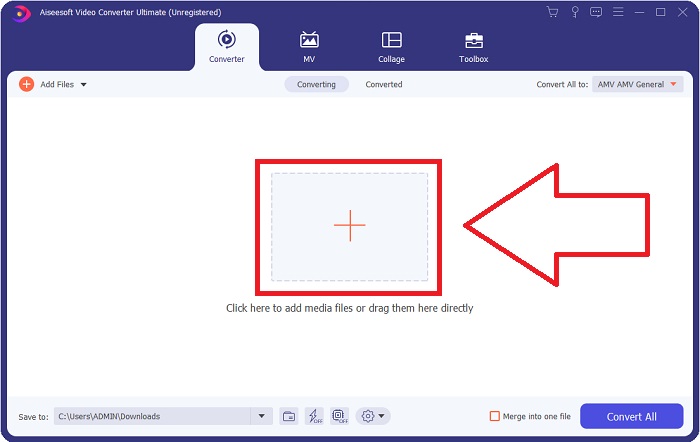
ขั้นตอนที่ 3: หากต้องการแปลงไฟล์วิดีโอรูปแบบ AMV ให้เป็น FLV คุณต้องเลือกประเภทไฟล์หลังจากอัปโหลดไฟล์เข้าโปรแกรมแล้ว จากนั้นเลือกเป็นรูปแบบ FLV นอกจากนี้คุณยังสามารถเลือกคุณภาพวิดีโอที่ต้องการได้ในภายหลัง.
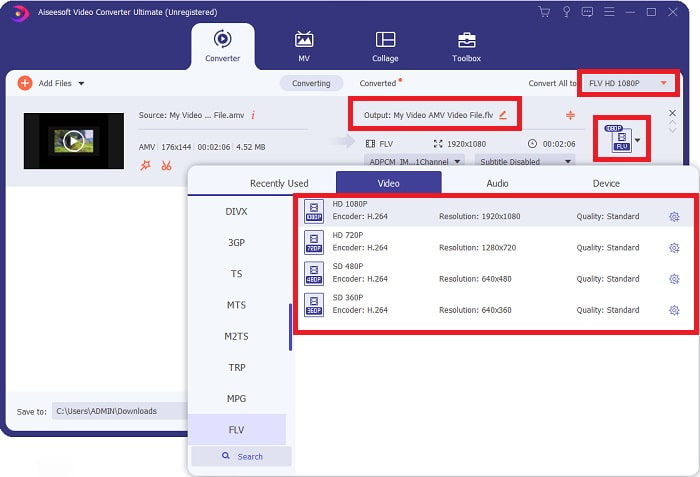
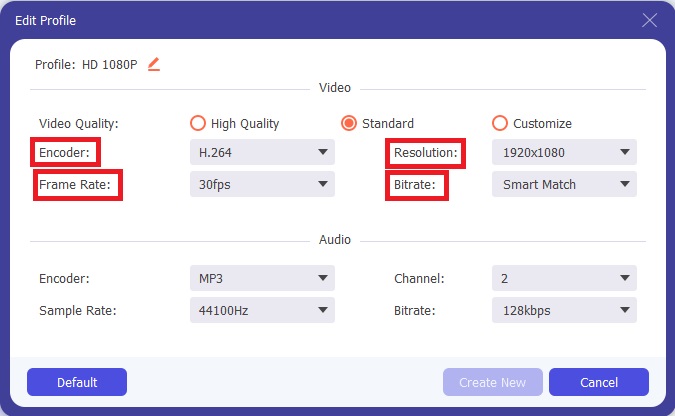
ขั้นตอนที่ 4: หากคุณต้องการปรับแต่งหรือสร้างคุณภาพวิดีโอรูปแบบใหม่ตามที่คุณต้องการ สามารถคลิกที่ไอคอนรูปเฟืองที่อยู่ถัดจากรายการเลือกระดับคุณภาพวิดีโอได้.
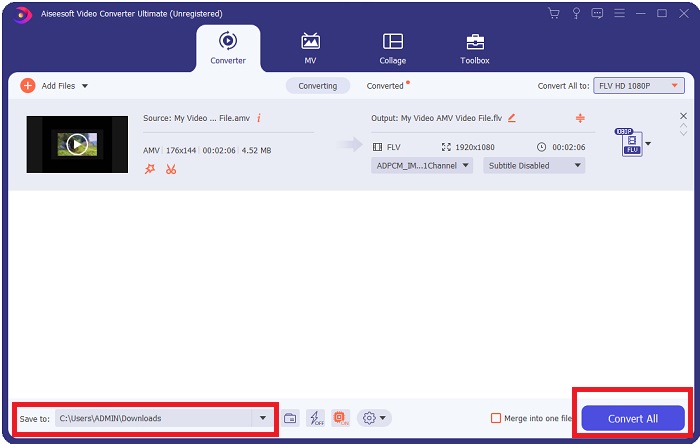
ขั้นตอนที่ 5: ใกล้เสร็จแล้ว! เมื่อคุณตั้งค่าข้อมูลจำเพาะและการปรับแต่งทั้งหมดตามที่ต้องการเรียบร้อยแล้ว คุณสามารถเลือกตำแหน่งที่จะบันทึกไฟล์ที่แปลงเสร็จ โดยคลิกที่ไอคอนโฟลเดอร์ถัดจากช่อง Save to บริเวณมุมล่างของหน้าต่าง จากนั้นคุณก็สามารถเริ่มแปลงไฟล์วิดีโอของคุณได้โดยคลิกปุ่ม Convert All.
ส่วนที่ 2 เครื่องมือออนไลน์ที่ต้องพิจารณาเพื่อใช้ในการแปลง AMV เป็น FLV
การใช้โปรแกรมแปลงไฟล์แบบออนไลน์นั้นง่าย เพราะไม่ต้องดาวน์โหลดหรือติดตั้งซอฟต์แวร์ใด ๆ Free Video Converter Online เป็นตัวอย่างที่ยอดเยี่ยมของโปรแกรมที่สามารถแปลง AMV เป็น FLV ได้อย่างรวดเร็วและง่ายดาย คุณสามารถแปลงไฟล์เสียงและวิดีโอได้หลากหลายรูปแบบด้วยโปรแกรมนี้ และใช้งานได้ฟรีทั้งหมด คุณสามารถอัปโหลดไฟล์ได้ครั้งละสองไฟล์เพื่อแปลง และเมื่อกระบวนการเสร็จสิ้น ไฟล์ที่แปลงเรียบร้อยแล้วจะถูกบันทึกลงในฮาร์ดไดรฟ์ของคุณโดยอัตโนมัติ ต่อไปจะเป็นขั้นตอนทั้งหมดที่คุณต้องรู้ในการใช้เครื่องมือออนไลน์ที่ยอดเยี่ยมนี้.
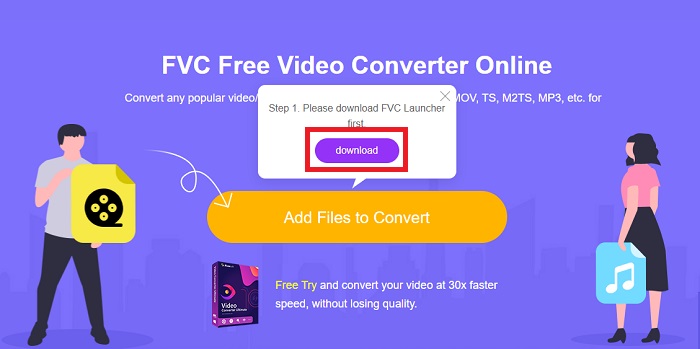
ขั้นตอนที่ 1: คลิกที่ ลิงก์นี้ เพื่อเข้าสู่หน้าเว็บหลักของเครื่องมือออนไลน์ เมื่อเข้าสู่หน้าเว็บแล้ว ให้เริ่มแปลงไฟล์โดยคลิกที่ Add Files to Convert ปุ่มดาวน์โหลดจะปรากฏที่มุมบนของหน้าจอคุณ จากนั้นเมื่อโปรแกรม launcher ติดตั้งเสร็จ คุณก็สามารถเริ่มอัปโหลดไฟล์จากคอมพิวเตอร์ของคุณมายังเครื่องมือนี้ได้.
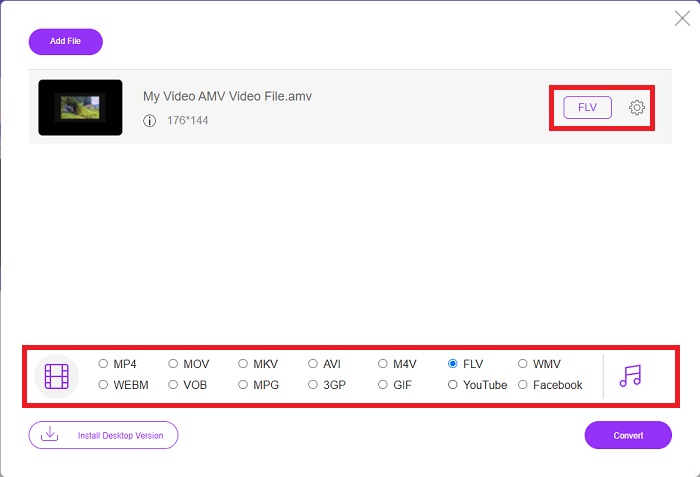
ขั้นตอนที่ 2: ตอนนี้ไฟล์ที่คุณนำเข้าเสร็จเรียบร้อยแล้ว ให้คลิกเลือกรูปแบบวิดีโอ FLV ที่อยู่ด้านล่าง เช่นเดียวกับในซอฟต์แวร์หลัก คุณยังสามารถปรับแต่งข้อมูลจำเพาะทั้งหมดของวิดีโอเอาต์พุตได้โดยคลิกที่ไอคอนรูปเฟือง.
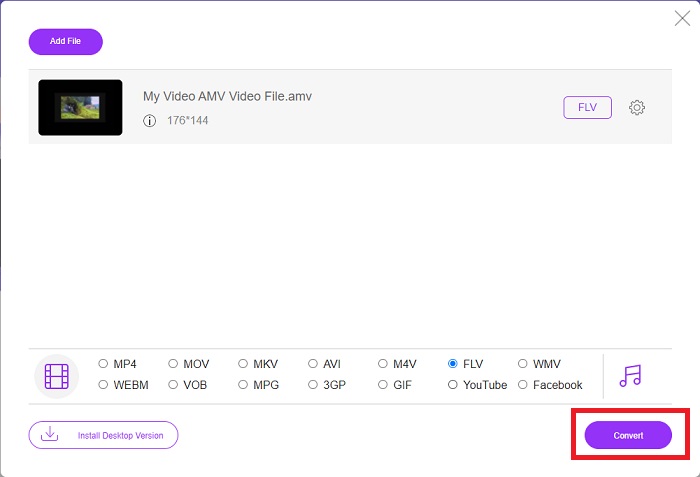
ขั้นตอนที่ 3: สุดท้ายให้คลิกปุ่ม Convert เพื่อแปลงไฟล์ AMV ของคุณให้เป็นรูปแบบ FLV.
ที่เกี่ยวข้อง:
ส่วนที่ 3 ความรู้เพิ่มเติมเกี่ยวกับ AMV & FLV
AMV ปรับเครื่องเล่นสื่ออเนกประสงค์ต่ำให้เหมาะสมด้วย CPU ที่ช้าและหน้าจอขนาดเล็ก เช่น เครื่องเล่น S1 MP3 ตัวแปลงสัญญาณวิดีโอคือ Motion JPEG พร้อมตารางการหาปริมาณคงที่ ตัวแปลงสัญญาณเสียงคือ IMA ADPCM ซึ่ง 8 ไบต์แรกของแต่ละเฟรมคือต้นทาง (16 บิต) ดัชนี (16 บิต) และจำนวนตัวอย่าง 16 บิตที่เข้ารหัส (32 บิต) ค่าโสหุ้ยในการถอดรหัสสำหรับตัวแปลงสัญญาณแบบง่ายเหล่านี้ไม่มีนัยสำคัญ การบีบอัดวิดีโอต่ำ (4 พิกเซล/ไบต์เทียบกับมากกว่า 10 พิกเซล/ไบต์สำหรับ MPEG-2) แต่ขนาดไฟล์มีขนาดเล็กเนื่องจากความละเอียดลดลง (96x96 สูงกว่าหรือเท่ากับ 208x176) และ fps (10, 12, หรือ 16 เฟรม/วินาที) วิดีโอ 30 นาทีที่บีบอัดเป็น 128x96 พิกเซลและ 12 เฟรม/วินาทีจะมีขนาด 80 MB
อย่างไรก็ตาม ไฟล์วิดีโอที่มีนามสกุล.flv ซึ่งคุณสามารถใช้นามสกุลไฟล์ FLV ได้หากต้องการสตรีมวิดีโอหรือเสียงจาก Adobe Flash Player หรือ Adobe Air ทางอินเทอร์เน็ต เป็นเวลานานแล้วที่ Flash Video เป็นรูปแบบวิดีโอเริ่มต้นสำหรับวิดีโอออนไลน์เกือบทั้งหมด รวมถึงวิดีโอบนเว็บไซต์อย่าง YouTube, Hulu และอื่นๆ อีกนับไม่ถ้วน ด้วยเหตุนี้ บริการสตรีมมิ่งและนักพัฒนาซอฟต์แวร์จึงไม่ใช้รูปแบบ Flash ที่เป็นกรรมสิทธิ์ของ Adobe อีกต่อไป จากการเปรียบเทียบทั้งหมดที่กล่าวมา นี่เป็นความช่วยเหลือเล็กน้อยสำหรับคุณ บทความนี้ให้แผนภูมิเปรียบเทียบแก่คุณ:
| นามสกุลไฟล์ | AMV | FLV |
| ชื่อไฟล์ | มิวสิควิดีโออนิเมะ | ไฟล์วิดีโอแฟลช |
| พัฒนาโดย | Jim Kaposztas | Adobe System Incorporated |
| ข้อดี | ◆ AMV เป็นหนึ่งในมิวสิกวิดีโออนิเมะที่แฟนๆ ทำมากที่สุดจนถึงปัจจุบัน ◆ ขนาดไฟล์มีขนาดเล็ก | Adobe Flash สำหรับหน้าเว็บแบบไดนามิกและโต้ตอบได้เป็นประโยชน์อย่างมาก แม้ว่านี่จะเป็นกระบวนการง่ายๆ แต่ผลลัพธ์ก็อาจมีมากมาย Flash เคยเป็นตัวเลือกยอดนิยมสำหรับวิดีโอเกมง่ายๆ เช่นกัน |
| จุดด้อย | ◆ เข้ากันไม่ได้กับเครื่องเล่นและอุปกรณ์สื่อส่วนใหญ่ คุณภาพต่ำ. | ความนิยมที่ลดลงของ FLV เป็นข้อเสียเปรียบ การสร้างเนื้อหา FLV อาจใช้เวลานานและมีราคาแพง การขาดการรองรับ Flash บนอุปกรณ์ iOS นั้นจำกัดความสามารถในการดึงดูดผู้ใช้ใหม่อย่างรุนแรง |
| โปรแกรมที่รองรับไฟล์ | ◆ VLC Media Player ◆ ตัวแปลง iOrgsoft AMV | ◆ ผู้เล่นจริง ◆ Apple QuickTime Player ◆ VLC Media Player ◆ MPlayer |
ส่วนที่ 4 คำถามที่พบบ่อยเกี่ยวกับการแปลง AMV เป็น FLV
วัตถุประสงค์ของ AMV คืออะไร?
การซิงโครไนซ์และความสามัคคีใน AMV สามารถบรรลุรูปแบบการตัดต่อวิดีโอที่หลากหลาย เป็นไปได้ที่จะบรรลุการแก้ไขดิบด้วย 'เอฟเฟกต์' การซูมเข้าและออกอย่างง่าย และการเปลี่ยนช่วงการเปลี่ยนภาพอย่างง่าย ในบรรดาตัวอย่างมากมายมีดังนี้
AMV เกิดขึ้นได้อย่างไร?
เพื่อให้ AMV ประสบความสำเร็จ ต้องใช้เพลงที่มีความเกี่ยวข้องอย่างใกล้ชิดกับเนื้อหาสาระและบรรยายได้เกือบสมบูรณ์ ใครก็ตามที่อ่านข้อความนี้สามารถตอบกลับโดยพูดว่า 'ว้าว นี่มันน่าทึ่งมาก! เพลงนี้เป็นเพลงของเขา เพลงประกอบของเธอ ด้วยเหตุนี้คุณจึงเลือกชิ้นที่ดี
FLV มีคุณภาพดีกว่าหรือไม่?
รูปแบบ FLV และ MP4 สามารถจัดเก็บการเข้ารหัสดิจิทัลวิดีโอและเสียงคุณภาพสูง คุณภาพของไฟล์ FLV เป็นเรื่องที่ต้องถกเถียงกัน แต่ข้อดีและข้อเสียของ FLV สามารถพูดถึงรูปแบบไฟล์ได้ อัตราการบีบอัดที่สูงขึ้นใน MP4 ส่งผลให้สูญเสียคุณภาพน้อยลง
สรุป
โดยสรุป คุณจะทราบถึงความสำคัญของการเลือกตัวแปลงที่ดีที่สุดในการแปลง AMV เป็น FLV คนอื่นจะผลิตวิดีโอคุณภาพต่ำและไม่ซิงค์กันหลังจากวิดีโอผ่านการแปลง แต่ตัวแปลงสองตัวที่บทความนี้แนะนำคือตัวแปลงคุณภาพสูงที่คุณไม่ต้องกังวลกับคุณภาพที่จะให้
-
 วิธีที่ดีที่สุดที่จะใช้ในการแปลง AMV เป็น AVI [อนุมัติ]
 คุณประสบปัญหาในการแปลงไฟล์วิดีโอรูปแบบ AMV เป็น AVI หรือไม่? นี่คือเคล็ดลับบางประการที่คุณจะพบได้ในบทความนี้เท่านั้น
-
 3 ตัวแปลง AMV ใหม่ล่าสุดพร้อมให้แปลงรูปแบบ AMV เป็น MOV [2022]
 Don'ไม่ทราบวิธีการแปลงไฟล์ AMV ของคุณเป็นรูปแบบ MOV? บทความนี้จะพูดถึงตัวแปลง AMV 3 เป็น MOV ที่คุณสามารถใช้ออนไลน์หรือออฟไลน์ได้
-
 4 วิธีที่ได้รับการยืนยันเพื่อแปลง TS เป็น FLV บนเดสก์ท็อป / ออนไลน์
 คุณไม่สามารถเปิด TS บนคอมพิวเตอร์หรือมือถือของคุณโดยค่าเริ่มต้น วิธีเดียวที่จะดูไฟล์วิดีโอคือแปลง TS เป็น FLV หรือรูปแบบอื่นๆ ด้วยคำแนะนำที่เป็นรูปธรรมของเรา
