


 Video Converter Ultimate
 บันทึกหน้าจอ
 ซ่อมวิดีโอ
 ดาวน์โหลดอย่างปลอดภัย
วิธีแปลงไฟล์วิดีโอ FLV ของคุณเป็นรูปแบบ 3G2 บนเดสก์ท็อปและออนไลน์
มีคนกล่าวกันว่าเทคโนโลยีเปลี่ยนแปลงชีวิตและทำให้การใช้ชีวิตประจำวันและการทำงานของเราง่ายขึ้น อย่างไรก็ตาม ทุกสิ่งย่อมมีสองด้าน เทคโนโลยีก็เช่นกัน ตัวอย่างเช่น วิดีโอดิจิทัลทำให้เราสามารถเข้าถึงความบันเทิงและข้อมูลได้ทุกที่ทุกเวลา ปัญหาคือรูปแบบไฟล์วิดีโอ จากผลสำรวจล่าสุด มีรูปแบบไฟล์วิดีโอกว่า 100 ชนิด คู่มือนี้มุ่งเน้นที่การช่วยคุณแปลงไฟล์ FLV เป็น 3G2 หรือ 3GP บนคอมพิวเตอร์และออนไลน์ได้ฟรี.

ส่วนที่ 1: วิธีการแปลง FLV เป็น 3G2 บน PC/Mac
วิธีที่ 1: แปลง FLV เป็น 3G2 ด้วยตัวแปลง FLV ฟรี
มีโปรแกรมแปลงวิดีโอเพียงไม่กี่ตัวที่รองรับรูปแบบ 3G2 โดย FVC Free FLV Converter เป็นหนึ่งในนั้น นอกจากนี้ยังสามารถตอบโจทย์ความต้องการของคุณได้โดยไม่ต้องเสียเงินแม้แต่บาทเดียว หากคุณมีไฟล์ FLV จำนวนมาก โปรแกรมนี้สามารถประมวลผลหลายไฟล์พร้อมกันได้อย่างรวดเร็ว.
คุณสมบัติหลักของโปรแกรมแปลง FLV เป็น 3G2 ที่ดีที่สุด
- 1. แปลง FLV เป็น 3G2 โดยไม่สูญเสียคุณภาพ
- 2. แบทช์จัดการไฟล์ FLV หลายไฟล์โดยใช้เทคโนโลยีมัลติเธรด
- 3. เสนอเครื่องมือโบนัสมากมาย เช่น การตัดต่อวิดีโอ
ดาวน์โหลดฟรีสำหรับ Windows 7 ขึ้นไปดาวน์โหลดอย่างปลอดภัย
ดาวน์โหลดฟรีสำหรับ MacOS 10.7 ขึ้นไปดาวน์โหลดอย่างปลอดภัย
วิธีแปลงไฟล์ FLV เป็น 3G2 แบบหลายไฟล์พร้อมกันโดยไม่เสียค่าใช้จ่าย
ขั้นตอนที่ 1: เพิ่มไฟล์ FLV
เมื่อคุณต้องการแปลง FLV เป็น 3G2 ให้ติดตั้งโปรแกรมแปลงวิดีโอฟรีที่ดีที่สุดบนคอมพิวเตอร์และเปิดใช้งาน คลิกปุ่ม Add File(s) ค้นหาไฟล์ FLV ทั้งหมดที่คุณต้องการแปลง แล้วเปิดไฟล์เหล่านั้น.

ขั้นตอนที่ 2: เลือกรูปแบบผลลัพธ์
ไปที่ด้านล่างหลังจากโหลดวิดีโอเสร็จแล้ว คลิกและขยายตัวเลือก Output format ใช้แถบค้นหาเพื่อหา 3G2 และเลือกที่ด้านขวา จากนั้นคลิกปุ่ม Open Folder แล้วเลือกโฟลเดอร์เฉพาะสำหรับบันทึกไฟล์ที่แปลงแล้ว.

ขั้นตอนที่ 3: แปลง FLV เป็น 3G2
สุดท้าย คลิกปุ่ม Convert เพื่อเริ่มแปลงไฟล์ FLV เป็น 3G2 ทันที ผ่านไปไม่กี่นาที คุณจะพบไฟล์ 3G2 อยู่ในโฟลเดอร์ที่คุณเลือกไว้.

วิธีที่ 2: วิธีแปลง FLV เป็น 3G2 ด้วย VLC
VLC ไม่ได้เป็นเพียงเครื่องเล่นสื่อโอเพนซอร์ซเท่านั้น แต่ยังเป็นตัวแปลง FLV เป็น 3G2 ฟรีอีกด้วย ช่วยให้คุณสามารถแปลงวิดีโอได้ฟรีทั้งบน Windows และ Mac นี่คือขั้นตอน:
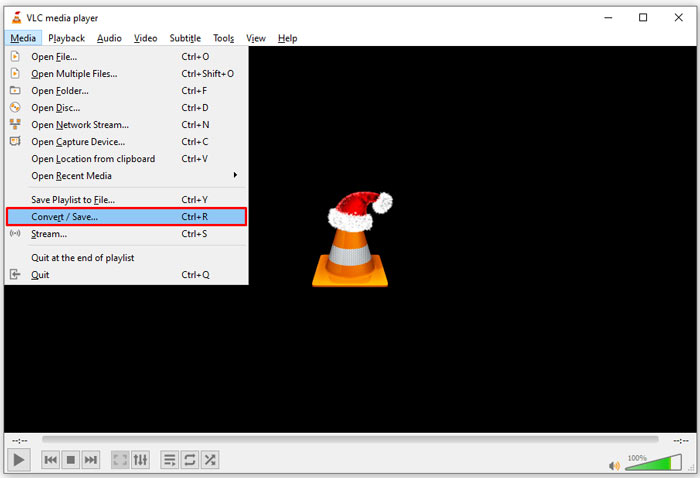
ขั้นตอนที่ 1: เปิด VLC ไปที่เมนู Media บนริบบอนด้านบน แล้วเลือก Convert/Save.
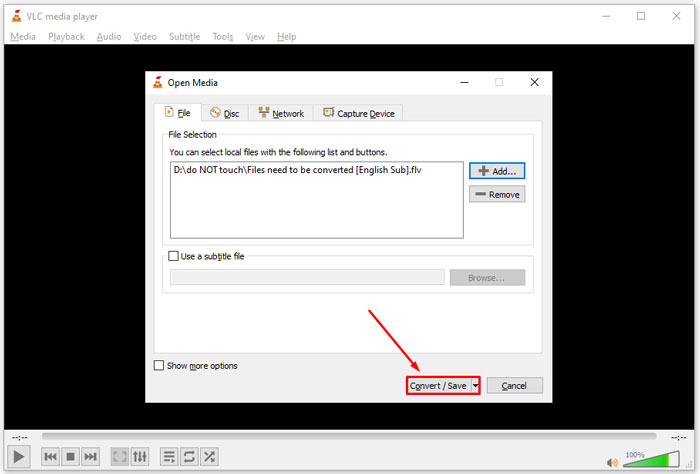
ขั้นตอนที่ 2: คลิกปุ่ม Add แล้วเปิดไฟล์ FLV ที่คุณต้องการแปลงเป็นรูปแบบอื่น จากนั้นกดปุ่ม Convert/Save เพื่อไปต่อ.
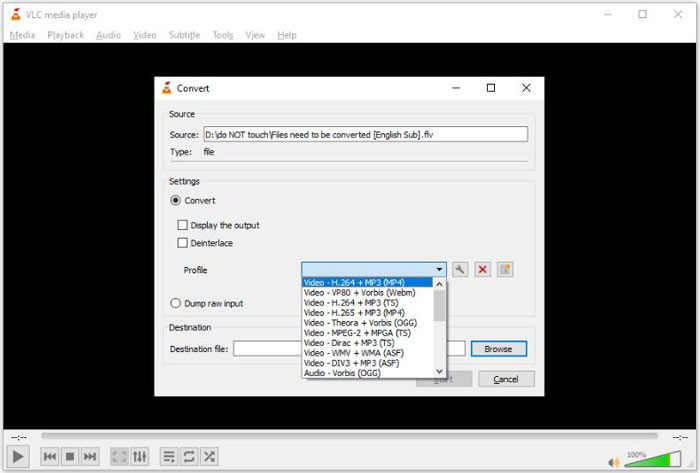
ขั้นตอนที่ 3: คลิกขยายตัวเลือก Profile แล้วเลือก 3G2 หรือรูปแบบที่ใกล้เคียง จากนั้นตั้งค่าโฟลเดอร์ปลายทางโดยคลิกปุ่ม Browse.
ขั้นตอนที่ 4: เมื่อคุณคลิกปุ่ม Start VLC จะเริ่มแปลงไฟล์ FLV เป็น 3G2 ต้องใช้เวลาสักครู่และคุณจำเป็นต้องรออย่างใจเย็น.
ส่วนที่ 2: วิธีการแปลง FLV เป็น 3G2 ออนไลน์
บางครั้งคุณอาจแค่ต้องการแปลง FLV เป็น 3G2 เป็นครั้งคราว ในกรณีเช่นนี้ แอปบนเว็บถือเป็นตัวเลือกที่สะดวก เช่น FVC Free Online Video Converter ซึ่งให้ใช้งานฟรี ไม่มีการลงทะเบียนและไม่มีข้อจำกัดขนาดไฟล์.
ขั้นตอนที่ 1: เข้าไปที่ https://www.free-videoconverter.net/free-online-video-converter/ ด้วยเบราว์เซอร์ใดก็ได้ คลิกปุ่ม Add Files to Convert เพื่อดาวน์โหลดตัวเรียกใช้งาน (launcher).

ขั้นตอนที่ 2: เมื่อดาวน์โหลดเสร็จ ตัวเรียกใช้งานจะเด้งขึ้นมา ให้คลิกปุ่ม Add File แล้วอัปโหลดไฟล์ FLV แอปแปลงวิดีโอบนเว็บตัวนี้รองรับการแปลงแบบหลายไฟล์พร้อมกัน.
หากต้องการปรับค่าพารามิเตอร์ เช่น ความละเอียด อัตราเฟรม และอื่น ๆ ให้คลิกไอคอน Gear เพื่อเปิดหน้าต่าง Settings.

ขั้นตอนที่ 3: เลื่อนไปที่ด้านล่างแล้วเลือกฟอร์แมตไฟล์ผลลัพธ์ที่เหมาะสมในส่วนฟอร์แมต เมื่อตั้งค่าทุกอย่างเรียบร้อยแล้ว ให้คลิกปุ่ม Convert จากนั้นดาวน์โหลดไฟล์ที่แปลงแล้วลงในฮาร์ดไดรฟ์ของคุณ.
คุณอาจสนใจ:
ส่วนที่ 3: คำถามที่พบบ่อยเกี่ยวกับ FLV ถึง 3G2
ไฟล์ 3G2 คืออะไร?
3G2 ย่อมาจาก 3rd Generation Partnership Project Group 2 เป็นส่วนขยายสำหรับไฟล์มัลติมีเดียที่ใช้ MPEG-4 มันถูกสร้างขึ้นโดยกลุ่มองค์กรพัฒนามาตรฐานเจ็ดแห่งสำหรับโทรศัพท์มือถือบนเครือข่าย CDMA มันคล้ายกับ 3GP มาก
Windows Media Player สามารถเปิด 3G2 ได้หรือไม่
ไม่ WMP ไม่สามารถเปิดหรือเล่นไฟล์วิดีโอ 3G2 ได้ เนื่องจากไม่มีตัวแปลงสัญญาณที่เกี่ยวข้อง คุณมีสามทางเลือกในการเปิดไฟล์ 3G2: แปลงเป็นรูปแบบวิดีโอมาตรฐาน ดาวน์โหลดเครื่องเล่นวิดีโอ 3G2 หรือติดตั้งแพ็คเกจตัวแปลงสัญญาณพิเศษสำหรับ WMP
FLV ดีกว่า 3G2 หรือไม่?
คำตอบขึ้นอยู่กับวัตถุประสงค์ของคุณ หากคุณดูวิดีโอบนโทรศัพท์มือถือที่มีเครือข่าย CDMA 3G2 เป็นตัวเลือกที่ดีกว่า สำหรับการแชร์วิดีโอ FLV ดีกว่า 3G2
สรุป
ตอนนี้ คุณควรเข้าใจว่า 3G2 ย่อมาจากอะไรและจะแปลง FLV เป็น 3G2 ได้อย่างไรโดยไม่สูญเสียคุณภาพ VLC เป็นโปรแกรมแปลงวิดีโอฟรีที่มีความสามารถในการเปลี่ยนรูปแบบวิดีโอ อย่างไรก็ตาม FVC Free FLV Converter ทำงานได้ดีกว่า ใช้งานง่ายกว่า VLC และไม่มีค่าใช้จ่ายใด ๆ ทั้งสิ้น หากคุณมีปัญหาเพิ่มเติม โปรดฝากข้อความไว้ใต้โพสต์นี้ แล้วเราจะตอบกลับอย่างรวดเร็ว
-
 FLV เป็น WAV - แปลง FLV เป็น WAV ออนไลน์ฟรีและบน Mac / PC
 ฉันจะแปลงไฟล์ FLV ได้อย่างไร VLC สามารถแปลง FLV เป็น WAV ได้หรือไม่ โพสต์นี้บอก 3 วิธีฟรีในการแปลง FLV เป็น WAV โดยไม่สูญเสียคุณภาพ
-
 FLV เป็น MPG - วิธีการแปลง FLV เป็น MPG บน Mac, PC และออนไลน์ฟรี
 วิธีแปลง FLV เป็น MPEG ฉันสามารถแปลง FLV เป็น MPG ได้ฟรีหรือไม่ โพสต์นี้แชร์ตัวแปลงวิดีโอฟรี 3 รายการเพื่อช่วยคุณแปลง FLV เป็น MPG โดยไม่สูญเสียคุณภาพ
-
 FLV เป็น Xbox - วิธีการแปลงและเล่น FLV บน Xbox
 ไม่สามารถเล่นไฟล์ FLV บน Xbox One หรือ Xbox 360 ได้? ต้องการแปลง FLV เป็นรูปแบบที่รองรับ Xbox เช่น MP4, AVI, MOV หรือ WMV หรือไม่ โพสต์นี้แสดงรายการตัวแปลง FLV เป็น Xbox ฟรี 3 รายการเพื่อให้คุณเล่น FLV บน Xbox
