


 Video Converter Ultimate
 บันทึกหน้าจอ
 ซ่อมวิดีโอ
 ดาวน์โหลดอย่างปลอดภัย
วิธีแปลงไฟล์วิดีโอ FLV ของคุณเป็นรูปแบบ DivX โดยไม่สูญเสียคุณภาพ
คู่มือนี้จะแนะนำวิธีที่ดีที่สุดในการแปลงไฟล์ FLV เป็น DivX ทั้งสองอย่างเป็นรูปแบบวิดีอยอดนิยม แต่การใช้งานแตกต่างกันอย่างสิ้นเชิง FLV เป็นรูปแบบไฟล์ที่ใช้ส่งวิดีโอผ่านอินเทอร์เน็ตด้วย Adobe Flash Player เว็บไซต์ส่วนใหญ่รองรับ FLV รวมถึง YouTube, Google Video, Yahoo Video และอื่น ๆ อย่างไรก็ตาม DivX เป็นตัวแปลงรหัสวิดีโอ (video codec) คุณภาพสูงที่ใช้จัดเก็บเนื้อหาวิดีโอที่มีความละเอียดได้สูงสุดถึงระดับ 1080 HD.

ส่วนที่ 1: วิธีที่ง่ายที่สุดในการแปลง FLV เป็น DivX ฟรี
เมื่อจะแปลงไฟล์ FLV เป็น DivX คุณอาจกังวลเรื่องการสูญเสียคุณภาพ ซึ่งปฏิเสธไม่ได้ว่าปัญหานี้จะเกิดขึ้นได้หากคุณใช้เครื่องมือที่ไม่เหมาะสม แต่FVC Free FLV Converter ในทางกลับกันเป็นตัวแปลง FLV เป็น DivX ที่ทรงพลัง แม้ว่าจะให้ใช้งานได้ฟรี แต่คุณภาพไฟล์ที่ได้ยอดเยี่ยม นั่นเป็นเพราะซอฟต์แวร์นี้
คุณสมบัติเด่นของโปรแกรมฟรีที่ดีที่สุดสำหรับแปลง FLV เป็น DivX
- 1. Batch แปลงไฟล์ FLV เป็น DivX อย่างรวดเร็ว
- 2. ปรับคุณภาพวิดีโอและเสียงให้เหมาะสมโดยอัตโนมัติ
- 3. รองรับรูปแบบวิดีโอและเสียงเกือบทั้งหมด
ดาวน์โหลดฟรีสำหรับ Windows 7 ขึ้นไปดาวน์โหลดอย่างปลอดภัย
ดาวน์โหลดฟรีสำหรับ MacOS 10.7 ขึ้นไปดาวน์โหลดอย่างปลอดภัย
วิธีแปลง FLV เป็น DivX เป็นแบทช์ฟรี
ขั้นตอนที่ 1: นำเข้าไฟล์ FLV
เปิดโปรแกรมแปลง FLV เป็น DivX รุ่นฟรีที่ดีที่สุดหลังจากติดตั้งลงในคอมพิวเตอร์ของคุณแล้ว จากนั้นคลิกปุ่ม Add File(s) เพื่อเปิดหน้าต่างเลือกไฟล์ ค้นหาไฟล์ FLV ที่คุณต้องการแปลง และเปิดไฟล์เหล่านั้นทั้งหมดเข้าสู่โปรแกรม.

ขั้นตอนที่ 2: ตั้งค่า DivX เป็นรูปแบบเอาต์พุต
หลังจากโหลดไฟล์ FLV แล้ว คุณจะเข้าสู่หน้าต่างหลักและวิดีโอจะปรากฏในพาเนลไลบรารี ที่นี่คุณสามารถพรีวิวและแก้ไขวิดีโอได้ เมื่อต้องการตั้งค่ารูปแบบเอาต์พุต ให้คลิกและเปิดตัวเลือก Output format ที่ด้านล่าง จากนั้นไปที่แท็บ General Video เลื่อนลงมาและเลือก DivX.

ขั้นตอนที่ 3: แปลง FLV เป็น DivX
จากนั้นคลิกปุ่ม Open Folder และเปลี่ยนโฟลเดอร์ปลายทางตามต้องการ ตามค่าเริ่มต้นวิดีโอของคุณจะถูกบันทึกไว้ในโฟลเดอร์วิดีโอไลบรารี ขั้นตอนสุดท้าย ให้คลิกปุ่ม Convert เพื่อเริ่มแปลง FLV เป็น DivX ทันที.

ส่วนที่ 2: วิธีแปลง FLV เป็น DivX ออนไลน์
วิธีที่ 1: วิธีการแปลง FLV เป็น DivX ออนไลน์โดยไม่มีขีดจำกัด
FVC Free Online Video Converter เป็นแอปพลิเคชันแปลง FLV เป็น DivX แบบออนไลน์ผ่านเว็บ ไม่เหมือนเว็บแอปอื่น ๆ ตรงที่ไม่มีข้อจำกัดใด ๆ เลย คุณสามารถอัปโหลดไฟล์ FLV หลายไฟล์พร้อมกันได้ นอกจากนี้ยังใช้งานได้ฟรีทั้งหมดโดยไม่ต้องสมัครสมาชิกและไม่มีลายน้ำ.
ขั้นตอนที่ 1: คัดลอกและวาง https://www.free-videoconverter.net/free-online-video-converter/ ลงในแถบที่อยู่ของเบราว์เซอร์ จากนั้นเปิดหน้าเว็บ แล้วคลิกปุ่ม Add Files to Convert เพื่อดาวน์โหลดโปรแกรมเรียกใช้งาน (launcher).

ขั้นตอนที่ 2: รอให้โปรแกรมเรียกใช้งานปรากฏขึ้น จากนั้นคลิกปุ่ม Add File เพื่ออัปโหลดไฟล์ FLV ที่คุณต้องการแปลง.

ขั้นตอนที่ 3: เลื่อนไปที่ด้านล่างและเลือกฟอร์แมตเอาต์พุตที่คุณต้องการ จากนั้นคลิกปุ่ม Convert สิ่งสุดท้ายที่คุณต้องทำคือดาวน์โหลดไฟล์ผลลัพธ์เมื่อกระบวนการเสร็จสิ้น.
วิธีที่ 2: วิธีแปลง FLV เป็น DivX โดย Convertio
Convertio เป็นแอพแปลงวิดีโอบนคลาวด์ คุณสามารถเปลี่ยนไฟล์ FLV หลายไฟล์ได้ถึง 100MB เป็นรูปแบบ DivX ต่อครั้ง นอกจากนี้ยังมีตัวเลือกพื้นฐานที่กำหนดเองเพื่อสร้างผลลัพธ์ที่ต้องการ นี่คือขั้นตอน
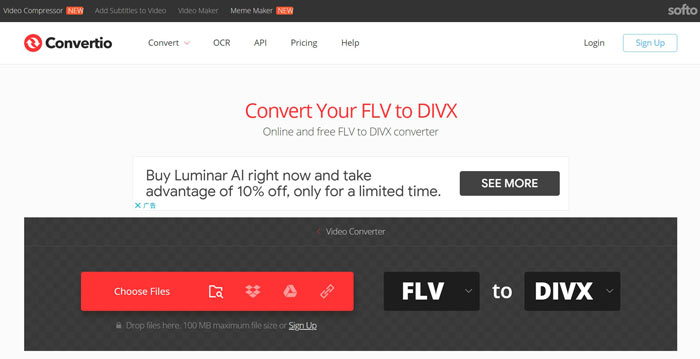
ขั้นตอนที่ 1: ไปที่ https://convertio.co/flv-divx/ ด้วยเว็บเบราว์เซอร์เพื่อเปิดโปรแกรมแปลง FLV เป็น DivX โดยตรง.
ขั้นตอนที่ 2: มีสี่วิธีในการอัปโหลดไฟล์ FLV ได้แก่ จากคอมพิวเตอร์ จาก Dropbox จาก Google Drive หรือจาก URL ให้เลือกวิธีที่เหมาะสมและอัปโหลดวิดีโอของคุณ.
ขั้นตอนที่ 3: คลิกปุ่ม Convert เพื่อเริ่มแปลง FLV เป็น DivX แบบออนไลน์ รอให้กระบวนการเสร็จสิ้นแล้วดาวน์โหลดไฟล์ DivX ลงในฮาร์ดไดรฟ์ของคุณ.
ส่วนที่ 3: คำถามที่พบบ่อยเกี่ยวกับ FLV ถึง DivX
DivX เป็นรูปแบบใด
DivX เป็นรูปแบบวิดีโอที่สร้างโดย DivX, Inc. ส่วนหนึ่งได้รับความนิยมเนื่องจากสามารถบีบอัดวิดีโอให้มีขนาดเกือบ 15% ของขนาดไฟล์ดั้งเดิมโดยไม่สูญเสียคุณภาพมากนัก
ฉันจะเล่นไฟล์ DivX ได้อย่างไร
น่าเสียดายที่ทั้ง Windows Media Player และ QuickTime Player ไม่สามารถเปิดไฟล์ DivX ได้ ดังนั้นคุณจึงต้องติดตั้งโปรแกรมเล่น DivX ของผู้พัฒนารายอื่นลงในคอมพิวเตอร์ หรือไม่ก็ต้องติดตั้งชุดโค้ดेक (codec package) เพิ่มเติมสำหรับโปรแกรมเล่นวิดีโอของคุณ.
FLV ยังคงใช้อยู่หรือไม่?
แม้ว่า HTML 5 จะเป็นที่นิยมมากขึ้นบนอินเทอร์เน็ต แต่ FLV ก็ยังสามารถใช้งานได้บน YouTube และเว็บไซต์วิดีโอส่วนใหญ่ นอกจากนี้โปรแกรมเล่นวิดีโอยอดนิยมก็รองรับ FLV เช่นกัน อย่างเช่น VLC, MPC-HC หรือโปรแกรมเล่น FLV อื่น ๆ.
สรุป
คู่มือนี้ได้แบ่งปันวิธีการสามวิธีในการแปลงไฟล์วิดีโอ FLV ของคุณเป็นรูปแบบ DivX เพื่อให้คุณสามารถเปิดและเล่นกับเครื่องเล่นสื่อของคุณได้อย่างราบรื่น แน่นอน คุณสามารถลองใช้แอปแปลงวิดีโอบนเว็บได้ อย่างไรก็ตาม FVC Free FLV Converter เป็นตัวเลือกที่ดีที่สุดหากคุณมีไฟล์ FLV จำนวนมากที่รอการแปลง ยิ่งกว่านั้นมันค่อนข้างใช้งานง่ายและไม่ต้องถามถึงทักษะทางเทคนิค คำถามเพิ่มเติม? กรุณาฝากข้อความของคุณไว้ใต้โพสต์นี้
-
 3 วิธีง่ายๆในการแปลง FLV เป็น AVI บนเดสก์ท็อปและออนไลน์
 1. แปลงวิดีโอ FLV เป็นรูปแบบมัลติมีเดียอื่น ๆ ได้อย่างง่ายดาย 2. รองรับรูปแบบวิดีโอเกือบทั้งหมด เช่น AVI, MP4, MKV ฯลฯ 3. แบทช์ประมวลผลไฟล์ FLV หลายร้อยไฟล์ต่อการแปลง
-
 3 วิธียอดนิยมในการแปลง FLV เป็น WMV บน Windows และ Mac
 กำลังมองหาวิธีที่ดีที่สุดในการแปลง FLV เป็น WMV โดยไม่สูญเสียคุณภาพบนพีซีหรือ Mac ใช่ไหม คุณโชคดีเพราะที่นี่เราแบ่งปันสามวิธีในการทำงานอย่างง่าย
-
 ตัวแปลง MP4 เป็น DivX 6 อันดับแรกเพื่อแปลงรหัส MP4 เป็น DivX ได้อย่างง่ายดาย
 เมื่อคุณต้องการสำรองไฟล์ MP4 ลงในดีวีดีหรือเล่นบนสมาร์ททีวีที่มีคุณภาพสูงคุณสามารถเรียนรู้เพิ่มเติมเกี่ยวกับตัวแปลง MP4 เป็น DivX ฟรีที่ดีที่สุด 6 รายการได้จากบทความ
