


 Video Converter Ultimate
 บันทึกหน้าจอ
 ซ่อมวิดีโอ
ค้นหาว่าตัวแปลง FLV เป็น MKV ที่ดีที่สุด 3 ตัวคืออะไรเพื่อแปลงไฟล์ FLV ของคุณเป็น MKV
คุณเบื่อกับการค้นหาบนอินเทอร์เน็ตเพื่อหาวิธีที่ดีที่สุดในการแปลงไฟล์ FLV เป็น MKV ฟรีอยู่หรือเปล่า อาจเป็นเรื่องบังเอิญก็ได้ แต่วันนี้เราได้รวบรวมโปรแกรมแปลงไฟล์ FLV ที่ดีที่สุดมาให้คุณเลือกใช้ แน่นอนว่าเราคัดมาแต่ตัวท็อปเท่านั้น เพื่อให้การค้นหาของคุณง่ายขึ้น คุณควรอ่านบทความด้านล่างต่อไปเรื่อย ๆ เพราะคุณจะได้เรียนรู้อีกมากเกี่ยวกับ FLV, MKV และโปรแกรมแปลงไฟล์ที่สามารถใช้ได้.

ส่วนที่ 1 2 วิธีในการแปลง FLV เป็น MKV ฟรี
วิธีที่ 1 ใช้ตัวแปลงออนไลน์เพื่อแปลง FLV เป็น MKV
ตัวแปลงไฟล์ออนไลน์ตัวนี้ถือได้ว่าเป็นหนึ่งในทรานส์โคเดอร์ชั้นดีสำหรับการแปลง FLV เป็น MKV ออนไลน์ FVC Free Video Converter Online เป็นตัวแปลงไฟล์ที่ใช้งานง่ายและเข้าใจไม่ยากผ่านเว็บ แต่เครื่องมือนี้ต้องพึ่งพาอินเทอร์เน็ต หมายความว่าหากคุณไม่มีการเชื่อมต่ออินเทอร์เน็ต ก็ยากที่จะใช้แปลงไฟล์ได้ ถึงแม้เป็นเครื่องมือออนไลน์ แต่ก็ไม่มีโฆษณาบนหน้าตาโปรแกรมให้กวนใจ และไม่มีมัลแวร์ ดังนั้นหากคุณอยากลองใช้งานจริงด้วยตัวเอง ให้ทำตามขั้นตอนด้านล่างนี้.
ขั้นตอนที่ 1 คลิกลิงก์นี้เพื่อเปิด FVC Free Video Converter Online ในแท็บใหม่.
ขั้นตอนที่ 2 คลิกปุ่ม Add Files to Convert เพื่อเปิดโฟลเดอร์บนคอมพิวเตอร์ที่คุณใช้ เลือกไฟล์ FLV ที่ต้องการแปลงแล้วกด Open เพื่ออัปโหลดไฟล์.
ดาวน์โหลดเวอร์ชันเดสก์ท็อปเพื่อแปลงไฟล์แบบเป็นชุดได้.
ขั้นตอนที่ 3 เลือกฟอร์แมต MKV จากรายการฟอร์แมตที่แสดงด้านล่าง.
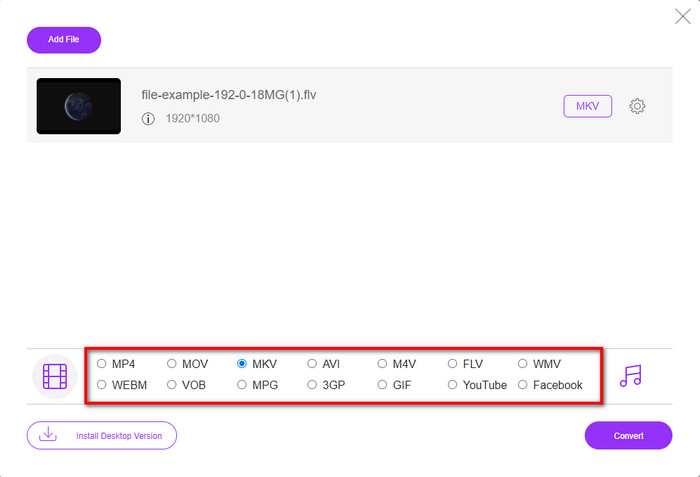
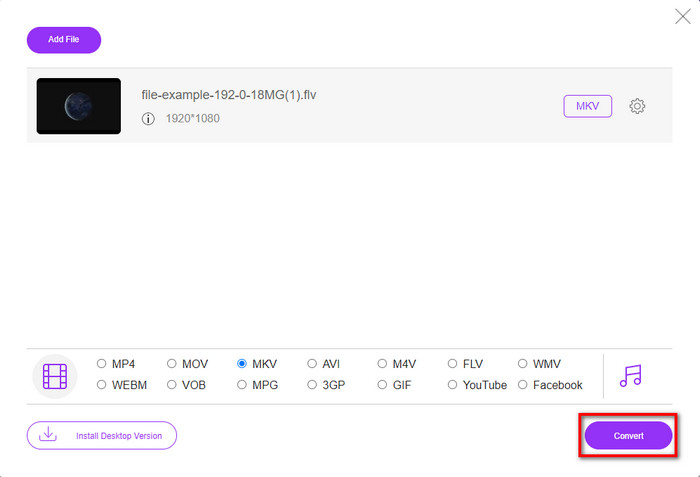
ขั้นตอนที่ 4 เริ่มกระบวนการแปลงไฟล์ด้วยการคลิกปุ่ม Convert จากนั้นไฟล์ที่แปลงเสร็จจะถูกบันทึกลงไดรฟ์ในคอมพิวเตอร์ของคุณโดยอัตโนมัติ.
วิธีที่ 2 ใช้ตัวแปลงฟรีที่มีให้ดาวน์โหลดบน Windows และ Mac
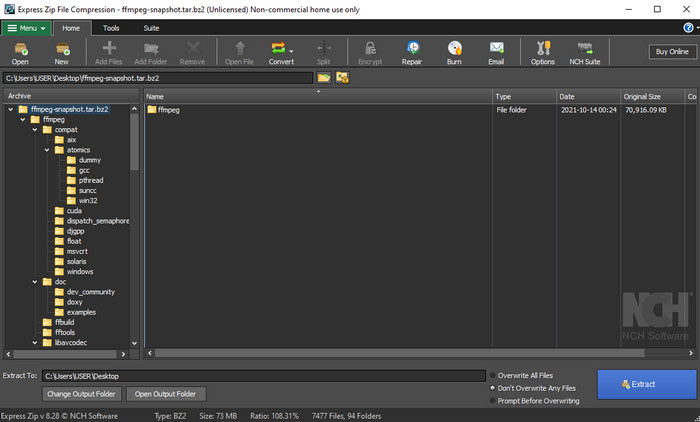
FFmpeg ไม่ใช่โปรแกรมแปลงไฟล์แบบคลาสสิกที่คุณคุ้นเคย ถึงแม้มันจะไม่ได้เป็นตัวแปลงไฟล์แบบทั่วไป แต่ก็ยังสามารถแปลงไฟล์ FLV ของคุณได้ จุดที่ทำให้เครื่องมือนี้แตกต่างคือมันใช้ส่วนติดต่อแบบบรรทัดคำสั่ง (CLI) หมายความว่าก่อนจะแปลงไฟล์ คุณต้องสั่งงานด้วยการเขียนโค้ดหรือง่าย ๆ คือการพิมพ์คำสั่ง ถ้าคุณสนใจโปรแกรมแปลงไฟล์ตัวนี้ ให้อ่านรายละเอียดด้านล่างเพื่อใช้ FFmpeg แปลง FLV เป็น MKV ตามขั้นตอนต่อไปนี้.
ขั้นตอนที่ 1 ดาวน์โหลดและเปิดไฟล์ FFmpeg.exe.
ขั้นตอนที่ 2 เปิดหน้าต่าง Command Prompt บนคอมพิวเตอร์ของคุณ.
ขั้นตอนที่ 3 เรียกดูไฟล์ FLV ผ่าน CMD จากนั้นคัดลอกโค้ดนี้ไปวางใน Command Prompt ffmpeg -i input.flv -vn -ar 44100 -ac 2 -b:a 192k output.mkv แล้วกด Enter บนคีย์บอร์ดเพื่อเริ่มกระบวนการ.
ส่วนที่ 2 แปลง FLV เป็น MKV ด้วยตัวแปลง FLV เป็น MKV ที่ดีที่สุดโดยไม่สูญเสียข้อมูล
วิธีที่ 3 ใช้ตัวแปลงมืออาชีพเพื่อแปลง FLV เป็น WMV
ยังไม่พอใจกับโปรแกรมแปลงไฟล์สองตัวแรกที่แนะนำไปใช่ไหม ถ้าอย่างนั้นคุณต้องลองใช้ FVC Video Converter Ultimate ทำไมต้องตัวนี้? เพราะมันสามารถให้ผลงานระดับมืออาชีพได้ แม้ว่าคุณจะไม่ต้องออกแรงปรับค่ามากนัก นอกจากนี้ยังรองรับฟอร์แมตมากมายในการแปลงไฟล์ FLV เป็น MKV, AVI, MOV, AVI, MP4 และอีกกว่า 200 ฟอร์แมต ยังไม่ประทับใจอีกหรือ บางทีคุณอาจอยากใส่ลูกเล่นพิเศษให้วิดีโอของคุณ? ในกรณีนั้นคุณถือว่าโชคดีที่มีตัวแปลงไฟล์นี้ เพราะมันมาพร้อมฟีเจอร์ตัดต่อวิดีโอขั้นสูงให้คุณใช้ คุณลังเลเพราะคิดว่าเครื่องมือนี้อาจซับซ้อนเกินไปสำหรับคุณหรือเปล่า ถ้าใช่ ให้ทำตามขั้นตอนด้านล่างเพื่อทดลองและเรียนรู้วิธีใช้โปรแกรมแปลง FLV เป็น MKV ตัวนี้.
ขั้นตอนที่ 1 ก่อนใช้โปรแกรมนี้ คุณต้องดาวน์โหลดมาก่อนโดยคลิกปุ่มดาวน์โหลดด้านล่าง จากนั้นทำตามคำแนะนำการติดตั้งให้ครบ แล้วเปิดโปรแกรม.
ดาวน์โหลดฟรีสำหรับ Windows 7 หรือใหม่กว่าดาวน์โหลดอย่างปลอดภัย
ดาวน์โหลดฟรีสำหรับ MacOS 10.7 หรือใหม่กว่าดาวน์โหลดอย่างปลอดภัย
ขั้นตอนที่ 2 เพื่อเพิ่มไฟล์ FLV ที่ต้องการแปลง ให้กดปุ่ม + จากนั้นเลือกไฟล์ FLV ในโฟลเดอร์ที่แสดงบนหน้าต่างโปรแกรม แล้วกด Open เพื่อไปยังขั้นตอนถัดไป.
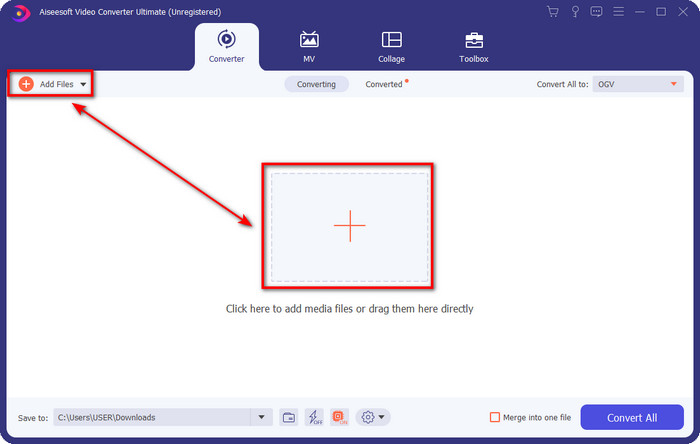
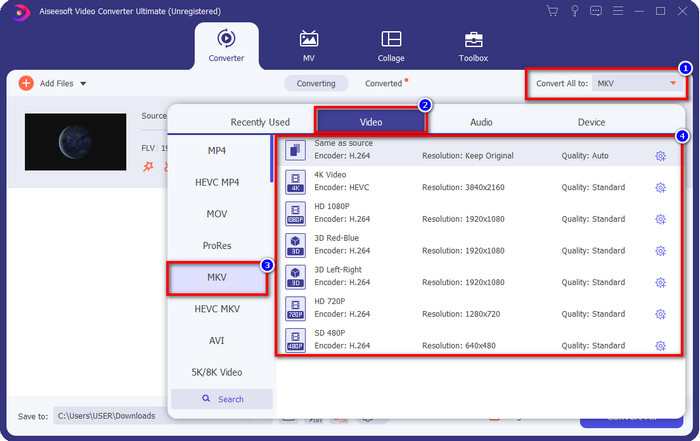
ขั้นตอนที่ 3 จากนั้นเปลี่ยนฟอร์แมตเป็น MKV โดยคลิกปุ่ม drop-down ที่มุมขวาบนของหน้าต่างโปรแกรม.
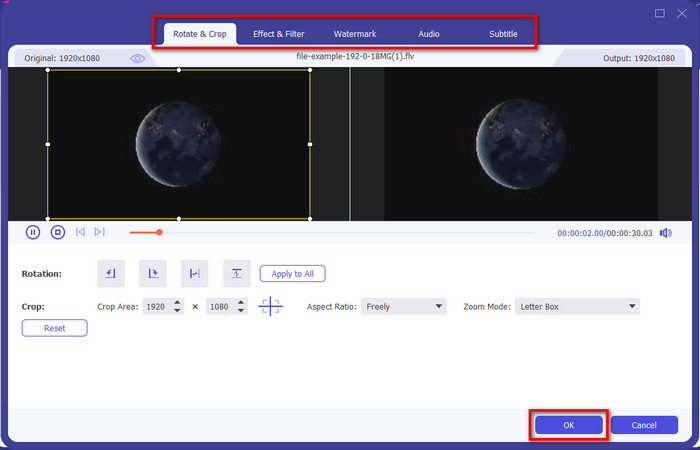
ตัวเลือกเพิ่มเติม หากคุณต้องการตัดต่อวิดีโอ สามารถคลิกปุ่มรูปไม้กายสิทธิ์ ได้ หน้าต่างใหม่จะแสดงขึ้นมา คุณสามารถ หมุน, ครอบตัด, ใส่เอฟเฟ็กต์, ฟิลเตอร์, ลายน้ำ, ปรับเสียง และ คำบรรยาย ได้ในหน้านี้ อย่าจำกัดจินตนาการของคุณ ทำอะไรก็ได้ตามต้องการ และเพื่อยืนยันการปรับแต่งทั้งหมด ให้คลิก OK.
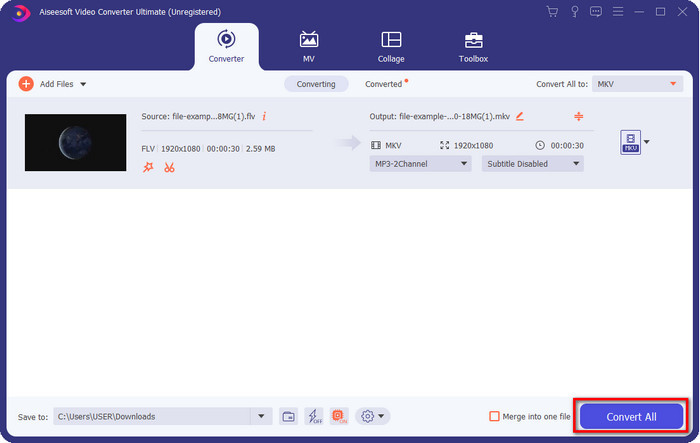
ขั้นตอนที่ 4 เมื่อเสร็จเรียบร้อยแล้ว ให้คลิก Convert All เพื่อแปลงไฟล์ FLV เป็นฟอร์แมต MKV กระบวนการใช้เวลาไม่ถึงหนึ่งนาที จึงไม่ต้องรอนาน จากนั้นจะมีโฟลเดอร์ปรากฏขึ้นบนหน้าจอซึ่งมีไฟล์ FLV ที่แปลงแล้วอยู่ภายใน.
ที่เกี่ยวข้อง:
ส่วนที่ 3 อะไรคือความแตกต่างระหว่าง FLV และ MKV
FLV และ MKV ขึ้นชื่อว่าเป็นหนึ่งในคอนเทนเนอร์ที่ดีที่สุดที่ทุกคนรู้จัก แต่ก่อนอื่น เรามาเปรียบเทียบและดูรายละเอียดเพิ่มเติมเกี่ยวกับทั้งสองรูปแบบกันดีกว่า
FLV เป็นที่รู้จักในทุกเว็บไซต์เนื่องจากเป็นที่นิยมในหน้าเว็บ ส่วนใหญ่เป็นเพราะ Adobe สร้างขึ้น นอกจากนี้ .flv ยังเล่นวิดีโอสตรีมออนไลน์ได้เนื่องจากโหลดได้ง่ายกว่ารูปแบบอื่นมาก นอกจากนี้ รูปแบบนี้จำเป็นต้องมี Plug-in-Play ก่อนที่คุณจะสามารถดูหรือดูวิดีโอในรูปแบบนี้ หรือคุณสามารถดาวน์โหลด Flash Player ได้อย่างง่ายดาย แม้ว่ารูปแบบจะยอดเยี่ยม แต่ Plug-in-play ที่ใช้ก็ถูกลบไปแล้ว ซึ่งหมายความว่ารูปแบบนี้ไม่ใช่ตัวเลือกที่ดีที่สุด อย่างไรก็ตาม เครื่องเล่นสื่อจำนวนมากยังคงสนับสนุนรูปแบบนี้และผู้ใช้ที่ยังคงใช้รูปแบบนี้อยู่
MKV ขึ้นชื่อว่าเป็นรูปแบบที่เหมือนอนาคตมากที่สุด รูปแบบนี้จะไม่เหมือนกับรูปแบบอื่นมากนักหากเราจะเปรียบเทียบ ตัวอย่างเช่น โครงสร้างที่สร้างในรูปแบบนี้ไม่เหมือนกับ MP4 หรือ AVI แต่ต่างกัน การออกแบบและการจัดเก็บไฟล์มีเดียที่เป็นเอกลักษณ์ทำให้น่าประทับใจยิ่งขึ้น ปัจจุบันนี้เป็นเรื่องยากที่จะเลือกรูปแบบที่ล้าสมัย และรูปแบบหนึ่งคือ MKV
หากเราศึกษารายละเอียดเพิ่มเติม เราจะพบสาเหตุหลายประการที่คุณต้องแปลง FLV เป็น MKV แม้ว่าทั้งสองรูปแบบจะมีเนื้อหาสื่อ แต่ MKV ก็มีประสิทธิภาพมากกว่า FLV ดังนั้น หากคุณต้องการพลังพิเศษของ MKV คุณต้องแปลงไฟล์ของคุณเป็นรูปแบบนี้
FLV เทียบกับ MKV
Adobe Flash Player ใช้ FLV เพื่อส่งเนื้อหาวิดีโอ เช่น ภาพยนตร์และรายการทีวี ปัจจุบัน Adobe ไม่ได้พัฒนาโปรแกรมเล่นอีกต่อไปและแนะนำให้ผู้ใช้ถอนการติดตั้งโปรแกรมดังกล่าวด้วยเหตุผลด้านความปลอดภัย อย่างไรก็ตาม คุณยังคงสามารถใช้รูปแบบ FLV ในโปรแกรมที่ไม่ใช่ Adobe/Macromedia จำนวนมากได้
รูปแบบคอนเทนเนอร์มัลติมีเดีย Matroska ซึ่งเปิดตัวในปี 2545 เป็นรูปแบบโอเพนซอร์สที่สามารถรวมแทร็กวิดีโอ เสียง รูปภาพ และคำบรรยายได้จำนวนหนึ่ง ดังนั้น คุณสามารถใช้เพื่อเก็บคลิปวิดีโอสั้น รายการทีวี และภาพยนตร์ได้อย่างง่ายดาย ค่อนข้างเป็นที่นิยมสำหรับแฟนอนิเมะ
ส่วนที่ 4 คำถามที่พบบ่อยเกี่ยวกับการแปลง FLV เป็น MKV
การแปลง FLV เป็น MKV ออนไลน์ปลอดภัยหรือไม่
รูปแบบการแปลงควรจะปลอดภัยถ้าคุณใช้เครื่องมือเว็บ อย่างไรก็ตาม ตัวแปลงออนไลน์บางตัวอาจไม่ปลอดภัยในการแปลงรูปแบบไฟล์ของคุณ เนื่องจากมีแนวโน้มบางอย่าง จึงจะมีข้อผิดพลาดที่ไม่คาดคิดมากมายเมื่อคุณใช้ตัวแปลงที่ไม่ถูกต้อง ตัวอย่างเช่น การสูญเสียคุณภาพเป็นปัญหาที่แพร่หลาย ไวรัสเมื่อดาวน์โหลดไฟล์หลังจากแปลง โฆษณาป๊อปอัปหลายรายการ มัลแวร์ติดไวรัส และอื่นๆ อีกมากมาย ดังนั้น หากคุณต้องการให้มีกระบวนการแปลงออนไลน์อย่างปลอดภัย คุณต้องใช้ FVC Free Video Converter Online แทน
การแปลง FLV จะใช้เวลาหรือไม่?
ขั้นตอนการแปลงจะขึ้นอยู่กับหลายปัจจัย และหนึ่งในนั้นคือเครื่องมือที่คุณใช้และขนาดไฟล์ หากคุณมีไฟล์ FLV ขนาดใหญ่ คุณต้องใช้ FVC Video Converter Ultimate โดยเฉพาะอย่างยิ่งในเวลาเร่งด่วน เนื่องจากเครื่องมือนี้มีกระบวนการที่รวดเร็ว คุณจึงไม่จำเป็นต้องเชื่อมต่ออินเทอร์เน็ตเพื่อใช้งาน และตอนนี้ m หากคุณกำลังมองหาตัวแปลงที่สามารถประมวลผลรูปแบบของคุณได้เร็วขึ้น เครื่องมือที่ดีที่สุดคือตัวเลือก
เหตุใดฉันจึงไม่สามารถเปิดไฟล์ FLV ของฉันได้
มีสาเหตุหลายประการที่ทำให้คุณไม่สามารถเปิดไฟล์ FLV ได้ รับทราบ; รายละเอียดต่อไปนี้เป็นหนึ่งในสาเหตุที่ทำให้คุณไม่สามารถเปิดไฟล์ FLV ได้ ก่อนอื่น คุณไม่สามารถเปิด FLV ได้หากไฟล์นั้นแคร็กหรือมีไวรัสอยู่ในนั้น ประการที่สอง ปัญหาที่พบบ่อยที่สุดที่ไฟล์วิดีโอไม่ได้รับการสนับสนุนในแอปที่คุณกำลังใช้ ประการที่สาม หากคุณดาวน์โหลดไฟล์ FLV บนอินเทอร์เน็ต จะมีกรณีที่ไฟล์สูญเสียข้อมูลสำคัญบางอย่างในการเล่น แม้ว่าจะเป็นปัญหา แต่เรายังคงสามารถช่วยเรื่องนี้ได้โดยการแปลง FLV ของคุณเป็นรูปแบบอื่น แต่อย่าลืมว่าคุณไม่สามารถกู้คืน FLV ด้วยการเปลี่ยนรูปแบบได้หากไฟล์นั้นเสียหายหรือไม่สมบูรณ์
สรุป
เราศึกษาแล้วว่าเราสามารถแปลง FLV เป็น MKV ได้หลายวิธี เครื่องมือด้านบนเป็นตัวเลือกที่ยอดเยี่ยมหากต้องการแปลงไฟล์ไปเป็นฟอร์แมตใหม่ ตอนนี้ก็ขึ้นอยู่กับคุณแล้วว่าจะเลือกวิธีไหนที่คิดว่าเหมาะที่สุดสำหรับการแปลงไฟล์ของคุณ ไม่ว่าเครื่องมือทั้งสามตัวด้านบนตัวไหนก็สามารถช่วยให้คุณแปลงไฟล์ได้สำเร็จ แต่หากคุณต้องการผลลัพธ์ระดับมืออาชีพและดึงศักยภาพสูงสุดจากไฟต์วิดีโอของคุณ คุณควรเลือกใช้ FVC Video Converter Ultimate ไม่จำเป็นต้องอธิบายมาก เพราะโปรแกรมนี้จะตอบโจทย์ความต้องการของคุณได้อย่างครบถ้วน.
-
 3 โซลูชั่นเกี่ยวกับวิธีการแปลง FLV เป็น PSP โดยไม่สูญเสียข้อมูล
 วิธีแปลง FLV เป็น PSP? ที่นี่ คุณจะได้รับคำแนะนำทีละขั้นตอนในการแปลงวิดีโอ Flash เป็นรูปแบบที่รองรับ PSP (WMV, MP4, AVI, FLV ฯลฯ) บน Windows และ Mac
-
 2 วิธีในการแปลง FLV เป็น WMA Audio [ฟรี & ออนไลน์]
 ต้องการแยกเสียง WMA จากวิดีโอ FLV หรือไม่ ต่อไปนี้คือตัวแยกเสียง WMA ฟรี 2 ตัวเพื่อแปลง FLV (Flash Video) เป็น WMA (Windows Media Audio) ด้วยความเร็วในการแปลงที่รวดเร็วบน Mac OS X และ Windows 10/8/7
-
 [แก้ไขแล้ว] วิธีแปลงวิดีโอ FLV เป็นไฟล์ GIF แบบเคลื่อนไหวได้ฟรี
 หากคุณต้องการสร้าง GIF จากกลุ่มวิดีโอ FLV เพื่อการส่งที่ดียิ่งขึ้น คุณสามารถเรียนรู้เพิ่มเติมเกี่ยวกับวิธีการแปลงวิดีโอ FLV เป็นไฟล์ GIF ได้อย่างง่ายดายจากบทความนี้

