


 Video Converter Ultimate
 บันทึกหน้าจอ
 ซ่อมวิดีโอ
มารู้จักแนวทางปฏิบัติขั้นสูงสุดทั้งหมดในการแปลง MPG เป็น FLV [แก้ไขแล้ว]
MPEG-1 or MPEG-2 video formats can combine audio formats in MPG, a video format. It compresses VHS-quality raw digital videos without losing quality. The MPG standard supports Mac, Windows, and other operating systems. However, many online videos and audio streaming services use FLV, a Flash-compliant video container. Although Adobe Flash Player is required to view FLV files in a web browser, many other media players do as well. This article talks about everything about these two video formats and converting MPG to FLV; that's why you need to read more to know these things.

ส่วนที่ 1. MPG และ FLV คืออะไร?
ไฟล์ MPG เป็นไฟล์วิดีโอประเภทหนึ่งที่ใช้รูปแบบวิดีโอดิจิทัลมาตรฐาน (MPEG) ของกลุ่มผู้เชี่ยวชาญด้านภาพเคลื่อนไหว มันรวมวิดีโอ เสียง และข้อมูลเมตา ไฟล์ MPG สามารถใช้สร้างภาพยนตร์บนเว็บได้ ไฟล์ MPG มักจะมีไฟล์เสียงและวิดีโอที่บีบอัดโดยใช้ MPEG-1 หรือ MPEG-2 MPEG-1 เป็นหนึ่งในรูปแบบวิดีโอ/เสียงที่มีการสูญเสียมากที่สุดทั่วโลก เนื่องจากมีการสนับสนุนอย่างกว้างขวางในแอพพลิเคชั่นวิดีโอและเสียงที่หลากหลาย จุดประสงค์ของ MPEG-2 คือเพื่อแก้ไขข้อบกพร่องของ MPEG-1 ซึ่งมีระบบบีบอัดเสียงแบบสองช่องสัญญาณและรองรับความต้องการวิดีโอความละเอียดสูงไม่เพียงพอ ไฟล์ MPG สามารถจัดเก็บรูปแบบที่เรียกว่า PS หรือ MPEG-PS ซึ่งเป็นคอนเทนเนอร์สตรีมโปรแกรม รูปแบบจะรักษาสตรีมเสียง วิดีโอ และเมตาดาต้าเพียงรายการเดียวเพื่อการจัดส่งที่มีประสิทธิภาพ
ในขณะเดียวกัน ไฟล์วิดีโอที่บันทึกในรูปแบบคอนเทนเนอร์ Adobe Flash (FLV) จะเป็นไฟล์ FLV สตรีมข้อมูลเสียงและวิดีโอเข้ารหัสคล้ายกับแฟลชมาตรฐาน รูปแบบ SWF และแพ็กเก็ตข้อมูลเมตา ด้วยปลั๊กอิน Flash Video Exporter (รวมอยู่ใน Adobe Animate) หรือแอปพลิเคชันอื่นที่รองรับไฟล์ FLV ผู้ใช้สามารถส่งออกเนื้อหา Flash Video เป็นไฟล์ FLV นอกจาก QuickTime และ Windows Media แล้ว Adobe Media Encoder ยังสามารถเข้ารหัสรูปแบบวิดีโออื่นๆ ได้อีกด้วย
ตอนนี้คุณมีข้อมูลโดยละเอียดเกี่ยวกับรูปแบบวิดีโอทั้งสองนี้แล้ว คุณจำเป็นต้องรู้ตัวแปลงสองตัวนี้ ซึ่งสามารถใช้ได้ทั้งแบบออฟไลน์หรือออนไลน์ เพื่อช่วยคุณแปลง MPG เป็น FLV
ส่วนที่ 2 เคล็ดลับที่ง่ายและรวดเร็วเพื่อใช้ในการแปลง MPG เป็น FLV [ออฟไลน์]
เราขอแนะนำ Video Converter Ultimate เป็นทางเลือกที่ดีที่สุดสำหรับ VLC และตัวแปลงวิดีโออื่น ๆ ซึ่งเป็นเครื่องมือที่ตรงไปตรงมาสำหรับการแปลงไฟล์ของคุณ แต่ไม่มีการแปลงแบบไม่สูญเสียและคุณสมบัติเพิ่มเติม โปรแกรมรองรับรูปแบบและอุปกรณ์มากกว่า 1,000+ ทำให้สามารถแปลงคุณภาพแบบไม่สูญเสียด้วยความเร็วที่รวดเร็ว มีตัวแก้ไขในตัวสำหรับปรับแต่งไฟล์ และผู้ใช้สามารถแปลงไฟล์หลายไฟล์พร้อมกันได้ นี่คือขั้นตอนที่คุณต้องปฏิบัติตามเพื่อใช้อย่างถูกต้อง:
Step 1: You can download the software on both Windows and Mac by clicking the Free Download below. After you download it to your computer, you can now install it and run it after.
ดาวน์โหลดฟรีสำหรับ Windows 7 หรือใหม่กว่าดาวน์โหลดอย่างปลอดภัย
ดาวน์โหลดฟรีสำหรับ MacOS 10.7 หรือใหม่กว่าดาวน์โหลดอย่างปลอดภัย
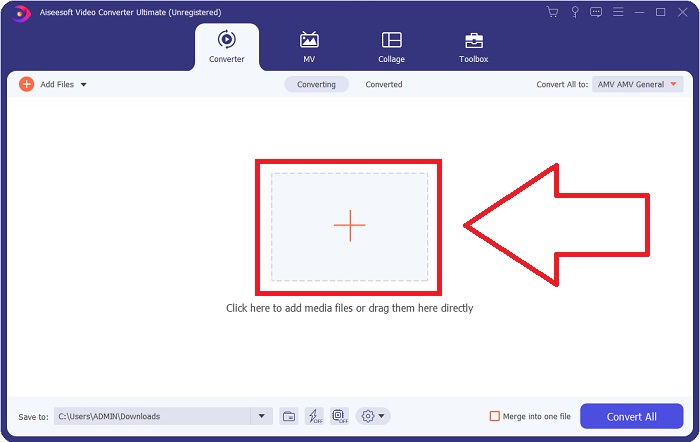
Step 2: Proceed with importing video files by clicking the + at the middle of the window that will appear after you run the software. You can also drag the files directly from your computer transferring them to the software.
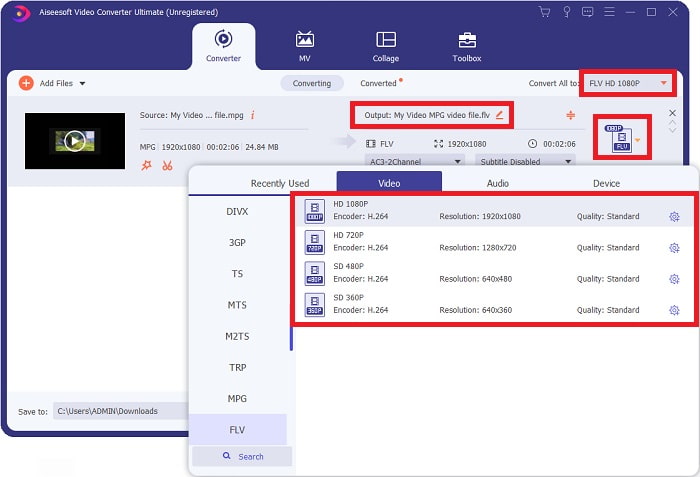
Step 3: Then, after that choose FLV video format to the drop-down menu. You can also encounter the different choices of qualities the software will offer and pick what video qualities do you prefer.
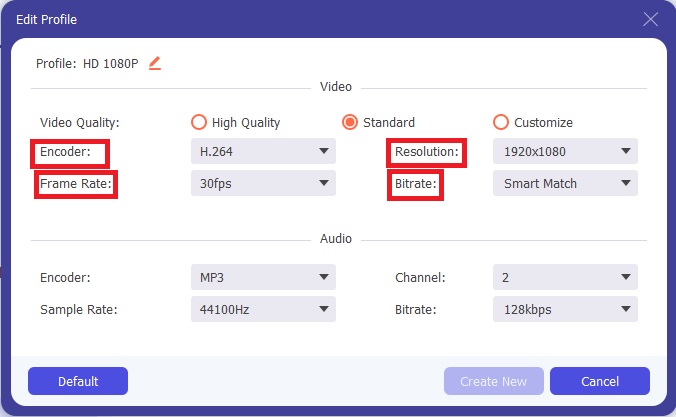
Step 4: But what if you don't see your preferred quality on the choices, you can click the gear icon right next to your selected video quality and edit all the specifications that will appear, like the resolution, frame rate, bitrate, etc. Click OK if you finish adjusting.
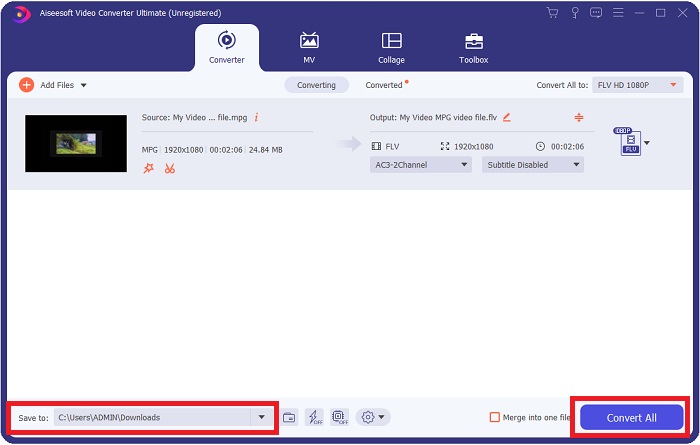
Step 5: Before you will convert the file you have to choose the location of your video output. By doing this, click the drop-down button of the Save to locate at the bottom left of the window. If you have already secured the location of your converted files, you can now convert the video by clicking the Convert All.
ที่เกี่ยวข้อง:
ส่วนที่ 3 ทางเลือกที่ดีที่สุดในการแปลง MPG เป็น FLV [ออนไลน์]
Free Video Converter Online is a multimedia converter that is free to use and supports video and audio formats that include MP4, FLV, MKV, MOV, M4V, MTS, TS, M2TS, WMV, ASF, VOB, and more; as well as MP3, and AAC. HD videos can be converted to MP4, FLV, and other popular formats in a matter of seconds without losing any of their original quality. If you have a lot of videos or audio that you want to convert, you can do so without losing quality. Buckle up and set your mind ready to learn all the procedures on how to convert MPG to FLV with this online converter.
Step 1: Click this link to access the Free Video Converter Online. Proceed with clicking the Add files to Convert button, a small window will pop up that dictates Download on your screen. Click it to download the launcher and install it. Click the Add files to Convert button again to import files you need to convert.
ดาวน์โหลดเวอร์ชันเดสก์ท็อปเพื่อแปลงไฟล์แบบเป็นชุดได้.
Step 2: Choose the FLV video player on the video format selection located below and adjust its specifications by clicking the gear icon right next to your chosen video format.
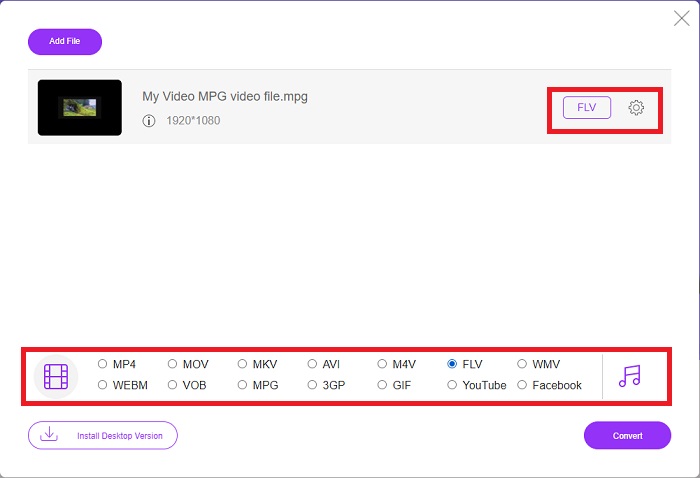
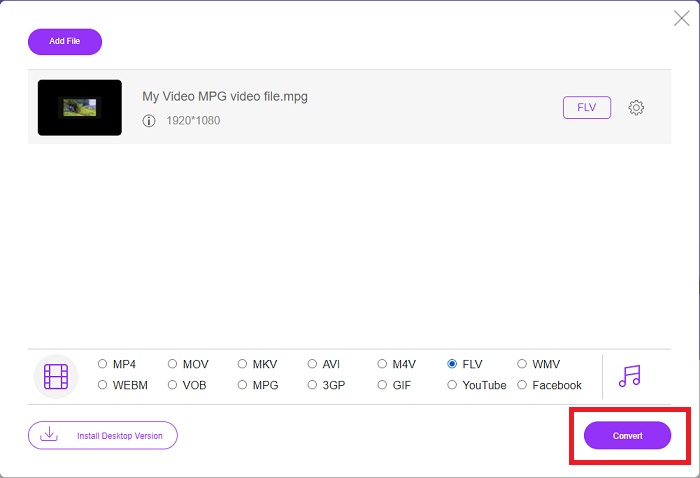
Step 3: Now that you selected the video format and adjusted all the specifications you want to change on video quality settings, your video file is ready to convert. And by doing this, click the Convert button and wait for it to download for a while.
MPG เทียบกับ FLV
จัดทำโดยกลุ่มผู้เชี่ยวชาญด้านภาพเคลื่อนไหว (MPEG) MPG เป็นรูปแบบวิดีโอดิจิทัลทั่วไปสำหรับจัดเก็บข้อมูลวิดีโอ เสียง และข้อมูลเมตา มีประโยชน์มากเมื่อสร้างภาพยนตร์เพื่อแชร์บนอินเทอร์เน็ต ไฟล์เหล่านั้นใน MPG มักจะมีการบีบอัดวิดีโอ/เสียง MPEG-1 หรือ MPEG-2
Adobe Flash Player ใช้ FLV เพื่อส่งเนื้อหาวิดีโอ เช่น ภาพยนตร์และรายการทีวี ปัจจุบัน Adobe ไม่ได้พัฒนาโปรแกรมเล่นอีกต่อไปและแนะนำให้ผู้ใช้ถอนการติดตั้งโปรแกรมดังกล่าวด้วยเหตุผลด้านความปลอดภัย อย่างไรก็ตาม คุณยังคงสามารถใช้รูปแบบ FLV ในโปรแกรมที่ไม่ใช่ Adobe/Macromedia จำนวนมากได้
ส่วนที่ 4 คำถามที่พบบ่อยเกี่ยวกับการแปลง MPG เป็น FLV
รูปแบบไฟล์ MPG ที่ใช้คืออะไร?
นามสกุลไฟล์ MPG (หรือ. mpg) หมายถึงรูปแบบไฟล์วิดีโอ MPEG ซึ่งเป็นรูปแบบที่นิยมสำหรับภาพยนตร์ที่เผยแพร่ทางอินเทอร์เน็ตและเว็บไซต์แบ่งปันวิดีโอจำนวนมาก พวกเขาใช้การบีบอัดแบบเฉพาะที่ช่วยให้สามารถสตรีมและดาวน์โหลดวิดีโอได้เร็วกว่ารูปแบบวิดีโออื่นๆ ที่ใช้กันทั่วไป
ไฟล์ MPG ถูกบีบอัดหรือไม่
MPG มีความเกี่ยวข้องมากที่สุดกับรูปแบบการบีบอัดวิดีโอและเสียง MPEG-1 และ MPEG-2 ตามลำดับ จุดประสงค์คือเพื่อบีบอัดเสียงและวิดีโอให้อยู่ในรูปแบบที่เหมาะสมสำหรับการดาวน์โหลด ภาพยนตร์ที่มีส่วนขยายนี้มีขนาดเล็กกว่าและคุณภาพสูงกว่า แต่คุณภาพไม่ตรงกับวิดีโอ VCR ดั้งเดิม รูปแบบไฟล์นี้สามารถเปิดและใช้งานบน Mac, คอมพิวเตอร์ Windows และอุปกรณ์พกพาอื่นๆ
FLV เป็นรูปแบบวิดีโอคุณภาพสูงหรือไม่
ตามรายงาน FLV และ MP4 สามารถจัดเก็บการเข้ารหัสวิดีโอและเสียงแบบดิจิทัลคุณภาพสูง ผู้คนต่างมอง FLV แตกต่างกัน และข้อดีและข้อเสียของ FLV สามารถพูดถึงคุณภาพของรูปแบบไฟล์ได้ MP4 มีความโดดเด่นเนื่องจากสูญเสียคุณภาพน้อยลงเมื่อบีบอัดที่อัตราที่สูงขึ้น
สรุป
ตอนนี้คุณได้เรียนรู้หลายสิ่งหลายอย่างเกี่ยวกับหัวข้อนี้และความคิดสุดท้ายแล้ว ตัวแปลงสัญญาณที่แนะนำข้างต้นแสดงความช่วยเหลือและการใช้งานอย่างมืออาชีพแก่คุณอย่างชัดเจน ตัวแปลงเหล่านี้ไม่เหมือนกับตัวแปลงอื่น ๆ เนื่องจากเป็นบริการฟรีและใช้งานง่าย นอกเหนือจากรูปแบบที่พวกเขาสนับสนุนและเครื่องมือที่โดดเด่นและโดดเด่นอื่นๆ
-
 วิธีแปลงไฟล์ MPG เป็นรูปแบบ GIF [ออนไลน์และออฟไลน์]
 ต้องการแสดงอารมณ์ที่ดีขึ้นหรือไม่? จากนั้นคุณต้องใช้ GIF แทน บทความนี้จะสอนวิธีแปลงไฟล์ MPG เป็น GIF เพื่อแสดงความรู้สึกของคุณได้ดีขึ้นมาก
-
 [2022] ตัวเลือกยอดนิยมของตัวแปลง MPG เป็น AVI เพื่อช่วยคุณแปลง MPG เป็น AVI
 คุณเคยสงสัยเกี่ยวกับการแปลง MPG เป็นไฟล์วิดีโอ AVI เพื่อเล่นบนเครื่องเล่นวิดีโอของคุณหรือไม่? นี่คือบทความที่ดีที่สุดที่คุณสามารถหาได้ซึ่งพูดถึงปัญหาข้างต้น
-
 2 วิธีง่ายๆ ในการแปลงไฟล์ MOV เป็น FLV บน Windows/Mac
 วิธีแปลง MOV เป็น FLV ฟรี นี่คือตัวแปลงวิดีโอที่ดีที่สุดบนเดสก์ท็อปและออนไลน์เพื่อแปลงไฟล์ MOV ของคุณเป็น FLV ในไม่กี่วินาทีโดยไม่ต้องเสียเงิน

