


 Video Converter Ultimate
 บันทึกหน้าจอ
 ซ่อมวิดีโอ
ค้นหา 4 ตัวแปลง SWF เป็น FLV ออฟไลน์และออนไลน์ที่ดีที่สุดบน Windows & Mac
ฉันกำลังค้นหาวิธีแก้ปัญหาในการอัปโหลดไฟล์ SWF ของฉันบนเว็บไซต์แบ่งปันวิดีโอ เช่น Youtube, Facebook, MySpace และอื่นๆ คุณช่วยฉันหาวิธีที่เร็วที่สุดในการแก้ปัญหานี้ได้ไหม
ปัญหานี้พบได้บ่อย โดยเฉพาะหากวิดีโอของคุณอยู่ในรูปแบบไฟล์นามสกุล .swf แม้ว่าฟอร์แมตนี้จะใช้กันมากบนเว็บไซต์ แต่เมื่อนำไฟล์ไปแชร์บนแพลตฟอร์มวิดีโอกลับไม่สามารถใช้งานได้ นอกจากนี้ หากคุณต้องการแชร์ไฟล์ SWF ของคุณ คุณจำเป็นต้องแปลงไฟล์ให้เป็นฟอร์แมตที่รองรับมากกว่าอย่างเช่น FLV ดังนั้นมาดู 4 เครื่องมือแปลงไฟล์ SWF เป็น FLV ทั้งแบบออฟไลน์และแบบออนไลน์ที่ซ่อนตัวเป็นเพชรเม็ดงาม ซึ่งคุณสามารถใช้งานได้จากบทความนี้.

ส่วนที่ 1 แปลง SWF เป็น FLV ออนไลน์ฟรีด้วย FVC Free Video Converter Online
FVC Free Video Converter Online เป็นตัวแปลงวิดีโอออนไลน์ที่โดดเด่นที่สุดที่คุณสามารถใช้แปลง SWF เป็น FLV ได้ฟรีแบบออนไลน์ เครื่องมือนี้ทำงานผ่านเว็บ ช่วยแปลงไฟล์เป็นฟอร์แมตใหม่โดยไม่ต้องดาวน์โหลดโปรแกรมลงคอมพิวเตอร์ นอกจากความสามารถในการแปลงไฟล์แล้ว คุณยังสามารถปรับแต่งสเปกของวิดีโอและเสียงให้ตรงตามความต้องการได้ด้วย ต้องการรู้วิธีใช้ตัวแปลงผ่านเว็บที่มีน้ำหนักเบานี้หรือไม่ งั้นให้ทำตามขั้นตอนด้านล่างได้เลย.
ขั้นตอนที่ 1. คลิกลิงก์นี้เพื่อเปิดแท็บใหม่ ซึ่งจะพาคุณไปยังหน้าเว็บอย่างเป็นทางการของ FVC Free Video Converter Online.
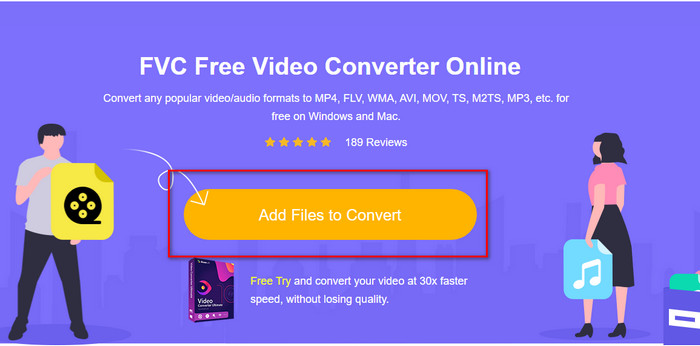
ขั้นตอนที่ 2. บนหน้าเว็บไซต์ ให้คลิก Add Files to Convert จากนั้นจะมีหน้าต่างโฟลเดอร์คอมพิวเตอร์แสดงขึ้นมา ให้เลือกไฟล์ .swf แล้วกด Open.
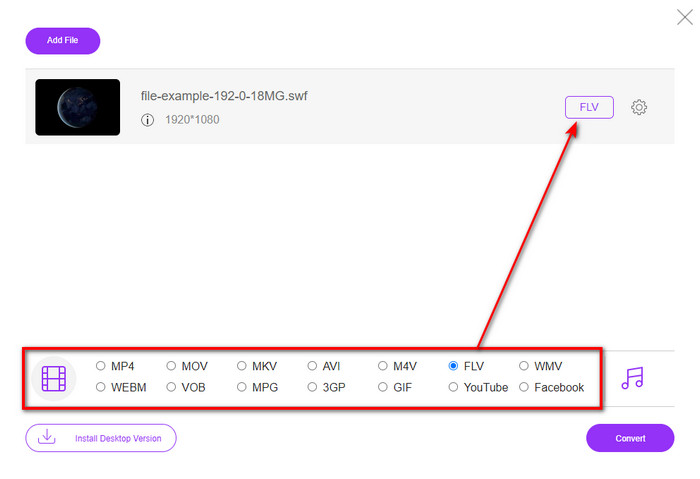
ขั้นตอนที่ 3. หลังจากใส่ไฟล์แล้ว ใต้รายการฟอร์แมต ให้เลือกฟอร์แมต FLV.
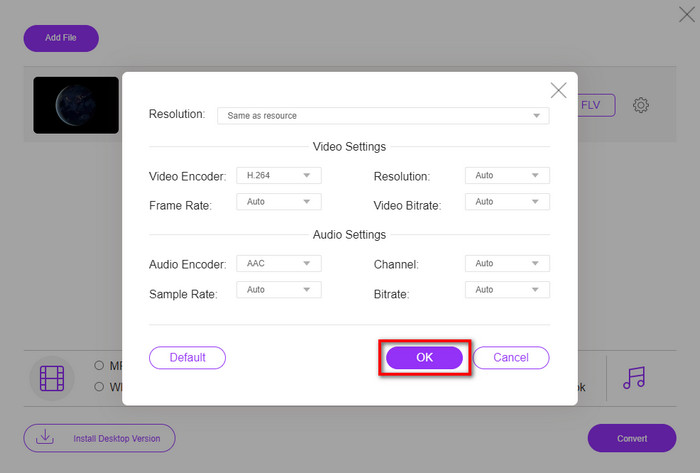
หากต้องการเปลี่ยนสเปกวิดีโอและเสียง ให้คลิกปุ่มรูปเฟือง.
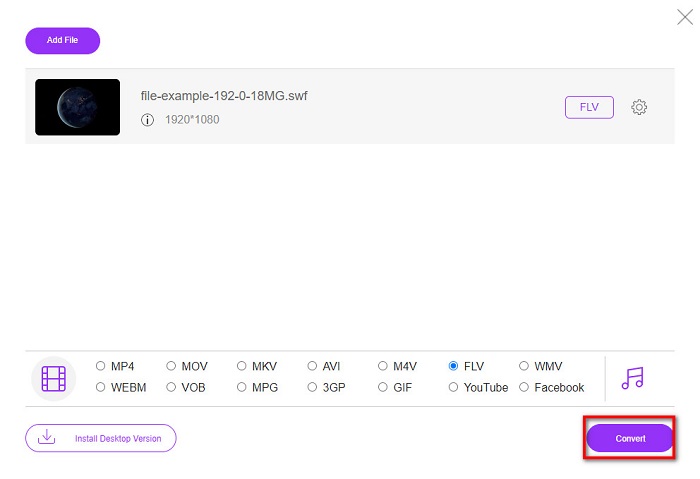
ขั้นตอนที่ 4. เพื่อเริ่มกระบวนการแปลงไฟล์ ให้คลิกปุ่ม Convert.
ส่วนที่ 2 แปลง SWF เป็น FLV ด้วย FFmpeg
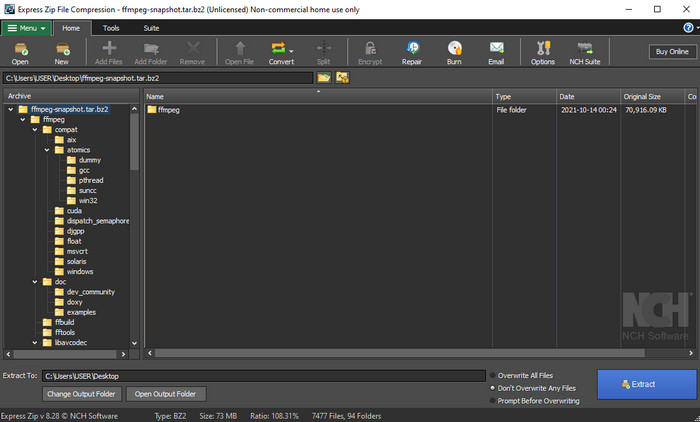
FFmpeg มีหน้าตาและรูปแบบคำสั่งเฉพาะตัวในการแปลง SWF เป็น FLV ได้ฟรี หากคุณรู้จักโปรแกรมนี้อยู่แล้ว คุณก็น่าจะรู้วิธีใช้งาน แต่ก็ไม่ใช่ทุกคนที่จะคุ้นเคย อธิบายโดยย่อ โปรแกรมนี้ไม่ใช่ตัวแปลงวิดีโอทั่วไปที่คุณใช้งานผ่านเว็บหรือดาวน์โหลดแล้วใช้ด้วยปุ่มคลิก แต่คุณจะต้องใช้คำสั่งผ่านหน้าต่างพรอมต์เพื่อควบคุมโปรแกรมนี้แทน.
ขั้นตอนที่ 1. ดาวน์โหลดโปรแกรม FFmpeg ลงไดรฟ์ของคุณ จากนั้นเปิดใช้งาน.
ขั้นตอนที่ 2. บนคอมพิวเตอร์ของคุณ ให้เปิดหน้าต่าง Command Prompt.
ขั้นตอนที่ 3. ใช้ CMD เปลี่ยนไปยังโฟลเดอร์ที่เก็บไฟล์ SWF ของคุณ จากนั้นเตรียมใส่คำสั่ง คัดลอกคำสั่งนี้แล้ววางลงใน Command Prompt: ffmpeg -i input.swf -vn -ar 44100 -ac 2 -b:a 192k output.flv แล้วกด Enter เพื่อให้กระบวนการเริ่มทำงาน.
ส่วนที่ 3 แปลง SWF เป็น FLV ใน Flash
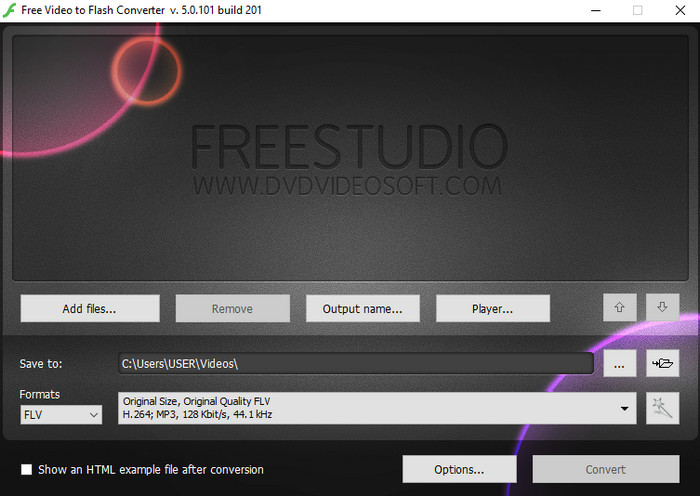
Free Video to Flash Converter เป็นโปรแกรมแปลงไฟล์ที่ดาวน์โหลดมาใช้ได้ฟรีบน Windows โปรแกรมนี้มีให้เลือกเพียงสองฟอร์แมต คือใช้แปลงไฟล์เป็น FLV หรือ SWF เท่านั้น ดังนั้นหากคุณต้องการแปลงไฟล์ SWF ให้เป็น AVI, MP4, MOV, MKV และอื่น ๆ จะไม่สามารถทำได้ในโปรแกรมนี้ มาเรียนรู้กันเลยว่าจะแปลง SWF เป็น FLV ใน Flash ได้อย่างไรโดยไม่ต้องรออีกต่อไป.
ขั้นตอนที่ 1. ดาวน์โหลดซอฟต์แวร์ Flash Converter ตัวเต็มอย่างเป็นทางการบน Windows ของคุณ แล้วรันโปรแกรม.
ขั้นตอนที่ 2. กด Add Files เพื่ออัปโหลดไฟล์เข้าโปรแกรมแปลงไฟล์ จากนั้นกด Formats มองหา FLV และคุณยังสามารถเลือกคุณภาพของไฟล์ได้ด้วย.
ขั้นตอนที่ 3. เริ่มการแปลงไฟล์ด้วยการคลิกปุ่ม Convert ที่ด้านล่างขวาของหน้าต่างโปรแกรม.
ส่วนที่ 4 วิธีการแปลง SWF เป็น FLV ด้วยความช่วยเหลือของตัวแปลง SWF ที่ดีที่สุดบน Windows & Mac
ยังไม่พอใจกับ 3 โปรแกรมแปลง SWF เป็น FLV ทั้งออนไลน์และออฟไลน์ที่แนะนำไปด้านบนใช่หรือไม่ ถ้าอย่างนั้นลองใช้ FVC Video Converter Ultimate ดู โปรแกรมนี้ให้ประสิทธิภาพเหนือความคาดหมายของผู้ใช้ทุกคน โดยเฉพาะความเร็วในการแปลงไฟล์ที่โดดเด่น นอกเหนือจากการแปลงไฟล์ที่ยอดเยี่ยมแล้ว ยังมีฟีเจอร์ตัดต่อขั้นสูงเพื่อยกระดับวิดีโอของคุณ และกล่องเครื่องมือ (Toolbox) สำหรับการใช้งานอื่น ๆ อีกด้วย นอกจากนี้ ขั้นตอนการใช้งานด้านล่างยังรับประกันความสำเร็จ 101% ในการแปลงไฟล์ของคุณ.
ขั้นตอนที่ 1. ก่อนใช้งานโปรแกรม คุณต้องดาวน์โหลดลงไดรฟ์ Windows หรือ Mac จากนั้นทำตามขั้นตอนการติดตั้งโปรแกรม และรันให้เรียบร้อย.
ดาวน์โหลดฟรีสำหรับ Windows 7 หรือใหม่กว่าดาวน์โหลดอย่างปลอดภัย
ดาวน์โหลดฟรีสำหรับ MacOS 10.7 หรือใหม่กว่าดาวน์โหลดอย่างปลอดภัย
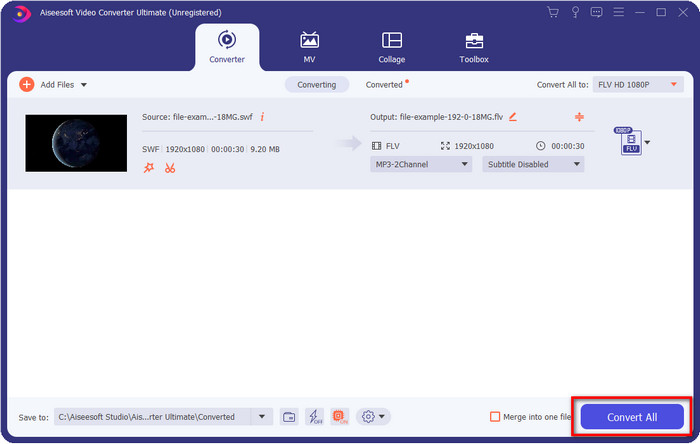
ขั้นตอนที่ 2. เมื่อโปรแกรมทำงานบนระบบของคุณแล้ว ให้คลิก Add Files เพื่ออัปโหลดไฟล์ SWF ที่ต้องการแปลง.
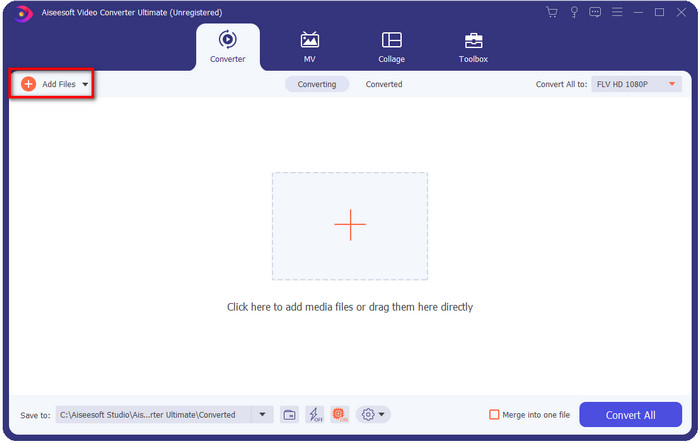
ขั้นตอนที่ 3. คลิกตัวเลือก Convert All to แล้วเลือกฟอร์แมต FLV คุณยังสามารถเลือกระดับคุณภาพให้เป็นความคมชัดสูง หรือคงไว้ซึ่งคุณภาพดั้งเดิมก็ได้.

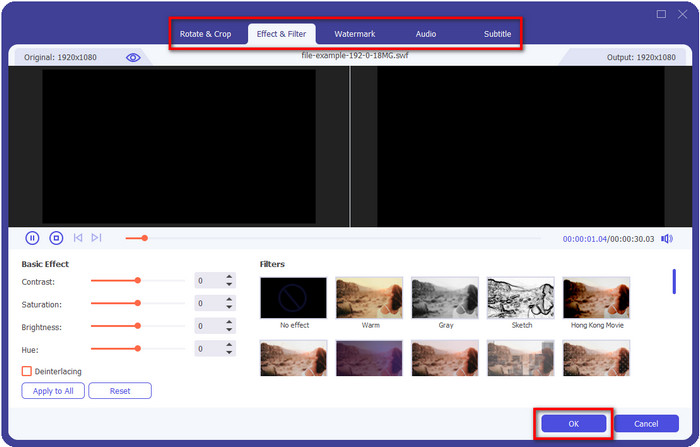
หากต้องการทำให้วิดีโอเอาต์พุตของคุณดูดีขึ้นไปอีก ให้คลิกปุ่มรูปไม้กายสิทธิ์ ระบบจะพาคุณไปยังหน้าต่างแก้ไขต่าง ๆ เช่น Crop, Rotate, Add Effects, Subtitle, Audio, และ Watermark เมื่อต้องการบันทึกการเปลี่ยนแปลงที่ทำไป ให้คลิก OK.
ขั้นตอนที่ 4. คลิก Convert All แล้วกระบวนการจะแสดง เริ่มขึ้น จะใช้เวลาไม่นานในการแปลง SWF เป็น FLV จากนั้นจะมีโฟลเดอร์แสดงขึ้นบนหน้าจอของคุณพร้อมไฟล์ FLV หลังจากแปลงเสร็จ.
ส่วนที่ 5. เพิ่มพูนความรู้เกี่ยวกับ SWF และ FLV
ไฟล์ ShockWave หรือ SWF เป็นรูปแบบ Adobe แต่ Macromedia สร้างขึ้น เป็นที่รู้จักในด้านการรักษาภาพเคลื่อนไหวและเสียงแบบเวกเตอร์ที่ใช้บนเว็บ ยิ่งไปกว่านั้น เนื่องจากเป็นฐานเวกเตอร์ คุณจึงปรับขนาดกราฟิกให้พอดีหรือซูมได้อย่างง่ายดาย นอกจากภาพเคลื่อนไหวแบบเวกเตอร์แล้ว ขนาดไฟล์ยังเล็กมากในการโหลดวิดีโอเร็วขึ้น แม้ว่าคุณจะมีการเชื่อมต่ออินเทอร์เน็ตที่ช้า แต่รูปแบบไม่รองรับหากคุณต้องการแชร์บนแพลตฟอร์มการแชร์วิดีโอ
แม้ว่า FLV จะอยู่ภายใต้ Adobe แต่รูปแบบนี้ดีกว่า SWF รูปแบบ FLV หรือ FlashVideo เป็นรูปแบบวิดีโอมาตรฐานบนเว็บไซต์ส่วนใหญ่ รูปแบบนี้สามารถมีตัวแปลงสัญญาณที่แตกต่างกันสองแบบสำหรับวิดีโอและเสียง และเช่นเดียวกับไฟล์ SWF รูปแบบนี้มีขนาดเล็กเพื่อให้โหลดไฟล์บนเว็บได้เร็วขึ้น เมื่อคุณดาวน์โหลดไฟล์ FLV บนไดรฟ์ของคุณแล้ว คุณสามารถเล่นไฟล์นั้นบนเครื่องเล่นสื่อของคุณได้ แม้ว่าจะยังไม่เสร็จสมบูรณ์ก็ตาม
จะช่วยได้หากคุณแปลง SWF เป็น FLV เนื่องจาก SWF มีความไม่สมบูรณ์มากมายที่คุณสามารถหาได้ในรูปแบบ FLV โดยเฉพาะอย่างยิ่งหากไฟล์วิดีโอมีความยาว เนื่องจาก .swf สามารถมีเฟรมต่อวินาทีที่จำกัดเท่านั้น จึงมีโอกาสที่คุณจะใช้งานไม่ได้ แต่ FLV สามารถเก็บวิดีโอขนาดยาวได้อย่างง่ายดาย นอกจากนี้ หากคุณต้องการเน้นที่คุณภาพ FLV มีคุณภาพดีกว่า SWF
ส่วนที่ 6 คำถามที่พบบ่อยเกี่ยวกับการแปลง SWF เป็น FLV
ไฟล์ SWF รองรับความโปร่งใสหรือไม่
เช่นเดียวกับ PNG และ GIF รูปแบบนี้ยังสนับสนุนระดับสีเทาด้วยสีจริงหรือกำหนดสีเดียวเพื่อทำให้โปร่งใส
ฉันจะดูวิดีโอ SWF ได้ที่ไหน
ในตอนนี้ คุณไม่สามารถเปิดไฟล์ SWF บนโปรแกรมเล่นสื่อ (Media Player) เริ่มต้นของคุณได้ เพราะยังไม่รองรับ อย่างไรก็ตาม คุณสามารถคลิกลิงก์นี้เพื่อเรียนรู้เพิ่มเติมเกี่ยวกับ 4 สุดยอดโปรแกรมเล่นไฟล์ SWF บน Windows และ Mac.
ฉันสามารถบันทึกไฟล์ .swf ของโทรศัพท์ได้หรือไม่
การบันทึกไฟล์ SWF บนโทรศัพท์ของคุณสามารถทำได้ แต่ไม่สามารถเล่นบนเครื่องเล่นสื่อในพื้นที่ของคุณได้ เนื่องจากรูปแบบนี้ไม่เหมาะกับโทรศัพท์แต่ใช้กับเว็บ ดังนั้น หากคุณดาวน์โหลดไฟล์ภายใต้นามสกุลนี้ ให้คาดหวังว่าคุณจะไม่สามารถใช้งานได้ อย่างไรก็ตาม คุณสามารถแปลงเป็นรูปแบบที่สามารถเล่นได้ เช่น MP4 บนโทรศัพท์ของคุณ
สรุป
บทความนี้ได้เปิดกล่องสมบัติรวมโปรแกรมแปลงไฟล์ที่คุณสามารถใช้แปลง SWF เป็น FLV โดยไม่ทำให้คุณภาพของไฟล์ SWF ลดลง ขณะรวบรวมโปรแกรมเหล่านี้ เราพบว่า FVC Video Converter Ultimate คือเพชรเม็ดงามที่คุณกำลังมองหาเพื่อแก้ปัญหานี้ เพราะให้ผลลัพธ์ที่ยอดเยี่ยมที่สุดและแปลงไฟล์ได้รวดเร็วที่สุดเมื่อเทียบกับทุกเครื่องมือที่กล่าวมา ตอนนี้ก็ขึ้นอยู่กับคุณแล้วว่าจะเลือกสมบัติชิ้นใดมาใช้แก้ปัญหาการแปลงไฟล์ โดยการดาวน์โหลดโปรแกรมหรือเข้าใช้งานผ่านเว็บไซต์.
-
 ตัวแปลง DV เป็น FLV ที่เป็นประโยชน์เพื่อแปลง DV เป็น FLV [2022]
 หากคุณกำลังมองหาเครื่องมือที่ดีที่สุดและใช้งานง่ายในการแปลง DV เป็น FLV นี่คือบทความที่ดีที่สุดสำหรับคุณในการอ่าน มีข้อมูลเชิงลึกที่ยอดเยี่ยม เจาะลึกข้อมูลทั้งหมดของบทความนี้
-
 วิธีแปลง MPG เป็น FLV โดยไม่สูญเสียคุณภาพ [พิสูจน์แล้ว]
 คุณต้องชมภาพยนตร์เรื่องโปรดด้วยเครื่องเล่นสื่อนี้ แต่ไม่รองรับ MPG ลองแปลงไฟล์ MPG ของคุณเป็น FLV โดยใช้ตัวแปลงเหล่านี้ในบทความนี้
-
 แปลง TRP เป็น FLV ด้วยวิธีออฟไลน์และออนไลน์ที่ง่ายที่สุด
 คุณต้องการแปลงไฟล์วิดีโอ TRP เป็น FLV อย่างรวดเร็วและไม่ยุ่งยากหรือไม่? อ่านบทความนี้เพื่อจัดหาซอฟต์แวร์และบริการออนไลน์ที่ดีที่สุดให้กับคุณ
