


 Video Converter Ultimate
 บันทึกหน้าจอ
 ซ่อมวิดีโอ
 ดาวน์โหลดอย่างปลอดภัย
วิธีแปลง VOB เป็น FLV ฟรีด้วยเดสก์ท็อปและโซลูชั่นออนไลน์ในปี 2022
ไฟล์รูปแบบ VOB มักถูกจัดเก็บไว้ในโฟลเดอร์ VIDEO_TS ที่อยู่ในระดับรากของแผ่น DVD วิดีโอ VOB จะมีข้อมูลส่วนใหญ่ที่บันทึกอยู่บนแผ่น เช่น วิดีโอ เสียง คำบรรยาย เมนู DVD และเนื้อหาการนำทางอื่นๆ แต่หากคุณต้องการอัปโหลดไฟล์ VOB ไปยังโซเชียลเน็ตเวิร์ก เช่น YouTube คุณจำเป็นต้องแปลงรูปแบบไฟล์ VOB ให้เป็นไฟล์วิดีโอสตรีมมิงที่รองรับอย่าง FLV ซึ่งเป็นมาตรฐานสำหรับสื่อสตรีมมิงบนอินเทอร์เน็ต ดังนั้นในบทความนี้ เราจะอธิบายวิธีแปลง VOB เป็น FLV แบบออนไลน์หรือด้วยโปรแกรมแปลงไฟล์ VOB เป็น FLV ฟรีเพื่อให้สตรีมได้ดียิ่งขึ้น.

ส่วนที่ 1 วิธีแปลง VOB เป็น FLV ด้วยซอฟต์แวร์เดสก์ท็อปฟรี
หากต้องการเปลี่ยนรูปแบบไฟล์ VOB ของคุณเป็น FLV อย่างรวดเร็ว ลองใช้ FVC Free FLV Converter ด้วยฟรีแวร์นี้ คุณสามารถแปลงไฟล์วิดีโอจาก VOB เป็น FLV, MP4, AVI, WMV, MOV และอื่นๆ อีกมากมาย นอกจากนี้ โปรแกรมยังสามารถทำงานตัดต่อวิดีโอพื้นฐานได้หากจำเป็น เพียงดาวน์โหลดโปรแกรมแปลงไฟล์ VOB เป็น FLV แล้วทำตามขั้นตอนง่ายๆ ด้านล่างนี้.
ดาวน์โหลดฟรีสำหรับ Windows 7 ขึ้นไปดาวน์โหลดอย่างปลอดภัย
ดาวน์โหลดฟรีสำหรับ MacOS 10.7 ขึ้นไปดาวน์โหลดอย่างปลอดภัย
ขั้นตอนที่ 1. เปิดใช้งาน FVC Free FLV Converter
ขั้นแรก ดาวน์โหลดตัวแปลง VOB เป็น FLV สำหรับ Windows หรือ Mac ของคุณ หลังจากดาวน์โหลดไฟล์การติดตั้งแล้ว ให้ดับเบิลคลิกและปฏิบัติตามคำแนะนำบนหน้าจอ หลังจากนั้น เปิดใช้งานบนคอมพิวเตอร์ของคุณ และคุณจะเข้าสู่อินเทอร์เฟซดังต่อไปนี้

ขั้นตอนที่ 2. เพิ่มไฟล์ VOB ลงในโปรแกรม
คลิกปุ่ม Add File(s) เลือกไฟล์ VOB ของคุณ แล้วกด Next เพื่อดำเนินการต่อ.

ขั้นตอนที่ 3. เลือก FLV เป็นรูปแบบเอาต์พุต
จากนั้น เลือกรูปแบบไฟล์ FLV จากช่อง Output format
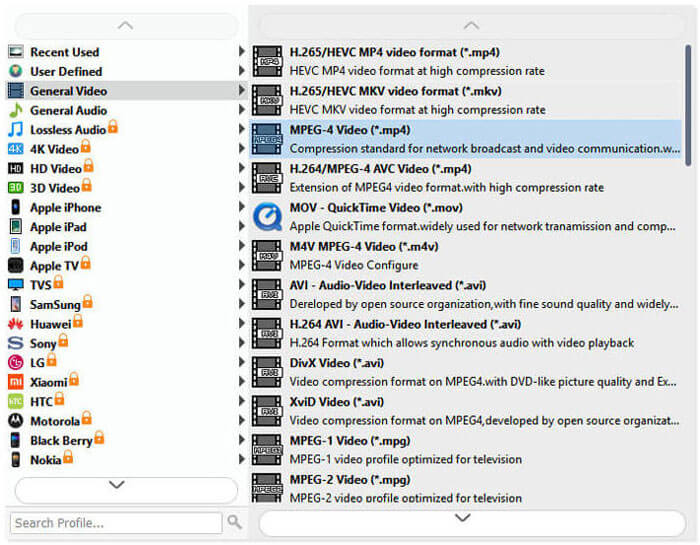
ขั้นตอนที่ 4. แปลง VOB เป็น FLV
คลิกปุ่ม Open Folder และเลือกโฟลเดอร์ที่คุณต้องการบันทึกไฟล์ที่แปลงแล้ว เมื่อต้องการเริ่มแปลงไฟล์ VOB ของคุณเป็น FLV ให้คลิกปุ่ม Convert เมื่อการแปลงเสร็จสมบูรณ์ โฟลเดอร์ที่มีไฟล์ที่แปลงแล้วจะเปิดขึ้นโดยอัตโนมัติ.
ส่วนที่ 2 วิธีการแปลง VOB เป็น FLV ออนไลน์
การใช้บริการออนไลน์เพื่อเปลี่ยน VOB เป็น FLV ก็เป็นทางเลือกที่ดีเช่นกัน เราได้เลือกตัวแปลง VOB เป็น FLV ออนไลน์สองรายการให้คุณเลือก เครื่องมือออนไลน์ทั้งหมดเหล่านี้ฟรีและมักใช้โดยผู้ใช้จำนวนมาก อ่านเพื่อเรียนรู้วิธีแปลง VOB เป็น FLV บนคอมพิวเตอร์ของคุณโดยใช้เครื่องมือออนไลน์
FVC แปลงวิดีโอออนไลน์ฟรี
FVC Free Online Video Converter เป็นเครื่องมือออนไลน์ที่มีฟังก์ชันครบครัน รองรับรูปแบบไฟล์วิดีโอและเสียงที่ได้รับความนิยมมากที่สุด การแปลงไฟล์ด้วยบริการออนไลน์นี้มีความปลอดภัย และไฟล์ที่แปลงแล้วของคุณจะถูกลบออกจากเซิร์ฟเวอร์ทันทีที่คุณดาวน์โหลดผลลัพธ์เสร็จ การแปลงไม่ต้องติดตั้งซอฟต์แวร์ใดๆ และกระบวนการทั้งหมดก็ทำได้ง่ายมาก.
คุณสามารถทำตามขั้นตอนด้านล่างเพื่อเปลี่ยนไฟล์ VOB ของคุณเป็น FLV
ขั้นตอนที่ 1. บนเว็บไซต์ FVC Free Online Video Converter ให้คลิกปุ่ม Add Files to Convert เพื่อเพิ่มไฟล์ VOB ของคุณ ครั้งแรกที่คุณใช้เครื่องมือนี้ คุณจะต้องดาวน์โหลดและติดตั้งตัวเปิดใช้งาน (launcher) ก่อน.
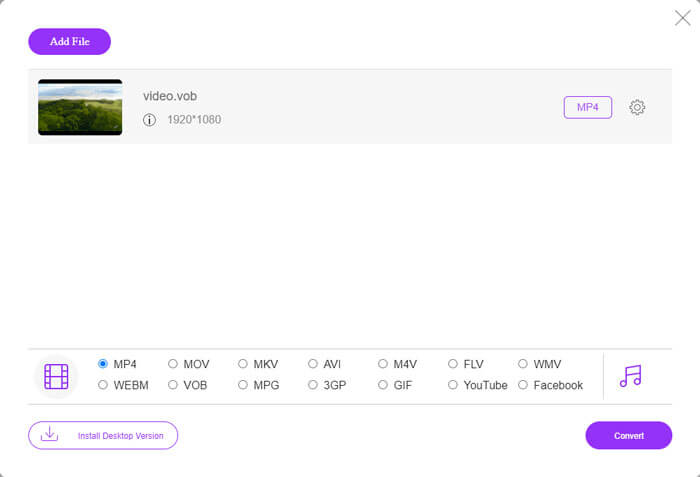
ขั้นตอนที่ 2. ตรวจสอบให้แน่ใจว่าได้เลือก FLV เป็นรูปแบบเอาต์พุตในหมวด Video ที่ด้านล่างของหน้าต่าง.
ขั้นตอนที่ 3. กดปุ่ม Convert จากนั้นเลือกโฟลเดอร์ปลายทาง หลังจากกระบวนการแปลงเสร็จสิ้น ไฟล์ที่แปลงแล้วจะถูกดาวน์โหลดโดยอัตโนมัติ และโฟลเดอร์ที่เก็บไฟล์แปลงแล้วจะถูกเปิดขึ้น.
ConvertFiles
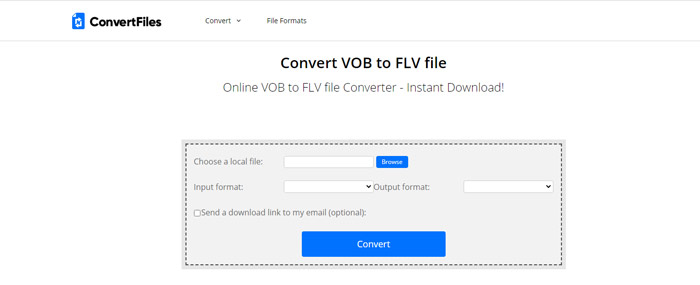
ConvertFiles เป็นอีกหนึ่งโปรแกรมแปลงไฟล์ VOB เป็น FLV ออนไลน์ฟรี บริการนี้สามารถแปลงไฟล์ประเภทต่างๆ ได้ฟรีภายในไม่กี่นาที บริการนี้สามารถส่งลิงค์ดาวน์โหลดไปยังไฟล์ที่แปลงแล้วไปยังที่อยู่อีเมลของคุณหากคุณต้องการ การแปลงไม่จำเป็นต้องติดตั้งซอฟต์แวร์และกระบวนการแปลงทั้งหมดนั้นง่าย แต่โปรดทราบว่าเครื่องมือออนไลน์นี้สามารถแปลงไฟล์ขนาดใหญ่ได้ถึง 250 MB
นี่คือวิธีที่คุณสามารถใช้ตัวแปลง VOB-to-FLV ออนไลน์นี้ได้
ขั้นตอนที่ 1. ไปที่หน้าเว็บของ ConvertFiles คลิก Browse และเพิ่มไฟล์ VOB ของคุณลงในโปรแกรม.
ขั้นตอนที่ 2. จากนั้น เลือก Flash Video File (.flv) จากเมนูดรอปดาวน์ Output format.
ขั้นตอนที่ 3. คลิกปุ่ม Convert เพื่อเริ่มแปลงไฟล์ VOB เป็น FLV เมื่อไฟล์ถูกแปลงสำเร็จแล้ว คุณจะเห็นลิงก์และสามารถคลิกเพื่อไปยังหน้าดาวน์โหลดเพื่อดาวน์โหลดไฟล์ที่แปลงแล้วได้.
ส่วนที่ 3 การเปรียบเทียบระหว่าง VOB และ FLV Formats
| พารามิเตอร์เปรียบเทียบ | VOB | FLV |
| นามสกุลไฟล์ | .vob | .flv |
| พัฒนาโดย | ดีวีดีฟอรั่ม | Adobe Systems |
| วิดีโอ 00codecs | MPEG-1, MPEG-2 | On2 VP6, Sorenson Spark, วิดีโอบนหน้าจอ, วิดีโอบนหน้าจอ 2, H.264 |
| ตัวแปลงสัญญาณเสียง | MP1, MP2, PCM, AC-3, DTS | MP3, ADPCM, Nellymoser, Speex, AAC |
| โปรแกรมที่เปิดไฟล์ VOB/FLV | Windows Media PlayerVLC Media Player | VLC Media PlayerAdobe Flash Player |
ส่วนที่ 4 คำถามที่พบบ่อยเกี่ยวกับการแปลง VOB เป็น FLV
VOB คืออะไร?
VOB (ย่อมาจาก video object) เป็นรูปแบบไฟล์คอนเทนเนอร์ในสื่อ DVD-Video โดย VOB สามารถบรรจุวิดีโอ เสียง คำบรรยาย เมนู DVD พร้อมการนำทางผ่านบท (chapter) ต่างๆ บนแผ่น DVD ได้ รูปแบบ VOB มักจะเข้ารหัสในแบบ MPEG-2 และสามารถเปิดได้ด้วยโปรแกรมเล่นสื่อเกือบทุกชนิด อ่านเพิ่มเติมได้ที่ 5 โปรแกรมเล่นไฟล์ VOB ยอดนิยมสำหรับ Windows 10/8/7 และ Mac เพื่อเรียนรู้เกี่ยวกับโปรแกรมเล่นไฟล์ VOB เพิ่มเติม.
FLV คืออะไร?
FLV เป็นรูปแบบคอนเทนเนอร์วิดีโอ–เสียง ที่ใช้สำหรับสตรีมเนื้อหาวิดีโอดิจิทัลผ่านอินเทอร์เน็ตโดยใช้ Adobe Flash Player เวอร์ชัน 6 ขึ้นไป คุณสามารถเล่นไฟล์ FLV ได้ด้วย Windows Media Player, VLC, Adobe Media Player, Winamp, RealPlayer หรือโปรแกรม เล่นไฟล์ FLV อื่นๆ.
ไฟล์ VOB มีเสียงหรือไม่
ใช่. ไฟล์ VOB ประกอบด้วยเมนูวิดีโอ เสียง คำบรรยาย และดีวีดี
สรุป
อย่างที่คุณเห็น คุณสามารถเปลี่ยน MP4 เป็น FLV ในขณะที่ยังคงคุณภาพวิดีโอต้นฉบับไว้ด้วยตัวแปลงไฟล์ VOB ฟรีได้อย่างง่ายดาย นอกจากนี้ คุณยังสามารถทำการแปลง VOB เป็น FLV ออนไลน์ได้อีกด้วย เดสก์ท็อปและตัวแปลง VOB เป็น FLV ที่กล่าวถึงข้างต้นนั้นฟรีทั้งหมด เราหวังว่าคุณจะพบโซลูชันที่น่าพอใจที่ตรงกับความต้องการของคุณมากที่สุด
-
 ไฟล์ VOB คืออะไรและจะเปลี่ยนไฟล์ VOB เป็น GIF ฟรีได้อย่างไร
 คุณต้องการทราบข้อมูลเพิ่มเติมเกี่ยวกับไฟล์ VOB และวิธีแชร์หลังจากถูกริปหรือไม่? หรือทำไมคุณต้องแปลง VOB เป็น GIF จากนั้นอ่านบทความนี้อย่างละเอียด
-
 VOB เป็น MP4 - 3 วิธีในการแปลงไฟล์ VOB เป็น MP4 ฟรีใน Bulk
 บทความนี้แนะนำตัวแปลง VOB เป็น MP4 ฟรี 3 รายการและบทช่วยสอนที่เกี่ยวข้อง คุณสามารถแปลงไฟล์ VOB เป็น MP4 ได้ฟรีบน Windows / Mac / ออนไลน์ได้อย่างง่ายดาย
-
 วิธีบีบอัดไฟล์ VOB ออนไลน์และฟรี
 คุณกำลังมองหาวิธีการบีบอัดไฟล์ VOB หรือไม่? เรียนรู้วิธีที่ดีที่สุดในการทำให้ขนาดไฟล์ VOB เล็กลงในบทความนี้
