


 Video Converter Ultimate
 บันทึกหน้าจอ
 ซ่อมวิดีโอ
วิธีแปลง GIF เป็น WebM ด้วยขั้นตอนและเครื่องมือโดยละเอียด [ฟรี & ราคาแพง]
ภาพ GIF ได้รับความนิยมเพราะเนื้อหาตลก ๆ ที่มอบให้เรา แทนที่เราจะใช้ภาพนิ่งเพื่อเพิ่มสีสันให้กับข้อความ เราจึงใช้ GIF ซึ่งมีการเคลื่อนไหวและใส่อารมณ์เกินจริงลงไปได้ แต่ไม่ใช่ทุกแพลตฟอร์มที่จะรองรับ GIF เนื่องจากรูปแบบไฟล์นี้มีอายุกว่า 30 ปีแล้ว และในบางกรณี เมื่อคุณเพิ่มไฟล์ GIF ลงในเว็บ คุณภาพของไฟล์อาจไม่รองรับ ดังนั้นวิธีที่ดีที่สุดในการแชร์ GIF คือแปลงให้เป็นรูปแบบ WebM ไฟล์ WebM จะมีการบีบอัด ขนาดไฟล์ที่เล็กกว่า และให้คุณภาพสูง ซึ่งเหมาะกับทุกคน รูปแบบไฟล์ชนิดนี้จึงเป็นตัวแทนระยะยาวที่ดีที่สุดสำหรับ GIF เพราะสามารถเก็บได้ทั้งภาพนิ่งและภาพเคลื่อนไหวเช่นเดียวกับ GIF หากต้องการรู้ว่ามีตัวแปลง GIF เป็น WebM ตัวไหนบ้างที่ดีที่สุด อ่านต่อด้านล่างและเลือกตัวที่เหมาะกับคุณที่สุด.

ส่วนที่ 1 วิธีแปลง GIF เป็น WebM สำหรับเว็บและเดสก์ท็อปฟรี
1. FVC วิดีโอฟรีไปยัง GIF Maker
หากต้องการทำงานให้เสร็จอย่างมีประสิทธิภาพ คุณต้องเลือกเครื่องมือให้ถูกต้อง และถ้างานของคุณคือการแปลง GIF เป็น WebM คุณอาจสนใจลองใช้ FVC Free Video to GIF Maker การสร้าง GIF จะกลายเป็นเรื่องง่ายเมื่อใช้ซอฟต์แวร์ตัวนี้ รวมถึงการแปลง GIF ด้วย ดังนั้นขั้นตอนการเรียนรู้วิธีใช้เครื่องมือนี้จึงไม่ซับซ้อน ต้องขอบคุณคู่มือของ FVC ที่อธิบายไว้อย่างตรงประเด็น ทำให้ทั้งผู้ใช้ใหม่และมือโปรสามารถใช้งานได้ง่าย พร้อมได้ผลงานที่ดีเยี่ยม หากต้องการรู้วิธีใช้เครื่องมือนี้ ให้ทำตามขั้นตอนด้านล่างที่เตรียมไว้ให้คุณเป็นพิเศษ.
ขั้นตอนที่ 1. ติดตั้งเครื่องมือฟรีนี้ลงในไดรฟ์ของคุณ เลือกระบบปฏิบัติการที่ตรงกับโปรแกรมของคุณ.
ดาวน์โหลดฟรีสำหรับ Windows 7 หรือใหม่กว่าดาวน์โหลดอย่างปลอดภัย
ดาวน์โหลดฟรีสำหรับ MacOS 10.7 หรือใหม่กว่าดาวน์โหลดอย่างปลอดภัย
ขั้นตอนที่ 2. คลิกที่ไอคอนของเครื่องมือที่ดาวน์โหลดมาเพื่อเปิดใช้งาน หากโปรแกรมรันอยู่แล้วในพื้นหลัง หน้าตาของอินเทอร์เฟซควรจะเป็นแบบนี้.
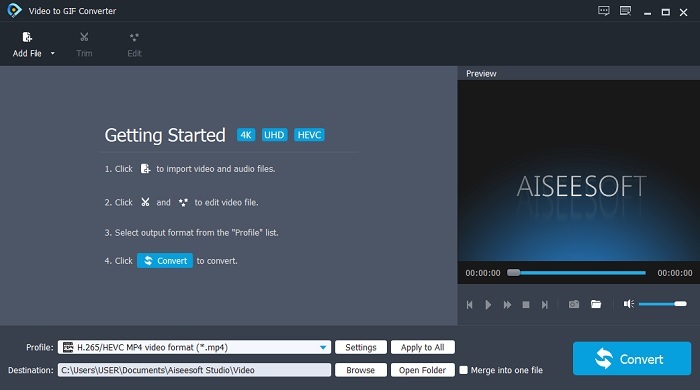
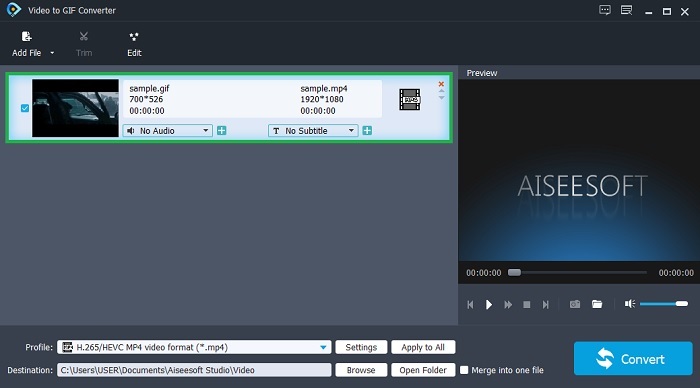
ขั้นตอนที่ 3. คลิก Add File แล้วเลือกไฟล์ GIF ที่คุณต้องการแปลง ในหน้าต่างอินเทอร์เฟซ คุณยังสามารถตัดต่อหรือตัดแต่งวิดีโอได้.
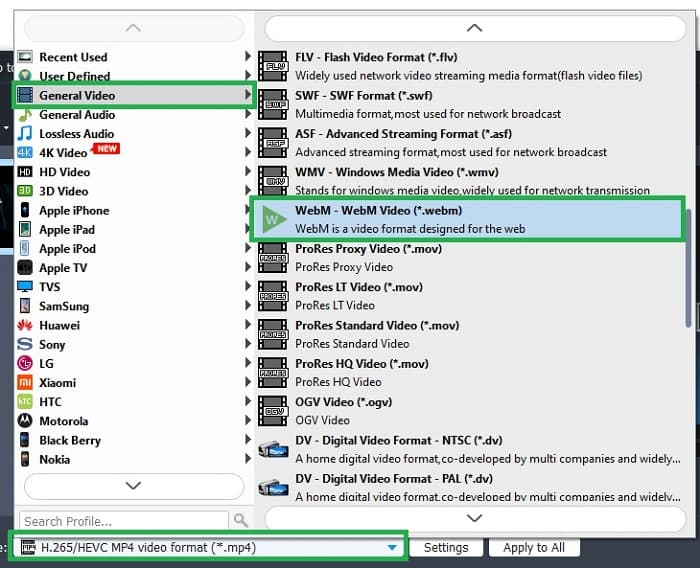
ขั้นตอนที่ 4. ในปุ่มดรอปดาวน์ ให้เลือก WebM หรือรูปแบบอื่นที่คุณต้องการแปลง ถ้าพร้อมจะเริ่มกระบวนการแปลงแล้ว ให้กด Convert.
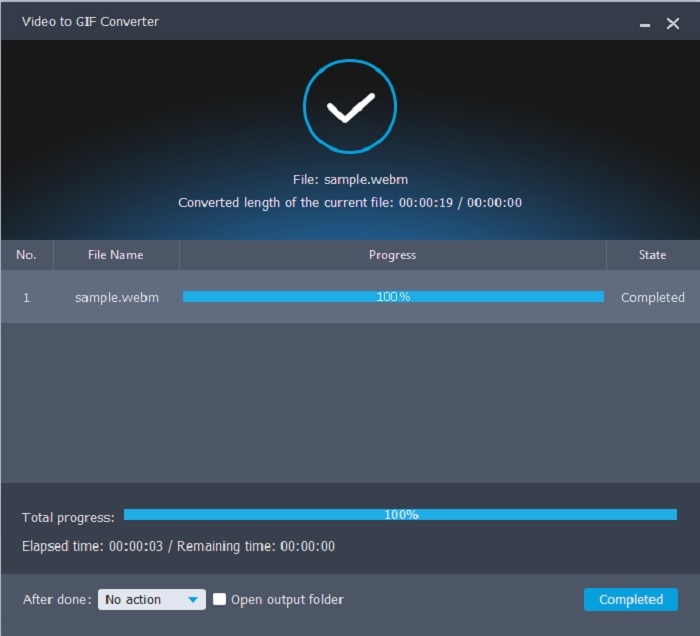
ขั้นตอนที่ 5. กระบวนการแปลงจะใช้เวลาไม่ถึงหนึ่งนาที เมื่อแปลงเสร็จแล้ว คุณสามารถตรวจสอบไฟล์ผลลัพธ์ได้จากตัวจัดการไฟล์.
ข้อดี
- มันยอดเยี่ยมในการสร้างและแปลง GIF
- เครื่องมือตรงจุดเพื่อให้กระบวนการเรียนรู้วิธีใช้เครื่องมือนี้เป็นเรื่องง่ายมากในทุกเพศทุกวัย
- ไม่จำเป็นต้องใช้อินเทอร์เน็ตเพื่อใช้เครื่องมือ
จุดด้อย
- คุณสมบัติหลักส่วนใหญ่ในเครื่องมือขั้นสูงสุดไม่มีอยู่ที่นี่
- จำเป็นต้องติดตั้งบนเดสก์ท็อปของคุณ
2. OnlineConverter.com
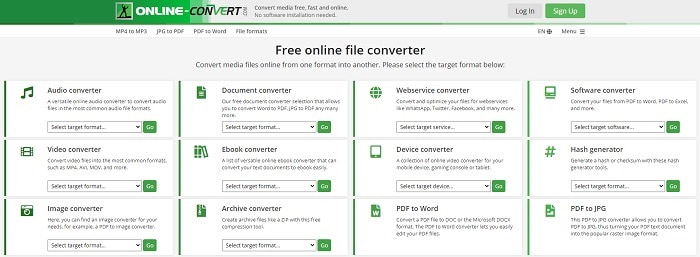
เปลี่ยนไฟล์ .webm เป็น .gif ได้ด้วย OnlineConverter.com ถ้าคุณต้องการเครื่องมือที่เน้นเฉพาะการแปลงไฟล์ คุณควรลองใช้เครื่องมือนี้ เครื่องมือนี้รองรับการแปลงหลายประเภท เช่น เอกสาร eBook และไฟล์บีบอัด แต่อีกด้านหนึ่งคือไม่รองรับฟีเจอร์การตัดต่อ แม้แต่แบบพื้นฐาน หากคุณอยากรู้วิธีใช้เครื่องมือนี้ ให้ทำตามขั้นตอนด้านล่าง.
ขั้นตอนที่ 1. ค้นหาเว็บเพจหลักของเครื่องมือนี้ในเครื่องมือค้นหาที่คุณใช้งานประจำ.
ขั้นตอนที่ 2. คลิกที่ตัวแปลงวิดีโอแล้วอัปโหลดไฟล์.
ขั้นตอนที่ 3. หากต้องการเริ่มการแปลง ให้คลิกปุ่มเริ่มแปลง (start conversion) แล้วรอจนกระบวนการเสร็จสิ้น.
ข้อดี
- Easy Access ที่ทุกคนสามารถใช้ออนไลน์ได้
- ไม่จำเป็นต้องใช้ไฟล์เพิ่มเติม
- รองรับการแปลงที่แตกต่างกันเช่นกัน
จุดด้อย
- ขั้นตอนการแปลงผ่านออนไลน์ใช้เวลานานกว่าเครื่องมือบนเดสก์ท็อป
- มีโฆษณาไม่กี่รายการและอินเทอร์เฟซเว็บที่น่าเบื่อ
3. Convertio
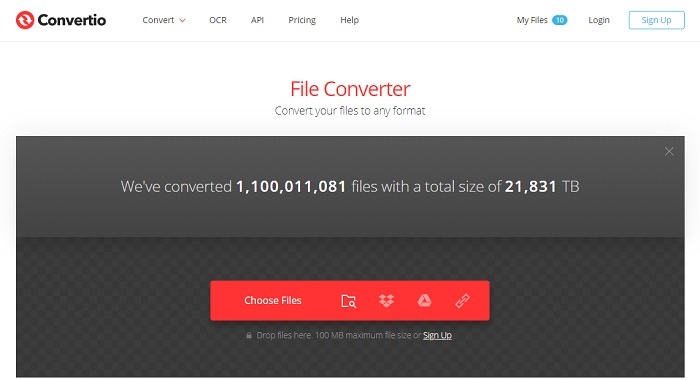
หากคุณอยากรู้วิธีแปลง WebM เป็น GIF หรือกลับกัน เพียงใช้เครื่องมือออนไลน์ Convertio คุณก็สามารถแปลงได้แทบทุกอย่าง หากการแปลงไฟล์เป็นปัญหาของคุณ เครื่องมือนี้อาจเป็นคำตอบ แม้ว่าเครื่องมือออนไลน์นี้จะมีโฆษณาและไม่มีฟีเจอร์ตัดต่อ แต่ก็ยังถือว่าเป็นหนึ่งในตัวแปลงไฟล์ออนไลน์ที่ดีที่สุดตัวหนึ่ง หากอยากลองใช้เครื่องมือนี้ ให้ทำตามขั้นตอนด้านล่าง.
ขั้นตอนที่ 1. หาเว็บเพจหลักของ Convertio ออนไลน์แล้วคลิกลิงก์เพื่อเข้าใช้งาน.
ขั้นตอนที่ 2. เมื่ออยู่ในหน้าอินเทอร์เฟซหลักแล้ว ให้เลือกไฟล์ Gif ที่คุณต้องการแปลง.
ขั้นตอนที่ 3. หากต้องการเริ่มกระบวนการ ให้คลิกปุ่ม convert.
ข้อดี
- ใช้งานง่ายเพราะตรงจุดวิธีการใช้งาน
- รองรับแพลตฟอร์มที่แตกต่างกันเช่นกัน
- สามารถเข้าถึงได้ง่ายผ่านทางอินเทอร์เน็ต
จุดด้อย
- มีโอกาสสูงที่จะสูญเสียข้อมูลในขณะที่ทำการแปลงหากอินเทอร์เน็ตถูกขัดจังหวะ
- โฆษณาบนเว็บไซต์ซึ่งอาจสร้างความรำคาญเล็กน้อย
ส่วนที่ 2 วิธีที่ดีที่สุดในการเปลี่ยน GIF เป็น WebM ด้วยความช่วยเหลือของ Ultimate Tool
Video Converter Ultimate
แต่คุณอาจลองใช้ Video Converter Ultimate ที่พัฒนาโดย FVC หากเวอร์ชันฟรีของเครื่องมือนี้ให้ผลลัพธ์ที่ดีที่สุดแก่คุณ เครื่องมือนี้มีมากกว่านั้นมาก มันสามารถปรับปรุงคุณภาพวิดีโอและเพิ่มเอฟเฟกต์เข้าไปได้ หากคุณต้องการปรับปรุงคุณภาพเสียง คุณสามารถใช้เครื่องมือนี้เพื่อปรับปรุงคุณภาพเสียงได้ ดังนั้น หากคุณต้องการที่จะยกระดับการแปลงของคุณไปอีกระดับ คุณต้องใช้เครื่องมือนี้เป็นทางเลือกส่วนตัวของคุณ เพราะเป็นเครื่องมือที่เหมาะสมที่จะมอบผลลัพธ์ขั้นสุดท้ายเพื่อสร้างความประทับใจให้กับเพื่อน ครอบครัว หรือใครก็ตาม อ่านขั้นตอนโดยละเอียดด้านล่างเพื่อทราบวิธีใช้เครื่องมือขั้นสูงสุดนี้เพื่อสร้างผลลัพธ์ขั้นสูงสุด
ขั้นตอนที่ 1. ในการเริ่มใช้เครื่องมือ คุณต้องดาวน์โหลดโปรแกรมที่ถูกต้องลงคอมพิวเตอร์ คลิกปุ่มดาวน์โหลดและทำตามขั้นตอนการติดตั้ง ปรับค่าต่าง ๆ หากจำเป็น แล้วคลิก Finish เพื่อเริ่มเปิดโปรแกรม.
ดาวน์โหลดฟรีสำหรับ Windows 7 หรือใหม่กว่าดาวน์โหลดอย่างปลอดภัย
ดาวน์โหลดฟรีสำหรับ MacOS 10.7 หรือใหม่กว่าดาวน์โหลดอย่างปลอดภัย
ขั้นตอนที่ 2. อินเทอร์เฟซขนาดเล็กแบบนี้จะปรากฏบนหน้าจอของคุณ.
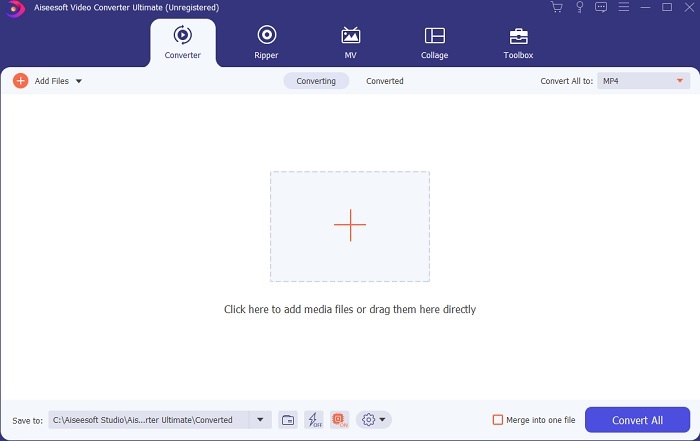
ขั้นตอนที่ 3. คลิกสัญลักษณ์บวกตรงกลางอินเทอร์เฟซเพื่อเพิ่มไฟล์ หากคุณต้องการแปลงไฟล์ GIF จำนวนมาก แนะนำให้ลากและวางไฟล์ลงในอินเทอร์เฟซโดยตรง.
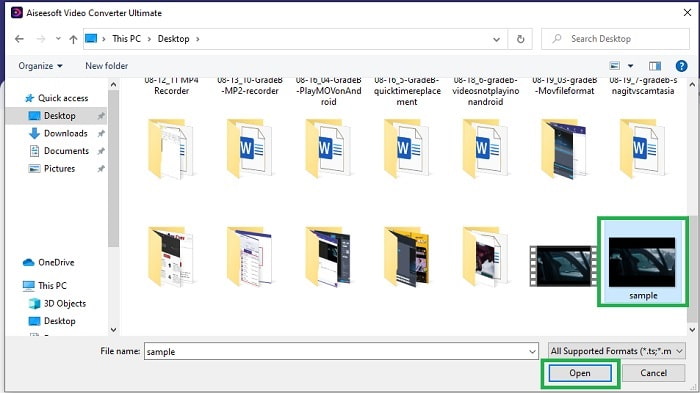
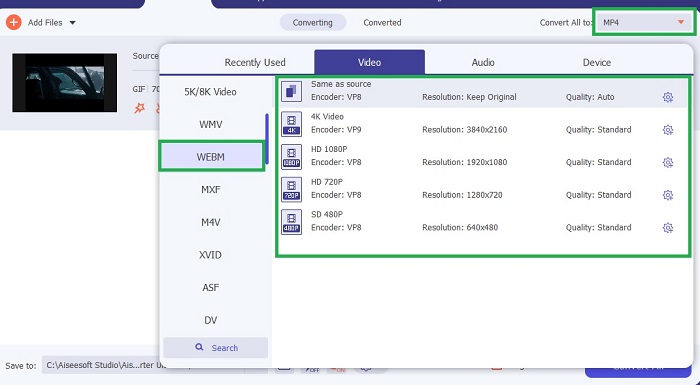
ขั้นตอนที่ 4. เลือกรูปแบบไฟล์ที่คุณต้องการหลังจากกดเมนู Convert All to เมื่อพร้อมแล้วให้คลิก Convert All เพื่อเริ่มกระบวนการแปลง.
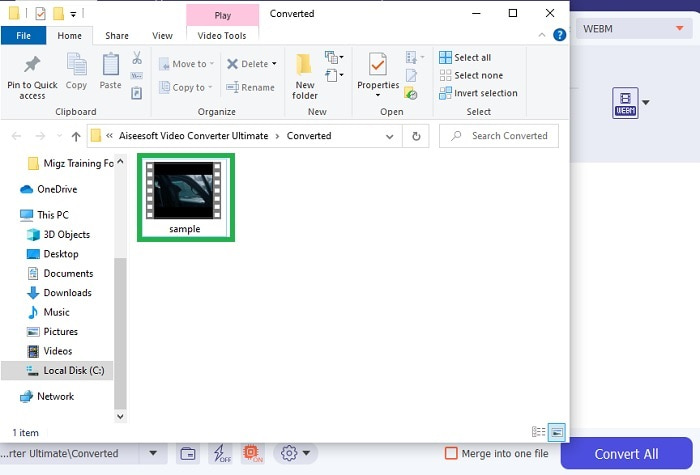
ขั้นตอนที่ 5. การแปลงจะไม่ใช้เวลามาก เพราะเร็วกว่าเครื่องมือฟรี 30 เท่า และเร็วกว่าตัวอื่น ๆ ถึง 100 เท่า เมื่อกระบวนการเสร็จแล้ว หน้าต่างตัวจัดการไฟล์จะเด้งขึ้นบนหน้าจอ ให้คลิกที่วิดีโอเพื่อเล่น คุณยังสามารถปรับแต่งผลลัพธ์เพิ่มเติมได้ในแถบเครื่องมือภายหลังหากต้องการ.
ข้อดี
- มีคุณสมบัติเพิ่มเติมเพื่อปรับปรุงวิดีโอที่แปลงแล้วของคุณ
- มีรูปแบบทั้งหมดที่คุณรู้จักหรือไม่
- ขั้นตอนการแปลงนั้นเร็วมากแทนที่จะเป็นเครื่องมือแปลงใด ๆ ที่มีให้ที่นี่
จุดด้อย
- คุณต้องดาวน์โหลดไฟล์เพิ่มเติมก่อนเปิดตัวเครื่องมือ มิฉะนั้น เครื่องมือจะไม่เริ่มทำงาน
- จ่ายก่อนใช้เครื่องมือ
ส่วนที่ 3 คำถามที่พบบ่อยเกี่ยวกับ GIF ถึง WebM
ทำไม WebM ของฉันไม่สามารถเล่นบนเว็บได้
สาเหตุนั้นง่ายมาก เพราะโปรแกรมค้นเว็บ (เบราว์เซอร์) ของคุณล้าสมัย ไม่มีไฟล์ WebM ใดที่เล่นได้บนเว็บเบราว์เซอร์รุ่นเก่า เช่น Internet Explorer คลิก ที่นี่ เพื่อดูโปรแกรมเล่น WebM อื่น ๆ ที่รองรับ.
อันไหนดีกว่า GIF หรือ WebM
หากคุณต้องการบรรจุวิดีโอพร้อมเสียง WebM เป็นรูปแบบที่ดีกว่ามาก แต่ถ้ารูปแบบ GIF แบบภาพนิ่งเป็นสิ่งที่คุณควรทำ
ใครเป็นผู้พัฒนารูปแบบ WebM
อย่างแรกคือ On2, Xiph และ Matroska และต่อมา Google พัฒนามัน
สรุป
ตอนนี้เราจะเห็นได้ชัดเจนขึ้นว่า การแปลงGIF เป็น WebM นั้นสำคัญ โดยเฉพาะหากคุณต้องการไฟล์ขนาดเล็กแต่คุณภาพวิดีโอสูง และเครื่องมือที่ดีที่สุดสำหรับการแปลงก็คือ Video Converter Ultimate ที่สำคัญยิ่งไปกว่านั้น ยังรองรับการแปลง WebM เป็น GIF ได้อย่างง่ายและรวดเร็ว หากคุณยังไม่มั่นใจกับเครื่องมือฟรี การใช้เครื่องมือพรีเมียมตัวนี้จะดีกว่า นอกจากปลอดภัยแล้ว ยังให้ความสำเร็จในการแปลงและการตัดต่อสูงกว่าถึง 100 เท่า เครื่องมือนี้จึงเป็นตัวเลือกหลักของคุณอย่างแท้จริง ใช้ตัวแปลงที่ดีที่สุดเพื่อให้ได้ผลลัพธ์การแปลงที่ยอดเยี่ยม.
-
 เลือก GIF Cropper ที่ดีที่สุดออนไลน์และออฟไลน์เพื่อครอบตัด GIF [2021]
 การเลือกเครื่องมือครอบตัดที่ดีที่สุดคือสิ่งที่ต้องทำ และผู้ผลิต GIF บางรายไม่มีคุณสมบัตินี้ แต่เครื่องมือครอบตัด GIF ที่ดีที่สุดคืออะไรและใช้งานอย่างไร
-
 5 ตัวเลือกที่ดีที่สุดในการบันทึกรูปแบบ GIF ด้วยเครื่องบันทึก GIF สำหรับพีซีและ Mac
 เครื่องบันทึก GIF ที่ดีที่สุดที่คุณควรใช้บันทึก GIF คืออะไร รายการด้านล่างแสดงหลักฐานว่าเครื่องบันทึกหน้าจอใดดีที่สุด
-
 วิธีแปลงไฟล์ MPG เป็นรูปแบบ GIF [ออนไลน์และออฟไลน์]
 ต้องการแสดงอารมณ์ที่ดีขึ้นหรือไม่? จากนั้นคุณต้องใช้ GIF แทน บทความนี้จะสอนวิธีแปลงไฟล์ MPG เป็น GIF เพื่อแสดงความรู้สึกของคุณได้ดีขึ้นมาก
