


 Video Converter Ultimate
 บันทึกหน้าจอ
 ซ่อมวิดีโอ
 ดาวน์โหลดอย่างปลอดภัย
2 วิธีที่มีประสิทธิภาพในการแปลงไฟล์ WMV เป็น GIF เพื่อการแชร์อย่างง่ายดาย
เมื่อคุณตัดส่วนย่อยที่น่าสนใจและยอดเยี่ยมจากวิดีโอ WMV และต้องการแบ่งปันกับเพื่อนของคุณ คุณจะพบว่าไม่สามารถส่งผ่านหลายแพลตฟอร์มได้ ทางออกที่ดีที่สุดคือการแปลงเซ็กเมนต์ WMV เป็นไฟล์ GIF แบบเคลื่อนไหวที่มีขนาดเล็กและเข้ากันได้สูงกับเว็บหรืออุปกรณ์พกพา ด้วยวิธีนี้ คุณสามารถแชร์ช่วงเวลาโปรดในวิดีโอได้อย่างง่ายดายผ่านแอปใดก็ได้
บทความนี้จะช่วยแนะนำ 2 วิธีที่ดีที่สุดในการแปลงวิดีโอ WMV เป็น GIF พร้อมขั้นตอนอย่างละเอียด คุณสามารถเลือกใช้วิธีแบบมืออาชีพที่ช่วยจัดการได้ทุกปัญหา หรือวิธีง่าย ๆ ที่ทำตามได้รวดเร็วแต่มีฟังก์ชันน้อยกว่า โปรดอ่านต่อเพื่อเรียนรู้รายละเอียดของแต่ละวิธีให้มากขึ้น.

ส่วนที่ 1: วิธีที่ดีที่สุดและมีประสิทธิภาพในการแปลงวิดีโอ WMV เป็น GIF ฟรี
หากต้องการสร้างภาพ GIF ที่น่าสนใจจากวิดีโอ WMV อย่างมีประสิทธิภาพ คุณควรใช้โปรแกรมทำ GIF ระดับมืออาชีพอย่าง FVC Free Video to GIF Maker แท้จริงแล้วนี่คือโปรแกรมแปลงวิดีโออเนกประสงค์ที่สามารถแปลงได้มากกว่า 100 รูปแบบไปเป็นรูปแบบอื่น ๆ ได้ทุกชนิด รวมถึงการแปลงไฟล์ WMV เป็น GIF นอกจากนี้ยังรองรับการปรับความละเอียดวิดีโอและอัตราเฟรมเพื่อรักษาคุณภาพและความลื่นไหลของภาพ.
- 1. ถ่ายโอนวิดีโอ WMV ไปยัง GIF ด้วยการคลิกง่ายๆ
- 2. ตัดและตัดวิดีโอ WMV ให้เหลือส่วนที่ต้องการ
- 3. ปรับแต่งความละเอียดของวิดีโอ อัตราเฟรม และเอฟเฟกต์ได้อย่างอิสระ
- 4. ครอบตัด ลายน้ำ ลายน้ำ และหมุน WMV ก่อนสร้าง GIF
ดาวน์โหลดฟรีสำหรับ Windows 7 หรือใหม่กว่าดาวน์โหลดอย่างปลอดภัย
ดาวน์โหลดฟรีสำหรับ MacOS 10.7 หรือใหม่กว่าดาวน์โหลดอย่างปลอดภัย
ขั้นตอนที่ 1: ดาวน์โหลด FVC Free Video to GIF Maker ฟรีลงบน Windows/Mac แล้วเปิดโปรแกรม จากนั้นคลิกปุ่ม Add Files เพื่อเลือกวิดีโอ WMV ที่ต้องการแปลงเป็น GIF.
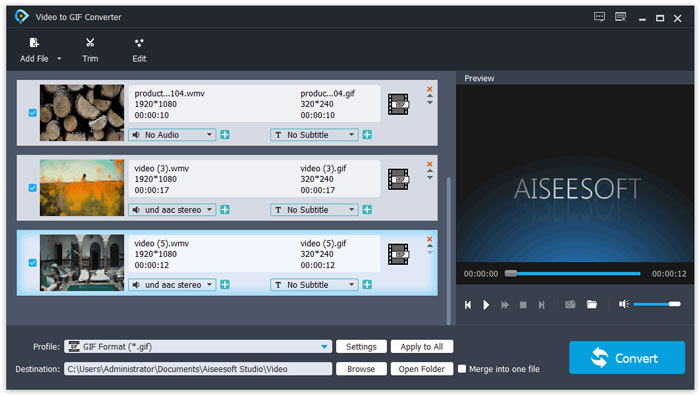
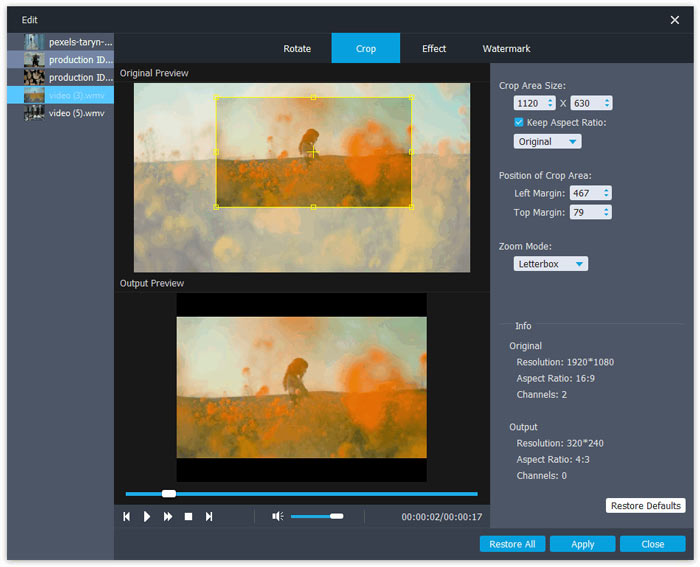
ขั้นตอนที่ 2: คลิกปุ่ม Edit เพื่อตัดต่อวิดีโอให้กลายเป็นแอนิเมชันสั้น ๆ คุณยังสามารถครอปและหมุนวิดีโอได้อย่างอิสระ จากนั้นสามารถเพิ่มธีม เอฟเฟกต์ และคำบรรยายตามที่ต้องการได้.
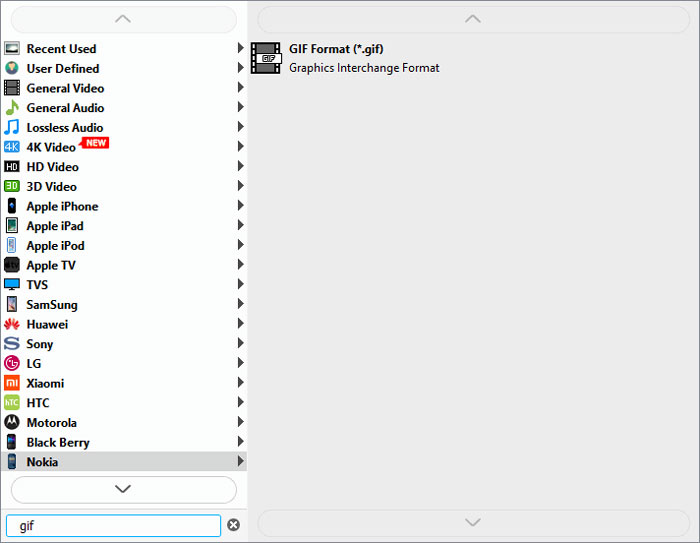
ขั้นตอนที่ 3: จากนั้นให้คลิกเมนู Profile แล้วเลือกส่งออกเป็นรูปแบบ GIF เพื่อรักษาคุณภาพและความลื่นไหลของไฟล์ GIF ให้คลิกไอคอน Settings แล้วปรับความละเอียดและอัตราเฟรมให้เป็นระดับสูงสุด จากนั้นกลับไปยังหน้าหลักแล้วคลิกปุ่ม Convert เพื่อเริ่มแปลงไฟล์ WMV เป็น GIF.
ส่วนที่ 2: วิธีการแปลง WMV เป็นภาพเคลื่อนไหว GIF ออนไลน์ฟรีอย่างง่ายดาย
FVC Free Online Video Converter ใช้งานได้ง่ายมาก ช่วยให้คุณแปลงวิดีโอ WMV เป็น GIF แบบเคลื่อนไหวออนไลน์ได้โดยไม่ต้องดาวน์โหลดซอฟต์แวร์อื่น รองรับการนำเข้าได้ทุกฟอร์แมต และส่งออกวิดีโอเป็นรูปแบบยอดนิยมได้มากกว่า 10 ชนิด แม้ว่าตัวเลือกสำหรับ GIF จะมีความละเอียดและอัตราเฟรมต่ำ แต่ก็เป็นตัวเลือกที่ดีที่สุดสำหรับการแปลงไฟล์แบบรวดเร็ว ขั้นตอนโดยละเอียดมีดังนี้
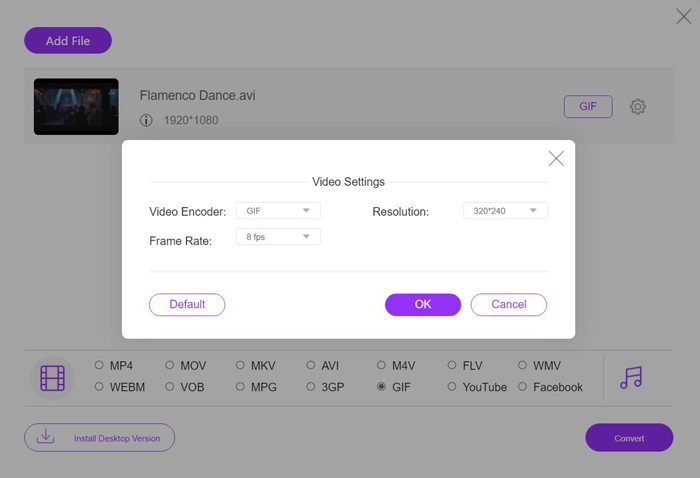
ขั้นตอนที่ 1: เปิด FVC Free Online Video Converter บนเบราว์เซอร์ใดก็ได้ คลิกปุ่ม Add Files to Convert เพื่อติดตั้งตัวเรียกใช้งาน จากนั้นคลิกปุ่มเดิมอีกครั้งเพื่อเพิ่มไฟล์ WMV ที่แก้ไขเรียบร้อยแล้ว และเปิดโปรแกรมแปลงไฟล์.
ดาวน์โหลดเวอร์ชันเดสก์ท็อปเพื่อแปลงไฟล์แบบเป็นชุดได้.
ขั้นตอนที่ 2: เลือกรูปแบบ GIF จากรายการวิดีโอ แล้วคลิกไอคอน Settings เพื่อเลือกความละเอียด 320x240p และอัตราเฟรม 8 fps จากนั้นคลิกปุ่ม OK เพื่อบันทึกการตั้งค่า หลังจากนั้นให้คลิกปุ่ม Convert เพื่อเลือกเส้นทางจัดเก็บไฟล์และเริ่มแปลงวิดีโอ WMV เป็นไฟล์ GIF.
WMV เทียบกับ GIF
ผลิตโดย Microsoft WMV เป็นหนึ่งในรูปแบบวิดีโอที่พบบ่อยที่สุดในยุค 2000 สามารถดูได้ทางเว็บและเล่นโดยโปรแกรมเล่นสื่อต่างๆ บน Windows และยังเป็นรูปแบบไฟล์วิดีโอเริ่มต้นของ Windows Media Player แต่รูปแบบอื่นๆ กลับถูกยึดครองไปเมื่อเร็วๆ นี้
GIF เป็นรูปแบบภาพทั่วไปสำหรับกราฟิกบนเว็บ นอกจากการบันทึกรูปภาพขนาดเล็กและรูปภาพที่มีข้อความแล้ว GIF ยังสามารถมีและแสดงแอนิเมชั่นพื้นฐานบนเว็บไซต์ได้อีกด้วย เป็นรูปแบบที่ไม่มีการสูญเสีย และการบีบอัด GIF จะไม่ทำให้ความคมชัดของภาพลดลง
ส่วนที่ 3: คำถามที่พบบ่อยเกี่ยวกับการแปลงวิดีโอ WMV เป็น GIF
1. วิธีการแปลง WMV เป็น GIF ด้วยคุณภาพดั้งเดิม?
ที่จริงแล้ว คุณไม่สามารถรักษาคุณภาพต้นฉบับได้หลังจากแปลง WMV เป็น GIF GIF รองรับเฉพาะสี 256 บิต ดังนั้นคุณภาพของภาพจึงค่อนข้างต่ำ และขนาดไฟล์มีขนาดเล็ก แต่คุณสามารถใช้ FVC Free Video to GIF Maker เพื่อปรับการตั้งค่าและรักษาคุณภาพที่ค่อนข้างสูงได้
2. เหตุใดฉันจึงส่งแฟรกเมนต์ WMV บน Twitter ไม่ได้
นั่นเป็นเพราะ Twitter รองรับเฉพาะรูปแบบวิดีโอ MP4 และ MOV หากคุณต้องการแชร์ส่วนภาพยนตร์บน Twitter คุณควรแปลงวิดีโอ WMV เป็นไฟล์ GIF ที่เข้ากันได้ซึ่งมีขนาดที่เล็กกว่า
3. ฉันควรลบแทร็กเสียงเมื่อแปลง WMV เป็น GIF หรือไม่
ไม่ คุณไม่จำเป็นต้องทำเช่นนี้ เนื่องจาก GIF ถูกรวมเข้ากับรูปภาพหลายรูปเท่านั้น จึงไม่รองรับไฟล์เสียง เมื่อคุณต้องการโอน WMV เป็น GIF แทร็กเสียงจะถูกล้างโดยอัตโนมัติ
สรุป
GIF เป็นที่นิยมอย่างมากในขณะนี้ และคุณอาจต้องการสร้าง GIF ที่น่าสนใจหรือยอดเยี่ยมจากวิดีโอ WMV บทความนี้ได้แนะนำ 2 วิธีที่ง่ายและมีประสิทธิภาพเพื่อช่วยคุณแปลงวิดีโอ WMV เป็น GIF คุณสามารถแปลง WMV เป็น GIF ออนไลน์ได้ฟรีด้วยการปรับพื้นฐาน เพื่อให้มีคุณภาพสูงและความคล่องแคล่ว โปรดดาวน์โหลด FVC Free Video to GIF Maker ฟรีเพื่อเปลี่ยนความละเอียดและอัตราเฟรม
-
 ตัวแปลง FLV เป็น Xvid ฟรี – แปลง FLV เป็น Xvid สำหรับเครื่องเล่น CD/DVD
 โพสต์นี้เป็นคำแนะนำทีละขั้นตอนในการแปลงไฟล์ที่เข้ารหัส FLV เป็น Xvid ฟรี เพื่อให้คุณสามารถเล่นไฟล์วิดีโอ FLV บนเครื่องเล่นซีดีและดีวีดีโดยไม่ต้องใช้ความพยายาม
-
 วิธีดาวน์โหลด MKV Codec ใน Windows Media Player เพื่อการเล่นที่ราบรื่น
 ไม่สามารถเล่นวิดีโอ MKV ใน Windows Media Player ได้? คุณสามารถดาวน์โหลดตัวแปลงสัญญาณ MKV สำหรับ Windows Media Player ได้ฟรี ตรงกันข้าม ให้แปลง MKV เพื่อให้สามารถเล่นได้ใน Windows Media Player
-
 วิธีแปลงวิดีโอ AVI เป็นไฟล์ GIF แบบเคลื่อนไหวบน Windows/Mac
 ต้องการเลือกกลุ่ม AVI ที่น่าสนใจเพื่อสร้างมีม GIF หรือไม่ บทความนี้จะบอก 2 วิธีที่ดีที่สุดในการตัดวิดีโอ AVI และแปลง AVI เป็นไฟล์ GIF แบบเคลื่อนไหวได้ฟรี

