


 Video Converter Ultimate
 บันทึกหน้าจอ
 ซ่อมวิดีโอ
 ดาวน์โหลดอย่างปลอดภัย
วิธีแปลง SVG เป็น JPG อย่างรวดเร็ว [วิธีที่ง่ายสุด ๆ]
คุณอาจต้องการแปลงภาพ SVG ให้เป็น JPG ด้วยเหตุผลหลายประการ เหตุผลหนึ่งคือเพื่อให้แก้ง่ายขึ้น เนื่องจากไฟล์ SVG ต้องใช้โปรแกรมแก้ไขภาพแบบเวกเตอร์ แต่โปรแกรมแก้ไขภาพแบบราสเตอร์กลับเป็นที่นิยมในหมู่ผู้ใช้มากกว่า เช่น Microsoft Paint และ Adobe Lightroom เป็นต้น การใช้ Lightroom แก้ไขไฟล์ SVG อาจทำได้ก็ต่อเมื่อคุณแปลงไฟล์นั้นเป็น JPG เสียก่อน การแชร์ออนไลน์ก็เป็นอีกเหตุผลหนึ่งที่ควรแปลง SVG เป็น JPG เพราะไฟล์ JPG แทบจะถูกยอมรับในทุกเว็บไซต์และแอปที่เปิดให้ผู้ใช้ อัปโหลดรูปภาพ ในทางกลับกัน SVG มักจะไม่ถูกยอมรับ ตัวอย่างเช่น Instagram รับไฟล์ JPG แต่ไม่รองรับ SVG บทความนี้จะนำเสนอวิธีการใช้งานจริงในการเปลี่ยนSVG เป็น JPG นอกจากนี้คุณยังจะได้รู้จักโปรแกรมแปลงไฟล์ภาพที่ดีที่สุด ทั้งแบบออนไลน์และออฟไลน์ที่คุณสามารถใช้งานได้.

ส่วนที่ 1 เปรียบเทียบ SVG และ JPG
| รูปแบบไฟล์ | SVG | JPG |
| นามสกุลไฟล์ | .svg | .jng |
| พัฒนาโดย | สมาคมเวิลด์ไวด์เว็บ | คณะกรรมการ JPEG |
| พัฒนาโดย | SVG เป็นรูปแบบไฟล์ภาพเวกเตอร์สำหรับกราฟิก 2 มิติที่ใช้ XML รองรับภาพเคลื่อนไหวและการโต้ตอบ ในไฟล์ข้อความ XML รูปภาพ SVG และพฤติกรรมจะถูกกำหนด เนื่องจากไฟล์ SVG เป็นเพียงไฟล์ XML จึงแก้ไขได้ด้วยโปรแกรมแก้ไขข้อความ | JPG ใช้สำหรับเว็บไซต์และอีเมลเพราะมีขนาดไฟล์ที่เล็กลง อย่างไรก็ตาม เนื่องจาก JPG สูญเสียไป จึงส่งผลต่อคุณภาพของภาพหลังการบีบอัด ไฟล์ที่ได้ "สูญหาย" แสดงว่าคุณภาพสูญหาย การ์ดหน่วยความจำสำหรับกล้องดิจิทัลใช้รูปแบบ JPG |
| รายละเอียดทางเทคนิค | SVG เป็นรูปแบบที่ใช้ในการกำหนดกราฟิกแบบเวกเตอร์ที่ใช้ XML สำหรับเว็บ ไฟล์นี้จะไม่สูญเสียคุณภาพของภาพแม้ว่าจะซูมเข้าหรือปรับขนาดก็ตาม องค์ประกอบและแอตทริบิวต์ของไฟล์ SVG สามารถเคลื่อนไหวได้ทั้งหมด | JPG เป็นรูปแบบไฟล์รูปภาพสำหรับแก้ไขภาพนิ่ง มีเทคนิคการบีบอัดแบบสมมาตรที่ใช้โปรเซสเซอร์มาก นอกจากนี้ยังใช้เวลานานในการบีบอัดและคลายการบีบอัด JPEG เป็นมาตรฐานทั่วไปของสหภาพโทรคมนาคมระหว่างประเทศ นอกจากนี้ยังรวมถึงองค์การระหว่างประเทศเพื่อการมาตรฐาน |
| โปรแกรมที่เกี่ยวข้อง | Adobe Photoshop อะโดบีพรีวิว Corel Paint Shop โปร โปรแกรมดู Corel SVG | โปรแกรมดูรูปภาพของ Microsoft Windows Adobe Photoshop อะโดบีพรีวิว Corel Paint Shop โปร |
ส่วนที่ 2 วิธีที่ดีที่สุดในการแปลง SVG เป็น JPG ออนไลน์
เครื่องมือที่ดีที่สุดที่คุณสามารถใช้ได้คือ FVC Free Image Converter เครื่องมือนี้สามารถแปลง SVG เป็น JPG ได้อย่างง่ายดาย และยังสามารถแปลงไฟล์ SVG หลายไฟล์เป็น JPG พร้อมกันได้อีกด้วย ตัวโปรแกรมมีหน้าตาและคำแนะนำที่ใช้งานง่าย เหมาะอย่างยิ่งสำหรับผู้ใช้ทั่วไป โปรแกรมแปลงภาพนี้รองรับการแปลงแบบเป็นชุด (batch) อีกทั้งยังสามารถดาวน์โหลดไฟล์ที่แปลงเสร็จแล้วหลายไฟล์ได้ด้วยการคลิกเพียงครั้งเดียว ข้อดีอีกอย่างคือไม่มีโฆษณากวนใจ ทำให้คุณโฟกัสกับการแปลงไฟล์ได้โดยไม่ต้องเจอโฆษณาเพิ่มเติม นอกจากนี้ยังรองรับไฟล์นำเข้าหลายรูปแบบ เช่น PNG, BMP, TIFF, GIF เป็นต้น อีกทั้งไม่จำเป็นต้องติดตั้งโปรแกรมลงเครื่อง เพราะควบคุมการใช้งานได้ผ่านเว็บเบราว์เซอร์โดยตรง ยิ่งไปกว่านั้น หลังจากแปลงไฟล์แล้ว คุณภาพของภาพจะยังคงเท่ากับต้นฉบับ ทำให้มั่นใจได้ว่ารูปภาพของคุณยังคงมีคุณภาพดีเยี่ยม นอกจากนี้ข้อมูลของคุณยังปลอดภัยบนเว็บไซต์นี้ หลังจากแปลงและบันทึกรูปภาพเสร็จ ระบบจะลบข้อมูลทั้งหมดของคุณโดยอัตโนมัติ.
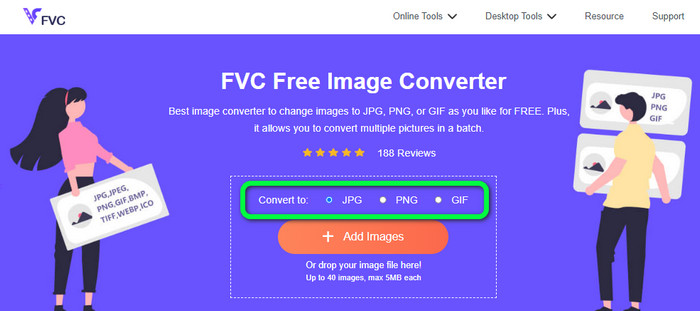
ขั้นตอนที่ 1: ไปที่เว็บไซต์หลักของ FVC Free Image Converter ก่อนที่จะเพิ่มไฟล์ภาพ SVG ให้เลือกชนิดไฟล์ผลลัพธ์ที่คุณต้องการ จากนั้นคลิกเลือกไฟล์รูปแบบ JPG จากเมนูรูปแบบไฟล์.
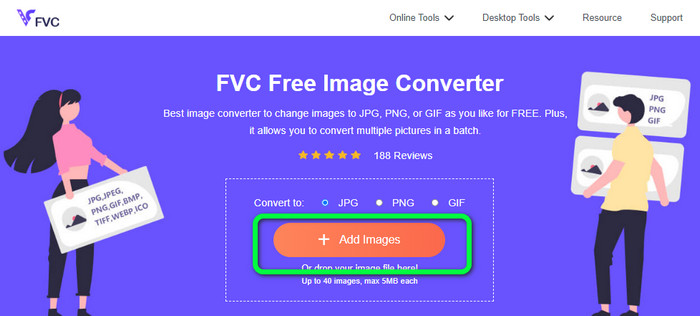
ขั้นตอนที่ 2: คลิกปุ่ม Add Images ที่บริเวณกึ่งกลางหน้าจอ จากนั้นโฟลเดอร์ไฟล์ของคุณจะปรากฏบนหน้าจอ เลือกภาพ SVG ที่คุณต้องการแปลงแล้วกดเปิดไฟล์ คุณยังสามารถลากไฟล์ SVG มาวางลงในกล่องได้โดยตรง หากต้องการแปลงแบบเป็นชุด ให้คลิกปุ่ม Add Images อีกครั้งเพื่อเพิ่มไฟล์หลาย ๆ ไฟล์.
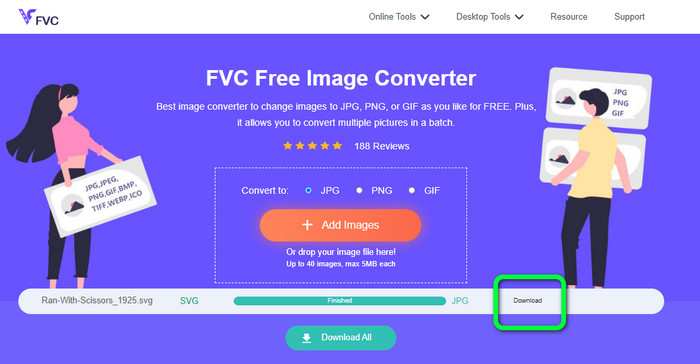
ขั้นตอนที่ 3: ระหว่างที่อัปโหลดไฟล์ ระบบจะแปลงภาพให้โดยอัตโนมัติ ขั้นตอนสุดท้ายให้คลิกปุ่ม Download ที่ด้านขวาของหน้าจอ หลังจากบันทึกไฟล์เสร็จแล้ว ให้เปิดไฟล์ภาพที่แปลงแล้วบนคอมพิวเตอร์ของคุณ.
ส่วนที่ 3 วิธีง่ายๆ ในการแปลง SVG เป็น JPG บน Windows
ในส่วนนี้ คุณจะได้เรียนรู้วิธีที่มีประสิทธิภาพที่สุดในการแปลง SVG เป็น JPG แบบออฟไลน์บนคอมพิวเตอร์ Windows วิธีที่มีประสิทธิภาพวิธีหนึ่งคือการใช้ HitPaw Video Converter ฟีเจอร์ Image Convert ของ HitPaw Video Converter ทำให้การแปลงภาพแบบเป็นชุดเป็นเรื่องง่าย คุณสามารถนำเข้ารูปภาพและกราฟิกได้หลากหลายรูปแบบ แล้วแปลงให้เป็นรูปแบบไฟล์ที่คุณต้องการ ไม่ว่าจะเป็นการเปลี่ยนไฟล์รูปภาพครั้งละจำนวนมากหรือทีละไฟล์ก็ตาม ถือเป็นตัวเลือกที่ยอดเยี่ยม อีกทั้งยังรองรับไฟล์ภาพยอดนิยมทุกชนิด เช่น PNG, JPG, HEIC, RAW, BMP และอื่น ๆ ดังนั้นคุณจึงสามารถใช้เครื่องมือนี้เพื่อแปลง BMP เป็น JPG หรือ PNG ได้ด้วย นอกจากนี้โปรแกรมที่ดาวน์โหลดได้ตัวนี้ยังมีฟังก์ชันอื่นนอกเหนือจากการแปลงไฟล์ คุณสามารถดาวน์โหลดเพลงและวิดีโอผ่านซอฟต์แวร์นี้ได้ รวมทั้งสามารถแก้ไขวิดีโอได้ด้วยการหมุน ตัดต่อ และใส่ฟิลเตอร์ อย่างไรก็ตาม HitPaw Video Converter ใช้งานค่อนข้างยาก โดยเฉพาะสำหรับผู้เริ่มต้น เพราะมีหน้าตาที่ซับซ้อน ทำให้ทำความเข้าใจได้ยาก อีกทั้งขั้นตอนการติดตั้งยังใช้เวลานาน.
ขั้นตอนที่ 1: ติดตั้ง HitPaw Video Converter บน Windows ของคุณ จากนั้นหลังการติดตั้งเสร็จสิ้น ให้เปิดโปรแกรมขึ้นมา.
ขั้นตอนที่ 2: ไปที่แท็บ Toolbox แล้วเลือกเครื่องมือ Image Converter จากนั้นเลือกไฟล์ภาพ SVG ที่คุณต้องการแปลงจากโฟลเดอร์บนคอมพิวเตอร์ของคุณ.
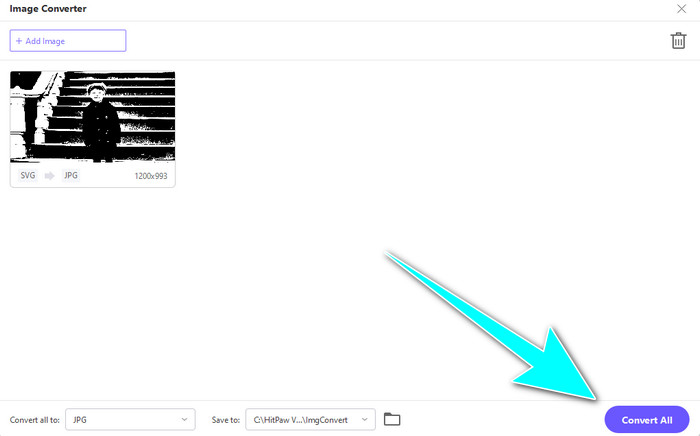
ขั้นตอนที่ 3: คลิกตัวเลือก Convert All to ที่มุมล่างซ้ายของหน้าจอ จากนั้นเลือก JPG เป็นรูปแบบไฟล์ผลลัพธ์.
ขั้นตอนที่ 4: สุดท้ายให้คลิกปุ่ม Convert All ที่มุมล่างขวาของหน้าจอ แล้วรอให้กระบวนการแปลงเสร็จสิ้น จากนั้นคุณก็สามารถเปิดภาพของคุณในรูปแบบไฟล์ PNG ได้แล้ว.
ส่วนที่ 4 วิธีแปลง SVG เป็น JPG บน Mac
หากคุณต้องการแปลง SVG เป็น JPG บน Mac ให้ใช้โปรแกรม BatchPhoto Pro ซึ่งรองรับรูปแบบไฟล์ภาพหลากหลาย เช่น JPG, PNG, ICO, SVG, EPS และอื่น ๆ กว่า 170 รูปแบบ คุณยังสามารถบันทึกรูปภาพเป็นไฟล์ PDF ได้ด้วย อีกทั้งยังรองรับการแปลงแบบเป็นชุด ทำให้คุณสามารถแปลงไฟล์หลายไฟล์พร้อมกันได้ นอกจากนี้ นอกจากการแปลงภาพแล้ว โปรแกรมยังมีฟีเจอร์แก้ไขรูปภาพ เช่น ปรับขนาด หมุนภาพ และปรับการตั้งค่าสี อย่างไรก็ตาม หากต้องการใช้งานอย่างต่อเนื่อง คุณจำเป็นต้องซื้อโปรแกรม เนื่องจากเวอร์ชันทดลองให้ใช้ได้เพียงไม่กี่วัน และขั้นตอนการแปลงก็เข้าใจยาก ผู้ใช้ที่ไม่ใช่มืออาชีพอาจพบว่าการแปลงภาพด้วยโปรแกรมนี้ค่อนข้างซับซ้อน.
ขั้นตอนที่ 1: ดาวน์โหลดและติดตั้ง BatchPhoto Pro คุณสามารถใช้เวอร์ชันทดลองฟรีได้ หลังจากติดตั้งโปรแกรมเสร็จแล้ว ให้เปิดโปรแกรมขึ้นมา.
ขั้นตอนที่ 2: ที่ด้านบนของหน้าจอ ให้เลือกตัวเลือก Add Photos จากนั้นเพิ่มภาพ SVG ที่คุณต้องการแปลงเป็น JPG คุณสามารถเพิ่มไฟล์หลายไฟล์พร้อมกันได้.
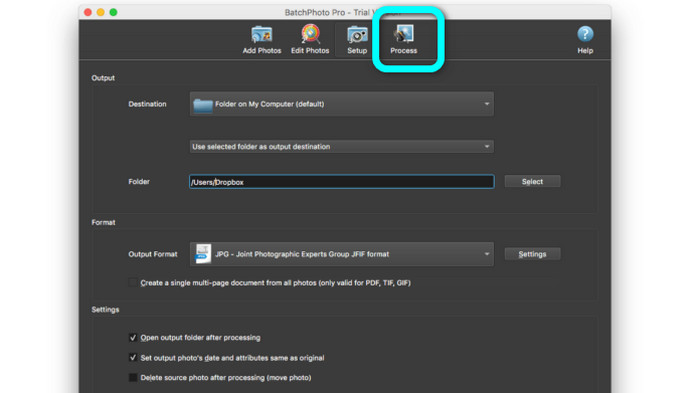
ขั้นตอนที่ 3: ไปที่ตัวเลือก Set Up ที่ด้านบนของหน้าจอ จากนั้นไปที่ส่วน Output Format แล้วเลือก JPG เป็นรูปแบบไฟล์ผลลัพธ์.
ขั้นตอนที่ 4: คลิกตัวเลือก Process เพื่อเริ่มการแปลงไฟล์ เมื่อเสร็จแล้ว ให้ไปที่โฟลเดอร์ปลายทางของคุณแล้วตรวจสอบภาพที่แปลงเสร็จเรียบร้อย.
ส่วนที่ 5 คำถามที่พบบ่อยเกี่ยวกับการแปลง SVG เป็น JPG
1. ทำไมคุณควรแปลง SVG เป็น JPG
เมื่อเทียบกับ SVG แล้ว JPG เหมาะสำหรับโซเชียลมีเดียและอุปกรณ์อื่น ๆ มากกว่า เป็นหนึ่งในรูปแบบรูปภาพยอดนิยมที่คุณสามารถใช้ได้ในปัจจุบัน ใน SVG คุณสามารถเปิดไฟล์นี้ได้บนเว็บเบราว์เซอร์เท่านั้น ดังนั้นการแปลง SVG เป็น JPG จึงจำเป็นสำหรับการใช้งานที่เข้ากันได้มากขึ้น
2. ข้อดีและข้อเสียของไฟล์ SVG คืออะไร?
คุณสามารถขยายหรือย่อไฟล์ SVG ให้มีขนาดเท่าใดก็ได้โดยไม่สูญเสียคุณภาพ SVG ไม่สนใจประเภทการแสดงผลหรือขนาดภาพ วิธีที่พวกเขาดูเหมือนคงที่ SVG ยังช่วยให้นักออกแบบและนักพัฒนาสามารถควบคุมรูปลักษณ์ของพวกเขาได้อย่างมาก ดีกว่าการแก้ไขในโปรแกรมแก้ไขข้อความ แม้แต่องค์ประกอบภาพอื่นๆ เช่น เงาและการไล่ระดับสีก็ปรับได้ อย่างไรก็ตาม มีรูปแบบที่ดีกว่า SVG สำหรับภาพถ่ายที่มีรายละเอียดและมีคุณภาพสูง ผู้ใช้สร้างกราฟิกแบบเวกเตอร์โดยใช้จุดและทางเดินมากกว่าพิกเซล รหัสก็จำเป็นเช่นกัน
3. ฉันจะเปิดไฟล์ SVG ได้อย่างไร
วิธีที่ดีที่สุดในการเปิดไฟล์ SVG คือเปิดผ่านเว็บเบราว์เซอร์ของคุณ กดปุ่ม ctrl+o บนแป้นพิมพ์ จากนั้นเลือกไฟล์ SVG ที่คุณต้องการดูแล้วคลิก Open.
สรุป
จบแล้ว! ข้อมูลด้านบนคือวิธีการแปลงSVG เป็น JPG บน Windows, Mac และแบบออนไลน์ อย่างไรก็ตาม การดาวน์โหลดโปรแกรมแปลงภาพอาจเป็นเรื่องยุ่งยาก ดังนั้นหากคุณต้องการวิธีที่ง่ายกว่าในการแปลงรูปภาพ ให้ใช้ FVC Free Image Converter เครื่องมือแปลงภาพออนไลน์นี้ช่วยให้คุณแปลงรูปภาพได้โดยตรงบนเว็บเบราว์เซอร์.
-
 วิธีการที่มีประโยชน์ในการแปลง TIFF เป็น JPG/PNG อย่างง่ายดาย
 อย่าพลาดวิธีที่ยอดเยี่ยมเหล่านี้ในการเปลี่ยนรูปแบบ TIF เป็น JPG/PNG โพสต์นี้จะให้ข้อมูลที่จำเป็นที่คุณต้องรู้ รวมถึงความแตกต่างของพวกเขา
-
 แปลง JPEG เป็น JPG อย่างมีประสิทธิภาพ [รายการห้าวิธี]
 มารับบทเรียนที่ตรงไปตรงมาที่สุดเกี่ยวกับการแปลงรูปแบบไฟล์ภาพ JPEG เป็น JPG คลิกป้ายบอกทางนี้และเริ่มเรียนรู้วิธีการที่คุณต้องการ
-
 บทช่วยสอนชั้นนำ 5 อันดับแรกในการแปลง PNG เป็น JPG อย่างรวดเร็ว
 หากคุณต้องการแปลงไฟล์ PNG เป็นรูปแบบ JPG คุณสามารถเรียนรู้วิธีที่ดีที่สุดได้ที่นี่ คุณจะได้เรียนรู้ความแตกต่างระหว่างรูปแบบไฟล์ PNG และ JPG
