


 Video Converter Ultimate
 บันทึกหน้าจอ
 ซ่อมวิดีโอ
 ดาวน์โหลดอย่างปลอดภัย
แอพแต่งภาพสีที่ดีที่สุดที่คุณต้องดาวน์โหลดบนอุปกรณ์มือถือของคุณ [ฟรี]
ขณะประมวลผลภาพ สีมีความสำคัญอย่างยิ่งในการทำให้ภาพดึงดูดสายตาผู้ชมและผู้ที่มองเห็นวัตถุ ในทุกพิกเซลจะมีข้อมูลสีที่สอดคล้องกัน ไม่ว่าภาพที่คุณถ่ายจะดีแค่ไหน บางครั้งคุณก็ยังจำเป็นต้องประมวลผลเพิ่มเติมเพื่อโชว์ภาพที่สวยงามน่าทึ่งให้กับผู้ชม โชคดีที่คุณสามารถปรับแต่งได้แม้บน Android และ iOS และบทความนี้ได้รวบรวมแอปที่ดีที่สุดบนสโตร์ต่าง ๆ ให้คุณดาวน์โหลด หากต้องการให้ภาพที่คุณถ่ายมีรายละเอียดที่ละเอียดคมชัดขึ้น คุณควรอ่านเนื้อหานี้และดาวน์โหลดแอปเพิ่มสีรูปภาพตอนนี้เลย!

ส่วนที่ 1 สารปรับสีภาพถ่าย 4 อันดับแรกที่คุณสามารถดาวน์โหลดได้ที่ Playstore & Appstore
EnhanceFox - โปรแกรมปรับปรุงภาพ AI 12+
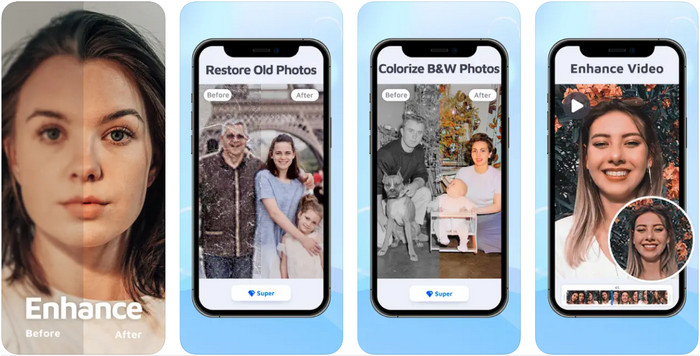
คุณสามารถดาวน์โหลดแอปปรับสีรูปภาพนี้บน iOS เพื่อใช้ปรับแต่งงานกราฟิกได้ EnhanceFox ให้โอกาสผู้ใช้ในการทำให้ภาพที่ถ่ายมาดูเนียนตาและสวยงามยิ่งขึ้นกว่าต้นฉบับ แม้ว่าคุณจะเป็นมือใหม่ด้านการแต่งภาพ คุณก็สามารถเรียนรู้และใช้งานแอปนี้จนคล่องเพื่อทำให้รูปของคุณดูสวยกว่าเดิมได้ นอกจากนี้ยังสามารถเปลี่ยนภาพที่เบลอให้กลายเป็นความละเอียดสูงด้วยความช่วยเหลือของ AI ในเครื่องมือนี้ แม้คุณจะใช้เวอร์ชันฟรีได้ แต่หากต้องการเข้าถึงฟังก์ชันทั้งหมด คุณจำเป็นต้องซื้อเวอร์ชันโปร.
ข้อดี
- คุณสามารถดาวน์โหลดแอปบน iOS ได้ฟรี
- มันซ่อมแซมและเปลี่ยนภาพให้ดูดีขึ้น
- แอพนี้รองรับ AI
จุดด้อย
- ฟีเจอร์บางอย่างไม่มีในเวอร์ชันฟรี
- คุณจะต้องเชื่อมต่ออินเทอร์เน็ตเพื่อประมวลผลภาพของคุณ
Remini - โปรแกรมปรับปรุงภาพ AI 4+
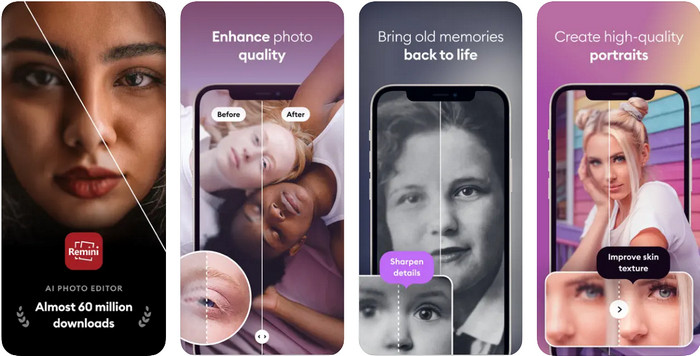
Remini เป็นหนึ่งในแอปเพิ่มสีรูปภาพยอดนิยมที่คุณสามารถดาวน์โหลดได้ทั้งบน iOS และ Android ความสามารถในการปรับปรุงคุณภาพภาพถ่ายทำให้ผู้ใช้จำนวนมากบนทั้งสองแพลตฟอร์มให้ความสนใจ ด้วยชุดฟีเจอร์การแก้ไขรูปภาพ คุณสามารถชุบชีวิตภาพเก่าให้คมชัดขึ้นได้ในเวลาไม่ถึงวินาทีด้วยเทคโนโลยี AI นอกจากนี้คุณยังสามารถปรับแต่งใบหน้าให้สวยงามก่อนนำเซลฟีไปใช้งานได้อีกด้วย แม้จะต้องซื้อแอป แต่คุณสามารถเลือกประเภทการสมัครสมาชิกได้ทั้งแบบรายสัปดาห์ รายเดือน หรือรายปี.
ข้อดี
- เปลี่ยนภาพถ่ายใบหน้าของคุณให้เป็นภาพที่เรียบเนียน
- ซ่อมแซมสีที่หายไปบนภาพที่คุณมีด้วยเทคโนโลยี AI
- ตกแต่งรูปภาพของคุณโดยเปลี่ยนการตั้งค่าในแอพนี้
จุดด้อย
- ราคาของคุณสมบัติแต่ละอย่างของแอพนี้มีการชำระเงินเพิ่มเติม
- จะต่ออายุค่าธรรมเนียมการสมัครสมาชิกโดยอัตโนมัติหลังจากสิ้นสุดการสมัครสมาชิก
Colorized - สีให้กับรูปภาพเก่า
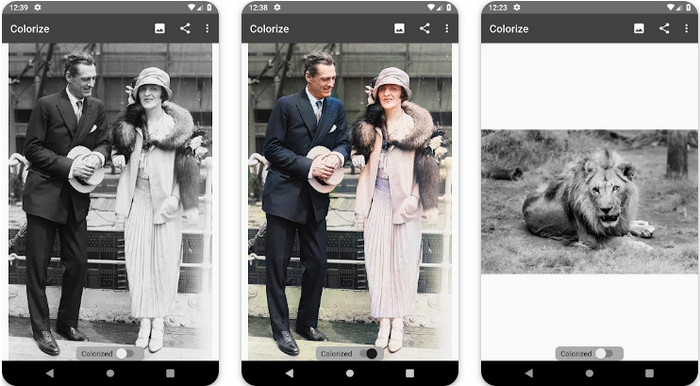
Colorize เป็นแอปสแกนอัจฉริยะบนอุปกรณ์ Android ที่ช่วยกู้สีที่หายไปในรูปของคุณและทำการบูรณะภาพถ่ายเก่า คุณสามารถเรียนรู้วิธีเพิ่มสีดวงตาในรูปถ่ายด้วยฟีเจอร์แก้ไขของแอป แม้ว่าแอปอื่นอาจไม่มีฟังก์ชันนี้ แอปนี้สามารถเปลี่ยนภาพขาวดำของคุณให้กลายเป็นภาพสีด้วยเทคโนโลยี Photomyne ตัวแอปถูกออกแบบมาอย่างชัดเจนและใช้งานง่ายมาก แม้ว่านี่จะเป็นครั้งแรกที่คุณลองแต่งภาพก็ตาม เช่นเดียวกับแอปอื่น ๆ ที่กล่าวถึง คุณต้องซื้อภายในแอปก่อนจึงจะใช้งานฟีเจอร์ต่าง ๆ ได้.
ข้อดี
- เป็นการเพิ่มสีให้กับภาพขาวดำโดยอัตโนมัติด้วย Photomyne
- ผู้เชี่ยวชาญหรือไม่สามารถใช้ซอฟต์แวร์นี้ได้อย่างง่ายดายเนื่องจากสร้างขึ้น
- การตั้งค่าสีของแอพนี้เหนือกว่าแอพแต่งสีรูปภาพอื่นๆ มาก
จุดด้อย
- มันพลาดบางจุดเมื่อคุณเพิ่มสีให้กับภาพ
- มันครอบตัดรูปภาพโดยอัตโนมัติเมื่อประมวลผล
- คุณจะต้องซื้อแอปเพื่อป้องกันข้อจำกัด
โปรแกรมแก้ไขภาพ Photoshop Express
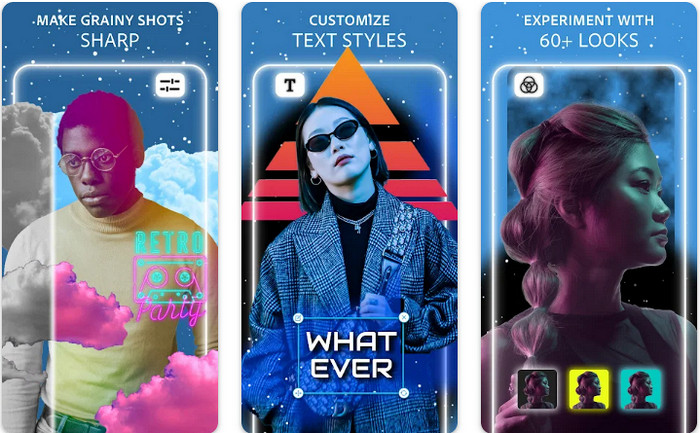
Photoshop Express Photo Editor เป็นเวอร์ชันย่อของโปรแกรมระดับมืออาชีพที่ผู้เชี่ยวชาญและนักแต่งภาพนับล้านใช้กันอยู่แล้วเพื่อปรับรูปให้เป็นแบบ HD คุณสามารถใช้ Photoshop ปรับสีรูปภาพเวอร์ชันนี้ได้ทั้งบน Android และ iOS มันแก้ปัญหาได้ไหม? ได้ และทำได้อย่างง่ายดาย ดังที่กล่าวไปก่อนหน้านี้ แอปนี้คล้าย Photoshop ไม่ได้คล้ายที่หน้าตาโปรแกรม (GUI) แต่คล้ายที่ความสามารถในการแก้ไขภาพ มันให้ผลลัพธ์ที่ละเอียดคมชัดแก่ผู้ใช้ด้วยการเพิ่มหรือปรับค่า PPI ของทุกภาพที่คุณถ่าย อย่างไรก็ตามแอปนี้ค่อนข้างใช้ยาก คุณอาจต้องสละเวลาอ่านวิธีใช้งาน แต่ถึงอย่างนั้น นี่ก็ถือเป็นแพ็กเกจซอฟต์แวร์ที่ครบถ้วนที่สุดที่คุณต้องมี.
ข้อดี
- คุณสามารถดาวน์โหลดซอฟต์แวร์ได้ไม่เฉพาะบนเดสก์ท็อปแต่ยังดาวน์โหลดบนอุปกรณ์เคลื่อนที่ได้ด้วย
- รองรับคุณสมบัติการแก้ไขระดับมืออาชีพที่คุณสามารถนำไปใช้กับรูปภาพของคุณได้
- มีความคล้ายคลึงกันกับ Photoshop เพราะทั้งคู่ให้ผลลัพธ์ระดับมืออาชีพ
- คุณสามารถทำการแก้ไขได้หลายประเภทที่นี่ ซึ่งแอปอื่นๆ ไม่สามารถให้คุณได้
จุดด้อย
- แอปอาจมีราคาสูงเมื่อเทียบกับการซื้อในแอปอื่นๆ
- จำเป็นต้องปรับปรุงปัญหาเล็กน้อยอื่นๆ
ส่วนที่ 2 ตัวเพิ่มคุณภาพภาพถ่ายที่แนะนำยอดนิยมซึ่งคุณไม่จำเป็นต้องดาวน์โหลด [บริการบนเว็บ]
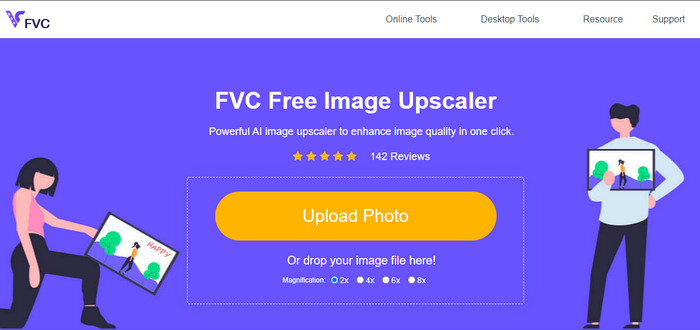
FVC Free Image Upscaler สามารถช่วยคุณแก้ปัญหาได้โดยไม่ต้องเสียเงินซื้ออะไรเลย เครื่องมือเพิ่มคุณภาพรูปภาพนี้ใช้งานได้บนเว็บ คุณจึงไม่จำเป็นต้องดาวน์โหลดก่อนใช้ นอกจากนี้คุณยังสามารถใช้ประโยชน์จากฟีเจอร์แก้ไขภาพด้วยปัญญาประดิษฐ์อันทรงพลังที่สามารถสแกนหาว่าภาพของคุณมีปัญหาตรงไหนและแก้ไขให้ทันที เมื่อเทียบกับแอปอื่นที่เราได้กล่าวถึง นี่ถือเป็นตัวเพิ่มคุณภาพภาพแบบคลิกเดียวที่ตอบโจทย์ที่สุด เพียงอัปโหลดรูป ปรับระดับการขยาย แล้วคุณก็จะได้เวอร์ชันภาพที่ถูกปรับปรุงแล้ว หากคุณใช้ตัวนี้ คุณแทบไม่ต้องมานั่งปรับแต่งรายละเอียดอะไรเพิ่มเติม อยากลองไหม? คลิกที่ลิงก์ ซึ่งจะพาคุณไปยังหน้าเว็บของเครื่องมือเพิ่มคุณภาพภาพโดยตรง.
ส่วนที่ 3 คำถามที่พบบ่อยเกี่ยวกับ Photo Colour Enhancer
ฉันจำเป็นต้องเป็นมืออาชีพเพื่อใช้ตัวปรับสีภาพถ่ายหรือไม่?
หากคุณกำลังใช้ซอฟต์แวร์ที่พัฒนามาอย่างดี คุณจะต้องมีความคิดเกี่ยวกับคุณสมบัติและการทำงานของมันในรูปภาพ ไม่ใช่มืออาชีพ ไม่ใช่มืออาชีพ อย่างไรก็ตาม มีซอฟต์แวร์ที่เรียบง่าย ซึ่งหมายความว่ารองรับ AI; บางครั้งคุณไม่จำเป็นต้องปรับแต่งหรือบางครั้งก็ทำ สำหรับผู้เริ่มต้น คุณต้องใช้ซอฟต์แวร์ที่ใช้งานง่ายก่อนที่จะยกระดับเกมของคุณไปสู่ความเป็นมืออาชีพ
จะเกิดอะไรขึ้นกับภาพที่ฉันปรับปรุงสี
ภาพที่มีสีสมบูรณ์จะมีรายละเอียดและคมชัดมากกว่าภาพที่รองรับสีน้อย ไม่สามารถมองเห็นพิกเซลของพวกมันได้เมื่อเทียบกับภาพถ่ายที่รองรับคุณภาพต่ำ
รูปแบบภาพใดที่รองรับการผสมสีของภาพได้ดีที่สุด
JPEG และ PNG รองรับ 16 ล้านสีและเป็นหนึ่งในรูปแบบภาพที่ดีที่สุดที่คุณสามารถใช้เพื่อวัตถุประสงค์ต่างๆ แต่ HEIC รองรับบิตขั้นสูงเมื่อเทียบกับรูปแบบภาพสองรูปแบบ
สรุป
คุณจะเลือกตัวปรับสีภาพตัวใดในแอปที่เรารีวิว ด้วยข้อมูลทั้งหมดที่เราเพิ่ม คุณจะสามารถทราบได้อย่างรวดเร็วว่าคุณควรดาวน์โหลดแอปใดบนอุปกรณ์ของคุณ แม้ว่าจะมีข้อดีและข้อเสียต่างกัน แต่ยังสามารถปรับปรุงสีรูปภาพของคุณได้อย่างรวดเร็ว
-
 ตัวเพิ่มประสิทธิภาพพิกเซล 7 อันดับแรกสำหรับเว็บเบราว์เซอร์ทั้งหมดที่คุณต้องใช้
 หากคุณต้องการทราบเครื่องมือเพิ่มประสิทธิภาพพิกเซลที่ดีที่สุด คุณควรตรวจสอบโพสต์นี้ บทความนี้แสดงรายการเครื่องมือเพิ่มประสิทธิภาพพิกเซลภาพถ่ายที่ดีที่สุดเจ็ดรายการสำหรับเว็บเบราว์เซอร์ทั้งหมด
-
 แอป Photo Resizer ที่ดีที่สุดออนไลน์ ออฟไลน์ Android และ iPhone
 แอพปรับขนาดรูปภาพที่ดีที่สุดคืออะไร? คลิกที่หน้าเพื่อเรียนรู้เกี่ยวกับแอพปรับขนาดรูปภาพที่ทรงพลังที่สุดห้าอันดับแรกที่คุณสามารถใช้เพื่อปรับปรุงหรือปรับขนาดไฟล์ของคุณ
-
 ตัวขยายรูปภาพออนไลน์และออฟไลน์ที่ดีที่สุด 7 อันดับแรก
 ต้องการเรียนรู้เครื่องมือขยายรูปภาพที่มีประสิทธิภาพสูงสุดสำหรับอุปกรณ์ Windows หรือ Mac ของคุณหรือไม่? อ่านโพสต์นี้เพื่อทราบเครื่องขยายภาพที่ดีที่สุดที่ควรค่าแก่การลอง
