


 Video Converter Ultimate
 บันทึกหน้าจอ
 ซ่อมวิดีโอ
รีวิวโปรแกรมปรับปรุงรูปภาพ Cutout Pro: คุณสมบัติหลักที่น่าหลงใหล
เครื่องเพิ่มคุณภาพรูปภาพได้กลายเป็นตัวช่วยสำคัญในโลกของภาพดิจิทัล การมองหาเครื่องมือที่ใช่เพื่อยกระดับรูปภาพของคุณจากธรรมดาให้กลายเป็นโดดเด่นจึงเป็นเรื่องสำคัญ ปัจจุบันมีเครื่องมือมากมายที่ช่วยเพิ่มคุณภาพรูปภาพ แต่การจะหาเครื่องมือที่เชื่อถือได้ ปลอดภัย และมีประสิทธิภาพนั้นไม่ใช่เรื่องง่าย โชคดีที่ Cutout Pro Image Enhancer กลายเป็นคำตอบที่คุณกำลังมองหา โดยแก่นหลักของ Cutout Pro Image Enhancer คือการปลดล็อกศักยภาพและเสริมสิ่งที่รูปของคุณยังขาดอยู่ เพื่อให้ได้ผลลัพธ์ที่ราบรื่นและมีคุณภาพ ตอบโจทย์ความต้องการด้านภาพของคุณ เมื่อเราไล่ดูฟีเจอร์เด่นต่าง ๆ ที่ทำให้เครื่องมือนี้เหมาะกับคุณ บทความนี้จะพาคุณเจาะลึก Cutout Pro Image Enhancer ทั้งในด้านคุณภาพผลลัพธ์ไปจนถึงรูปแบบไฟล์ภาพที่รองรับ การอ่านต่อไปจะทำให้คุณได้ข้อมูลครบถ้วนสำหรับการเพิ่มคุณภาพรูปภาพด้วย Cutout Pro นอกจากนี้ยังมีการแนะนำเครื่องมือทางเลือกที่ควรจับตามองไว้ในบทความนี้ด้วย อย่าจบแค่ถ่าย แก้ไข แล้วอัปโหลดรูปเท่านั้น แต่ให้เริ่มเพิ่มขั้นตอน “การเพิ่มคุณภาพรูปภาพ” เข้าไปตั้งแต่วันนี้!

ส่วนที่ 1 รีวิว Cutout Pro Image Enhancer
Cutout Pro สร้างเครื่องมือที่มีประโยชน์ซึ่งช่วยให้ผู้ใช้แก้ไขภาพได้อย่างรวดเร็ว ในกรณีนี้คือเครื่องมือเพิ่มประสิทธิภาพรูปภาพ อินเทอร์เฟซของเครื่องมือเพิ่มประสิทธิภาพรูปภาพ Cutout Pro นั้นใช้งานง่ายสำหรับทั้งผู้เริ่มต้นและมืออาชีพ เพื่อให้ได้ผลลัพธ์คุณภาพของภาพที่ไม่สูญเสีย โปรแกรมปรับปรุงภาพนี้ใช้ AI เพื่อปรับแต่งรายละเอียดที่ดีที่สุดที่แม้แต่มืออาชีพก็อาจมองข้ามไป คุณจะประหยัดเวลาได้ในทันทีโดยปล่อยให้ AI ทำหน้าที่ระบุและปรับปรุงส่วนต่างๆ ของภาพของคุณ เครื่องมือที่ขับเคลื่อนด้วย AI นี้ไม่เพียงแต่รองรับการปรับปรุงรูปภาพเท่านั้น แต่ยังมีคุณสมบัติต่างๆ เช่น การลบพื้นหลังและตัวแปลงรูปภาพ ทำให้เป็นเครื่องมือที่ยืดหยุ่นเมื่อทำงานหลายอย่างพร้อมกัน รายการด้านล่างนี้คือคุณสมบัติหลักบางประการที่คุณคาดหวังได้
คุณสมบัติหลัก
◆ การเพิ่มคุณภาพรูปภาพ เทคโนโลยี AI ที่ผสานอยู่ในเครื่องมือจะใช้การประมวลผลขั้นสูงเพื่อขยายขนาดภาพ ปรับสีให้ถูกต้อง เพิ่มความคมชัด และลดนอยส์ ตามความต้องการของรูปภาพแต่ละใบของคุณ.
◆ ใช้งานได้บนหลายอุปกรณ์ คุณสามารถใช้ฟังก์ชันเพิ่มคุณภาพรูปภาพผ่านเบราว์เซอร์บนอุปกรณ์ใดก็ได้ ทำให้คุณใช้งานฟีเจอร์ต่าง ๆ ได้อย่างสะดวกสบายบนอุปกรณ์คู่ใจของคุณ.
◆ ประมวลผลแบบแบตช์ Cutout Pro Image Enhancer โดดเด่นเรื่องการทำงานหลายอย่างพร้อมกันและช่วยประหยัดเวลา ด้วยฟังก์ชันประมวลผลแบบแบตช์ที่ให้คุณเพิ่มคุณภาพรูปหลาย ๆ ใบได้อย่างต่อเนื่อง โดยไม่ต้องรอให้ภาพหนึ่งเสร็จแล้วจึงค่อยเริ่มอีกภาพ.
◆ เครื่องมือ AI สำหรับตัดส่วนเกินออก (AI cutout tools) ช่วยลบวัตถุ บุคคล ความรก และจุดบกพร่องที่ไม่ต้องการออกจากภาพ ซึ่งทำลายความสวยงามโดยรวมของรูป นอกจากนี้ยังใช้กับการลบตัวอักษรที่ไม่ต้องการออกจากภาพได้เช่นกัน จะลบข้อความออกจากรูปภาพอย่างไร?
◆ การลบพื้นหลัง ฟีเจอร์นี้มีความแม่นยำในการลบพื้นหลังอยู่ในระดับยอดเยี่ยม โดยไม่จำเป็นต้องใช้ฉากเขียว (greenscreen) เพราะ AI จะระบุจุดโฟกัสของภาพและวาดเส้นรอบตัวแบบ (subject) ให้อัตโนมัติเพื่อแยกพื้นหลังออกอย่างแม่นยำ.
◆ ตัวใส่สีให้รูปภาพ (Photo colorizer) สามารถเปลี่ยนรูปเก่าขาวดำให้กลับมามีชีวิตอีกครั้ง ด้วยการใส่สีที่ระบบมองว่าเหมาะสมและช่วยให้ภาพดูสดใสมีมิติยิ่งขึ้น.
คุณภาพผลผลิต
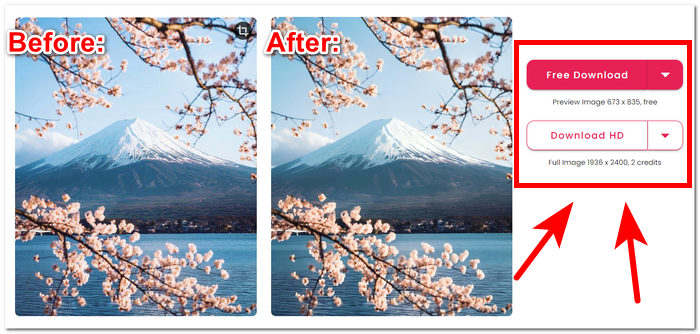
คุณภาพผลงานสำหรับ Cutout Pro Image Enhancer ถูกจำกัดไว้ที่ 2 เท่าเท่านั้น โดยจะชำระเป็นเครดิต รายการด้านล่างนี้คือคุณภาพผลงานที่มีใน Cutout Pro Image Enhancer
ดาวน์โหลดฟรี: PNG และ JPG - ความละเอียด 673 x 835
ดาวน์โหลดแบบ HD: PNG และ JPG - ความละเอียด 1936 x 2400
รูปแบบภาพที่รองรับ
Cutout Pro Image Enhancer รองรับรูปแบบภาพที่หลากหลาย ทำให้มั่นใจได้ถึงความยืดหยุ่นในการจัดการไฟล์ประเภทต่างๆ รูปแบบรูปภาพที่รองรับได้แก่ PNG, JPG, JPEG, BMP และ WEBP ไม่ว่าคุณจะทำงานกับรูปภาพโปร่งใส ภาพถ่ายคุณภาพสูง หรือรูปแบบที่เหมาะกับเว็บต่างๆ Cutout Pro ช่วยให้ผู้ใช้สามารถปรับปรุงและแก้ไขรูปภาพในนามสกุลไฟล์ต่างๆ ที่ใช้กันทั่วไปได้อย่างราบรื่น
คุณสมบัติ Cutout Pro Image Enhancer สามารถช่วยแก้ปัญหาการลดขนาดคุณภาพของภาพได้อย่างง่ายดาย อย่างไรก็ตาม จำเป็นต้องตรวจสอบเวอร์ชันเฉพาะและการอัพเดตของ Cutout Pro เพื่อดูข้อมูลที่ถูกต้องและเป็นปัจจุบันที่สุดเกี่ยวกับรูปแบบภาพ คุณสมบัติ และคุณภาพงานพิมพ์ที่รองรับ
ส่วนที่ 2 ทางเลือกของ Cutout Pro เพื่อปรับปรุงภาพถ่าย
หากคุณกำลังมองหาทางเลือกที่ใช้งานฟรี มีประสิทธิภาพ และเชื่อถือได้แทน Cutout Pro เผื่อกรณีที่ไม่สามารถเข้าใช้งานได้ ไม่ต้องกังวลไป FVC Free Image Upscaler คือคำตอบให้คุณ ถือเป็นหนึ่งในเครื่องมือบนเว็บที่ดีที่สุดในหมวดตัวเพิ่มคุณภาพรูปภาพ ด้วยตัวเลือกการขยายภาพได้สูงสุดถึง 8 เท่า ซึ่งสูงกว่าเครื่องมือบนเว็บส่วนใหญ่ ทำให้กลายเป็นตัวเลือกทดแทน Cutout Pro Image Enhancer ที่เหมาะสม FVC ใช้เทคโนโลยี AI ขั้นสูงในการสร้างผลลัพธ์ที่เนียนตาและใกล้เคียงความสมบูรณ์แบบ ทั้งที่ให้ใช้งานได้ฟรี ในขณะที่ Cutout Pro Image Enhancer อาจจำกัดคุณภาพผลลัพธ์สำหรับผู้ใช้ฟรี และมีตัวเลือกการขยายสูงสุดเพียง 2 เท่าเท่านั้น หากต้องการทราบว่าอะไรทำให้ FVC Free Image Upscaler โดดเด่น ด้านล่างนี้คือคุณสมบัติหลักบางส่วนของมัน.
◆ ตัวขยายภาพที่ผสาน AI การใช้ AI เพื่อระบุส่วนที่เบลอแล้วปรับให้คมชัดขึ้นโดยอัตโนมัติ ช่วยให้การทำงานรวดเร็วและง่ายดาย โดยไม่ต้องกังวลเรื่องคุณภาพภาพที่ลดลง ระบบจะเพิ่มคุณภาพภาพตามความต้องการของรูปแต่ละใบ ด้วยการปรับพิกเซล เพิ่มความคม และปรับสี.
◆ ขยายได้ถึงแปดเท่า FVC ทำได้มากกว่าแค่ตัวเลขปกติ เครื่องมือเพิ่มคุณภาพภาพส่วนมากมักจำกัดการขยายไว้เพียง 2 เท่า และบางเจ้ามีตัวเลือกสูงกว่านี้เฉพาะสำหรับผู้ใช้แบบเสียเงิน แต่เครื่องมือนี้ให้ผู้ใช้เพิ่มคุณภาพและขยายภาพได้มากถึง 8 เท่า.
◆ ใช้งานง่าย อินเทอร์เฟซเข้าใจง่ายตรงไปตรงมา เหมือนเป้าหมายของเครื่องมือที่ต้องการช่วยให้ผู้ใช้เพิ่มคุณภาพรูปภาพได้โดยไม่มีโฆษณารบกวนและไม่มีค่าใช้จ่ายแอบแฝง.
◆ พิมพ์งานและใช้เป็นวอลเปเปอร์ ผลลัพธ์ที่ได้สามารถนำไปใช้พิมพ์งาน หรือใช้เป็นวอลเปเปอร์บนเดสก์ท็อปหรือมือถือได้โดยที่ยังคงความคมชัด ตัวช่วยเพิ่มคุณภาพรูปภาพคุณภาพสูงเหล่านี้ทำให้คุณสามารถนำรูปเบลอ ๆ มาใช้ซ้ำเพื่อการพิมพ์หรือทำวอลเปเปอร์ได้.
◆ รองรับไฟล์หลายรูปแบบอย่างยืดหยุ่น เปลี่ยนรูปภาพของคุณให้เป็นผลงานชิ้นเอกไม่ว่ารูปแบบไฟล์จะเป็นอะไรก็ตาม ทั้ง JPG, JPEG หรือ BMP คุณก็สามารถอัปโหลดขึ้นแพลตฟอร์มของเราได้อย่างง่ายดาย ให้เราช่วยทำให้จินตนาการด้านภาพของคุณกลายเป็นจริง!
◆ การเพิ่มคุณภาพด้วยความเร็วสูง ความเร็วในการประมวลผลรวดเร็วและให้ผลลัพธ์ที่น่าประทับใจ เพราะ AI ได้รับการฝึกจากภาพนับล้านไฟล์เพื่อให้ได้ผลลัพธ์ที่คมชัดในระดับพิกเซล.
เพื่อสรุปสิ่งต่างๆ เครื่องมือทั้งสองจะสร้างผลลัพธ์ที่มีคุณภาพดีที่สุดอย่างมืออาชีพ ไม่มีที่ว่างสำหรับภาพเบลอและข้อบกพร่อง ทำให้ FVC และ Cutout Pro เป็นเครื่องมือที่เชื่อถือได้ในการใช้งาน ในแง่ของคุณสมบัติ Cutout Pro มีความได้เปรียบในด้านความพร้อมใช้งานบนอุปกรณ์หลายเครื่องและการประมวลผลเป็นชุด ในทางกลับกัน FVC Free Image Upscaler ชนะในด้านผลลัพธ์ด้านคุณภาพ การประมวลผลที่รวดเร็ว และความพร้อมของฟีเจอร์ต่างๆ ฟรี
ส่วนที่ 3 คำถามที่พบบ่อยเกี่ยวกับ Cutout Pro Image Enhancer
Cutout Pro บันทึกรูปภาพหรือไม่
Cutout Pro ช่วยให้ผู้ใช้สามารถบันทึกรูปภาพที่ได้รับการปรับปรุงได้อย่างง่ายดายโดยเสนอตัวเลือกการบันทึกที่หลากหลาย ด้วยความยืดหยุ่นในการเลือกรูปแบบและความละเอียดที่แตกต่างกัน ผู้ใช้สามารถปรับแต่งภาพที่บันทึกไว้เพื่อให้สอดคล้องกับความต้องการเฉพาะและข้อกำหนดของโครงการ คุณสมบัตินี้ช่วยให้มั่นใจได้ถึงประสบการณ์ที่ราบรื่นและปรับแต่งได้เพื่อรักษาผลลัพธ์ที่แก้ไขด้วยความชัดเจนและรายละเอียดที่เหมาะสมที่สุด
Cutout Pro มีแอปออฟไลน์หรือไม่
Cutout Pro ไม่มีแอปพลิเคชันออฟไลน์ โดยไม่ให้ผู้ใช้สามารถแก้ไขและปรับปรุงรูปภาพได้โดยไม่จำเป็นต้องเชื่อมต่ออินเทอร์เน็ตอย่างต่อเนื่อง หากต้องการใช้คุณสมบัติการปรับปรุงรูปภาพของ Cutout Pro คุณต้องเชื่อมต่ออินเทอร์เน็ตเนื่องจากเป็นเครื่องมือบนเว็บ
ฉันสามารถสร้างภาพถ่าย 2×2 ด้วย Cutout Pro ได้หรือไม่
Cutout Pro ผู้ใช้สามารถสร้างภาพถ่าย 2×2 ได้อย่างง่ายดายโดยใช้เครื่องมือแก้ไขอเนกประสงค์ ซอฟต์แวร์นี้รองรับขนาดที่กำหนดเอง โดยให้ความยืดหยุ่นในการครอบตัดและปรับขนาดรูปภาพอย่างแม่นยำตามความต้องการเฉพาะ ทำให้เหมาะสำหรับการสร้างเลย์เอาต์รูปภาพ 2×2 แบบกำหนดเอง คุณสมบัตินี้ช่วยให้ผู้ใช้ได้องค์ประกอบและรูปแบบที่ต้องการสำหรับภาพได้อย่างง่ายดาย
Cutout Pro ดีหรือไม่ดี?
ประสิทธิภาพของ Cutout Pro แตกต่างกันไปขึ้นอยู่กับความชอบส่วนบุคคลและข้อกำหนดเฉพาะ แม้ว่าจะได้รับการยอมรับอย่างกว้างขวางว่าเป็นโปรแกรมปรับปรุงภาพที่แข็งแกร่งพร้อมคุณสมบัติที่หลากหลาย แต่ความเหมาะสมก็ขึ้นอยู่กับปัจจัยต่างๆ เช่น อินเทอร์เฟซที่เป็นมิตรต่อผู้ใช้ ฟังก์ชันการทำงานที่ต้องการ และการตั้งค่าการแก้ไขส่วนบุคคล ผู้ใช้ที่มีศักยภาพควรศึกษาซอฟต์แวร์เพื่อตรวจสอบความเข้ากันได้กับความคาดหวังและขั้นตอนการทำงานของพวกเขา
Cutout Pro ฟรีหรือเปล่า?
Cutout Pro มอบทั้งเวอร์ชันฟรีและพรีเมียมให้กับผู้ใช้ ก่อนที่จะเลือกเวอร์ชันใดเวอร์ชันหนึ่ง จำเป็นต้องตรวจสอบรายละเอียดราคาและตัวเลือกสิทธิ์การใช้งานที่เกี่ยวข้องอย่างละเอียดก่อน โปรดทราบว่าฟีเจอร์หรือความสามารถขั้นสูงอาจมีเฉพาะในเวอร์ชันพรีเมียม ซึ่งทำให้ยากและมีโอกาสน้อยที่จะเลือกเป็นเครื่องมือที่คุณใช้งาน
สรุป
สรุปแล้ว ทั้ง Cutout Pro Image Enhancer และ FVC Free Image Upscaler ต่างก็โดดเด่นในฐานะเครื่องมือระดับมืออาชีพที่นำพลังของ AI มาใช้ยกระดับการเพิ่มคุณภาพรูปภาพให้ถึงมาตรฐานใหม่ด้านความคมชัดและความสวยงาม การมุ่งมั่นผลักดันขีดจำกัดของคุณภาพภาพทำให้ทั้งสองเครื่องมือนี้กลายเป็นทรัพยากรที่มีค่าสำหรับทุกคน ท้ายที่สุดแล้ว การเลือกใช้งานระหว่างสองเครื่องมือนี้ขึ้นอยู่กับความสะดวกและการใช้งานจริงของแต่ละคน ไม่ว่าจะเลือกใช้ฟีเจอร์ขั้นสูงของ Cutout Pro หรือความเป็นมิตรและใช้งานง่ายของ FVC Free Image Upscaler ผู้ใช้ก็สามารถเพิ่มคุณภาพรูปภาพได้อย่างมั่นใจด้วยเทคโนโลยี AI ที่ออกแบบมาให้ตอบโจทย์ความต้องการเฉพาะของตนเอง โลกของการแก้ไขรูปภาพยังคงได้รับการต่อยอดอย่างต่อเนื่องด้วยเครื่องมือเหล่านี้ ซึ่งมอบตัวเลือกที่หลากหลายสำหรับการยกระดับภาพให้สวยงามยิ่งขึ้น.
-
 รีวิว PicWish Photo Enhancer และเครื่องมือทางเลือกที่ต้องลอง
 ค้นพบความมหัศจรรย์ที่โปรแกรมเพิ่มประสิทธิภาพรูปภาพ PicWish นำมาสู่โลกแห่งการแก้ไขภาพ การตรวจสอบเชิงลึกและการสำรวจทางเลือกที่เป็นไปได้เพื่อให้คุณลอง
-
 รีวิว Fotor สำหรับการลบพื้นหลังและเครื่องมือเพิ่มประสิทธิภาพภาพถ่าย
 ทุกสิ่งที่คุณต้องรู้เกี่ยวกับ Fotor Background Remover และ Photo Enhancer ดูคุณสมบัติบางอย่างและดูทางเลือกที่แนะนำที่เหมาะกับความต้องการของคุณ
-
 วิธีเพิ่มขนาดภาพออนไลน์และออฟไลน์
 ค้นพบวิธีที่ง่ายที่สุดในการเพิ่มขนาดภาพโดยไม่สูญเสียคุณภาพ ดูเครื่องมือและซอฟต์แวร์ปรับขนาดของเราเพื่อให้แน่ใจว่ารูปภาพของคุณมีคุณภาพดีที่สุด
