


 Video Converter Ultimate
 บันทึกหน้าจอ
 ซ่อมวิดีโอ
Fotor ลบคุณสมบัติพื้นหลังและการตรวจสอบการปรับปรุง
เมื่อคุณทำงานตัดต่อรูปภาพ การลบพื้นหลัง และการเพิ่มคุณภาพรูปถ่าย ล้วนเป็นเรื่องปกติในสายงานนี้ ซึ่งสามารถยกระดับคุณภาพผลงานของคุณให้โดดเด่นขึ้นได้ และนั่นคือช่วงที่เครื่องมืออย่าง Fotor เข้ามาสู่สนามของการแต่งรูป โดยเน้นที่การลบพื้นหลังและการเพิ่มคุณภาพภาพถ่าย คำถามที่มักจะเกิดขึ้น เช่น Fotor ปลอดภัยไหม? ในรีวิวนี้ เราจะเจาะลึกฟีเจอร์หลากหลายด้านของ Fotor เพื่อคลี่ให้เห็นศักยภาพที่แท้จริงของมัน พร้อมกันนั้น เราจะพาคุณไปทำความรู้จักกับตัวเลือกทางเลือกที่น่าสนใจซึ่งคุณอาจลองใช้งานได้เช่นกัน อ่านรีวิว Fotor ต่อไปเพื่อค้นหาว่า Fotor ทำอะไรได้บ้างในด้านการลบพื้นหลังและการเพิ่มคุณภาพภาพถ่าย และตัดสินใจว่ามันเป็นเครื่องมือที่เหมาะกับความต้องการของคุณจริงหรือไม่.

ส่วนที่ 1. Fotor Review - เครื่องมือลบพื้นหลัง & เครื่องมือปรับปรุงรูปภาพ
การเข้าถึงเครื่องมือแก้ไขที่หลากหลายและมีประสิทธิภาพถือเป็นสิ่งสำคัญในโลกแบบไดนามิกของการถ่ายภาพดิจิทัลและการออกแบบที่สร้างสรรค์ Fotor เป็นโปรแกรมแก้ไขภาพที่ครอบคลุม มอบเครื่องมือที่จำเป็นแก่ผู้ใช้เพื่อสำรวจอาณาจักรที่พัฒนาอยู่ตลอดเวลานี้ สำรวจความสามารถของมัน โดยเฉพาะอย่างยิ่งฟีเจอร์ที่โดดเด่น เช่น เครื่องมือลบพื้นหลังและเครื่องมือเพิ่มประสิทธิภาพรูปภาพ เพื่อยกระดับการเดินทางที่สร้างสรรค์ของคุณวันนี้!
โฟเตอร์
Fotor เครื่องมือแต่งรูปที่มีความหลากหลาย โดดเด่นเรื่องอินเทอร์เฟซที่ใช้งานง่ายและฟีเจอร์น่าประทับใจสำหรับการเพิ่มคุณภาพภาพและการลบพื้นหลัง ฟีเจอร์ Background Remover ของมันช่วยให้ผู้ใช้ลบพื้นหลังและยกระดับรูปภาพได้อย่างง่ายดาย เมื่อนำมาใช้คู่กับตัวเพิ่มคุณภาพรูปภาพ (photo enhancer) ก็จะช่วยให้คุณได้ผลลัพธ์คุณภาพสูงสมบูรณ์แบบตามที่ต้องการ เครื่องมือนี้ไม่ได้ถูกออกแบบมาเพื่อการแต่งรูปเพียงอย่างเดียว แต่ยังมีเทมเพลตมากมายสำหรับผู้ใช้ที่ไม่ใช่มืออาชีพให้เริ่มต้นหรือนำไปใช้ในโปรเจ็กต์ของตนได้ หากคุณกำลังมองหาซอฟต์แวร์ที่รวมเอาเครื่องมือพื้นฐานครบครัน พร้อมฟีเจอร์ลบพื้นหลังและเพิ่มคุณภาพรูปภาพ Fotor ก็อาจเป็นหนึ่งในตัวเลือกที่ควรพิจารณา.
ดีที่สุดสำหรับ
Fotor เหมาะสำหรับบุคคลและธุรกิจที่กำลังมองหาแพลตฟอร์มที่ใช้งานง่ายเพื่อปรับปรุงภาพถ่าย โดยเฉพาะอย่างยิ่งเมื่อการลบพื้นหลังที่มีความแม่นยำเป็นสิ่งจำเป็นเพื่อให้ได้ผลลัพธ์ขั้นสุดท้ายที่สวยงาม ด้านล่างนี้คือคุณสมบัติบางส่วนที่ Fotor มีความสามารถจริงและเหมาะที่สุดสำหรับ:
◆ บุคคลทั่วไปและธุรกิจ ซอฟต์แวร์ที่ใช้งานง่ายนี้ถูกออกแบบมาสำหรับทั้งมืออาชีพและผู้เริ่มต้น ทำให้เป็นโซลูชันที่เหมาะสมสำหรับทั้งบุคคลและธุรกิจในการสร้างและพัฒนาผลงานได้อย่างราบรื่นด้วยอินเทอร์เฟซและฟีเจอร์ที่ตรงไปตรงมา.
◆ เครื่องมือเพิ่มคุณภาพรูปภาพ Fotor อัดแน่นด้วยเทมเพลตและฟิลเตอร์มากมายเพื่อทำให้รูปของคุณมีคุณภาพดีที่สุดเท่าที่จะเป็นไปได้ นอกจากนี้ Fotor ยังช่วยลดความเบลอและข้อบกพร่องต่าง ๆ ด้วยฟีเจอร์เพิ่มคุณภาพภาพถ่าย ทำให้เป็นเครื่องมือที่เหมาะมากเมื่อคุณต้องจัดการกับปัญหาคุณภาพของรูปภาพ.
◆ เครื่องมือลบพื้นหลัง ความแม่นยำของ Fotor ในการลบพื้นหลัง ถือว่าน่าชื่นชมอย่างยิ่ง เพราะให้ผลลัพธ์ที่แม่นยำกว่าเมื่อเทียบกับซอฟต์แวร์อื่น ๆ บนเว็บ.
◆ การปรับแต่งรูปภาพ ภายในมีเครื่องมือที่จำเป็นสำหรับการแต่งรูปและงานที่เกี่ยวข้องอย่างครบถ้วน ส่งผลให้ Fotor กลายเป็นซอฟต์แวร์ตัวเลือกหลักเมื่อคุณต้องจัดการงานแต่งรูปหลายอย่างในคราวเดียว.
ราคา
รูปแบบราคา: Basic และ Pro
Fotor Basic: ฟรี
Fotor Pro: $8.99 ต่อเดือน
◆ การประมวลผลภาพเป็นชุด
◆ โปรแกรมแก้ไขและเพิ่มประสิทธิภาพรูปภาพ
◆ ความพร้อมใช้งานบนอุปกรณ์หลายเครื่อง
◆ เทมเพลตที่สร้างไว้ล่วงหน้า
◆ น้ำยาล้างพื้นหลัง
◆ เครื่องมือภาพตัดปะ
◆ แปลงไฟล์ RAW
◆ ตัวกรองและเอฟเฟกต์ขั้นสูง
◆ ผู้ออกแบบ
ขั้นตอนในการใช้ Fotor Photo Enhancer
ขั้นตอนที่ 1. ไปที่เว็บไซต์ Fotor Photo Enhancer แล้วอัปโหลดรูปที่คุณต้องการเพิ่มคุณภาพในช่อง Enhance Photo Now.
ขั้นตอนที่ 2. Fotor จะประมวลผลรูปของคุณโดยอัตโนมัติ หน้าที่ของคุณที่เหลือคือเปรียบเทียบภาพก่อนและหลังโดยลากลูกศรจากซ้ายไปขวา.
ขั้นตอนที่ 3. เมื่อพอใจกับผลลัพธ์แล้ว ให้คลิก Apply เพื่อบันทึกความคืบหน้าของรูปภาพ.
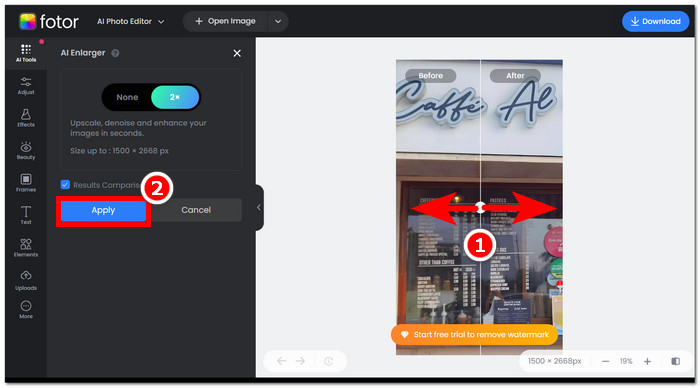
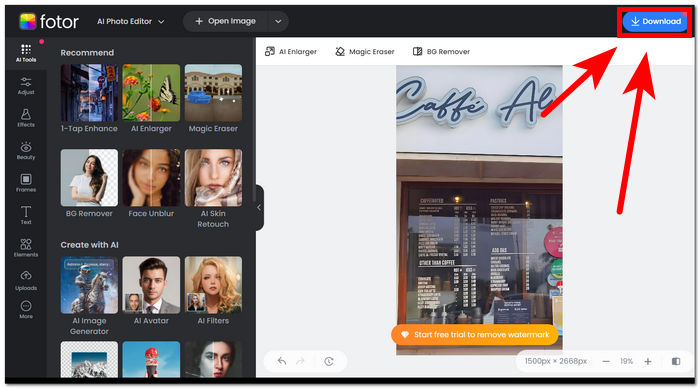
ขั้นตอนที่ 4. เมื่อต้องการบันทึกรูปที่ได้รับการเพิ่มคุณภาพแล้ว ให้คลิก Download ตำแหน่งอยู่มุมขวาบนของหน้าจอ,
ขั้นตอนในการใช้เครื่องมือลบพื้นหลัง Fotor
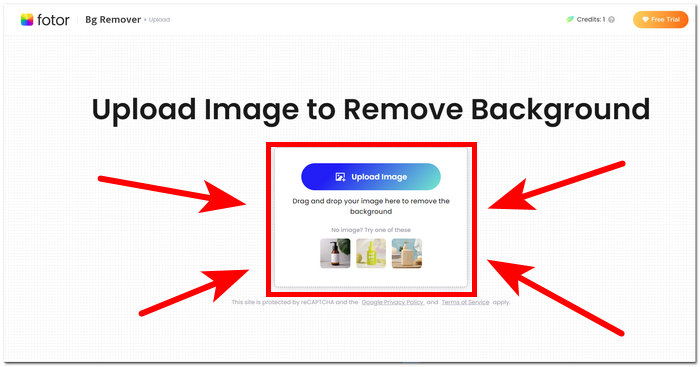
ขั้นตอนที่ 1. ไปที่เว็บไซต์ Fotor Background Remover แล้วอัปโหลดรูปที่คุณต้องการลบพื้นหลังในช่อง Upload Image.
ขั้นตอนที่ 2. เมื่อรูปของคุณถูกโหลดเข้าสู่ซอฟต์แวร์ ระบบจะลบพื้นหลังของรูปที่อัปโหลดให้โดยอัตโนมัติ.
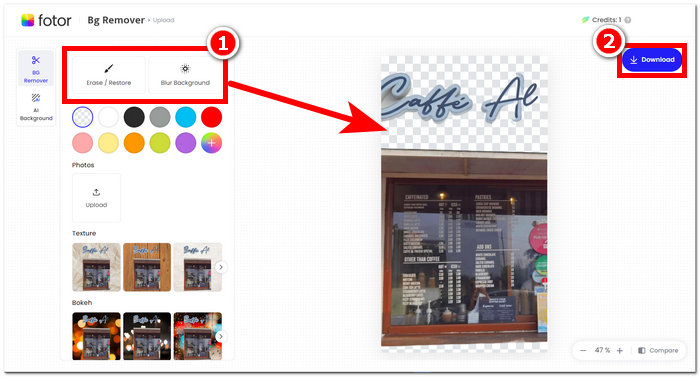
ขั้นตอนที่ 3. คุณสามารถลบ/กู้คืนพื้นหลังได้ด้วยตนเองโดยลองใช้เครื่องมือ Erase/Restore ตามที่ต้องการ ซึ่งอยู่ในแถบนำทางด้านซ้ายบน.
ขั้นตอนที่ 4. เมื่อพอใจกับผลลัพธ์แล้ว ให้คลิก Download ที่มุมขวาบนของหน้าจอ เพื่อบันทึกลงในคอมพิวเตอร์ของคุณ.
เพื่อสรุปรีวิวของ Fotor คุณสมบัติของมันนั้นยอดเยี่ยมเกินไปในด้านการแก้ไขภาพ ดังนั้นสิ่งนี้จะช่วยให้คุณสร้างโปรเจ็กต์ที่ยอดเยี่ยมได้อย่างง่ายดาย นอกเหนือจากการประกอบด้วยเครื่องมือพื้นฐานทั้งหมดในการจัดการกับรูปภาพแล้ว การเน้นไปที่การปรับปรุงรูปภาพและเครื่องมือลบพื้นหลังนั้นราบรื่น เนื่องจากง่ายต่อการใช้งานอินเทอร์เฟซ อย่างไรก็ตาม จากฟีเจอร์ทั้งหมดที่มีมาให้บนโต๊ะ คุณสามารถเพลิดเพลินกับฟีเจอร์และฟังก์ชันการทำงานของ Fotor ได้อย่างเต็มที่เมื่อคุณสมัครแผนรายเดือนเท่านั้น
ส่วนที่ 2 Fotor Alternative เพื่อลบพื้นหลังและรูปภาพระดับสูง
FVC ได้ขยายการพัฒนาเครื่องมือและซอฟต์แวร์เพื่อตอบโจทย์ความต้องการของครีเอเตอร์ในอุตสาหกรรมการแก้ไขภาพเชิงภาพ สองในบรรดาเครื่องมือเหล่านั้นคือ FVC Free Background Remover และ FVC Free Image Upscaler ซึ่งทั้งสองมีโดเมนบนเว็บของตนเองแยกจากกันอย่างชัดเจน เพื่อไม่ให้ผู้ใช้สับสนในวัตถุประสงค์ของแต่ละเครื่องมือ เมื่อเทียบกันแล้ว ซอฟต์แวร์แบบรวมเครื่องมือทุกอย่างไว้ในโปรแกรมเดียวสำหรับงานที่ต่างกันอาจทำให้ต้องใช้เวลาในการทำความคุ้นเคยนานกว่า นอกจากนี้ เครื่องมือ FVC เหล่านี้ยังช่วยให้ผู้สร้างคอนเทนต์ใช้งานฟีเจอร์ได้อย่างอิสระ และลดความยุ่งยากในกระบวนการดาวน์โหลดและติดตั้ง ขั้นตอนการใช้งานเครื่องมือลบพื้นหลังและตัวขยายภาพของ FVC มีดังนี้.
ขั้นตอนการใช้ FVC Free Background Remover:
ขั้นตอนที่ 1. เข้าไปที่เว็บไซต์ FVC Free Background Remover และอัปโหลดรูปที่คุณต้องการลบพื้นหลังออก.
ขั้นตอนที่ 2. FVC AI จะตรวจจับและลบพื้นหลังออกจากรูปของคุณโดยอัตโนมัติ.
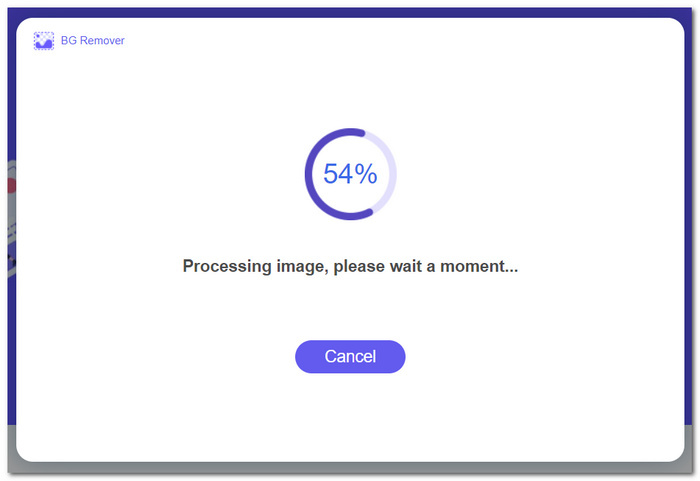
ขั้นตอนที่ 3. เมื่อกระบวนการเสร็จสมบูรณ์ คุณสามารถดาวน์โหลดรูปของคุณได้ทันที.
ขั้นตอนการใช้ฟีเจอร์ของ FVC Free Image Upscaler:
ขั้นตอนที่ 1. อัปโหลดรูปของคุณไปยังเว็บไซต์ FVC Image Upscaler.
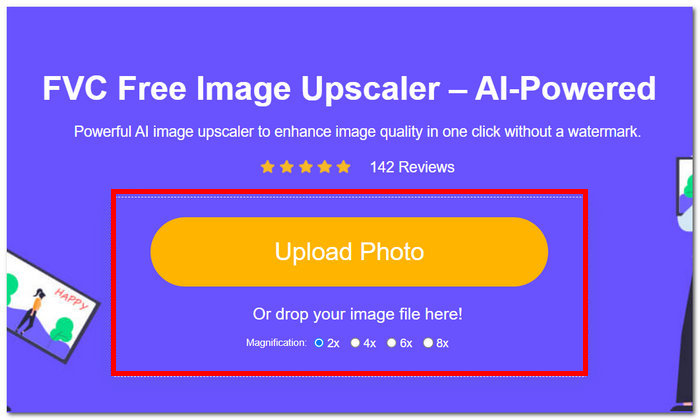
ขั้นตอนที่ 2. เลือกอัตราการขยาย (Magnification) ที่คุณต้องการแล้วคลิกเลือก.
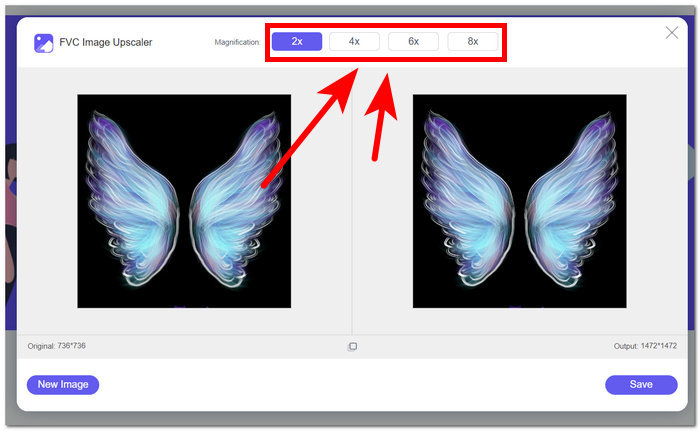
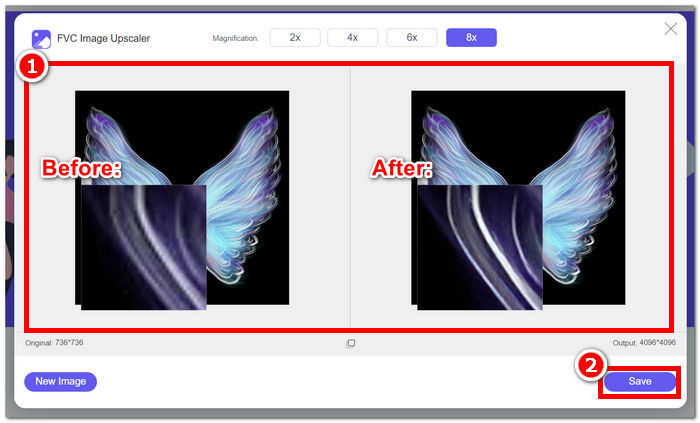
ขั้นตอนที่ 3. เครื่องมือจะประมวลผลรูปภาพให้โดยอัตโนมัติ และคุณสามารถเห็นความแตกต่างตามอัตราการขยายที่เลือก.
ขั้นตอนที่ 4. รูปที่ถูกขยายความละเอียดเรียบร้อยแล้วพร้อมสำหรับการบันทึก เพียงคลิกที่ Download.
เครื่องมือ Fotor และ FVC อาจให้ผลลัพธ์คุณภาพและความแม่นยำเหมือนกันเมื่อต้องจัดการกับการลบพื้นหลังและการเพิ่มขนาดภาพ อย่างไรก็ตาม ความพร้อมใช้งานจะแตกต่างกันเมื่อเครื่องมือ FVC ใช้งานได้ฟรีในเบราว์เซอร์ท้องถิ่นใดๆ ในขณะที่ Fotor อาจมีคุณสมบัติพื้นฐานฟรีแต่มีข้อจำกัด อย่าลืมตรวจสอบฟังก์ชันการทำงานและความสะดวกสบายที่พวกเขานำมาให้คุณก่อน และปล่อยให้ตัวเองดื่มด่ำไปกับการใช้เครื่องมือออนไลน์ที่รวดเร็ว มีประสิทธิภาพ และปลอดภัย FVC ช่วยคุณประหยัดเวลาและกลับมาทำโปรเจ็กต์ที่รอดำเนินการให้เสร็จตรงเวลา
ส่วนที่ 3 คำถามที่พบบ่อยเกี่ยวกับ Fotor
Fotor ใช้งานได้ฟรีหรือไม่?
ใช่ Fotor นำเสนอแพลตฟอร์มแก้ไขภาพเวอร์ชันฟรี โดยให้ผู้ใช้สามารถเข้าถึงเครื่องมือพื้นฐานได้โดยไม่มีค่าใช้จ่าย ช่วยให้บุคคลสามารถใช้คุณลักษณะที่จำเป็นได้โดยไม่ต้องเสียค่าใช้จ่ายใดๆ
Fotor ราคาเท่าไหร่ต่อเดือน?
Fotor มีแผนราคาที่หลากหลาย ครอบคลุมทั้งการสมัครสมาชิกรายเดือนและรายปี โดยมีต้นทุนที่แตกต่างกันขึ้นอยู่กับคุณสมบัติที่รวมไว้ หากต้องการดูข้อมูลราคาที่เป็นปัจจุบันและถูกต้อง ขอแนะนำให้ผู้ใช้ดูที่เว็บไซต์อย่างเป็นทางการของ Fotor เพื่อดูรายละเอียดเกี่ยวกับข้อเสนอปัจจุบันของตน
ทดลองใช้ Fotor ฟรีนานเท่าใด
Fotor อาจให้ทดลองใช้ฟรีสำหรับฟีเจอร์พรีเมียม แม้ว่าระยะเวลาทดลองใช้อาจมีการเปลี่ยนแปลง สำหรับข้อมูลล่าสุดเกี่ยวกับระยะเวลาทดลองใช้ฟรี ขอแนะนำให้ตรวจสอบเว็บไซต์อย่างเป็นทางการของ Fotor
โฟเตอร์ไม่ทำงานเหรอ?
หากคุณประสบปัญหา Fotor ไม่ทำงาน ให้ลองตรวจสอบการเชื่อมต่ออินเทอร์เน็ต ล้างแคชของเบราว์เซอร์ หรืออัปเดตแอปหากคุณใช้เวอร์ชันเดสก์ท็อป หากยังเกิดปัญหาอยู่ ขอแนะนำให้ติดต่อฝ่ายสนับสนุนลูกค้าของ Fotor เพื่อขอความช่วยเหลือ พวกเขาสามารถแนะนำคุณในการแก้ไขปัญหาทางเทคนิคหรือเสนอข้อมูลเชิงลึกเกี่ยวกับการอัปเดตระบบที่อาจเกิดขึ้น
Fotor เป็นโปรแกรมที่ดีหรือไม่?
ใช่ Fotor ถือเป็นโปรแกรมที่ดีสำหรับการแก้ไขภาพ โดยมีอินเทอร์เฟซที่เป็นมิตรต่อผู้ใช้ซึ่งเหมาะสำหรับทั้งผู้เริ่มต้นและผู้ใช้ที่มีประสบการณ์มากกว่า คุณสมบัติที่หลากหลาย รวมถึงตัวลบพื้นหลัง ทำให้ใช้งานได้หลากหลายสำหรับความต้องการในการแก้ไขที่หลากหลาย อย่างไรก็ตาม ความเหมาะสมของ Fotor ขึ้นอยู่กับความชอบส่วนบุคคลและข้อกำหนดเฉพาะในการปรับปรุงภาพถ่าย
สรุป
Fotor ถือเป็นหนึ่งในตัวเลือกที่น่าจับตามอง โดยเฉพาะด้านฟีเจอร์ลบพื้นหลังและเพิ่มคุณภาพรูปภาพ มันได้กลายเป็นหนึ่งในเครื่องมือมาตรฐานสำหรับการแต่งรูป ด้วยความหลากหลายของฟีเจอร์และอินเทอร์เฟซที่รวบรวมเครื่องมือพื้นฐานที่จำเป็นเกือบทั้งหมดไว้ในที่เดียว อย่างไรก็ตาม เมื่อคำนึงถึงความต้องการที่แตกต่างกันของผู้ใช้ การมองหาเครื่องมือทางเลือกอย่าง FVC ก็ช่วยเปิดมุมมองให้กว้างขึ้น ไม่ว่าคุณจะเลือกใช้ Fotor หรือทางเลือกอื่น สิ่งสำคัญคือการเสริมพลังให้เส้นทางการสร้างสรรค์ของคุณด้วยเครื่องมือที่สอดคล้องกับวิสัยทัศน์ของคุณ อย่าลืมลองใช้และดึงศักยภาพของแต่ละเครื่องมือออกมาให้เต็มที่ เพื่อค้นหาเครื่องมือที่เหมาะสมที่สุดสำหรับงานลบพื้นหลังและการเพิ่มคุณภาพรูปภาพของคุณ.
-
 วิธีลบพื้นหลังออกจากรูปภาพโดยใช้ GIMP
 เริ่มต้นใช้งาน GIMP และกระบวนการลบพื้นหลังออกจากรูปภาพทีละขั้นตอน ค้นพบวิธีที่มีประสิทธิภาพในการสร้างภาพที่โปร่งใสโดยใช้ GIMP วันนี้!
-
 วิธีเพิ่มขนาดภาพออนไลน์และออฟไลน์
 ค้นพบวิธีที่ง่ายที่สุดในการเพิ่มขนาดภาพโดยไม่สูญเสียคุณภาพ ดูเครื่องมือและซอฟต์แวร์ปรับขนาดของเราเพื่อให้แน่ใจว่ารูปภาพของคุณมีคุณภาพดีที่สุด
-
 วิธีปรับขนาดรูปภาพใน Photoshop: คำแนะนำที่ต้องรู้
 เรียนรู้กระบวนการปรับขนาดรูปภาพใน Photoshop ทีละขั้นตอน ปฏิบัติตามคำแนะนำนี้เพื่อเปลี่ยนขนาดรูปภาพของคุณอย่างง่ายดายและมีคุณภาพอย่างมีประสิทธิภาพ!
