


 Video Converter Ultimate
 บันทึกหน้าจอ
 ซ่อมวิดีโอ
 ดาวน์โหลดอย่างปลอดภัย
สิ่งที่ต้องทำเมื่อรูปภาพของคุณถูกบีบอัดมากเกินไป: 2 วิธีที่ดีที่สุด
การบีบอัดรูปภาพเป็นวิธีที่ดีในการเพิ่มประสิทธิภาพรูปภาพ ซึ่งจัดการได้ง่ายกว่ามาก โดยเฉพาะอย่างยิ่งสำหรับการใช้บนเว็บไซต์และงานอื่นๆ เช่น การส่งและการอัปโหลด อย่างไรก็ตาม หากทำไม่ถูกต้อง การบีบอัดรูปภาพอาจกลายเป็นฝันร้ายและน่ากังวลใจสำหรับการทำลายคุณภาพของรูปภาพ แต่ต่อไปนี้คือสิ่งที่จะทำให้คุณหมดกังวล เราเข้าใจถึงความจำเป็นในการบีบอัดรูปภาพ แต่แน่นอนว่าคุณต้องมีคำแนะนำที่เหมาะสมเกี่ยวกับวิธีการบีบอัดรูปภาพอย่างราบรื่น
ในบทความนี้ เราจะสอนคุณว่าควรทำอย่างไรกับรูปภาพที่ถูกบีบอัดจนเกินไป และอธิบายสาเหตุที่ทำให้เกิดปัญหาเหล่านี้ เลิกสงสัยแล้วมาเริ่มกันเลย!

ส่วนที่ 1 เหตุใดภาพจึงถูกบีบอัดมากเกินไป
มีสาเหตุมากมายที่ทำให้ภาพถูกบีบอัดมากเกินไป แต่ต่อไปนี้คือปัจจัยทั่วไปที่สุดที่คุณจำเป็นต้องเข้าใจว่าทำไมถึงเกิดขึ้น:
• เมื่อคุณพยายามลดขนาดไฟล์รูปภาพลงอย่างมากด้วยอัตราการบีบอัดที่สูงเกินไป อาจทำให้ข้อมูลในภาพสูญหายอย่างมีนัยสำคัญ การบีบอัดแบบนี้จะทำให้คุณภาพของรูปภาพลดลงอย่างเห็นได้ชัด เพราะรายละเอียดสำคัญถูกลดทอนในกระบวนการนี้
• การใช้เครื่องมือบีบอัดรูปภาพที่ใช้ อัลกอริทึมการบีบอัดที่ไม่เหมาะสม อัลกอริทึมการบีบอัดแต่ละแบบถูกออกแบบมาเพื่อวัตถุประสงค์ที่ต่างกัน การใช้อัลกอริทึมแบบสูญเสียข้อมูล (lossy) อย่าง JPEG กับภาพที่ต้องการรายละเอียดสูง อาจทำให้คุณภาพค่อย ๆ ลดลง เพราะอัลกอริทึมแบบ lossy จะตัดทอนข้อมูลบางส่วนออกเมื่อทำการบีบอัดภาพ
• การบีบอัดภาพซ้ำหลายครั้งย่อมส่งผลกระทบต่อคุณภาพของรูปภาพอย่างแน่นอน นี่เป็นตัวอย่างที่ชัดเจนของรูปภาพที่ถูกบีบอัดเกินไป เพราะในแต่ละรอบของการบีบอัดจะลบข้อมูลออกไปเพิ่มขึ้น ทำให้รายละเอียดและความคมชัดของภาพค่อย ๆ หายไป
• การใช้การตั้งค่าที่ไม่ถูกต้องระหว่างกระบวนการบีบอัด เช่น การเลือกหรือปรับพารามิเตอร์การบีบอัดที่ไม่เหมาะสม อาจทำให้ภาพถูกบีบอัดมากเกินไป ส่งผลให้เกิดภาพแตก (artifact) ภาพเบลอ และปัญหาด้านคุณภาพอื่น ๆ
• การเริ่มจากรูปภาพที่มีความละเอียดต่ำอยู่แล้ว แล้วนำมาบีบอัดอีก จะทำให้คุณภาพลดลงอย่างมาก เนื่องจากภาพมีรายละเอียดน้อยตั้งแต่แรก การบีบอัดภาพประเภทนี้อาจทำให้กลายเป็นรูปภาพที่ถูกบีบอัดเกินไป และทำให้ความสูญเสียชัดเจนยิ่งขึ้น.
หากพิจารณาเหตุผลเหล่านี้แล้ว มีโอกาสอย่างมากที่คุณจะหลีกเลี่ยงการบีบอัดรูปภาพมากเกินไปเมื่อลดขนาดรูปภาพได้
ส่วนที่ 2 วิธีที่ดีที่สุดในการป้องกันไม่ให้ภาพถูกบีบอัดมากเกินไป
อย่างที่กล่าวไปแล้วว่า เมื่อต้องบีบอัดรูปภาพ คุณจำเป็นต้องเริ่มจากเครื่องมือและวิธีการที่ถูกต้องเพื่อหลีกเลี่ยงรูปภาพที่ถูกบีบอัดจนเกินไป วิธีที่ดีที่สุดในการป้องกันไม่ให้เกิดปัญหานี้ คือการใช้เครื่องมือบีบอัดรูปภาพที่เชื่อถือได้ FVC Free Image Compressor ถือเป็นตัวเลือกที่โดดเด่นเพราะมีฟีเจอร์การปรับแต่งให้เหมาะสมและอัลกอริทึมการบีบอัดที่ช่วยรักษาคุณภาพของภาพให้คงเดิม ในขณะที่ลดขนาดไฟล์ลง นอกจากนี้ ผู้ใช้ยังจะได้ใช้งานผ่านอินเทอร์เฟซที่ใช้งานง่ายและเป็นมิตร เพียงคลิกครั้งเดียวเพื่ออัปโหลดรูปภาพ แล้วเครื่องมือก็จะบีบอัดให้โดยอัตโนมัติ.
วิธีบีบอัดรูปภาพโดยใช้ FVC Free Image Compressor
ขั้นตอนที่ 1 ไปที่เบราว์เซอร์ของคุณ แล้วพิมพ์คำว่า Free Image Compressor ในแถบค้นหา.
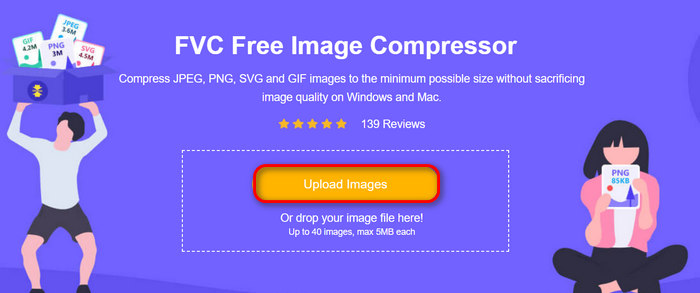
ขั้นตอนที่ 2 เมื่อคุณเข้าสู่เว็บไซต์แล้ว ให้คลิก Upload Images เพื่ออิมพอร์ตภาพที่คุณต้องการปรับขนาด เครื่องมือจะบีบอัดรูปภาพทั้งหมดที่คุณอัปโหลดให้อัตโนมัติ.
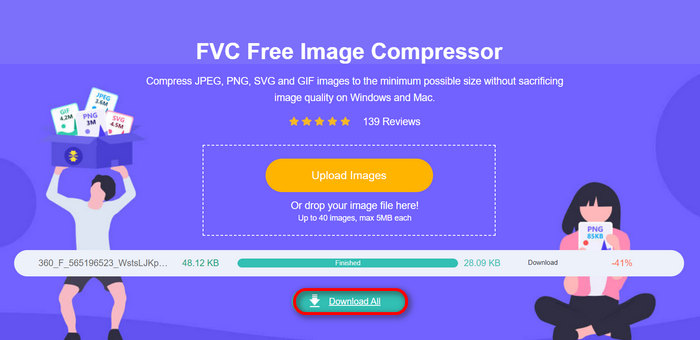
ขั้นตอนที่ 3 รอให้กระบวนการบีบอัดเสร็จสิ้น เมื่อเสร็จแล้ว คุณจะเห็นแถบสถานะระบุว่าดำเนินการเสร็จแล้ว พร้อมข้อมูลขนาดไฟล์ก่อนและหลังการบีบอัด จากนั้นคลิก Download All เพื่อบันทึกรูปภาพของคุณ.
การใช้โปรแกรมบีบอัดรูปภาพฟรี FVC ถือเป็นวิธีที่ดีในการป้องกันภาพที่ถูกบีบอัดมากเกินไป นอกจากนี้ ยังใช้งานได้ฟรีและเข้าถึงได้ง่ายทางออนไลน์ ลองดูด้วยตัวคุณเองแล้วลองบีบอัดรูปภาพของคุณได้เลย
ส่วนที่ 3. วิธีการแก้ไขรูปภาพที่ถูกบีบอัดมากเกินไป
ขั้นตอนที่ 1 ก่อนอื่น ให้เข้าไปที่ FVC Free Image Compressor จากเว็บไซต์ทางการของพวกเขา.
ขั้นตอนที่ 2 เมื่อคุณเข้าไปยังหน้าเครื่องมือแล้ว ให้อิมพอร์ตภาพที่ถูกบีบอัดมากเกินไปที่คุณต้องการขยาย โดยคลิกปุ่ม Upload Photo.
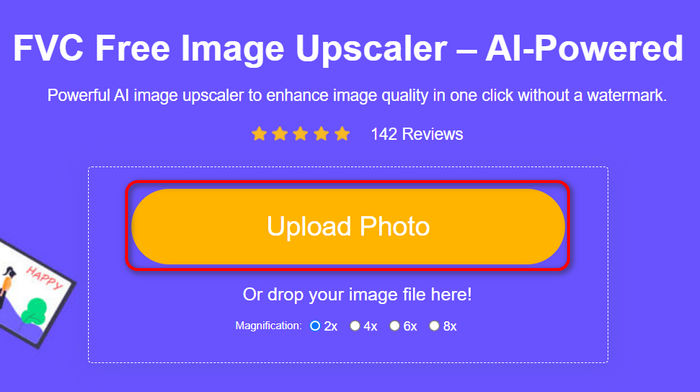
ขั้นตอนที่ 3 จากนั้น เลือกวิธีการขยายภาพตามที่คุณต้องการ คุณสามารถเลือกระดับการขยายได้ตั้งแต่ 2× ไปจนถึง 8×.
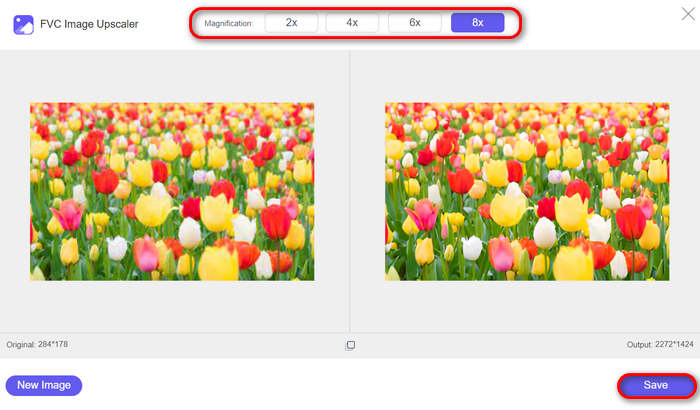
ขั้นตอนที่ 4 เมื่อเสร็จแล้ว ให้คลิกปุ่ม Save ไฟล์ภาพใหม่ที่ปรับขนาดแล้วจะถูกดาวน์โหลดมายังคอมพิวเตอร์ของคุณโดยอัตโนมัติ.
FVC Free Image Upscaler เป็นโซลูชันที่ยอดเยี่ยมสำหรับการแก้ไขรูปภาพที่ถูกบีบอัดมากเกินไป โดยได้รับการสนับสนุนจากพลังของ AI และฟีเจอร์อื่นๆ ที่จำเป็นสำหรับการอัปสเกลรูปภาพ นอกจากนี้ คุณยังไม่ต้องกังวลใจเมื่อใช้งาน เนื่องจากใช้งานง่ายและฟรีอย่างสมบูรณ์
ส่วนที่ 4 คำถามที่พบบ่อยเกี่ยวกับการแก้ไขรูปภาพที่ถูกบีบอัดมากเกินไป
การบีบอัดทำให้คุณภาพของภาพลดลงหรือไม่?
ใช่ การบีบอัดข้อมูลอาจทำให้คุณภาพของภาพลดลง โดยเฉพาะเมื่อใช้อัตราการบีบอัดข้อมูลสูงหรือเมื่อใช้อัลกอริทึมการบีบอัดข้อมูลที่มีการสูญเสียข้อมูล เช่น JPEG วิธีการเหล่านี้จะลบข้อมูลภาพบางส่วนทิ้งเพื่อลดขนาดไฟล์ ซึ่งอาจทำให้สูญเสียคุณภาพได้ อย่างไรก็ตาม ไม่ใช่ว่าจะเป็นเช่นนี้เสมอไป เมื่อทำการบีบอัดข้อมูลอย่างถูกต้องด้วยเครื่องมือที่เหมาะสม คุณภาพของภาพที่ถูกบีบอัดจะไม่สูญเสียคุณภาพอย่างเห็นได้ชัด
คุณสามารถคืนค่ารูปภาพที่ถูกบีบอัดได้หรือไม่?
ใช่ คุณสามารถกู้คืนรูปภาพที่ถูกบีบอัดโดยใช้เครื่องมือเช่น FVC Free Image Upscaler เครื่องมือที่ขับเคลื่อนด้วย AI นี้จะปรับปรุงรูปภาพโดยการปรับพิกเซล สี และพื้นผิว ช่วยกู้คืนและปรับปรุงคุณภาพได้อย่างมีประสิทธิภาพ เพียงอัปโหลดรูปภาพที่ถูกบีบอัดไปยังเครื่องมือและรอขั้นตอนการอัปสเกลซึ่งจะใช้เวลาเพียงไม่กี่วินาที
ฉันจะลดอัตราการบีบอัดของรูปภาพได้อย่างไร
หากต้องการลดอัตราการบีบอัดของรูปภาพ คุณสามารถใช้วิธีการและเครื่องมือต่างๆ สำหรับเรื่องนี้ได้ แต่สำหรับวิธีลดอัตราการบีบอัดของรูปภาพสำหรับผู้เริ่มต้น วิธีที่ดีที่สุดคือใช้เครื่องมือที่ให้คุณปรับการตั้งค่าการบีบอัดได้ เครื่องมือเช่น FVC Free Image Compressor มีคุณสมบัติการเพิ่มประสิทธิภาพที่ยอดเยี่ยม ช่วยให้มั่นใจได้ว่าคุณภาพของรูปภาพจะคงอยู่ในขณะที่ลดขนาดไฟล์ ในการทำเช่นนี้ คุณเพียงแค่เข้าไปที่เว็บไซต์ของพวกเขา อัปโหลดรูปภาพของคุณที่นั่น และปล่อยให้เครื่องมือบีบอัดรูปภาพโดยอัตโนมัติ
สัญญาณที่บอกว่าภาพถูกบีบอัดมากเกินไปมีอะไรบ้าง?
มีสัญญาณต่างๆ ที่มองเห็นได้เพื่อระบุว่ารูปภาพถูกบีบอัดมากเกินไปหรือไม่ สัญญาณเหล่านี้ได้แก่ ภาพเบลอ สูญเสียรายละเอียด สีผิดเพี้ยน และลักษณะที่เสื่อมลงโดยทั่วไป ปัญหาเหล่านี้เกิดขึ้นเนื่องจากข้อมูลสำคัญของรูปภาพสูญหายระหว่างกระบวนการบีบอัด
สรุป
รูปภาพที่ถูกบีบอัดจนเกินไป อาจสร้างความยุ่งยากให้คุณได้ แต่ด้วยเครื่องมือและวิธีการบีบอัดรูปภาพที่เหมาะสม คุณสามารถป้องกันและแก้ไขปัญหาเหล่านี้ได้ ใช้เครื่องมือ FVC Free Image Compressor เพื่อหลีกเลี่ยงการบีบอัดรูปภาพมากเกินไปและคงไว้ซึ่งคุณภาพของภาพ ในขณะเดียวกัน หากรูปภาพของคุณถูกบีบอัดไปแล้ว FVC Free Image Upscaler ก็สามารถช่วยกู้คืนและปรับปรุงคุณภาพให้ดีขึ้น เพื่อให้ภาพกลับมาคมชัดและมีรายละเอียดดังเดิม ลองใช้เครื่องมือทรงพลังแต่ใช้งานง่ายเหล่านี้ดู เพื่อให้มั่นใจว่ารูปภาพของคุณจะดูดีที่สุดอยู่เสมอ!
-
 3 วิธีที่มีประสิทธิภาพในการปรับขนาดรูปภาพโดยไม่สูญเสียคุณภาพ
 กังวลเรื่องการสูญเสียคุณภาพเมื่อบีบอัดรูปภาพใช่หรือไม่? ไม่ต้องกังวลอีกต่อไป! ในบทความนี้ เราจะมาเรียนรู้เกี่ยวกับ 3 วิธีในการปรับขนาดรูปภาพโดยไม่สูญเสียคุณภาพได้อย่างง่ายดาย
-
 วิธีลบพื้นหลังออกจากรูปภาพโดยใช้ GIMP
 เริ่มต้นใช้งาน GIMP และกระบวนการลบพื้นหลังออกจากรูปภาพทีละขั้นตอน ค้นพบวิธีที่มีประสิทธิภาพในการสร้างภาพที่โปร่งใสโดยใช้ GIMP วันนี้!
-
 วิธีการบีบอัดไฟล์ JPEG บน Windows และ Mac [คู่มือฉบับสมบูรณ์]
 กำลังมองหาเครื่องมือที่มีประสิทธิภาพในการบีบอัดไฟล์ JPEG บนอุปกรณ์ Windows และ Mac ของคุณอยู่ใช่หรือไม่ อ่านบทความนี้เลยเพื่อเรียนรู้วิธีบีบอัดไฟล์อย่างราบรื่น 5 วิธี
