


 Video Converter Ultimate
 บันทึกหน้าจอ
 ซ่อมวิดีโอ
 ดาวน์โหลดอย่างปลอดภัย
เลือกโปรแกรมบีบอัด JPEG ที่ดีที่สุด - มีให้เลือก 6 แบบ
ในขณะที่ท่องอินเทอร์เน็ต คุณมักจะเห็นรูปภาพสวย ๆ และอยากบันทึกเก็บไว้ในอุปกรณ์ของตัวเองอยู่บ่อยครั้ง และด้วยพื้นที่เก็บข้อมูลบนอุปกรณ์ที่มีจำกัด ผู้ใช้จำนวนมากจึงมักประสบปัญหากังวลเรื่องพื้นที่จัดเก็บ นอกจากนี้ ผู้คนยังนิยมแชร์รูปภาพของตนบนโซเชียลมีเดีย หากไฟล์รูปภาพมีขนาดใหญ่เกินไป ก็จะทำให้อัปโหลดช้าและใช้ปริมาณดาต้ามาก ในกรณีเช่นนี้ เราจำเป็นต้องบีบอัดรูปภาพให้มีขนาดเล็กลง แล้วคุณจะเลือกตัวบีบอัดรูปภาพที่ตรงกับความต้องการของคุณจากตัวเลือกมากมายได้อย่างไร? ในหัวข้อถัดไป เราจะประเมินตัวบีบอัด JPEG ที่ดีที่สุด 6 ตัว และสรุปรายละเอียดฟีเจอร์ของแต่ละตัว เพื่อช่วยให้คุณตัดสินใจได้ว่าสิ่งใดเหมาะกับการใช้งานของคุณ.

ส่วนที่ 1. ภาพรวมของโปรแกรมบีบอัด JPEG ที่ดีที่สุด 6 อันดับ
ก่อนอื่นมาดูภาพรวมคร่าวๆ ของเครื่องมือบีบอัด JPEG ทั้ง 6 ตัวเพื่อช่วยให้คุณเข้าใจพวกมันได้
FVC Free Image Compressor
นี่คือโปรแกรมลดขนาดไฟล์ JPG ออนไลน์ คุณสามารถทำทั้งหมดนี้ได้ในหน้าเดียว และโปรแกรมจะบีบอัดขนาดไฟล์ JPEG, PNG, SVG และ GIF โดยอัตโนมัติหลังจากที่คุณอัปโหลดรูปภาพ คุณไม่จำเป็นต้องดาวน์โหลดซอฟต์แวร์เพิ่มเติมเพื่อใช้บริการบีบอัดรูปภาพความเร็วสูงนี้
iLoveIMG
นี่คือโปรแกรมลดขนาดไฟล์ JPG ออนไลน์แบบครบวงจร นอกจากจะรองรับการบีบอัดรูปภาพแล้ว ยังช่วยให้คุณแปลงไฟล์รูปภาพ เพิ่มคุณภาพของรูปภาพ ลบพื้นหลัง ครอบตัดรูปภาพ ฯลฯ ได้อีกด้วย
TinyPNG
นี่คือเครื่องมือระดับมืออาชีพที่เน้นการบีบอัดขนาดรูปภาพ และปัจจุบันรองรับการบีบอัดไฟล์รูปแบบ WebP, JPEG และ PNG ประสบการณ์อันยาวนานกับรูปภาพทำให้สามารถหาสมดุลที่สมบูรณ์แบบระหว่างคุณภาพและขนาดได้
GIMP
นี่คือโปรแกรมลดขนาดไฟล์ภาพ JPEG สำหรับระบบปฏิบัติการหลายระบบ โปรแกรมนี้มีการตั้งค่าส่วนบุคคลมากมาย และยังสามารถรวมเข้ากับปลั๊กอินของบริษัทอื่นได้ดี เพื่อเพิ่มประสิทธิภาพคุณภาพของภาพเอาต์พุตของคุณให้ดียิ่งขึ้น
Photoshop
ซอฟต์แวร์ประมวลผลภาพระดับมืออาชีพนี้มีคุณสมบัติและการแก้ไขภาพขั้นสูงมากมาย ผู้สร้างคอนเทนต์จำนวนมากเลือกใช้ซอฟต์แวร์นี้เพื่อช่วยในการทำงาน
บีบอัด JPEG
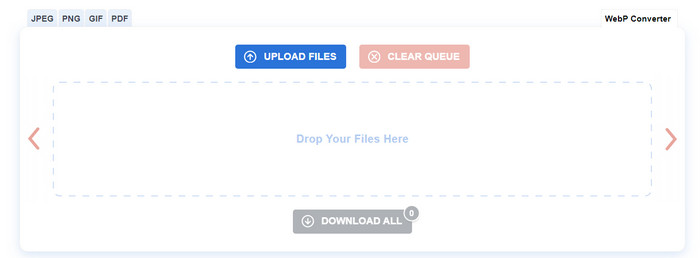
Compress JPEG คือเครื่องมือออนไลน์สำหรับบีบอัดไฟล์ JPEG, PNG, GIF และ PDF คุณสมบัติทั้งหมดจะแสดงบนหน้าโดยตรง ดังนั้นไม่ว่าคุณจะเป็นมือใหม่หรือมืออาชีพ คุณก็สามารถดำเนินการลดขนาด JPEG ได้อย่างรวดเร็วด้วยเครื่องมือนี้
ตอนนี้ เราแน่ใจว่าคุณคงทราบถึงความสำคัญโดยทั่วไปของเครื่องมือทั้ง 6 ตัวนี้แล้ว ตอนนี้ เราจะนำเสนอการแยกรายละเอียดเครื่องมือเหล่านี้จากมุมมองของแพลตฟอร์ม ราคา และการบีบอัดผลลัพธ์
ส่วนที่ 2. FVC โปรแกรมบีบอัดรูปภาพฟรี
แพลตฟอร์ม ออนไลน์
ราคา: ฟรี
ข้อจำกัดการประมวลผลเป็นชุด: สูงสุด 40 รูปภาพ ไฟล์ละไม่เกิน 5MB.
สิ่งแรกที่อยากจะแนะนำคือเครื่องย่อขนาดไฟล์ JPG ออนไลน์อย่าง FVC Free Image Compressor ซึ่งมาพร้อมอัลกอริทึมการปรับให้เหมาะสมและการบีบอัดที่มีประสิทธิภาพสูง สามารถลดขนาดไฟล์รูปภาพได้ในขณะที่ยังคงคุณภาพของภาพต้นฉบับไว้ให้ได้มากที่สุด เพื่อเพิ่มประสิทธิภาพการทำงานของคุณ เครื่องมือนี้ยังรองรับการประมวลผลไฟล์หลายไฟล์พร้อมกัน FVC Free Image Compressor ใช้งานง่ายมาก คุณสามารถทำการบีบอัดได้เสร็จสิ้นในสามขั้นตอน หลังจากที่คุณอัปโหลดรูปภาพแล้ว ไฟล์ของคุณจะได้รับการปกป้องอย่างปลอดภัย และจะไม่มีบุคคลที่สามเข้าถึงข้อมูลส่วนตัวของคุณได้.
หลังจากการทดสอบของเรา FVC Free Image Compressor สามารถรักษาเวลาการบีบอัดได้ภายในไม่กี่วินาที เราสามารถเห็นไฟล์ที่บีบอัดบนหน้าเว็บได้โดยแทบไม่ต้องรอเลย ขนาดไฟล์ที่บีบอัดและเปอร์เซ็นต์ของการบีบอัดจะแสดงขึ้นทันทีหลังชื่อไฟล์ เปอร์เซ็นต์ของการบีบอัดภาพขึ้นอยู่กับขนาดของภาพก่อนการบีบอัด ไฟล์ภาพขนาดใหญ่สามารถบีบอัดได้ตั้งแต่ 70% ถึง 80%
ต่อไปนี้เป็นขั้นตอนในการใช้ FVC Free Image Compressor เพื่อบีบอัด JPG
ขั้นตอนที่ 1 เข้าเว็บไซต์ FVC Free Image Compressor ด้วยเบราว์เซอร์ของคุณ.
ขั้นตอนที่ 2 คลิก Upload Images เพื่อเลือกไฟล์ JPG ที่คุณต้องการแก้ไข คุณยังสามารถลากไฟล์ไปวางในพื้นที่ที่กำหนดบนหน้าเว็บได้.
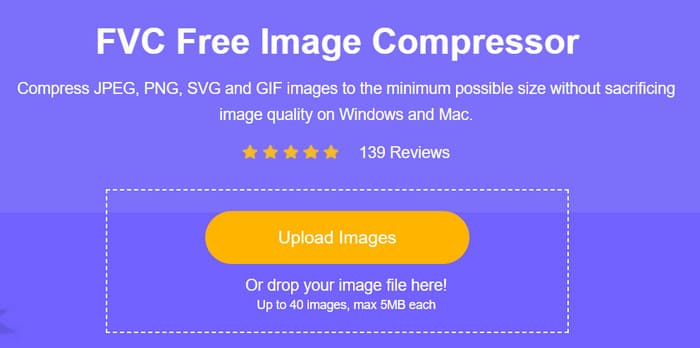
ขั้นตอนที่ 3 ไฟล์ที่ถูกบีบอัดจะแสดงขึ้นทันทีที่ด้านล่างของปุ่ม Upload Image คุณสามารถคลิก Download หรือ Download All เพื่อบันทึกลงคอมพิวเตอร์ของคุณ.

ตอนที่ 3. iLoveIMG
แพลตฟอร์ม ออนไลน์
ราคา: ฟรี
ข้อจำกัดการประมวลผลเป็นชุด: ไม่มี
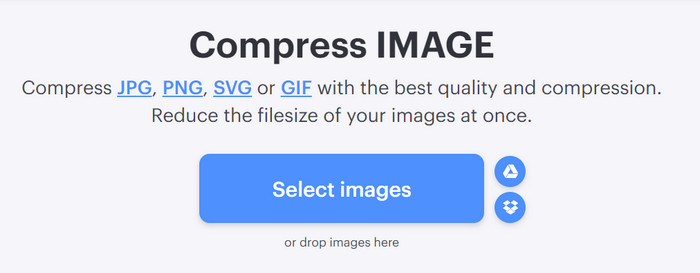
iLoveIMG นำเสนอฟีเจอร์มากมายสำหรับการแก้ไขรูปภาพ เช่น การบีบอัด ตัวแปลง เครื่องตัด อัปสเกล ลบพื้นหลัง โปรแกรมแก้ไข และอื่นๆ ในแง่ของการย่อขนาด JPG นั้นฟรีโดยสิ้นเชิง ไม่มีข้อจำกัดขนาดไฟล์ และให้คุณบีบอัดรูปภาพหลายภาพได้ในครั้งเดียว ตราบใดที่คุณมีการเชื่อมต่ออินเทอร์เน็ตที่เสถียร คุณก็สามารถใช้งานได้ไม่ว่าจะใช้ระบบใดก็ตาม
นอกจากนี้ยังบีบอัดรูปภาพได้อย่างรวดเร็วอีกด้วย ถึงอย่างนั้นก็ยังด้อยกว่า FVC Free Image Compressor เล็กน้อย แต่ก็ไม่ได้ส่งผลกระทบต่อประสบการณ์การใช้งานของผู้ใช้มากนัก โดยทั่วไปแล้ว มันสามารถบีบอัดรูปภาพให้มีขนาด 50%- 60% เท่ากับขนาดเดิมได้ เมื่อเปรียบเทียบกันแล้ว ความแตกต่างของคุณภาพระหว่างรูปภาพก่อนและหลังการประมวลผลก็ไม่ชัดเจนเช่นกัน การใช้งานก็ค่อนข้างตรงไปตรงมา เพียงแค่อัปโหลดรูปภาพเป้าหมายและรอให้การบีบอัดเสร็จสิ้น จากนั้นคุณก็สามารถดาวน์โหลดรูปภาพที่ประมวลผลแล้วได้
ส่วนที่ 4. TinyPNG
แพลตฟอร์ม ออนไลน์
ราคา: ฟรี
ข้อจำกัดการประมวลผลเป็นชุด: สูงสุด 20 รูปภาพ ไฟล์ละไม่เกิน 5MB.
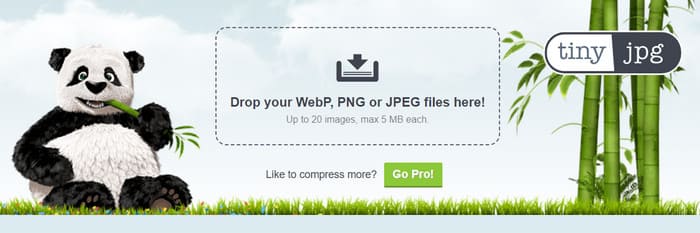
นี่คือโปรแกรมลดขนาดไฟล์ JPG ออนไลน์ที่ออกแบบมาสำหรับบีบอัดรูปภาพโดยเฉพาะ หลังจากที่คุณอัปโหลดรูปภาพแล้ว ระบบจะใช้การเข้ารหัส JPEG ที่ดีที่สุดเพื่อวิเคราะห์เนื้อหาของรูปภาพอย่างละเอียด เพื่อค้นหาจุดสมดุลที่เหมาะสมระหว่างขนาดไฟล์ที่ถูกบีบอัดและการรักษาคุณภาพของภาพ ในกระบวนการนี้จะลบข้อมูลเมตาที่ไม่จำเป็นออก เพื่อช่วยให้ได้ขนาดไฟล์ที่เล็กลง เครื่องมือนี้มีอินเทอร์เฟซที่ออกแบบมาอย่างสวยงาม ผู้ใช้มักประทับใจกับลายแพนด้าน่ารัก และตัวเลือกการอัปโหลดรูปภาพที่ยืดหยุ่นก็ช่วยเพิ่มความสะดวกในการใช้งาน.
ในขั้นตอนการใช้ TinyPNG เราคิดว่ายังคงมีประสิทธิภาพค่อนข้างดีในการลดขนาด JPG และเราสามารถได้รูปภาพที่บีบอัดในเวลาเกือบหนึ่งถึงสองวินาที อย่างไรก็ตาม เปอร์เซ็นต์ของรูปภาพที่บีบอัดนั้นค่อนข้างต่ำเมื่อเทียบกับเครื่องมือสองตัวก่อนหน้า เราได้ทดสอบกับรูปภาพ JPG หลายภาพ ซึ่งถูกบีบอัดโดยเฉลี่ยที่ 30%-50%
ส่วนที่ 5. GIMP
แพลตฟอร์ม GNU/Linux, MacOS, Windows เป็นต้น.
ราคา: ฟรี
ข้อจำกัดด้านไฟล์: ไม่มี
ชื่อเต็มของ GIMP คือ GNU Image Manipulation Program ซอฟต์แวร์ตัวนี้รองรับระบบปฏิบัติการได้หลากหลาย ปัจจุบันผู้ใช้สามารถใช้เพื่อปรับแต่งสีของรูปภาพ เพิ่มคุณภาพของรูปภาพ ใส่เอฟเฟ็กต์และฟิลเตอร์พิเศษให้รูปภาพ บีบอัดขนาดไฟล์รูปภาพ ฯลฯ ในแง่การตัดต่อก็ยังถือว่ามีความเป็นมืออาชีพอยู่มาก ผู้ใช้สามารถปรับแต่งหน้าตาและขั้นตอนการทำงานของโปรแกรมได้ตามความชอบ อย่างไรก็ตาม สิ่งนี้ก็หมายความว่ามันอาจใช้งานค่อนข้างซับซ้อน และผู้ใช้อาจต้องใช้เวลาปรับตัวบ้าง ด้วยฐานผู้ใช้ที่กว้าง การค้นหาคู่มือหรือบทเรียนแบบละเอียดจึงทำได้ง่าย นอกจากนี้ ผู้ใช้ยังสามารถติดตั้งปลั๊กอินจากภายนอกเพื่อเพิ่มความสามารถในการตัดต่อรูปภาพได้หลากหลายยิ่งขึ้น.
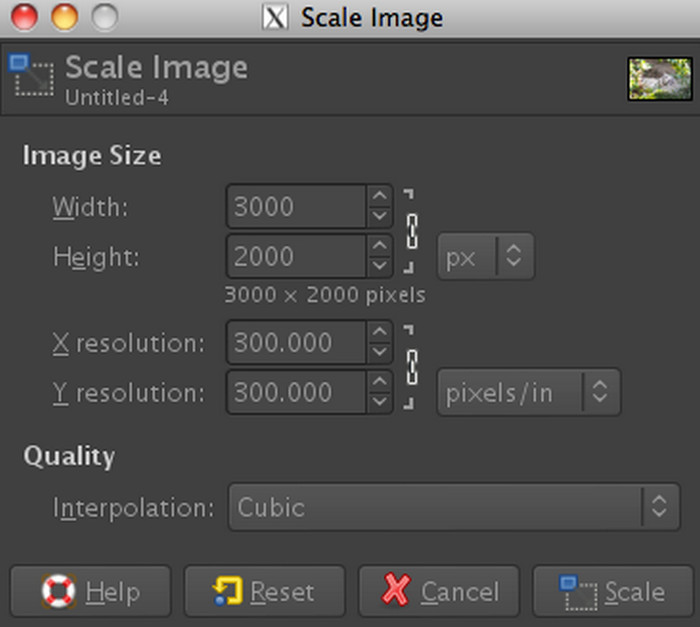
ในด้านการใช้งานจริง GIMP อนุญาตให้เราปรับค่าต่าง ๆ ได้อย่างอิสระเพื่อกำหนดขนาดรูปภาพหลังการบีบอัด เราสามารถลดขนาดรูป JPG ได้ด้วยการเปลี่ยนขนาดรูปภาพ หรือปรับค่าความคมชัดและคุณภาพของรูป ดังนั้นจึงไม่มีช่วงเปอร์เซ็นต์การบีบอัดที่ตายตัว คุณสามารถตั้งค่าต่าง ๆ ให้เหมาะสมตามความต้องการของคุณได้.
ตอนที่ 6. โฟโต้ช็อป
แพลตฟอร์ม Windows และ MacOS
ราคา: $19.99/เดือน
ข้อจำกัดด้านไฟล์: ไม่มี
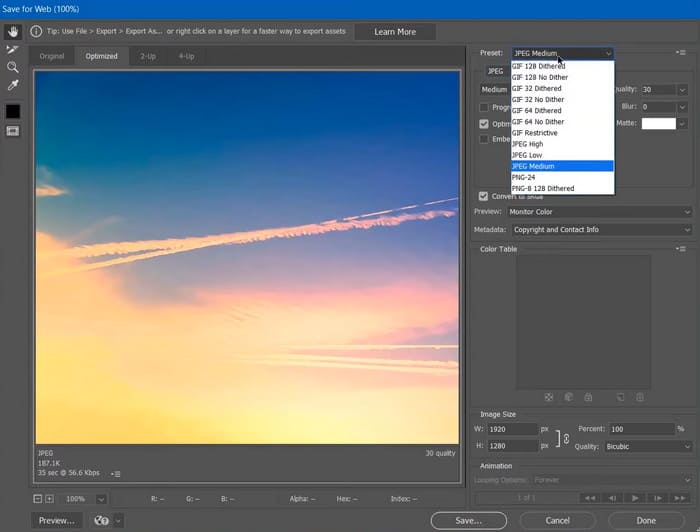
Photoshop เป็นเครื่องมือแก้ไขภาพที่มีแอพพลิเคชั่นมากมายที่พัฒนาโดย Adobe โปรแกรมบีบอัด JPEG ขั้นสูงนี้ถือเป็นมาตรฐานอุตสาหกรรมในการประมวลผลภาพในปัจจุบัน คุณสามารถใช้จินตนาการของคุณในการแบ่งภาพออกเป็นเลเยอร์ต่างๆ และประมวลผลองค์ประกอบต่างๆ ในเวลาเดียวกันได้ ปัจจุบัน Photoshop ถูกใช้กันอย่างแพร่หลายในการถ่ายภาพ โฆษณา การออกแบบเว็บ และสาขาอื่นๆ อีกมากมาย อย่างไรก็ตาม Photoshop ยังเป็นที่รู้จักกันดีว่าใช้งานยาก และผู้คนมักต้องการการสอนจากมืออาชีพหรือวิดีโอและบทความการสอนจำนวนมากเพื่อให้เชี่ยวชาญในการใช้งาน ซึ่งแน่นอนว่าต้องใช้ความพยายามอย่างมาก หากคุณต้องการใช้ Photoshop เพื่อบีบอัดรูปภาพ คุณอาจต้องมีบทช่วยสอนบางอย่างเพื่อช่วยคุณ
จากประสบการณ์ของเรา ขั้นตอนการใช้ Photoshop เพื่อบีบอัดรูปภาพค่อนข้างเรียบง่าย คุณสามารถกำหนดขนาดรูปภาพเองใน Photoshop ซึ่งจะเป็นตัวกำหนดว่ารูปภาพจะถูกบีบอัดให้มีขนาดเท่าใด และคุณไม่จำเป็นต้องรอนานในการส่งออกไฟล์ที่ถูกบีบอัดไปยังเดสก์ท็อปของคุณ.
ส่วนที่ 7. การบีบอัด JPEG
แพลตฟอร์ม ออนไลน์
ราคา: $19.99/เดือน
ข้อจำกัดด้านไฟล์: สูงสุด 20 รูปภาพ
Compress JPEG คือเครื่องมือบีบอัดไฟล์ JPEG ออนไลน์ฟรีที่ช่วยลดขนาดรูปภาพที่อัปโหลดโดยไม่สูญเสียคุณภาพของรูปภาพ จุดที่เราชื่นชมเครื่องมือนี้มากขึ้นก็คือเครื่องมือนี้มีฟีเจอร์ดูตัวอย่างที่ช่วยให้ผู้ใช้เปรียบเทียบรูปภาพต้นฉบับกับรูปภาพที่บีบอัดเพื่อประเมินคุณภาพก่อนดาวน์โหลดไฟล์ที่ปรับให้เหมาะสม ที่ด้านขวาสุดของหน้าจอดูตัวอย่าง คุณสามารถปรับระดับคุณภาพของรูปภาพที่ส่งออกได้อย่างอิสระ ข้อมูลนี้จะมีผลโดยตรงต่อเปอร์เซ็นต์ของรูปภาพที่บีบอัด และรูปภาพที่บีบอัดจะได้รับการอัปเดตบนหน้าจอดูตัวอย่างแบบเรียลไทม์
โปรแกรมย่อไฟล์ JPG ฟรีนี้มีประสิทธิภาพในการบีบอัดข้อมูลได้ค่อนข้างดี รูปภาพของคุณจะถูกบีบอัดเกือบจะทันทีหลังจากที่คุณอัปโหลดสำเร็จ ปัจจุบัน โปรแกรมย่อขนาดรูปภาพได้สูงสุดถึง 80%- 90%
ส่วนที่ 8 คำถามที่พบบ่อยเกี่ยวกับการบีบอัด JPEG
ไฟล์ JPEG มีการบีบอัดสูงสุดเท่าไร?
ระดับการบีบอัดของไฟล์ JPEG อาจแตกต่างกันไปขึ้นอยู่กับโปรแกรมบีบอัด โดยทั่วไประดับการบีบอัดจะถูกควบคุมโดยการตั้งค่าคุณภาพหรือระดับการบีบอัดที่ผู้ใช้เลือก
ตัวบีบอัดภาพที่ดีที่สุดโดยไม่สูญเสียคุณภาพคืออะไร?
เมื่อมองหาโปรแกรมบีบอัดรูปภาพที่ดีที่สุด ให้พิจารณาเครื่องมือและวิธีการที่ใช้ขั้นตอนการบีบอัดขั้นสูง เครื่องมือเช่น TinyPNG และ FVC Free Image Compressor ถือเป็นตัวเลือกที่ดี
รูปแบบภาพใดที่เป็นทางเลือกแทนการบีบอัด JPEG?
รูปแบบภาพหลายรูปแบบ เช่น PNG, GIF และ WebP ทำหน้าที่เป็นทางเลือกแทนการบีบอัด JPEG
สรุป
บทความนี้สรุปฟีเจอร์ของตัวบีบอัด JPEG ทั้งหมด 6 ตัว รวมถึงแพลตฟอร์มที่รองรับ ราคา ข้อจำกัดในการประมวลผลเป็นชุด ฯลฯ ไม่ว่าคุณจะต้องการบีบอัดรูปภาพโดยตรงบนหน้าเว็บ หรือกำลังมองหาโปรแกรมเดสก์ท็อประดับมืออาชีพสำหรับตัดต่อรูปภาพ เนื้อหาของเราจะมีคำตอบที่สอดคล้องกับความต้องการของคุณ.
-
 รีวิว PicWish Photo Enhancer และเครื่องมือทางเลือกที่ต้องลอง
 ค้นพบความมหัศจรรย์ที่โปรแกรมเพิ่มประสิทธิภาพรูปภาพ PicWish นำมาสู่โลกแห่งการแก้ไขภาพ การตรวจสอบเชิงลึกและการสำรวจทางเลือกที่เป็นไปได้เพื่อให้คุณลอง
-
 วิธีลบข้อความออกจากรูปภาพบน Windows/Mac/Online
 บอกลาข้อความที่กวนใจในภาพของคุณได้เลย! สำรวจวิธีการลบข้อความออกจากรูปภาพด้วยโซลูชันที่ราบรื่นเหล่านี้ซึ่งออกแบบมาเพื่อการลบข้อความได้อย่างราบรื่น
-
 3 วิธีสุดยอดในการบีบอัด SVG [ออนไลน์และออฟไลน์]
 ต้องการบีบอัดไฟล์ SVG แต่ไม่รู้ว่าต้องทำอย่างไร? ในบทความนี้ เราจะแนะนำเครื่องมือ 3 ตัวและสอนขั้นตอนโดยละเอียดเกี่ยวกับวิธีการใช้งานอย่างง่ายดาย
