


 Video Converter Ultimate
 บันทึกหน้าจอ
 ซ่อมวิดีโอ
ปลดปล่อยความคิดสร้างสรรค์ของคุณ: รีวิว Luminar Neo ที่ครอบคลุม
คุณกำลังมองหาวิธีแบบครบวงจรสำหรับการเพิ่มคุณภาพรูปภาพและลบพื้นหลังอยู่หรือเปล่า? ถ้าใช่ Luminar Neo อาจเป็นเครื่องมือที่เหมาะสมอย่างยิ่งสำหรับคุณ ด้วยอินเทอร์เฟซที่ใช้งานง่ายและฟีเจอร์ทรงพลังที่ขับเคลื่อนด้วย AI ทำให้เครื่องมือนี้โดดเด่นในฐานะโปรแกรมแต่งภาพอเนกประสงค์สำหรับผู้ใช้ทุกประเภท ไม่ว่าคุณต้องการเพิ่มความสดใสของสี เปลี่ยนพื้นหลังอย่างแนบเนียน หรือเพียงแค่ปรับแต่งรายละเอียดในภาพของคุณ เครื่องมือนี้ก็มีเครื่องมือและฟังก์ชันที่หลากหลายและทรงประสิทธิภาพเพื่อตอบโจทย์งานสร้างสรรค์ของคุณ ในการรีวิว Luminar Neo ครั้งนี้ เราจะพาคุณมาสำรวจว่าเครื่องมือทรงพลังนี้สามารถยกระดับงานถ่ายภาพของคุณได้อย่างง่ายดายเพียงใด พร้อมมอบข้อมูลที่จะช่วยให้คุณปลดล็อกศักยภาพของภาพถ่ายได้อย่างเต็มที่ มาร่วมกันเจาะลึกฟีเจอร์และความสามารถต่าง ๆ ที่ทำให้ Luminar Neo โดดเด่นในโลกของการเพิ่มคุณภาพรูปภาพกัน.

ส่วนที่ 1 รีวิว Luminar Neo
Luminar Neo ซอฟต์แวร์แต่งภาพสุดล้ำที่พัฒนาโดย Skylum ถือเป็นตัวเปลี่ยนเกมสำหรับช่างภาพและศิลปินสายภาพที่กำลังมองหาชุดเครื่องมือแบบครบครันเพื่อยกระดับผลงานของตน แก่นของเครื่องมือนี้คือเทคโนโลยี AI ขั้นสูงที่เข้ามาช่วยให้กระบวนการแต่งภาพที่ซับซ้อนกลายเป็นเรื่องง่าย ทำให้ผู้ใช้ทุกระดับทักษะสามารถเข้าถึงได้ ขณะเดียวกันก็ยังมาพร้อมเครื่องมือสร้างสรรค์และพรีเซ็ตให้เลือกใช้อย่างหลากหลาย จุดที่ทำให้ Luminar Neo แตกต่างคือฟีเจอร์ การขยายความละเอียดภาพ และการลบพื้นหลังที่โดดเด่นเป็นพิเศษ ตัวขยายภาพช่วยให้ภาพถ่ายของคุณคงความคมชัดและรายละเอียดได้แม้เมื่อขยายขนาด ในขณะที่ตัวลบพื้นหลังก็มอบวิธีแก้ปัญหาที่ราบรื่นสำหรับการเปลี่ยนและปรับแต่งพื้นหลังได้อย่างง่ายดาย.
คุณสมบัติหลัก
◆ ใช้ AI ขั้นสูงเพื่อการปรับปรุงที่แม่นยำ รวมถึงเครื่องมือพิเศษสำหรับท้องฟ้าและผิวหนัง
◆ เครื่องมือและการตั้งค่าล่วงหน้าที่หลากหลายสำหรับการเพิ่มเอกลักษณ์ให้กับภาพถ่ายของคุณ
◆ บูรณาการกับซอฟต์แวร์แก้ไขยอดนิยมเช่น Photoshop เพื่อขั้นตอนการทำงานที่ราบรื่น
◆ การประมวลผลที่รวดเร็วสำหรับการจัดการไฟล์ขนาดใหญ่และการแก้ไขที่ซับซ้อนได้อย่างง่ายดาย
◆ รักษาภาพต้นฉบับของคุณไว้ในขณะที่ทดลองแก้ไข
◆ ส่วนต่อประสานที่ใช้งานง่าย
◆ น้ำยาล้างพื้นหลัง
ข้อดี
- เวิร์กโฟลว์ที่ปรับเปลี่ยนได้
- ความสามารถด้าน AI ที่แข็งแกร่ง
- ราคาไม่แพง
- ง่ายสำหรับผู้เริ่มต้น
- ส่วนลดสำหรับผู้ใช้ Skylum
- การสนับสนุนลูกค้าตลอด 24 ชั่วโมงทุกวัน
จุดด้อย
- ฟังก์ชั่นบางอย่างจำเป็นต้องปรับปรุง
- ไม่มีแอปบนมือถือสำหรับแก้ไขรูปภาพ
ตอนที่ 2 Luminar Neo กับ Luminar AI
นี่คือตารางเปรียบเทียบระหว่าง Luminar Neo และ Luminar AI
| ลักษณะเฉพาะ | ลูมินาร์ นีโอ | ลูมินาร์ เอไอ |
| การแก้ไขที่ขับเคลื่อนด้วย AI | ใช่ | ใช่ |
| อินเตอร์เฟซ | ขั้นสูงและปรับแต่งได้ | ใช้งานง่ายและเรียบง่าย |
| เครื่องมือแก้ไข | เครื่องมือและพรีเซ็ตที่หลากหลาย | เทมเพลตที่ขับเคลื่อนด้วย AI และเครื่องมืออัจฉริยะ |
| บูรณาการ | บูรณาการอย่างราบรื่นกับซอฟต์แวร์แก้ไขอื่น ๆ | ประสิทธิภาพที่มีประสิทธิภาพ ปรับให้เหมาะสมสำหรับการประมวลผล AI |
| กลุ่มเป้าหมาย | ช่างภาพมืออาชีพและผู้ใช้ขั้นสูง | ผู้เริ่มต้นและช่างภาพทั่วไป |
สิ่งสำคัญคือต้องจำไว้ว่าตัวเลือกระหว่าง Luminar Neo กับ Luminar AI นั้นขึ้นอยู่กับความชอบส่วนบุคคลและข้อกำหนดในการแก้ไขของคุณ ไม่ว่าคุณจะหันไปใช้คุณสมบัติขั้นสูงและปรับแต่งได้ของ Luminar Neo หรือชอบความเรียบง่ายที่ใช้งานง่ายของ Luminar AI เครื่องมือทั้งสองก็ถือเป็นโซลูชั่นอันทรงพลังในขอบเขตของการแก้ไขภาพ
ส่วนที่ 3 วิธีใช้ Luminar Neo
ต่อไปนี้คือวิธีที่คุณสามารถใช้ Luminar Neo เพื่อเพิ่มขนาดภาพ:
ขั้นตอนที่ 1. เปิด Luminar Neo ในโหมดโปรแกรมแบบสแตนด์อโลน.
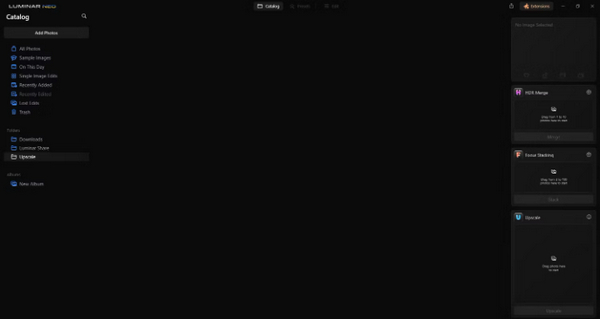
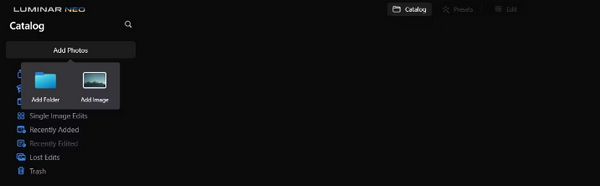
ขั้นตอนที่ 2. คลิกที่ Add Photos จากนั้นเลือก Add Image.
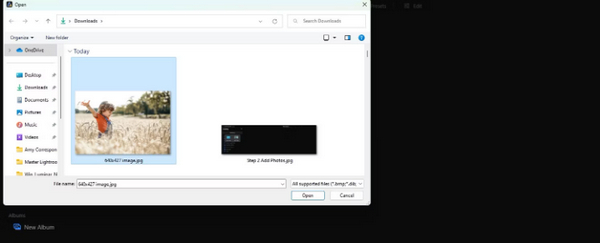
ขั้นตอนที่ 3. เลือกไฟล์ที่คุณต้องการแล้วคลิก Open.
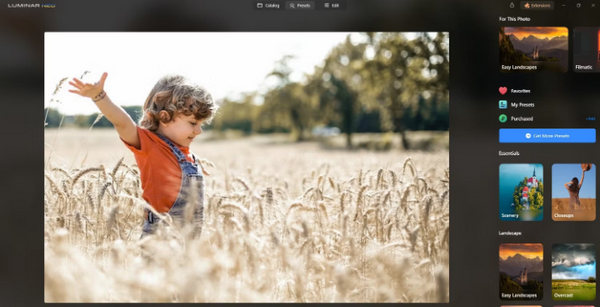
ขั้นตอนที่ 4. จากนั้นคลิกที่ Catalog ที่ด้านบนของเมนู.
ขั้นตอนที่ 5. ลากภาพลงด้านล่างไปที่ช่อง Upscale AI ที่อยู่ด้านล่างสุด ซึ่งมีข้อความว่า Drag photo here to start.
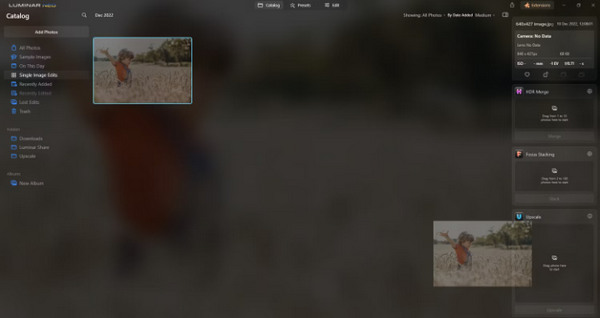
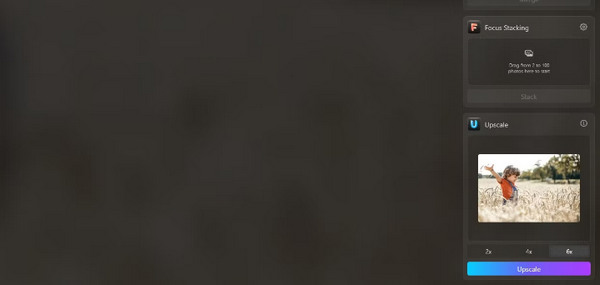
ขั้นตอนที่ 6. ทำขั้นตอนให้เสร็จสมบูรณ์โดยเลือกระดับการขยายภาพที่คุณต้องการ ตัวอย่างเช่น ในสาธิตนี้เราเลือกขยาย 6 เท่า.
ขั้นตอนที่ 7. สุดท้ายคลิก Upscale เพื่อใช้ระดับการขยายภาพที่คุณเลือกกับรูปของคุณ.
ถ่ายโอนภาพที่เพิ่มสเกลใหม่จากคอมพิวเตอร์ไปยังโทรศัพท์ของคุณอย่างง่ายดายโดยใช้ Luminar Share
คุณสามารถใช้ Luminar Neo เพื่อลบพื้นหลังรูปภาพได้ดังนี้:
ขั้นตอนที่ 1. เริ่มต้นด้วยการนำเข้ารูปภาพที่คุณต้องการแก้ไข ค้นหาและคลิกปุ่ม Add Photos ที่มุมบนซ้ายของหน้าจอ หลังจากเลือกภาพแล้วให้คลิก Open.
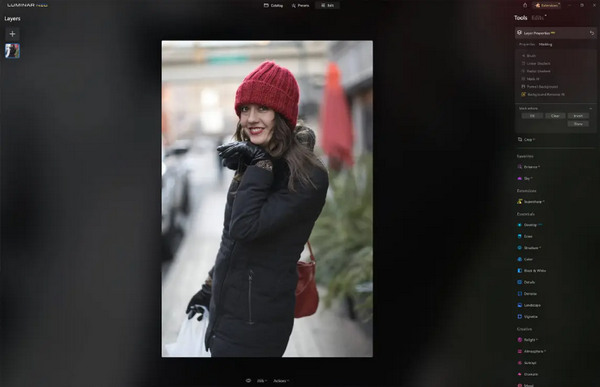
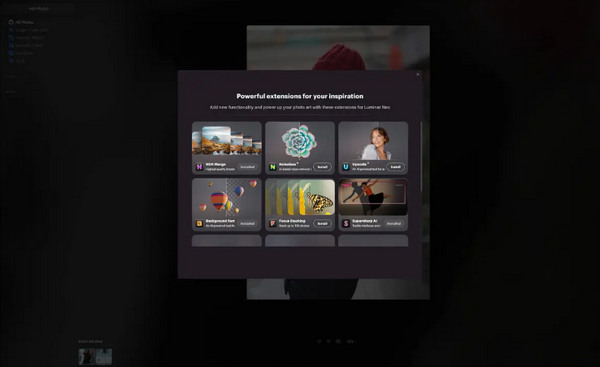
ขั้นตอนที่ 2. ขั้นตอนนี้สำคัญมากสำหรับผู้ใช้ครั้งแรก คุณต้องดาวน์โหลดส่วนเสริม Background Removal AI จากแท็บส่วนเสริมที่มุมขวาบนของหน้าจอ หลังจากดาวน์โหลดแล้ว ดับเบิลคลิกที่รูปภาพของคุณ คลิก Edit และเริ่มแก้ไข.
ขั้นตอนที่ 3. ในแถบแก้ไขทางด้านขวาของหน้าจอ ให้ไปที่ Layer Properties จากนั้นไปที่ Masking และเลือก Background Removal AI เพื่อให้คุณสามารถเลือกวัตถุหลักได้ เมื่อวัตถุถูกไฮไลต์เป็นสีแดงแล้ว ให้กด Remove เพื่อลบพื้นหลังออกอย่างมหัศจรรย์ ใช้แปรงปรับแต่ง (refinements brush) เพื่อเก็บรายละเอียดในส่วนที่ AI อาจตรวจจับพลาด.
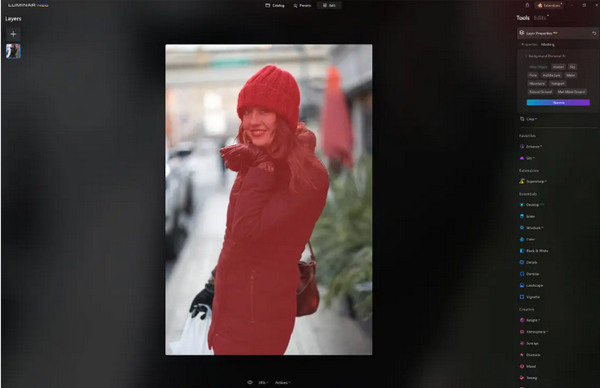
สิ่งเดียวที่เกี่ยวกับ Luminar Neo ก็คือเวอร์ชันฟรีไม่มีฟีเจอร์นี้ อย่างไรก็ตาม หากคุณมีงบจำกัดและต้องการยกระดับรูปภาพของคุณขึ้นไปอีกระดับ เครื่องมือนี้เหมาะสำหรับคุณ
ส่วนที่ 4 2 ทางเลือกฟรีที่ดีที่สุดสำหรับ Luminar Neo
Luminar Neo อาจมีราคาแพงสำหรับบางคนและซับซ้อนเกินกว่าจะสำรวจได้ง่าย ดังนั้นหากคุณกำลังมองหาเครื่องมือทางเลือกสำหรับ Luminar Neo นี่คือเครื่องมือที่ดีที่สุดที่คุณสามารถตรวจสอบได้
เครื่องมือเพิ่มสเกลเลอร์รูปภาพออนไลน์ของ FVC
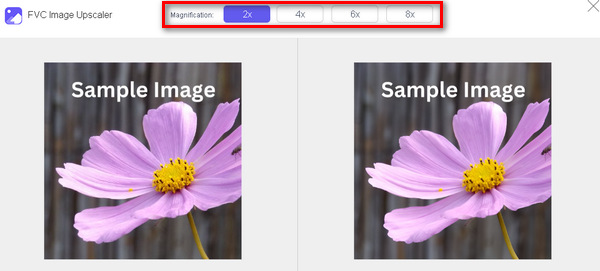
FVC Online Image Upscaler เป็นเครื่องมือขยายภาพออนไลน์ฟรี ใช่ คุณอ่านไม่ผิด มันฟรี แต่ก็อย่าเพิ่งมองข้ามความสามารถของมัน เครื่องมือนี้ผสานเทคโนโลยี AI เพื่อทำให้กระบวนการเพิ่มคุณภาพภาพเป็นไปโดยอัตโนมัติและราบรื่น นอกจากนี้คุณยังสามารถขยายภาพได้สูงสุดถึง 8 เท่าโดยไม่ทำให้คุณภาพลดลง.
ต่อไปนี้คือวิธีที่คุณสามารถใช้เครื่องมือนี้ได้
ขั้นตอนที่ 1. ไปที่เว็บไซต์ทางการของพวกเขา.
ขั้นตอนที่ 2. คลิกที่ Upload Photo แล้วเลือกภาพที่คุณต้องการขยาย.

ขั้นตอนที่ 3. หลังจากนั้น เครื่องมือนี้จะแสดงภาพตัวอย่างให้คุณดู คุณสามารถใช้ตัวเลือก Magnifier เพื่อเช็คคุณภาพของภาพได้.
ขั้นตอนที่ 4. คลิก Save เพื่อดาวน์โหลดรูปภาพของคุณ.
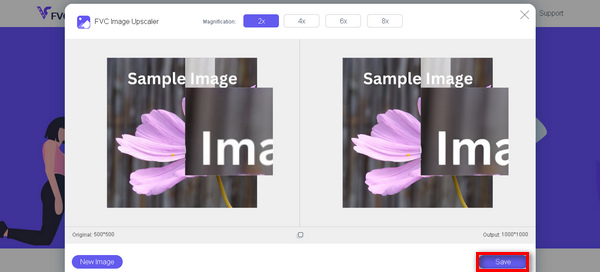
FVC Free Image Upscaler เป็นทางเลือกที่ดีที่สุดสำหรับ Luminar Neo เมื่อพูดถึงเรื่องการลดขนาดภาพ นอกจากนี้ ด้วยเครื่องมือนี้ ผู้ใช้สามารถปรับปรุงรูปภาพของตนได้อย่างง่ายดาย ไม่มีอินเทอร์เฟซที่ซับซ้อน คุณเพียงแค่คลิกไม่กี่ครั้งเพื่อปรับปรุงรูปภาพของคุณได้อย่างสมบูรณ์แบบ
เครื่องมือลบพื้นหลังออนไลน์ของ FVC
ในขณะเดียวกัน คุณสามารถใช้ FVC Online Background Remover เป็นตัวเลือกสำหรับการลบพื้นหลังภาพ เครื่องมือนี้มีความยืดหยุ่นสูงและถูกออกแบบมาเพื่อทำให้กระบวนการลบพื้นหลังภาพเป็นแบบอัตโนมัติ รองรับรูปแบบไฟล์ยอดนิยมหลายชนิด เช่น PNG, JPG และ JPEG นอกจากนี้คุณยังสามารถปรับแต่งผลลัพธ์ของภาพได้ เช่น เปลี่ยนพื้นหลังเป็นสีทึบ พลิกวัตถุ ย้ายตำแหน่ง และครอบตัดภาพ.
ต่อไปนี้เป็นขั้นตอนในการใช้เครื่องมือนี้อย่างง่ายดาย:
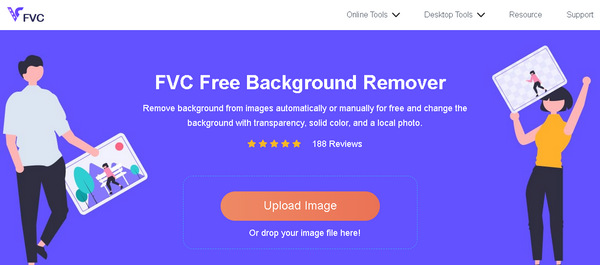
ขั้นตอนที่ 1. อันดับแรก ไปที่เว็บไซต์ทางการของพวกเขาแล้วคลิก Upload Image.
ขั้นตอนที่ 2. หลังจากได้ผลลัพธ์แล้ว คุณสามารถแก้ไขภาพเพิ่มเติมได้ด้วยการเก็บขอบให้เนียนขึ้นและย้ายตำแหน่งวัตถุ.
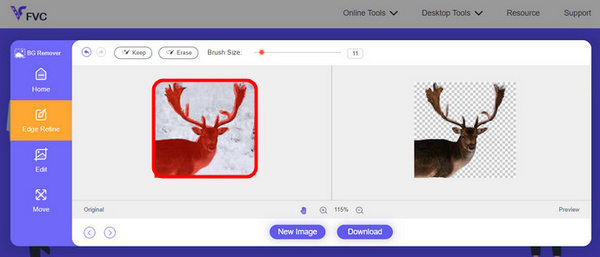
ขั้นตอนที่ 3. หากต้องการบันทึกผลลัพธ์ ให้คลิกปุ่ม Download.
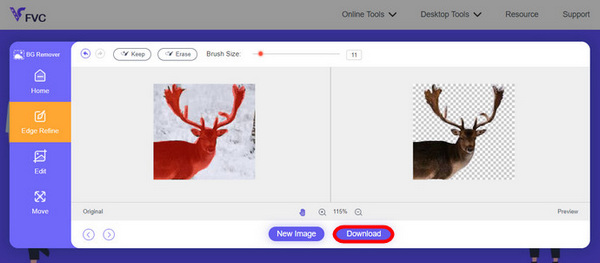
FVC Image Background Remover เป็นเครื่องมือสำหรับตัดรูปภาพและเป็นทางเลือกที่ดีที่สุดสำหรับ Luminar Neo และนอกจากจะฟรีแล้ว เครื่องมือนี้ยังใช้งานง่ายอีกด้วย ไม่ยุ่งยาก มีแต่ผลลัพธ์ที่มีคุณภาพ
ส่วนที่ 5. คำถามที่พบบ่อยเกี่ยวกับ Luminar Neo Review
Luminar Neo ดีกว่า Lightroom หรือไม่?
การเปรียบเทียบระหว่าง Luminar Neo และ Lightroom มักขึ้นอยู่กับความชอบส่วนบุคคลและความต้องการเฉพาะ Lightroom มีชื่อเสียงในด้านการผสมผสานอย่างลงตัวกับ Creative Cloud ของ Adobe ทำให้เป็นที่ชื่นชอบในหมู่ช่างภาพมืออาชีพ ในทางกลับกัน Luminar Neo นำเสนอคุณสมบัติ AI ขั้นสูงและขั้นตอนการทำงานที่ยืดหยุ่น ทางเลือกระหว่างทั้งสองในที่สุดขึ้นอยู่กับสไตล์การแก้ไขของผู้ใช้และข้อกำหนดเวิร์กโฟลว์
Luminar Neo ดีเท่ากับ Photoshop หรือไม่?
Luminar Neo และ Photoshop มีจุดประสงค์ที่แตกต่างกันในขอบเขตของการแก้ไขภาพ Photoshop เป็นมาตรฐานอุตสาหกรรมที่นำเสนอชุดเครื่องมือขั้นสูงที่ครอบคลุมสำหรับการแก้ไขที่ซับซ้อนและการออกแบบกราฟิก Luminar Neo แม้จะทรงพลัง แต่ก็เหมาะกับช่างภาพมากกว่าด้วยฟีเจอร์ที่ขับเคลื่อนด้วย AI ความเหมาะสมอย่างใดอย่างหนึ่งขึ้นอยู่กับความต้องการเฉพาะของผู้ใช้
Luminar Neo ดีสำหรับผู้เริ่มต้นหรือไม่?
ใช่ Luminar Neo ได้รับการออกแบบมาให้ใช้งานง่าย ทำให้เป็นตัวเลือกที่ยอดเยี่ยมสำหรับผู้เริ่มต้น อินเทอร์เฟซที่ใช้งานง่าย ควบคู่ไปกับความสามารถ AI ขั้นสูง ช่วยให้ผู้ใช้ได้รับผลลัพธ์ที่น่าประทับใจโดยไม่ต้องอาศัยการเรียนรู้ที่สูงชัน ค่าที่ตั้งไว้ล่วงหน้าและเครื่องมือสร้างสรรค์ที่หลากหลายของซอฟต์แวร์ยังช่วยให้ผู้เริ่มต้นสำรวจและปรับปรุงภาพถ่ายได้อย่างง่ายดาย
Luminar Neo เป็นการซื้อครั้งเดียวหรือแบบสมัครสมาชิกหรือไม่
Luminar Neo เป็นแบบซื้อครั้งเดียว ผู้ใช้สามารถซื้อซอฟต์แวร์และเข้าถึงคุณลักษณะต่างๆ ได้โดยไม่จำเป็นต้องสมัครสมาชิกซ้ำ โครงสร้างราคานี้ให้แนวทางที่ตรงไปตรงมาและคุ้มค่าสำหรับผู้ใช้ที่ต้องการชำระเงินแบบครั้งเดียวสำหรับความต้องการในการแก้ไขภาพ
สรุป
สรุปแล้ว การรีวิว Luminar Neo นี้ได้มอบข้อมูลเชิงลึกอันมีค่าเกี่ยวกับโปรแกรมแต่งภาพที่ทรงพลังแต่ใช้งานง่ายตัวนี้ ด้วยฟีเจอร์ล้ำสมัยอย่างการขยายภาพด้วย AI และการลบพื้นหลัง ทำให้เหมาะทั้งสำหรับมืออาชีพและผู้เริ่มต้น แม้จะยังมีบางจุดที่สามารถพัฒนาได้ต่อไป แต่ความหลากหลายของฟังก์ชัน พลังของ AI และราคาที่เข้าถึงได้ ล้วนทำให้มันเป็นตัวเลือกที่น่าสนใจสำหรับการยกระดับทักษะการถ่ายภาพของคุณ ไม่ว่าคุณจะมองหาการปรับแต่งแบบละเอียดหรือความเรียบง่าย Luminar Neo ก็พร้อมมอบโซลูชันแบบครบวงจรสำหรับการแปลงโฉมภาพของคุณ.
-
 เพิ่มพื้นหลังให้กับรูปภาพบน iPhone, Android, คอมพิวเตอร์, ออนไลน์
 ฉันสามารถเพิ่มพื้นหลังสีขาวให้กับภาพถ่ายได้หรือไม่? ทำอย่างไร? เรียนรู้ 3 วิธีในการเพิ่มพื้นหลังให้กับรูปภาพทางออนไลน์ บนคอมพิวเตอร์ iPhone หรือ Android
-
 เครื่องมือเพิ่มประสิทธิภาพรูปภาพ Canva: ตัวเร่งคุณภาพของรูปภาพใหม่ใช่ไหม [ทบทวน]
 ค้นพบว่า Canve Image Enhancer สามารถยกระดับภาพถ่ายของคุณไปอีกระดับได้อย่างไร ตรวจสอบการตรวจสอบโดยละเอียดของเราซึ่งครอบคลุมฟีเจอร์ ข้อดีและข้อเสียทั้งหมดของเครื่องมือนี้
-
 Vance AI Image Enhancer: การตรวจสอบเชิงลึก [2024]
 กำลังมองหาเครื่องมือเพิ่มประสิทธิภาพรูปภาพที่ทรงพลังและมีประสิทธิภาพอยู่ใช่ไหม? อ่านบทวิจารณ์เชิงลึกของเราเกี่ยวกับ Vance AI Image Enhancer และดูว่ามันจะแปลงโฉมภาพถ่ายของคุณได้อย่างไร
