


 Video Converter Ultimate
 บันทึกหน้าจอ
 ซ่อมวิดีโอ
วิธีลดขนาดภาพด้วยวิธีและเครื่องมือพิเศษ
บางครั้งการมีไฟล์รูปถ่ายดิจิทัลขนาดใหญ่อาจทำให้การทำงานของคุณเกิดปัญหาได้ นอกจากนี้ ไฟล์เหล่านี้ยังทำให้เว็บไซต์โหลดรูปภาพได้ไม่เต็มประสิทธิภาพ การต้องรอนานเพื่อดูข้อมูลรูปภาพที่สำคัญอาจส่งผลต่ออารมณ์ของผู้ชมได้ เพื่อแก้ไขปัญหานี้จึงจำเป็นอย่างยิ่งที่จะต้องลดขนาดรูปภาพหรือปริมาณข้อมูลของรูปภาพลง การทำเช่นนี้ช่วยเพิ่มประสิทธิภาพในการส่งต่อและจัดเก็บรูปภาพ อีกทั้งการลดขนาดภาพอย่างมีประสิทธิภาพยังมีส่วนสำคัญในการเพิ่มความเร็วในการโหลดไฟล์อีกด้วย โชคดีที่ในบทความนี้ เราจะขยายให้เห็นวิธีการที่มีประโยชน์และใช้ได้จริง นำเสนอแนวทางที่มีประสิทธิภาพในการบีบอัดรูปภาพ ดังนั้นโดยไม่ให้เสียเวลา เรามาเริ่มกันเลย!

ส่วนที่ 1 3 วิธีที่มีประสิทธิภาพในการลดขนาดภาพ
มีสามวิธีที่แตกต่างกันในการลดขนาดของรูปภาพ ซึ่งได้แก่ การบีบอัด การครอบตัด และลดขนาด แต่ละคนมีความสามารถในการรองรับแง่มุมต่างๆ ของภาพของคุณได้ นอกจากนี้ ด้วยการรวมวิธีการเหล่านี้เข้าด้วยกัน คุณสามารถปรับแต่งภาพให้ตรงตามความต้องการเฉพาะของคุณได้ ดังนั้น สิ่งเหล่านี้จึงมีประสิทธิภาพแม้ว่างานนี้จะเป็นการอนุรักษ์พื้นที่จัดเก็บข้อมูล ปรับให้เหมาะสมสำหรับการใช้งานออนไลน์ หรือปรับสมดุลขนาดไฟล์ด้วยคุณภาพของภาพ สำหรับกรณีการใช้งานเฉพาะ ขอแนะนำให้ทดลองใช้วิธีการเหล่านี้เพื่อหาสมดุลที่เหมาะสมระหว่างขนาดและคุณภาพ ดังนั้น ต่อไปนี้เป็นคำอธิบายสำหรับวิธีการทั่วไปสองวิธี: การครอบตัดและการบีบอัด รวมถึงการลดขนาดหรือขนาดของรูปภาพ
1. บีบอัดขนาดรูปภาพ
การบีบอัดรูปภาพเป็นวิธีการที่ซับซ้อนที่ใช้ในการย่อขนาดไฟล์ ทำงานโดยปรับการเข้ารหัสข้อมูลให้เหมาะสมเพื่อให้เกิดความสมดุลที่ละเอียดอ่อนระหว่างพื้นที่จัดเก็บข้อมูลขนาดกะทัดรัดและคุณภาพของภาพที่คงไว้ อย่างไรก็ตาม วิธีการนี้พิสูจน์ให้เห็นถึงข้อได้เปรียบโดยเฉพาะอย่างยิ่งในบริบทที่การสร้างสมดุลที่เหมาะสมระหว่างขนาดไฟล์และความเที่ยงตรงของภาพเป็นสิ่งสำคัญ นอกจากนี้ อัลกอริธึมการบีบอัดที่โดดเด่น เช่น JPEG หรือ PNG มีบทบาทสำคัญในกระบวนการนี้ด้วยการระบุและลบข้อมูลที่ซ้ำซ้อนภายในข้อมูลภาพอย่างเป็นระบบ ผลลัพธ์ที่ได้คือขนาดไฟล์ที่ได้รับการปรับปรุงซึ่งอำนวยความสะดวกในการจัดเก็บข้อมูลที่มีประสิทธิภาพและการส่งข้อมูลออนไลน์ที่รวดเร็วโดยไม่กระทบต่อความสมบูรณ์ของภาพโดยรวมมากเกินไป กระบวนการบีบอัดนี้สามารถย้อนกลับได้บางส่วน ทำให้คุณมีความยืดหยุ่นในการปรับแต่งการแลกเปลี่ยนระหว่างการลดขนาดไฟล์และการรักษาคุณภาพของภาพตามความต้องการเฉพาะของคุณ โดยรวมแล้ว การบีบอัดภาพถือเป็นเทคนิคอเนกประสงค์ ช่วยให้มั่นใจได้ถึงการนำเสนอภาพที่เหมาะสมที่สุดในภูมิทัศน์ดิจิทัล ในขณะเดียวกันก็ลดความต้องการทรัพยากรในการจัดเก็บข้อมูลด้วย
2. ลดขนาดภาพ
การปรับขนาดมิติของรูปภาพหรือที่มักเรียกกันว่าการรีไซส์ (resize) เป็นกระบวนการที่มีผลต่อขนาดไฟล์และลักษณะการแสดงผลของรูปภาพ การลดขนาดมิติของภาพลงมักจะทำให้ขนาดไฟล์โดยรวมลดลงตามไปด้วย วิธีนี้จึงมีประโยชน์อย่างมากเมื่อสามารถใช้เวอร์ชันภาพที่เล็กลงได้ โดยเฉพาะในกรณีอย่างเช่นการสร้างภาพตัวอย่าง (thumbnail) หรือการเตรียมภาพสำหรับแสดงผลบนออนไลน์ ด้วยการปรับความกว้างและความสูงของรูปภาพ คุณจึงควบคุมขนาดและปรับให้เหมาะกับความต้องการเฉพาะได้ นอกจากนี้ วิธีลดขนาดรูปภาพโดยไม่ทำให้คุณภาพลดลงนี้ ยังโดดเด่นในฐานะวิธีที่รวดเร็วและมีประสิทธิภาพสำหรับการปรับแต่งภาพเพื่ออัปโหลดและแบ่งปัน โดยสรุปแล้ว การรีไซส์รูปภาพถือเป็นสิ่งสำคัญทั้งในการประหยัดพื้นที่จัดเก็บและการแชร์ออนไลน์.
3. ครอบตัดรูปภาพ
สุดท้ายคือวิธีการครอบตัด เป็นเทคนิคการแก้ไขภาพที่จงใจลบบางส่วนออกจากภาพ วิธีนี้จะดึงความสนใจของผู้ชมไปยังวัตถุเฉพาะหรือเปลี่ยนแปลงองค์ประกอบโดยรวม ประโยชน์หลักของวิธีนี้คือสามารถลดขนาดไฟล์ได้อย่างมากโดยกำจัดพื้นที่ภายนอกในการแสดงภาพที่อาจไม่ส่งผลต่อการมองเห็นตามที่ตั้งใจไว้ นอกจากนี้ การลบเนื้อหาส่วนเกินเชิงกลยุทธ์นี้ช่วยให้มั่นใจได้ว่าภาพสุดท้ายจะยังคงโฟกัสและมีผลกระทบโดยไม่มีภาระของข้อมูลที่ไม่จำเป็น ดังนั้น แทนที่จะบีบอัดรูปภาพสำหรับเว็บ คุณสามารถทำการครอบตัดได้อย่างมีประสิทธิภาพโดยใช้เครื่องมือแก้ไขรูปภาพต่างๆ ที่ช่วยให้คุณสามารถเลือกและกำจัดส่วนที่ไม่ต้องการของรูปภาพได้ด้วยตนเอง กระบวนการนี้ส่งผลโดยตรงต่อขนาดไฟล์ เนื่องจากข้อมูลที่สอดคล้องกับขอบเขตที่ครอบตัดจะถูกละทิ้งโดยเจตนา เป็นผลให้คุณจะมีภาพที่คล่องตัวซึ่งยังคงรักษาพลังในการสื่อสารในขณะที่ใช้พื้นที่เก็บข้อมูลน้อยลง
ส่วนที่ 2 วิธีบีบอัดขนาดรูปภาพออนไลน์
1. การใช้โปรแกรมบีบอัดรูปภาพฟรี FVC
เครื่องมือออนไลน์ตัวแรกที่ควรใช้คือ FVC Free Image Compressor ตัวนี้ เป็นคอมเพรสเซอร์ที่โดดเด่นเรื่องความรวดเร็วและมีประสิทธิภาพในการบีบอัดรูปภาพ โดยใช้การปรับแต่งและอัลกอริทึมบีบอัดขั้นสูง นอกจากนี้ เครื่องมือนี้ยังรองรับไฟล์รูปภาพหลากหลายรูปแบบ เช่น PNG, JPEG, SVG และ GIF แบบเคลื่อนไหว อีกทั้งยังช่วยลดขนาดไฟล์ลงได้มากโดยแทบไม่กระทบต่อคุณภาพของภาพ เพราะเป้าหมายหลักคือการคงความละเอียดและคุณภาพที่เหมาะสมไว้ พร้อมกับลดขนาดรูปภาพในหน่วยกิโลไบต์อย่างชัดเจน หนึ่งในคุณสมบัติเด่นของตัวบีบอัดภาพฟรีนี้คือการรองรับการบีบอัดแบบหลายไฟล์พร้อมกัน (batch compression) คุณสามารถปรับขนาดภาพหลาย ๆ รูปพร้อมกันได้ทันทีหลังจากอัปโหลด ซึ่งช่วยให้ขั้นตอนทั้งหมดกระชับและประหยัดเวลาอย่างยิ่ง.
มีอะไรอีก? โปรแกรมบีบอัดรูปภาพฟรี FVC นี้รองรับภาพได้สูงสุด 40 ภาพ และแต่ละภาพมีขนาดสูงสุด 5MB และยังให้ความยืดหยุ่นที่เพียงพอสำหรับคุณและผู้ใช้รายอื่นที่มีความต้องการการบีบอัดที่หลากหลาย
คุณสมบัติเด่น
◆ อัพโหลดและบีบอัดขั้นตอน
◆ ขั้นตอนแบทช์
◆ กระบวนการบีบอัดที่รวดเร็ว
◆ ผลผลิตคุณภาพสูง
◆ เซิร์ฟเวอร์ที่มีการรักษาความปลอดภัย 100%
◆ ตัวลดขนาดรูปภาพที่ให้ใช้ได้ฟรีทั้งหมด.
วิธีบีบอัดรูปภาพด้วย FVC
ขั้นตอนที่ 1 เข้าไปที่เว็บไซต์ทางการของ FVC Free Image Compressor.
ขั้นตอนที่ 2 ลากไฟล์รูปภาพที่ต้องการบีบอัดมาวาง หรือคลิกปุ่ม Upload Images เพื่ออัปโหลดไฟล์.
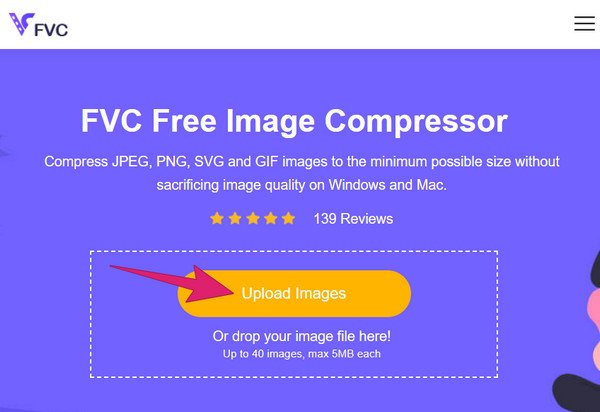
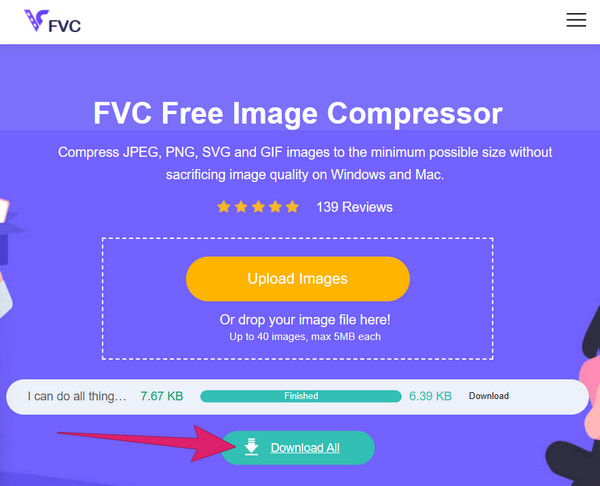
ขั้นตอนที่ 3 เครื่องมือจะลดขนาดรูปภาพโดยไม่ทำให้คุณภาพลดลงทันทีที่อัปโหลดเสร็จ เมื่อเรียบร้อยแล้วให้คลิกปุ่ม Download All เพื่อส่งออกไฟล์ภาพที่บีบอัดแล้ว.
2. การใช้ TinyPNG
ตัวบีบอัดรูปภาพออนไลน์ตัวถัดไปที่น่าใช้คือ TinyPNG เครื่องมือบีบอัดนี้เป็นหนึ่งในเครื่องมือฟรีที่ได้รับความนิยมและใช้งานมายาวนานสำหรับไฟล์รูปแบบPNG และ JPG ชื่อเสียงในฐานะเครื่องมือที่เชื่อถือได้ทำให้ TinyPNG ยังคงเป็นตัวเลือกที่หลายคนไว้วางใจสำหรับการลดขนาดรูปภาพ นอกจากนี้ TinyPNG ยังเป็นเครื่องมือสำคัญในการปรับขนาดภาพให้เหมาะสม โดยมีคุณค่าอย่างมากต่อการใช้งานในแอปพลิเคชันและเว็บไซต์ร้านค้าออนไลน์ คุณสมบัติเด่นอีกอย่างของคอมเพรสเซอร์นี้คือประสิทธิภาพที่ยอดเยี่ยม ซึ่งมักจะลดขนาดไฟล์ภาพได้มากกว่า 70% อย่างสม่ำเสมอ อย่างไรก็ตาม TinyPNG รองรับการบีบอัดภาพได้สูงสุดเพียง 20 รูปต่อครั้งเท่านั้น.
คุณสมบัติเด่น
◆ การบำรุงรักษาคุณภาพดั้งเดิม
◆ ปลั๊กอินเวิร์ดเพรส
◆ ลดขนาดไฟล์ลงอย่างมาก
◆ ขั้นตอนแบทช์
วิธีบีบอัดรูปภาพให้เหลือ 50kb ด้วย TinyPNG
ขั้นตอนที่ 1 เมื่อเข้าเว็บไซต์ TinyPNG แล้ว คุณสามารถเริ่มอัปโหลดไฟล์ได้ทันที.
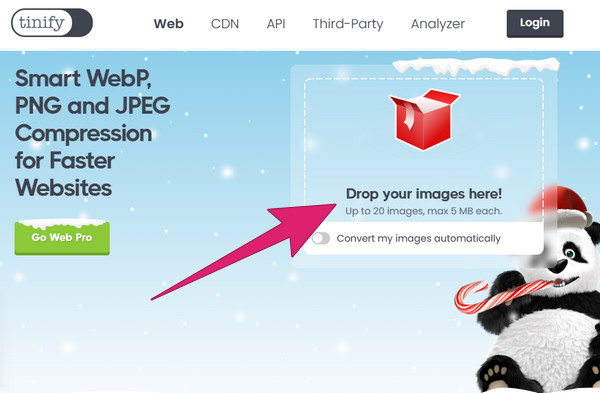
ขั้นตอนที่ 2 ในการอัปโหลดไฟล์ เพียงลากไฟล์ไปวางในกล่องที่ระบุว่า drop your images here.
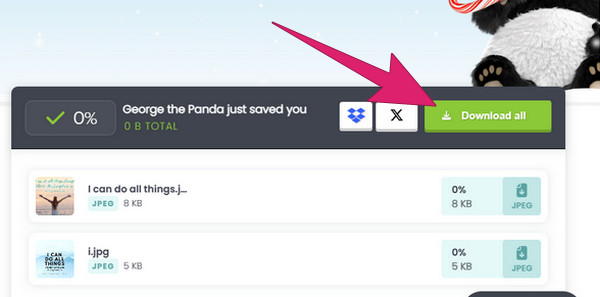
ขั้นตอนที่ 3 เมื่อบีบอัดไฟล์เสร็จแล้ว ให้คลิกปุ่ม Download All.
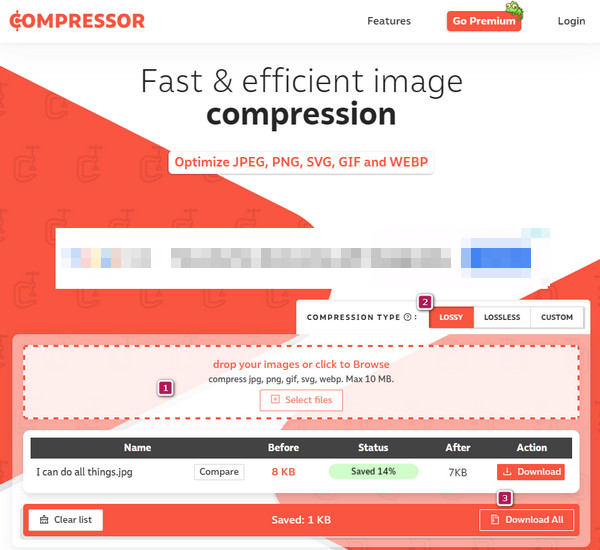
3. การใช้ Compressor.io
ในที่สุดคอมเพรสเซอร์.io ก็มาถึงซึ่งโดดเด่นในฐานะเครื่องมือบีบอัดรูปภาพที่มีประสิทธิภาพเป็นพิเศษ มีชื่อเสียงในด้านอัตราการบีบอัดที่น่าทึ่ง และใช้วิธีการบีบอัดแบบคู่โดยผสมผสานวิธีการบีบอัดทั้งแบบสูญเสียและไม่สูญเสียข้อมูล นอกจากนี้ Compressor.io ยังช่วยให้การประมวลผลเป็นชุดมีประสิทธิภาพ ทำให้คุณสามารถบีบอัดภาพได้สูงสุด 10 ภาพพร้อมกัน นอกจากนี้ แต่ละภาพสามารถมีขนาดไฟล์สูงสุดได้ 10 MB ซึ่งให้ความยืดหยุ่นในการจัดการไฟล์หลายไฟล์ภายในขีดจำกัดขนาดที่เหมาะสม อย่างไรก็ตาม สามารถลดได้สูงสุดถึง 5% -20 % เท่านั้น
คุณสมบัติเด่น
◆ บีบอัดรูปภาพจาก PowerPoint
◆ กระบวนการบีบอัดภาพแบบไม่สูญเสีย
ขั้นตอนที่ 1 ลากไฟล์ไปวางในพื้นที่อัปโหลด หรือคลิกปุ่ม Select Files เพื่อเลือกรูปภาพ.
ขั้นตอนที่ 2 เลือกประเภทการบีบอัดที่ต้องการแล้วคลิก.
ขั้นตอนที่ 3 เมื่อเสร็จสิ้น ให้คลิกปุ่ม Download เพื่อส่งออกไฟล์รูปภาพ.
ส่วนที่ 3 วิธีลดขนาดหรือขนาดรูปภาพ
1. ด้วยเครื่องมือเพิ่มประสิทธิภาพ JPEG
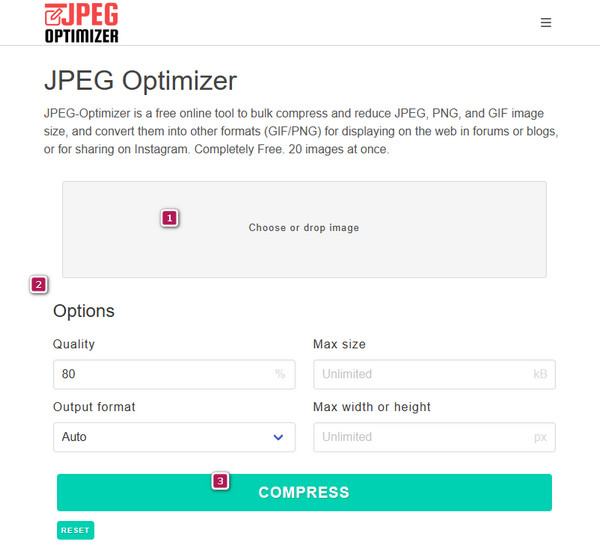
แม้ชื่อของเครื่องมือจะว่า JPEG Optimizer ทำให้ฟังดูเหมือนรองรับเฉพาะ JPEG แต่จริง ๆ แล้วไม่ใช่เท่านั้น คุณยังสามารถใช้เป็นตัวบีบอัด GIFและตัวลดขนาดไฟล์ PNG ได้ด้วย เครื่องมือออนไลน์ที่ใช้งานง่ายตัวนี้ขึ้นชื่อเรื่องความเชื่อถือได้และความเรียบง่ายในฐานะตัวบีบอัดรูปภาพ ขั้นตอนการปรับแต่งสำหรับ JPEG Optimizer ก็ตรงไปตรงมา ทำให้ผู้ใช้สามารถเพิ่มประสิทธิภาพของรูปภาพได้อย่างสะดวก นอกจากนี้ ยังโดดเด่นด้านการปรับขนาดรูปให้ตรงกับมิติที่ต้องการ จึงเหมาะอย่างยิ่งสำหรับการปรับภาพให้เข้ากับแพลตฟอร์มและจุดประสงค์ต่าง ๆ พร้อมกันนั้นยังสามารถบีบอัดรูปภาพได้อย่างมีประสิทธิภาพและลดขนาดได้มาก อย่างไรก็ตาม ควรทราบว่าการบีบอัดไฟล์ JPEG อาจทำให้ความละเอียดของรูปภาพลดลงได้.
คุณสมบัติเด่น
◆ การแปลงรูปภาพ
◆ ปรับแต่งคุณภาพรูปภาพได้ตามต้องการ.
◆ ปรับขนาดภาพให้เป็นขนาดที่คุณต้องการ
วิธีบีบอัดรูปภาพ
ขั้นตอนที่ 1 ไปที่หน้าคอมเพรสเซอร์ แล้วลากไฟล์ภาพมาวางในช่อง.
ขั้นตอนที่ 2 ตั้งค่าที่เมนู Options ตามความต้องการของคุณ.
ขั้นตอนที่ 3 จากนั้นคลิกปุ่ม COMPRESS เพื่อเริ่มกระบวนการ แล้วดาวน์โหลดไฟล์ผลลัพธ์หลังเสร็จสิ้น.
2. โปรแกรมปรับขนาดรูปภาพ
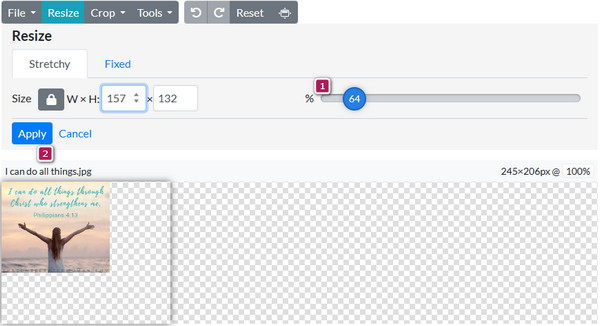
ตัวลดขนาดอื่นที่คุ้มค่ากับเวลาของคุณคือ Photo Resizer เครื่องมือนี้มอบโซลูชันที่หลากหลายโดยไม่เพียงแต่ปรับขนาดรูปภาพเท่านั้น แต่ยังรวมเอาคุณสมบัติการแก้ไขต่างๆ ไว้ด้วยเพื่อเพิ่มความดึงดูดสายตาของไฟล์ นอกจากนี้ เพื่อลดขนาดไฟล์และปรับขนาด คุณสามารถใช้องค์ประกอบสร้างสรรค์เพื่อยกระดับความสวยงามโดยรวมของรูปภาพของคุณได้ อย่างไรก็ตาม คุณต้องทราบว่าวิธีนี้ช่วยให้คุณลดขนาดรูปภาพได้ทีละรายการเท่านั้น
คุณสมบัติเด่น
◆ ย่อ ครอบตัด และขยายรูปภาพ
◆ คุณสมบัติการแก้ไขขั้นพื้นฐาน
◆ แบ่งปันรูปภาพบนภาพโซเชียล
ขั้นตอนที่ 1 บนหน้าเว็บ ให้คลิกปุ่ม Browse แล้วอัปโหลดไฟล์ภาพ.
ขั้นตอนที่ 2 ลากแถบปรับขนาด (resizer bar) ได้อย่างอิสระให้ตรงกับขนาดที่ต้องการ.
ขั้นตอนที่ 3 เมื่อเสร็จเรียบร้อยแล้ว ให้คลิกปุ่ม Apply เพื่อบันทึกการเปลี่ยนแปลง.
ส่วนที่ 4. คำถามที่พบบ่อยเกี่ยวกับขนาดไฟล์รูปภาพ
ขนาดไฟล์รูปภาพในอุดมคติสำหรับหน้าเว็บคือเท่าไร?
ขนาดรูปภาพที่เหมาะสำหรับหน้าเว็บคือต่ำกว่า 100-200 KB
ฉันจะลดขนาด MB ของรูปภาพได้อย่างไร
ใช้โปรแกรมบีบอัดรูปภาพที่เชื่อถือได้ เช่น FVC Free Image Compressor
การลดขนาดภาพทำให้คุณภาพลดลงหรือไม่?
ใช่ การลดขนาดไฟล์อาจลดคุณภาพของภาพเนื่องจากพิกเซลลดลง
JPEG สามารถบีบอัดได้เท่าไหร่?
ขนาดการบีบอัดมาตรฐานของ JPEG คือ 10:1 ถึง 20:1
มีรูปแบบภาพที่ไม่มีการบีบอัดหรือไม่?
ใช่. โดยทั่วไปรูปแบบ BMP และ RAW จะไม่มีการบีบอัด
สรุป
วิธีที่ได้นำเสนอในการบีบอัดและลดขนาดรูปภาพเหล่านี้ถือว่าเหมาะสมอย่างยิ่ง ดังนั้นคุณสามารถเลือกเครื่องมือและวิธีที่เหมาะกับตัวเองได้เลย หากคุณต้องการแอปตัวลดขนาดรูปที่ดีที่สุดสำหรับใช้งานบนมือถือและเดสก์ท็อป ให้เข้าไปที่ FVC Image Compressor Online เพื่อรับทางออกที่ดีที่สุด.
-
 วิธีขยายรูปภาพสำหรับการพิมพ์ออนไลน์และออฟไลน์
 หากคุณมีภาพความละเอียดคุณภาพต่ำและต้องการขยาย เรามีทางออกสำหรับคุณ อ่านบทความนี้เพื่อเรียนรู้วิธีขยายรูปภาพสำหรับการพิมพ์
-
 บทแนะนำการบีบอัด GIF และลดขนาดไฟล์ด้วยคุณภาพสูง
 ต่อไปนี้คือ 2 วิธีง่ายๆ ในการบีบอัด GIF คุณสามารถใช้ FVC Free Online Video Compressor และ Photoshop เพื่อลดขนาดไฟล์ GIF ในด้านต่างๆ ได้
-
 วิธีใช้ GIMP เพื่อปรับขนาดรูปภาพ: กระบวนการทีละขั้นตอน
 หากคุณต้องการปรับขนาดภาพ คุณสามารถใช้ GIMP เพื่อปรับขนาดภาพได้ อ่านคู่มือนี้อย่างละเอียดเพื่อเรียนรู้วิธีใช้ GIMP เพื่อปรับขนาดภาพออนไลน์บนพีซีของคุณ
