


 Video Converter Ultimate
 บันทึกหน้าจอ
 ซ่อมวิดีโอ
 ดาวน์โหลดอย่างปลอดภัย
วิธีลบลายน้ำออกจากรูปภาพจบการศึกษาอย่างง่ายดาย
ลายน้ำเป็นสิ่งที่น่าเบื่อหน่ายทุกครั้งที่คุณเห็นลายน้ำในภาพถ่าย และทำลายคุณภาพของภาพถ่าย คุณจะเห็นลายน้ำบนภาพถ่ายเมื่อใดก็ตามที่ผู้สร้างไม่ต้องการให้งานของเขาถูกขโมย และถ้าคุณเป็นนักเรียน คุณอาจเห็นลายน้ำบนรูปภาพจบการศึกษาของคุณ ซึ่งระบุชื่อสตูดิโอหรือช่างภาพที่ถ่าย
หากคุณต้องการลบลายน้ำบนรูปถ่ายวันรับปริญญา คุณจำเป็นต้องมีเครื่องมือที่จะช่วยลบลายน้ำออกจากรูปได้ ในบทความนี้ เราได้รวบรวม 3 เครื่องมือลบลายน้ำที่ถูกใช้งานบ่อยที่สุด และคุณยังจะได้เรียนรู้ขั้นตอนในการลบลายน้ำออกจากรูปถ่ายวันรับปริญญาอีกด้วย.

ส่วนที่ 1 วิธีลบลายน้ำออกจากรูปภาพจบการศึกษาออนไลน์
มีเครื่องมือลบลายน้ำมากมายที่คุณจะเห็นบนอินเทอร์เน็ต อย่างไรก็ตาม ไม่ใช่ทั้งหมดที่มีให้ใช้ฟรีและใช้งานง่าย นอกจากนี้ ในส่วนนี้ คุณจะรู้วิธีลบลายน้ำอย่างสะดวกและมีประสิทธิภาพ
FVC Free Watermark Remover เป็นเครื่องมือลบลายน้ำออนไลน์ที่ช่วยให้คุณลบลายน้ำออกจากรูปถ่ายวันรับปริญญาได้อย่างง่ายดาย เครื่องมือออนไลน์ตัวนี้ได้รับความนิยมเพราะคุณไม่จำเป็นต้องดาวน์โหลดอะไรให้ยุ่งยากก่อนใช้งาน นอกจากนี้ ยังรองรับรูปภาพฟอร์แมตยอดนิยม เช่น PNG, JPG, JPEG, BMP และอื่น ๆ อีกทั้งถึงแม้คุณจะลบลายน้ำออกจากรูปแล้ว เมื่อดาวน์โหลดกลับมา ไฟล์ภาพก็ยังคงเป็นฟอร์แมตเดิมเหมือนก่อนลบ.
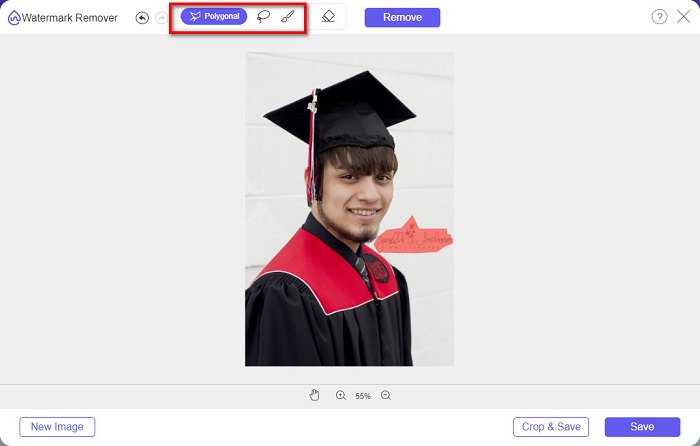
การใช้ตัวลบลายน้ำนี้ คุณสามารถเลือกจากค่าที่ตั้งไว้ล่วงหน้าของตัวลบในการเลือกพื้นที่ลายน้ำ คุณสามารถเลือกระหว่างโพลิกอน บ่วงบาศ หรือพู่กัน นอกจากนี้ คุณสามารถใช้เครื่องมือนี้เพื่อลบสิ่งที่ไม่จำเป็นอื่นๆ บนรูปภาพของคุณ
ข้อดี
- มีอินเทอร์เฟซซอฟต์แวร์ที่ใช้งานได้รวดเร็ว
- มีความปลอดภัยในการใช้งาน
- ใช้งานได้ฟรี 100%
- ใช้ได้กับทุกเว็บเบราว์เซอร์ รวมถึง Google, Firefox และ Safari
จุดด้อย
- เป็นที่พึ่งทางอินเทอร์เน็ต
วิธีกำจัดลายน้ำบนรูปภาพจบการศึกษาโดยใช้ FVC Free Watermark Remover:
ขั้นตอนที่ 1. บนเบราว์เซอร์ที่คุณใช้งาน ให้ค้นหา FVC Free Watermark Remover คุณสามารถคลิกที่ลิงก์นี้เพื่อไปยังหน้าเว็บของพวกเขาโดยตรง.
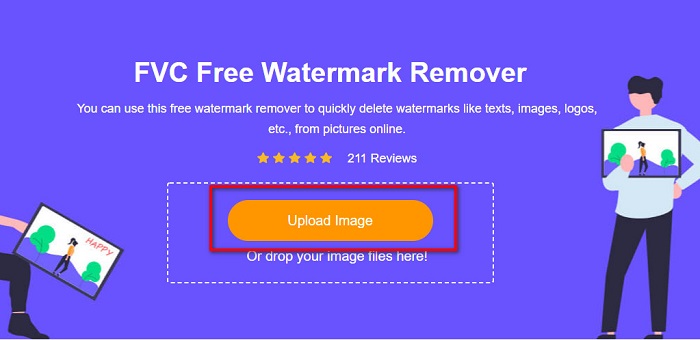
ขั้นตอนที่ 2. บนหน้าหลักของซอฟต์แวร์ ให้คลิกปุ่ม Upload Image จากนั้นจะมีหน้าต่างโฟลเดอร์ในคอมพิวเตอร์ขึ้นมา ให้คุณเลือกภาพถ่ายวันรับปริญญาแล้วอัปโหลด.
ขั้นตอนที่ 3. จากนั้น เลือกเครื่องมือลบลายน้ำที่คุณต้องการใช้ในการลบลายน้ำ เลือกได้ระหว่าง Polygonal, Lasso หรือ Brush แล้วทำการเลือกบริเวณลายน้ำที่คุณต้องการลบ.
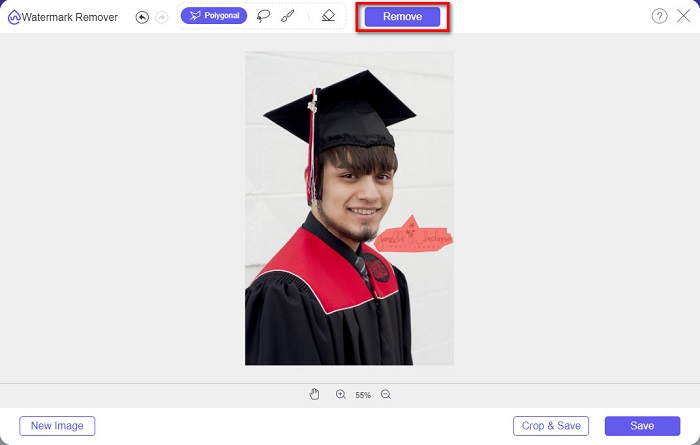
ขั้นตอนที่ 4. หลังจากเลือกพื้นที่ลายน้ำเรียบร้อยแล้ว ให้คลิกปุ่ม Remove เพื่อลบลายน้ำ.
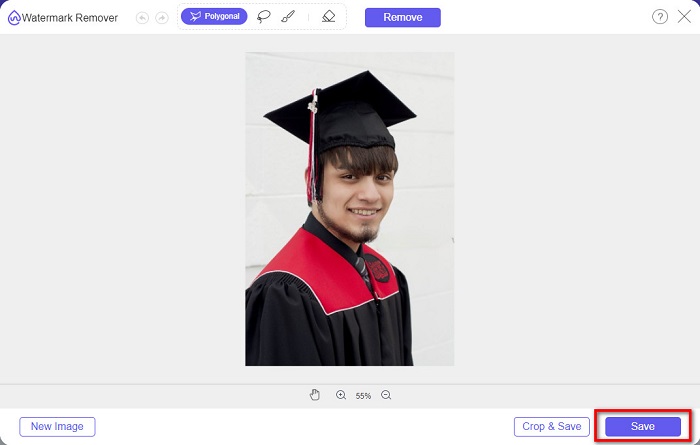
ขั้นตอนที่ 5. คุณจะเห็นว่าลายน้ำถูกลบออกแล้ว ให้คลิกปุ่ม Save เพื่อดาวน์โหลดรูปภาพลงในอุปกรณ์ของคุณ นอกจากนี้ เครื่องมือลบลายน้ำออนไลน์ตัวนี้ยังใช้เป็นเครื่องมือลบลายน้ำจาก Photobucketได้อีกด้วย.
ส่วนที่ 2 วิธีการลบลายน้ำออกจากรูปภาพจบการศึกษาโดยใช้ Inpaint
บางครั้งผู้คนรีทัชลายน้ำเพื่อให้รูปภาพมีลักษณะเหมือนต้นฉบับ แต่พวกเขาทำอย่างนั้นได้อย่างไร? ผู้เชี่ยวชาญใช้โปรแกรมแก้ไขรูปภาพและระบายสีป้ายกำกับแบบพิกเซลต่อพิกเซล ส่งผลให้ใช้เวลาทำงานสองสามชั่วโมง อย่างไรก็ตาม ยังมีอีกเครื่องมือหนึ่งที่จะช่วยให้คุณใช้ชีวิตได้ง่ายขึ้น ในส่วนนี้ คุณจะได้เรียนรู้วิธีใช้ Inpaint และข้อดีของมัน
Inpaint เป็นเครื่องมือลบลายน้ำออนไลน์ที่ช่วยลบลายน้ำออกจากรูปถ่ายวันรับปริญญาของคุณได้เช่นกัน ซอฟต์แวร์ออนไลน์ตัวนี้ยังมีเวอร์ชันให้ดาวน์โหลดสำหรับ Windows และ Mac อีกด้วย นอกจากนี้ ยังช่วยลบสิ่งที่ไม่ต้องการในภาพ เช่น โลโก้ ตัวอักษร วัตถุ ฯลฯ ที่น่าประทับใจไปกว่านั้นคือมีฟีเจอร์ซ่อมแซมรูปเก่าให้กลับมามีคุณภาพใกล้เคียงต้นฉบับ และยังมีเครื่องมือสำหรับเลือกพื้นที่ลายน้ำที่คุณต้องการลบ.
ข้อดี
- มีอินเทอร์เฟซซอฟต์แวร์ที่ใช้งานง่าย
- ช่วยให้คุณทำการรีทัชใบหน้าแบบดิจิทัลได้
- ช่วยให้คุณสามารถเติมพื้นที่สีดำของพาโนรามาได้
- เข้าถึงได้บนเว็บเบราว์เซอร์เกือบทั้งหมด เช่น Google และ Firefox
จุดด้อย
- มันขึ้นอยู่กับอินเทอร์เน็ต
วิธีลบลายน้ำออกจากรูปภาพจบการศึกษาโดยใช้ Inpaint:
ขั้นตอนที่ 1. ค้นหา Inpaint ในเบราว์เซอร์ของคุณ แล้วเข้าไปที่หน้าเว็บ จากนั้นบนหน้าหลักของซอฟต์แวร์ ให้คลิกปุ่ม Upload Image เพื่ออัปโหลดรูปถ่ายวันรับปริญญา.
ขั้นตอนที่ 2. จากนั้น เลือกเครื่องมือลบลายน้ำที่คุณต้องใช้ในการเลือกพื้นที่ลายน้ำ เลือกได้ระหว่าง marker tool, lasso tool และ polygonal lasso tool.
ขั้นตอนที่ 3. แล้วใช้เครื่องมือที่คุณเลือก ทำการเลือกบริเวณลายน้ำที่ต้องการลบ.

ขั้นตอนที่ 4. สุดท้าย คลิกปุ่ม Erase เพื่อลบลายน้ำออกจากรูปถ่ายวันรับปริญญา จากนั้นคลิกปุ่ม Download เพื่อดาวน์โหลดรูปภาพ.
ส่วนที่ 3 วิธีการลบลายน้ำออกจากรูปภาพจบการศึกษาโดยใช้ Photoshop
Adobe Photoshop เป็นซอฟต์แวร์แก้ไขที่มีชื่อเสียงที่สุดที่มืออาชีพหลายคนใช้ แต่สิ่งที่ผู้ใช้หลายคนไม่รู้ก็คือไม่ใช่แค่ซอฟต์แวร์ตัดต่อเท่านั้น นอกจากนี้ยังสามารถลบลายน้ำที่ไม่ต้องการบนรูปภาพของคุณได้ หากต้องการเรียนรู้วิธีลบลายน้ำออกจากรูปภาพของคุณ โปรดอ่านส่วนนี้อย่างละเอียด
Adobe Photoshop เป็นซอฟต์แวร์ตกแต่งรูปภาพที่ได้รับความนิยมมากที่สุด และมีฟีเจอร์การแก้ไขภาพอย่างหลากหลาย ผู้เชี่ยวชาญจำนวนมากเลือกใช้แอปพลิเคชันนี้เพราะสามารถตกแต่งภาพได้อย่างมืออาชีพ มีเครื่องมือที่ช่วยให้คุณแก้ไขภาพได้อย่างละเอียด อีกทั้งยังสามารถส่งออกไฟล์คุณภาพสูงเพื่อแชร์บนแพลตฟอร์มโซเชียลมีเดียใดก็ได้.
ข้อดี
- มีคุณสมบัติการแก้ไขขั้นสูงมากมายที่จะใช้
- มันมีเครื่องมือมากมายที่จะใช้สำหรับการแก้ไข
- ให้ผลผลิตคุณภาพสูง
- ช่วยให้คุณสามารถแก้ไขและสร้างภาพทั้งการพิมพ์และเว็บ
จุดด้อย
- มีอินเทอร์เฟซซอฟต์แวร์ที่ใช้งานง่าย
- คุณต้องซื้อแอปเพื่อดาวน์โหลด
วิธีลบลายน้ำบนภาพถ่ายของคุณโดยใช้ Adobe Photoshop:
ขั้นตอนที่ 1. ดาวน์โหลด Adobe Photoshop ลงบนอุปกรณ์ของคุณ แล้วเปิดโปรแกรม จากนั้นบนหน้าหลักของผู้ใช้ ให้เปิดรูปภาพใน Photoshop.
ขั้นตอนที่ 2. ทำการเลือกบริเวณที่เป็นลายน้ำ คุณสามารถใช้ Pen tool, Quick Selection tool หรือ Magic Wand tool ก็ได้.
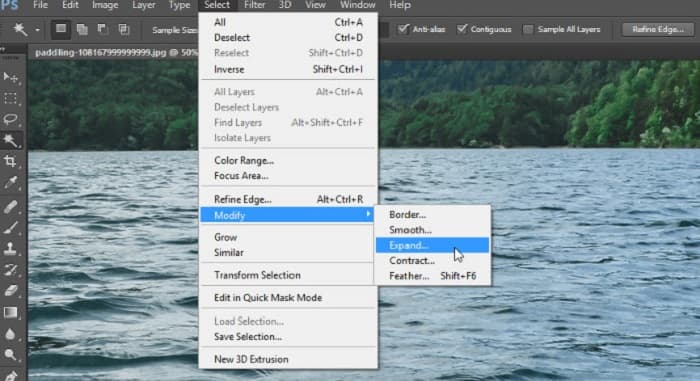
ขั้นตอนที่ 3. ไปที่ Select > Modify > Expand เพื่อให้ครอบคลุมพิกเซลของพื้นหลังรอบ ๆ.
ขั้นตอนที่ 4. ไปที่ Edit > Fill แล้วเลือก Content-Aware ในส่วน Contents.
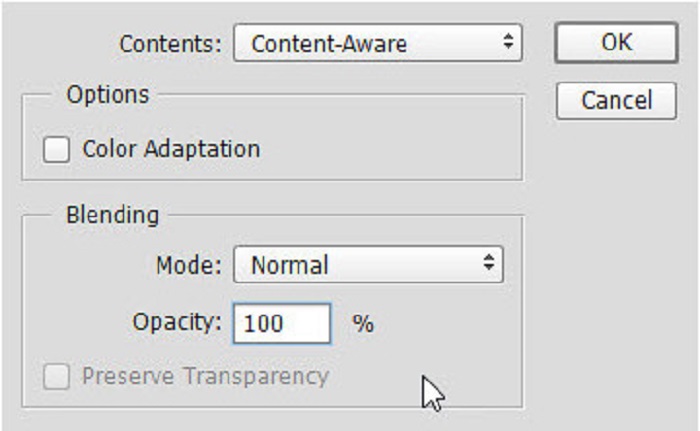
ขั้นตอนที่ 5. จากนั้นกด CTRL+D คุณจะเห็นว่าบริเวณลายน้ำถูกเติมด้วยพื้นหลังแล้ว จากนั้นให้ใช้ Clone Stamp Tool เพื่อลบขอบของลายน้ำ.
ขั้นตอนที่ 6. กดค้างที่ปุ่ม Alt แล้วลากตามแนวขอบของลายน้ำ เมื่อคุณลบร่องรอยเสร็จแล้ว จะเห็นได้ว่าลายน้ำถูกลบออกไปเรียบร้อย.
ส่วนที่ 4 คำถามที่พบบ่อยเกี่ยวกับการลบลายน้ำออกจากภาพจบการศึกษา
การลบลายน้ำออกจากรูปภาพจบการศึกษาทำลายคุณภาพหรือไม่?
การนำลายน้ำออกจากรูปภาพจบการศึกษาไม่ได้ทำให้คุณภาพเสียหายเสมอไป อย่างไรก็ตาม เมื่อคุณลบลายน้ำ เครื่องมือบางอย่างยังคงทิ้งรอยไว้
คุณสามารถลบลายน้ำบน Canva ได้ไหม
ใช่. Canva มีคุณสมบัติที่คุณสามารถลบลายน้ำได้ฟรี เพียงคลิกปุ่มลบลายน้ำเพื่อดำเนินการดังกล่าว
คุณสามารถลบลายน้ำใน PDF ได้หรือไม่?
ด้วยเครื่องมือต่าง ๆ ข้างต้น คุณสามารถลบลายน้ำใด ๆ ออกจากไฟล์ PDFของคุณได้.
สรุป
เมื่อคุณได้เรียนรู้วิธีลบลายน้ำออกจากรูปถ่ายวันรับปริญญาแล้ว ตอนนี้คุณก็สามารถลงมือทำเอง และลองใช้เครื่องมือที่แนะนำไว้ด้านบนได้ การลบลายน้ำจะกลายเป็นเรื่องง่ายเมื่อใช้โปรแกรมลบลายน้ำ อย่างไรก็ตาม หลายคนแนะนำให้ใช้ FVC Free Watermark Remover เพราะใช้งานสะดวกและง่าย.
-
 วิธีลบลายน้ำ Lumion บน Windows & Mac ได้อย่างง่ายดาย
 ต้องการลบลายน้ำ Lumion เพื่อนำเสนออย่างมืออาชีพหรือไม่? มีเครื่องมือต่างๆ ที่คุณสามารถใช้ช่วยคุณกำจัดลายน้ำที่ทิ้งไว้ได้
-
 วิธีลบลายน้ำ Weibo บนวิดีโอและรูปภาพได้อย่างง่ายดาย
 มีปัญหาในการลบ Weibo Watermark บนวิดีโอและภาพที่ส่งออก? ในกรณีนั้น คุณต้องมีตัวลบลายน้ำที่เราแสดงรายการด้านล่างที่สามารถช่วยคุณได้
-
 เรียนรู้วิธีลบ Movavi Watermark ฟรี $91 ต้องมี! $93;
 การส่งออกวิดีโอหรือภาพบน Movavi จะทิ้งลายน้ำไว้ แต่เป็นไปได้ไหมที่จะลบออก หากต้องการสอนวิธีลบลายน้ำให้อ่านฟรี
