


 Video Converter Ultimate
 บันทึกหน้าจอ
 ซ่อมวิดีโอ
 ดาวน์โหลดอย่างปลอดภัย
ลบลายน้ำกันกระแทกอย่างมืออาชีพด้วยเครื่องมือที่ยอดเยี่ยมเหล่านี้
Shootproof เป็นแกลเลอรีรูปภาพสำหรับลูกค้าและเว็บไซต์พอร์ตโฟลิโอ หากคุณค้นหารูปภาพสวย ๆ ทางออนไลน์ Shootproof อาจช่วยคุณได้ เว็บไซต์นี้มีรูปภาพสวยงามจำนวนมากที่ผู้ขายเป็นผู้สร้างขึ้น Shootproof เป็นธุรกิจแชร์แกลเลอรีที่เป็นที่รู้จักในหมู่ช่างภาพ นอกจากนี้ยังเปิดโอกาสให้ช่างภาพสร้างร้านค้าออนไลน์สำหรับรูปภาพของตนเอง แต่ผู้ขายหลายรายจะใส่ลายน้ำลงบนรูปภาพเพื่อไม่ให้ผู้อื่นนำรูปภาพไปใช้เป็นของตนได้ง่าย ๆ ดังนั้น หากคุณเป็นหนึ่งในผู้ใช้ที่กำลังค้นหาวิธีลบลายน้ำ Shootproof ให้คุณอ่านบทความนี้ต่อไป.

ส่วนที่ 1 2 วิธีการในการลบลายน้ำ Shootproof ได้อย่างง่ายดาย
การลบลายน้ำ Shootproof นั้นไม่ใช่เรื่องยากหากคุณมีตัวลบลายน้ำที่เหมาะสม และเพื่อช่วยคุณเลือกน้ำยาล้างลายน้ำที่ดีที่สุด เราจึงค้นหาโปรแกรมลบลายน้ำออนไลน์ฟรีที่ใช้บ่อยที่สุด หากต้องการทราบเครื่องมือนี้ ให้อ่านส่วนนี้อย่างครอบคลุม
FVC ฟรี Watermark Remover
FVC Free Watermark Remover เป็นหนึ่งในเครื่องมือลบลายน้ำออนไลน์ที่เป็นที่รู้จัก แอปพลิเคชันออนไลน์นี้ใช้งานได้ฟรีและปลอดภัย นอกจากนี้ยังสามารถเข้าถึงได้จากทุกเว็บเบราว์เซอร์ อย่างเช่น Google, Firefox และ Safari รองรับไฟล์รูปภาพมาตรฐาน เช่น PNG, JPEG, JPG, BMP และอื่น ๆ และในฟีเจอร์ลบลายน้ำของมัน คุณสามารถเลือกใช้เครื่องมือเลือกพื้นที่แบบต่าง ๆ เพื่อเอาลายน้ำออกจากรูปภาพของคุณได้.
นอกจากนี้ ผู้เริ่มต้นจำนวนมากสามารถใช้น้ำยาล้างลายน้ำนี้ได้ เนื่องจากใช้งานง่าย นอกจากนี้ เมื่อคุณส่งออกรูปภาพ รูปภาพนั้นจะมีรูปแบบไฟล์ดั้งเดิม เครื่องมือนี้ไม่ต้องการให้คุณลงชื่อเข้าใช้หรือลงทะเบียน
วิธีลบลายน้ำ Shootproof โดยใช้ FVC Free Watermark Remover:
ขั้นตอนที่ 1. ก่อนอื่น เปิดเบราว์เซอร์ของคุณแล้วค้นหา FVC Free Watermark Remover ในช่องค้นหา.
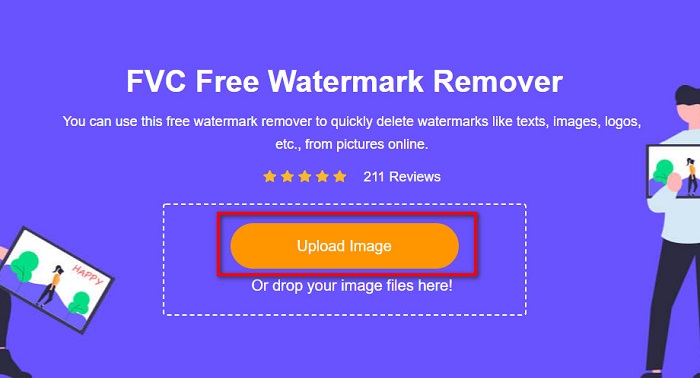
ขั้นตอนที่ 2. จากนั้นคลิกปุ่ม Upload Image บนอินเทอร์เฟซหลักเพื่ออัปโหลดรูปภาพที่คุณต้องการลบลายน้ำ.
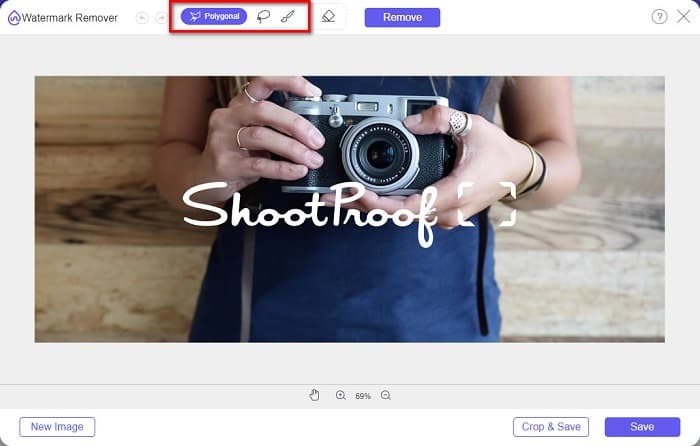
ขั้นตอนที่ 3. ต่อไป เลือกเครื่องมือเลือกพื้นที่ที่คุณต้องการใช้เพื่อลบลายน้ำออกจากรูปภาพของคุณ คุณสามารถเลือกได้ระหว่าง Polygonal, Lasso และ Brush.
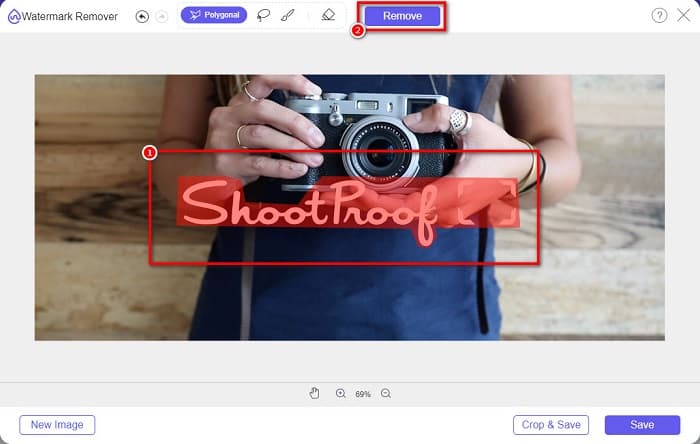
ขั้นตอนที่ 4. จากนั้น ลากครอบพื้นที่ที่มีลายน้ำบนรูปภาพของคุณ แล้วคลิกปุ่ม Remove เมื่อเลือกเสร็จแล้ว คุณจะเห็นว่าลายน้ำหายไปแล้ว.
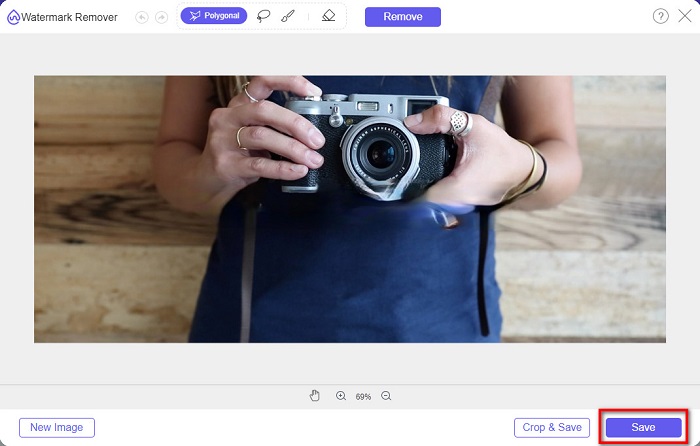
ขั้นตอนที่ 5. ขั้นตอนสุดท้าย คลิกปุ่ม Save เพื่อบันทึกผลงานลงในอุปกรณ์ของคุณ แค่นั้นเอง! ด้วยขั้นตอนง่าย ๆ เหล่านี้ คุณก็จะได้รูปภาพจาก Shootproof ที่ไม่มีลายน้ำแล้ว.
Apowersoft น้ำยาลบลายน้ำออนไลน์
Apowersoft Online Watermark Remover เป็นแอปออนไลน์ที่รู้จักกันดีสำหรับการลบลายน้ำออกจากรูปภาพของคุณ เป็นแอปออนไลน์ที่ใช้งานง่ายเพราะมีอินเทอร์เฟซที่เข้าใจได้ไม่ยาก นอกจากนี้ยังรองรับรูปแบบไฟล์ภาพมาตรฐานส่วนใหญ่ เช่น PNG และ JPG คุณไม่ต้องกังวลเรื่องความปลอดภัยของไฟล์เพราะเครื่องมือนี้ใช้งานได้อย่างปลอดภัย อีกทั้งยังมีฟังก์ชันลบลายน้ำออกจากวิดีโอด้วย อย่างไรก็ตาม หากอินเทอร์เน็ตของคุณช้า คุณอาจพบปัญหาการอัปโหลดและส่งออกไฟล์ที่ล่าช้าได้.
วิธีลบลายน้ำ Shootproof โดยใช้ Apowersoft Online Watermark Remover:
ขั้นตอนที่ 1. ค้นหา Apowersoft Online Watermark Remover บนเบราว์เซอร์ของคุณ จากนั้นไปที่หน้าแรก แล้วบนหน้าอินเทอร์เฟซหลักให้คลิกตัวเลือก Remove Watermark From Image.
ขั้นตอนที่ 2. จากนั้น ในหน้าอินเทอร์เฟซถัดไป คุณจะเห็น กล่องลบลายน้ำ (watermark remover box) แล้วนำไปวางทับบนบริเวณที่มีลายน้ำ.

ขั้นตอนที่ 3. เมื่อต้องการลบลายน้ำออกจากรูปภาพของคุณ ให้คลิกปุ่ม Erase.
ส่วนที่ 2 เคล็ดลับเกี่ยวกับการใช้คุณสมบัติ Shootproof Watermark
การใช้คุณสมบัติลายน้ำของ Shootproof คุณสามารถเพิ่มและลบลายน้ำบนรูปภาพของคุณได้ หากคุณต้องการป้องกันไม่ให้ผู้ใช้รายอื่นเป็นเจ้าของรูปภาพของคุณ คุณสามารถเพิ่มข้อความบนรูปภาพที่ทำหน้าที่เป็นลายน้ำได้
วิธีเพิ่มลายน้ำบน Shootproof:
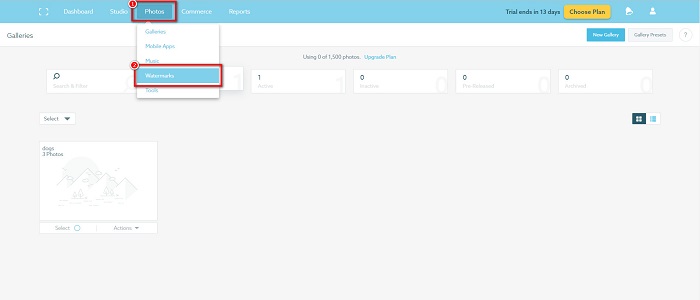
ขั้นตอนที่ 1. ไปที่ Photos แล้วคลิกตัวเลือก Watermarks.
ขั้นตอนที่ 2. จากนั้น เลือกว่าจะใช้ลายน้ำแบบ ข้อความ หรือ รูปภาพ.
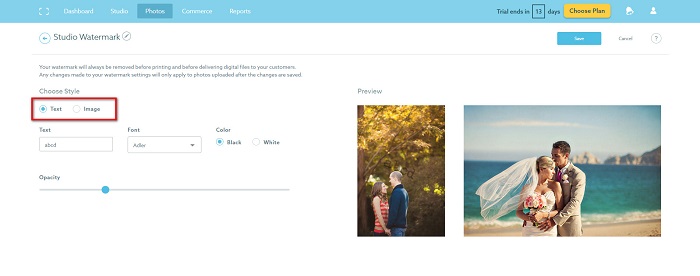
หากคุณต้องการใช้ลายน้ำของรูปภาพ ขอแนะนำให้คุณอัปโหลดไฟล์ PNG ที่มีความละเอียดสูงพร้อมพื้นหลังโปร่งใส คุณยังสามารถใช้ไฟล์ JPG
ขั้นตอนที่ 3. ต่อไป ปรับ Watermark Settings ในส่วน Watermark Settings คุณสามารถเลือกตำแหน่งที่จะวางลายน้ำบนรูปภาพของคุณได้ รวมถึงปรับขนาดและความทึบแสงของลายน้ำได้ด้วย.
ขั้นตอนที่ 4. สุดท้าย คลิกปุ่ม Save เพื่อบันทึกการตั้งค่าที่คุณได้เปลี่ยนแปลง.
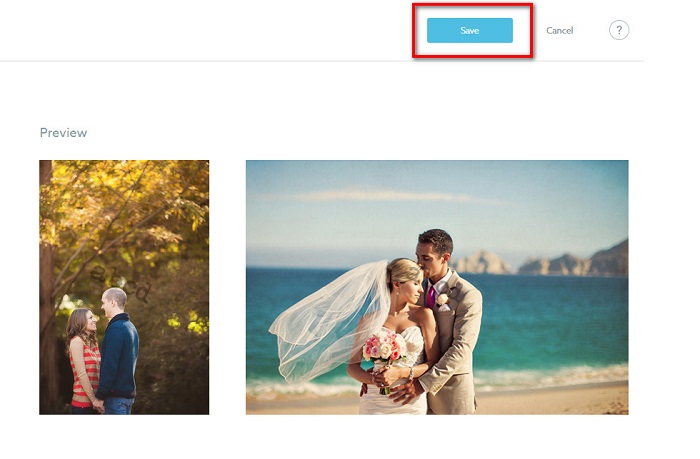
ใส่ลายน้ำบนรูปภาพที่คุณอัปโหลด
ในหน้าลายน้ำ คุณสามารถเลือกลายน้ำเริ่มต้นได้ คุณยังเปิดลายน้ำสำหรับการอัปโหลดในอนาคตทั้งหมดได้อีกด้วย คุณสามารถเปลี่ยนแปลงได้ก่อนที่จะอัปโหลดภาพใหม่
และเมื่อคุณอัปโหลดรูปภาพใหม่ไปยังแกลเลอรีของคุณผ่านตัวอัปโหลดทางเว็บหรือ Desktop Uploader คุณสามารถเลือกลายน้ำที่คุณต้องการใช้บนหน้าจออัปโหลดได้
วิธีลบลายน้ำใน Shootproof
โปรดจำไว้เสมอว่าการแก้ไขหรือเพิ่มลายน้ำที่มีอยู่จะส่งผลต่อการอัปโหลดในอนาคตของคุณเท่านั้น การเปลี่ยนแปลงที่คุณทำจะไม่ส่งผลต่อรูปภาพที่อยู่ในแกลเลอรีของคุณอยู่แล้ว แต่ถ้าคุณต้องการเปลี่ยนลายน้ำหรือลบลายน้ำ Shootproof คุณสามารถรีเฟรชลายน้ำเพื่ออัปเดตในแกลเลอรีของคุณ นี่คือวิธีที่คุณสามารถลบหรือเปลี่ยนลายน้ำ Shootproof
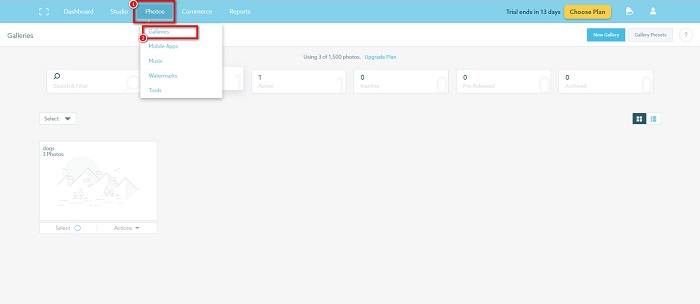
ขั้นตอนที่ 1. ไปที่ Photos > Galleries แล้วคลิกที่แกลเลอรีของคุณ.
ขั้นตอนที่ 2. ภายในแกลเลอรี ให้คลิกปุ่ม More Actions ที่มุมขวาบนของอินเทอร์เฟซ.
ขั้นตอนที่ 3. จากนั้น เลือก Refresh Watermark เพื่อเอาลายน้ำออกจากทุกภาพที่คุณอัปโหลด.
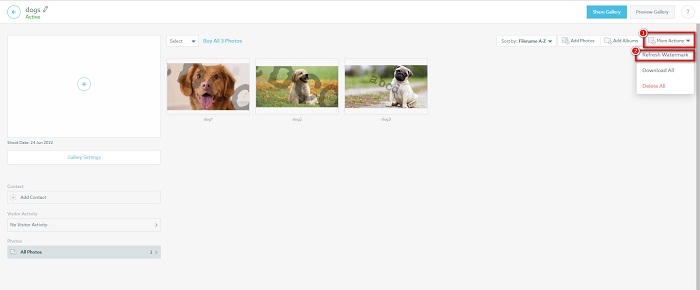
ขั้นตอนที่ 4. เมื่อต้องการลบลายน้ำ ให้ปิดแถบสไลด์ และหากคุณต้องการเพียงเปลี่ยนลายน้ำ ให้เลือก New Watermark.
ขั้นตอนที่ 5. สุดท้าย คลิก Apply Change เพื่อบันทึกการเปลี่ยนแปลงที่คุณทำ.
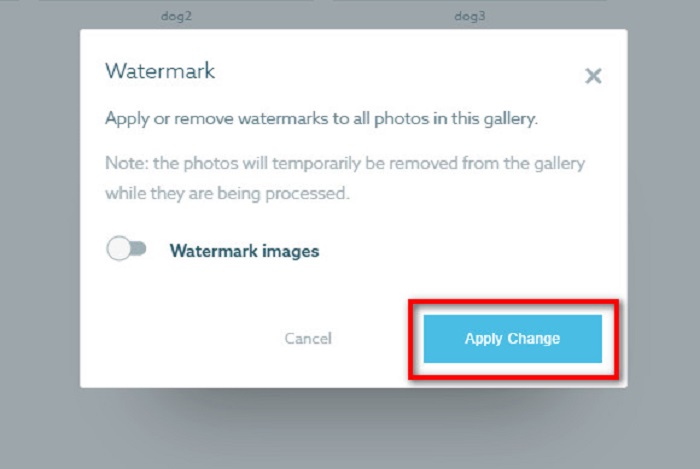
คุณจะเห็นว่ารูปภาพจะแสดงเป็นการประมวลผลโดยอัตโนมัติ เมื่อนำการเปลี่ยนแปลงไปใช้ คุณจะเห็นว่ารูปภาพจะกลับไปที่แกลเลอรีของคุณ
ที่เกี่ยวข้อง:
ตัวลบลายน้ำ Arnold Maya ที่โดดเด่นซึ่งคุณไม่ควรพลาด
ตัวลบลายน้ำ 123rf – รีวิวละเอียดของเครื่องมือระดับสุดยอด
ส่วนที่ 3 คำถามที่พบบ่อยเกี่ยวกับ Shootproof Remove Watermark
คุณสามารถลบลายน้ำดิจิทัลได้หรือไม่?
การลบลายน้ำดิจิทัลที่มองไม่เห็นนั้นทำได้ยาก ตัวอย่างเช่น สิ่งที่ฝังโดยปลั๊กอิน Digimarc Photoshop นั้นยากที่จะลบออก การครอบตัด การปรับขนาด เพิ่มจุดรบกวน และการเบลอในระดับปานกลางอาจไม่ทำงานกับลายน้ำดิจิทัล
คุณสามารถลบลายน้ำโลโก้ออกจากวิดีโอได้หรือไม่?
ใช่. เป็นไปได้ที่จะลบลายน้ำโลโก้บนวิดีโอของคุณ ตัวลบลายน้ำจำนวนมากอนุญาตให้คุณลบโลโก้บนวิดีโอของคุณ หากคุณต้องการลบโลโก้บนวิดีโอของคุณ ให้ใช้ Video Converter Ultimate
Shootproof แสดงว่าคุณถ่ายภาพหน้าจอหรือไม่
Shootproof ใช้มาตรการหลายอย่างในการปกป้องภาพถ่ายของผู้ขาย อย่างไรก็ตาม Shootproof ไม่สามารถป้องกันผู้คนจากการจับภาพหน้าจอในแกลเลอรี่ของคุณ
สรุป
จบแล้ว! ด้วยการทำตามวิธีการที่กล่าวมาข้างต้น ตอนนี้คุณก็สามารถลบลายน้ำ Shootproof ออกจากรูปภาพของคุณได้แล้ว แม้การลบลายน้ำบน Shootproof จะทำได้ฟรี แต่ขั้นตอนอาจค่อนข้างยุ่งยาก ดังนั้น หากคุณต้องการลบลายน้ำ Shootproof บนรูปภาพของคุณได้อย่างง่ายดาย ให้ใช้ FVC Free Watermark Remover.
-
 Photobucket Watermark Remover ที่โดดเด่นทั้งออนไลน์และออฟไลน์
 เรียนรู้วิธีลบลายน้ำ Photobucket ออกจากภาพถ่ายของคุณโดยใช้ตัวลบลายน้ำ Photobucket ที่น่าทึ่งเหล่านี้ อ่านบทความนี้เพื่อเรียนรู้วิธีต่างๆ
-
 ลบลายน้ำออกจาก PDF อย่างง่ายดายด้วยขั้นตอนง่าย ๆ
 ลบลายน้ำออกจาก PDF โดยทำตามขั้นตอนง่าย ๆ เหล่านี้ เรียนรู้วิธีลบลายน้ำออกจากไฟล์ PDF ของคุณอย่างง่ายดายโดยใช้เครื่องมือที่น่าทึ่งเหล่านี้
-
 วิธีง่ายๆ ในการลบลายน้ำออกจากรูปภาพจบการศึกษา
 ต้องการทราบวิธีที่ดีที่สุดในการลบลายน้ำออกจากรูปภาพจบการศึกษาหรือไม่? โดยการอ่านบทความนี้ คุณจะสามารถรู้วิธีลบลายน้ำบนรูปภาพระดับบัณฑิตได้อย่างง่ายดาย
