


 Video Converter Ultimate
 บันทึกหน้าจอ
 ซ่อมวิดีโอ
 ดาวน์โหลดอย่างปลอดภัย
วิธี Unpixelate ภาพอย่างรวดเร็วด้วย 3 วิธีที่ดีที่สุดที่จะใช้
การลบความเป็นพิกเซลของรูปภาพ (Unpixelate image เป็นวิธีแก้ปัญหาที่คุณต้องใช้เมื่อต้องการปรับโฉมรูปภาพที่กลายเป็นภาพแตกเป็นสี่เหลี่ยมพิกเซล หรือหากรูปของคุณเป็นภาพบิตแมปที่เต็มไปด้วยสี่เหลี่ยมเล็ก ๆ ผู้ใช้จำนวนมากมองว่าการปรับแต่ง แก้ไข เปลี่ยนแปลง และเพิ่มคุณภาพของภาพเป็นเรื่องยุ่งยาก ซึ่งตามจริงก็ใช่ แต่ทั้งหมดนั้นเป็นเรื่องในอดีตแล้ว ด้วยเทคโนโลยีล้ำสมัยที่เราสามารถเข้าถึงได้ งานนี้จึงกลายเป็นเรื่องง่าย เมื่อคุณใช้เครื่องมือที่ถูกต้อง.
ไม่มีเครื่องมือที่เหมาะสมในการลบพิกเซลในรูปภาพของคุณใช่ไหม โชคดีที่บทความนี้จะนำเสนอซอฟต์แวร์ที่ดีที่สุดสามรายการที่เราพบ ซึ่งสามารถช่วยคุณแก้ไขพิกเซลของภาพถ่ายและคำแนะนำเกี่ยวกับซอฟต์แวร์แต่ละรายการเพื่อแก้ปัญหา

ส่วนที่ 1 วิธีคลายพิกเซลรูปภาพออนไลน์ด้วยโปรแกรมแก้ไขรูปภาพตัวเลือกที่ดีที่สุด [แนะนำ]
FVC Free Image Upscaler เป็นเครื่องมือออนไลน์แบบอัตโนมัติเต็มรูปแบบที่คุณสามารถใช้ลบความเป็นพิกเซลของรูปภาพได้ฟรีบนเว็บเบราว์เซอร์ คุณสามารถเปิดใช้ได้บนเว็บเบราว์เซอร์ใดก็ได้ที่คุณมีอยู่ ไม่จำเป็นต้องดาวน์โหลดโปรแกรมเสริมเพื่อเปิดใช้งาน ดังนั้นคุณจึงสามารถใช้เครื่องมือนี้ได้ทันทีที่เข้าถึง แม้ซอฟต์แวร์นี้จะให้บริการบนเว็บ แต่พลังและประสิทธิภาพในการลบภาพแตกพิกเซลนั้นทัดเทียมกับโปรแกรมตัดต่อรูปภาพระดับมืออาชีพทั้งแบบออนไลน์และออฟไลน์ คุณอาจคิดว่าการใช้เครื่องมือนี้จะยุ่งยาก แต่จริง ๆ แล้วไม่ใช่ หากยังไม่มั่นใจ คุณสามารถอ่านหรือทำตามคู่มือที่ระบุด้านล่างเพื่อดูขั้นตอนการใช้งานอย่างง่ายได้.
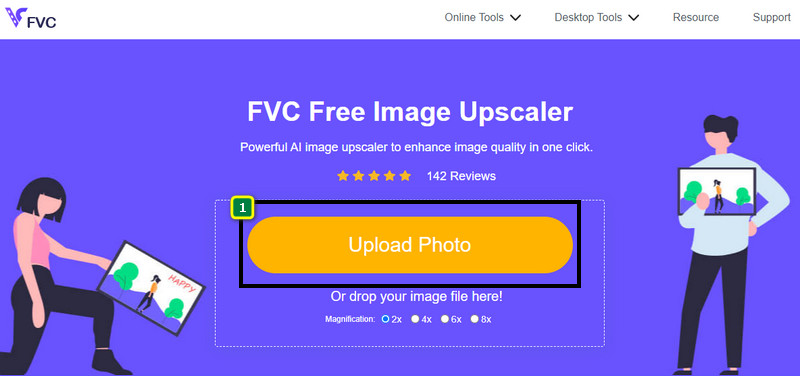
ขั้นตอนที่ 1. คุณสามารถเข้าถึงเว็บทูลนี้ได้ผ่านเว็บเบราว์เซอร์ใดก็ได้บนอุปกรณ์ของคุณ โดยพิมพ์ค้นหาชื่อเครื่องมือ หรือคลิกที่ ลิงก์ นี้เพื่อเปิดหน้าเว็บไซต์หลัก.
ขั้นตอนที่ 2. เมื่อเข้ามายังเว็บทูลแล้ว ให้คลิกปุ่ม Add Image เพื่ออัปโหลดรูปภาพที่เป็นพิกเซล หน้าต่างโฟลเดอร์ไฟล์จะปรากฏบนหน้าจอ จากนั้นคุณสามารถค้นหารูปภาพที่บันทึกไว้ในไดรฟ์ภายในเครื่อง แล้วกด Open เพื่ออัปโหลด.
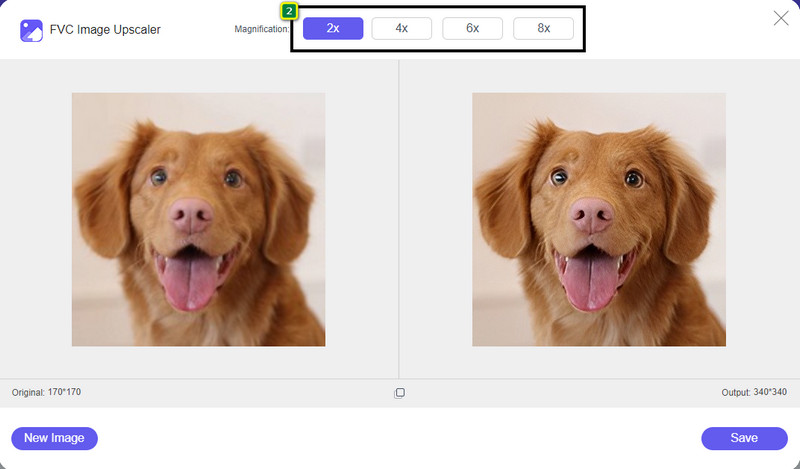
ขั้นตอนที่ 3. ถัดไป เลือกตัวเลือกการขยายภาพ (magnification) ที่คุณต้องการใช้กับรูป เพื่อทำให้ภาพดูเรียบเนียนขึ้น ไม่ให้ดูเป็นภาพบิตแมปที่มีสี่เหลี่ยมเล็ก ๆ อีกต่อไป.
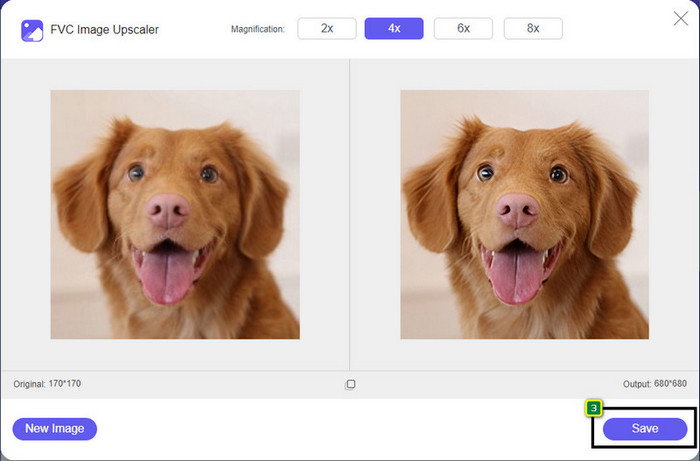
ขั้นตอนที่ 4. ง่าย ๆ เพียงคลิก Save เพื่อดาวน์โหลดเวอร์ชันที่ลบความเป็นพิกเซลแล้วกลับไปยังไดรฟ์ภายในเครื่องของคุณ.
ส่วนที่ 2 วิธีคลายพิกเซลภาพออฟไลน์โดยใช้ 2 วิธีบน Windows และ Mac [ง่าย]
Pixbim - Unpixelate รูปภาพบน Windows
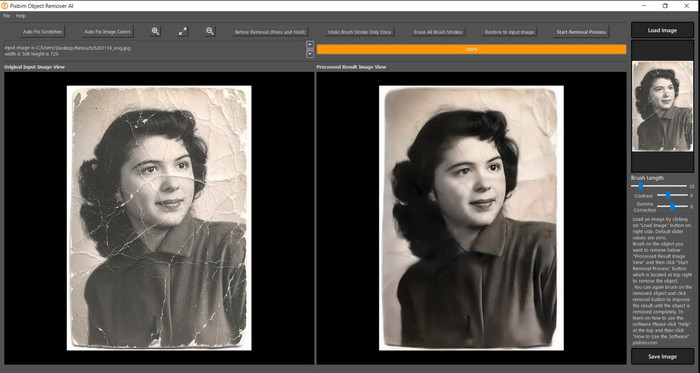
Pixbim เป็นหนึ่งในโปรแกรมลบความเป็นพิกเซลของรูปภาพที่ทรงพลังและรองรับระบบ AI ซึ่งคุณสามารถดาวน์โหลดลงบน Windows เพื่อแก้ปัญหานี้ได้ โปรแกรมแก้ไขนี้คู่ควรแก่การถูกกล่าวถึงในบทความ เพราะสามารถจัดการกับภาพแตกพิกเซลได้อย่างรวดเร็วและมีประสิทธิภาพ ด้วย AI ที่ช่วยปรับค่าต่าง ๆ ให้โดยอัตโนมัติ คุณจึงใช้งานซอฟต์แวร์นี้ได้โดยไม่ยุ่งยาก เนื่องจากฟีเจอร์และความสามารถต่าง ๆ คุณจำเป็นต้องซื้อคีย์ไลเซนส์เพื่อใช้งานต่อหลังจากช่วงทดลองใช้ฟรี ซึ่งอาจรู้สึกว่าราคาแพงสำหรับผู้ใช้หลายคนที่ต้องการติดตั้งบนพีซี.
ขั้นตอนที่ 1. เมื่อติดตั้งซอฟต์แวร์เสร็จแล้ว ให้เปิดโปรแกรมขึ้นมาเพื่อไปยังขั้นตอนถัดไป.
ขั้นตอนที่ 2. กดปุ่ม Load Image เพื่อเพิ่มรูปภาพที่เป็นพิกเซลที่คุณต้องการปรับให้ดีขึ้น.
ขั้นตอนที่ 3. จากนั้นปรับค่าพารามิเตอร์โดยลาก แถบเลื่อน (sliders) ไปยังค่าที่คุณต้องการให้ได้ผลลัพธ์ตามต้องการ.
ขั้นตอนที่ 4. เมื่อตั้งค่ารูปภาพเรียบร้อยแล้ว ให้บันทึกผลลัพธ์เพื่อส่งออกไฟล์.
Movavi Photo Editor [Windows & Mac]
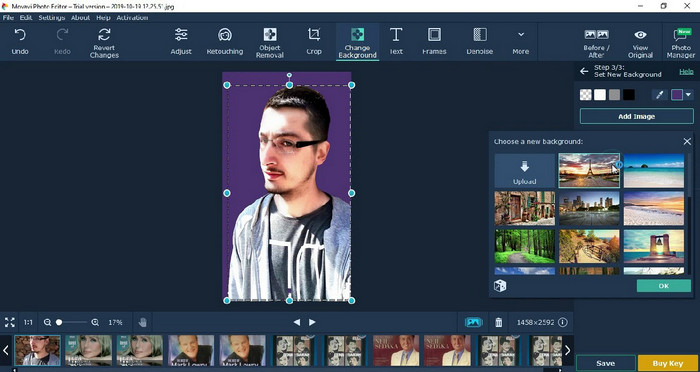
ผู้ใช้จำนวนมากได้ลองใช้ Movavi Photo Editor แล้ว เพราะความหลากหลายในการปรับแต่งรูปภาพของโปรแกรมนี้ เช่นเดียวกับ Pixbim มันสามารถกู้คืนพิกเซลที่หายไปของรูปภาพได้ด้วยระบบโครงข่ายประสาท (neural networks) ของ AI เมื่อคุณมีโปรแกรมแก้ไขนี้อยู่ในมือ คุณสามารถทำทั้งการแก้ไขพื้นฐานและขั้นสูงกับรูปภาพได้ เช่น ครอป หมุนภาพ ใส่ฟิลเตอร์ แก้ไขพิกเซล และอื่น ๆ อย่างไรก็ตาม คุณจะไม่ได้ใช้ฟีเจอร์ทั้งหมด หากไม่ได้ซื้อเวอร์ชันพรีเมียมมาติดตั้งบนเดสก์ท็อป.
มีราคาใกล้เคียงกับ Pixbim ซึ่งค่อนข้างแพงสำหรับหลาย ๆ คน แต่ถ้าคุณมีงบประมาณในการซื้อโปรแกรมแก้ไข นี่อาจเป็นสิ่งที่คุณต้องการ เรียนรู้วิธีแยกพิกเซลภาพด้วยแอพนี้โดยทำตามขั้นตอน
ขั้นตอนที่ 1. ดาวน์โหลดแอปพลิเคชันลงบน Windows หรือ Mac OS.
ขั้นตอนที่ 2. เปิดซอฟต์แวร์ จากนั้นอัปโหลดรูปภาพที่คุณต้องการลบความเป็นพิกเซลเข้ามาที่นี่.
ขั้นตอนที่ 3. เมื่อตัวรูปภาพถูกอัปโหลดแล้ว ให้คลิก Magic Enhance เพื่อให้ AI ปรับแต่งภาพให้อัตโนมัติ.
ขั้นตอนที่ 4. ส่งออกไฟล์รูปภาพ แล้วเพลิดเพลินกับผลลัพธ์ที่ได้.
ส่วนที่ 3 คำถามที่พบบ่อยเกี่ยวกับวิธี Upixelate รูปภาพ
เหตุใดจึงมีลายน้ำบนรูปภาพที่ไม่มีพิกเซลที่ส่งออก
เมื่อคุณใช้แอปพลิเคชันรุ่นทดลองใช้ฟรี มีโอกาสที่แอปพลิเคชันจะทิ้งลายน้ำไว้เมื่อส่งออก ดังนั้น หากคุณต้องการส่งออกรูปภาพโดยไม่มีลายน้ำ คุณสามารถซื้อใบอนุญาตของแอปพลิเคชันหรือใช้ FVC Free Image Upscaler ได้ เนื่องจากจะไม่ทิ้งลายน้ำไว้บนรูปภาพที่ส่งออก
ภาพเบลอและพิกเซลแตกต่างกันอย่างไร
บทความจำนวนมากได้พิสูจน์แล้วว่าความพร่ามัวและพิกเซลไม่เหมือนกันเนื่องจากปัจจัยบางประการ ภาพที่พร่ามัวเป็นสาเหตุที่คุณจับการเคลื่อนไหวความเร็วสูงหรือถ่ายภาพด้วยกล้องที่สั่นไหว เมื่อคุณขยายสแนปชอต ภาพจะเริ่มสร้างพิกเซล และคุณจะเห็นบิตแมปที่มีสี่เหลี่ยมเล็กๆ
อะไรคือปัจจัยที่ทำให้ภาพแตกเป็นพิกเซล?
เหตุผลบางประการทำให้รูปภาพกลายเป็นพิกเซล สาเหตุทั่วไปคือเมื่อคุณขยายภาพแรสเตอร์ รูปแบบแรสเตอร์ เช่น PNG, JPG, GIF และอื่นๆ ประกอบด้วยสี่เหลี่ยมเล็กๆ ที่สร้างรูปลักษณ์ของวัตถุที่จัดเก็บไว้ในคอนเทนเนอร์เหล่านี้ โดยปกติแล้ว เมื่อคุณขยายภาพ คุณจะเห็นว่ามีสี่เหลี่ยมจัตุรัสหรือที่เรียกว่าพิกเซล ซึ่งมีข้อมูลสีซึ่งแสดงเป็นภาพ อาจเป็นปัญหาสำหรับบรรณาธิการหลายคน โดยเฉพาะอย่างยิ่งเมื่อเกิดพิกเซล
ฉันจะแก้ไขสัญญาณรบกวนบนภาพได้อย่างไร?
นี่เป็นอีกหนึ่งปัญหาทั่วไปที่คุณอาจพบเจอกับรูปภาพที่ถ่ายมา และวิธีแก้ที่คุณต้องการอาจอยู่ในบทความนี้แล้ว คลิกลิงก์นี้เพื่ออ่าน ทำความเข้าใจ และแก้ไขได้ง่าย ๆ ว่า จะลบจุดรบกวน (noise) ในรูปภาพได้อย่างไร.
สรุป
ง่ายเพียงเท่านี้ คุณก็สามารถลบความเป็นพิกเซลของรูปภาพได้อย่างไม่ยุ่งยากด้วยความช่วยเหลือจากโปรแกรมแก้ไขรูปภาพที่ดีที่สุด ที่คุณสามารถดาวน์โหลดหรือใช้งานบนเว็บได้ ปัญหานี้ถูกแก้แล้ว! ดังนั้นหากคุณพบปัญหาภาพแตกเป็นพิกเซลเมื่อไร คุณก็สามารถอ้างอิงบทความนี้เพื่อช่วยคุณได้ เครื่องมือที่ดีที่สุดที่คุณอาจต้องการอยู่ที่นี่และพร้อมจะช่วยคุณ เช่น FVC Free Image Upscaler การแก้ไขโดยปรับปัญหาพิกเซลในภาพจะช่วยให้ภาพไม่ถูกนำเสนอออกมาในลักษณะที่รบกวนสายตาผู้ชม บอกลาภาพแตกพิกเซลได้เลยเมื่อคุณใช้โปรแกรมแก้ไขรูปภาพออนไลน์นี้.
-
 7 Image Upscaler ที่คุณสามารถใช้เพื่อเพิ่มประสิทธิภาพและปรับปรุงทุกๆ ภาพ [2022]
 คุณต้องการเครื่องเพิ่มขนาดภาพหรือไม่? โชคดีที่บทความนี้ครอบคลุมซอฟต์แวร์ที่ดีที่สุดที่คุณสามารถเข้าถึงและดาวน์โหลดบนเดสก์ท็อปของคุณ
-
 5 ตัวปรับปรุงความละเอียดของภาพที่คุณต้องใช้ในปี 2022 [คัดสรรล่าสุด]
 ไม่ทราบว่าคุณควรใช้ตัวเพิ่มความละเอียดของภาพแบบใด? อ่านบทความนี้ในขณะที่เราทบทวนเครื่องมือห้าอย่างเพื่อใช้และปรับปรุงความละเอียดของภาพ
-
 4 แอปเพื่อเพิ่มความละเอียดของภาพบนอุปกรณ์เคลื่อนที่ของคุณ [ตัวเลือกที่ดีที่สุด]
 คุณจะต้องใช้แอพเพื่อเพิ่มความละเอียดของภาพถ่ายหากคุณต้องการให้ได้ 1080p, 4k หรือเช่นนั้น ด้วยรายการด้านล่าง คุณสามารถทำได้อย่างง่ายดาย!
