


 Video Converter Ultimate
 บันทึกหน้าจอ
 ซ่อมวิดีโอ
 ดาวน์โหลดอย่างปลอดภัย
รีวิว Waifu2x ฉบับสมบูรณ์ & ทางเลือกที่ดีที่สุดที่คุณต้องใช้วันนี้
เมื่อคุณต้องการเครื่องมือสำหรับลดนอยส์ในภาพและปรับขนาดภาพไปพร้อมกัน คุณอาจเคยเจอกับ Waifu2x มาแล้ว ด้วยตัวมันเอง คุณสามารถแก้ปัญหาทั่วไปที่มักเกิดขึ้นกับภาพของคุณได้ โดยไม่ทำให้ภาพแตกเป็นพิกเซลหรือเบลอ อย่างไรก็ตาม ยังมีเครื่องมืออื่น ๆ อีกหลายตัวที่ให้ฟีเจอร์แบบเดียวกับที่คุณหาได้ใน Waifu2x บางทีคุณอาจกำลังสงสัยว่าควรใช้มันในการขยายขนาดและลดนอยส์ภาพหรือไม่ ในบทความนี้ เราจะมารีวิวแอปตัวนี้ให้คุณ และพูดถึงทางเลือกอื่นที่เรากล่าวถึง ซึ่งสามารถทำทุกอย่างได้เหมือนกับที่ Waifu2x ทำได้ให้คุณ.

ส่วนที่ 1 Waifu2x รีวิวที่คุณต้องรู้และเรียนรู้วิธีใช้งาน
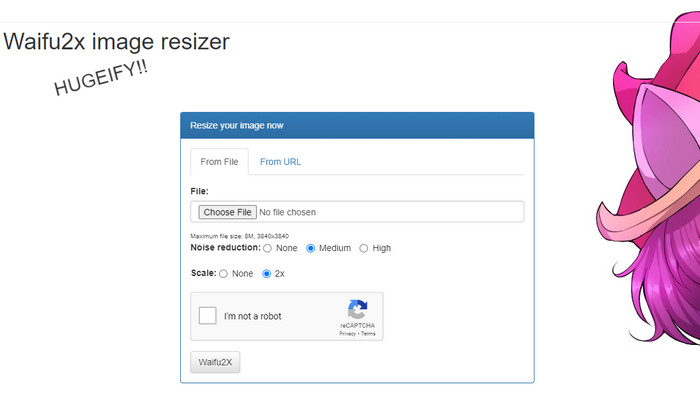
Waifu2x เป็นเครื่องมือแก้ไขรูปออนไลน์ที่คุณสามารถเข้าใช้ผ่านเว็บเพื่อขยายขนาดและลดนอยส์ภาพได้ ด้วยเครื่องมือนี้ คุณสามารถเพิ่มความละเอียดของทุกภาพที่อัปโหลดเข้ามาได้เป็นสองเท่า แม้ซอฟต์แวร์นี้อาจดูไม่เหมือนเครื่องมือเพิ่มความละเอียดและลดนอยส์จากชื่อของมัน แต่จริง ๆ แล้วมันพร้อมช่วยคุณอยู่แล้ว เมื่อคุณค้นหาชื่อนี้ คุณจะเห็นผลการค้นหามากมาย แต่ทั้งหมดล้วนทำงานเหมือนกัน ไม่ว่าจะเป็นแบบออนไลน์หรือออฟไลน์.
“เรื่องเล็กน้อย: ชื่อนี้มาจากคำภาษาญี่ปุ่น waifu ซึ่งแปลว่าภรรยา ปกติจะเห็นหรือใช้เป็นความคิดเห็นเมื่อผู้หญิงมีเสน่ห์ พวกเขาเรียกเธอว่า waifu”
ข้อดี
- คุณสามารถสัมผัสประสบการณ์การใช้งานทั้งหมดของเครื่องมือเว็บนี้ได้ฟรีเมื่อคุณเข้าถึงจากเว็บเบราว์เซอร์ของคุณ
- ไม่จำเป็นต้องดาวน์โหลดหรือติดตั้งซอฟต์แวร์ก่อนจึงจะสามารถใช้งานได้
- รองรับรูปแบบยอดนิยมเช่น PNG และ JPG
- คุณสามารถขยายภาพได้สูงสุด 2 เท่า
- คุณสามารถลดสัญญาณรบกวนบนภาพของคุณได้โดยตั้งค่าให้เป็นระดับปานกลางหรือสูง
จุดด้อย
- ไม่รองรับรูปแบบการอัปโหลดที่หลากหลาย
- มี reCAPTCHA ทุกกระบวนการ
- การเลือกและคุณสมบัติที่จำกัด
ขั้นตอนในการใช้ Waifu2x:
หลังจากเลือกเว็บไซต์ที่เราควรใช้สำหรับขั้นตอนต่างๆ แล้ว ต่อไปนี้คือเวอร์ชันที่เราเลือกใช้ waifu2x.booru เป็นตัวอย่าง ดังนั้น ถ้าคุณต้องการเริ่มใช้ Waifu2x image resizer คุณสามารถทำตามบทช่วยสอนที่เราเพิ่มด้านล่างเพื่อทราบได้ดีขึ้น
ขั้นตอนที่ 1. ใช้เว็บเบราว์เซอร์ของคุณ คัดลอกลิงก์ที่เราให้ไว้เพื่อเข้าใช้เว็บเครื่องมือนี้.
ขั้นตอนที่ 2. กด Choose File เพื่ออัปโหลดไฟล์ PNG หรือ JPG ที่คุณต้องการขยายขนาดหรือ ลดนอยส์.
ขั้นตอนที่ 3. คุณสามารถเลือกการลดนอยส์ได้สามระดับ ได้แก่ None, Medium หรือ High.
หลังจากคุณเลือกเรียบร้อยแล้ว คุณสามารถเริ่มขยายภาพไปพร้อมกันได้โดยคลิกที่ 2x จากนั้นติ๊กถูกในช่องแคปช่าและไปต่อยังขั้นตอนสุดท้าย.
ขั้นตอนที่ 4. กด Waifu2x เพื่อปรับปรุงภาพตามการตั้งค่าที่คุณได้เลือกไว้ก่อนหน้านี้.
ส่วนที่ 2 ทางเลือก Waifu2x ที่ดีที่สุดที่คุณสามารถใช้ได้ฟรี [บริการเว็บ]
ตัวเลือกที่เราแนะนำเป็นทางเลือกแทน Waifu2x ก็คือ FVC Free Image Upscaler เพราะมีฟังก์ชันการทำงานเหมือนกับเครื่องมือที่เรารีวิว แต่เครื่องมือนี้สามารถขยายภาพได้มากกว่าถึง 8 เท่า เครื่องมือออนไลน์ตัวนี้เป็นที่นิยมเพราะมีประสิทธิภาพในการขยายภาพตามอัลกอริทึมที่ AI ตรวจจับได้ แม้ว่าจะไม่มีตัวเลือกให้เปิดการลบนอยส์เอง แต่มันจะถูกดำเนินการให้อัตโนมัติเมื่อคุณประมวลผลภาพ.
นอกจากนั้น เครื่องมือนี้รองรับรูปแบบมากกว่า Waifu2x; คุณสามารถอัปโหลด PNG, JPG, GIF, BMP, SVG และอื่นๆ ได้ที่นี่ พร้อมกันเพื่อเพิ่มสเกล นอกจากนี้ยังมีเว็บไซต์สีสันสดใสกว่าเว็บไซต์แรกซึ่งดึงดูดผู้ใช้ ดังนั้น หากคุณต้องการลองใช้ตัวเพิ่มสเกลนี้ คุณสามารถทำตามบทแนะนำทีละขั้นตอนที่เรารวมไว้ต่อไป
ขั้นตอนที่ 1. คุณสามารถคลิก ลิงก์นี้ เพื่อเปิดเว็บไซต์อย่างเป็นทางการของเครื่องมือขยายภาพนี้ ซึ่งเป็นอีกหนึ่งตัวเลือกยอดนิยมแทนเครื่องมือแรก.
ขั้นตอนที่ 2. กดปุ่ม Upload เพื่อเพิ่มรูปภาพที่คุณต้องการให้ AI ช่วยขยาย ปรับขนาด ลดนอยส์ และแก้ไข.
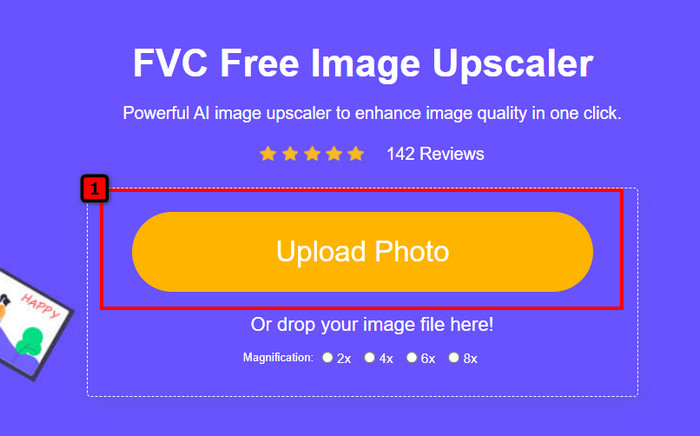
ขั้นตอนที่ 3. หลังจากอัปโหลดรูปแล้ว ให้กดเลือกระดับการขยาย (Magnification) ที่คุณต้องการให้ใช้กับภาพที่เพิ่มเข้าไป คุณสามารถลองทุกระดับเพื่อดูว่าระดับใดเหมาะกับภาพของคุณที่สุด.
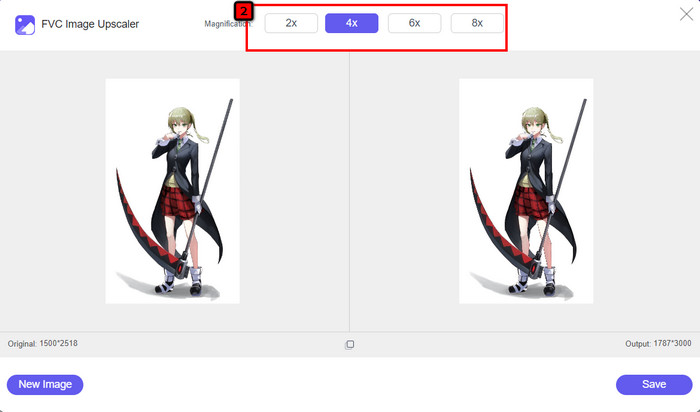
ขั้นตอนที่ 4. สุดท้าย เมื่อคุณเลือกการแก้ไขภาพได้ตามต้องการแล้ว ให้กด Save จากนั้นกระบวนการดาวน์โหลดจะเริ่มขึ้นโดยอัตโนมัติ.
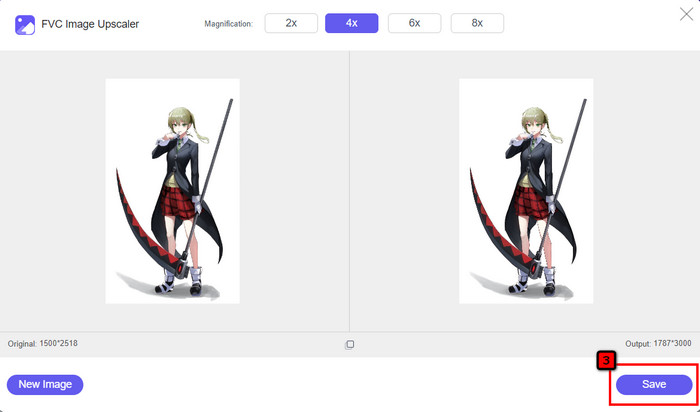
เช่นเดียวกับโปรแกรมแก้ไขภาพอื่น ๆ คุณสามารถใช้เครื่องมือนี้บนเว็บที่รองรับเทคโนโลยี AI ได้ เครื่องมือ เพิ่มพิกเซล ตัวนี้ยังสามารถซ่อมแซมพิกเซลที่หายไปในภาพได้ ทำให้รายละเอียดในภาพคมชัดและเด่นชัดยิ่งกว่าปกติ จึงพูดได้ไม่ยากว่านี่คือทางเลือกแทน Waifu2x ที่สมบูรณ์แบบ ซึ่งสามารถให้ผลลัพธ์คุณภาพสูงได้ภายในไม่กี่วินาที.
ส่วนที่ 3 คำถามที่พบบ่อยเกี่ยวกับ Waifu2x Review
Waifu2x ปลอดภัยในการเข้าถึงหรือไม่
เว็บไซต์ที่เราตรวจสอบข้างต้น waifu2x.booru เข้าถึงได้อย่างปลอดภัยและไม่มีโฆษณาบนอินเทอร์เฟซเว็บ เราสามารถรับรองได้ว่าคุณจะมีขั้นตอนการอัพสเกลหรือลดสัญญาณรบกวนได้อย่างราบรื่นด้วยโปรแกรมแก้ไขนี้ อย่างไรก็ตาม มีเว็บไซต์อื่นๆ เช่น waifu2x ซึ่งมีส่วนขยายต่างกัน บางเว็บไซต์ไม่ปลอดภัยในการเข้าถึง ดังนั้นคุณไม่ควรใช้เพื่อหลีกเลี่ยงปัญหา
ฉันสามารถเปลี่ยนภาพถ่ายเป็นงานศิลปะบน Waifu2x ได้หรือไม่
ใช่ Waifu2x สามารถเปลี่ยนการถ่ายภาพให้เป็นงานศิลปะได้อย่างง่ายดาย ทว่าเว็บไซต์ที่สามารถเปลี่ยนภาพถ่ายเป็นงานศิลปะนั้นไม่ปลอดภัยในการเข้าถึง ดังนั้น เราขอแนะนำว่าคุณไม่ควรประมวลผลไฟล์ภาพใดๆ ที่นี่ เนื่องจากภาพส่วนใหญ่มีข้อมูลเมตาที่เว็บไซต์อาจขโมยมาจากคุณ แต่ถ้าคุณต้องการลองใช้คุณควรยอมรับความเสี่ยงเอง
ฉันสามารถดาวน์โหลด Waifu2x บนพีซีของฉันได้หรือไม่
Waifu2x มีเวอร์ชันออฟไลน์ที่คุณสามารถดาวน์โหลดได้บนพีซีของคุณ หากคุณเป็นผู้ใช้ Windows แต่ถ้าไม่ใช่ น่าเสียดายที่ไม่มีเวอร์ชันอื่น หากคุณต้องการใช้โปรแกรมแก้ไขรูปภาพนี้บนอุปกรณ์ของคุณ ให้ลองใช้เวอร์ชันออนไลน์ เพราะสามารถเข้าถึงได้จากเว็บเบราว์เซอร์ต่างๆ
สรุป
ถึงเวลาปรับขยายและลดสัญญาณรบกวนของภาพ แล้วคุณจะไม่ผิดหวังกับการเลือก Waifu2x เพราะมันเป็นทางออกที่ดีที่สุด จากข้อมูลที่เรารวมไว้ เราสามารถพูดได้ว่าซอฟต์แวร์นี้มีความน่าเชื่อถือและคุ้มค่ากับความไว้วางใจของผู้ใช้หลายรายที่ต้องการแก้ไขรูปภาพอย่างรวดเร็ว ทว่ากำลังลดขนาดเป็น 2x เท่านั้น; ถ้าอยากได้สูงต้องทำอย่างไร? ในกรณีนั้น คุณควรเลือกทางเลือกอื่นที่เราเพิ่มลงในแอปพลิเคชันนี้เพื่อทำการอัปสเกลสูงสุดที่คุณจะได้รับฟรี
ทำตามบทช่วยสอนที่เราเพิ่มไว้ข้างๆ เพื่อให้คุณสามารถปรับปรุงรูปภาพของคุณได้อย่างง่ายดายและมีประสิทธิภาพมากกว่าโปรแกรมแก้ไขรูปภาพใดๆ ที่คุณสามารถใช้ได้
-
 วิธีทำให้ภาพคมชัดทั้งออนไลน์และออฟไลน์ด้วย 4 วิธีง่ายๆ
 มีหลายวิธีที่คุณทำได้หากต้องการเพิ่มความคมชัดให้กับภาพ เราจะพูดถึงวิธีที่ดีที่สุดและง่ายที่สุดในการทำให้ภาพคมชัดทั้งแบบออนไลน์และออฟไลน์ด้านล่าง
-
 วิธีปรับขนาดรูปภาพ – Adobe ปรับขนาดรูปภาพ [ออนไลน์และออฟไลน์]
 หากคุณกำลังค้นหา Adobe resize image เรามีวิธีแก้ปัญหาสำหรับคุณ ดูโพสต์นี้อย่างละเอียดเพื่อเรียนรู้วิธีปรับขนาดภาพโดยใช้ Adobe บนพีซีของคุณ
-
 วิธีปรับขนาดรูปภาพสำหรับ Facebook [ขั้นตอนที่ง่ายและรวดเร็ว]
 หากคุณประสบปัญหาในการอัปโหลดรูปภาพขนาดใหญ่บน Facebook เรามีวิธีแก้ปัญหาให้คุณ จบบทความนี้เพื่อเรียนรู้วิธีปรับขนาดรูปภาพสำหรับ Facebook
