


 Video Converter Ultimate
 บันทึกหน้าจอ
 ซ่อมวิดีโอ
 ดาวน์โหลดอย่างปลอดภัย
การแปลง Caf เป็น MP3 อย่างราบรื่นเพื่อรักษาคุณภาพเสียงและความสามารถในการเข้าถึง
การแปลง Caf เป็น MP3 เป็นสิ่งจำเป็นสำหรับความเข้ากันได้และการเข้าถึงที่ดีขึ้น การแปลงไฟล์ Caf ของคุณเป็น MP3 ช่วยให้เล่นได้อย่างราบรื่นบนแพลตฟอร์มต่างๆ ขจัดปัญหาความเข้ากันได้ นอกจากนี้ ไฟล์ MP3 ยังมีขนาดเล็กกว่า ทำให้จัดเก็บ ถ่ายโอน และแชร์ได้ง่ายขึ้น ไม่ว่าคุณจะต้องการเพลิดเพลินกับคอลเลกชันเสียงของคุณบนสมาร์ทโฟน คอมพิวเตอร์ หรือระบบในรถยนต์ การแปลงไฟล์ Caf เป็น MP3 ช่วยให้คุณมีความยืดหยุ่นและสะดวกสบายมากขึ้นในการเข้าถึงเพลง พ็อดคาสท์ หรือการบันทึกที่คุณชื่นชอบ
ด้วยการใช้ตัวแปลงไฟล์ Caf เป็น MP3 คุณสามารถแปลงไฟล์ Caf ของคุณให้เป็นรูปแบบ MP3 ที่ได้รับความนิยมได้อย่างง่ายดาย ซึ่งช่วยให้เข้าถึงได้กว้างขึ้น ขนาดไฟล์เล็กลง และแบ่งปันคอลเลกชันเสียงของคุณได้อย่างราบรื่น ทั้งนี้ มาดูเครื่องมือที่คุณสามารถใช้เพื่อช่วยเปลี่ยนไฟล์ของคุณจากCaf เป็น MP3กัน.

ส่วนที่ 1 CAF คืออะไรและทำไมต้องแปลง CAF เป็น MP3
Caf หรือ Core Audio Format เป็นรูปแบบไฟล์เสียงที่ Apple Inc. นำเสนอ โดยทั่วไปจะใช้บนแพลตฟอร์ม macOS และ iOS ไฟล์ Caf มักถูกสร้างและใช้ในแอปพลิเคชันเสียงระดับมืออาชีพ เช่น การตัดต่อเสียง การมิกซ์เสียง และการบันทึกเสียง การแปลง Caf เป็น MP3 มีเหตุผลและข้อดีที่น่าสนใจหลายประการ ต่อไปนี้เป็นเหตุผลสำคัญบางประการที่คุณอาจพิจารณาแปลงไฟล์ Caf เป็นรูปแบบ MP3:
ความเข้ากันได้ที่ดียิ่งขึ้น: MP3 เป็นหนึ่งในรูปแบบเสียงที่ได้รับการรองรับอย่างแพร่หลายที่สุดบนอุปกรณ์ต่าง ๆ เครื่องเล่นสื่อ และระบบปฏิบัติการหลากหลายชนิด เมื่อคุณแปลงไฟล์ Caf ของคุณเป็น MP3 คุณจึงมั่นใจได้ในความเข้ากันได้ และขจัดปัญหาการเล่นหรือข้อจำกัดต่าง ๆ ที่อาจพบเจอกับไฟล์ Caf.
การเข้าถึง: การแปลงไฟล์ Caf เป็น MP3 ช่วยให้เข้าถึงเนื้อหาเสียงของคุณได้สะดวกยิ่งขึ้น ไฟล์ MP3 สามารถสตรีมได้บนหลายอุปกรณ์ ไม่ว่าจะเป็นสมาร์ตโฟน แท็บเล็ต แล็ปท็อป คอมพิวเตอร์ตั้งโต๊ะ เครื่องเล่นเพลงพกพา ไปจนถึงระบบเสียงในรถยนต์ ความหลากหลายนี้ทำให้คุณเพลิดเพลินกับเพลง พอดแคสต์ หรือบันทึกเสียงโปรดของคุณได้ทุกที่ทุกเวลา.
ขนาดไฟล์เล็กลง: ไฟล์ MP3 มักถูกบีบอัด ทำให้มีขนาดไฟล์เล็กลงอย่างมากเมื่อเทียบกับไฟล์ Caf การบีบอัดนี้ช่วยประหยัดพื้นที่จัดเก็บบนอุปกรณ์ของคุณโดยไม่ทำให้คุณภาพเสียงลดลงอย่างเห็นได้ชัด อีกทั้งยังทำให้การส่งต่อหรือแชร์ไฟล์เสียงของคุณผ่านอีเมล แอปแชต หรือแพลตฟอร์มออนไลน์ต่าง ๆ ทำได้ง่ายขึ้น.
ส่วนที่ 2 แปลง CAF เป็น MP3 ออฟไลน์
Video Converter Ultimate เป็นซอฟต์แวร์ที่มีประสิทธิภาพสูง ช่วยแปลงไฟล์รูปแบบต่าง ๆ ให้เป็นรูปแบบเสียงหลากหลาย เช่น Caf และ MP3 ซอฟต์แวร์นี้รองรับการแปลงแบบกลุ่ม ทำให้ผู้ใช้สามารถแปลงไฟล์เสียงหลายไฟล์ได้พร้อมกัน.
นอกจากนี้ ผู้ใช้ยังสามารถปรับแต่งคุณภาพของเพลงที่ต้องการผ่านคุณลักษณะของโปรแกรมที่อนุญาตให้ปรับแต่งด้านเทคนิคของเอาต์พุต รวมถึงอัตราตัวอย่างและบิตเรต สำหรับบุคคลที่ต้องการแปลงไฟล์เสียงเป็นชุดจาก Caf เป็น MP3 หรือกลับกัน เราได้จัดเตรียมคำแนะนำสั้นๆ ไว้ด้านล่างสำหรับการอ่านออกเสียงของคุณ คุณสามารถดูคำแนะนำด้านล่างเพื่อเรียนรู้วิธีเปลี่ยน Caf เป็น MP3
ขั้นตอนที่ 1 เลือกไอคอน ดาวน์โหลดฟรี ที่เหมาะสมด้านล่างเพื่อติดตั้งโปรแกรมบนอุปกรณ์ของคุณ อย่าลืมทำตามคำแนะนำบนหน้าจอเพื่อเปิดใช้งานโปรแกรมในขั้นตอนถัดไป เมื่อติดตั้งเสร็จแล้ว คุณจะทำความคุ้นเคยกับอินเทอร์เฟซได้ไม่ยาก เครื่องมือนี้สามารถใช้เป็นตัวแปลง Caf เป็น MP3 บนทั้ง Mac และ Windows.
ดาวน์โหลดฟรีสำหรับ Windows 7 ขึ้นไปดาวน์โหลดอย่างปลอดภัย
ดาวน์โหลดฟรีสำหรับ MacOS 10.7 ขึ้นไปดาวน์โหลดอย่างปลอดภัย
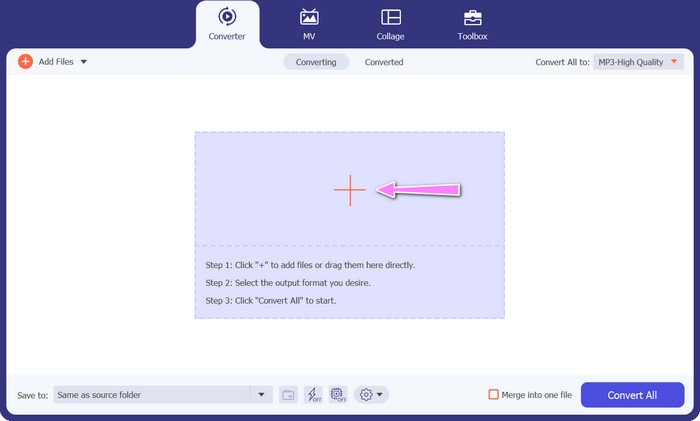
ขั้นตอนที่ 2 คลิกปุ่ม เพิ่ม บนหน้าหลักของโปรแกรมเพื่อนำเข้าไฟล์เสียงที่คุณต้องการแก้ไข จากนั้นคุณจะถูกนำไปยังหน้าที่แสดงภาพตัวอย่างของไฟล์ที่นำเข้า คุณสามารถส่งทั้งโฟลเดอร์เพื่อแปลงหลายไฟล์พร้อมกันได้ เลือกตำแหน่งในไดเรกทอรีของคุณที่เก็บไฟล์เสียงทั้งหมดที่ต้องการ.
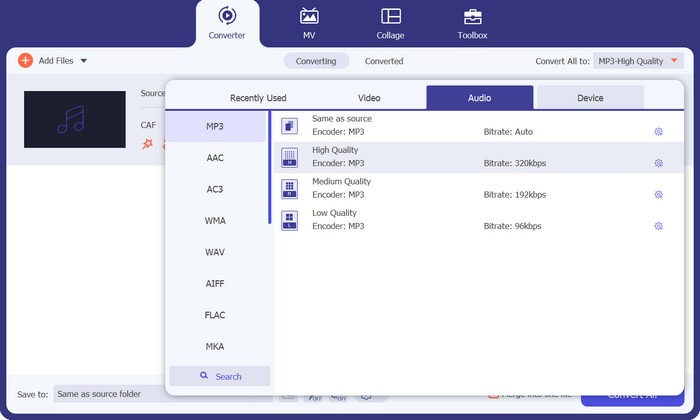
ขั้นตอนที่ 3 ตอนนี้คุณสามารถเปลี่ยนรูปแบบไฟล์ผลลัพธ์ได้โดยคลิกปุ่ม แปลงทั้งหมดเป็น ที่ด้านบนของหน้าต่างโปรแกรม เลือก MP3 จากแถบด้านข้างที่มีป้ายว่า เสียง พร้อมกันนี้ คุณยังสามารถปรับอัตราการสุ่มตัวอย่าง (sample rate) และบิตเรตของไฟล์ผลลัพธ์เพื่อให้ได้คุณภาพตามต้องการ.
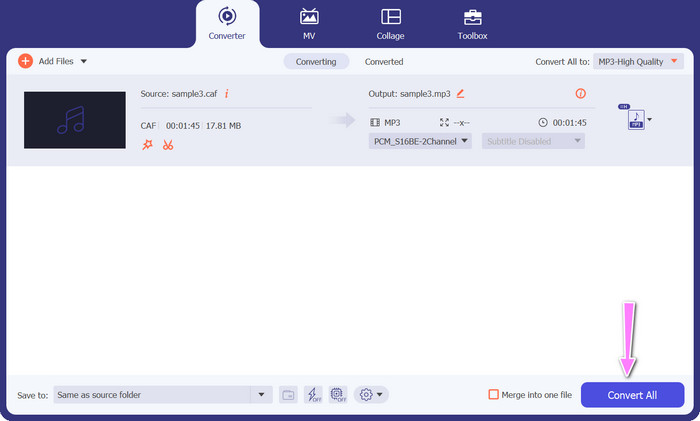
ขั้นตอนที่ 4 คลิกปุ่ม แปลงทั้งหมด ด้านล่างเพื่อเริ่มกระบวนการแปลงในขั้นตอนสุดท้าย จากนั้นโปรแกรมจะเปิดโฟลเดอร์ปลายทางขึ้นมาโดยอัตโนมัติเพื่อให้คุณตรวจสอบรูปแบบไฟล์ใหม่.
ข้อดี
- มันสามารถแบทช์แปลงไฟล์เสียง Caf เป็นรูปแบบไฟล์ MP3
- โปรแกรมทำงานได้ดีกับทั้ง Windows และ Mac OS
จุดด้อย
- ต้องชำระค่าสมัครสมาชิกหลังจากทดลองใช้ฟรี
ส่วนที่ 3 แปลง CAF เป็น MP3 ออนไลน์
คุณยังสามารถใช้ Free MP3 Audio Converter Online ซึ่งเป็นอีกหนึ่งทางเลือกได้เช่นกัน นี่คือแอปพลิเคชันบนเว็บที่ทำงานร่วมกับอินเทอร์เน็ตตามชื่อของมัน ดังนั้นคุณจึงไม่จำเป็นต้องติดตั้งแอปสำหรับแปลง Caf เป็น MP3 ทุกอย่างเข้าถึงได้ผ่านบราวเซอร์ของคุณเท่านั้น ในด้านฟีเจอร์ ตัวแปลง Caf เป็น MP3 ฟรีตัวนี้ก็ไม่ได้ด้อยไปกว่ากัน นอกจากนี้ คุณยังสามารถอัปโหลดไฟล์จำนวนมาก แปลงแบบเป็นชุด หรือปรับโปรไฟล์ของวิดีโอหรือคลิปเสียงได้ ด้วยการทำตามวิธีการที่อธิบายไว้ที่นี่ คุณจะได้เรียนรู้เกี่ยวกับตัวแปลง Caf เป็น MP3 ออนไลน์ที่ดีที่สุด.
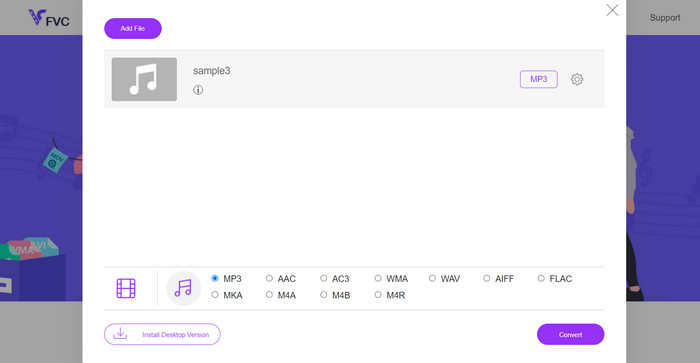
ขั้นตอนที่ 1 เพียงเข้าไปที่เว็บไซต์หลักของ Free MP3 Audio Converter Online โดยคลิกลิงก์ด้านบน คุณสามารถส่งไฟล์เสียงของคุณได้จากหน้าหลักโดยเลือกตัวเลือก เพิ่มไฟล์เพื่อแปลง.
ขั้นตอนที่ 2 ที่หน้าจอจะแสดงตัวอย่างของไฟล์ต้นฉบับที่คุณเลือก คุณสามารถเลือกประเภทไฟล์ผลลัพธ์ที่ต้องการได้โดยไปที่ส่วนด้านล่างของแผงที่คุณอยู่ในตอนแรก.
ขั้นตอนที่ 3 เพื่อเปลี่ยนรูปแบบไฟล์จาก Caf เป็น MP3 ให้คลิกปุ่ม แปลง หากคุณต้องการแปลงไฟล์อื่น คุณจำเป็นต้องทำขั้นตอนเดิมซ้ำตั้งแต่ต้น.
ข้อดี
- ผู้ใช้สามารถเพลิดเพลินไปกับการแปลงไม่จำกัดต่อวัน
- ตัวแปลง Caf เป็น MP3 ออนไลน์นี้ใช้งานได้กับเว็บเบราว์เซอร์เกือบทั้งหมด
จุดด้อย
- ความเร็วในการแปลงเป็นสัดส่วนกับแบนด์วิธอินเทอร์เน็ตที่มี
อ่านเพิ่มเติม:
การแปลง MP3 เป็น AAC: วิธีปรับปรุงคุณภาพเสียงของคุณ
ดาวน์โหลดโปรแกรมเล่น MP3 – 10 โปรแกรมเล่นเพลง MP3 ฟรีที่ดีที่สุด ปี 2023
ส่วนที่ 4 คำถามที่พบบ่อยเกี่ยวกับการแปลง CAF เป็น MP3
ฉันสามารถเก็บข้อมูลเมตาของไฟล์ Caf ของฉันหลังจากแปลงเป็น MP3 ได้หรือไม่
การเก็บรักษาข้อมูลเมตาระหว่างการแปลง Caf เป็น MP3 ขึ้นอยู่กับตัวแปลงหรือซอฟต์แวร์เฉพาะที่คุณใช้ เครื่องมือแปลงบางอย่างมีความสามารถในการเก็บข้อมูลเมตา เช่น ชื่อศิลปิน ชื่ออัลบั้ม หมายเลขแทร็ก และอื่นๆ อย่างไรก็ตาม สิ่งสำคัญคือต้องทราบว่าตัวแปลงบางตัวไม่สนับสนุนการเก็บรักษาข้อมูลเมตา
มีรูปแบบเสียงอื่น ๆ ที่ฉันสามารถแปลงไฟล์ Caf ได้หรือไม่?
ได้ นอกจาก MP3 แล้ว ยังมีรูปแบบเสียงอื่นๆ อีกมากมายที่คุณสามารถแปลงไฟล์ Caf เป็นได้ ขึ้นอยู่กับความต้องการเฉพาะของคุณ รูปแบบทางเลือกทั่วไป ได้แก่ WAV, FLAC (Free Lossless Audio Codec), AAC และ OGG (Ogg Vorbis)
ฉันต้องจ่ายค่าตัวแปลง Caf เป็น MP3 หรือไม่
มีตัวเลือกการแปลงไฟล์ Caf เป็น MP3 ทั้งแบบฟรีและเสียเงิน ตัวแปลงออนไลน์จำนวนมากให้บริการฟรี ให้คุณแปลงไฟล์ Caf เป็น MP3 โดยไม่มีค่าใช้จ่ายใดๆ อย่างไรก็ตาม ซอฟต์แวร์ขั้นสูงหรือบริการออนไลน์ระดับพรีเมียมบางอย่างอาจต้องซื้อหรือสมัครสมาชิกเพื่อรับคุณสมบัติเพิ่มเติมหรือความเร็วในการแปลงที่สูงขึ้น
สรุป
ด้วยการแปลงจากCaf เป็น MP3 คุณสามารถปลดล็อกศักยภาพเต็มรูปแบบของคอลเลกชันเสียงของคุณ และเพลิดเพลินกับการเล่นไฟล์ได้อย่างราบรื่นทุกที่ทุกเวลา ช่วยให้คุณฟังเพลง พอดแคสต์ หรือบันทึกเสียงโปรดบนอุปกรณ์และแพลตฟอร์มได้หลากหลาย.
-
 4 วิธีที่ดีที่สุดในการแปลง AIFF เป็น MP3 บน Mac & PC
 มีปัญหาเพราะไฟล์ AIFF ใหญ่เกินไปที่จะบันทึก? ดังนั้น คุณต้องอ่านต่อในขณะที่เราอธิบายวิธีแก้ไขโดยแปลงรูปแบบ AIFF เป็น MP3
-
 ค้นหาวิธีแปลง AMR เป็น MP3 [ออนไลน์และออฟไลน์]
 มีช่วงเวลาที่ยากลำบากเพราะไม่สามารถเล่นไฟล์ .amr บนเดสก์ท็อปของคุณได้ใช่หรือไม่ จากนั้นอ่านบทความนี้เพื่อเรียนรู้วิธีแปลงรูปแบบ AMR เป็น MP3
-
 คำแนะนำเกี่ยวกับวิธีการเพิ่มปกอัลบั้มลงใน MP3 อย่างง่ายดายที่ Breze
 คุณต้องการทราบวิธีการเพิ่มปกอัลบั้มลงใน MP3 หรือไม่? ถ้าใช่ โปรดอ่านรายละเอียดทั้งหมดและบทช่วยสอนเกี่ยวกับการแก้ไขปกอัลบั้มในไฟล์ของคุณ
