


 Video Converter Ultimate
 บันทึกหน้าจอ
 ซ่อมวิดีโอ
 ดาวน์โหลดอย่างปลอดภัย
MPG เป็น MP3: คู่มือฉบับสมบูรณ์สำหรับการแปลงและปรับปรุงไฟล์เสียง
รูปแบบวิดีโอ MPG มักถูกนำมาใช้บ่อยครั้งสำหรับการจัดเก็บภาพยนตร์และวิดีโอประเภทอื่น ๆ ในบางโอกาส อาจต้องการแยกส่วนของเสียงออกจากไฟล์รูปแบบ MPG แล้วบันทึกเป็นไฟล์ MP3 เครื่องมืออย่างตัวแปลงไฟล์ MPG เป็น MP3จึงมีประโยชน์อย่างมากในบริบทนี้.
ด้วยการใช้ตัวแปลงที่เชี่ยวชาญ ผู้ใช้สามารถแปลงไฟล์ MPG เป็นรูปแบบ MP3 ได้อย่างง่ายดาย จึงช่วยให้พวกเขาเพลิดเพลินกับเนื้อหาเสียงที่ต้องการบนอุปกรณ์ที่หลากหลาย มีตัวแปลงหลายตัว ทั้งแบบฟรีและแบบเสียเงิน ที่สามารถช่วยให้งานนี้สำเร็จได้ โปรแกรมถูกจัดหมวดหมู่สำหรับผู้ใช้ตามการตั้งค่าสำหรับการเข้าถึงแบบออนไลน์หรือออฟไลน์ โปรดดูรายการด้านล่างเพื่อเป็นข้อมูลอ้างอิงของคุณ

ส่วนที่ 1 แปลง MPG เป็น MP3 หรือ MP3 เป็น MPG ด้วย Video Converter Ultimate
การแปลงจาก MPG เป็น MP3 เป็นเพียงหนึ่งในหลาย ๆ รูปแบบวิดีโอที่สามารถแปลงได้ด้วย Video Converter Ultimate นอกจากนี้ โปรแกรมยังสามารถแปลงวิดีโอความละเอียดสูงได้ภายในไม่กี่วินาทีโดยไม่สูญเสียคุณภาพ อีกทั้งยังรองรับการแปลงแบบชุด การจัดการประวัติการแปลง และการปรับแต่งพารามิเตอร์ต่าง ๆ เมื่อพูดถึงการแปลงวิดีโอไปเป็นรูปแบบอื่น ๆ FVC Video Converter Ultimate จึงเป็นตัวเลือกที่ดีที่สุด.
ขั้นตอนที่ 1. ดาวน์โหลดโปรแกรม
ดาวน์โหลด FVC Video Converter Ultimate และติดตั้งลงในคอมพิวเตอร์ของคุณ เพียงกดปุ่ม ดาวน์โหลดฟรี ด้านล่าง เปิดโปรแกรมขึ้นมา จากนั้นนำเข้าไฟล์ MPG ด้วยปุ่ม เพิ่มไฟล์.
ดาวน์โหลดฟรีสำหรับ Windows 7 หรือใหม่กว่าดาวน์โหลดอย่างปลอดภัย
ดาวน์โหลดฟรีสำหรับ MacOS 10.7 หรือใหม่กว่าดาวน์โหลดอย่างปลอดภัย
ขั้นตอนที่ 2 เลือกรูปแบบเอาต์พุต
จากเมนูดรอปดาวน์ของตัวเลือก โปรไฟล์ ให้เลือก MP3 เป็นรูปแบบเอาต์พุตที่ต้องการ หากต้องการ คุณสามารถแก้ไขการตั้งค่าของไฟล์เสียงได้.
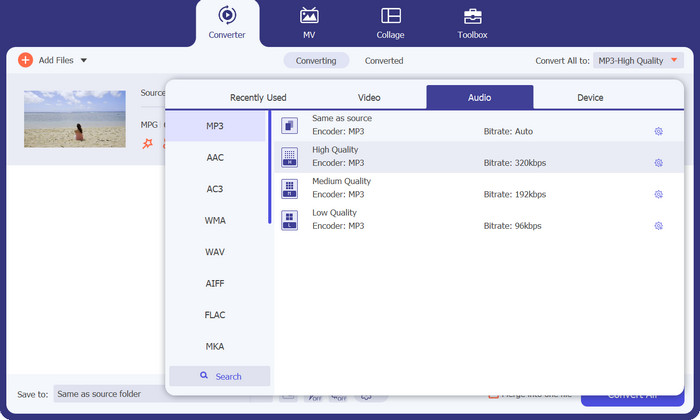
ขั้นตอนที่ 3 แปลงเป็น MP3
ระบุโฟลเดอร์ปลายทางในคอมพิวเตอร์ของคุณสำหรับบันทึกไฟล์ที่แปลงแล้ว จากนั้นเริ่มกระบวนการแปลง ให้คลิกปุ่ม แปลงทั้งหมด และรอจนกว่าการแปลงจะเสร็จสมบูรณ์.
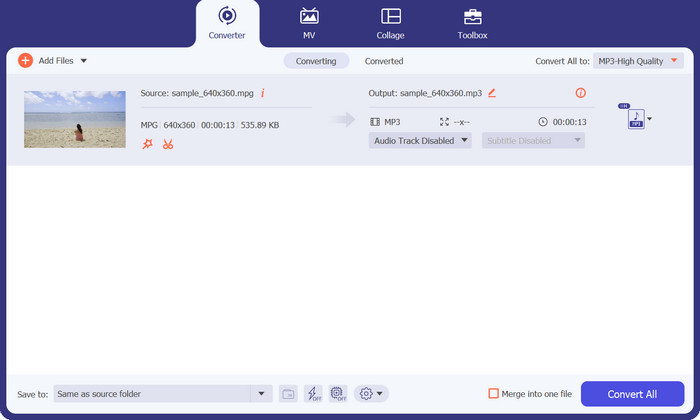
ข้อดี
- ความเร็วการแปลงที่รวดเร็วในขณะที่รักษาคุณภาพ
- ครอบตัด ตัดแต่ง เพิ่มคำบรรยาย และอื่นๆ
- รองรับการแปลงเป็นชุด
จุดด้อย
- ต้องสมัครสมาชิกแบบชำระเงินเพื่อเข้าถึงคุณสมบัติทั้งหมด
ส่วนที่ 2 แปลง MPG เป็น MP3 หรือ MP3 เป็น MPG ด้วย Free MP3 Converter Online
อีกหนึ่งแอปตัวแปลง MPG เป็น MP3 ที่ช่วยให้คุณแปลงไฟล์ MPG เป็น MP3 หรือ MP3 เป็น MPG ได้คือ Free MP3 Converter Online แอปนี้ใช้งานได้ฟรีทั้งหมดและไม่มีข้อจำกัดใด ๆ เครื่องมือรองรับการแปลงไฟล์เสียงไปเป็นรูปแบบยอดนิยมอย่าง MP3, AAC, AC3, WMA, WAV และอื่น ๆ โดยไม่มีค่าธรรมเนียมหรือค่าใช้จ่ายแอบแฝง นอกจากนี้ยังให้ผลลัพธ์ที่ไม่มีลายน้ำในตัวเลือกไฟล์เสียงหลากหลายรูปแบบ และความเร็วการแปลงจะเร็วเท่ากับความเร็วในการอัปโหลดและดาวน์โหลดอินเทอร์เน็ตของคุณ หากต้องการแปลง MPG เป็น MP3 ออนไลน์ฟรี ให้ทำตามขั้นตอนเหล่านี้:
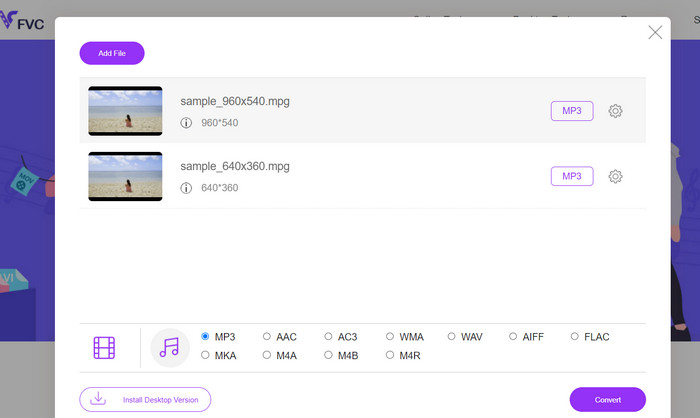
ขั้นตอนที่ 1 ไปที่เว็บไซต์ทางการของ Free MP3 Converter Online ด้วยเบราว์เซอร์ใดก็ได้บนคอมพิวเตอร์ของคุณ เพื่อเพิ่มไฟล์เพลง ให้คลิกปุ่ม เพิ่มไฟล์เพื่อแปลง แล้วเลือกไฟล์เพลงที่ต้องการ.
ขั้นตอนที่ 2 หลังจากอัปโหลดไฟล์เพลงแล้ว คุณจะเห็นรูปแบบเสียงทั้งหมดที่มีให้ เลือก MP3 จากเมนูโปรไฟล์.
ขั้นตอนที่ 3 เพื่อเริ่มต้นกระบวนการแปลง ให้กดปุ่ม Convert จากนั้นรอจนกว่าการแปลงจะเสร็จสิ้น.
ข้อดี
- รองรับการปรับพารามิเตอร์
- แปลงรหัสเสียงคุณภาพสูงโดยไม่สูญเสียคุณภาพ
- ไม่มีค่าธรรมเนียมหรือค่าใช้จ่ายแอบแฝง
จุดด้อย
- มันต้องมีการเชื่อมต่ออินเทอร์เน็ตที่ดี
- เวลาอัปโหลดช้าลงในไฟล์เสียงขนาดใหญ่
ส่วนที่ 3 แปลง MPG เป็น MP3 ด้วย VLC
VLC Media Player เป็นเครื่องเล่นมีเดียโอเพ่นซอร์สฟรีที่สามารถเปิดไฟล์เสียงและวิดีโอแทบทุกไฟล์ที่มี นอกจากนี้ยังค่อนข้างหลากหลาย ในทางกลับกัน ไม่เพียงแต่เล่นไฟล์มีเดียได้อย่างยอดเยี่ยมเท่านั้น แต่ยังมีฟังก์ชันในตัวที่ช่วยให้ผู้ใช้สามารถแปลงไฟล์มีเดียจากรูปแบบหนึ่งเป็นอีกรูปแบบหนึ่งได้
เมื่อแปลงไฟล์โดยใช้ VLC ผู้ใช้จะสามารถเปลี่ยนการตั้งค่าต่างๆ ได้ เช่น อัตราบิต ช่องสัญญาณ และอัตราตัวอย่าง เพื่อให้ได้คุณภาพเสียงที่ดีที่สุด เนื่องจากความสามารถรอบด้านนี้ จึงเป็นไปได้ที่จะปรับแต่งเอาต์พุตของไฟล์ MP3 เพื่อให้สามารถใช้ในบริบทต่างๆ ได้
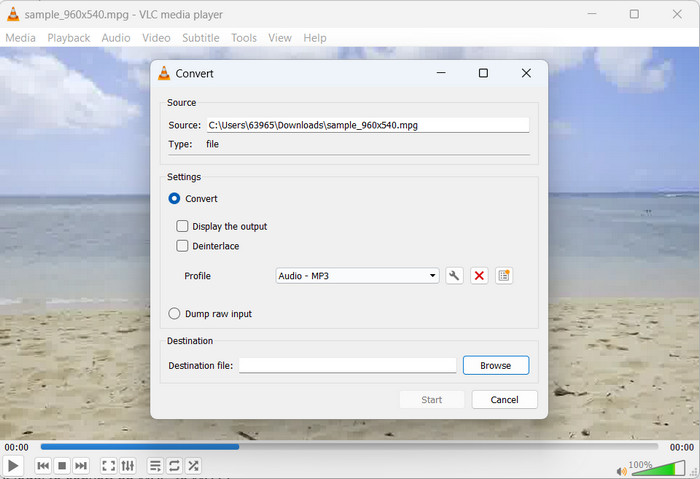
ขั้นตอนที่ 1 ก่อนอื่น เปิดโปรแกรมเล่นสื่อ VLC แล้วคลิกที่เมนู สื่อ (Media) ที่มุมซ้ายบน.
ขั้นตอนที่ 2 จากนั้นเลือก แปลง/บันทึก (Convert/Save) จากเมนูดรอปดาวน์ แล้วคลิก เพิ่ม (Add) และเลือกไฟล์ MPG ที่คุณต้องการแปลง.
ขั้นตอนที่ 3 ทำเครื่องหมายที่ แปลง/บันทึก (Convert/Save) ที่ด้านล่างหน้า เลือก Audio-MP3 จากดรอปดาวน์ในส่วน โปรไฟล์ ขั้นตอนสุดท้ายคือเลือกตำแหน่งที่จะบันทึกไฟล์ที่แปลงแล้วและคลิก เริ่ม (Start) นั่นคือวิธีการดึงไฟล์ MP3 ออกจาก MPG ด้วย VLC.
ข้อดี
- ใช้ได้กับหลายแพลตฟอร์ม
- ใช้ตัวแปลงสัญญาณเสียงและวิดีโอขั้นสูง
- มันมีการตั้งค่าแบบกำหนดเอง
จุดด้อย
- รองรับรูปแบบเอาต์พุตเพียงไม่กี่รูปแบบเท่านั้น
- คุณสมบัติการแก้ไขที่ จำกัด
อ่านเพิ่มเติม:
3 วิธีที่ดีที่สุดในการแปลง MPG เป็น MP4 อย่างรวดเร็ว
เคล็ดลับและเทคนิควิธีแปลงไฟล์ MKV เป็น MP3 [2023]
ส่วนที่ 4 คำถามที่พบบ่อยเกี่ยวกับการแปลง MP3 และ MPG
การแปลง MPG เป็น MP3 ถูกกฎหมายหรือไม่
เพื่อตอบคำถามของคุณ การแปลงไฟล์ MPG เป็น MP3 นั้นถูกต้องตามกฎหมายสำหรับการใช้งานที่ไม่ใช่เชิงพาณิชย์ หากคุณต้องการแบ่งปันหรือขายเสียงที่แปลงแล้ว คุณต้องมีใบอนุญาตหรือใบอนุญาตที่เหมาะสม
ปัจจัยใดที่ส่งผลต่อคุณภาพเสียงของไฟล์ MP3 ที่ส่งออก
ความเที่ยงตรงในการได้ยินของไฟล์ MP3 ที่เป็นผลลัพธ์นั้นขึ้นอยู่กับหลายปัจจัย รวมถึงแต่ไม่จำกัดเพียงอัตราบิต ความถี่ในการสุ่มตัวอย่าง และโหมดช่องสัญญาณ การเพิ่มคุณภาพเสียงของไฟล์เอาต์พุตสามารถทำได้โดยการเพิ่มความถี่ในการสุ่มตัวอย่างและอัตราบิต
ฉันจะเลือกบิตเรตที่ถูกต้องสำหรับไฟล์ MP3 ที่แปลงแล้วได้อย่างไร
คุณภาพเสียงและขนาดไฟล์ของไฟล์ MP3 ถูกกำหนดโดยอัตราบิต ซึ่งโดยทั่วไปจะแสดงเป็นกิโลบิตต่อวินาที (kbps) อัตราบิตที่เพิ่มขึ้นมีความสัมพันธ์เชิงบวกกับความเที่ยงตรงของเสียงที่ดีขึ้น แม้ว่าจะมีขนาดไฟล์ที่ใหญ่ขึ้นก็ตาม
สรุป
การแปลงไฟล์จากMPG เป็น MP3 เป็นทางออกที่สะดวกในการเพิ่มความรองรับด้านเสียงและทำให้การเล่นไฟล์เป็นไปอย่างต่อเนื่องบนอุปกรณ์หลากหลายชนิด ด้วยการปฏิบัติตามเทคนิคที่อธิบายไว้ในคู่มือนี้ คุณสามารถแปลงไฟล์ MPG ของคุณไปเป็นรูปแบบ MP3 ซึ่งได้รับการยอมรับอย่างกว้างขวางได้อย่างราบรื่น.
-
 3 วิธีง่ายๆ ในการแปลงไฟล์ MPG เป็น MOV บน Mac/Windows/Online
 ต้องการแปลงไฟล์ MPG ของคุณและโอนย้ายในภายหลังบน iOS, iPod, iPad หรือ Mac ของคุณหรือไม่? บทความนี้จะช่วยหาวิธีแปลง MPG เป็น MOV ด้วยขั้นตอนต่างๆ
-
 วิธีเข้าร่วมไฟล์วิดีโอ MPG หลายไฟล์เป็นไฟล์เดียวบน Windows และ Mac
 การรวมคลิป MPG หลาย ๆ คลิปไว้ในไฟล์เดียวอาจเป็นปัญหาสำหรับคุณ คุณสามารถเรียนรู้เพิ่มเติมเกี่ยวกับวิธีการรวมวิดีโอ MPG เข้าด้วยกันบนคอมพิวเตอร์ของคุณได้ในบทความนี้
-
 5 เครื่องตัด MP3 เพื่อตัดเสียงใด ๆ ได้อย่างง่ายดาย [อัปเดต 2023]
 คุณต้องการเครื่องตัด MP3 เพื่อตัดเสียงหรือไม่? ในกรณีนั้น โปรดอ่านบทความนี้เพราะเรามีเครื่องมือที่คุณสามารถพึ่งพาได้ซึ่งให้การตัดเสียงที่ง่ายดาย
