


 Video Converter Ultimate
 บันทึกหน้าจอ
 ซ่อมวิดีโอ
 ดาวน์โหลดอย่างปลอดภัย
โปรแกรมแปลง MP2 เป็น MP3 ยอดนิยมสำหรับผู้ใช้ออฟไลน์และออนไลน์
คุณมีไฟล์เสียง MP2 อยู่แล้ว และกำลังคิดที่จะแปลงเป็น MP3 ใช่ไหม การแปลงรูปแบบเสียงเป็นตัวเปลี่ยนเกมอย่างแท้จริง โดยเฉพาะอย่างยิ่งเมื่อต้องคำนึงถึงความเข้ากันได้และความสะดวกสบาย
ดังนั้น หากคุณพร้อมที่จะปลดล็อกศักยภาพของไฟล์ MP2 และเปิดรับความยืดหยุ่นของรูปแบบ MP3 แล้ว มาดำดิ่งไปพร้อมกันเลย! เรามีเครื่องมือแปลงไฟล์ MP2 เป็น MP3 ที่ดีที่สุดและคู่มือการใช้งานครบถ้วน เพื่อให้กระบวนการแปลงไฟล์เป็นไปอย่างราบรื่นและไร้ความยุ่งยาก เพียงคุณนั่งสบาย ๆ แล้วเราจะพาคุณทำตามขั้นตอนทีละขั้น เพื่อให้แน่ใจว่าไฟล์เสียงของคุณถูกแปลงได้อย่างง่ายดายไร้สะดุด.

ส่วนที่ 1 MP2 กับ MP3
สำหรับตารางเปรียบเทียบโดยละเอียดซึ่งเน้นความแตกต่างที่สำคัญระหว่าง MP2 และ MP3 คุณสามารถดำเนินการด้านล่าง:
| เอ็มพีทู | MP3 | |
| รูปแบบ | MPEG-1 Audio Layer II | MPEG-1 Audio Layer III |
| การบีบอัด | ขาดทุน | ขาดทุน |
| นามสกุลไฟล์ | mp2 | mp3 |
| บิตเรต | ปกติอยู่ที่ 192-256 kbps | แตกต่างกันไป (ปกติ 128-320 kbps) |
| ขนาดไฟล์ | ค่อนข้างใหญ่ | เล็กกว่า |
| คุณภาพเสียง | ดี | ดีมาก |
| ช่วงความถี่ | สูงถึง 22.05 กิโลเฮิรตซ์ | สูงถึง 48 kHz (คุณภาพซีดี) |
ส่วนที่ 2 วิธีที่ดีที่สุดในการแปลง MP2 เป็น MP3
สัมผัสความสะดวกสบายของการแปลงไฟล์คุณภาพสูงด้วยความเร็วระดับสายฟ้า Video Converter Ultimate ช่วยให้ไฟล์ MP2 ของคุณถูกแปลงเป็น MP3 ได้โดยไม่ลดทอนคุณภาพเสียง เครื่องมือแปลงเสียง MP2 เป็น MP3 ตัวนี้ถูกออกแบบมาเพื่อตอบโจทย์การใช้งานของคุณโดยเฉพาะ แปลงไฟล์ MP2 หลายไฟล์เป็น MP3 ได้พร้อมกันในครั้งเดียว ช่วยประหยัดทั้งเวลาและแรงของคุณ อินเทอร์เฟซที่ใช้งานง่ายทำให้ขั้นตอนทั้งหมดเป็นเรื่องสบาย ๆ แม้สำหรับผู้ที่มีทักษะด้านเทคนิคเพียงเล็กน้อย.
คุณสมบัติเด่น
◆ การแปลง MP2 เป็น MP3: แปลงไฟล์เสียง MP2 ของคุณเป็นรูปแบบ MP3 ที่ได้รับการสนับสนุนอย่างแพร่หลายอย่างง่ายดายด้วยการคลิกเพียงไม่กี่ครั้ง
◆ การแปลง DVD: แปลง DVD เป็นรูปแบบวิดีโอและเสียงต่างๆ ขยายไลบรารีสื่อของคุณ และทำให้ภาพยนตร์และรายการโปรดของคุณสามารถเข้าถึงได้บนอุปกรณ์ต่างๆ
◆ ความเข้ากันได้ข้ามแพลตฟอร์ม: FVC Video Converter Ultimate เข้ากันได้กับทั้งระบบปฏิบัติการ Windows และ Mac ทำให้ผู้ใช้เข้าถึงได้อย่างกว้างขวาง
ขั้นตอนที่ 1 ดาวน์โหลดและติดตั้งโปรแกรม
คลิกปุ่ม ดาวน์โหลดฟรี ปุ่มใดปุ่มหนึ่ง จากนั้นบันทึกไฟล์ลงคอมพิวเตอร์ของคุณโดยทำตามคำแนะนำบนหน้าจอ ขั้นตอนถัดไปคือเปิดใช้งานแอปแล้วทำความคุ้นเคยกับการควบคุมที่เรียบง่ายของมัน.
ดาวน์โหลดฟรีสำหรับ Windows 7 ขึ้นไปดาวน์โหลดอย่างปลอดภัย
ดาวน์โหลดฟรีสำหรับ MacOS 10.7 หรือใหม่กว่าดาวน์โหลดอย่างปลอดภัย
ขั้นตอนที่ 2 เพิ่มไฟล์ MP2
หลังจากกดสัญลักษณ์ เครื่องหมายบวก บนหน้าแรกแล้ว ให้ไปยังตำแหน่งที่จัดเก็บไฟล์เสียงที่คุณต้องการแปลง เมื่ออัปโหลดไฟล์แล้ว ตัวอย่างไฟล์จะปรากฏในส่วนติดต่อผู้ใช้ คุณสามารถแปลง MP2 เป็น MP3 แบบแบตช์ได้โดยอัปโหลดทั้งโฟลเดอร์ของไฟล์.
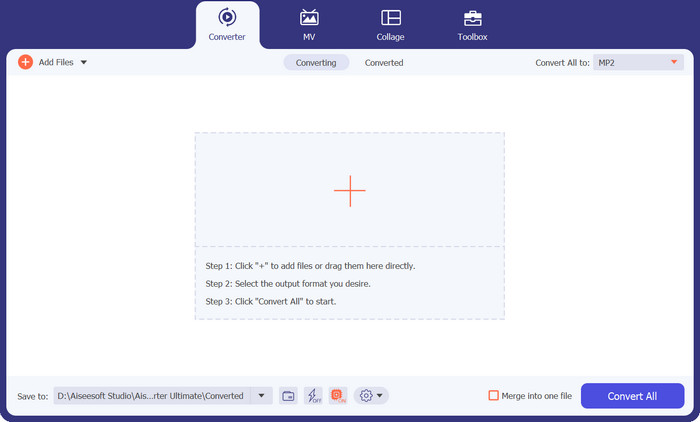
ขั้นตอนที่ 3 เลือกรูปแบบไฟล์เอาต์พุต
จากนั้นคุณสามารถเลือกฟอร์แมตเอาต์พุตได้โดยกดแท็บ เสียง จากเมนูดรอปดาวน์ที่มุมขวาบนของเครื่องมือ คุณสามารถใช้ฟอร์แมตใดก็ได้ในการแปลงสลับไปมาระหว่าง MP2 และ MP3.
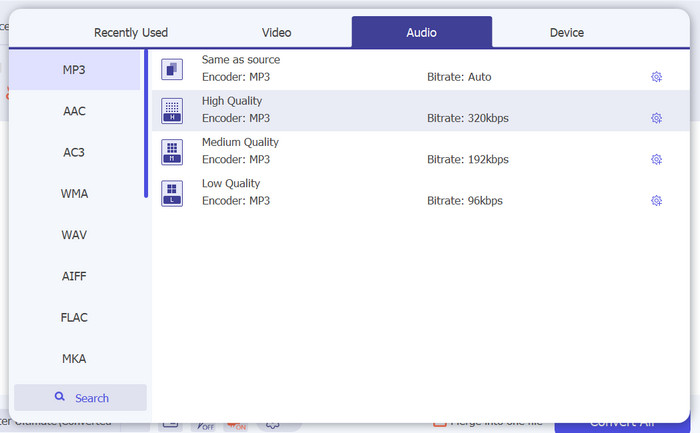
ขั้นตอนที่ 4 บันทึกผลลัพธ์
เลือกโฟลเดอร์ปลายทางจากตัวเลือกดรอปดาวน์ที่ด้านล่างของหน้าจอ เมื่อคุณพร้อมเริ่มการแปลงแล้ว ให้คลิกปุ่ม Convert All.
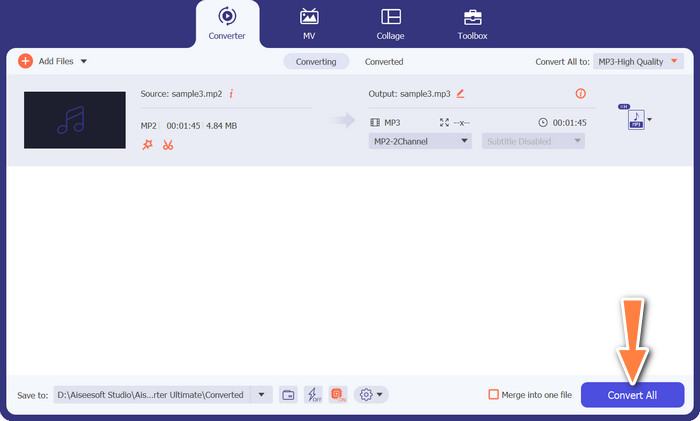
ส่วนที่ 3 วิธีที่ดีที่สุดในการแปลง MP2 เป็น MP3 ออนไลน์ฟรี
โซลูชันแบบวันสต็อปสำหรับการแปลงไฟล์เสียงเป็นรูปแบบ MP3 ยอดนิยมได้โดยตรงจากเว็บเบราว์เซอร์ของคุณ Free MP3 Converter Online ใช้อัลกอริทึมขั้นสูงเพื่อให้แน่ใจว่าเพลงของคุณยังคงความสมบูรณ์ของเสียง ความใส และมิติความลึกเอาไว้ มอบประสบการณ์การฟังที่ยอดเยี่ยม อินเทอร์เฟซที่ใช้งานง่ายทำให้กระบวนการแปลงไฟล์เป็นเรื่องสบายสำหรับผู้ใช้ทุกระดับ เพียงไม่กี่ขั้นตอนที่เข้าใจง่าย คุณก็สามารถเลือกไฟล์เสียง ตั้งค่าการเอาต์พุตตามต้องการ และแปลงเป็น MP3 ได้อย่างไร้ความยุ่งยาก ทั้งรวดเร็ว เรียบง่าย และไม่ซับซ้อน มาดูวิธีการทำงานของเครื่องมือนี้ได้จากขั้นตอนด้านล่าง.
คุณสมบัติเด่น
◆ บิตเรตที่ปรับได้: ปรับบิตเรตเสียงเพื่อให้ขนาดไฟล์และคุณภาพเสียงสมดุล ทำให้คุณควบคุมขนาดและความเที่ยงตรงของไฟล์ MP3 ที่แปลงแล้วได้
◆ รวดเร็วและมีประสิทธิภาพ: รับประโยชน์จากเวลาในการแปลงที่รวดเร็ว ช่วยให้คุณแปลงไฟล์เสียงเป็นรูปแบบ MP3 ได้อย่างรวดเร็วและสะดวก
◆ ฟรีและสะดวก: เพลิดเพลินกับเครื่องมือออนไลน์ฟรีที่ช่วยให้คุณแปลงไฟล์เสียงเป็นรูปแบบ MP3 โดยไม่ต้องเสียค่าใช้จ่ายหรือยุ่งยากใดๆ
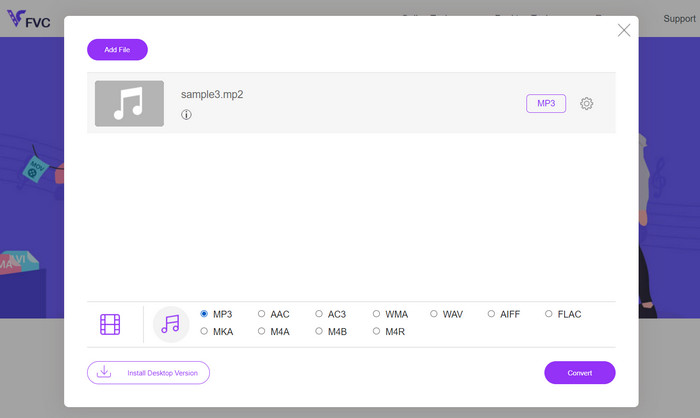
ขั้นตอนที่ 1 ก่อนอื่นให้ไปที่เว็บไซต์อย่างเป็นทางการของโปรแกรมผ่านเว็บเบราว์เซอร์ที่คุณต้องการ จากนั้นคุณจะสังเกตเห็นปุ่ม Add Files to Convert ได้ทันทีจากหน้าแรก.
ขั้นตอนที่ 2 ต่อไปให้ค้นหาไฟล์เสียง MP2 ที่คุณต้องการแปลง แล้วเลือกฟอร์แมตเอาต์พุต เพียงกดปุ่มสัญลักษณ์โน้ตดนตรี จากนั้นเลือกปุ่มตัวเลือก MP3.
ขั้นตอนที่ 3 เมื่อเสร็จแล้ว ให้กดปุ่ม Convert เพื่อเริ่มกระบวนการแปลงไฟล์.
อ่านเพิ่มเติม:
MP3 VS MP4: ความแตกต่างระหว่าง MP3 กับ MP4 คืออะไร
คู่มือการเพิ่มภาพปกอัลบั้มลงใน MP3 ได้อย่างง่ายดายและรวดเร็ว
ส่วนที่ 4 คำถามที่พบบ่อยเกี่ยวกับการแปลง MP2 เป็น MP3
รูปแบบ MP3 และ MP2 แตกต่างกันอย่างไร
MP3 และ MP2 เป็นทั้งรูปแบบเสียง แต่ใช้อัลกอริธึมการบีบอัดที่แตกต่างกัน MP3 ให้การบีบอัดและคุณภาพเสียงที่ดีกว่าเมื่อเทียบกับ MP2 MP3 ได้รับการสนับสนุนอย่างกว้างขวางมากขึ้นและใช้กันทั่วไปเพื่อวัตถุประสงค์ต่างๆ รวมถึงการสตรีมออนไลน์ เพลงดิจิตอล และอุปกรณ์พกพา
คุณภาพเสียงลดลงเมื่อแปลงจาก MP3 เป็น MP2 หรือไม่
ใช่ คุณภาพของเสียงอาจลดลงเมื่อแปลงจาก MP3 เป็น MP2 MP3 เป็นรูปแบบที่มีการบีบอัดมากกว่า และการแปลงเป็น MP2 อาจส่งผลให้คุณภาพลดลงอีก ขอแนะนำให้แปลงจากไฟล์ต้นฉบับคุณภาพสูงเพื่อลดการสูญเสีย
มีข้อจำกัดเกี่ยวกับขนาดไฟล์สำหรับการแปลง MP2 เป็น MP3 หรือไม่
ขีดจำกัดขนาดไฟล์สำหรับการแปลง MP2 เป็น MP3 อาจแตกต่างกันไปขึ้นอยู่กับเครื่องมือแปลงหรือซอฟต์แวร์ที่คุณใช้ เครื่องมือบางอย่างอาจมีข้อจำกัดเกี่ยวกับขนาดไฟล์ ดังนั้นขอแนะนำให้ตรวจสอบเอกสารประกอบหรือคุณลักษณะของเครื่องมือที่คุณเลือกว่ามีข้อจำกัดหรือไม่
ฉันสามารถแปลงไฟล์ MP2 เป็นรูปแบบเสียงอื่นนอกเหนือจาก MP3 ได้หรือไม่
ใช่ โดยปกติจะมีตัวเลือกในการแปลงไฟล์ MP2 เป็นรูปแบบเสียงอื่นๆ ขึ้นอยู่กับซอฟต์แวร์หรือเครื่องมือออนไลน์ที่คุณเลือก รูปแบบที่สนับสนุนโดยทั่วไปสำหรับการแปลงอาจรวมถึง WAV, AAC, FLAC, OGG และ WMA เป็นต้น ความพร้อมใช้งานของรูปแบบเฉพาะจะขึ้นอยู่กับคุณสมบัติและความสามารถของเครื่องมือการแปลงที่เลือก
ฉันสามารถแปลงไฟล์ MP2 เป็น MP3 ด้วยอัตราบิตแปรผัน (VBR) ได้หรือไม่
ใช่ เครื่องมือแปลงจำนวนมากเสนอตัวเลือกในการแปลงไฟล์ MP2 เป็นรูปแบบ MP3 โดยใช้บิตเรตผันแปร (VBR) การเข้ารหัส VBR จะปรับบิตเรตแบบไดนามิกตามความซับซ้อนของเสียง ส่งผลให้คุณภาพเสียงดีขึ้นและขนาดไฟล์มีประสิทธิภาพมากขึ้น
สรุป
โดยสรุปแล้ว การแปลงไฟล์ MP2 เป็น MP3 เป็นวิธีที่สะดวกในการเปลี่ยนไฟล์เสียงให้เป็นรูปแบบที่รองรับอย่างแพร่หลาย ด้วยเครื่องมือและซอฟต์แวร์แปลงไฟล์ที่มีให้ใช้งานมากมาย คุณสามารถแปลงไฟล์ MP2 เป็น MP3 ได้อย่างง่ายดาย พร้อมทั้งปรับตั้งค่าต่าง ๆ เช่น บิตเรต อัตราการสุ่มตัวอย่าง และการกำหนดช่องสัญญาณเสียงให้ตรงตามความต้องการเฉพาะของคุณ.
-
 วิธีแปลง M4B และ MP3 สำหรับความเก่งกาจของหนังสือเสียง
 สัมผัสความสะดวกสบายในการเพลิดเพลินกับหนังสือเสียงเล่มโปรดของคุณบนทุกแพลตฟอร์มด้วยตัวแปลง MP3 และ M4B ที่เชื่อถือได้ของเรา
-
 รายชื่อเครื่องบันทึก MP2 ที่ดีที่สุดในการบันทึกรูปแบบ MP2 (ฟรีและจ่ายได้)
 หากคุณ'กำลังมีปัญหาในการบันทึกเสียง MP2 รายการด้านล่างคือเครื่องบันทึก MP2 ที่คุณสามารถใช้เป็นเครื่องบันทึกเสียงได้
-
 แปลง MP3 เป็น MIDI และปรับแต่งเพลงของคุณอย่างที่ไม่เคยมีมาก่อน
 แปลง MP3 ที่คุณชื่นชอบเป็นไฟล์ MIDI ที่ปรับแต่งได้ในไม่กี่วินาทีด้วยตัวแปลง MP3 เป็น MIDI ที่ใช้งานง่ายของเรา ลองดูพวกเขาเพื่อเรียนรู้เพิ่มเติม
